Smart Plan Guide 2026: Plans, Registration, Benefits, Features & How to Use
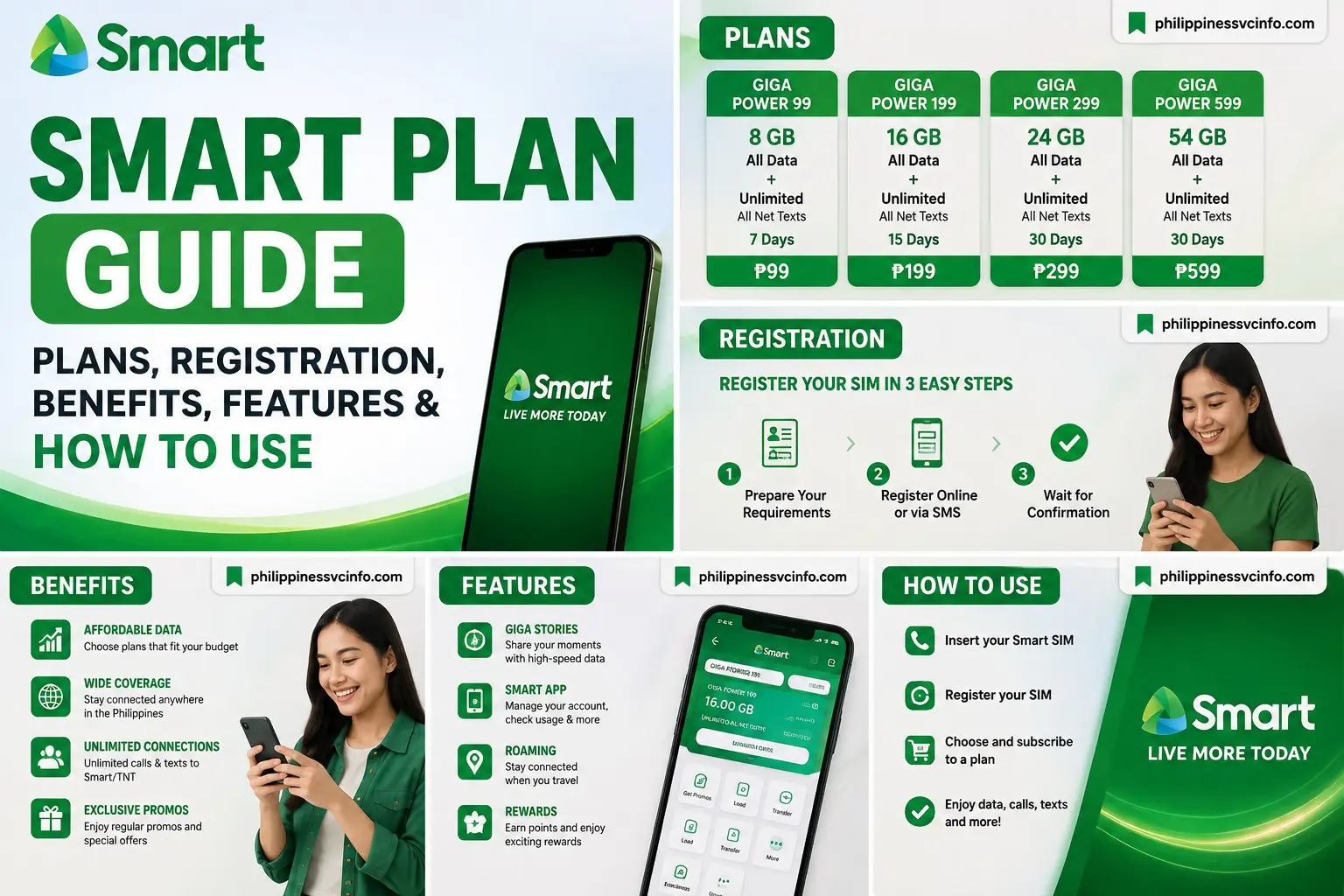
If you are looking for a Smart Plan in the Philippines, this guide explains what Smart Postpaid offers, how to compare plans, how to apply online, how to check your account, pay your bill, renew or upgrade a plan, and troubleshoot common problems. Smart’s current online store lists several plan-only options, while the exact inclusions and promotions can change, so it is best to verify the latest details before submitting an application.
What Is Smart Plan?
A Smart Plan is a postpaid mobile subscription from Smart Communications in the Philippines. Instead of purchasing prepaid load whenever you need mobile services, you select a monthly plan and receive the data, calls, texts, and other benefits included with that plan.
Smart’s current All-New Plans+ lineup is designed around different ways people use their phones, including connecting, creating, entertainment, productivity, and everyday communication. Smart introduced the refreshed Plans+ lineup in 2026, with Unli App Bundles included in selected plans.
Depending on the Smart Plan you select, the package may include:
- Mobile data
- 5G access
- Unlimited all-network calls
- Unlimited all-network texts
- Unlimited landline calls, excluding special numbers
- Smart Postpaid Perks
- Unli App Bundles on eligible Plans+
- Optional device bundles on applicable offers
The important point is that Smart Plan inclusions are not identical across every plan. Always check the individual plan page before applying.
How Does Smart Plan Work?
A Smart Plan works through a monthly postpaid billing arrangement.
The basic process is:
- Choose an available Smart Postpaid plan.
- Submit your application online or through an authorized Smart channel.
- Provide the information and verification requested by Smart.
- Wait for application processing and approval.
- Activate your Smart service according to the instructions provided.
- Use the data, calls, texts, and other benefits included in your Smart Plan.
- Pay your monthly bill by the stated due date.
Your first bill may not be exactly the same as the regular monthly plan price because the first billing cycle can include a pro-rated monthly service fee and other applicable charges.
This is one reason users should look at the actual billing information rather than assuming that the advertised monthly price will always equal the final amount on every bill.
Types of Smart Plans Available
Smart currently lists several Plan Only options through its official online store. The current store includes All-New Plans+ 799, 999, 1499, 1999, and 2499, as well as other plan listings.
|
Smart Plan |
Monthly Price |
Main Data/Inclusions |
|---|---|---|
|
All-New Plans+ 799 |
₱799 |
See current Smart listing |
|
All-New Plans+ 999 |
₱999 |
20GB data |
|
All-New Plans+ 1499 |
₱1,499 |
40GB data |
|
All-New Plans+ 1999 |
₱1,999 |
60GB data |
|
All-New Plans+ 2499 |
₱2,499 |
Unli 4G/5G data |
The prices and inclusions above are based on Smart’s current listings and can change with promotions or new offers.
Smart Plan 799
The Smart Plan 799 is one of the entry-level Plans+ options. Smart’s current store should be checked for its complete and latest inclusions before purchase.
Smart Plan 999
The Smart Plan 999 currently includes:
- 20GB data
- Unli 5G data for 12 months under the listed promotion
- Unlimited all-network calls and texts
- Unlimited landline calls, excluding special numbers
- Smart Postpaid Perks
- One selected Unli App Bundle for 12 months
The listed monthly price is ₱999.
Smart Plan 1499
The Smart Plan 1499 currently includes 40GB data, Unli 5G data for 12 months under the listed promotion, unlimited all-network calls and texts, unlimited landline calls, Smart Postpaid Perks, and one selected Unli App Bundle for 12 months. The listed price is ₱1,499 per month.
Smart Plan 1999
The Smart Plan 1999 currently provides 60GB data, together with Unli 5G data for 12 months under the listed promotion, unlimited all-network calls and texts, unlimited landline calls, Smart Postpaid Perks, and one selected Unli App Bundle. The listed monthly price is ₱1,999.
Smart Plan 2499
The Smart Plan 2499 currently lists unlimited 4G/5G data, unlimited all-network calls and texts, unlimited landline calls excluding special numbers, and Smart Postpaid Perks. The listed monthly price is ₱2,499.
Smart Plan Requirements
The exact Smart Plan requirements can depend on the type of application, selected plan, device option, and current Smart eligibility rules.
Before starting your application, prepare the information and documents that Smart requests. Depending on the application, this may include:
- Valid government-issued identification
- Personal information
- Contact information
- Email address
- Address information
- Employment or financial information where requested
- Payment information when applicable
- Additional documents requested during verification
For online applications involving identity verification, Smart may require a valid ID and electronic identity verification. For example, Smart’s online switching process asks applicants to select an accepted ID and complete eKYC verification.
Tip: Do not rely on an old requirements list. Smart can change its application process and requirements, so follow the requirements displayed during your current application.
How to Register for a Smart Plan
You can apply for a Smart Plan online through the official Smart Online Store.
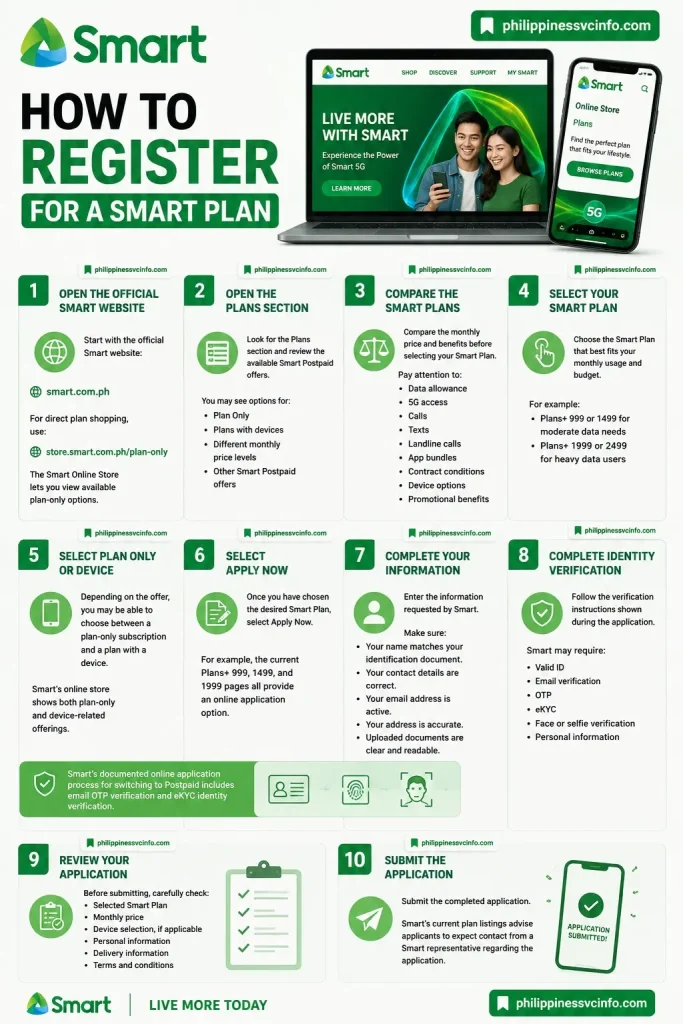
Step 1: Open the Official Smart Website
Start with the official Smart website:
For direct plan shopping, use:
The Smart Online Store currently has a dedicated Plans category where customers can view available plan-only options.
Step 2: Open the Plans Section
Look for the Plans section and review the available Smart Postpaid offers.
You may see options for:
- Plan Only
- Plans with devices
- Different monthly price levels
- Other Smart Postpaid offers
Step 3: Compare the Smart Plans
Compare the monthly price and benefits before selecting your Smart Plan.
Pay particular attention to:
- Data allowance
- 5G access
- Calls
- Texts
- Landline calls
- App bundles
- Contract conditions
- Device options
- Promotional benefits
Step 4: Select Your Smart Plan
Choose the Smart Plan that best fits your monthly usage and budget.
For example, a user who needs moderate data may consider the Plans+ 999 or 1499 options, while a heavy-data user may prefer the Plans+ 1999 or 2499 options.
Step 5: Select Plan Only or Device
Depending on the offer, you may be able to choose between a plan-only subscription and a plan with a device.
Smart’s online store currently shows both plan-only and device-related offerings.
Step 6: Select Apply Now
Once you have chosen the desired Smart Plan, select Apply Now.
For example, the current Plans+ 999, 1499, and 1999 pages all provide an online application option.
Step 7: Complete Your Information
Enter the information requested by Smart.
Make sure:
- Your name matches your identification document.
- Your contact details are correct.
- Your email address is active.
- Your address is accurate.
- Uploaded documents are clear and readable.
Step 8: Complete Identity Verification
Follow the verification instructions shown during the application.
Depending on the application, Smart may require:
- Valid ID
- Email verification
- OTP
- eKYC
- Face or selfie verification
- Personal information
Smart’s documented online application process for switching to Postpaid includes email OTP verification and eKYC identity verification.
Step 9: Review Your Application
Before submitting, carefully check:
- Selected Smart Plan
- Monthly price
- Device selection, if applicable
- Personal information
- Delivery information
- Terms and conditions
Step 10: Submit the Application
Submit the completed application.
Smart’s current plan listings advise applicants to expect contact from a Smart representative regarding the application.
How to Activate a Smart Plan
After your Smart Plan application is approved, follow the activation instructions provided by Smart.
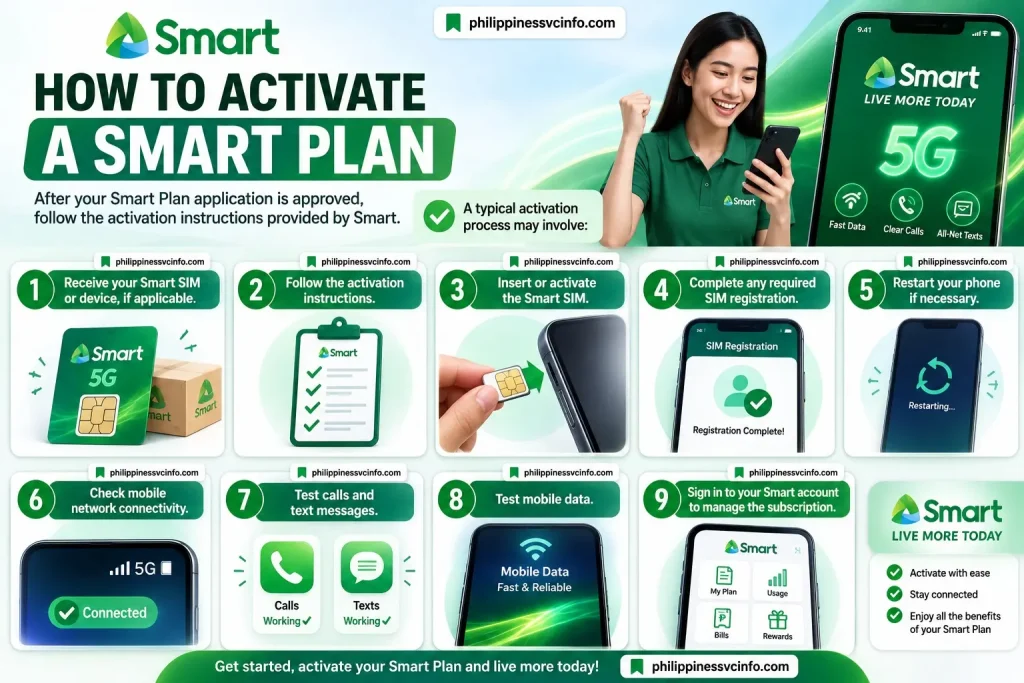
A typical activation process may involve:
- Receive your Smart SIM or device, if applicable.
- Follow the activation instructions.
- Insert or activate the Smart SIM.
- Complete any required SIM registration.
- Restart your phone if necessary.
- Check mobile network connectivity.
- Test calls and text messages.
- Test mobile data.
- Sign in to your Smart account to manage the subscription.
For new individual Postpaid subscribers and subscribers renewing their Postpaid Plans, Smart states that SIM registration is handled simultaneously with the application for the new or renewed Postpaid subscription.
If you encounter an activation problem, use Smart’s official support channels rather than repeatedly submitting a new application.
How to Check Your Smart Plan
Once your Smart Plan is active, you can manage your account through Smart’s digital services.
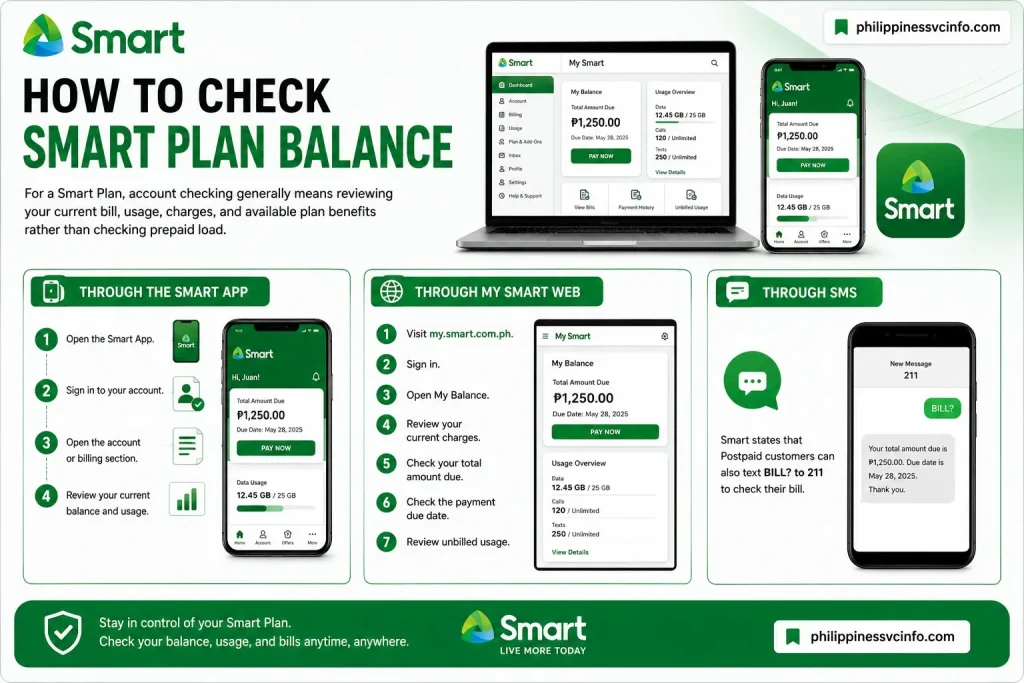
Using My Smart Web
Go to:
Then:
- Log in to your My Smart account.
- Open your account information.
- Check your current balance.
- Review your bill.
- Check your payment due date.
- Review unbilled usage where available.
Smart says My Smart can provide information such as previous bill balance, current charges, total amount due, payment due date, and unbilled usage.
Using the Smart App
You can also use the Smart App to manage your account, check billing information, and access other available services.
How to Subscribe to a Smart Plan
If you are a new customer, choose your preferred Smart Plan from the Smart Online Store and select the available application option.
If you already have a Smart Postpaid account, first determine whether you need:
- A new subscription
- Renewal
- Upgrade
- Plan switch
- Add-on
Existing subscribers should not automatically submit a completely new application when they actually need to renew or upgrade their existing Smart Plan.
How to Renew Your Smart Plan
Smart provides an online Plan Renewal process.
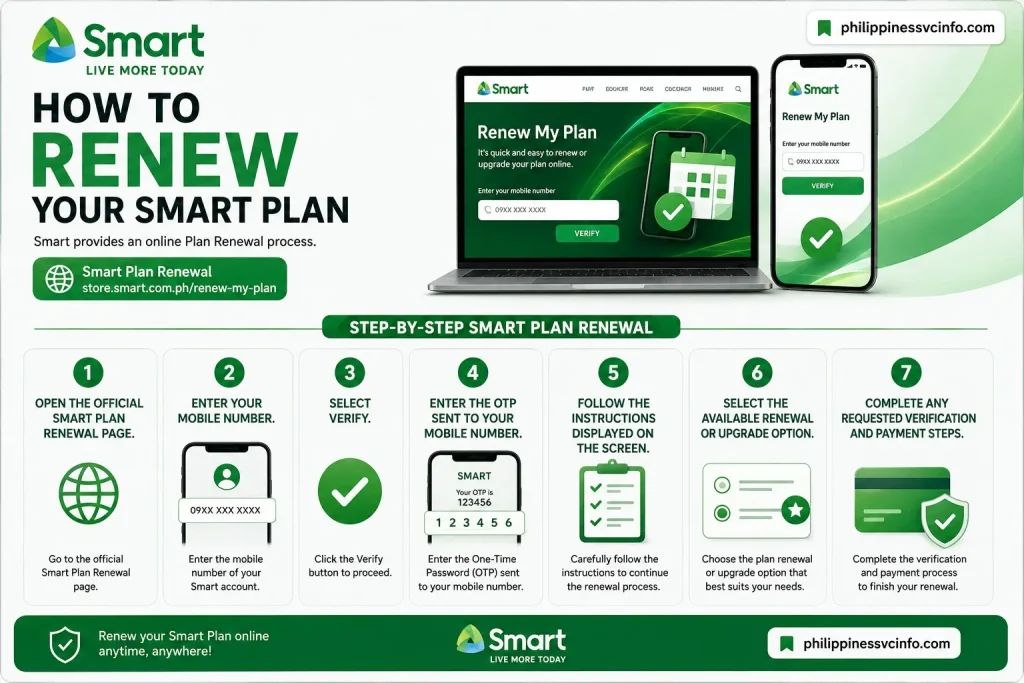
Step-by-Step Smart Plan Renewal
- Open the official Smart Plan Renewal page.
- Enter your mobile number.
- Select Verify.
- Enter the OTP sent to your mobile number.
- Follow the instructions displayed on the screen.
- Select the available renewal or upgrade option.
- Complete any requested verification and payment steps.
Smart’s current renewal page states that customers should have no outstanding balance, no ongoing renewal application, and should already be out of contract. If the current plan includes a device, its full payment must be completed before applying.
Smart Plan Prices and Fees
The monthly cost of a Smart Plan depends on the selected package.
Current examples include:
|
Smart Plan |
Monthly Price |
Possible Additional Charges |
|---|---|---|
|
Plans+ 799 |
₱799 |
Pro-rated charges, device charges, add-ons, applicable fees |
|
Plans+ 999 |
₱999 |
Pro-rated charges, device charges, add-ons, applicable fees |
|
Plans+ 1499 |
₱1,499 |
Pro-rated charges, device charges, add-ons, applicable fees |
|
Plans+ 1999 |
₱1,999 |
Pro-rated charges, device charges, add-ons, applicable fees |
|
Plans+ 2499 |
₱2,499 |
Pro-rated charges, device charges, add-ons, applicable fees |
These prices are current examples from Smart’s online listings, not a guarantee that the same offers will remain available permanently.
Your actual bill can differ from the basic monthly plan price because of factors such as:
- Pro-rated charges
- Device charges
- Add-ons
- Other applicable fees
- Billing-cycle differences
Smart explains that the first bill can contain a pro-rated monthly service fee.
Smart Plan Data, Calls, and Texts
The benefits of each Smart Plan depend on the selected package.
For example, the current Plans+ 999 offers:
- 20GB data
- Unli 5G data for 12 months under the listed promotion
- Unlimited all-network calls
- Unlimited all-network texts
- Unlimited landline calls, excluding special numbers
- Smart Postpaid Perks
- One Unli App Bundle for 12 months
Plans+ 1499 currently provides 40GB data, while Plans+ 1999 provides 60GB data. Both also list Unli 5G data for 12 months under the applicable promotion.
The Plans+ 2499 currently lists unlimited 4G/5G data.
Because promotions can have eligibility requirements and terms, always read the specific plan page before purchasing.
How to Check Smart Plan Balance
For a Smart Plan, account checking generally means reviewing your current bill, usage, charges, and available plan benefits rather than checking prepaid load.
Through the Smart App
- Open the Smart App.
- Sign in to your account.
- Open the account or billing section.
- Review your current balance and usage.
Through My Smart Web
- Visit my.smart.com.ph.
- Sign in.
- Open My Balance.
- Review your current charges.
- Check your total amount due.
- Check the payment due date.
- Review unbilled usage.
Through SMS
Smart states that Postpaid customers can also text BILL? to 211 to check their bill.
How to Change or Upgrade Your Smart Plan
If your current Smart Plan no longer matches your usage, you may be able to upgrade or renew.
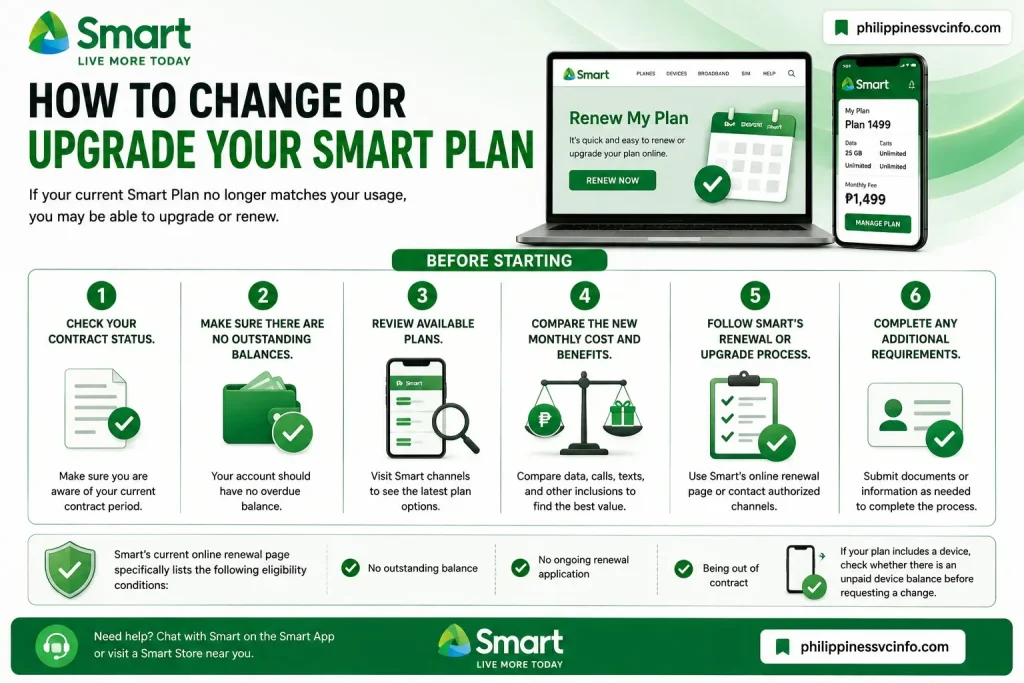
Before starting:
- Check your contract status.
- Make sure there are no outstanding balances.
- Review available plans.
- Compare the new monthly cost and benefits.
- Follow Smart’s renewal or upgrade process.
- Complete any additional requirements.
Smart’s current online renewal page specifically lists no outstanding balance, no ongoing renewal application, and being out of contract as eligibility conditions.
If your plan includes a device, check whether there is an unpaid device balance before requesting a change.
How to Cancel a Smart Plan
Cancellation of a Smart Plan should be handled through Smart’s official customer-service channels.
Before requesting cancellation, review:
- Remaining contract period
- Outstanding balance
- Device obligations
- Applicable pre-termination charges
- Terms of your subscription
Do not simply stop paying the bill and assume that the Smart Plan has been cancelled. An unpaid account can lead to service restrictions and outstanding obligations.
If you are unsure about your contract, contact Smart and ask for the applicable cancellation procedure and charges.
Smart Plan Payment Options
Smart provides several ways to pay Postpaid bills.
Pay Through the Smart App
- Sign in to your Smart account.
- Tap Pay Bills.
- Enter the amount.
- Select a payment method.
- Complete OTP verification when required.
- Confirm the payment.
Smart currently lists Maya and debit/credit cards for payments through its digital channels.
Pay Through My Smart Web
- Go to My Smart Web.
- Log in.
- Select Pay Now.
- Enter the required payment details.
- Select your payment method.
- Complete the payment.
Smart says it also has thousands of authorized payment channels nationwide for Smart Postpaid and Smart Home WiFi Postpaid bills.
Smart Plan Not Working: Common Problems and Solutions
Even after successfully activating a Smart Plan, you may occasionally experience problems with data, calls, texts, billing, or account access.
Mobile Data Is Not Working
Try these basic checks:
- Confirm that mobile data is enabled.
- Check your phone’s network signal.
- Restart the device.
- Check whether your Smart Plan is active.
- Review your available data.
- Check whether there is a network issue in your location.
If the problem continues, use Smart’s official support channels.
Calls or Texts Are Not Working
First check your account status and bill.
Smart states that an overdue balance or exceeding the account credit limit may result in temporary restrictions on outgoing calls, texts, and mobile internet.
Smart Plan Service Has Been Restricted
If service was restricted because of an overdue balance or credit-limit issue, settle the required amount and check the account again.
Smart advises customers to settle outstanding balances to restore service.
Payment Is Not Showing
Keep your payment confirmation or transaction reference.
Then:
- Check your Smart account again.
- Confirm that the payment was successful.
- Keep your receipt.
- Contact Smart support if the payment remains unposted.
Avoid making another payment immediately if you are unsure whether the first transaction succeeded.
Frequently Asked Questions About Smart Plan
Final Thoughts on Smart Plan
A Smart Plan can be a practical option for users who prefer predictable monthly mobile service instead of repeatedly purchasing prepaid load. Smart’s current Plans+ lineup gives customers several price and data levels, including options with unlimited 4G/5G data, unlimited calls and texts, landline calls, Smart Postpaid Perks, and selected app benefits. Smart also provides online tools for applying, checking bills, making payments, adding services, and renewing eligible subscriptions. Because Smart Plan prices, promotions, eligibility requirements, and inclusions can change, always verify the latest information on the official Smart website and Online Store before submitting an application.
Discover What You Need to Know:
- Globe Plan with Device Philippines 2026: GPlan Prices, Requirements, Devices & How to Apply
- GOMO eSIM Guide 2026 : How to Buy, Activate, Install, Register & Fix Common Issues
- Globe Postpaid Guide: Plans, Requirements, Application, Billing & GlobeOne 2026
- GlobeOne App: Complete Guide to Registration, Login, Load & Rewards (2026)
- DITO SIM Registration Number 2026: Check Your Number, Registration Status & Reference Number
- GOMO Unli Data Promos: Price, Validity, Registration & How to Avail 2026