
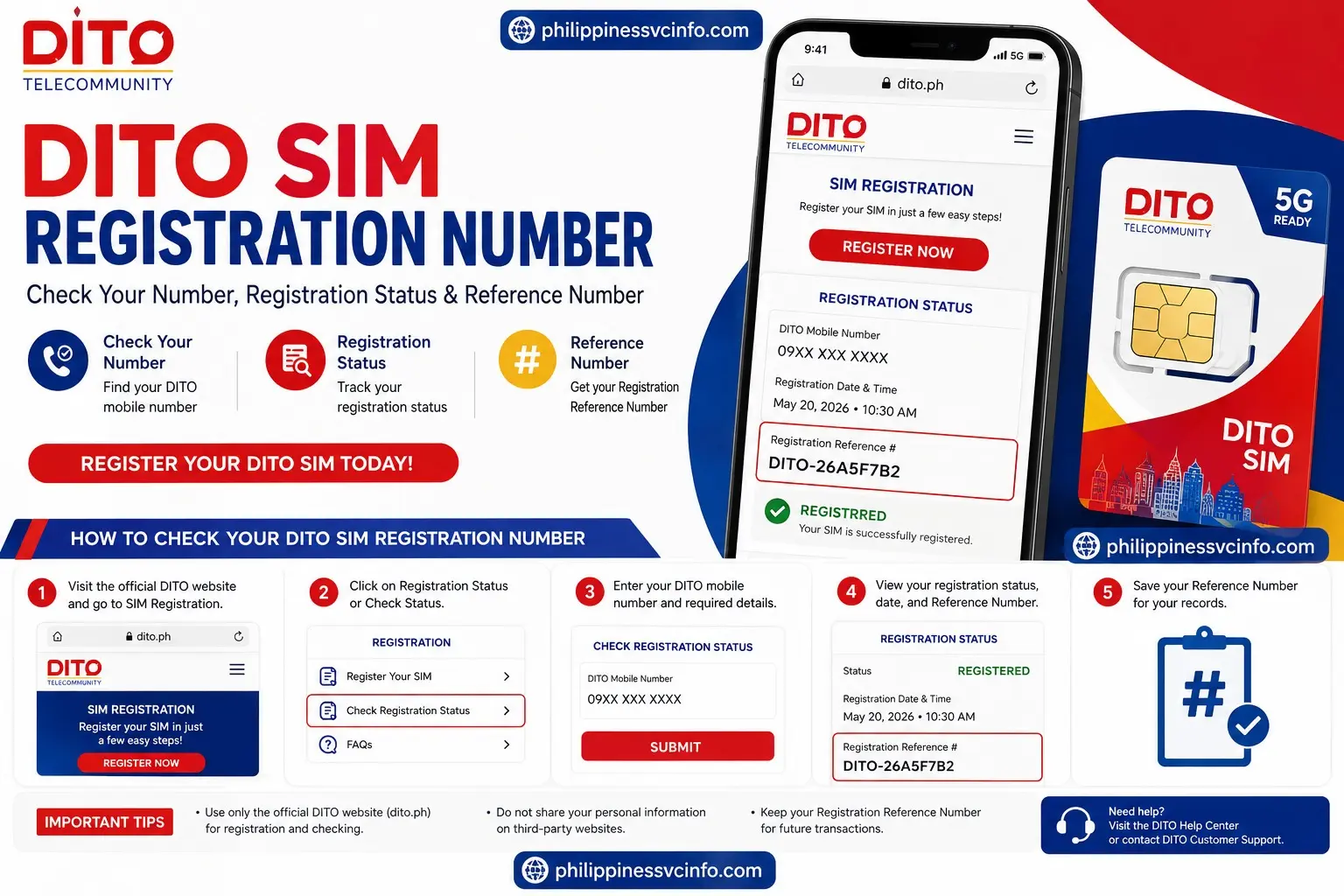
If you are searching for your DITO SIM Registration Number, you may be trying to find the registration reference associated with your DITO SIM, check whether your SIM registration was completed, or understand where your registration details are stored. The term can be confusing because your DITO mobile number and your DITO SIM Registration Number are not necessarily the same thing.
For registration records, DITO uses the term “Registration Reference #.” A registration-status result can show the Registration Reference # together with the application date and time and the registered DITO mobile number.
This guide explains the DITO SIM Registration Number, how DITO SIM registration works, what information you need, how to find your registration reference, and what to do if you cannot locate it.
What Is the DITO SIM Registration Number?
The DITO SIM Registration Number is commonly used by people searching for the reference number connected to their DITO SIM registration record. On DITO’s registration-status system, this information is identified as the Registration Reference #.
Your DITO mobile number is the actual telephone number assigned to your SIM. The registration reference, on the other hand, is associated with your SIM registration record. Therefore, if you are looking for your DITO SIM Registration Number, do not automatically assume that it means your ordinary DITO phone number.
DITO SIM Registration Number vs. DITO Mobile Number
|
Information |
Meaning |
|---|---|
|
DITO SIM Registration Number |
Common search term for the registration reference associated with your SIM registration |
|
Registration Reference # |
Reference shown with the registration record |
|
DITO Mobile Number |
The telephone number assigned to your DITO SIM |
|
SIM Registration |
The process of registering your SIM with DITO |
Understanding this difference makes it easier to find the information you need without entering the wrong number.
Official DITO Website
The official DITO website is:
For SIM registration information, use the official:
DITO’s official SIM Registration page explains that Republic Act No. 11934, or the SIM Registration Act, requires new subscribers to register their SIM before activation and covers existing subscribers as well. DITO also states that prepaid and postpaid SIM users, including foreign nationals, are covered.
When dealing with your DITO SIM Registration Number, personal information, identification documents, or registration records, use official DITO resources rather than websites that imitate the registration process.
DITO specifically warns subscribers not to click SIM-registration links from unknown senders or unverified accounts.
Who Needs DITO SIM Registration?
DITO states that all DITO SIM card users, whether prepaid or postpaid, including foreign nationals, need to comply with SIM registration requirements. Businesses and corporate entities also have applicable registration requirements.
This means the DITO SIM registration process can apply to:
- Filipino subscribers
- Foreign residents
- Other foreign nationals
- Prepaid DITO users
- Postpaid DITO users
- Eligible business and corporate subscribers
DITO also states that a subscriber can register multiple SIM cards under one name.
What Information Is Required for DITO SIM Registration?
Before beginning your DITO SIM registration, prepare the information and identification required by DITO.
The official DITO SIM registration page lists the following personal information:
- Full name
- Date of birth
- Gender
- Present or official address
- Accepted government-issued identification
Having these details ready can make the DITO SIM registration process easier and reduce the chance of entering incorrect information.
Accepted IDs for DITO SIM Registration
DITO’s published list includes several government-issued identification documents, including:
- Passport
- PhilSys ID or National ID
- SSS ID
- GSIS e-Card
- Driver’s License
- NBI Clearance
- Police Clearance
- PRC ID
- OWWA ID
- BIR ID
- Voter’s ID
- Senior Citizen Card
- UMID
- PWD Card
- Other valid government-issued IDs with photo
DITO’s page also lists additional accepted IDs, including certain PhilHealth, PhilPost, PNP, AFP, municipality, LGU, health-worker, agricultural, maritime, and other government-issued IDs. Student IDs issued by a state university or college in the Philippines are also listed for students aged 18 and above.
Because accepted documents can be updated, check the official DITO SIM Registration page before submitting your information.
How to Register Your DITO SIM
If you have a new DITO SIM and need to complete registration, DITO’s current Help Center provides a six-step activation process. It starts with inserting the SIM and ends with successful registration and activation.
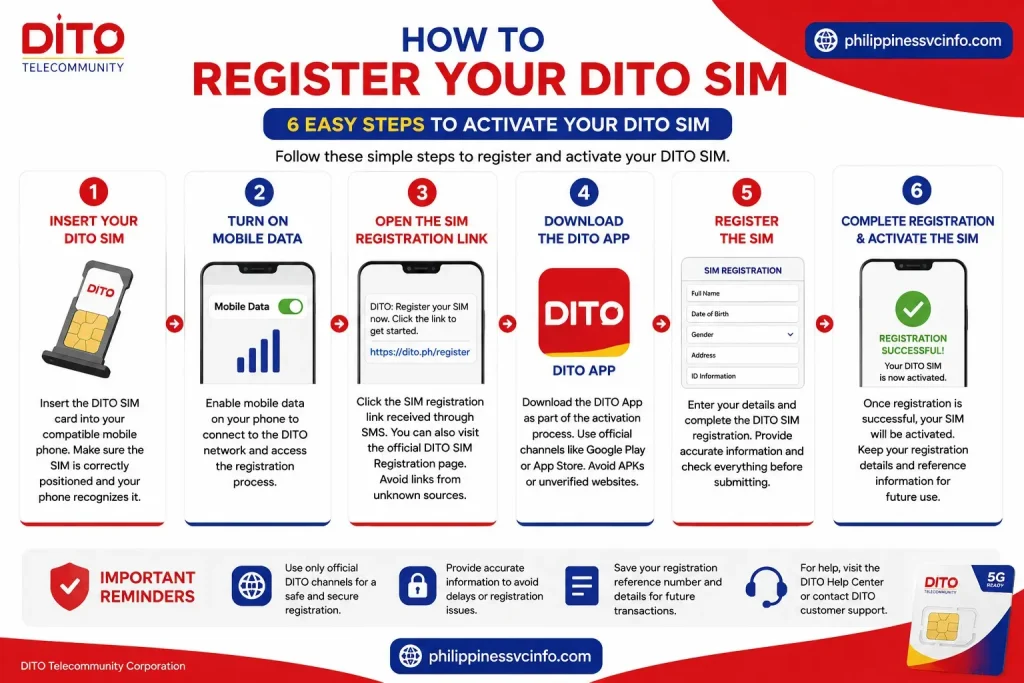
Step 1: Insert Your DITO SIM
Insert the DITO SIM card into your compatible mobile phone.
Make sure the SIM is correctly positioned in the SIM tray and that your phone recognizes it.
Step 2: Turn On Mobile Data
Enable mobile data on your phone.
This allows your device to connect to the DITO network and access the registration process.
Step 3: Open the SIM Registration Link
According to DITO’s current Help Center instructions, users activating a DITO Starter Pack should click the SIM registration link received through SMS.
If you are looking for general registration information, you can also start from the official DITO SIM Registration page.
Do not use registration links from random websites, social-media posts, or unknown messages.
Step 4: Download the DITO App
DITO’s current activation instructions direct users to download the DITO App as part of the activation process.
Use DITO’s official channels to obtain the app rather than downloading an APK or application from an unverified third-party website.
Step 5: Register the SIM
Enter the requested subscriber information and complete the DITO SIM registration process.
You should provide accurate information, including your name, date of birth, gender, address, and required identification details.
Check everything carefully before submitting.
Step 6: Complete Registration and Activate the SIM
Once the DITO SIM registration is successfully completed, DITO’s Help Center states that the SIM will be activated.
After activation, keep your registration details and any reference information available for future use.
How to Find Your DITO SIM Registration Number
If you are specifically searching for the DITO SIM Registration Number, your goal may be to locate the Registration Reference # connected with your registration.
The registration-status result described in your supplied material displays the Registration Reference # together with the application date and time and DITO mobile number.
Basic Steps
- Open the official DITO registration/status service.
- Provide the information requested by DITO.
- Submit the status inquiry.
- Review the registration result.
- Look for Registration Reference #.
- Save the reference information for your records.
The key point is that the Registration Reference # is different from your DITO mobile number.
If your purpose is simply to confirm that your SIM has been registered, check the registration record rather than assuming that your mobile number itself is the registration reference.
What Is the DITO SIM Register?
The SIM Register is different from the DITO SIM Registration Number.
DITO describes the SIM Register as a secure digital database containing the required information for registered prepaid and postpaid subscribers.
In simple terms:
SIM registration is the process.
SIM Register is the database containing registration information.
Registration Reference # is the reference associated with a registration record.
DITO mobile number is the telephone number assigned to the SIM.
Keeping these terms separate can help when searching for your DITO registration information.
How to Check Your DITO SIM Registration Number
If you have already registered your DITO SIM and want to locate your DITO SIM Registration Number, start by checking your registration record. DITO’s registration-status page identifies the relevant field as Registration Reference # and displays it alongside the application date and time and DITO mobile number.
The exact information displayed can depend on the status of your registration, so always use DITO’s official service rather than relying on third-party websites.
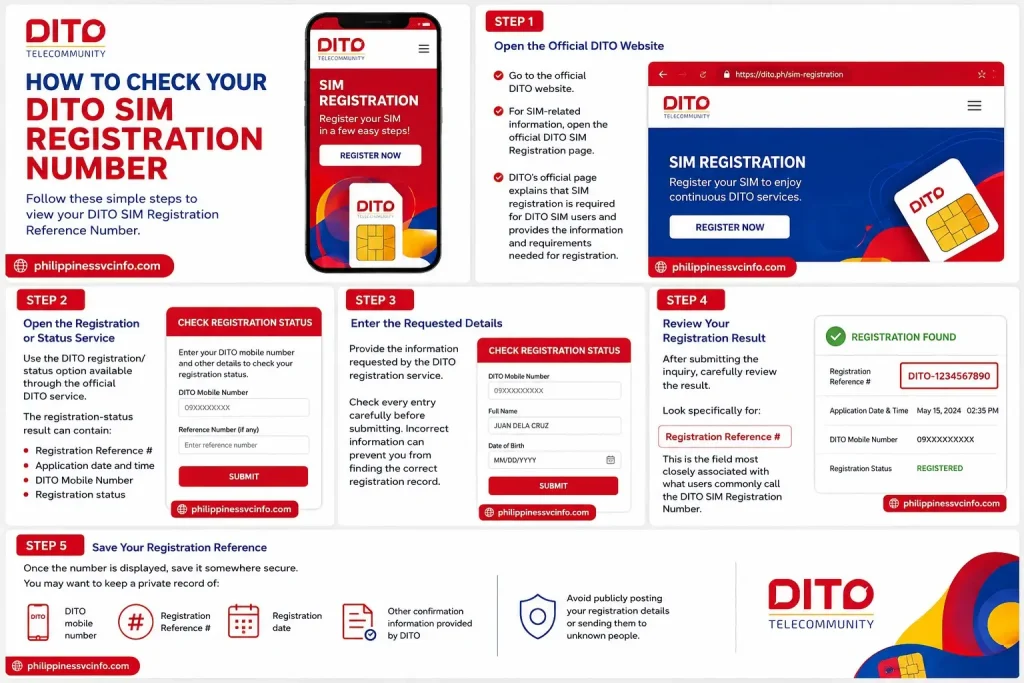
Step 1: Open the Official DITO Website
Go to the official DITO website.
For SIM-related information, open the official DITO SIM Registration page.
DITO’s official page explains that SIM registration is required for DITO SIM users and provides the information and requirements needed for registration.
Step 2: Open the Registration or Status Service
Use the DITO registration/status option available through the official DITO service.
The registration-status result can contain:
- Registration Reference #
- Application date and time
- DITO Mobile Number
- Registration status
This makes the status page particularly useful when your goal is to locate your DITO SIM Registration Number or confirm your registration record.
Step 3: Enter the Requested Details
Provide the information requested by the DITO registration service.
Check every entry carefully before submitting. Incorrect information can prevent you from finding the correct registration record.
Step 4: Review Your Registration Result
After submitting the inquiry, carefully review the result.
Look specifically for:
Registration Reference #
This is the field most closely associated with what users commonly call the DITO SIM Registration Number.
Step 5: Save Your Registration Reference
Once the number is displayed, save it somewhere secure.
You may want to keep a private record of:
- DITO mobile number
- Registration Reference #
- Registration date
- Other confirmation information provided by DITO
Avoid publicly posting your registration details or sending them to unknown people.
How to Register a DITO SIM Through the Official Process
If you have not yet completed registration, you need to register your DITO SIM before expecting to find a registration reference associated with it.
DITO’s official SIM Registration page states that Republic Act No. 11934, or the SIM Registration Act, requires new subscribers to register their SIM before activation. It also states that existing subscribers must comply to avoid deactivation.
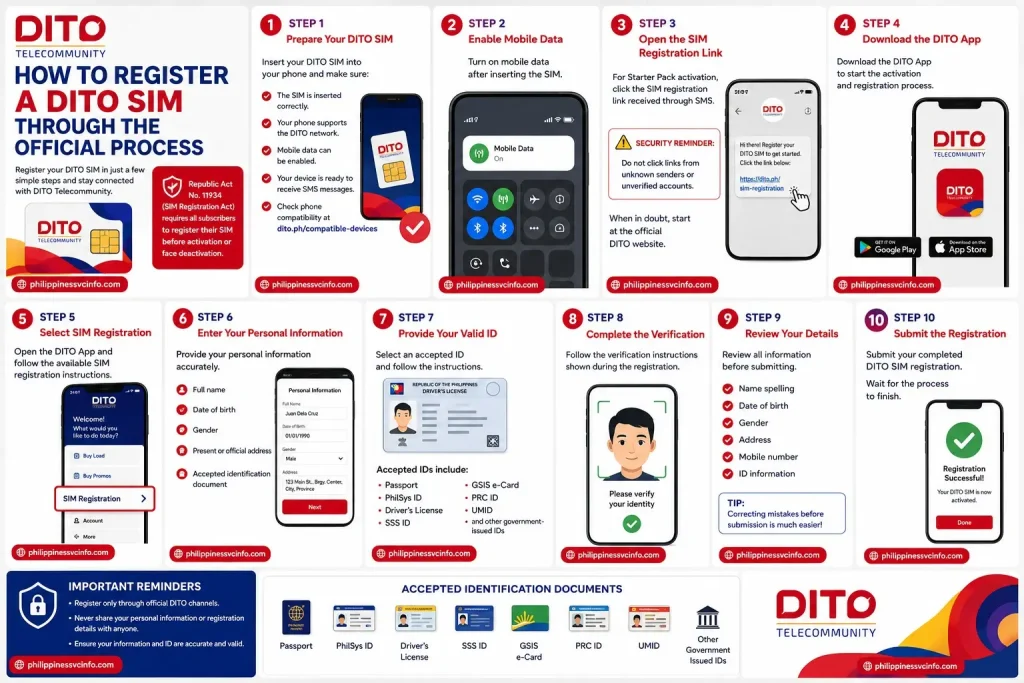
Step 1: Prepare Your DITO SIM
Insert your DITO SIM into your phone.
Make sure:
- The SIM is inserted correctly.
- Your phone supports the DITO network.
- Mobile data can be enabled.
- Your device is ready to receive SMS messages.
DITO also provides a compatibility-check option for phones that need to work with its network.
Step 2: Enable Mobile Data
Turn on mobile data after inserting the SIM.
DITO’s current Help Center gives mobile-data activation as part of the Starter Pack activation process.
Step 3: Open the SIM Registration Link
For DITO Starter Pack activation, DITO currently instructs users to click the SIM registration link received through SMS.
Security reminder: DITO specifically tells subscribers not to click links from unknown senders or unverified accounts.
When in doubt, begin at the official DITO website instead of using a suspicious link.
Step 4: Download the DITO App
DITO’s current activation instructions include downloading the DITO App as part of the process.
Use official DITO channels when downloading the application.
Step 5: Select SIM Registration
Open the DITO App and follow the available SIM registration instructions.
DITO’s Help Center directs users to its official SIM Registration page for guidance on registering their SIM.
Step 6: Enter Your Personal Information
DITO requires subscribers to provide personal information during registration.
The official registration page lists:
- Full name
- Date of birth
- Gender
- Present or official address
- Accepted identification document
Enter the information exactly and carefully.
Step 7: Provide Your Valid ID
Select an accepted identification document and follow the instructions for submitting the required information.
For example, DITO’s official page lists passports, PhilSys ID, driver’s licenses, SSS ID, GSIS e-Card, PRC ID, UMID, and other government-issued identification documents among its accepted IDs.
Make sure the document is valid and that the information you provide matches your registration details.
Step 8: Complete the Verification
Follow the verification instructions shown during the DITO SIM registration process.
If additional verification is requested, complete it before submitting your application.
Do not close the registration page while a required verification step is still processing.
Step 9: Review Your Details
Before submitting the registration, review all information.
Pay particular attention to:
- Name spelling
- Date of birth
- Gender
- Address
- Mobile number
- ID information
Correcting mistakes before submission is much easier than trying to resolve an inaccurate registration record later.
Step 10: Submit the Registration
Submit your completed DITO SIM registration.
Wait for the registration process to finish before closing the page or leaving the application.
According to DITO’s Help Center, once the SIM registration is successfully completed, the SIM will be activated.
DITO SIM Registration Requirements for Foreign Residents
Foreign nationals can register a DITO SIM, but the required documents depend on their situation.
DITO’s official SIM Registration page specifically includes foreign nationals among the users who need to register their DITO SIM.
Foreigners With a Non-Tourist Visa
DITO lists the following requirements for foreigners with a non-tourist visa:
- Passport
- Proof of address in the Philippines
- Other pertinent documents, such as an Alien Employment Permit issued by the Department of Labor and Employment (DOLE)
Because immigration status can affect the documentation required, check the official DITO requirements before beginning the registration.
Tourists
DITO’s official page lists these requirements for tourists:
- Passport
- Proof of address in the Philippines
- Return ticket to the tourist’s own country showing the departure date and time
Therefore, tourists should prepare their travel documentation before attempting DITO SIM registration.
DITO SIM Registration for Minors
DITO provides a separate requirement for minors.
The SIM should be registered under the parent or legal guardian’s name.
The parent or legal guardian must provide:
- Government-issued ID
- Consent to register the SIM for the minor
If you are registering a SIM for someone under the applicable age requirement, review DITO’s current instructions before submitting the application.
DITO SIM Registration for Businesses
Businesses and corporate entities can also have DITO SIM registration requirements.
DITO lists the following documents for businesses:
- SEC or DTI Certificate of Registration
- Board Resolution designating the authorized representative, or a Special Power of Attorney (SPA)
Business subscribers should therefore prepare their corporate documentation before starting the registration process.
What If Your DITO SIM Registration Number Is Not Showing?
Sometimes a user may complete the registration process but still be unable to locate the DITO SIM Registration Number or Registration Reference #.
If this happens, avoid repeatedly entering random information or using unofficial websites.
Instead, follow these troubleshooting steps.
1. Check the Registration Status Again
Return to the official DITO registration/status service and try checking your record again.
The DITO status page itself can display the Registration Reference #, application date and time, and DITO mobile number.
2. Confirm Your DITO Mobile Number
Make sure you are checking the correct DITO SIM.
If you have multiple DITO SIM cards, verify the mobile number before attempting to retrieve the corresponding registration information.
3. Check Your Entered Information
Review the information requested by the registration-status service.
A mismatch can prevent you from retrieving the intended record.
4. Try Again Later
If the DITO registration-status service is temporarily unavailable, wait and try again.
The status page may occasionally display a message asking users to try again later.
5. Contact DITO Support
If you still cannot locate your DITO SIM Registration Number, contact DITO through its official support channels.
DITO’s Help Center provides:
- 185 for free when calling from a DITO number
- 24/7 Help Chat through the DITO App
- Official DITO social-media accounts
You can also visit the official DITO Help Center for current assistance options.
Common DITO SIM Registration Errors
Incorrect Personal Information
If you accidentally enter incorrect personal information, review the registration details and follow DITO’s available instructions for correcting the information.
Do not submit false or altered information.
Invalid ID
If your ID is rejected, check the official DITO SIM Registration page for the current accepted-ID list. DITO’s requirements can include different documents depending on the subscriber category.
Registration Link Does Not Work
If a link received by SMS does not work, do not search for a random replacement link.
Instead, go directly to DITO’s official website or the official SIM Registration page.
SIM Is Not Activated
DITO’s Help Center states that the SIM activation process includes registering the SIM, and that the SIM is activated once registration is completed.
If registration has been completed but activation is still unavailable, contact DITO through the official Help Center.
Registration Status Cannot Be Checked
If the registration-status service does not return your information, verify the details you entered and try again later.
If the problem continues, use DITO’s official support channels instead of providing your personal information to an unofficial website.
How to Keep Your DITO Registration Information Safe
Your DITO SIM registration contains personal information, so security should be part of the process.
Follow these practices:
- Use the official dito.ph domain.
- Avoid unknown SIM-registration links.
- Never share sensitive registration information publicly.
- Do not send your ID to suspicious websites.
- Check the website address before entering personal details.
- Keep your Registration Reference # in a secure location.
- Use the official DITO App for supported account services.
- Contact DITO directly if you suspect fraudulent activity.
DITO explicitly warns users not to click links from unknown senders or unverified accounts.
Official DITO Links You Can Use
| Purpose | Official Link |
|---|---|
| DITO main website | dito.ph |
| SIM Registration information | DITO SIM Registration |
| Customer support | DITO Help Center |
| Registration status | DITO SIM Registration Status |
Use the official DITO domain whenever possible, especially when entering your mobile number, identification information, or other personal details.
DITO SIM Registration Number: Important Security Tips
Your SIM registration contains personal information, so security is an important part of the process.
Use the Official DITO Website
The safest starting point is:
When searching for a DITO SIM Registration Number, avoid assuming that the first third-party result is an official DITO service.
Check the Domain
Before entering your:
- Name
- Mobile number
- Address
- Date of birth
- ID information
- Registration details
check that you are using an official DITO service.
Avoid Unknown Links
DITO specifically advises subscribers not to click links from unknown senders or unverified accounts.
If someone sends you a suspicious SIM registration link, do not enter your personal information through it.
Instead, open the official DITO website manually.
Protect Your Registration Reference
Your Registration Reference # is part of your registration information. Keep it in a secure place and avoid posting it publicly.
If customer support needs information from your registration record, provide it only through an official DITO support channel.
DITO SIM Registration Number: Quick Step-by-Step Summary
If you only need the short version, follow these steps:

- Open the official DITO website.
- Go to the DITO SIM Registration page.
- Complete SIM registration if your SIM has not yet been registered.
- Provide your required personal information.
- Submit an accepted ID.
- Complete any verification requested by DITO.
- Submit the registration.
- Check the official registration-status service.
- Look for Registration Reference #.
- Save your reference information securely.
- Contact the DITO Help Center if you cannot retrieve the registration information.
This is the practical path for users searching for DITO SIM Registration Number, particularly when they actually mean the registration reference associated with their SIM.
DITO SIM Registration Number vs. Other DITO Searches
Several DITO-related searches may look similar but have different purposes.
| Search Term | Main User Intent |
|---|---|
| DITO SIM Registration Number | Find or understand the Registration Reference # |
| DITO SIM Registration | Register a DITO SIM |
| DITO SIM Registration Status | Check whether a SIM registration was completed |
| DITO Mobile Number | Find or identify the DITO telephone number |
| DITO SIM Register | Understand the registration database/process |
| DITO SIM Registration Requirements | Find IDs and information needed for registration |
| DITO SIM Registration Login | Access an account or registration-related service |
These keywords can be connected through internal links, but they do not necessarily have identical search intent.
Frequently Asked Questions About DITO SIM Registration Number
Final Thoughts
The keyword DITO SIM Registration Number is commonly used by users looking for the Registration Reference # linked to their DITO SIM registration. DITO’s registration-status service may show this reference along with the application date and time and registered DITO mobile number. If you are registering a new SIM, visit the official DITO website, follow the latest registration instructions, prepare your personal information and accepted ID, complete the required verification, and save your registration details after successful completion. If you need to find your DITO SIM Registration Number, check the official registration-status service and look for Registration Reference #. If you cannot retrieve it, use DITO’s official Help Center or customer-support channels rather than providing personal information to third-party websites.
Discover What You Need to Know:
- GOMO Unli Data Promos: Price, Validity, Registration & How to Avail 2026
- Globe Postpaid Guide: Plans, Requirements, Application, Billing & GlobeOne 2026
- DITO App: Complete Guide to Download, Login, Load, Promos & Account Management
- DITO eSIM Philippines: Complete Registration & Activation Guide 2026
- SIM: Complete Guide to SIM Cards, eSIM, Types, Activation & Registration 2026








