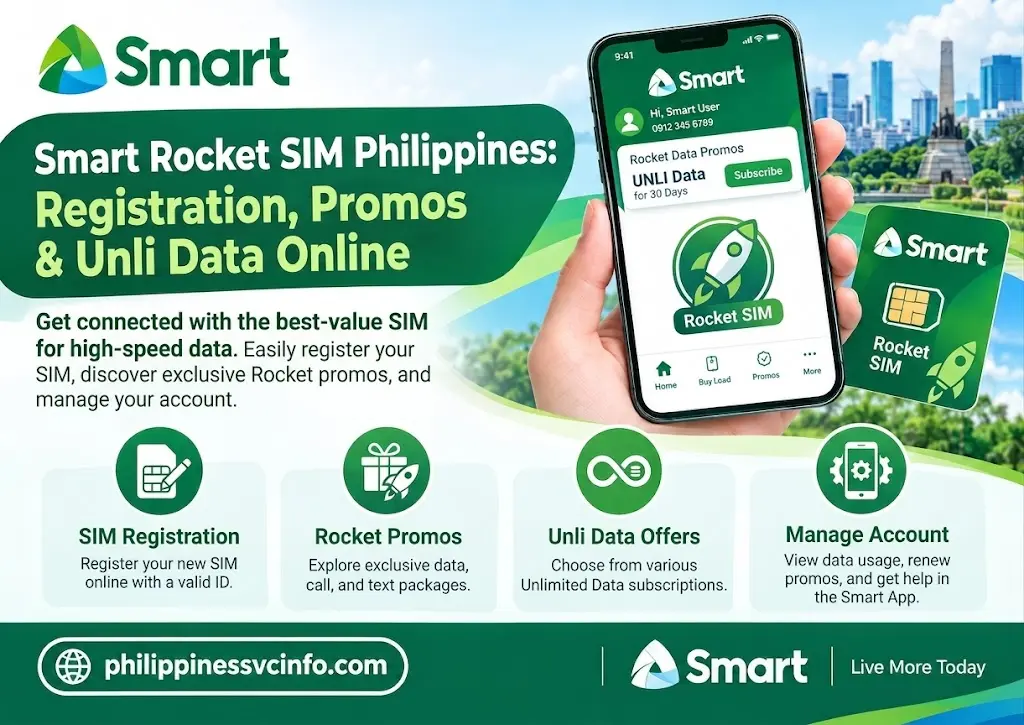
Smart Rocket SIM is a Smart telecommunications SIM designed for users who want a convenient mobile data connection through Smart’s network in the Philippines. It can be used with compatible smartphones, tablets, Smart Bro Pocket WiFi devices, and other supported SIM-enabled devices. Depending on the current Smart offer, a Rocket SIM may include a promotional data package, such as a 30-day unlimited-data offer. Users must complete the required SIM registration before using the service, while available prices, promos, and terms may change over time.
Smart Rocket SIM at a Glance
The Smart Rocket SIM is designed for people who need a data-focused mobile connection for smartphones, tablets, Pocket WiFi devices and compatible open-line routers. It operates on Smart’s mobile network and can be useful for streaming, browsing, online classes, remote work and other activities that require regular internet access.
One important point is that the term Rocket SIM can refer to Smart’s data-oriented SIM products, while the Smart Bro Rocket SIM is specifically associated with Smart Bro. Smart’s current Online Store lists a Smart Bro Rocket SIM 1099, which includes UNLI Data for 30 days.
This makes the product particularly interesting for users who want a SIM-based internet connection without signing up for a traditional fixed broadband contract.
Current Smart Bro Rocket SIM Details
| Feature | Information |
|---|---|
| Product | Smart Bro Rocket SIM |
| Network | Smart 5G/4G/LTE and other supported network technologies |
| Current listed price | ₱1,099 |
| Included data | UNLI Data |
| Validity | 30 days |
| Compatible devices | Smart Bro Pocket WiFi, SIM-enabled smartphones, tablets and open-line Pocket WiFi routers |
| Registration | Required before normal use |
| Provider | Smart Communications, Inc. |
The price and availability of Smart products can change, so it is best to check the official Smart Online Store before purchasing. The current product listing confirms the ₱1,099 Smart Bro Rocket SIM and its 30-day UNLI Data inclusion.
What Is Smart Rocket SIM?
A Smart Rocket SIM is a Smart SIM intended for users who want mobile data access across compatible devices. Unlike a conventional home broadband connection, you can move the SIM between supported devices, subject to the applicable Smart terms and service requirements.
For someone who works remotely, studies online or travels between locations, this flexibility can be useful. You can use a compatible smartphone or tablet directly, or place the SIM in an appropriate Pocket WiFi or open-line router to share the connection with other devices.
Smart’s official information confirms that the Smart Bro Rocket SIM can be used with Smart Bro Pocket WiFi devices as well as SIM-enabled smartphones and tablets. The current product listing also specifies compatibility with open-line Pocket WiFi routers.
Why Users Choose a Smart Rocket SIM
The main attraction is convenience. Instead of relying on a fixed internet connection, you can take a compatible device with you and access Smart’s mobile network where coverage is available.
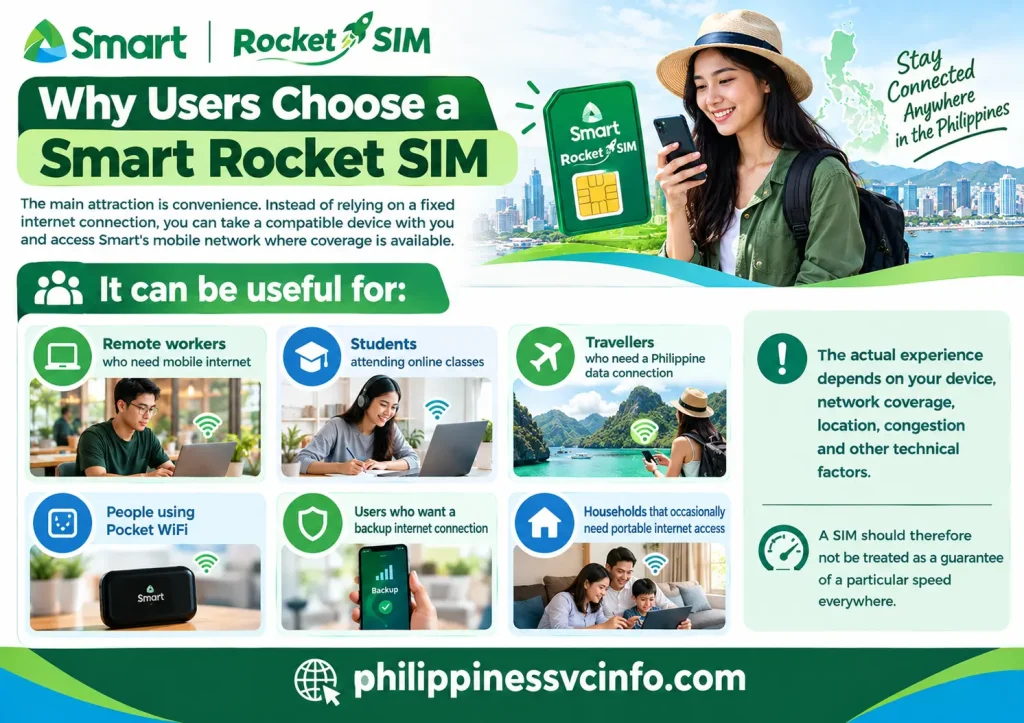
It can be useful for:
- Remote workers who need mobile internet
- Students attending online classes
- Travellers who need a Philippine data connection
- People using Pocket WiFi
- Users who want a backup internet connection
- Households that occasionally need portable internet access
The actual experience depends on your device, network coverage, location, congestion and other technical factors. A SIM should therefore not be treated as a guarantee of a particular speed everywhere.
Smart Rocket SIM Registration Is Required
Before using a newly purchased Smart SIM normally, you need to comply with the Philippine SIM Registration Act requirements. Smart provides an online SIM registration portal for this process.
Smart’s published registration guidance instructs users to visit the SIM registration portal, enter their mobile number, receive an OTP, provide the required information and upload the necessary identification and selfie information. After submission, users should wait for the registration confirmation.
Why Registration Matters
SIM registration is not an optional extra for a newly acquired SIM. It is part of the legal process governing SIM use in the Philippines.
Smart’s SIM registration terms explain that automatic deactivation can render a SIM unable to make or receive calls, access the internet or send and receive messages when the applicable registration period expires.
For that reason, complete the registration process before expecting the Smart Rocket SIM to provide normal network service.
Smart Rocket SIM Registration Requirements
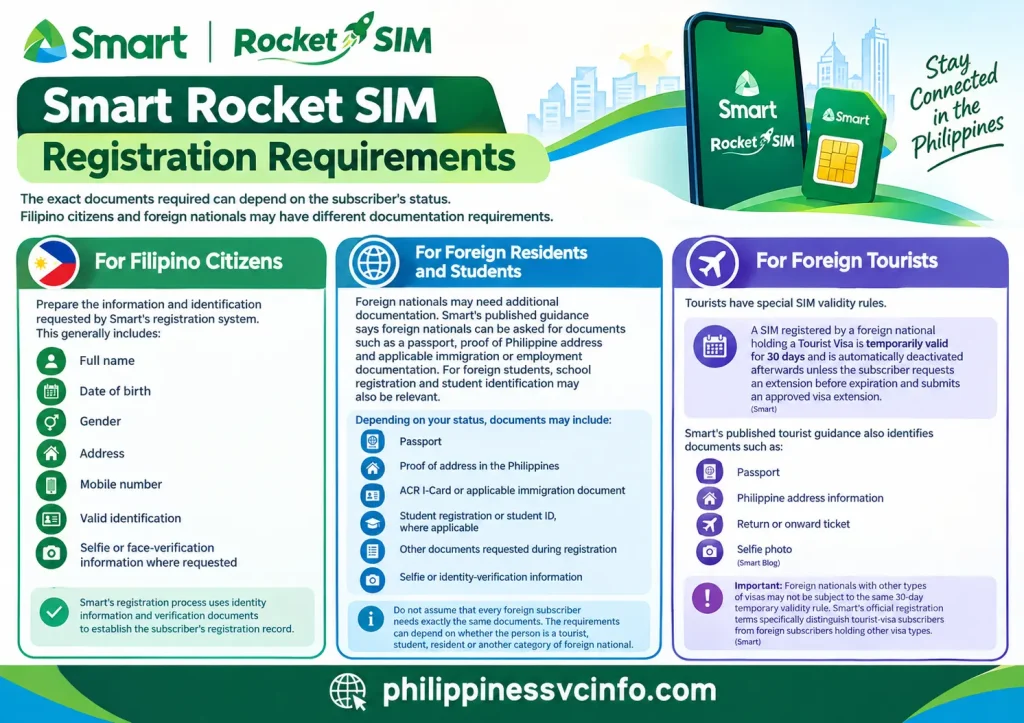
The exact documents required can depend on the subscriber’s status. Filipino citizens and foreign nationals may have different documentation requirements.
For Filipino Citizens
Prepare the information and identification requested by Smart’s registration system. This generally includes:
- Full name
- Date of birth
- Gender
- Address
- Mobile number
- Valid identification
- Selfie or face-verification information where requested
Smart’s registration process uses identity information and verification documents to establish the subscriber’s registration record.
For Foreign Residents and Students
Foreign nationals may need additional documentation. Smart’s published guidance says foreign nationals can be asked for documents such as a passport, proof of Philippine address and applicable immigration or employment documentation. For foreign students, school registration and student identification may also be relevant.
Depending on your status, documents may include:
- Passport
- Proof of address in the Philippines
- ACR I-Card or applicable immigration document
- Student registration or student ID, where applicable
- Other documents requested during registration
- Selfie or identity-verification information
Do not assume that every foreign subscriber needs exactly the same documents. The requirements can depend on whether the person is a tourist, student, resident or another category of foreign national.
For Foreign Tourists
Tourists have special SIM validity rules.
Smart states that a SIM registered by a foreign national holding a Tourist Visa is temporarily valid for 30 days and is automatically deactivated afterwards unless the subscriber requests an extension before expiration and submits an approved visa extension.
Smart’s published tourist guidance also identifies documents such as:
- Passport
- Philippine address information
- Return or onward ticket
- Selfie photo
Important: Foreign nationals with other types of visas may not be subject to the same 30-day temporary validity rule. Smart’s official registration terms specifically distinguish tourist-visa subscribers from foreign subscribers holding other visa types.
How to Register Your Smart Rocket SIM Online
Registration is best completed before moving the SIM permanently into a Pocket WiFi or router because the registration process requires OTP verification and may require information that is easier to provide while the SIM is in a phone.
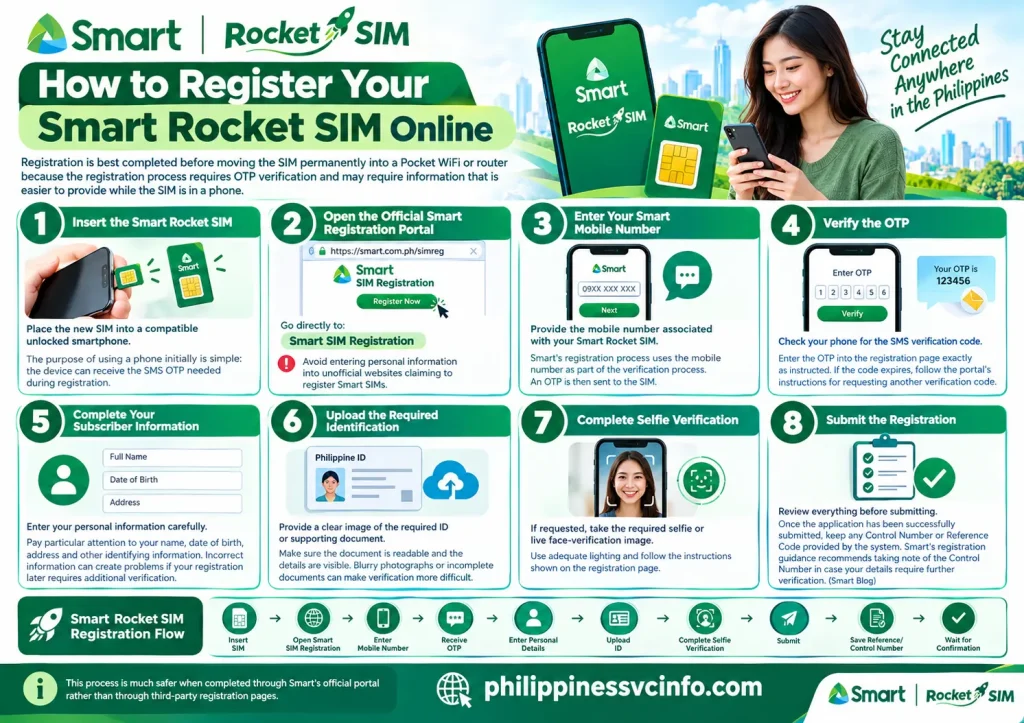
Step 1: Insert the Smart Rocket SIM
Place the new SIM into a compatible unlocked smartphone.
The purpose of using a phone initially is simple: the device can receive the SMS OTP needed during registration.
Step 2: Open the Official Smart Registration Portal
Go directly to:
Avoid entering personal information into unofficial websites claiming to register Smart SIMs.
Step 3: Enter Your Smart Mobile Number
Provide the mobile number associated with your Smart Rocket SIM.
Smart’s registration process uses the mobile number as part of the verification process. An OTP is then sent to the SIM.
Step 4: Verify the OTP
Check your phone for the SMS verification code.
Enter the OTP into the registration page exactly as instructed. If the code expires, follow the portal’s instructions for requesting another verification code.
Step 5: Complete Your Subscriber Information
Enter your personal information carefully.
Pay particular attention to your name, date of birth, address and other identifying information. Incorrect information can create problems if your registration later requires additional verification.
Step 6: Upload the Required Identification
Provide a clear image of the required ID or supporting document.
Make sure the document is readable and that the details are visible. Blurry photographs or incomplete documents can make verification more difficult.
Step 7: Complete Selfie Verification
If requested, take the required selfie or live face-verification image.
Use adequate lighting and follow the instructions shown on the registration page.
Step 8: Submit the Registration
Review everything before submitting.
Once the application has been successfully submitted, keep any Control Number or Reference Code provided by the system. Smart’s registration guidance recommends taking note of the Control Number in case your details require further verification.
Smart Rocket SIM Registration Flow
Insert SIM → Open Smart SIM Registration → Enter Mobile Number → Receive OTP → Enter Personal Details → Upload ID → Complete Selfie Verification → Submit → Save Reference/Control Number → Wait for Confirmation
This process is much safer when completed through Smart’s official portal rather than through third-party registration pages.
What Happens After Smart Rocket SIM Registration?
After the registration process is successfully completed, Smart sends confirmation according to its registration process. Once the SIM is active and the included offer is available, you can turn on mobile data and begin using the service.
For the Smart Bro Rocket SIM, Smart’s Help Centre explains that the included 30-day Unlimited Data works once the SIM is activated and mobile data is turned on.
This means you should not immediately assume that you need to purchase another data package after registration. First check whether the included offer is already active.
Activation in Simple Terms
The basic sequence is:
- Register the Smart Rocket SIM.
- Wait for successful registration/activation.
- Insert the SIM into the compatible device.
- Turn mobile data on.
- Allow the device to connect to the Smart network.
- Check the active promo through the Smart App or applicable Smart account tools.
Smart specifically states that the Smart Bro Rocket SIM’s included Unlimited Data automatically works once the SIM is activated and data is turned on.
Smart Bro Rocket SIM and the 30-Day UNLI Data Offer
One of the biggest reasons users look for the Smart Rocket SIM is its bundled data offer.
Smart’s current product listing for the Smart Bro Rocket SIM 1099 states that it comes with UNLI Data valid for 30 days.
Smart’s Help Centre similarly describes the Smart Bro Rocket SIM as coming with Unlimited Data for 30 days, with access to sites and apps and video quality up to HD.
After the initial period ends, you can check Smart’s currently available offers rather than assuming an older promo is still active. Smart’s Help Centre currently documents ways to subscribe to Smart Bro data offers through its app and other official channels.
Tip: Promo names, prices, inclusions and availability can change. Always verify the current offer through Smart’s official website, Smart App or Online Store before purchasing.
Where Can You Use a Smart Rocket SIM?
The Smart Rocket SIM is designed for users who need mobile data on a compatible device. Depending on the specific Rocket SIM package, it can be used with devices such as:
- Smart Bro Pocket WiFi
- SIM-enabled smartphones
- Tablets
- Open-line Pocket WiFi routers
The current Smart Bro Rocket SIM 1099 listing states that the SIM supports 5G, 4G, LTE, 3G and 2G, although actual network performance depends on coverage, device compatibility and the network available in your location.
How to Put Smart Rocket SIM in a Smartphone
If you want to use your Smart Rocket SIM directly in a smartphone, follow these basic steps:
- Turn off your phone before inserting the SIM.
- Locate the SIM tray.
- Insert the Smart Rocket SIM in the correct position.
- Turn your phone back on.
- Wait for the Smart network signal to appear.
- Enable Mobile Data.
- Allow a few moments for the network connection to become active.
Smart’s guidance explains that a Smart Bro SIM can be inserted into a phone for registration and activation before being moved to a compatible Pocket WiFi device.
If your phone does not detect the SIM, remove it carefully and check that it is positioned correctly. You should also confirm that the handset is compatible with the Smart network.
How to Use Smart Rocket SIM With Pocket WiFi
One of the most useful applications of a Smart Rocket SIM is mobile broadband through a Smart Bro Pocket WiFi.
Smart provides a straightforward setup process:
- Insert the Smart Bro SIM into a smartphone.
- Complete SIM registration through the official Smart registration portal.
- Wait for the registration confirmation.
- Insert the registered SIM into your Smart Bro Pocket WiFi.
- Turn on the Pocket WiFi.
- Connect your smartphone, laptop or other Wi-Fi-enabled device.
- Use the Smart App to manage your Smart Bro account where supported.
This setup is particularly useful for people who need a portable internet connection without relying entirely on a fixed broadband service.
Smart Rocket SIM and Multiple Devices
A major advantage of using a Rocket SIM with a Pocket WiFi is that the internet connection can be shared with several Wi-Fi-enabled devices.
For example, you can connect:
- A laptop for work or study
- A smartphone
- A tablet
- Another compatible Wi-Fi device
However, the practical experience depends on the Pocket WiFi model, network coverage and the number of connected devices. More connected devices can also increase overall data usage and affect performance.
Smart Rocket SIM Initial Data Offer
The current Smart Bro Rocket SIM 1099 listing includes UNLI Data valid for 30 days. This means the initial offer is intended to provide unlimited data access for the stated 30-day period.
The important point is that the initial offer has a limited validity period. Users should not assume that the included unlimited data continues permanently.
After the initial 30 days, you need to check the current Smart Bro offers and choose an available promo if you want to continue using mobile data.
How Smart Rocket SIM Activation Works
Activation is an important step when setting up your Smart Rocket SIM.
According to Smart’s support guidance, the included data on a Smart Bro Rocket SIM becomes usable when the SIM is activated and mobile data is turned on.
A simple activation process is:
- Complete the required SIM registration.
- Wait for the registration confirmation.
- Insert the SIM into your compatible phone or Smart Bro device.
- Turn on the device.
- Enable mobile data or connect your device to the Pocket WiFi.
- Check whether the internet connection is working.
If the connection does not work immediately, give the network some time to recognise the newly activated SIM.
Managing Your Smart Rocket SIM With the Smart App
The Smart App can make it easier to manage your mobile account and available services.

Depending on the services currently supported, you may use the app to:
- View your account information
- Check available promos
- Subscribe to eligible offers
- Monitor account activity
- Manage your Smart mobile services
Smart’s Pocket WiFi setup instructions also recommend downloading the Smart App after connecting to the Pocket WiFi. The app can detect the Smart Bro number and allow account sign-up.
Because Smart can update its app features and available promos, always check the current information shown inside the official Smart App.
How to Check Smart Rocket SIM Data and Promo Status
Before purchasing another promo, it is useful to check your current account and offer status.
You can use the Smart App or Smart’s official support channels to review available information.
When checking your Smart Rocket SIM, pay attention to:
- Current data or promo status
- Remaining validity
- Available replacement or renewal offers
- Account information
- Whether the SIM is active
This helps prevent confusion when an included 30-day offer expires.
What Happens When the 30-Day Offer Expires?
The initial Smart Rocket SIM offer is not unlimited forever. The current Smart Bro Rocket SIM guidance states that the included Unlimited Data is valid for 30 days. After that period, customers can subscribe to available Smart offers.
The exact offers available can change, so it is better to check Smart’s current promo catalogue rather than relying on an old price or promo name.
For example, Smart’s support information currently references UNLIDATA offers for eligible users, but availability and pricing can change over time.
How to Continue Using Smart Rocket SIM After 30 Days
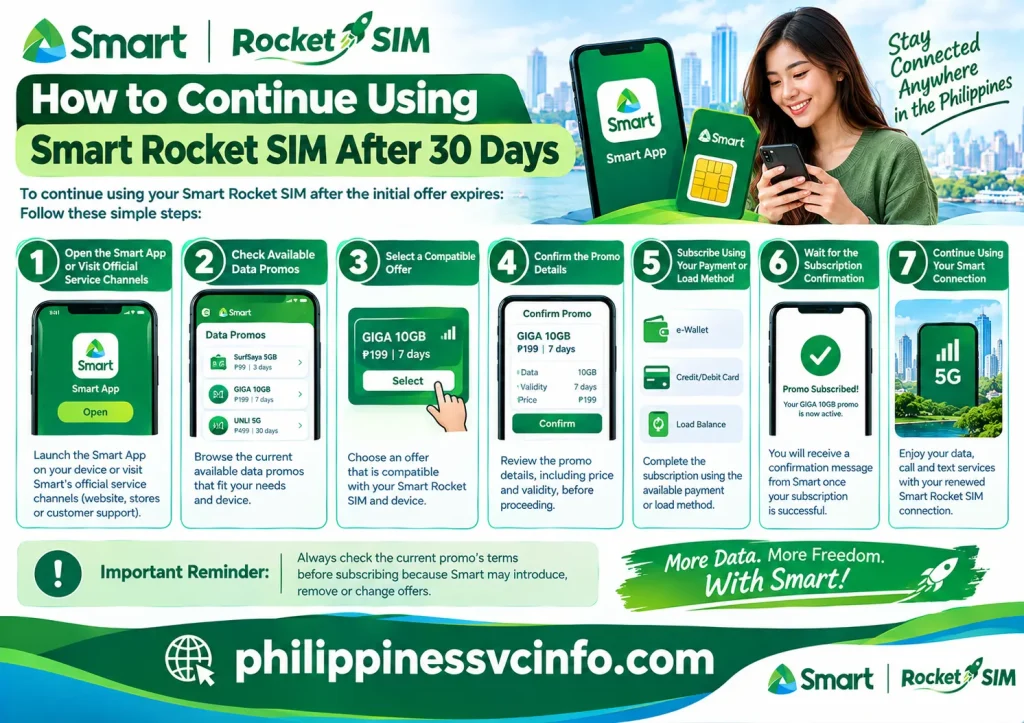
To continue using your Smart Rocket SIM after the initial offer expires:
- Open the Smart App or visit Smart’s official service channels.
- Check the current available data promos.
- Select an offer compatible with your SIM and device.
- Confirm the promo details, including price and validity.
- Subscribe using the available payment or load method.
- Wait for the subscription confirmation.
- Continue using your Smart connection.
Always check the current promo’s terms before subscribing because Smart may introduce, remove or change offers.
How to Reload or Add Load
If your chosen Smart service requires prepaid load, you should make sure that sufficient balance is available before subscribing.
Depending on the options currently offered by Smart, customers may be able to purchase load through official Smart channels and supported payment methods.
When adding load, verify:
- The mobile number is correct.
- The amount is correct.
- The transaction has been completed successfully.
- You receive confirmation of the transaction.
- The balance is available before subscribing to another promo.
For the safest option, use Smart’s official channels rather than relying on unofficial websites claiming to sell Smart load or Rocket SIM services.
Smart Rocket SIM for Foreign Visitors and Other Foreign Nationals
Foreign nationals using a Smart SIM in the Philippines also need to follow applicable SIM registration requirements.
Smart states that tourist SIMs have temporary validity and are automatically deactivated after 30 days, while an extension may be possible before expiry when the required approved visa extension is provided. Foreign nationals with other visa types can have different registration and validity arrangements.
Therefore, visitors should check the official Smart requirements that apply to their specific immigration status before purchasing or registering a SIM.
Smart Rocket SIM for Students and Remote Workers
A Rocket SIM can be useful for people who require a portable internet connection.
For students, it can provide connectivity for:
- Online classes
- Research
- Educational websites
- Video meetings
- File downloads and uploads
For remote workers, it can be useful as a backup connection when fixed broadband is unavailable.
However, users should check network coverage at their location before depending on a mobile connection for important work or classes.
Tips for Getting Better Performance
To get the best experience from your Smart Rocket SIM, consider these practical tips:
Keep the device in an area with good signal.
Signal strength can affect connection quality.
Use a suitable device.
A compatible Smart Bro Pocket WiFi or supported smartphone can provide a better experience than an unsuitable or locked device.
Keep your software updated.
Updates can improve compatibility and device performance.
Monitor connected devices.
If many devices are connected to your Pocket WiFi, overall performance may change.
Check your promo validity.
Knowing when your current offer expires helps you avoid unexpected loss of service.
Use official Smart channels.
For registration, promo information and account management, rely on Smart’s official website and support resources.
Smart Rocket SIM vs Regular Smart Prepaid SIM
Although both are Smart SIM products, they can serve different purposes.
A regular Smart Prepaid SIM may be suitable for everyday smartphone use involving calls, texts and mobile data.
A Smart Rocket SIM, particularly a Smart Bro Rocket SIM, is positioned towards users who want a data-focused connection that can also be used with compatible Pocket WiFi equipment.
Your best option therefore depends on how you intend to use the SIM. If portable internet access is your main requirement, a Rocket SIM and compatible Pocket WiFi can be a practical combination.
Important Things to Check Before Buying Smart Rocket SIM
Before purchasing a Smart Rocket SIM, check the latest information on the official Smart website or Online Store.
Look at:
- Current price
- Current data inclusion
- Promo validity
- Compatible devices
- SIM registration requirements
- Network compatibility
- Product availability
The Smart Online Store currently lists the Smart Bro Rocket SIM 1099, but product availability can change.
Smart Rocket SIM Troubleshooting Guide
Although a Smart Rocket SIM is designed for straightforward use, users may occasionally experience registration, activation, signal or internet connection problems. Most basic issues can be checked through a few simple steps before seeking additional support.
Smart Rocket SIM Has No Signal
If your Smart Rocket SIM does not show a network signal, try the following:
- Restart your smartphone, Pocket WiFi or router.
- Remove and reinsert the SIM correctly.
- Check whether the SIM is properly registered.
- Move to an area with better Smart network coverage.
- Check whether the device is compatible with the SIM.
- Make sure Airplane Mode is switched off.
- Try the SIM in another compatible device if possible.
If the problem continues, check Smart’s official support resources for current troubleshooting information.
Smart Rocket SIM Has Signal but No Internet
Having network bars does not always mean that mobile data is working.
If your Smart Rocket SIM has a signal but no internet connection:
- Make sure Mobile Data is enabled.
- Check whether your data promo is still valid.
- Restart the device.
- Check your account through the Smart App.
- If using Pocket WiFi, reconnect your device to its Wi-Fi network.
- Check whether other connected devices have the same problem.
If the included 30-day data period has ended, you may need to subscribe to a current eligible data offer. Smart’s official support information explains that users can subscribe to available offers after the initial Rocket SIM data period expires.
Smart Rocket SIM Registration Failed
SIM registration is required before the SIM can be used under the applicable Philippine SIM registration rules.
If registration does not complete successfully, check that:
- Your mobile number is entered correctly.
- Your personal information matches your documents.
- Your identification document is valid and readable.
- Your selfie or required image meets the registration instructions.
- You have a stable internet connection while completing the online process.
Smart’s registration process uses its official SIM registration portal and requires information and supporting documentation according to the applicable registration category.
What to Do if Your Smart Rocket SIM Stops Working
If your Smart Rocket SIM suddenly stops providing service, first determine whether the issue is related to the SIM, device, network or promo.
Check these items:
- SIM registration: Confirm that the SIM was successfully registered.
- Promo validity: Check whether your current data offer has expired.
- Device: Restart the smartphone, Pocket WiFi or router.
- Network: Check Smart coverage in your current location.
- SIM condition: Inspect the SIM for visible physical damage.
- Account status: Check your account using Smart’s official services.
These checks can help identify whether the problem is temporary or requires assistance from Smart.
Smart Rocket SIM Important Usage Tips
Following a few basic practices can make your Smart Rocket SIM easier to manage.
Keep Your Registration Information Accurate
During SIM registration, provide accurate information and use the required valid documents. Incorrect information can cause registration problems or delays.
Save Your Registration Details
After successfully registering, keep important confirmation information such as the registration Control Number where appropriate. Smart recommends retaining the Control Number provided during registration.
Check Promo Expiry Dates
The Rocket SIM’s included data offer has a defined validity period. The current Smart Bro Rocket SIM 1099 listing specifies UNLI Data for 30 days.
Checking the expiry date helps you avoid unexpected interruptions.
Check Current Promos Before Reloading
Smart regularly updates its available prepaid and Smart Bro offers. Rather than relying on old articles or screenshots, check the latest official Smart information before purchasing a new promo.
Protect Your Smart Account
Never share OTPs, passwords or other account security information with strangers. Be particularly careful with websites or social media accounts pretending to represent Smart.
For registration, account management and promotional information, use official Smart channels.
Smart Rocket SIM Frequently Asked Questions
Final Thoughts on Smart Rocket SIM
The Smart Rocket SIM is a practical option for users who want a mobile-data-focused connection that can work with compatible smartphones, tablets, Smart Bro Pocket WiFi devices and open-line Pocket WiFi routers. The current Smart Bro Rocket SIM 1099 provides UNLI Data for 30 days, giving users a substantial initial period for mobile internet use.
Before buying or activating a Smart Rocket SIM, however, it is important to check SIM registration requirements, device compatibility, current pricing, network coverage and the validity of the included data offer. After the initial 30-day period, users should review Smart’s latest available promos rather than relying on outdated information.
For registration, promo management and troubleshooting, always use official Smart channels whenever possible. This helps you access the latest information and reduces the risk of relying on unofficial or outdated Smart Rocket SIM instructions.
Discover What You Need to Know:
- LTFRB Philippines 2026 : Complete Guide Requirements, Registration, Franchise & Renewal
- Smart Load Philippines 2026 : How to Buy, Reload & Check Balance Online
- myMapúa Student Portal Guide 2026: Login, Enrollment, Grades, Schedule & Account Help
- CEU Portal Philippines 2026 : Complete Guide of Login, Student Portal and Registration Guide