

GOMO Load refers to the digital mobile data, calls, texts, and promotional packages available to GOMO users in the Philippines. It can include No-Expiry Data, UNLI Data, and other services purchased through official GOMO channels. Users can buy packages, manage their account, and check their remaining benefits through the GOMO app or website.
What Is GOMO Load?
GOMO Load refers to the data and service packages you purchase for a GOMO SIM rather than simply adding pesos to a conventional prepaid load balance.
A useful way to think about GOMO is:
You normally buy the service you want instead of loading a cash wallet first.
Depending on the offer available to your account, this can include:
- No-Expiry Data
- UNLI Data
- Calls and texts
- ‘Mo Creds conversions
- Roaming data
- Other digital offers
The exact GOMO Load products shown to you can depend on the current offers available through the GOMO platform.
Quick GOMO Load facts
| Feature | What it means |
|---|---|
| No-Expiry Data | Data remains available without a normal promo expiry |
| UNLI Data | Unlimited-data offer for a stated validity period |
| ‘Mo Creds | Lets eligible data be converted into other services |
| GOMO App | Main digital channel for managing the account |
| Website | Provides account access and current offers |
| eSIM | Available for supported devices and offers |
| Roaming | International data offers are available |
GOMO’s official account dashboard displays available data, calls and texts, so your account is centred around service allocations rather than a traditional monetary balance.
GOMO Data Offers You Can Buy
The most important part of GOMO Load Philippines is choosing the right type of offer. GOMO currently lists different packages through its official channels, and the selection can change over time.
1. GOMO No-Expiry Data
No-Expiry Data is designed for people who do not want to rush to consume their data within a short promo period.
Current official GOMO listings include packages such as:
- 15GB No-Expiry Data
- 30GB No-Expiry Data
- 60GB No-Expiry Data
- Other available data allocations
The price and exact package selection should always be checked on the official GOMO offer page before purchase.
Best suited to: students, occasional mobile-data users, travellers staying in the Philippines and people whose monthly usage changes.
2. GOMO UNLI Data
GOMO also provides UNLI Data offers for users who consume considerably more mobile data.
Depending on the current offer, the validity may be measured in days rather than being a permanent allocation. GOMO’s official offers page currently shows 7-day and 30-day UNLI options among its products.
Before buying, check:
- Validity period
- Whether calls and texts are included
- Any stated speed conditions
- The current price
- Whether the offer is available through the app only
Do not assume that every GOMO UNLI package has identical terms.
How to Buy GOMO Load Online
The easiest way to purchase GOMO Load is through GOMO’s own digital channels.
Method 1: Buy GOMO Load Through the GOMO App
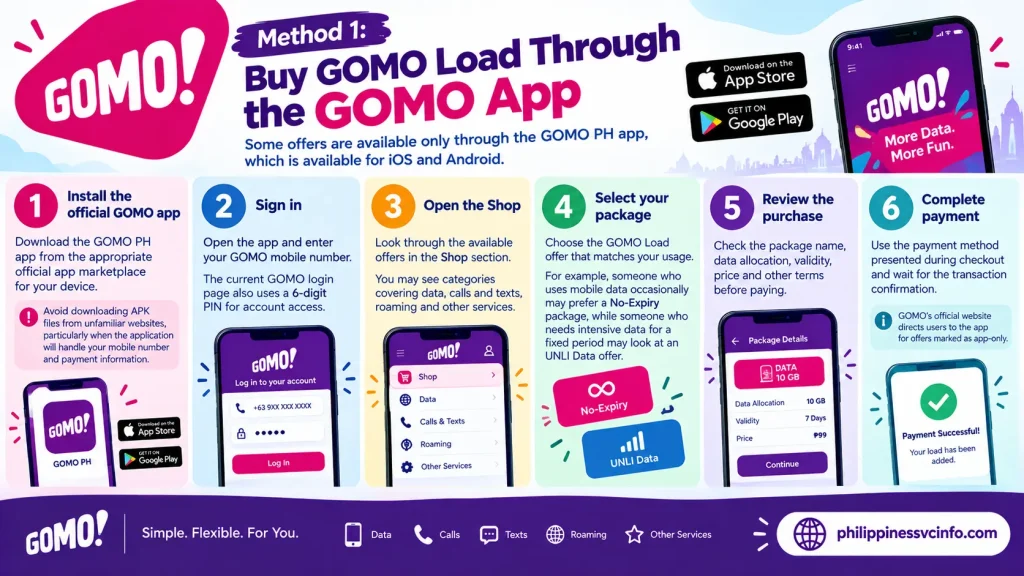
GOMO states that some offers are available only through the GOMO PH app, which is available for iOS and Android.
Follow these steps
Step 1 — Install the official GOMO app
Download the GOMO PH app from the appropriate official app marketplace for your device.
Avoid downloading APK files from unfamiliar websites, particularly when the application will handle your mobile number and payment information.
Step 2 — Sign in
Open the app and enter your GOMO mobile number.
The current GOMO login page also uses a 6-digit PIN for account access.
Step 3 — Open the Shop
Look through the available offers in the Shop section.
You may see categories covering data, calls and texts, roaming and other services.
Step 4 — Select your package
Choose the GOMO Load offer that matches your usage.
For example, someone who uses mobile data occasionally may prefer a No-Expiry package, while someone who needs intensive data for a fixed period may look at an UNLI Data offer.
Step 5 — Review the purchase
Check the package name, data allocation, validity, price and other terms before paying.
Step 6 — Complete payment
Use the payment method presented during checkout and wait for the transaction confirmation.
GOMO’s official website directs users to the app for offers marked as app-only.
Method 2: Use the GOMO Website
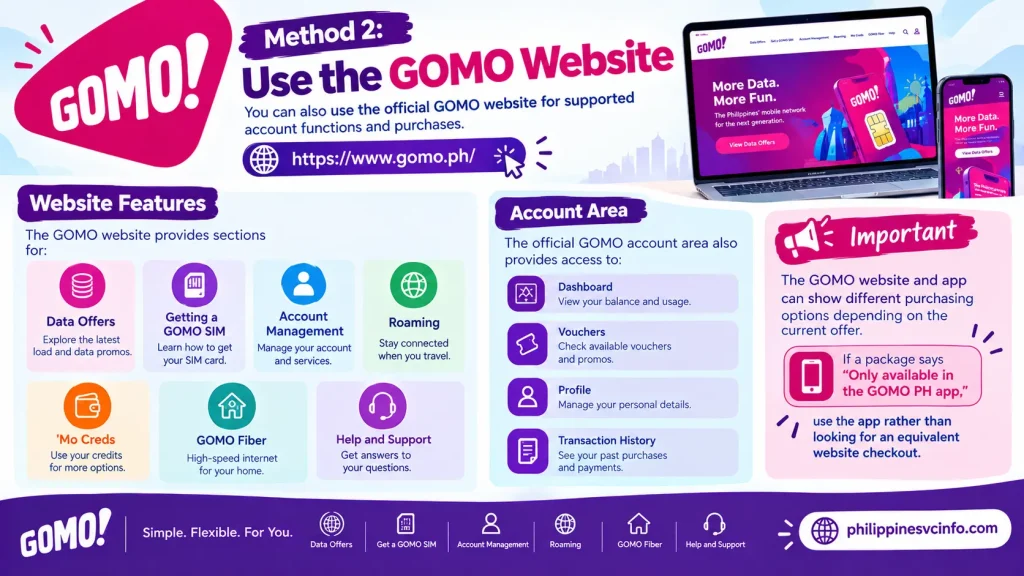
You can also use the official GOMO website for supported account functions and purchases.
GOMO Official Website
The website provides sections for:
- Data offers
- Getting a GOMO SIM
- Account management
- Roaming
- ‘Mo Creds
- GOMO Fiber
- Help and support
The official GOMO account area also provides access to the dashboard, vouchers, profile and transaction history.
Important
The GOMO website and app can show different purchasing options depending on the current offer. If a package says “Only available in the GOMO PH app,” use the app rather than looking for an equivalent website checkout.
Can You Buy GOMO Load Through GCash?
GOMO services may also be available through supported third-party payment or loading channels, but availability and the exact purchase flow can change.
If GCash displays a GOMO package for your number, check the package name and terms carefully before confirming payment.
The safest approach for a current offer is to compare what appears in the GOMO app with the offer shown in your payment application.
Tip: Don’t search for an old GOMO promo code simply because a previous guide lists it. Digital offers can change, so the current GOMO app or official website should take priority.
How to Check Your GOMO Load Balance
With GOMO, checking your “load balance” usually means checking your remaining data, calls and texts.
The official GOMO dashboard currently displays:
- Available Data
- Available Calls
- Available Texts
- ‘Mo Creds information
- Account and transaction information
Check GOMO Load in the App
Open the GOMO PH app and sign in.
Once inside your account, check the dashboard for your remaining allocations. This is generally the most useful method because you can see your available services together.
Check Through the GOMO Website
You can also sign in through the official GOMO website and access the account dashboard.
The current GOMO dashboard separates available data, calls and texts, making it easier to identify exactly what remains on your account.
What Is GOMO ‘Mo Creds?
‘Mo Creds is one of the features that makes GOMO different from a traditional prepaid setup.
Eligible data can be converted into other services through the GOMO system. The official ‘Mo Creds page currently shows categories including:
- Call & Text
- UNLI Data
- Roaming
- Entertainment
- Essentials
- Gaming
- Lifestyle
- Social Media
- Shopping
- Fiber
- Donations and other categories
This means your available GOMO data can potentially be used for something other than ordinary browsing, depending on the conversion options currently offered.
Before converting your data
Always check the conversion rate and offer conditions displayed in the GOMO app. The available conversion choices can change.
GOMO SIM Registration for Foreigners and Tourists
Foreign residents and tourists should pay particular attention to SIM registration.
The Philippine SIM Registration Act applies to both local and foreign SIM users. Globe’s official information states that foreign nationals using Philippine SIMs must register them.
For tourists, Globe currently states that registration requires:
- Passport
- Proof of address in the Philippines, such as a hotel booking or qualifying residence document
- Return ticket to the country of origin or another destination
Globe also states that a tourist’s registered SIM is valid for 30 days and automatically deactivates after that period. Foreign nationals with other visa types may have additional documentation requirements.
This is particularly important for visitors buying a GOMO SIM in the Philippines. Having a physical SIM or eSIM does not remove the registration requirement.
GOMO SIM, eSIM and New Number Options
GOMO currently offers several SIM formats through its official website, including:
- Physical SIM
- Local eSIM
- Roaming eSIM
- Easy Switch SIM
The available products depend on the current GOMO catalogue and location.
GOMO’s official SIM page also lists different data allocations with physical SIM and eSIM products, including No-Expiry options.
For an eSIM, make sure your phone supports eSIM before purchasing. If you are visiting the Philippines, also check the SIM registration requirements applicable to your nationality and stay.
Official GOMO Websites to Bookmark
For GOMO Load Philippines, use official sources whenever possible:
- GOMO Philippines Official Website
- GOMO Data Offers
- Get a GOMO SIM
- GOMO Account Login
- GOMO ‘Mo Creds
- GOMO Roaming
- Globe SIM Registration
These official pages are preferable to relying on old promo lists because GOMO can change its available packages, prices and purchasing channels.
How to Manage Your GOMO Load After Buying a Promo
The GOMO app is the main place to manage your account. Current GOMO offers also show that some products are available exclusively through the GOMO PH app.
After purchasing a package, keep these points in mind:
- Check the account dashboard to confirm your allocation.
- Look at the remaining GB before buying another package.
- Check the validity of time-limited offers.
- Review your transaction history if you need to confirm a purchase.
- Use the ‘Mo Creds section if you want to convert eligible data.
- Keep your GOMO app updated.
The official dashboard currently separates Available Data, Available Calls and Available Texts, making it easier to see what is actually left on your account.
Where to find your GOMO account information
The official account area includes:
- Dashboard
- My Vouchers
- User Profile
- Transaction History
These sections can be accessed after signing in through GOMO’s official platform.
Can You Transfer GOMO Data to Another User?
Yes, GOMO provides a GB transfer feature through its account-management system.
The official GOMO account-management page currently includes How to Transfer GB as one of its account functions.
This is useful when you have more eligible data than you need and another GOMO user requires additional GB.
Before transferring data
Check the instructions shown in the GOMO app before confirming the transaction. Not every type of data or promotional allocation should automatically be assumed to be transferable.
A good practice is to check:
- The amount of GB available for transfer
- The recipient’s GOMO number
- Any eligibility conditions
- Whether the transfer affects your remaining balance
- The confirmation shown before submitting
Important: Don’t rely on an old blog post for current transfer rules. GOMO’s app and official account-management pages should be treated as the current reference.
Using GOMO ‘Mo Creds Instead of Buying New Load
Another way to get more value from existing GOMO Load is through ‘Mo Creds.
GOMO describes the service as a way to convert eligible data into other products and services. The current official ‘Mo Creds catalogue includes categories such as Call & Text, UNLI Data, Roaming, Entertainment, Lifestyle, Social Media, Shopping, Gaming, Fiber and Donations.
For example, the official catalogue currently shows options where a specified number of GB can be used to obtain different services. The required GB depends on the particular offer.
How to access ‘Mo Creds
The current GOMO process is app-based:
Open GOMO PH app → ‘Mo Creds → Browse the available categories → Select an offer → Review the required GB → Confirm
GOMO currently states that ‘Mo Creds is available through the GOMO PH app.
This means you should check the live catalogue rather than assuming that a particular conversion mentioned in an older article is still available.
GOMO Load for Calls and Texts
GOMO is strongly associated with data-first mobile usage, but its current ecosystem also includes Call & Text options.
These can be obtained through available offers or through eligible ‘Mo Creds conversions. The exact allocation and required GB depend on the offer displayed at the time.
For someone who mostly uses messaging apps, a large No-Expiry Data allocation may be more relevant than a traditional call-and-text package. However, users who regularly make calls should check the current GOMO Call & Text options before purchasing.
What Payment Methods Can You Use for GOMO Load?
The payment options shown during checkout can vary by the particular GOMO transaction and channel.
When buying a package, always check the payment methods displayed on the official GOMO checkout page or app before confirming.
The important rule is simple:
Review the final amount and offer details before pressing the payment button.
This is especially useful when purchasing from a third-party wallet or marketplace, because the package name and validity should match what you intended to buy.
Keep your transaction record
If your payment succeeds but your GOMO Load does not immediately appear, retain:
- Payment confirmation
- Transaction reference
- Date and time
- GOMO mobile number
- Package name
- Amount paid
These details can make a support request easier to resolve.
GOMO Load Not Showing After Purchase?
Sometimes a user may complete payment but not immediately see the new allocation.

Start with the simplest checks.
1. Check the GOMO dashboard
Sign in again and check Available Data, Available Calls and Available Texts.
2. Check your transaction history
The official account area includes Transaction History, which can help you verify whether the purchase was recorded.
3. Restart your connection
Turn Airplane Mode on for a few seconds, then turn it off. You can also restart the phone.
4. Check your internet connection
If the GOMO app itself isn’t loading correctly, connect to a stable Wi-Fi network or use another working connection.
5. Don’t immediately purchase the same promo again
If money has already been deducted, avoid repeatedly submitting the same transaction until you know whether the first purchase was successful.
This can prevent an unnecessary duplicate purchase.
GOMO Mobile Data Not Working
Having GOMO Load does not automatically mean every phone has the correct network configuration.
If your data allocation is available but mobile internet isn’t working, check the device’s mobile-data and APN settings.
GOMO’s official website specifically addresses APN selection for Android devices. It says that when Android asks you to select an APN setting, you can choose prepaid or postpaid, and this choice does not affect the GOMO SIM’s internet settings.
For roaming, GOMO’s official instructions are more specific: it directs users to update APNs to gomo.ph.
Basic connection checklist
Before changing advanced settings, check:
- Mobile Data is switched on.
- The GOMO SIM is selected for mobile data if you have multiple SIMs.
- Airplane Mode is off.
- Your GOMO account has available data.
- Your phone has network signal.
- Your device supports the required network technology.
- The relevant APN settings are correct.
If the problem continues, use GOMO’s official Help Centre rather than changing unrelated network settings.
What If the GOMO App Won’t Log In?
The current GOMO website login page asks for your GOMO number and 6-digit PIN and also provides a Forgot PIN? option.
If you cannot sign in:
- Confirm that you entered the correct GOMO number.
- Enter the correct 6-digit PIN.
- Use the Forgot PIN? option if necessary.
- Make sure your phone has a working internet connection.
- Update the GOMO app if an update is available.
- Use the official GOMO support channels if the problem remains.
Avoid giving your PIN or verification codes to another person claiming to be a GOMO representative.
GOMO Load and Regular Load: What Should You Buy?
This is an important distinction for people coming from traditional prepaid networks.
| Need | What to look for |
|---|---|
| Occasional browsing | No-Expiry Data |
| Long-term flexible data | No-Expiry Data |
| Heavy usage for a fixed period | UNLI Data |
| Calls and texts | Call & Text offer |
| Want to use existing GB differently | ‘Mo Creds |
| Travelling abroad | GOMO Roaming |
| New phone with eSIM | Local or Travel eSIM, if compatible |
GOMO’s current official catalogue confirms that No-Expiry Data, UNLI Data and roaming products are offered, while the ‘Mo Creds catalogue provides additional ways to use eligible GB.
The exact products and prices can change, so treat this table as a guide to product types, not a permanent price list.
GOMO Roaming for Travellers
If you’re travelling outside the Philippines, GOMO also has a dedicated roaming section.
The current official roaming page allows users to select a country or region and view available roaming offers. It also explains that roaming packages can be purchased through the GOMO PH app.
The current process is:
GOMO PH app → Shop → Roaming → Select an offer → Proceed to Payment → Confirm
GOMO says a successful purchase generates an in-app notification.
Roaming APN setup
GOMO’s current roaming instructions say to update the APN to gomo.ph.
For iPhone, the official instructions point users to:
Settings → Cellular → Cellular Data Network
For Android, users can search for Access Point Names or find the relevant option under SIM/mobile-network settings.
Remember to check that both mobile data and data roaming are enabled when required.
Can You Use GOMO Load on Another Device?
GOMO’s current account-management section includes How to Link a Device and How to Buy Promos for Your Linked Devices.
This is useful if your GOMO service is being used with another compatible device.
Instead of assuming that every package works identically across devices, check the specific offer and account instructions shown by GOMO.
This is particularly important for users considering GOMO for:
- Tablets
- Secondary smartphones
- Mobile hotspots
- Other compatible connected devices
GOMO SIM vs GOMO eSIM
GOMO currently lists several SIM categories, including Physical SIM, Local eSIM, Roaming eSIM and Easy Switch SIM.
| Option | Suitable for |
|---|---|
| Physical SIM | Phones with a physical SIM slot |
| Local eSIM | Compatible devices supporting eSIM |
| Roaming eSIM | Travel and international connectivity |
| Easy Switch SIM | Users moving an existing number through the supported process |
Current GOMO listings include No-Expiry packages attached to some SIM and eSIM products, but the available products and prices change.
If you’re buying an eSIM, verify that your phone supports eSIM before paying.
Common GOMO Load Mistakes to Avoid
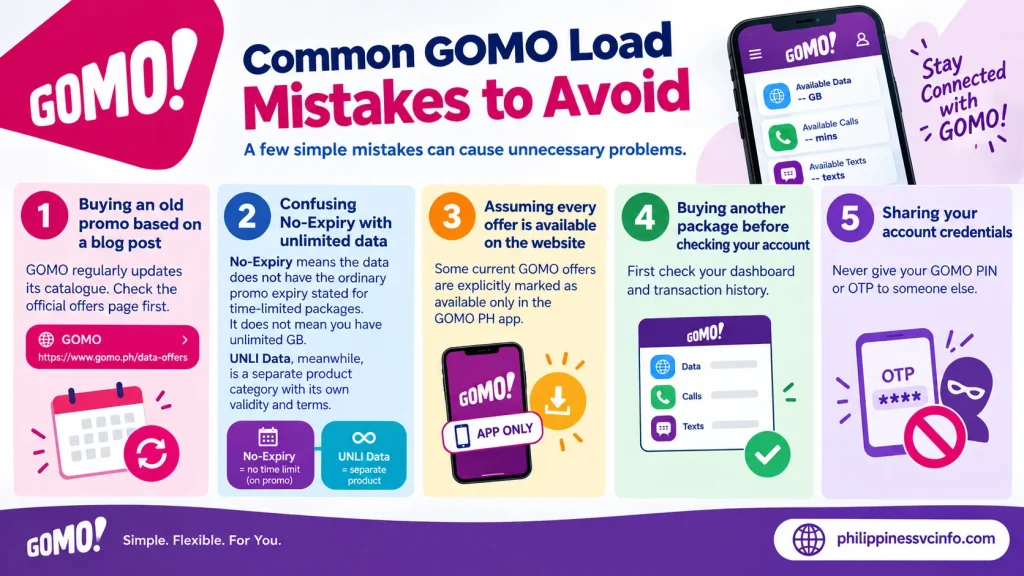
A few simple mistakes can cause unnecessary problems.
Mistake 1: Buying an old promo based on a blog post
GOMO regularly updates its catalogue. Check the official offers page first.
Mistake 2: Confusing No-Expiry with unlimited data
No-Expiry means the data does not have the ordinary promo expiry stated for time-limited packages. It does not mean you have unlimited GB.
UNLI Data, meanwhile, is a separate product category with its own validity and terms.
Mistake 3: Assuming every offer is available on the website
Some current GOMO offers are explicitly marked as available only in the GOMO PH app.
Mistake 4: Buying another package before checking your account
First check your dashboard and transaction history.
Mistake 5: Sharing your account credentials
Never give your GOMO PIN or OTP to someone else.
GOMO Load Quick Checklist
Before purchasing a package, ask yourself:
- How much data do I actually need?
- Do I need No-Expiry Data or a fixed-period UNLI offer?
- Do I need calls and texts?
- Can I use ‘Mo Creds instead of paying cash?
- Does my phone support the selected SIM or eSIM?
- Is the offer available through the app or website?
- Have I checked the current price?
- Have I reviewed the validity and conditions?
This approach is more reliable than choosing a GOMO Load package solely because it has the largest number of GB.
GOMO Load Frequently Asked Questions
Final GOMO Load Guide
The main difference between GOMO Load and traditional prepaid loading is the package-first approach. Instead of thinking only in terms of pesos sitting in a load wallet, GOMO users generally choose a particular data or service offer and manage that allocation digitally.
For flexible usage, GOMO currently lists No-Expiry Data packages. For intensive short-term usage, UNLI Data options are available. Users can also explore ‘Mo Creds, roaming services, calls and texts, eSIM products and other features.
The safest habit is to check the official GOMO app or GOMO website immediately before purchasing. Prices, package sizes, validity periods and app-only offers can change.
Discover What You Need to Know:
- GOMO SIM Registration Guide: Register, Verify & Activate Your SIM Online 2026
- GOMO Unli Data Promos: Price, Validity, Registration & How to Avail 2026
- GOMO eSIM Guide 2026 : How to Buy, Activate, Install, Register & Fix Common Issues
- Globe Postpaid Guide: Plans, Requirements, Application, Billing & GlobeOne 2026








