

A Globe Prepaid SIM is a prepaid mobile SIM card from Globe Telecom that lets users access mobile calls, text messaging, and internet services without a fixed monthly plan. Users can purchase regular load or prepaid promos, register the SIM as required by Philippine law, and manage their account through Globe’s available services.
What Is a Globe Prepaid SIM?
A Globe prepaid SIM is a mobile SIM card that lets users access Globe’s prepaid network without committing to a monthly postpaid plan. Users add prepaid load and can then purchase suitable data, call, text or combination promos.
Globe also supports electronic SIM technology. A local prepaid eSIM follows the same SIM Registration Act requirement as a physical SIM, so registration is still required before activation.
For a new physical SIM, Globe’s terms state that registration is required before activation. Registration can be completed through the official Globe registration portal, a Globe retail store or the GlobeOne app.
Globe Prepaid SIM at a Glance
| Feature | What users should know |
|---|---|
| SIM type | Physical SIM or prepaid eSIM |
| Main uses | Calls, texts and mobile data |
| Registration | Required before activation |
| Registration cost | Free through official Globe channels |
| Main registration options | Globe website, GlobeOne app or Globe Store |
| Identification | Valid government-issued photo ID |
| Registration proof | Reference number |
| Promo management | GlobeOne and other official channels |
Globe Prepaid SIM Registration: What You Need
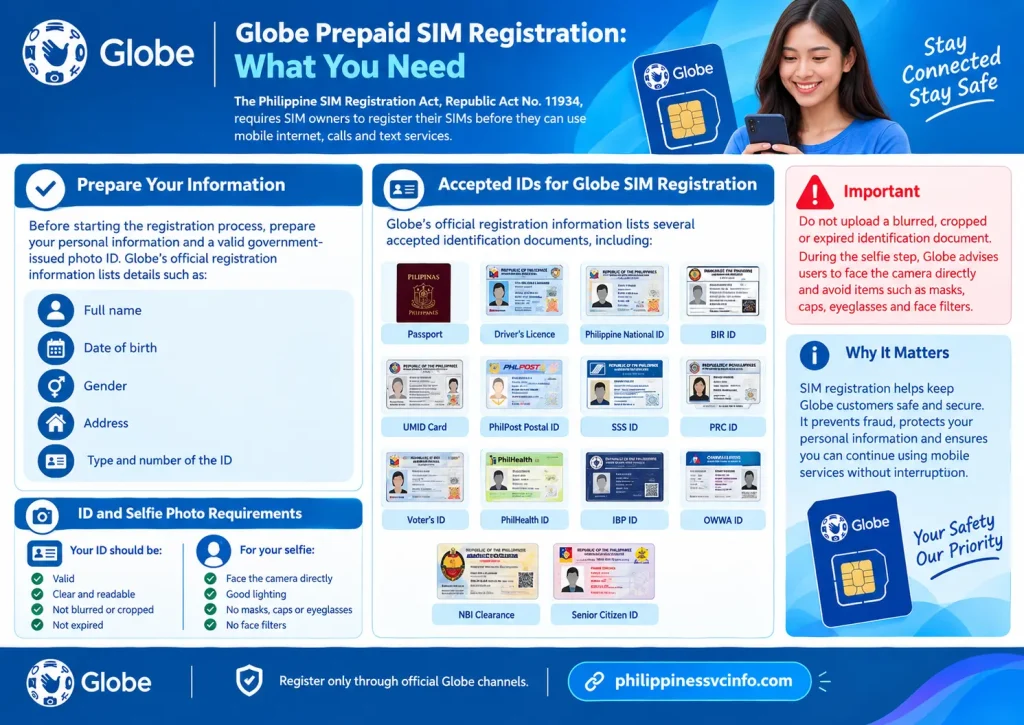
The Philippine SIM Registration Act, Republic Act No. 11934, requires SIM owners to register their SIMs before they can use mobile internet, calls and text services. Globe states that this requirement applies to both physical SIM cards and eSIMs.
Before starting the registration process, prepare your personal information and a valid government-issued photo ID. Globe’s official registration information lists details such as your full name, date of birth, gender and address, together with the type and number of the ID you present.
Accepted IDs for Globe SIM Registration
Globe’s official registration information lists several accepted identification documents, including:
- Passport
- Driver’s Licence
- Philippine National ID
- BIR ID
- UMID Card
- PhilPost Postal ID
- SSS ID
- PRC ID
- Voter’s ID
- PhilHealth ID
- IBP ID
- OWWA ID
- NBI Clearance
- Senior Citizen ID
The ID should be valid, clear and readable. Globe also provides specific photo requirements for the selfie and uploaded ID.
Important: Do not upload a blurred, cropped or expired identification document. During the selfie step, Globe advises users to face the camera directly and avoid items such as masks, caps, eyeglasses and face filters.
How to Register a Globe Prepaid SIM Online
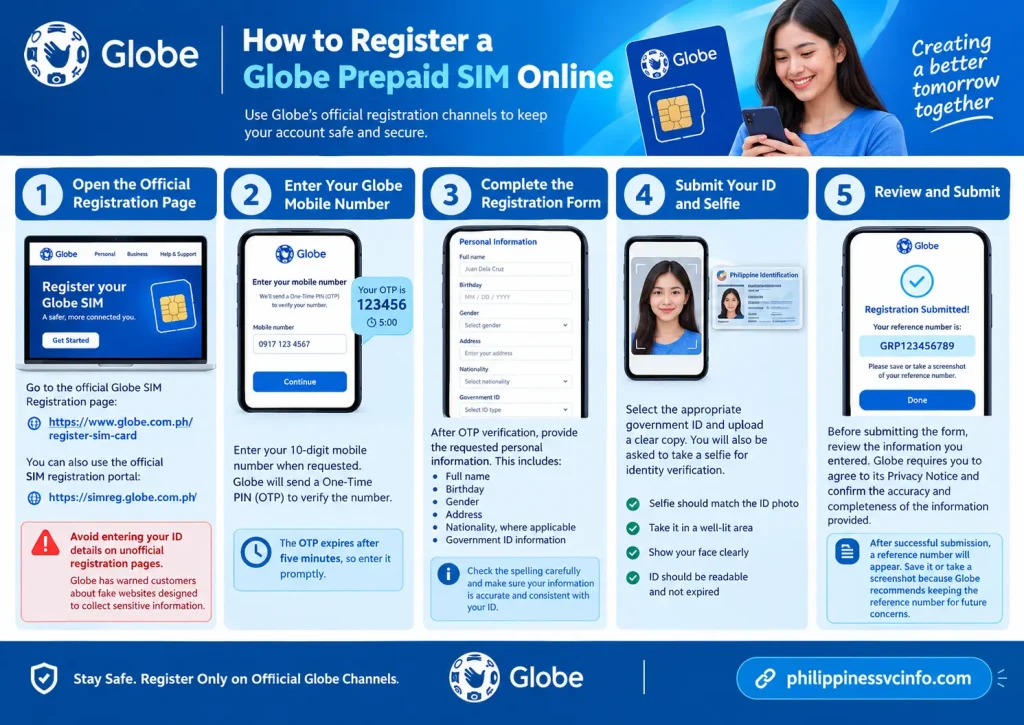
The safest approach is to use Globe’s official registration channels rather than links shared through random websites or social media.
Globe has specifically warned customers about fake SIM-registration websites designed to collect sensitive personal information. The company advises customers to use its official registration site or GlobeOne app.
Step 1: Open the Official Registration Page
Go to the official Globe SIM Registration page:
You can also use the official SIM registration portal:
Avoid entering your ID details on unofficial registration pages.
Step 2: Enter Your Globe Mobile Number
Enter your 10-digit mobile number when requested. Globe will send a One-Time PIN (OTP) to verify the number.
According to Globe’s registration instructions, the OTP expires after five minutes, so enter it promptly.
Step 3: Complete the Registration Form
After OTP verification, provide the requested personal information. This includes details such as:
- Full name
- Birthday
- Gender
- Address
- Nationality, where applicable
- Government ID information
Check the spelling carefully before continuing. Your information should be accurate and consistent with your identification document.
Step 4: Submit Your ID and Selfie
Select the appropriate government ID and upload a clear copy. You will also be asked to take a selfie for identity verification.
Globe says the selfie should match the ID photo, be taken in a well-lit area and show your face clearly. The uploaded ID should also be readable and not expired.
Step 5: Review and Submit
Before submitting the form, review the information you entered. Globe requires users to agree to its Privacy Notice and confirm the accuracy and completeness of the information provided.
After successful submission, a reference number will appear. Save it or take a screenshot because Globe recommends keeping the reference number for future concerns.
Is Globe Prepaid SIM Registration Free?
Yes. Globe states that online SIM registration is free and zero-rated, meaning customers can register through the official online channel without being charged for the registration process.
Be careful if a website, message or individual asks you to pay a separate registration fee. Globe has warned customers about fake SIM-registration links, so use only the official Globe website or GlobeOne app for this process.
What Happens After Registration?
Once your new Globe prepaid SIM has been successfully registered, it can be activated for normal mobile services. Globe explains that newly sold SIMs remain deactivated until the required registration has been completed.
Keep the registration reference number somewhere safe. If you later experience a registration-related problem, that information may help when dealing with Globe support.
For prepaid customers, Globe also says registration does not prevent a SIM from eventually expiring. The line still needs to be kept active according to Globe’s prepaid service rules.
Where Can You Buy a Globe Prepaid SIM?
A new Globe prepaid SIM can be obtained through Globe’s official sales channels and selected online stores. Globe’s current prepaid information also lists its official Globe stores and online channels for prepaid products.
For loaded SIM packages, Globe currently directs customers to its official Shopee and Lazada stores for selected products.
Physical SIM or eSIM?
Your choice mainly depends on your phone.
| Option | Suitable for | Main consideration |
|---|---|---|
| Physical Globe SIM | Most compatible phones | Requires a physical SIM slot |
| Globe prepaid eSIM | Compatible unlocked phones | Installed digitally using a QR code |
| Preloaded SIM | Users who want a promo included | Comes with a ready-to-use offer |
A Globe prepaid eSIM is installed by scanning the QR code supplied after purchase. Your phone must support eSIM technology and have an available eSIM slot.
Tip: Check your phone’s eSIM compatibility and network-lock status before purchasing an eSIM. Globe states that customers are responsible for ensuring their device is unlocked and has an available eSIM slot.
How to Load a Globe Prepaid SIM
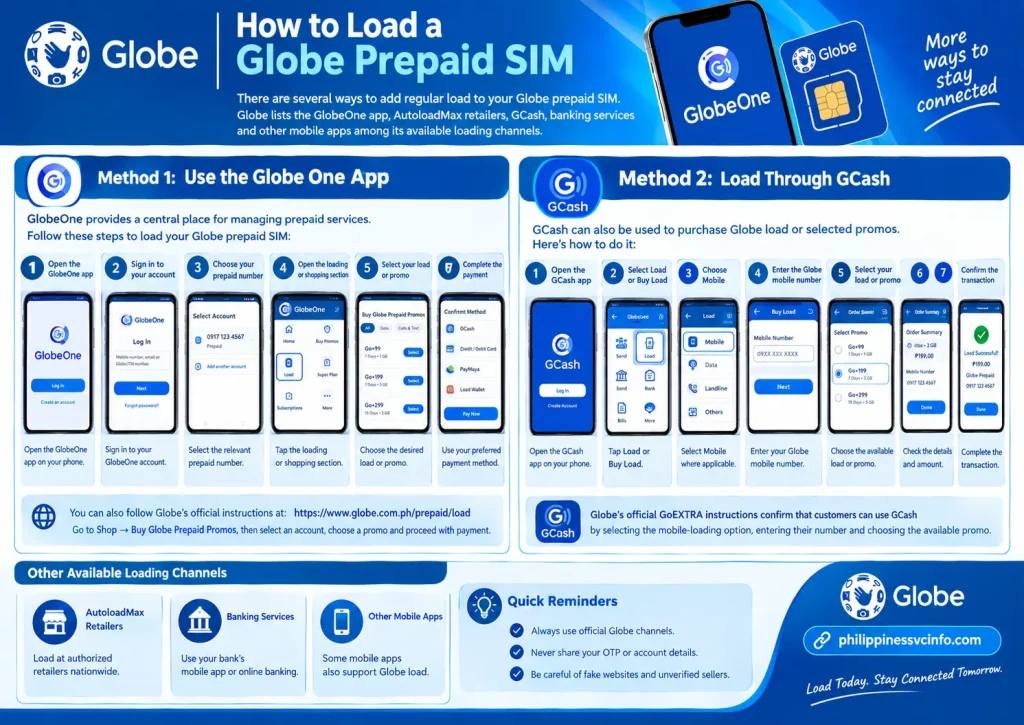
There are several ways to add regular load to your Globe prepaid SIM. Globe lists the GlobeOne app, AutoloadMax retailers, GCash, banking services and other mobile apps among its available loading channels.
Method 1: Use the GlobeOne App
GlobeOne provides a central place for managing prepaid services.
A typical loading process is:
- Open the GlobeOne app.
- Sign in to your account.
- Choose the relevant prepaid number.
- Open the loading or shopping section.
- Select the desired load or promo.
- Review the transaction.
- Complete the available payment method.
Globe’s current instructions also direct customers to Shop → Buy Globe Prepaid Promos, where they can select an account, choose a promo and proceed with payment.
Method 2: Load Through GCash
GCash can also be used to purchase Globe load or selected promos.
The general process is:
- Open the GCash app.
- Select Load or Buy Load.
- Choose Mobile where applicable.
- Enter the Globe mobile number.
- Select the available load or promo.
- Review the amount.
- Confirm the transaction.
Globe’s official GoEXTRA instructions confirm that customers can use GCash by selecting the mobile-loading option, entering their number and choosing the available promo.
How to Choose a Globe Prepaid Promo
A Globe prepaid SIM can be used with different promo categories. The right option depends on whether you mainly need open-access data, calls and texts, or additional data for selected apps.
Current Globe offers include GoEXTRA and Go+ packages. Because promo prices, data allocations and validity periods can change, always check the current official listing before subscribing.
GoEXTRA Promos
Globe describes GoEXTRA as an all-in-one prepaid promo combining data with unlimited calls and texts to all networks. Current offers start at ₱59.
GoEXTRA can be registered through:
- GlobeOne
- GCash
- SMS
*143#
For SMS registration, Globe currently lists keywords such as GOEXTRA59, GOEXTRA99, GOEXTRA109, GOEXTRA149, GOEXTRA179 and GOEXTRA199, sent to 8080.
Go+ Promos
Go+ offers different combinations of regular data, 5G data and data for selected apps. Globe’s current listing includes Go+99, Go+109, Go+129, Go+149, Go+179, Go+250 and Go+400.
For example, the current Go+ range includes:
| Promo | Current listed data | Validity |
|---|---|---|
| Go+99 | 8GB + 4GB 5G + 8GB apps | 7 days |
| Go+109 | 10GB + 4GB 5G + 8GB apps | 7 days |
| Go+129 | 11GB + 8GB 5G + 8GB apps | 7 days |
| Go+149 | 13GB + 8GB 5G + 8GB apps | 7 days |
| Go+179 | 8GB + 8GB 5G + 8GB apps | 15 days |
| Go+250 | 15GB + 8GB 5G + 15GB apps | 15 days |
| Go+400 | 25GB + 8GB 5G + 15GB apps | 15 days |
Globe notes that 5G data requires a 5G-capable device, a 5G SIM and access to a 5G-ready area.
Because Globe can modify its prepaid offers, treat this table as a guide rather than a permanent price list.
Check Globe Prepaid Load and Data Balance
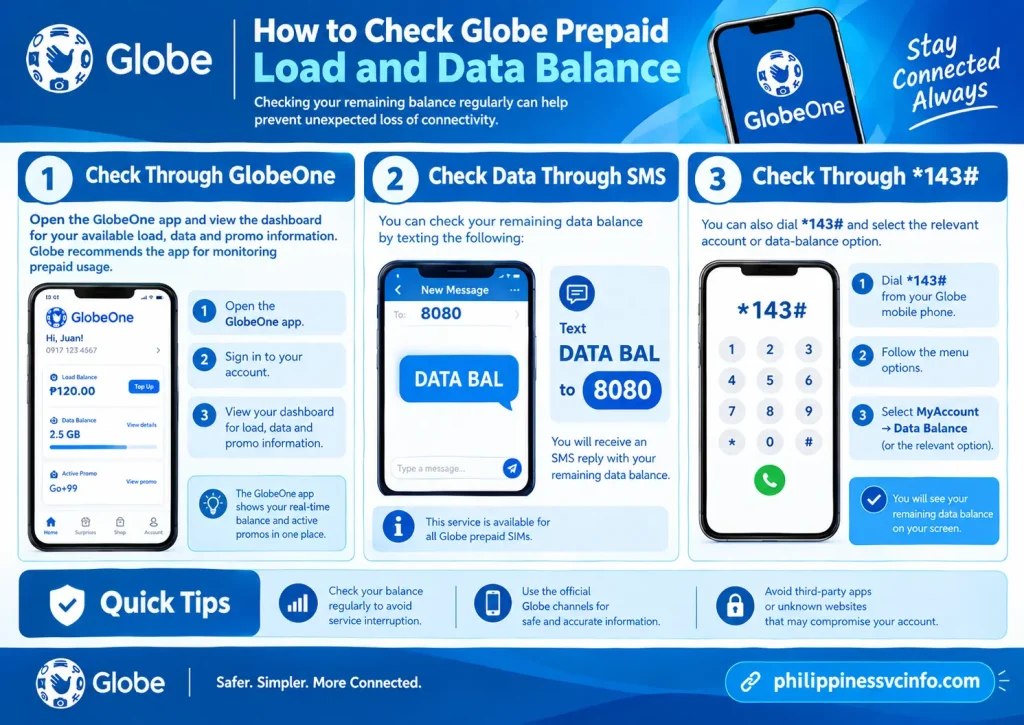
Checking your remaining balance regularly can help prevent unexpected loss of connectivity.
Check Through GlobeOne
Open the GlobeOne app and view the dashboard for your available load, data and promo information. Globe recommends the app for monitoring prepaid usage.
Check Data Through SMS
Globe currently provides the option to text:
DATA BAL to 8080
to check remaining data.
Check Through *143#
You can also dial:
*143#
and select the relevant account or data-balance option. Globe’s current mobile-data guidance lists MyAccount → Data Balance as the route for checking remaining data.
How Long Does a Globe Prepaid SIM Stay Active?
This is one of the most important things to understand about a Globe prepaid SIM.
Globe’s current prepaid terms state that an activated SIM can be permanently disconnected if there is no regular-load top-up activity for one year from the last regular-load top-up. Another condition applies when the account reaches zero regular load: if there is no regular-load top-up or promo registration for 120 days, the SIM can expire.
Simply receiving calls, making calls, sending texts or using data does not count as the required activity for keeping the SIM active under these terms.
Why This Matters
If your Globe number is connected to important services such as:
- GCash
- Online banking
- Social media accounts
- Email recovery
- Two-factor authentication
- School or work accounts
do not allow the SIM to expire. Globe states that permanently disconnected SIMs cannot be reconnected, and the associated mobile number may later be reassigned.
What About Globe Prepaid eSIM Expiration?
The same principle applies to Globe’s local prepaid eSIM. Globe states that a prepaid eSIM can permanently disconnect after one year without a regular reload, or after 120 days following zero balance or promo expiry without a qualifying reload or promo registration.
There is also a special rule for foreign tourists: Globe’s local prepaid eSIM terms state that an eSIM registered by a foreign tourist automatically expires 30 days after registration.
What to Do If Your Globe SIM Is Not Working

If your newly registered Globe prepaid SIM does not connect to the network, start with the phone rather than immediately replacing the SIM.
1. Restart the Phone
Switch the phone off and turn it on again. You can also enable Airplane Mode for a short time and then disable it.
This forces the device to search for the available mobile network again.
2. Check the SIM Connection
For a physical Globe prepaid SIM, remove the SIM carefully and make sure it is positioned correctly in the tray.
If your phone has two SIM slots, check that the Globe SIM is enabled under the phone’s SIM or mobile-network settings.
For an eSIM, confirm that the Globe mobile plan is enabled in the device settings.
3. Check Your Network Signal
Look at the signal indicator. If the phone shows no service, move to an area with better network coverage and test again.
A network problem can sometimes be temporary, so testing the SIM in another suitable location can help determine whether the issue is related to coverage.
4. Confirm SIM Registration
If the SIM is newly purchased, make sure its registration was successfully completed.
Keep your registration reference number because it can be useful when checking a registration-related concern with Globe.
5. Check Your Load or Promo
Registration does not automatically give a prepaid customer unlimited mobile data or calls.
If your Globe prepaid SIM has no usable load or active promo, you may need to purchase regular load or subscribe to a suitable prepaid offer.
What If Globe SIM Registration Is Rejected?
A rejected registration does not necessarily mean the SIM itself is defective.
Start by reviewing the information submitted during registration.
Check these points:
- Your name is entered correctly.
- Your date of birth is accurate.
- Your ID is valid.
- The ID image is clear and readable.
- The uploaded document is not unnecessarily cropped.
- Your selfie clearly shows your face.
- Your registration information matches your identification document.
Globe’s registration guidance also provides photo and selfie requirements. If the online process continues to fail, customers can seek assistance through Globe’s official support channels or a Globe Store. (globe.com.ph)
How to Avoid Fake Globe SIM Registration Web
SIM registration involves personal information and identification documents, so website safety matters.
Globe has warned customers about fraudulent websites and messages that imitate legitimate SIM-registration pages. The company advises customers to use official Globe channels rather than links received from unknown sources.
Before entering your ID details, check the website address carefully.
Use official Globe channels such as:
Do not give your OTP, password or identification details to someone who contacts you unexpectedly and asks for them.
Globe Prepaid SIM for Foreign Tourists
Foreign visitors can also obtain a prepaid mobile connection in the Philippines, but additional documentation and validity rules apply.
Globe’s SIM registration information states that foreign nationals must provide identification and other information appropriate to their status. For foreign tourists, registration can include their passport and supporting travel information.
The validity period is particularly important for tourists. Globe’s current prepaid eSIM terms state that a local prepaid eSIM registered by a foreign tourist automatically expires 30 days after registration.
If a visitor needs service beyond the applicable period, they should check Globe’s current requirements for extending or maintaining the line rather than relying on an old SIM-registration guide.
Globe Prepaid SIM: Before You Start Checklist

Use this short checklist when setting up a new line:
- Buy from an official or authorised source.
- Confirm that your phone supports the selected SIM type.
- Prepare an accepted government-issued ID.
- Register the SIM through an official Globe channel.
- Complete OTP verification.
- Upload a clear ID image.
- Complete the required selfie verification.
- Save your registration reference number.
- Wait for successful activation.
- Add regular load or choose a suitable promo.
- Check your balance and data.
- Keep the number active if it is linked to important accounts.
Globe Prepaid SIM: Common Questions
Final Takeaway
A Globe prepaid SIM gives users a flexible way to access calls, texts and mobile data without a postpaid contract. The most important first step is proper registration through an official Globe channel, followed by activation and regular account management. For everyday use, the GlobeOne app can make it easier to monitor load, data and available promos. If you buy a physical SIM or eSIM, keep your registration information safe and check current Globe offers before purchasing a package. Most importantly, use the official Globe website for registration and account-related transactions. Prepaid prices, promo inclusions and availability can change, so current Globe information should take priority over older screenshots, social media posts or third-party articles.
Discover What You Need to Know:
- SIAS NCF Philippines 2026 : Login, Admission, Portal & Student Guide
- Bangko Sentral ng Pilipinas 2026 : Official Website, Services, Regulations & Consumer Guide
- Blippi Philippines 2026 : Educational Videos, Learning Activities, Games & Complete Parent Guide
- Smart Rocket SIM Philippines 2026 : Price, Registration, Activation, Promos & Unlimited Data Guide
- LTFRB Philippines 2026 : Complete Guide Requirements, Registration, Franchise & Renewal
- Smart Load Philippines 2026 : How to Buy, Reload & Check Balance Online








