Globe Unli Data Philippines 2026: Unlimited 5G & Prepaid Promos Guide
Globe Unli Data Philippines refers to Globe prepaid offers that provide unlimited or app-specific mobile data for a set period. Depending on the promo, users may receive unlimited 5G access, unlimited data for selected applications, or additional all-access data. Availability, pricing, validity, coverage, and conditions vary by current Globe promotional offer.
What Is Globe Unli Data?
Globe Unli Data refers to Globe Prepaid offers that provide unlimited or app-specific data access for a defined period. The important point is that “unlimited” does not always mean unlimited access to every website and app.
Globe currently separates its prepaid offers into several categories, including 5G promos, UnliGo, Go, Go+, GoUNLI and app-exclusive offers. The exact data allocation, supported apps, validity and price depend on the promo you choose.
For example, Globe’s current UnliGo99 offers provide unlimited access to a selected app such as Facebook, TikTok or Instagram, together with 5GB for all sites and apps and unlimited all-network texts for seven days.
This makes Globe Unli Data useful for different types of users:
- 5G users who want high-speed mobile internet
- Social media users who mainly use Facebook, TikTok or Instagram
- Students who need affordable data for online learning
- Streamers and gamers who need larger data allocations
- Travellers who need prepaid mobile connectivity
- Heavy data users looking for alternatives to standard volume-based promos
A key distinction to remember
Before subscribing, check whether the offer is:
- Unlimited 5G → unlimited usage is tied to a compatible 5G connection and the promo’s conditions.
- Unlimited app data → unlimited access applies to specified apps, not necessarily the whole internet.
- All-access data → the allocated GB can generally be used across websites and apps covered by the promo.
That distinction can prevent a common mistake: buying a promo labelled “unli” and assuming every type of internet activity is unlimited.
Current Globe Unli Data Options Worth Checking
Globe changes its prepaid catalogue from time to time, so it is better to treat the official GlobeOne app and Globe’s current prepaid pages as the final reference before paying. Globe’s official prepaid page currently groups its offers into Go, App-Exclusives, GoUNLI, 5G Promos and UnliGo.
| Promo type | What it is suited for | Main point |
|---|---|---|
| Unli 5G | Heavy 5G users | Unlimited 5G access under the applicable offer |
| UnliGo | Social, gaming or content apps | Unlimited access to selected apps |
| Go+ | Mixed everyday use | All-access data plus app/5G allocations |
| GoUNLI | Calls, texts and some data | Unlimited calls/texts with data inclusions |
| App-exclusive promos | GlobeOne/GCash users | Special offers available through digital channels |
Globe’s official materials also show that some current offers are exclusive to GlobeOne or GCash, so a promo you see in the app may not be available through SMS or *143#.
Globe Unli 5G: What You Should Know First
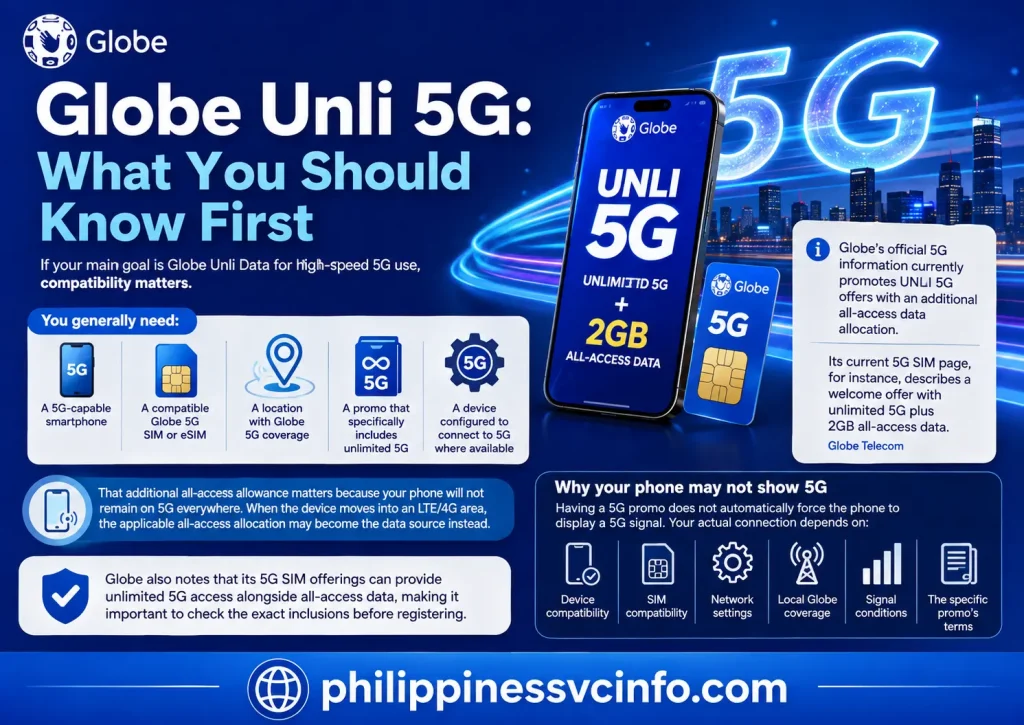
If your main goal is Globe Unli Data for high-speed 5G use, compatibility matters.
You generally need:
- A 5G-capable smartphone
- A compatible Globe 5G SIM or eSIM
- A location with Globe 5G coverage
- A promo that specifically includes unlimited 5G
- A device configured to connect to 5G where available
Globe’s official 5G information currently promotes UNLI 5G offers with an additional all-access data allocation. Its current 5G SIM page, for instance, describes a welcome offer with unlimited 5G plus 2GB all-access data.
That additional all-access allowance matters because your phone will not remain on 5G everywhere. When the device moves into an LTE/4G area, the applicable all-access allocation may become the data source instead.
Why your phone may not show 5G
Having a 5G promo does not automatically force the phone to display a 5G signal.
Your actual connection depends on:
- Device compatibility
- SIM compatibility
- Network settings
- Local Globe coverage
- Signal conditions
- The specific promo’s terms
Globe also notes that its 5G SIM offerings can provide unlimited 5G access alongside all-access data, making it important to check the exact inclusions before registering.
Globe UnliGo for Social Media Users
Not everyone needs unlimited internet across the entire network. If most of your mobile usage comes from one social platform, Globe UnliGo can be a more targeted option.
Globe’s current UnliGo99 range includes separate offers for:
- TikTok
Each provides unlimited access to the selected app, 5GB for all sites and apps, and unlimited all-network texts, with seven-day validity.
This type of Globe Unli Data offer can make sense if, for example, you spend most of your mobile data on TikTok but still need some ordinary internet data for Google searches, websites or other apps.
The official UnliGo page also confirms that customers can use UnliGo alongside other prepaid promos such as Go and Go+.
How to Register for Globe Unli Data
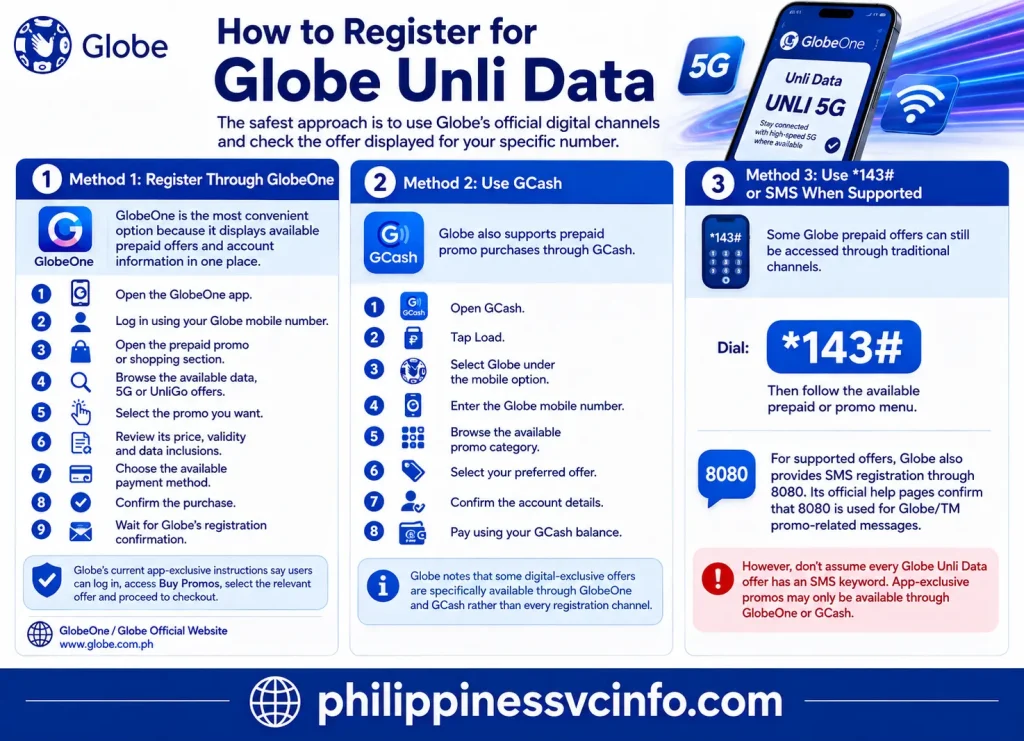
The safest approach is to use Globe’s official digital channels and check the offer displayed for your specific number.
Method 1: Register Through GlobeOne
GlobeOne is the most convenient option because it displays available prepaid offers and account information in one place.
Steps:
- Open the GlobeOne app.
- Log in using your Globe mobile number.
- Open the prepaid promo or shopping section.
- Browse the available data, 5G or UnliGo offers.
- Select the promo you want.
- Review its price, validity and data inclusions.
- Choose the available payment method.
- Confirm the purchase.
- Wait for Globe’s registration confirmation.
Globe’s current app-exclusive instructions say users can log in, access Buy Promos, select the relevant offer and proceed to checkout.
Method 2: Use GCash
Globe also supports prepaid promo purchases through GCash.
The current Globe instructions are:
- Open GCash.
- Tap Load.
- Select Globe under the mobile option.
- Enter the Globe mobile number.
- Browse the available promo category.
- Select your preferred offer.
- Confirm the account details.
- Pay using your GCash balance.
Globe notes that some digital-exclusive offers are specifically available through GlobeOne and GCash rather than every registration channel.
Method 3: Use *143# or SMS When Supported
Some Globe prepaid offers can still be accessed through traditional channels.
Dial:
*143#
Then follow the available prepaid or promo menu.
For supported offers, Globe also provides SMS registration through 8080. Its official help pages confirm that 8080 is used for Globe/TM promo-related messages.
However, don’t assume every Globe Unli Data offer has an SMS keyword. App-exclusive promos may only be available through GlobeOne or GCash.
Before You Buy a Globe Unli Data Promo
Take a few seconds to check these details:
- Is the data unlimited for all sites or only selected apps?
- Does it require 5G coverage?
- How many days is the promo valid?
- Is there an included all-access data allocation?
- Can the promo coexist with another active offer?
- Is it available through GlobeOne, GCash, SMS or *143#?
- Does the offer shown on your account differ from a general online promo list?
This last point is especially important because Globe’s current app-exclusive system can show personalised or channel-specific offers.
How to Check Your Globe Unli Data Balance
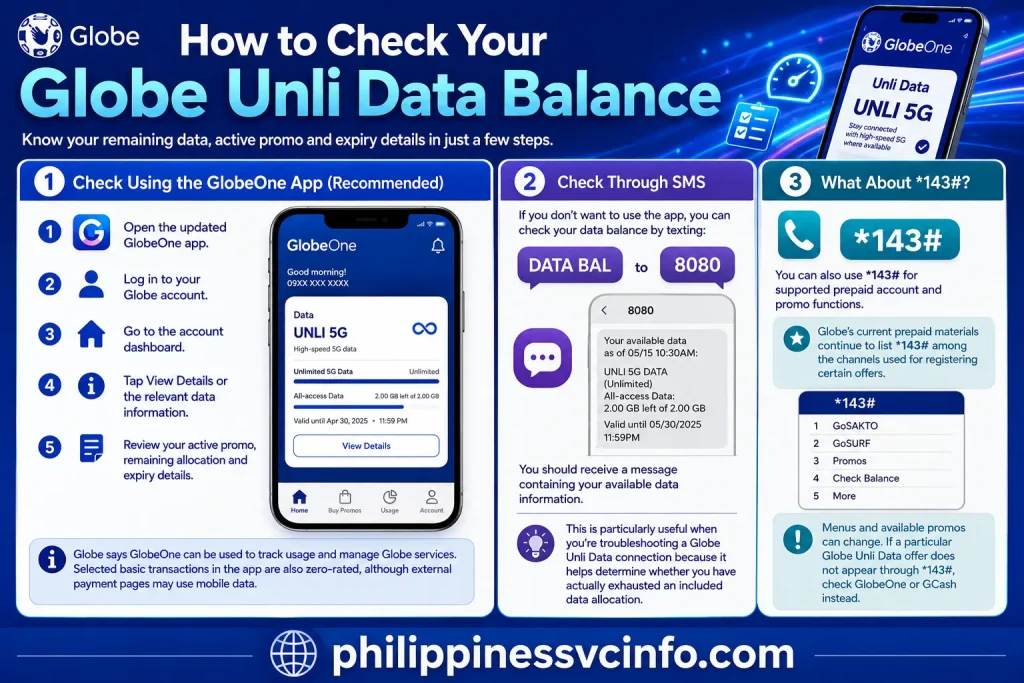
The quickest option is the GlobeOne app.
- Open the updated GlobeOne app.
- Log in to your Globe account.
- Go to the account dashboard.
- Tap View Details or the relevant data information.
- Review your active promo, remaining allocation and expiry details.
Globe says GlobeOne can be used to track usage and manage Globe services. Selected basic transactions in the app are also zero-rated, although external payment pages may use mobile data.
Check Through SMS
If you don’t want to use the app, Globe’s official Fair Use Policy page states that you can check your data balance by texting:
DATA BAL to 8080
You should receive a message containing your available data information.
This is particularly useful when you’re troubleshooting a Globe Unli Data connection because it helps determine whether you have actually exhausted an included data allocation.
What About *143#?
You can also use *143# for supported prepaid account and promo functions. Globe’s current prepaid materials continue to list *143# among the channels used for registering certain offers.
However, menus and available promos can change. If a particular Globe Unli Data offer does not appear through *143#, check GlobeOne or GCash instead.
Can You Extend Globe Unli Data?
This depends on the type of promo you have.
For Go and Go+ promos, Globe currently offers GoBOOSTER add-ons. These aren’t universal extensions for every unlimited offer; they are specifically designed for eligible Go and Go+ registrations.
Two useful examples are:
| Add-on | Price | Validity | Purpose |
|---|---|---|---|
| GoBOOST15 | ₱15 | 1 day | Adds 1GB for all sites and apps |
| GoLONGER10 | ₱10 | 1 day | Extends eligible Go/Go+ promo validity |
Globe confirms that GoBOOST15 provides an additional 1GB for all sites and apps, while GoLONGER10 adds one day to the validity of eligible Go and Go+ promos.
Important limitation
Don’t assume that buying a booster automatically extends an Unli 5G or another unlimited promo.
GoBOOSTERs are specifically intended for Go and Go+ promos. Globe states that these add-ons are exclusively available to customers registered to those promo types.
So, before spending additional load, open GlobeOne and check the exact options available for your active promo.
Understanding Globe’s Fair Use Policy
The word unlimited deserves some attention.
Globe maintains a Fair Use Policy (FUP) to help manage network resources and maintain service quality. The policy can apply to specific promos, including SuperSURF offers.
This means you shouldn’t automatically interpret an unlimited promotion as a promise of unrestricted maximum speed under every circumstance.
The practical rule is simple:
Always read the current promo’s terms before registering.
The applicable conditions can depend on the particular offer. Globe’s current FUP page specifically lists all SuperSURF promos under its policy.
This is also why older online articles can be misleading. A data offer’s price, validity, FUP treatment or registration method may change after the article was published.
Globe Unli Data Not Working? Try These Fixes
If your Globe Unli Data promo is active but the internet isn’t working, don’t immediately register for another promo.
Start with the basics.
1. Check Your Active Promo
Open GlobeOne and confirm that the promo is still active.
Globe specifically recommends checking your promo status when you cannot register for or use a prepaid offer. If your data allocation has already been consumed or the promo has expired, browsing may stop until you register for another eligible data offer.
Also check whether you have accidentally registered for a different promo than the one you intended.
2. Refresh Your Mobile Connection
Turn Airplane Mode ON for around 10–15 seconds and then switch it OFF.
This forces your phone to reconnect to the mobile network.
If that doesn’t work, restart the phone completely. A simple network reconnection can sometimes resolve temporary connection problems without changing any account settings.
3. Check Your Network Mode
If you’re using a Globe Unli 5G offer, confirm that your phone supports 5G and that the preferred network mode allows 5G.
A typical setting may appear as:
5G/LTE/3G/2G Auto
The exact wording depends on the smartphone manufacturer.
Remember that an active 5G promo doesn’t create 5G coverage where there isn’t any. Your actual connection still depends on device compatibility, SIM capability and local network availability.
4. Check Your SIM and Account Status
Globe recommends checking whether the prepaid SIM is registered and active.
An unregistered new prepaid SIM can experience service restrictions. Globe also says a prepaid SIM can expire after prolonged inactivity, so an account problem can sometimes look like a data problem.
If you’re using a newly purchased SIM, make sure you’ve completed the required SIM registration process.
What If Globe Unli Data Is Slow?
Slow internet doesn’t necessarily mean that your promo has failed.
There are several possible causes:
- Weak network signal
- Temporary network congestion
- Your phone switching between 5G and LTE
- No remaining all-access allocation
- Fair Use Policy management
- Device configuration
- SIM-related problems
- Temporary network interruption
Start by checking the active promo and data balance. Then test the connection in another location.
If your phone shows 5G, but the connection is still slow, the displayed network type alone doesn’t guarantee a particular speed. Actual performance varies according to network conditions and other technical factors.
Globe’s official troubleshooting guidance also recommends checking the account/promo status before assuming there is a network fault.
Globe Unli Data Registration Failed: What to Do
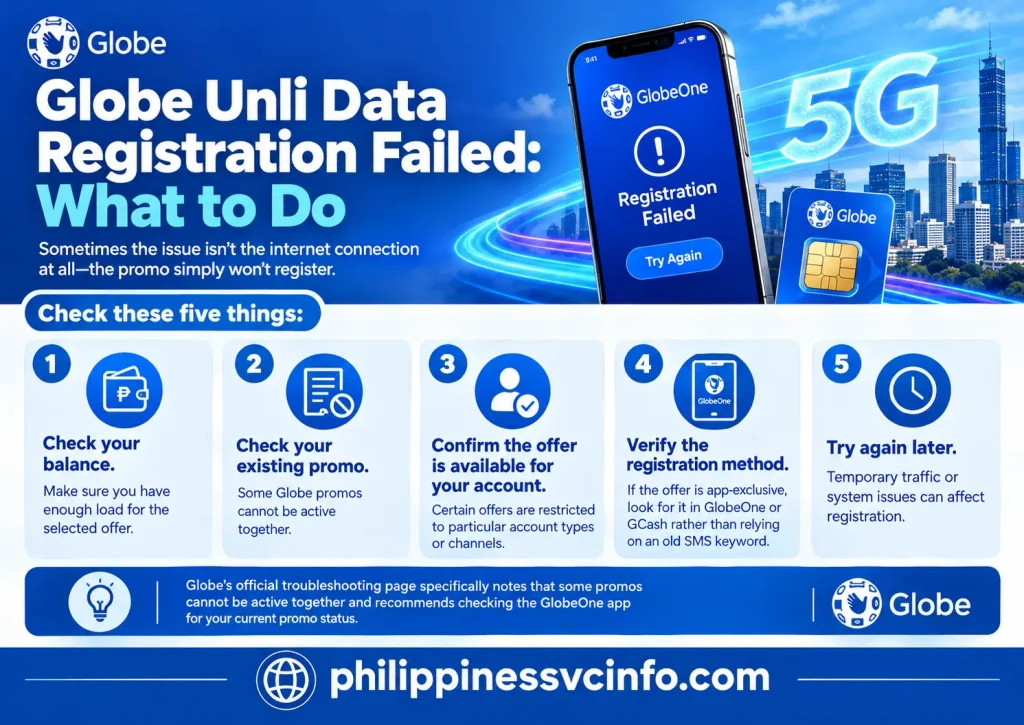
Sometimes the issue isn’t the internet connection at all—the promo simply won’t register.
Globe recommends several checks when a prepaid customer can’t register for a promo.
Check these five things:
1. Check your balance.
Make sure you have enough load for the selected offer.
2. Check your existing promo.
Some Globe promos cannot be active together.
3. Confirm the offer is available for your account.
Certain offers are restricted to particular account types or channels.
4. Verify the registration method.
If the offer is app-exclusive, look for it in GlobeOne or GCash rather than relying on an old SMS keyword.
5. Try again later.
Temporary traffic or system issues can affect registration.
Globe’s official troubleshooting page specifically notes that some promos cannot be active together and recommends checking the GlobeOne app for your current promo status.
Don’t Trust Every “Globe Promo” Text
This is especially important when searching for Globe Unli Data offers online.
Scammers may send messages pretending to be Globe and include suspicious links. Globe’s current security advisory says that Globe or 8080 will not send text messages containing links or ask for your OTP.
Globe identifies 8080 as an official sender for Globe/TM promo-related text messages, while other official sender names are used for different services.
Never give anyone:
- Your OTP
- SIM-related authentication codes
- Passwords
- Banking credentials
- GCash PIN
- Other account security information
If someone claims they can activate a special Globe Unli Data promo but asks for your OTP, treat it as suspicious.
Which Globe Data Option Should You Choose?
There’s no single best Globe Unli Data promo for everyone.
Your usage pattern should determine your choice.
| Your main need | Better option to investigate |
|---|---|
| Heavy 5G browsing | Unli 5G |
| Mostly Facebook | UnliGo Facebook offer |
| Mostly TikTok | UnliGo TikTok offer |
| Mostly Instagram | UnliGo Instagram offer |
| General browsing | All-access data promo |
| Mixed apps + 5G | Go+ or similar 5G-inclusive offer |
| Short-term emergency data | Available low-cost prepaid promo/add-on |
For example, Globe’s current Go+ lineup provides all-sites data together with separate 5G and app allocations, making it an alternative when you don’t necessarily need unlimited access. Current offers shown by Globe include Go+99, Go+109, Go+129, Go+149, Go+179, Go+250 and Go+400, with different data allocations and validity periods.
The right choice is therefore less about finding the word “unli” and more about matching the promo to how you actually use your phone.
Globe Unli Data vs High-Volume Data
A high-volume promo can sometimes be more practical than an unlimited offer.
Consider this example:
You mainly browse websites, use messaging apps and watch a few videos each day. A large all-access data package may give you enough capacity without requiring an unlimited-specific promo.
On the other hand, if you’re regularly consuming large amounts of data and live in a strong Globe 5G area, an eligible Globe Unli Data or Unli 5G offer may be more suitable.
The current Globe prepaid catalogue includes substantial Go+ data packages, with some offers providing separate all-sites, 5G and app allocations.
So compare:
Price + validity + usable data + network availability
rather than looking only at the headline “unlimited” label.
Globe Unli Data Quick Checklist
Before registering, run through this checklist:
- My SIM is active and registered.
- My phone supports the network required by the promo.
- I have checked the current GlobeOne offer.
- I understand whether the data is truly all-access or app-specific.
- I have checked the validity period.
- I know whether 5G coverage is available where I normally use mobile data.
- I have enough load or a supported payment method.
- I have checked whether another active promo affects registration.
- I know how to check my remaining balance.
- I will use only official Globe channels.
That last point matters because Globe’s current prepaid ecosystem changes regularly. The GlobeOne app is particularly useful because Globe describes it as the central place for managing accounts, checking usage and registering promos.
Frequently Asked Questions About Globe Unli Data
Smart Ways to Get More Value From Globe Unli Data
A good prepaid strategy is not necessarily about purchasing the biggest promo. It is about avoiding data that you cannot actually use.
Match the promo to your habits
If TikTok consumes most of your mobile data, an app-specific UnliGo offer may be more useful than a general package.
If you regularly switch between websites, YouTube, messaging, social media and other services, all-access data may give you greater flexibility.
For someone with reliable Globe 5G coverage and a compatible smartphone, an eligible 5G offer can be worth considering.
Check coverage before paying
A 5G promo makes more sense when you regularly use your phone in an area where Globe 5G is available.
If your normal locations have weak or inconsistent 5G coverage, compare the all-access component carefully. Paying for an unlimited 5G feature that you rarely receive is not necessarily good value.
Watch the expiry date
An unused allocation does not automatically mean the promo remains active forever.
Check the expiry date in GlobeOne and plan your next registration accordingly. This is particularly useful for users who alternate between work, school and home locations.
A Simple Globe Unli Data Decision Guide
Use this quick decision process:
Do you have a 5G phone and reliable Globe 5G coverage?
→ Yes: Check current Unli 5G offers.
→ No: Compare all-access or other prepaid data packages.
Do you mainly use one social app?
→ Yes: Check whether a current UnliGo offer covers that app.
→ No: Consider a general all-access package.
Do you need calls and texts as well?
→ Compare offers that bundle data with unlimited calls or texts instead of purchasing separate services.
Do you already have an active promo?
→ Check its compatibility before buying another one.
This approach is more reliable than choosing a promo solely because its name contains “Unli”.
Common Mistakes to Avoid
Buying an old promo from an outdated article
Prepaid offers change. A promo listed on an old blog post may no longer be available or may have different inclusions.
Use the current Globe website or GlobeOne listing as your final reference.
Confusing unlimited app data with unlimited internet
If an offer says unlimited Facebook, for example, don’t assume that YouTube, websites and every other application are also unlimited.
Read the inclusions.
Ignoring 5G requirements
An unlimited 5G offer isn’t the same as unlimited data on every network type. Check your device, SIM and coverage before registering.
Assuming every promo works with every other promo
Globe states that certain prepaid offers cannot be active together. Check your existing registration before buying another package.
Using unofficial links
When dealing with prepaid accounts, avoid suspicious registration pages and messages requesting OTPs or account credentials.
Globe warns customers not to provide OTPs and says official Globe/8080 messages will not contain links requesting sensitive information.
Globe Unli Data: Final Takeaway
Globe Unli Data isn’t one single package. It is better understood as a group of Globe prepaid options that may provide unlimited 5G, unlimited access to selected applications or other data-focused benefits.
For the best result, start with your actual usage:
- Heavy 5G user: investigate current Unli 5G offers.
- Social media-focused: compare UnliGo options.
- Mixed internet use: look at all-access data or Go+ packages.
- Need additional validity/data: check whether a supported GoBOOSTER applies.
- Connection problem: check your promo status, data balance, network mode and coverage before buying another package.
The most important habit is to verify the current offer immediately before registration. Globe’s prepaid catalogue can change, and an offer available through GlobeOne may not necessarily have the same registration method or inclusions as an older promo.
Discover What You Need to Know:
- Globe SIM Registration 2026: Complete Online Registration Guide
- Globe eSIM Philippines: Buy, Install, Register & Activate Online 2026
- Globe Postpaid Guide: Plans, Requirements, Application, Billing & GlobeOne 2026
- Globe Prepaid eSIM Philippines 2026 : Buy, Install & Activate Guide
- Globe Prepaid Sim Pack Philippines 2026 : Registration, Load & Activation Guide
- Globe Load Philippines 2026 : Complete Guide to Buying, Checking Balance, Promos & More