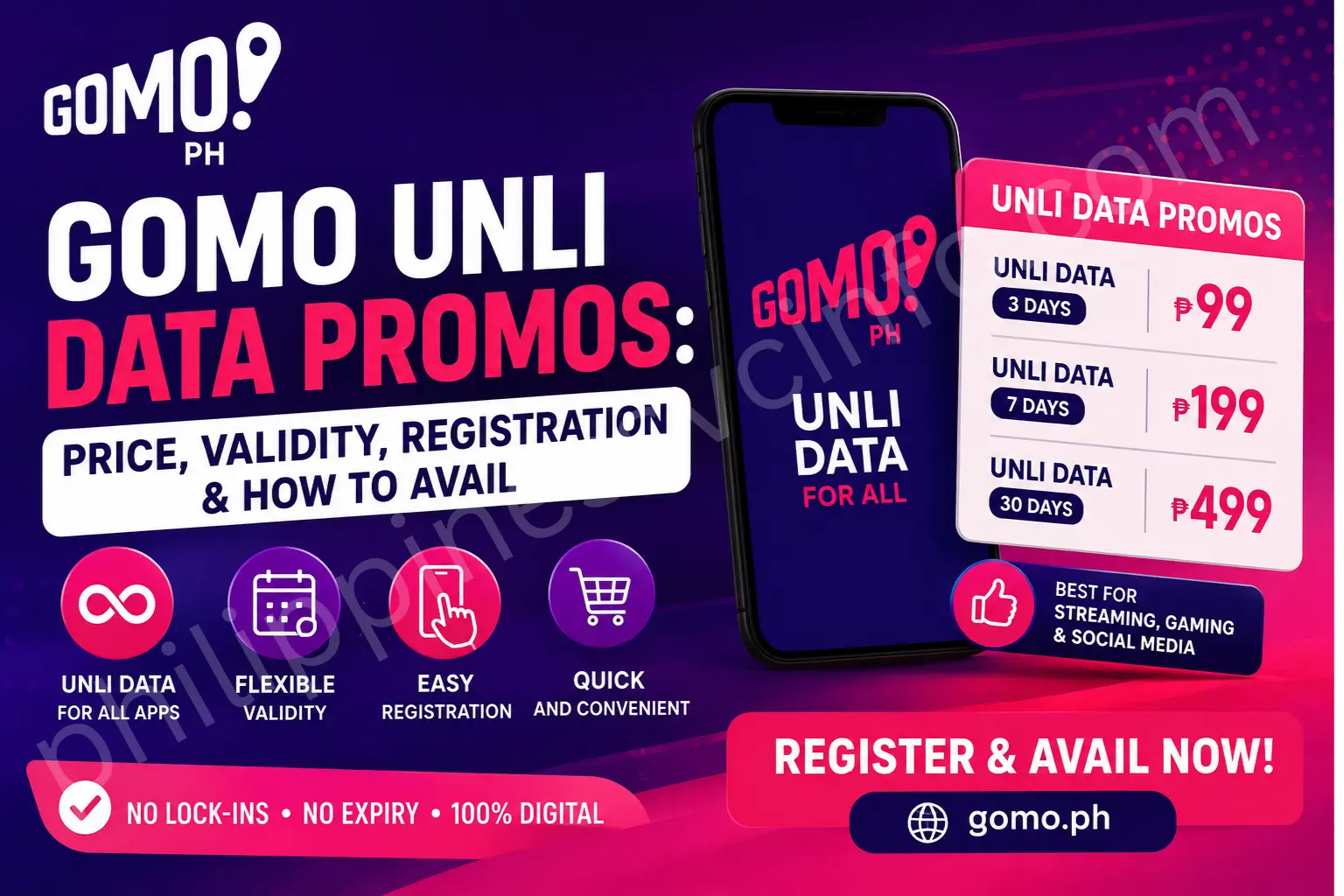
If you are looking for a convenient way to stay connected in the Philippines, GOMO Unli Data is an option worth checking. GOMO provides digital mobile services through its app, allowing users to view available data offers and purchase selected promos without visiting a physical loading outlet.
The official GOMO Philippines website is GOMO Philippines Official Website. GOMO also maintains an official data-offers page where users can view available offers. However, some offers are marked as available only through the GOMO PH app, so the app is important when checking the latest GOMO Unli Data promotions.
Important: GOMO offers can change. Prices, validity periods, inclusions, and availability should always be confirmed in the official GOMO PH app or on the official GOMO website before purchasing.
What Is GOMO Unli Data?
GOMO Unli Data refers to an unlimited-data promotional offer that provides mobile internet access for a specified validity period. Instead of receiving a fixed number of gigabytes that you consume until the allocation is used, an Unli Data offer is designed around a specific period of unlimited data access.
This makes GOMO Unli Data potentially useful for people who use mobile internet heavily for streaming, browsing, social media, online classes, remote work, video calls, downloads, and other everyday activities.
GOMO also offers No Expiry Data, which is different from GOMO Unli Data. No Expiry Data gives you a specific data allocation that does not expire under the applicable offer terms, while Unli Data is based on the validity of the particular unlimited-data promo.
Because GOMO periodically changes its offers, users should not assume that an older GOMO Unli Data price or package is still available. The official GOMO data-offers page currently lists a 7-day UNLI Data offer at ₱199, while another listed 7-day offer combines UNLI Data with UNLI Calls & Texts for ₱249.
GOMO Unli Data Promos and Offers
The exact GOMO Unli Data offers available to a subscriber can vary. The official GOMO offers page currently shows examples of 7-day unlimited-data packages, including:
| GOMO Offer | Validity | Price Shown on Official Site |
|---|---|---|
| UNLI Data | 7 Days | ₱199 |
| UNLI Data + UNLI Calls & Texts | 7 Days | ₱249 |
The official page also displays other GOMO products, including No Expiry Data and longer-term offers that combine mobile data with fiber services.
For this reason, it is better to treat the prices above as current listed offers rather than permanent prices. Before registering GOMO Unli Data, open the official GOMO app and check the exact offer displayed on your account.
GOMO Unli Data vs No Expiry Data
Understanding the difference between these two types of offers can help you choose the right option.
GOMO Unli Data is suitable when you expect to use a large amount of mobile data during a limited period. The important factor is the promo’s validity.
No Expiry Data, on the other hand, provides a fixed data allocation that does not have the same short validity structure. The official GOMO website currently lists 15GB and 30GB No Expiry Data offers alongside its UNLI Data offers.
If you use a lot of data every day, GOMO Unli Data may be more convenient. If your usage is occasional and you want your purchased data to remain available for later use, a No Expiry offer may be more appropriate.
How to Register GOMO Unli Data
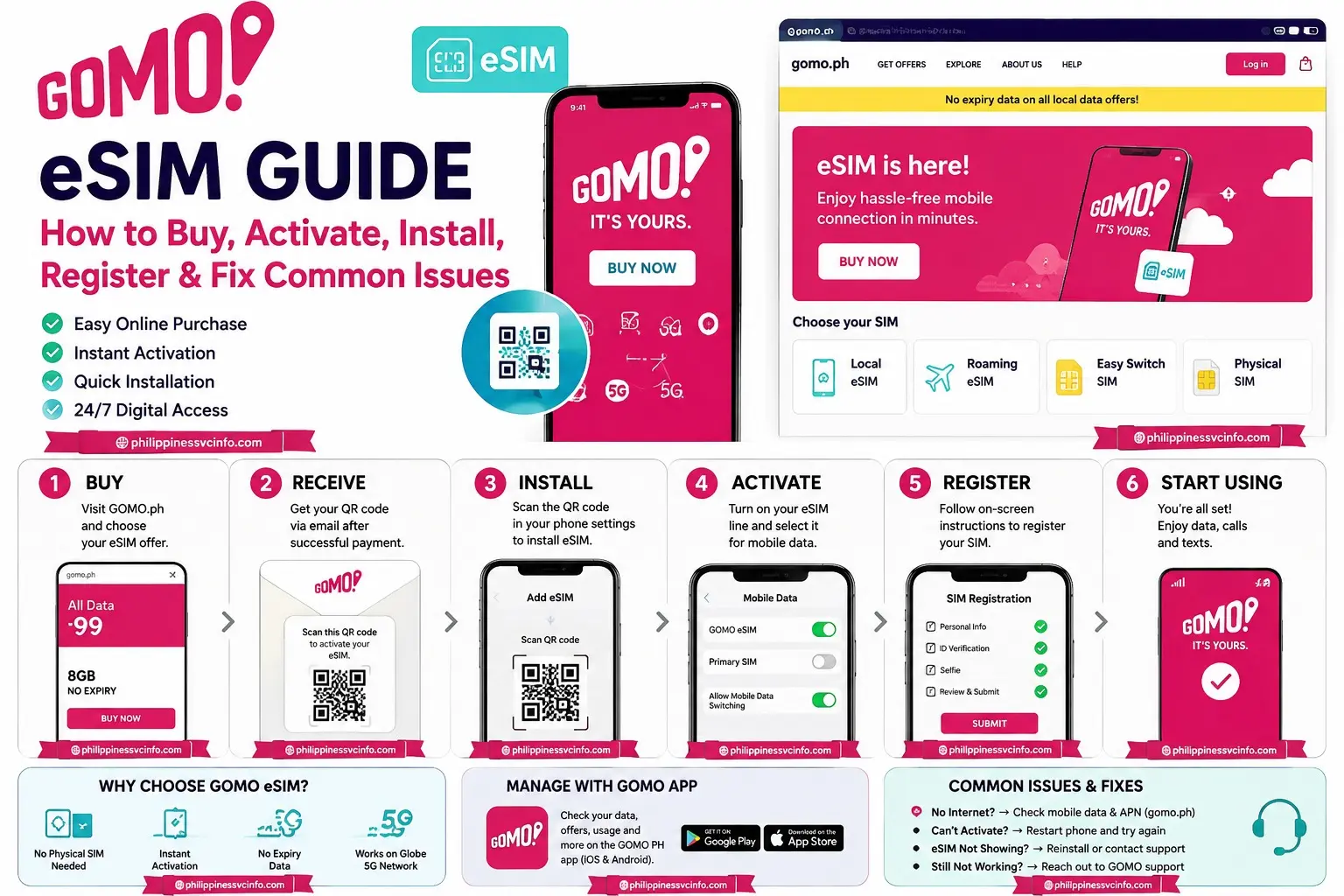
The easiest way to purchase GOMO Unli Data is through the official GOMO PH app. GOMO’s official offers page specifically states that some offers are available only in the GOMO PH app and provides app availability for iOS and Android.

Follow these steps:
Step 1: Open the GOMO PH App
Install and open the official GOMO PH app on your smartphone.
Make sure your device has an active internet connection. You can use Wi-Fi or an existing mobile-data connection to access the application.
For official information about GOMO services, visit Official GOMO Website:
Step 2: Log In to Your GOMO Account
Sign in using your registered GOMO mobile number and the authentication details requested by the application.
If GOMO sends an OTP or another verification code, enter the code through the official app. Never share an OTP with another person.
After successful login, you should reach your GOMO account dashboard.
Step 3: Open the Available Offers
Go to the section of the app where GOMO displays its available products or offers.
Look for an UNLI Data promotion. The exact layout and wording of the app can change after updates, so follow the current labels shown on your screen.
GOMO’s official website confirms that its available offers can include UNLI Data and that some offers are available exclusively through the GOMO PH app.
Step 4: Review the GOMO Unli Data Details
Before purchasing GOMO Unli Data, carefully review:
- Promo name
- Price
- Validity period
- Included services
- Applicable terms and conditions
- Payment details
- Any restrictions displayed by GOMO
Do not rely only on an old screenshot, social-media post, or third-party article because GOMO can change its promotional lineup.
Step 5: Confirm Your GOMO Unli Data Purchase
After selecting the appropriate GOMO Unli Data offer, proceed through the checkout process shown in the official application.
Review the final amount before authorizing payment. Once the transaction has been successfully completed, check your account dashboard to determine whether the selected GOMO Unli Data promo has become active.
How to Check GOMO Unli Data Status
After purchasing GOMO Unli Data, you should verify that the transaction was completed successfully.
Open the GOMO PH app and access your account dashboard. Look for information associated with your current active promo, data offer, or subscription.
Your account information should help you determine whether the GOMO Unli Data offer is active and how long the current promo remains valid.
If the purchase does not immediately appear, avoid repeatedly purchasing the same promo. First check your payment confirmation and transaction information to determine whether the first transaction was successful.
How to Check Your GOMO Data Balance
You can use the GOMO PH app to monitor your available mobile-data information.
The type of information displayed can depend on the active product. For a No Expiry Data package, the dashboard may show the remaining data allocation. For an Unli Data offer, the important information is the active promo and its remaining validity.
Regularly checking your GOMO account is useful because it helps you know when your GOMO Unli Data period is approaching its end.
How Long Does GOMO Unli Data Last?
The validity of GOMO Unli Data depends on the specific offer you purchase.
The official GOMO offers page currently lists UNLI Data for 7 Days, including a ₱199 UNLI Data offer and a ₱249 offer with UNLI Calls & Texts.
Therefore, you should always check the exact validity displayed before completing your purchase.
A 7-day promo should not automatically be assumed to be identical to every previous or future GOMO offer. Promotional terms can change, and GOMO may introduce, remove, or modify offers.
How to Buy GOMO Unli Data Using the App
Buying GOMO Unli Data is designed as a digital process.
- Open the official GOMO PH app.
- Sign in to your GOMO account.
- Open the available offers or shopping section.
- Find the current GOMO Unli Data offer.
- Review the price and validity.
- Select the offer you want.
- Continue to payment.
- Confirm the transaction.
- Check your GOMO account to verify activation.
The official GOMO website currently directs users to the GOMO PH app for certain offers and confirms that the app is available on iOS and Android.
GOMO Unli Data Payment Methods
The exact payment options shown during checkout can depend on the current GOMO app and payment interface. When purchasing GOMO Unli Data, use only payment methods presented through the official GOMO checkout process.
Before confirming payment, check that:
- The selected promo is correct.
- The displayed price is correct.
- Your payment account has sufficient funds.
- You are using the official GOMO application.
- You have received confirmation after completing the transaction.
Avoid sending payment directly to individuals who claim they can activate GOMO Unli Data for you. Using the official GOMO channels reduces the risk of fraudulent transactions.
How to Check GOMO Unli Data Expiration
Checking the validity of your GOMO Unli Data is important because unlimited data offers are tied to a specific validity period. The exact expiration information should be checked through your GOMO account and the promo details shown in the app.
Follow these steps:
- Open the official GOMO PH app.
- Log in to your GOMO account.
- Open your account dashboard.
- Look for your active GOMO Unli Data promo.
- Check the validity or expiration information displayed for the offer.
The official GOMO website currently lists a 7-day UNLI Data offer, while another listed offer combines UNLI Data with UNLI Calls & Texts for 7 days.
Because GOMO can update its offers, always use the current information displayed in the official app rather than relying on an old expiration example.
How to Renew GOMO Unli Data
When your current GOMO Unli Data promo is close to expiration, you can check the GOMO app for another available offer.
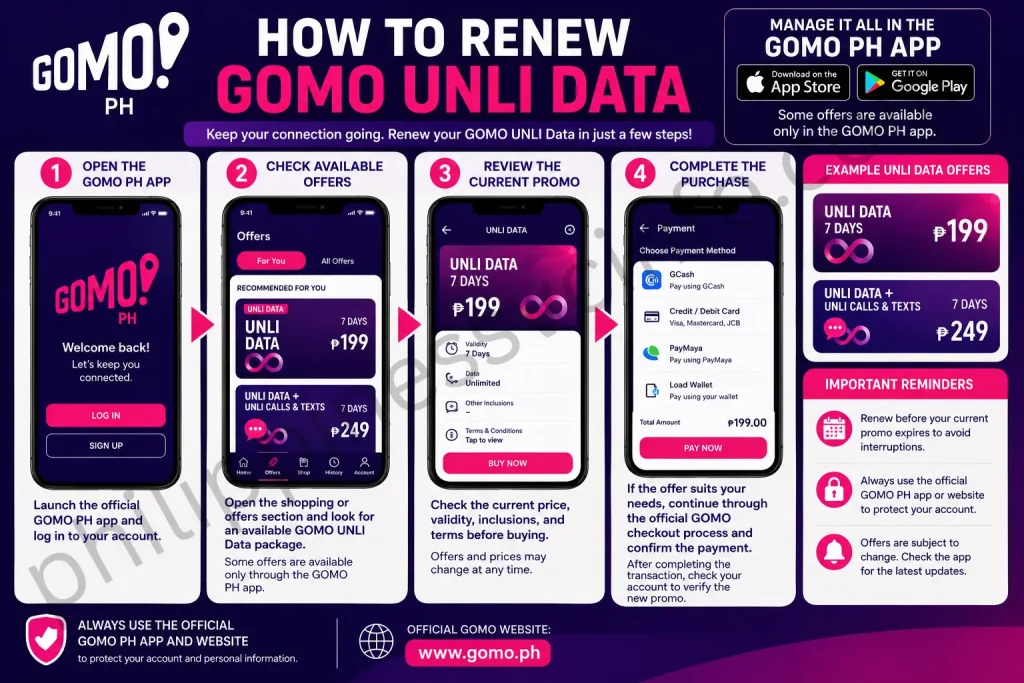
Step 1: Open the GOMO PH App
Launch the official GOMO PH app and log in to your account.
Step 2: Check Available Offers
Open the shopping or offers section and look for an available GOMO Unli Data package.
The official GOMO website currently shows UNLI Data options and indicates that some offers are available only through the GOMO PH app.
Step 3: Review the Current Promo
Check the current price, validity, inclusions, and terms before buying.
Do not assume that the same GOMO Unli Data package will always remain available. GOMO’s official offers page currently displays a ₱199 7-day UNLI Data offer and a ₱249 7-day UNLI Data + UNLI Calls & Texts offer.
Step 4: Complete the Purchase
If the offer suits your needs, continue through the official GOMO checkout process and confirm the payment.
After completing the transaction, check your account to verify the new promo.
Can You Buy GOMO Unli Data Before Your Current Promo Expires?
The answer depends on the specific promo’s current terms. Do not assume that buying another GOMO Unli Data offer will automatically extend, stack, or queue your existing promo.
Before purchasing another package, read the conditions displayed in the GOMO PH app. If the app provides specific instructions about overlapping or consecutive promos, follow those instructions.
This is especially important because GOMO can change its promotional mechanics over time.
GOMO Unli Data Payment and Purchase Safety
When buying GOMO Unli Data, use the payment methods presented through the official GOMO application.
Before confirming your purchase:
- Check the promo name.
- Check the displayed price.
- Check the validity period.
- Confirm the mobile number associated with your account.
- Verify the payment amount.
- Wait for confirmation after payment.
Avoid unofficial sellers who promise cheaper GOMO Unli Data packages. Using the official GOMO app or official GOMO website helps you verify that you are purchasing a legitimate offer.
GOMO Unli Data Tips for Better Usage
Getting the most from GOMO Unli Data is not only about purchasing an unlimited package. Your phone settings, network conditions, and usage habits can also affect your experience.
Keep Your Phone Connected to the GOMO Network
Make sure mobile data is enabled when you want to use GOMO Unli Data.
If your connection suddenly stops, check your signal and mobile-data settings before assuming that the promo has expired.
Restart the Mobile Connection
If mobile data is temporarily unavailable, turn Airplane Mode on for a short period and then turn it off.
You can also restart your phone if the connection continues to have problems.
Check Network Coverage
An active GOMO Unli Data promo does not guarantee identical connection performance everywhere. Actual mobile experience can vary according to network availability, location, congestion, device compatibility, and other network conditions.
If the connection is slow, move to an area with stronger signal and test the connection again.
Monitor Your Promo Status
Even though GOMO Unli Data is unlimited during its applicable validity, the promo itself still has an expiration period.
Checking your account regularly helps you avoid unexpectedly losing access when the promo ends.
Keep a Backup Data Option
If you depend on mobile internet for work, study, travel, or communication, keeping another available data option can be useful.
GOMO also lists No Expiry Data products on its official offers page. At present, the page shows 15GB and 30GB No Expiry Data options alongside UNLI Data products.
GOMO Unli Data vs No Expiry Data
Choosing between GOMO Unli Data and No Expiry Data depends mainly on your usage pattern.
| Feature | GOMO Unli Data | No Expiry Data |
|---|---|---|
| Data type | Unlimited data offer | Fixed data allocation |
| Validity | Promo-specific | No expiry under applicable offer terms |
| Best for | Heavy short-term usage | Occasional or long-term usage |
| Data limit | Depends on promo terms | Depends on purchased GB allocation |
| Availability | Depends on current offers | Depends on current offers |
The official GOMO website currently lists both types of products, including 7-day UNLI Data and No Expiry Data options.
GOMO Unli Data Not Working: Additional Troubleshooting
If your GOMO Unli Data is active but your phone cannot access the internet, work through the following checks.
Check Mobile Data
Make sure mobile data is enabled on the correct SIM.
On a dual-SIM phone, confirm that your GOMO SIM is selected for mobile-data usage.
Check Airplane Mode
Turn Airplane Mode on, wait briefly, and turn it off again. This forces the phone to reconnect to the available mobile network.
Restart Your Device
A simple restart can resolve temporary network-registration or device-related problems.
Check Your Account
Open the GOMO PH app and verify that the GOMO Unli Data promo is still active.
If the offer has expired, purchasing another currently available promo may be necessary.
Check Your Internet Settings
If your phone continues to have connectivity problems, review the mobile-network and APN settings recommended for your device and GOMO service.
Avoid changing advanced network settings randomly. If you are unsure about an APN value, consult GOMO’s official support information rather than relying on an unofficial configuration.
What to Do If Your GOMO Purchase Is Charged but the Promo Is Missing
If your payment has been deducted but the GOMO Unli Data promo does not appear in your account, do not immediately repeat the transaction.
First:
- Check the payment confirmation.
- Check your GOMO account.
- Check transaction information available in the app.
- Close and reopen the GOMO app.
- Confirm whether the promo has been activated.
- Keep your payment reference or transaction details if you need support.
If the transaction remains unresolved, contact GOMO through its official customer-support channels.
GOMO Unli Data Not Working: Common Problems and Solutions
Sometimes GOMO Unli Data may appear not to work immediately after registration. Before purchasing another package, check the most common causes.
GOMO Data Is Not Connecting
First, check whether your phone has adequate GOMO network coverage. Then turn mobile data off and on again.
You can also enable Airplane Mode briefly and then disable it to reconnect your device to the mobile network.
GOMO’s official website provides an APN-related FAQ and states that when an Android device asks you to select an APN setting, choosing prepaid or postpaid does not affect the GOMO SIM’s internet settings.
GOMO Unli Data Has Not Activated
If you have paid for GOMO Unli Data but cannot see the offer, first check whether your payment was successfully processed.
Check:
- Your payment account.
- The GOMO transaction information.
- Your GOMO account dashboard.
- Any confirmation message or notification.
Do not immediately make another purchase if the first transaction may still be processing, because you could accidentally purchase the same offer twice.
GOMO App Is Not Working
If the GOMO app is not loading correctly, try:
- Closing and reopening the app.
- Checking your internet connection.
- Updating the application.
- Restarting your phone.
- Switching between Wi-Fi and mobile data.
- Checking whether GOMO has published a service-related notice.
Always obtain app updates from the official app store rather than downloading an unofficial APK or modified application.
GOMO Promo Registration Failed
If registration fails, review the payment information and make sure your selected payment method has sufficient funds.
You should also confirm that the GOMO Unli Data offer is still available before attempting the transaction again. Promotional offers can change, a
How to Avoid GOMO Unli Data Registration Errors
You can reduce registration problems by following a few simple practices.
Use the official app: GOMO states on its official offers page that certain offers are available only through the GOMO PH app, which is available for iOS and Android.
Check your payment: Make sure your selected payment method has enough funds.
Review the offer: Confirm the promo price and validity before completing checkout.
Avoid repeated payments: If the first transaction appears to be processing, wait and verify its status before trying again.
Keep the app updated: Use the current version of the official application from your device’s legitimate app store.
GOMO Unli Data Safety Tips
When managing GOMO Unli Data, account security is just as important as choosing the right promo.
Use the Official GOMO Website
For current information, use the official GOMO Philippines website.
Avoid relying on websites that imitate the GOMO brand or request sensitive account information.
Download the Official GOMO App
Use the official app available through the legitimate app store for your device.
Do not install modified applications or APK files from unknown websites.
Never Share Your OTP
If GOMO sends an OTP or verification code, keep it private.
A legitimate support representative should not require you to disclose security codes through an unofficial channel.
Check the Payment Amount
Before confirming a GOMO Unli Data purchase, carefully review the amount displayed by the official checkout screen.
If a third-party seller asks for payment that differs significantly from the official price, verify the offer before proceeding.
Keep Your Account Information Secure
Use your own device when possible and avoid entering account credentials on public or suspicious websites.
If you suspect unauthorized access, contact GOMO through its official support channels.
How to Get the Most From GOMO Unli Data
You can improve your overall experience by managing both your device and your GOMO account properly.
Check Your Signal Before Heavy Usage
If you plan to use GOMO Unli Data for video meetings, streaming, downloads, or online work, check the signal in your location first.
A strong and stable connection is more important than simply having an active unlimited-data promo.
Use Wi-Fi When Appropriate
If a trusted Wi-Fi connection is available, you can use it for large downloads or system updates and preserve your mobile connection for situations where you actually need it.
Monitor Your Expiration
Unlimited data does not mean unlimited validity.
Always check when your current GOMO Unli Data package ends so you can plan your next purchase.
Keep Your GOMO App Updated
An updated application can provide access to the latest account-management features and current offers.
Download updates only through official app stores.
GOMO Unli Data for Different Types of Users
GOMO Unli Data for Students
Students can use an unlimited-data offer for online research, classes, messaging, educational platforms, and other internet activities.
Before purchasing, students should compare the promo validity with their expected usage period.
GOMO Unli Data for Remote Workers
Remote workers may find GOMO Unli Data useful as a mobile internet option when working away from a fixed broadband connection.
However, users who depend on uninterrupted connectivity for professional meetings should test GOMO network performance at their regular work location.
GOMO Unli Data for Travelers
Travelers within the Philippines can use mobile data for navigation, messaging, browsing, and other internet needs, subject to network availability and the terms of their GOMO offer.
For international travel, check GOMO’s applicable roaming services separately instead of assuming that a domestic GOMO Unli Data package works overseas.
GOMO Unli Data for Heavy Internet Users
Heavy internet users may find unlimited-data promos convenient because they do not have to monitor consumption against a small fixed GB allocation during the promo period.
Still, the offer’s validity, conditions, and network performance should be considered before purchasing.
GOMO Unli Data Troubleshooting Checklist
If your GOMO Unli Data is not working, use this quick troubleshooting sequence:
- Confirm that the GOMO SIM is active.
- Confirm that mobile data is enabled.
- Check your GOMO account for an active promo.
- Check the promo’s expiration.
- Check your network signal.
- Turn Airplane Mode on and off.
- Restart your phone.
- Check your mobile-network settings.
- Update the GOMO PH app.
- Check your payment or transaction information if the promo was recently purchased.
- Contact official GOMO support if the problem remains unresolved.
Following these steps can help determine whether the issue is related to the account, device, network, or transaction.
GOMO Unli Data FAQs
GOMO Unli Data: Final Guide
GOMO Unli Data is designed for users who want unlimited mobile-data access during the validity period of an eligible GOMO promotion. It can be useful for students, remote workers, travelers within the Philippines, streamers, and heavy mobile-data users. The most important thing to remember is that GOMO offers can change. The current official GOMO website should always be checked before purchasing because the available price, validity, inclusions, and promotional conditions may differ from older information. The official GOMO offers page currently displays a 7-day UNLI Data offer for ₱199 and a 7-day UNLI Data + UNLI Calls & Texts offer for ₱249. It also lists No Expiry Data products, allowing users to compare different types of mobile-data options. Check the latest GOMO data offers here. For registration, account management, troubleshooting, and current GOMO Unli Data availability, use the official GOMO Philippines website and the official GOMO PH app. This approach gives you the most reliable information and helps you avoid outdated promo details or unofficial sellers.
Discover What You Need to Know:
- Globe Postpaid Guide: Plans, Requirements, Application, Billing & GlobeOne 2026
- DITO App: Complete Guide to Download, Login, Load, Promos & Account Management
- DITO eSIM Philippines: Complete Registration & Activation Guide 2026
- SIM: Complete Guide to SIM Cards, eSIM, Types, Activation & Registration 2026
- Globe eSIM Philippines: Buy, Install, Register & Activate Online 2026