DENR Website Philippines 2026: Permits, Requirements, Registration, Fees & Online Applications
The DENR (Department of Environment and Natural Resources) is the Philippine government department responsible for the conservation, management, development and proper use of the country’s environment and natural resources. For people looking for a DENR permit, DENR registration, DENR requirements, DENR clearance, DENR fees or DENR application status, the most important thing to understand is that there is no single procedure covering every service.
DENR transactions are handled through different offices, regional offices and specialised bureaus. The requirements, fees, processing times and submission methods can therefore depend on the particular service you need. The official Citizen’s Charter is one of the best places to verify the current procedure before submitting an application.
What Can You Do Through the DENR Website?
The official DENR website provides access to information about the department, its offices, programmes and public services. Depending on your transaction, you may need to continue to a regional DENR website or a specialised online system.
Common service categories include:
|
Service area |
Examples |
|
Forestry |
Chainsaw registration, tree-cutting permits and timber-related documents |
|
Land management |
Land-classification certification, survey authority and free-patent applications |
|
Biodiversity |
Wildlife registration and related permits |
|
Environmental management |
Environmental permits and regulatory transactions |
|
Records |
Authentication and certification of DENR records |
|
Online services |
Electronic registration, permitting and application systems |
For example, the current DENR Region IV-A Citizen’s Charter lists services including chainsaw registration, private tree plantation registration, timber-origin certificates, tree-cutting permits, land-classification certification, survey authority and free-patent applications.
Before Starting a DENR Application
Don’t begin by searching only for “DENR application”. First identify the exact service.
For example:
- DENR registration → determine what you need to register.
- DENR permit application → identify the specific permit.
- DENR clearance requirements → identify the exact clearance or certification.
- DENR fees → check the fee for the particular service.
- DENR application status → identify which online system issued your reference number.
- DENR online appointment → first confirm whether your service actually requires an appointment.
This prevents a common problem: using the wrong checklist or online portal for a transaction that is handled by a different DENR office.
How to Find DENR Requirements
The DENR Citizen’s Charter is particularly useful because it is designed to explain frontline services, procedures and service standards. Current DENR regional websites publish Citizen’s Charter editions, including 2026 editions.

Step 1: Identify the exact service
Write down the transaction you want to complete.
For example, instead of searching for:
DENR certificate
search for the actual service, such as:
DENR land classification certification requirements
or:
DENR chainsaw registration requirements
Step 2: Find the responsible DENR office
Your transaction may be handled by a:
- DENR Regional Office
- Provincial Environment and Natural Resources Office (PENRO)
- Community Environment and Natural Resources Office (CENRO)
- DENR bureau
- Specialised regional service unit
The official DENR network includes specialised areas such as biodiversity management, environmental management, forestry management, land management and mines and geosciences.
Step 3: Open the relevant Citizen’s Charter
Use the official regional or bureau website and locate its Citizen’s Charter.
For example:
The Region VII page currently lists a 2026 First Edition of its Regional Citizen’s Charter.
Step 4: Check the requirements
Look for the service’s specific checklist. Depending on the transaction, it may include:
- Accomplished application forms
- Government-issued identification
- Supporting documents
- Property or land documents
- Technical documents
- Business or organisational records
- Authorisation documents
- Special Power of Attorney where applicable
Do not assume that this list applies to every DENR service. The exact checklist must come from the service you are applying for.
Step 5: Check the DENR fees
A DENR fee is not one fixed amount. Charges depend on the service and applicable rules.
For example, a DENR Citizen’s Charter can specify a particular fee for a particular transaction. The safest approach is to check the current Citizen’s Charter rather than relying on an old fee listed on a third-party website.
Step 6: Check the processing time
Before submitting a DENR application, look for the stated processing time and service standard. This helps you understand when to expect the next stage of the transaction. DENR Citizen’s Charters are specifically intended to make service procedures and standards more transparent to clients.
How to Apply for a DENR Permit or Certificate
Although each transaction has its own rules, most DENR permit application processes can be understood through the following sequence:

- Identify the permit or certificate.
- Confirm that you are eligible to apply.
- Read the current requirements.
- Prepare the required documents.
- Complete the correct application form.
- Submit through the required online or physical channel.
- Pay the applicable DENR fee, if any.
- Keep your receipt or reference number.
- Monitor the application if online tracking is available.
- Follow the release instructions for the final permit or certificate.
Some services can be submitted online, while others may require a physical transaction or follow a service-specific process. DENR Region VII’s Citizen’s Charter, for example, documents online application procedures for certain services as well as direct transactions at the regional office.
Important: Keep Your Application Reference
After submitting a DENR application, save every transaction detail you receive.
Keep:
- Reference number
- Application number
- Confirmation email
- Payment receipt
- Submitted-document record
- Appointment confirmation, if applicable
- Screenshots of important online confirmations
These details can become essential if you later need to check your DENR application status or contact the responsible office.
How DENR Online Registration Works
A common mistake is assuming that one DENR registration account gives access to every DENR service. In practice, online systems can be service- or region-specific.
For example, DENR-NCR has been developing digital systems for client transactions. Its Centralized Online Permitting System was designed to streamline client registration for DENR services, while the newer iCOPS platform is intended to digitise permits, clearances, certificates and other DENR-NCR transactions.

Step-by-step DENR registration
Step 1 — Identify your service
Before creating an account, determine exactly what you want to apply for. This could be a permit, clearance, certificate, registration or another DENR service.
Step 2 — Confirm the responsible office
Check whether your transaction belongs to the DENR Central Office, a regional office, PENRO, CENRO or a specialised bureau.
Step 3 — Open the official online system
Start from the official DENR website or the relevant regional DENR website. Avoid registering through unofficial websites that simply use the DENR name.
Step 4 — Select Register or Create Account
If the applicable system requires an account, choose its registration option and provide the requested information.
Step 5 — Enter your details carefully
Depending on the system, registration may request personal, contact, business or client information.
Step 6 — Verify your email
Some DENR systems require email activation before you can sign in or continue with an online application.
Step 7 — Log in and select the service
After activation, return to the official system and choose the transaction you need.
Important: Creating a DENR online account does not necessarily mean you have submitted a permit or clearance application. Registration and application submission are separate steps where the system distinguishes between them.
How to Check DENR Application Status
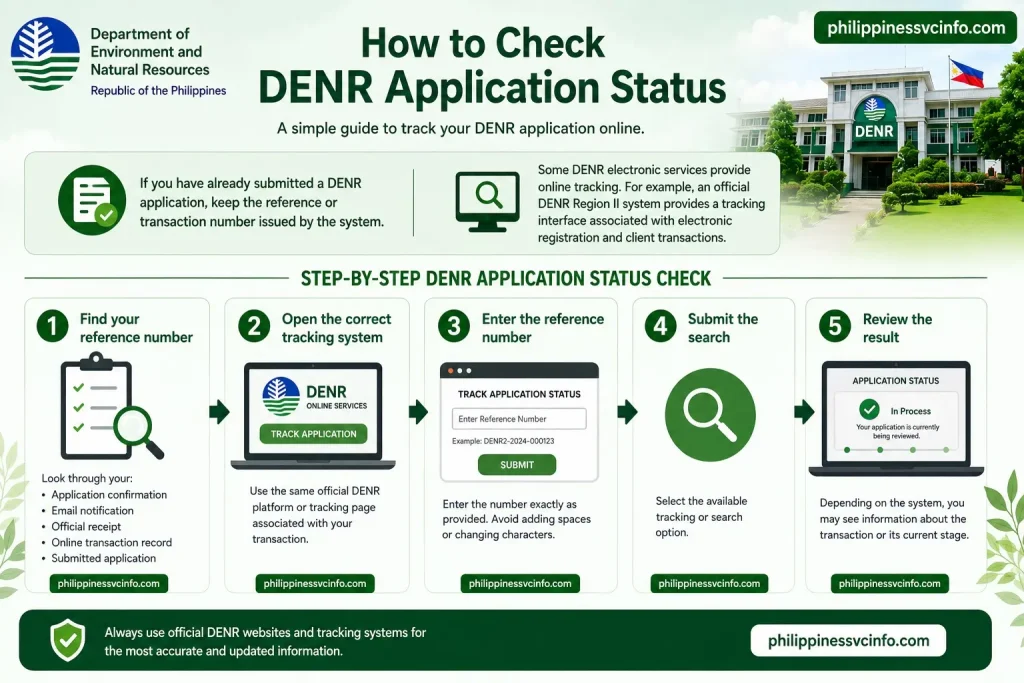
If you have already submitted a DENR application, keep the reference or transaction number issued by the system.
Some DENR electronic services provide online tracking. For example, an official DENR Region II system provides a tracking interface associated with electronic registration and client transactions.
Step-by-step DENR application status check
1. Find your reference number
Look through your:
- Application confirmation
- Email notification
- Official receipt
- Online transaction record
- Submitted application
2. Open the correct tracking system
Use the same official DENR platform or tracking page associated with your transaction.
3. Enter the reference number
Enter the number exactly as provided. Avoid adding spaces or changing characters.
4. Submit the search
Select the available tracking or search option.
5. Review the result
Depending on the system, you may see information about the transaction or its current stage.
What if your DENR application cannot be found?
A missing record does not automatically mean that your application was rejected.
Check these points first:
- Is the reference number correct?
- Are you using the correct DENR regional system?
- Was the application successfully submitted?
- Did you receive a confirmation email?
- Did you receive a receipt or transaction acknowledgement?
- Has enough time passed for the transaction to appear in the system?
If the problem continues, contact the DENR office responsible for your particular application.
DENR Online Appointment: Do You Need One?
A DENR online appointment and an online application are not necessarily the same thing.
Some DENR services can be processed electronically, while other transactions may require a physical appearance or follow a different appointment procedure. You should therefore confirm the requirement for your exact service instead of assuming that every DENR transaction needs an appointment.
DENR-NCR launched iCOPS (i Centralized Online Permitting and Services) on 18 May 2026. The platform is intended to streamline digital processing of permits, clearances, certificates and other DENR-NCR services.
If your service requires an appointment
Follow these steps:
- Identify the exact DENR service.
- Confirm the responsible office.
- Check its current Citizen’s Charter.
- Open the official appointment or service portal.
- Select the appropriate transaction.
- Choose an available schedule if appointment slots are provided.
- Enter the requested contact details.
- Confirm the booking.
- Save the appointment confirmation.
- Prepare the required documents before visiting the office.
Do not pay a third party simply to obtain a DENR appointment unless the official DENR instructions specifically require a legitimate service or payment.
DENR Clearance Requirements
The phrase DENR clearance requirements can be misleading because different clearances, certificates and permits have different requirements.
For example, current DENR Citizen’s Charter listings include services involving authentication of records, chainsaw registration, tree-cutting permits, private tree plantation registration, timber/lumber origin certificates and land-classification certification.
Therefore, before collecting documents, identify the exact clearance.
Check these five things
| What to check | Why it matters |
|---|---|
| Exact service name | Prevents you from using the wrong checklist |
| Responsible office | Different DENR offices handle different transactions |
| Eligibility | Not every service is available to every applicant |
| Required documents | Missing documents can delay processing |
| Fee and processing time | Both can depend on the specific service |
The DENR Citizen’s Charter is specifically intended to make requirements, procedures, fees and service standards available to clients.
DENR Fees: What Should You Expect?
There is no universal DENR fee that applies to all applications.
The amount, if any, depends on the transaction and the applicable rules. For this reason, a current Citizen’s Charter should be checked before making a payment.
A useful rule is:
Identify the service first, then verify the DENR fee for that service.
Do not rely on a fee quoted in an old blog post, social-media comment or unrelated DENR transaction.
When making a payment, keep the official receipt or transaction record. You may need it when following up on your DENR application status.
Where to Find Official DENR Information
For reliable information, start with official government sources:
- DENR Official Website — main department website.
- DENR-NCR — National Capital Region services and announcements.
- DENR-NCR Citizen’s Charter — published service information.
- DENR Region VII Citizen’s Charter — regional service procedures and current Charter editions.
- DENR Region IV-A Citizen’s Charter — service-specific requirements and procedures.
- DENR Forestry Management Bureau Citizen’s Charter — forestry-related services and current Charter information.
Documents You May Need for a DENR Application
There is no universal document checklist for every DENR application. The documents depend on the service, applicant type and responsible office.
Depending on the transaction, you may be asked for:
- A completed application or request form
- Government-issued identification
- Official letter request
- Property or land documents
- Technical plans or supporting records
- Business or organisation documents
- Authorisation documents
- Special Power of Attorney (SPA), where applicable
- Receipts or proof of payment
- Other documents specified in the service checklist
For example, the DENR Central Office Citizen’s Charter specifies a completed customer request form and government-issued ID for a particular records-certification service. An official letter request can be required in certain government-sector cases, while a representative may need a notarised SPA.
This example should not be treated as a universal DENR requirement. It demonstrates why applicants should always check the checklist attached to their particular service.
A useful document-preparation method
Before submitting your application, create three groups:
Group 1 — Mandatory documents
These are documents explicitly listed as required.
Group 2 — Conditional documents
These apply only in certain situations, such as when:
- You are applying through a representative.
- You are a business or organisation.
- The transaction concerns a particular type of land.
- The application involves a government project.
- Additional technical information is required.
Group 3 — Transaction records
Keep copies of:
- Your submitted application
- Reference number
- Official receipt
- Email confirmation
- Appointment confirmation
- Other correspondence from DENR
This makes a later DENR application status enquiry much easier.
Can Someone Apply on Your Behalf?
A representative may be allowed for some transactions, but this depends on the particular DENR service.
If representation is permitted, the responsible office may require an authorisation letter, SPA or other proof of authority.
For example, the DENR Central Office’s Citizen’s Charter specifically identifies a notarised SPA as an additional requirement when a representative requests the specified records-certification service.
Before sending a representative, verify:
- Whether the service permits representation.
- Whether an authorisation letter is sufficient.
- Whether an SPA is required.
- Whether the SPA must be notarised.
- Whether the representative must present their own ID.
- Whether the applicant’s original documents must also be presented.
This can save an unnecessary trip to the DENR office.
DENR Requirements for Foreign Residents
Foreign residents should not assume that the same eligibility rules apply to Filipino citizens for every DENR transaction.
The correct answer depends on the specific service and applicable Philippine laws and regulations. Some natural-resource transactions have specific eligibility restrictions. For example, the Forest Management Bureau states that participants in a Special Forest Land Use Agreement include Filipino citizens of legal age and certain juridical entities meeting Filipino ownership requirements.
Therefore, if you are a foreign resident, use this process:
- Identify the exact DENR service.
- Read the eligibility section of its Citizen’s Charter or official service page.
- Check whether citizenship or ownership restrictions apply.
- Confirm which identification documents are accepted.
- Ask the responsible DENR office if additional documents are required.
- Do not submit an application based solely on a generic DENR requirements article.
This is particularly important for applications involving land, forest resources, natural-resource use and other regulated activities.
How to Find the Correct DENR Office
One of the easiest ways to waste time is to visit the wrong office.
DENR has a network of regional offices, PENROs, CENROs and specialised bureaus. Its official regional Citizen’s Charter pages identify services handled by different offices and sectors.
Use this approach
First: identify the service.
Second: check the service’s Citizen’s Charter entry.
Third: note the office or division responsible for that service.
Fourth: use that office’s official contact or online service channel.
The DENR Region IV-A Citizen’s Charter, for example, separates services across administrative, forestry, lands and other divisions. Its listed services include chainsaw registration, private tree plantation registration, timber/lumber-origin certification, tree-cutting permits, land-classification certification and free-patent applications.
This is why searching simply for “DENR office” is often less useful than searching for the specific service and region.
What to Do If Your DENR Application Is Delayed
A delay does not necessarily mean that an application has been rejected.
Start by checking the service standard in the applicable Citizen’s Charter. DENR describes the Citizen’s Charter as a tool for simplifying frontline procedures and making service standards known to clients.
If the expected period has passed:
1. Check your reference number
Make sure you have the correct transaction details.
2. Check the official tracking system
If your service has online tracking, enter the reference number exactly as provided.
3. Review your email
Look for:
- Additional-document requests
- Application confirmations
- Payment instructions
- Appointment notices
- Release notifications
4. Check whether your application is complete
An application can require additional action or documentation depending on the service.
5. Contact the responsible office
Use the official DENR regional, bureau or office contact information rather than relying on an unofficial intermediary.
What If the DENR Website or Online System Is Not Working?
Online government systems can occasionally present technical problems.
If a DENR online application page is unavailable or fails to load:
- Confirm that you are using the official DENR domain or an official regional/bureau domain.
- Try again later.
- Check whether the regional office has published an alternative procedure.
- Save any error message or screenshot.
- Do not submit sensitive documents through an unverified website.
- Contact the responsible DENR office if the problem continues.
If you already have a transaction reference number, keep it even if the tracking page is temporarily unavailable.
What If You Entered the Wrong Information?
If you discover an error after submitting a DENR application, don’t create a second application immediately unless the responsible office instructs you to do so.
Instead:
- Keep the original reference number.
- Identify exactly what information is incorrect.
- Check whether the online system provides an editing or correction option.
- Contact the responsible DENR office.
- Follow its instructions for correction or amendment.
Creating duplicate applications can make it harder to determine which transaction should be processed.
How the DENR Citizen’s Charter Helps You
The DENR Citizen’s Charter should be treated as a practical transaction reference, not merely a general information page.
Official DENR Citizen’s Charter pages state that the Charter promotes transparency by simplifying frontline service procedures, establishing service standards and making those standards known to clients.
A Citizen’s Charter can help you identify:
| Information | Why you need it |
|---|---|
| Service name | Confirms the exact transaction |
| Eligibility | Shows who can apply |
| Requirements | Tells you which documents to prepare |
| Procedure | Explains the application workflow |
| Fees | Helps you verify the applicable charge |
| Processing time | Sets the expected service period |
| Responsible office | Helps you contact the correct unit |
| Release procedure | Explains how the result is obtained |
| Feedback mechanism | Provides a route for complaints or feedback |
DENR Region V, for example, currently publishes a 2026 First Edition Citizen’s Charter together with procedures for filing complaints and feedback.
Frequently Asked Questions About the DENR Website and Services
Final Thought
The most reliable way to complete a DENR application is to begin by identifying the exact service you need, such as registration, permit, clearance, certification, land service, forestry transaction, or another DENR service, and then confirm the responsible office and its latest Citizen’s Charter. The Citizen’s Charter is useful for checking current procedures, requirements, processing standards, and applicable fees, which may vary by service and DENR office. A practical process is: identify the service → verify eligibility → check DENR requirements → prepare documents → confirm DENR fees → submit through the official channel → keep your reference number → check DENR application status → follow the release instructions. For search-intent purposes, useful topics include DENR requirements, DENR registration, DENR permit application, DENR clearance requirements, DENR online appointment, DENR fees, and DENR application status, as these focus on the specific information applicants commonly need.
Discover What You Need to Know:
- Davao City Portal: Complete Online Services, Registration, Login & Payment Guide 2026
- PRC Renewal Complete Guide to Online License Renewal, Requirements, Fees & Appointment 2026
- NBI Online Registration: Complete Guide to Appointment, Account Creation, Application & Requirements
- PRC Online Appointment 2026: Registration, Booking and Requirements
- GSIS Website 2026: Complete Guide to Registration, Login, Loans, Benefits & Pension