Renewing a PRC license is an important step for registered professionals who need to keep their Professional Identification Card (PIC) valid. The Professional Regulation Commission (PRC) provides an online renewal service through the Licensure Examination and Registration Information System (LERIS), allowing professionals to begin their PRC renewal transaction online before completing any required in-person steps.
This guide explains the PRC renewal process, including online application, requirements, CPD compliance, fees, appointment scheduling, payment, documents, status checking, and common problems.
The official LERIS portal currently lists Renewal of Professional Identification Card as an online service for registered professionals.
What Is PRC Renewal?
PRC renewal is the process of renewing your Professional Identification Card (PIC), commonly referred to as a PRC license or PRC ID.
PRC states that Professional Identification Cards have a three-year validity period and are renewable during the professional’s birth month. The PRC online system allows registered professionals to start the renewal transaction electronically.
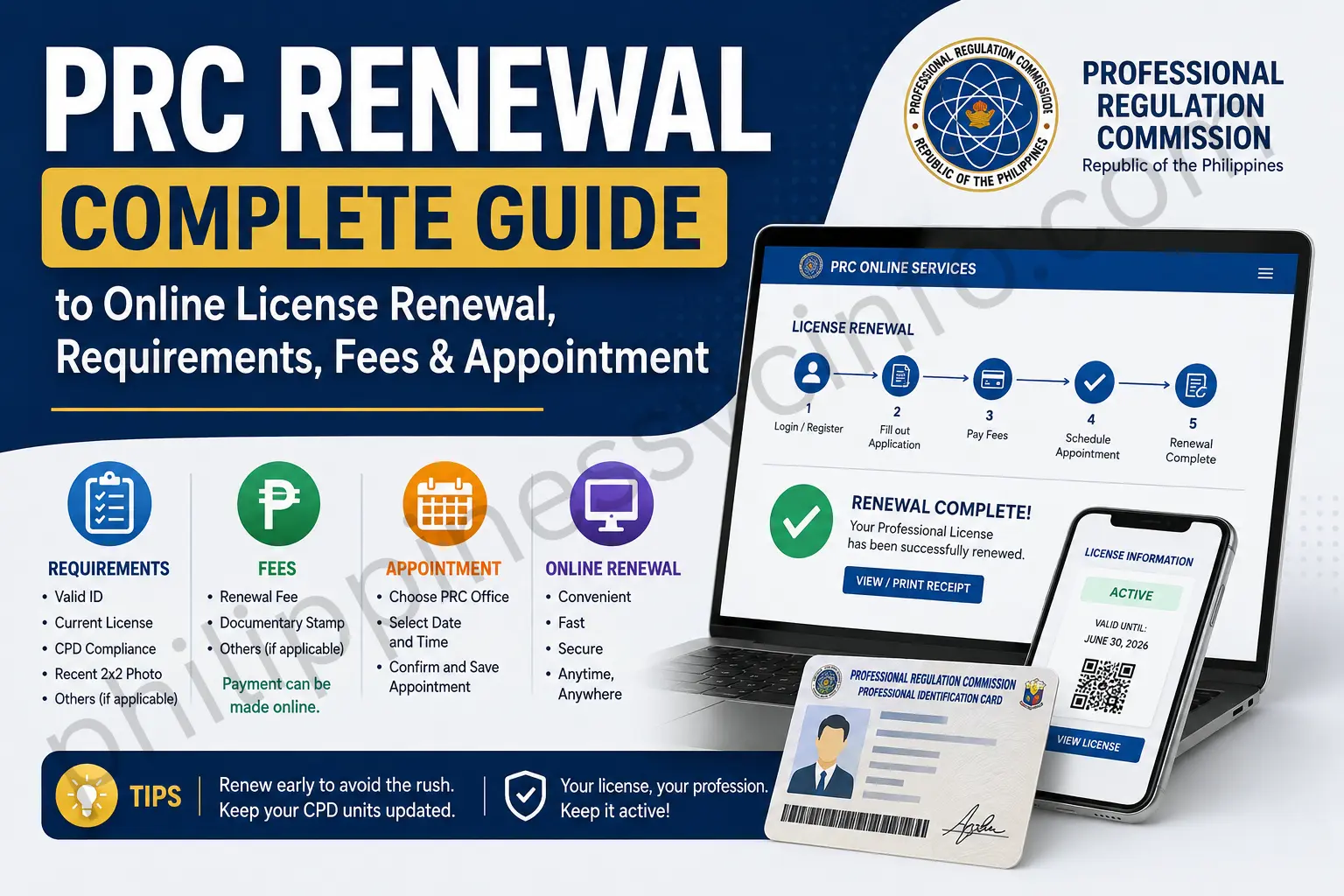
The PRC renewal process generally involves:
- Accessing your LERIS account
- Reviewing your professional information
- Selecting PIC renewal
- Checking CPD compliance
- Choosing an available appointment
- Paying the applicable renewal fee
- Printing the system-generated application
- Submitting the required documents
- Completing the PRC processing or claiming the renewed PIC
The exact requirements can differ according to your profession and circumstances.
PRC Renewal Requirements
Before starting your PRC license renewal, prepare the information and documents you may need. Doing this first can make the online application easier and reduce the possibility of delays.
PRC identifies the system-generated renewal application form and CPD documentation or an applicable CPD undertaking as basic renewal requirements. Some professions may also have additional requirements prescribed by their Professional Regulatory Board.
Basic PRC Renewal Requirements
You should generally prepare:
- Active PRC LERIS account
- PRC license or registration number
- Personal information matching your PRC records
- System-generated renewal application form
- CPD certificates or CPDAS records, when applicable
- CPD undertaking, when applicable
- Valid government-issued identification
- Existing or expired PIC, when required for the transaction
- Profession-specific documents, if applicable
- Payment for the applicable PRC renewal fee
Do not assume that every profession has exactly the same documentary requirements. PRC specifically identifies additional documents for certain professions, including certificates of good standing and other profession-specific requirements.
PRC Renewal Photo Requirements
A recent professional photograph may be required when creating or updating your LERIS profile.
Before uploading a photograph, follow the specifications displayed by the official PRC LERIS portal because photo requirements can be updated.
For the commonly used PRC online profile format, prepare a clear passport-style photograph with:
- Plain background
- Professional appearance
- Appropriate attire
- Clear facial visibility
- No distracting filters
- Recent photograph
- JPG format within the portal’s stated file-size limit
The safest approach is to check the photo instructions shown directly in your LERIS account before uploading the image.
Information Needed for PRC Renewal
Keep your PRC information available before beginning the application.
You may need:
- Full registered name
- Date of birth
- Civil status
- Gender
- Email address
- Contact information
- Current address
- Profession
- PRC license/registration number
PRC’s LERIS registration page specifically instructs users to enter details as printed on their Notice of Admission or Professional Identification Card for initial registration or renewal.
This is important because inconsistencies between your LERIS profile and PRC records can create problems during the PRC renewal process.
PRC Renewal and CPD Requirements
Continuing Professional Development (CPD) is an important part of the PRC renewal process.
PRC’s published renewal FAQ states that applicants may provide proof of attendance at accredited CPD seminars validated through the CPD Accreditation System (CPDAS) or screenshots from their CPDAS account showing earned CPD credit units. Where applicable, professionals who cannot meet the required units may execute a CPD undertaking.
CPD Undertaking in 2026
There is an important current update for professionals renewing their PRC PIC in 2026.
PRC announced that acceptance of the CPD undertaking for PIC renewal has been extended until December 31, 2026. PRC also makes clear that executing the undertaking does not waive CPD compliance; the required compliance must be completed in the next renewal cycle.
Therefore, if your CPD credits are incomplete, check whether the undertaking option is available to you through the current PRC renewal process.
Profession-Specific PRC Renewal Documents
Some professionals have additional documentary requirements.
PRC’s renewal information identifies professions that may need an updated Certificate of Good Standing from their respective Accredited Professional Organization. The list includes several regulated professions such as architects, agriculturists, agricultural and biosystems engineers, customs brokers, electrical engineers, electronics professionals, geodetic engineers, guidance and counseling professionals, interior designers, landscape architects, librarians, psychologists/psychometricians, real estate service professionals and respiratory therapists.
Because the requirements vary, check the current PRC instructions for your specific profession before your appointment.
PRC Renewal Fees
PRC’s published FAQ lists the following standard PIC renewal fees:
| Professional category | PRC renewal fee |
|---|---|
| Profession requiring a baccalaureate degree | ₱150 per year / ₱450 for 3 years |
| Profession requiring a non-baccalaureate degree | ₱140 per year / ₱420 for 3 years |
PRC also states that a surcharge applies when the PIC is renewed 20 days after the birth month: ₱30 for baccalaureate-degree professions and ₱28 for non-baccalaureate-degree professions.
Important Fee Update
PRC published a proposed Schedule of Fees and Charges in July 2026. Because fee policies can change, applicants should always check the amount displayed by their current LERIS transaction before making payment.
This means older online articles may show fee information that is no longer completely current.
How to Renew PRC License Online
The easiest starting point for PRC renewal is the official LERIS portal.

Step 1: Open the Official PRC Website
First, go to the official PRC website:
The PRC website provides official announcements, renewal information, CPD updates and other professional regulatory services.
For the actual online transaction, use:
The LERIS homepage currently includes Renewal of Professional Identification Card among its available online services.
Step 2: Log In to Your LERIS Account
On the official LERIS website, select Sign In.
Enter:
- Registered email address
- Password
If you already have a LERIS account, use the existing account rather than creating multiple accounts unnecessarily.
If you do not have an account, select Register and complete the registration process.
PRC’s portal requires personal information such as your name, gender, civil status, birthdate and email address during account registration.
Important
Enter your information carefully.
PRC’s LERIS instructions specifically tell applicants to input details as they appear on their Notice of Admission or Professional Identification Card for initial registration or renewal.
Step 3: Review Your LERIS Profile
After signing in, review the information associated with your account before beginning the PRC renewal transaction.
Check:
- Full name
- Birthdate
- Gender
- Civil status
- Address
- Contact details
- Email address
- Profession
- PRC registration information
Correct any obvious issue through the appropriate PRC procedure before submitting a renewal transaction.
Do not deliberately enter information that does not match your official professional record simply to move forward.
Step 4: Select PRC Renewal
Once your account is ready, locate the option for:
Renewal of Professional Identification Card
The official LERIS portal specifically identifies this as the online renewal service for registered professionals.
Follow the renewal screen and provide the requested professional information.
You may be asked to enter or confirm your:
- Profession
- PRC license number
- Personal information
- Other registration details
Review everything carefully before proceeding.
Step 5: Check Your CPD Status
Before finalizing your PRC renewal, determine whether you have the required CPD credits or whether an applicable CPD undertaking is available.
PRC’s official renewal guidance states that professionals may present CPD certificates or CPDAS evidence of earned units, or execute an undertaking when they are unable to comply with the required CPD credit units under the applicable rules.
For 2026, the CPD undertaking is accepted until December 31, 2026, subject to PRC’s applicable rules.
Step 6: Choose Your Appointment
Continue through the LERIS renewal transaction until you reach the appointment stage.
Choose an available PRC office or service location presented by the system.
Your options may depend on:
- PRC office
- Location
- Available dates
- Available appointment slots
- Type of transaction
Save the appointment details after completing this step.
No Appointment Slots?
If no suitable appointment is available, do not pay an unofficial agent for access to a slot.
Instead, check the official system again later or look for another available PRC location where appropriate.
Appointment availability can change, so the dates displayed in LERIS should be treated as the current source for your transaction.
Step 7: Pay the PRC Renewal Fee
After completing the applicable renewal details and appointment information, proceed to payment using the payment options presented by the official system.
Before submitting payment, carefully check:
- Applicant name
- Profession
- Transaction details
- Amount due
- Payment reference
- Payment channel
Do not make a second payment simply because your transaction does not immediately update.
Save your payment confirmation, receipt and reference number.
Step 8: Print the Renewal Application
After payment has been successfully recorded, return to your LERIS account and check your existing transactions.
The PRC FAQ states that after applying online, the applicant prints the application form and proceeds to the appointment date and place to submit the requirements.
Print the system-generated renewal application and keep an electronic copy as a backup.
Step 9: Prepare for the PRC Appointment
Before travelling to the PRC office, review your transaction and profession-specific requirements.
Prepare:
- Printed renewal application
- CPD certificates or CPDAS evidence, if applicable
- CPD undertaking, if applicable
- Valid identification
- Existing PIC, where required
- Profession-specific documents
- Proof of payment
- Appointment details
The exact documents depend on your profession and circumstances.
PRC Renewal Quick Checklist
Before moving to the next stage, confirm:
- You are using the official PRC website
- You are using the official LERIS portal
- Your LERIS account is accessible
- Your personal information is correct
- Your PRC license number is available
- Your CPD status has been checked
- Your profession-specific requirements are prepared
- Your renewal transaction has been started
- Your appointment information has been saved
- Your payment details are correct
- Your receipt/reference number has been saved
PRC Renewal Appointment
After selecting the Renewal of Professional Identification Card transaction in LERIS, you may need to select an appointment location and available schedule.
The available options shown in your account depend on the PRC office and current appointment availability.
How to Schedule Your PRC Renewal Appointment
- Log in to the official PRC LERIS Online Services.
- Open your existing PRC renewal transaction.
- Confirm your profession and licence information.
- Select the available PRC Regional Office or service location.
- Choose an available appointment date.
- Review the appointment details.
- Continue to the payment stage.
- Save your appointment information after completing the transaction.
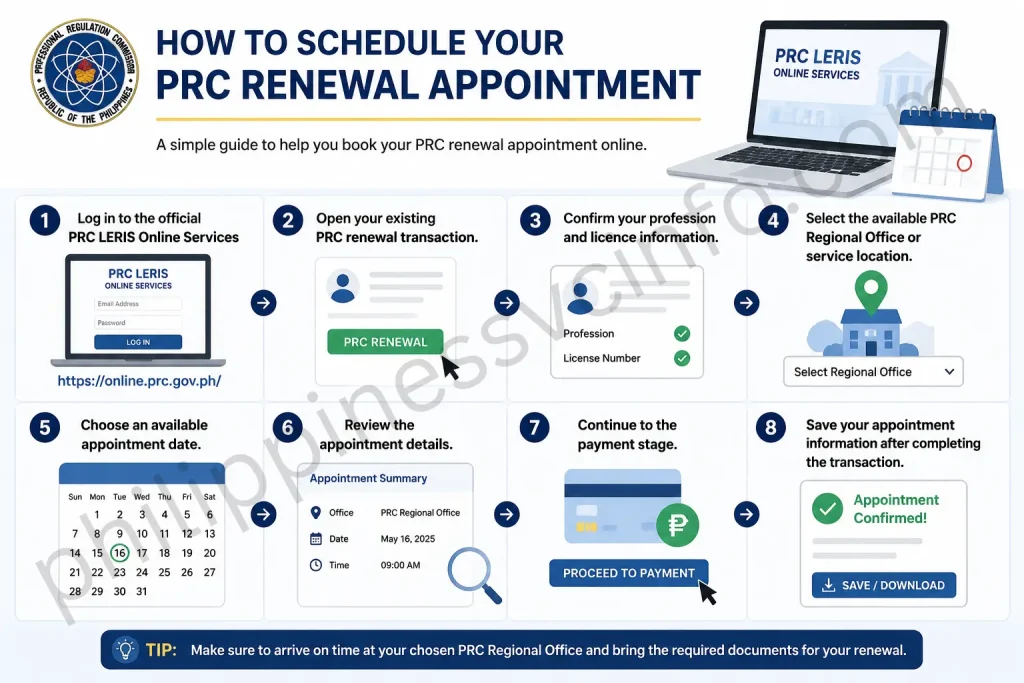
Important: Do not rely on unofficial websites or individuals selling appointment slots. PRC has warned the public about unauthorised individuals and pages offering PRC services.
What If There Are No PRC Appointment Slots?
If LERIS does not show an available appointment, do not immediately assume that your renewal application has failed.
Try the following:
- Check the LERIS portal again later.
- Look for another available PRC office.
- Check the appointment calendar for later dates.
- Keep your existing transaction details.
- Avoid paying a fixer for an appointment.
Appointment availability is controlled by the PRC system and can change as new slots become available.
PRC Renewal Payment
After completing the applicable renewal information and selecting an appointment, LERIS will provide the payment instructions for your transaction.
Before paying, carefully review the information displayed on the payment page.
Check These Details Before Payment
- Applicant name
- Profession
- PRC licence number
- Transaction details
- Amount due
- Payment reference number
- Selected payment channel
Use only the payment options provided through the official PRC transaction.
Common Payment Options
Depending on the options currently available in LERIS, payment may be offered through supported:
- E-wallets
- Online banking
- Bank/payment partners
- Over-the-counter channels
- Credit or debit cards
Available channels can change, so the payment options displayed in your current official LERIS transaction should be treated as the latest information.
What to Do After Paying
Once you complete payment, do not close the process without saving your transaction information.
Keep:
- Payment receipt
- Payment reference number
- Transaction number
- Appointment details
- Screenshots of successful payment
- Email confirmations, if received
Then log back into LERIS and open Existing Transactions.
Check whether your transaction has been updated to the appropriate paid or completed status.
How to Print Your PRC Renewal Application
After the payment has been successfully recorded:
- Log in to your LERIS account.
- Go to Existing Transactions.
- Find your PRC renewal transaction.
- Review the payment/transaction status.
- Select the option to Print Document when available.
- Download or print the generated application form.
- Keep an electronic backup of the document.
PRC’s online renewal instructions require applicants to print the generated application and proceed according to the appointment and document requirements.
Documents to Bring for PRC Renewal
The documents required for PRC renewal depend on your profession and circumstances.
For a standard renewal, prepare the documents shown in your official transaction and the applicable PRC requirements.
Standard Renewal
Common documents may include:
- Printed LERIS application form
- Existing/expired PRC PIC, when required
- Valid government-issued ID
- CPD certificates or CPDAS record, when applicable
- Proof of payment
- Other profession-specific documents
Do not assume that every professional needs every document on a generic checklist.
PRC Renewal Through CPD Undertaking
If you do not have the required CPD units, an undertaking may be available under PRC’s current rules.
For 2026, PRC has extended acceptance of the CPD undertaking for PIC renewal until 31 December 2026. The undertaking does not permanently remove the CPD requirement.
Before Using a CPD Undertaking
Check:
- Whether your profession permits the applicable undertaking.
- Whether LERIS provides the undertaking option.
- Whether your renewal falls within the current PRC policy.
- What CPD compliance you must complete afterward.
Use the current PRC announcement as the authoritative reference.
PRC Renewal for Married Professionals
If your legal name has changed after marriage, do not simply enter a new surname and proceed with a standard renewal without checking PRC’s applicable name-change procedure.
Prepare the appropriate civil-status documentation, such as the applicable PSA marriage certificate, when required.
The exact process for changing a registered name can depend on your circumstances and profession.
If your PRC record still contains your maiden name, check the current PRC instructions before completing your PRC renewal.
PRC Renewal Through a Representative
If someone else will handle a transaction on your behalf, additional authorisation documents may be required.
Depending on the transaction, these can include:
- Authorisation letter or Special Power of Attorney
- Valid ID of the professional
- Valid ID of the representative
- Other documents required by PRC
Do not give another person your LERIS password merely so they can assist with your application.
If representation is required, follow PRC’s official rules for authorised representatives.
PRC Renewal for Overseas Filipino Professionals
PRC provides provisions for professionals working overseas.
Depending on the applicable situation, PRC’s Citizens Charter identifies documents such as:
- Overseas Employment Certificate (OEC)
- Passport with working visa or permit
- Overseas employment contract
- Foreign company identification card
These may be relevant when satisfying certain documentary requirements, particularly in connection with CPD compliance.
Because requirements can differ, overseas professionals should check the latest PRC instructions before beginning their PRC renewal.
How to Check PRC Renewal Status
After submitting your renewal application and completing payment, you can monitor the transaction through your LERIS account.
Step-by-Step Status Check
- Open PRC LERIS.
- Sign in with your registered account.
- Open Existing Transactions.
- Locate your PRC renewal transaction.
- Review the current status.
- Check your appointment and payment information.
Keep your transaction number available if you need to contact PRC about the application.
PRC License Verification
After completing your PRC renewal, you can use PRC’s official verification service to check professional registration information.
The official PRC online system provides verification services for registered professionals.
Use:
When using verification, provide the information requested by the official system, which may include:
- Profession
- Name
- Birth information
- Licence/registration details
Always use the official PRC domain when checking your professional licence information.
PRC Renewal Common Issues
1. Payment Is Completed but LERIS Still Shows Pending
Do not immediately pay again.
First:
- Keep your payment receipt.
- Check your transaction again later.
- Confirm the payment reference.
- Check whether the payment channel has a processing delay.
- Contact PRC if the transaction remains unresolved.
A second payment could create an unnecessary duplicate transaction.
2. LERIS Says “For PRC Verification”
A “For PRC Verification” message may mean that your record requires additional PRC review.
Prepare:
- Registered email address
- PRC licence number
- Profession
- Transaction details
- Screenshot of the message
3. Forgot Your LERIS Password
Use the official password-recovery service instead of creating another account.
Go to the LERIS login page and select the password-recovery option.
You may be asked to verify your registered email through an OTP.
If you no longer have access to your registered email, follow the official PRC technical-support procedure.
4. Incorrect Personal Information
If your name, birthdate or other important information is incorrect, do not knowingly submit inaccurate information.
PRC’s online-services guidance provides procedures for dealing with incorrect personal information and record problems.
If necessary, contact PRC or visit the appropriate office for correction.
5. No Available Appointment
If there are no available appointments:
- Check again later.
- Try another available PRC office.
- Review future dates.
- Do not purchase a slot from an unofficial individual.
PRC appointment availability can change as offices release additional slots.
PRC Renewal Safety Tips
A successful renewal is not only about completing the online form. Protecting your personal and professional information is equally important.
Use the Official PRC Domains
The two main websites to remember are:
Never Share Your LERIS Password
PRC has warned applicants against unauthorised individuals offering PRC services. Your LERIS password should remain private.
Do Not Pay for an Appointment Slot
PRC states that appointment slots are free. Be cautious of anyone asking for money to obtain an appointment.
Save Every Transaction Record
Keep your:
- Application form
- Appointment confirmation
- Payment receipt
- Transaction reference
- CPD documents
- PRC correspondence
until your PRC renewal has been fully completed.
PRC Renewal Appointment Day Checklist
Before leaving for your PRC appointment, review this checklist:
- Printed LERIS application form
- Valid government-issued ID
- Existing PRC PIC, when applicable
- CPD certificates/records
- CPD undertaking, if applicable
- Profession-specific documents
- Payment receipt
- Appointment confirmation
- Transaction/reference number
- Additional documents required for your specific case
Arrive prepared and follow the instructions of the PRC office handling your transaction.
PRC Renewal Troubleshooting Guide
LERIS Website Is Not Loading
If the LERIS website does not load properly:
- Refresh the page.
- Check your internet connection.
- Try another browser.
- Clear your browser cache if necessary.
- Try again later if the portal is experiencing heavy traffic.
- Check the official PRC website for announcements.
Avoid repeatedly submitting the same transaction simply because the page is slow.
Forgot LERIS Password
Use the official password-recovery option on LERIS.
The password recovery process can require verification through your registered email address and an OTP.
If you no longer have access to the email account associated with your LERIS profile, follow PRC’s official technical-assistance procedure.
No Longer Have Access to Your Registered Email
Do not create multiple accounts simply because you cannot access your old email.
Instead, contact PRC through its official technical-support process and provide the information requested to establish ownership of the account.
Keep a valid government ID and relevant PRC information available when requesting assistance.
Payment Was Deducted but LERIS Has Not Updated
If your bank or payment provider shows a successful payment but LERIS still displays a pending status:
- Do not immediately pay again.
- Save your payment receipt.
- Save the transaction reference.
- Check Existing Transactions again later.
- Contact PRC if the status remains unresolved.
Your payment receipt is particularly important when requesting assistance.
Appointment Slot Disappeared
Appointment availability can change quickly.
If a selected schedule is no longer available:
- Return to the official LERIS transaction.
- Check the available calendar.
- Select another available schedule.
- Check another PRC office if appropriate.
Do not use unofficial appointment sellers.
PRC Renewal for Special Situations
PRC Renewal for Overseas Professionals
Filipino professionals working outside the Philippines may have additional options concerning documentary requirements.
PRC’s Citizens Charter identifies documents such as:
- Overseas Employment Certificate
- Passport with working visa or permit
- Overseas employment contract
- Foreign company identification card
These may be relevant to CPD-related documentary requirements for Overseas Filipino Professionals.
Always check the current requirements for your profession.
PRC Renewal With a Representative
If you cannot personally handle a transaction, check whether PRC allows a representative for your specific situation.
Potential documents can include:
- Authorization letter
- Special Power of Attorney
- Valid ID of the professional
- Valid ID of the representative
- Other documents specified by PRC
The requirements should be confirmed from the current PRC instructions rather than assumed from a general checklist.
PRC Renewal After a Name Change
A name change can require a separate record-update process.
For example, a married professional whose PRC record still uses a maiden name should check the applicable PRC procedure before completing the standard renewal.
Prepare the relevant civil-status documentation and follow PRC’s official instructions.
How to Avoid PRC Renewal Delays
Check Your Records Early
Before beginning the renewal, verify your:
- Name
- Birthdate
- Profession
- Licence number
- Address
- CPD records
Check Your Profession’s Requirements
Not every profession has identical requirements. Some Professional Regulatory Boards have additional documentary requirements.
Keep Payment Evidence
Never delete your payment receipt immediately after payment.
Save Your Appointment
Take a screenshot or save a copy of your appointment information.
Use Official Websites
For PRC renewal, the safest sources are:
PRC Renewal Final Checklist
Before completing your PRC license renewal, make sure you have completed the relevant items below.
Account
- LERIS account is active.
- Registered email is accessible.
- Password is working.
- Profile information is accurate.
Renewal
- PIC Renewal transaction selected.
- Profession selected correctly.
- PRC licence number confirmed.
- CPD status checked.
- CPD undertaking completed if applicable.
- Profession-specific requirements checked.
Appointment
- PRC office selected.
- Appointment date confirmed.
- Appointment details saved.
Payment
- Correct amount confirmed.
- Official payment channel used.
- Payment completed.
- Receipt saved.
- Transaction/reference number saved.
Documents
- Renewal application printed.
- Valid ID prepared.
- Existing PIC prepared if required.
- CPD documents prepared.
- Profession-specific documents prepared.
- Additional documents for special circumstances prepared.
After Processing
- LERIS transaction status checked.
- PRC licence information verified.
- Renewed PIC information checked.
- Important documents and receipts retained.
PRC Renewal Process Summary
The complete PRC renewal journey can be summarized as:
Visit PRC → Open LERIS → Sign in/Register → Complete profile → Select PIC Renewal → Enter profession and licence number → Check CPD → Choose appointment → Pay applicable fee → Print application → Prepare documents → Attend/complete the required PRC processing → Check transaction status → Verify professional licence information.
The online part makes the PRC renewal process more convenient, but applicants should still prepare for any in-person document submission or processing required by their transaction.
Official PRC Websites and Resources
For accurate PRC renewal information, use the official PRC domains rather than third-party websites.
| Purpose | Official link |
|---|---|
| PRC main website | PRC Official Website |
| Online renewal and LERIS | PRC LERIS Online Services |
| PRC online services | PRC Online Services |
| PRC announcements and policies | PRC Official Announcements |
PRC Renewal FAQs
Final Thoughts on PRC Renewal
A successful PRC renewal starts with accurate personal information, a working LERIS account and a clear understanding of your profession’s requirements. Before paying, carefully review the amount, appointment information and transaction details displayed in the official PRC system.
For professionals renewing in 2026, the CPD undertaking extension through 31 December 2026 is an important update. However, it should not be treated as a permanent exemption from CPD compliance.
Most importantly, use the official PRC website and LERIS portal, keep your payment and appointment records, and avoid anyone asking for your LERIS password or selling PRC appointment slots. When a problem occurs, use PRC’s official support procedures rather than creating duplicate transactions or paying an unauthorised intermediary.
Discover What You Need to Know:
- NBI Online Registration: Complete Guide to Appointment, Account Creation, Application & Requirements
- NBI Appointment Philippines 2026: Online Booking, Registration & Requirements Guide
- NBI Clearance Philippines 2026: Complete Guide to Registration, Fees & Requirements
- PRC Online Appointment 2026: Registration, Booking and Requirements
- GSIS Website 2026: Complete Guide to Registration, Login, Loans, Benefits & Pension
- May Huli Ka Portal: Check MMDA Violations, Fines & E-Contest