VFS Global Visa Application Guide: Appointments, Requirements, Fees & Tracking 2026
VFS Global is an important part of the visa application process for many travellers, students, workers and other international applicants. It provides administrative services for governments and diplomatic missions, helping applicants submit documents, provide biometrics, attend appointments and receive or track their passports.
The key point to understand is that VFS Global does not decide whether you receive a visa. Visa decisions remain with the relevant embassy, consulate or government authority. VFS Global’s role is primarily administrative and logistical.
What Is VFS Global?
VFS Global is a specialist provider of visa, passport and consular application services working with governments and diplomatic missions. It operates Visa Application Centres where applicants can complete administrative stages of their applications.
Depending on the country and visa category, VFS Global may provide information about application requirements, appointment booking, document submission, biometric collection, application tracking and passport return.
The exact services available depend on the government or diplomatic mission that has appointed VFS Global. This means applicants should always use the VFS Global page specifically connected to their country of residence and destination country rather than relying on a generic checklist.
Your supplied material describes VFS Global as handling non-judgmental administrative tasks, including application management, biometric enrolment and passport logistics.
What Does VFS Global Do?
The easiest way to understand VFS Global is to separate administrative processing from visa decision-making.
VFS Global may help with:
- Visa application information
- Appointment scheduling
- Document submission
- Passport handling
- Biometric collection
- Application tracking
- Courier services
- SMS notifications
- Selected premium services
- Customer support
For example, a VFS Global Visa Application Centre may collect your documents and biometrics and then transfer the application to the appropriate government authority.
VFS Global vs Embassy
|
VFS Global |
Embassy or Consulate |
|---|---|
|
Handles administrative services |
Assesses the visa application |
|
Provides appointment services |
Makes the visa decision |
|
May collect biometrics |
Reviews eligibility |
|
May receive documents |
Approves or refuses the visa |
|
Can provide tracking services |
May request additional information |
This distinction matters because contacting VFS Global cannot change the final visa decision. VFS Global’s official appointment information confirms that appointment availability, processing timelines and visa decisions remain the responsibility of the embassy or consulate.
How Does the VFS Global Visa Process Work?
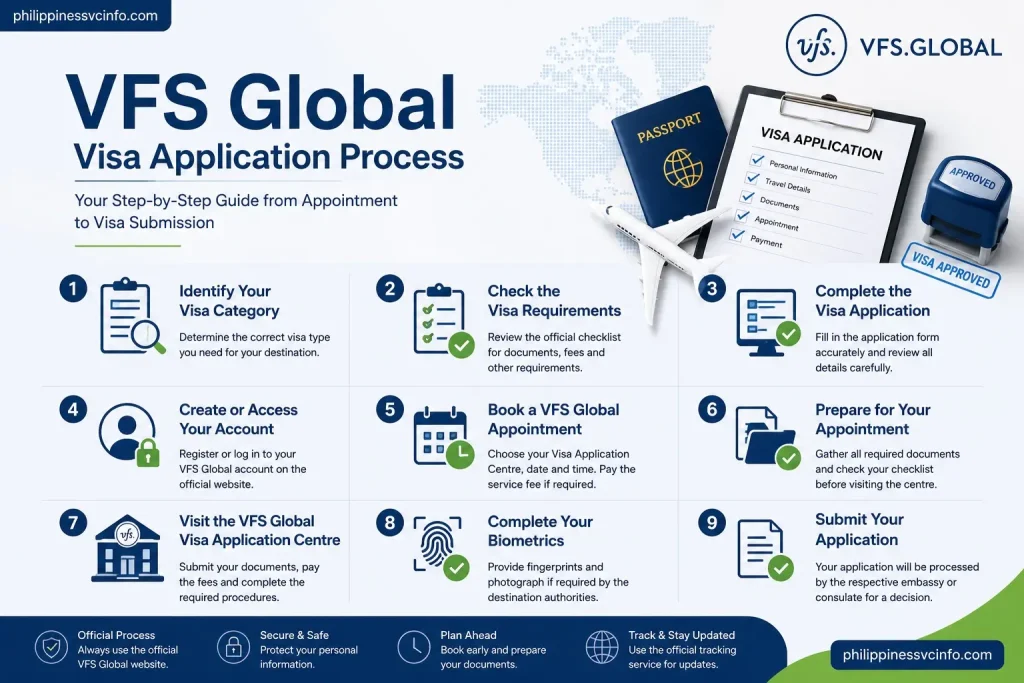
Although procedures differ between destinations, the process generally follows a logical sequence:
Identify visa type → Check requirements → Complete application → Book appointment → Visit Visa Application Centre → Submit documents and biometrics → Track application → Collect passport
Your supplied information follows the same basic workflow, beginning with the visa category and ending with passport return.
One important detail is that the application system itself may not always be operated entirely by VFS Global. Some governments require applicants to complete their visa application through a separate official government portal before using VFS Global for the appointment or biometric stage.
For that reason, always read the instructions on your destination-specific VFS Global page before creating an account or paying a fee.
VFS Global Visa Application Process
Step 1: Identify Your Visa Category
Before booking anything, determine which visa you actually need.
Depending on your destination, this could be a:
- Tourist visa
- Visitor visa
- Student visa
- Work visa
- Business visa
- Family visa
- Transit visa
- Long-stay visa
- Residence-related application
The correct category is important because appointment availability, documents, fees and application procedures can all depend on it.
Do not select an appointment category simply because it has an available slot. Official VFS Global pages warn that applicants must book under the correct visa category and ensure their details match their passport.
Step 2: Check the Visa Requirements
Once you know the visa category, review the official requirements.
Look for information about:
- Passport validity
- Application forms
- Photographs
- Financial documents
- Travel arrangements
- Accommodation
- Insurance
- Supporting documents
- Biometrics
- Visa fees
- VFS service charges
The requirements are not universal across VFS Global. A student applying for one country may need a completely different set of documents from a tourist applying for another.
Before You Begin
Create a document folder containing the files and papers required by your specific visa checklist. Check names, passport numbers and dates carefully before submitting anything.
Your supplied source identifies common examples such as a passport, appointment confirmation, visa form, photographs, financial evidence, travel information and supporting evidence.
Step 3: Complete the Visa Application
The application stage depends on the destination.
In some cases, you complete an online government application first. In other cases, VFS Global may provide access to forms or application-related services.
Before submitting your application, check:
- Full name
- Date of birth
- Passport number
- Nationality
- Travel dates
- Contact details
- Visa category
- Supporting information
Every detail should match your official documents.
A small inconsistency can create unnecessary delays or prevent you from submitting your application correctly.
Step 4: Create or Access Your VFS Global Account
Where the destination-specific VFS Global system requires an account, follow the registration instructions shown on that portal.
The general process described in your supplied material is:
- Open the official VFS Global website.
- Select your country of residence.
- Select your destination country.
- Choose the relevant visa service.
- Select the login or registration option.
- Enter your email address and create a password.
- Complete any account verification requested by the system.
However, don’t assume every VFS Global application uses the same account system. Current VFS procedures can differ by destination. For example, some newer workflows require applicants to complete an external government application first and then use the VFS appointment system for the biometric appointment.
Step 5: Book a VFS Global Appointment
Once your application is ready, follow the Book an Appointment instructions on your destination-specific VFS Global website.
The usual process is:
- Sign in or register if required.
- Select Book an Appointment.
- Choose your Visa Application Centre.
- Select the correct visa category.
- Enter your applicant information.
- Choose an available date and time.
- Review applicable VFS service fees.
- Complete payment if required.
- Save your appointment confirmation.
Some VFS Global portals require online payment of the VFS service fee before an appointment is confirmed.
Official VFS pages also make clear that appointment procedures can vary by location, so applicants should follow the instructions displayed for their particular destination.
Important Appointment Advice
Make sure the information entered during booking matches your passport exactly. A mismatch can cause problems when you arrive at the Visa Application Centre.
Do not pay unofficial agents for supposedly guaranteed appointments. Use the official VFS Global website and its authorised payment methods.
Step 6: Prepare for Your VFS Global Appointment
Before travelling to the Visa Application Centre, go through your checklist one more time.
You may need:
- Original passport
- Appointment confirmation
- Completed application form
- Photographs
- Original supporting documents
- Copies of documents
- Payment confirmation
- Additional destination-specific paperwork
Your appointment confirmation should be kept safely because it may contain the reference number or barcode associated with your booking.
Official VFS guidance for specific destinations also instructs applicants to bring the appointment letter, passport and required original documents to the Visa Application Centre.
Step 7: Visit the VFS Global Visa Application Centre
Attend the Visa Application Centre on the date and time shown on your appointment confirmation.
Before leaving home, check your appointment letter and destination-specific checklist once more. VFS Global’s official guidance for individual destinations can require applicants to bring their appointment letter, passport and original documents listed in the relevant checklist.
At the centre, the process can include:
- Identity and document checks
- Submission of your application and supporting documents
- Biometric enrolment, where required
- Payment of applicable fees
- Additional document or service procedures
- Passport submission, where applicable
The exact procedure depends on the destination and visa category.
What Should You Bring?
A practical preparation list includes:
- Valid passport
- Appointment confirmation
- Completed application form
- Required photographs
- Original supporting documents
- Required photocopies
- Government application confirmation, where applicable
- Biometric instruction letter, where applicable
- Payment confirmation
- Any additional documents specified by the relevant embassy or VFS checklist
Don’t assume that a document is unnecessary simply because another applicant wasn’t asked for it. Your own checklist is the one that matters.
Step 8: Complete Your Biometrics
For visa categories that require biometric information, you’ll normally provide it at the designated Visa Application Centre.
Biometrics commonly involve:
- Fingerprints
- A digital photograph
The precise biometric rules depend on the destination government. Some applicants may be exempt based on age, previous biometric enrolment or the particular visa programme.
For example, an official Swiss visa checklist for applications in Pakistan states that biometric data may be required for first-time travellers or where previous biometric data is more than 59 months old, subject to the applicable rules.
Before Providing Biometrics
Make sure your fingers are clean and suitable for fingerprint scanning. If the destination authority has specific requirements concerning photographs, religious head coverings or other identification matters, follow those instructions rather than relying on general advice.
Step 9: Submit Your Application
After your documents and biometrics have been handled, your application proceeds according to the relevant government’s process.
This is where it is important to remember the difference between VFS Global and the visa authority.
VFS Global can perform administrative tasks such as collecting documentation and biometrics, but it does not decide whether your visa is granted or refused. That decision belongs to the relevant embassy, consulate or government authority.
Keep your receipt and application reference details after submission. You may need them later when checking your application status.
How to Track Your VFS Global Visa Application
After submitting your application, you can often use the VFS Global application tracking service to follow its progress.
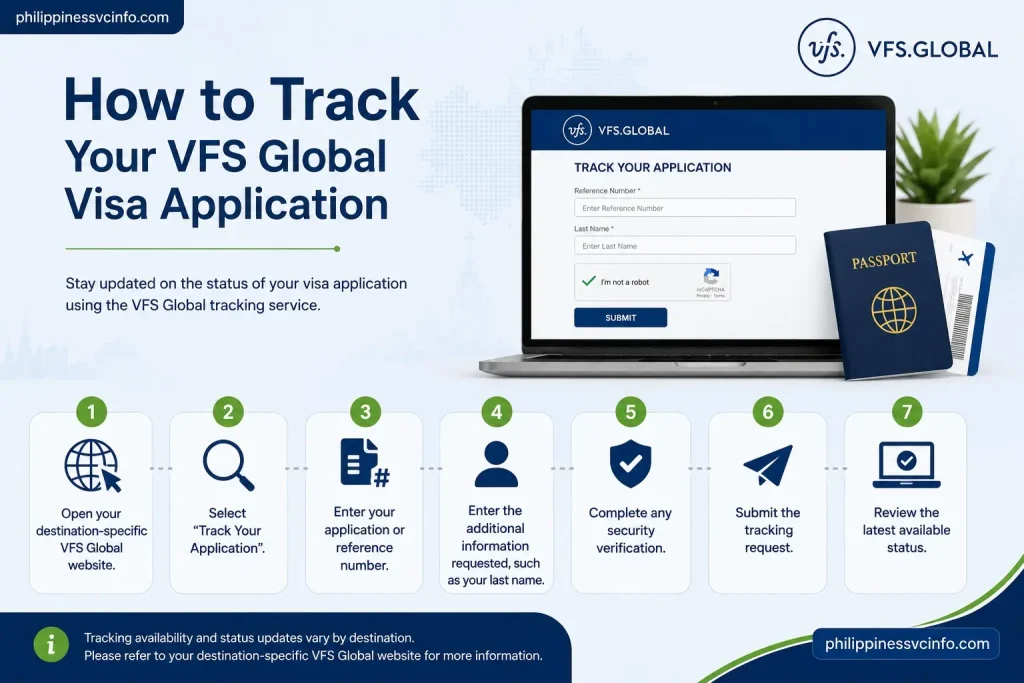
The exact tracking method differs between destinations. A current VFS Global tracking page, for example, instructs applicants to use the reference number shown on the Visa Application Centre invoice or receipt together with their last name.
General Tracking Steps
- Open your destination-specific VFS Global website.
- Select Track Your Application.
- Enter your application or reference number.
- Enter the additional information requested, such as your last name.
- Complete any security verification.
- Submit the tracking request.
- Review the latest available status.
Some VFS services may also offer SMS notifications. Availability depends on the particular Visa Application Centre and application.
Keep Your Reference Number Safe
Your application reference number is one of the most useful pieces of information after submission. Keep your:
- VFS receipt
- Appointment confirmation
- Application reference number
- Passport details
- Payment receipts
- Email notifications
until the process is finished.
How Long Does VFS Global Take to Process a Visa?
There is no single processing time for every VFS Global application.
VFS Global itself does not make the visa decision. Processing time depends on the responsible embassy, consulate or government authority, along with the visa category and individual circumstances. Official VFS pages specifically state that processing timelines and visa decisions are the responsibility of the relevant embassy or consulate.
A tracking page may also direct applicants to the relevant processing timelines information for their visa type.
What Can Affect Processing Time?
Possible factors include:
- Visa category
- Destination country
- Application volume
- Completeness of the application
- Additional document requests
- Security or background checks
- Government processing requirements
- Seasonal demand
Avoid planning important travel around an assumed VFS Global processing period unless the responsible authority has provided a suitable timeframe.
VFS Global Fees and Payment
Applicants may encounter more than one type of payment during the visa process.
|
Fee |
Usually relates to |
|---|---|
|
Visa fee |
Charged by the relevant government or visa authority |
|
VFS service fee |
Administrative services provided by VFS Global |
|
Courier fee |
Passport or document delivery, where available |
|
SMS fee |
Optional notification service, where offered |
|
Premium services |
Optional services available at selected centres |
The exact fees and payment methods vary by destination.
Some VFS Global appointment systems require the VFS service fee to be paid online to confirm an appointment, while other procedures can work differently.
Check the Fee Before Paying
Before completing a payment, check:
- Which fee you are paying.
- Whether it is a government visa fee or VFS service charge.
- Whether the fee is refundable.
- Which payment methods are accepted.
- Whether optional services have been added.
Do not assume that paying for a premium or optional service will influence the visa decision. VFS Global states that optional services do not affect visa decision-making.
How to Reschedule or Cancel a VFS Global Appointment
Appointment changes are controlled by the rules applicable to your particular destination.
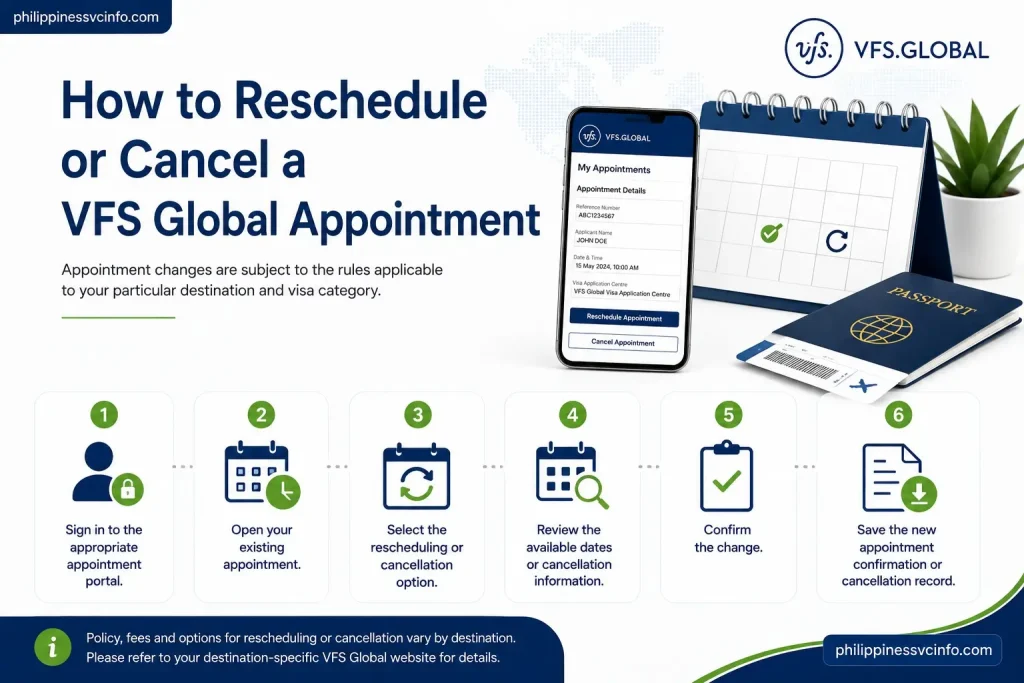
If your VFS Global portal provides rescheduling or cancellation options, the general process is:
- Sign in to the appropriate appointment portal.
- Open your existing appointment.
- Select the rescheduling or cancellation option.
- Review the available dates or cancellation information.
- Confirm the change.
- Save the new appointment confirmation or cancellation record.
Important: Do not assume that every VFS Global appointment can be changed in the same way. For example, the current VFS Global UK page for Pakistan states that an appointment can be rearranged only once and must be changed at least 24 hours before the original appointment.
Your destination-specific VFS Global page should therefore be treated as the final source for appointment-change rules.
VFS Global Passport Collection and Delivery
After the responsible visa authority has made its decision, the passport is returned according to the procedure available for that application.
Depending on the destination and service selected, you may have options such as:
- Collection from the Visa Application Centre
- Courier delivery
Official VFS guidance for certain applications confirms that applicants can collect passports from the Visa Application Centre or use courier delivery where that service has been selected.
Passport Collection
If your application uses centre collection, check the relevant VFS Global page for:
- Collection dates
- Collection hours
- Required identification
- Receipt requirements
- Whether someone else can collect the passport for you
Don’t visit the centre for collection until you have received the appropriate notification or the VFS instructions confirm that your passport is ready.
VFS Global Visa Application Centre Visit
Your Visa Application Centre experience can differ depending on the country and location.
Before visiting, check the centre-specific page for:
- Address
- Opening hours
- Submission hours
- Passport collection hours
- Security rules
- Accessibility information
- Items that are prohibited
- What applicants should bring
For example, a VFS Global centre page for Pakistan provides separate business, submission and passport-collection hours and lists security restrictions concerning electronic devices, large bags and other prohibited items.
This is why checking your specific VFS Global centre page before travelling is more reliable than following a generic appointment guide.
Common VFS Global Problems and Solutions
VFS Global Login Problems
If you cannot access your account, first check whether you’re using the correct destination-specific portal.
Try:
- Checking your email address
- Resetting your password if the option is available
- Checking your spam or junk folder
- Using an updated browser
- Clearing browser cache and cookies
- Trying a private browsing window
Avoid creating multiple accounts unless the relevant VFS instructions specifically tell you to do so.
Unable to Book a VFS Global Appointment
A VFS Global appointment may not be available because:
- No slots are currently open
- The selected visa category is incorrect
- The application has not reached the appointment stage
- The destination uses a different booking process
- The centre has limited capacity
- There is temporary technical difficulty
Don’t repeatedly enter incorrect information just to obtain a slot.
For example, VFS Global specifically warns applicants to select the correct visa category and ensure that their details match their passport. An incorrect category can prevent document submission or entry to the centre.
VFS Global Appointment Availability Issues
Limited appointment availability can be frustrating, particularly during busy travel or student application periods.
The safest approach is to:
- Check the official portal regularly.
- Confirm that you’re using the correct application category.
- Check whether your application must first be submitted through a government website.
- Avoid unofficial appointment sellers.
- Never provide your login credentials to unknown agents.
The official VFS Global UK page for Pakistan specifically warns applicants against unauthorised agents who claim to represent VFS Global or offer related services.
VFS Global Payment Problems
If payment appears to fail, don’t immediately submit another payment.
First:
- Check your bank or card account.
- Look for a transaction confirmation.
- Check whether the appointment was actually confirmed.
- Save any transaction reference.
- Follow the payment-support instructions on your destination-specific VFS website.
If money has been deducted but no confirmation appears, contact the official support channel rather than paying repeatedly.
VFS Global Tracking Problems
If your tracking information doesn’t appear:
- Confirm the reference number.
- Check that you’re using the correct VFS Global destination portal.
- Enter your surname exactly as required.
- Check your receipt for the correct reference.
- Allow time for the application to appear in the tracking system.
Different VFS Global portals can request different tracking details. For example, one official tracking service uses the application reference number and last name, while another VFS tracking interface may request an application reference number and passport number.
VFS Global Customer Support
If you need assistance, use the Contact Us or support section on your destination-specific VFS Global website.
Depending on the country, support may include:
- Online enquiry forms
- Telephone helplines
- Email-based assistance
- Chat support
- Application-centre information
When contacting VFS Global, keep your application information nearby. You may be asked for your reference number, passport details or appointment information.
Most importantly, use the official VFS Global domain rather than contact details supplied by an unknown agent.
VFS Global Mobile App and Online Digital Services
To accommodate modern digital workflows, VFS Global has integrated mobile and online features for specific regions and destination countries.
VFS Global Mobile App Features
Where supported, the official VFS Global mobile application allows applicants to:
- Track Applications: Receive real-time push notifications regarding application status changes.
- Upload Documents: Pre-scan and upload digital copies of supporting evidence before arriving at the centre.
- Manage Appointments: View, reschedule, or check appointment parameters directly from a smartphone.
On-Demand & Value-Added Digital Services
- Visa At Your Doorstep (VAYD): At select locations, trained VFS staff travel to your home or workplace to collect physical documentation, capture biometrics, and collect fees without requiring a visit to the physical center.
- Document Pre-Check & Verification: Digital review services where VFS staff review your uploaded paperwork online to check completeness before your appointment.
- Form-Filling Assistance: Online or in-centre help to ensure complex embassy forms are completed accurately.
VFS Global Frequently Asked Questions
Final Thoughts on VFS Global
The VFS Global visa application process becomes much easier when you understand which tasks are handled by VFS Global and which are controlled by the relevant embassy, consulate, or government authority. Start by checking the official visa requirements, prepare your documents carefully, book the correct appointment, and attend the Visa Application Centre on time. After submission, keep your receipt and reference number so you can use the appropriate VFS Global tracking service to monitor available updates. Because requirements, fees, appointment rules, and processing times vary by destination, always rely on the official VFS Global and government instructions for the latest information.
Discover What You Need to Know:
- Oxecure Philippines 2026: Official Website, Products, Acne Care & Skincare Guide
- DMW Website Guide philippiness (2026): eRegistration, OFW Pass, OEC, Jobs & Online Services
- CHED Philippine (2026): Complete Guide to Scholarships, Requirements, Application Steps, and Official Resources
- DICT Philippines: Official Website, Services, Programs & Online Guide 2026
- DENR Website Philippines 2026: Permits, Requirements, Registration, Fees & Online Applications
- Davao City Portal: Complete Online Services, Registration, Login & Payment Guide 2026