
eFPS login is the secure sign-in process used by enrolled taxpayers to access the Philippines Bureau of Internal Revenue Electronic Filing and Payment System. It requires registered taxpayer and account credentials, followed by security verification. After successful authentication, eligible users can access applicable electronic tax filing, payment, inquiry and account-management functions.
What Is BIR eFPS?
The Electronic Filing and Payment System (eFPS) is an online BIR facility designed for electronic tax filing and payment. Instead of completing every part of the tax process manually, eligible or mandated taxpayers can use the system to submit applicable tax returns and access related electronic payment functions.
BIR currently lists eFPS alongside other electronic services such as ORUS, eBIRForms and ePay.
The important point for a new user is that having a Philippine Tax Identification Number (TIN) does not automatically mean that you can immediately perform an eFPS login. The taxpayer needs an approved and activated eFPS account.
The BIR’s own eFPS information states that taxpayers first need to be registered with the BIR Integrated Tax System and complete the applicable eFPS enrolment process.
eFPS at a Glance
| Item | Information |
|---|---|
| System | Electronic Filing and Payment System |
| Government agency | Bureau of Internal Revenue |
| Country | Philippines |
| Main purpose | Electronic filing and payment of taxes |
| Login information | TIN, branch code, username and password |
| Additional security | Challenge question |
| Official portal | eFPS BIR domain |
| Main government website | BIR official website |
| Access | Internet-based |
Where Should You Perform an eFPS Login?
Always check the domain before entering your TIN, username or password.
The official BIR eFPS login page is hosted under efps.bir.gov.ph. The direct address supplied for this guide is:
You can also begin from the main BIR website and navigate to its eServices section. BIR currently lists eFPS as an official electronic service.
Why the Domain Matters
Tax credentials should never be entered into a website simply because it looks similar to a government portal.
Before completing an eFPS login, check that the address belongs to the official BIR domain:
Official BIR domain: bir.gov.ph
Official eFPS domain: efps.bir.gov.ph
Avoid following login links received from unknown emails, social-media messages or unfamiliar websites. When in doubt, manually open the official BIR website and navigate to eFPS.
What You Need Before Using eFPS Login
An eFPS account must already be enrolled and activated before you can sign in.
The official eFPS enrolment page currently provides separate account selections for Corporate and Individual taxpayers and asks for taxpayer and account information during the enrolment process.
For an existing user, prepare the following:
- Valid BIR Tax Identification Number
- Applicable branch code
- Registered eFPS username
- eFPS password
- Correct challenge-question answer
- Stable internet connection
- A supported browser
The live eFPS login page specifically displays fields for the TIN, username and password and states that usernames and passwords are case-sensitive.
The challenge-question stage is separate from the initial credential screen. BIR’s current challenge page also states that the answer is case-sensitive.
eFPS Login: Step-by-Step Process
Once your account has been activated, the actual sign-in process is relatively straightforward.
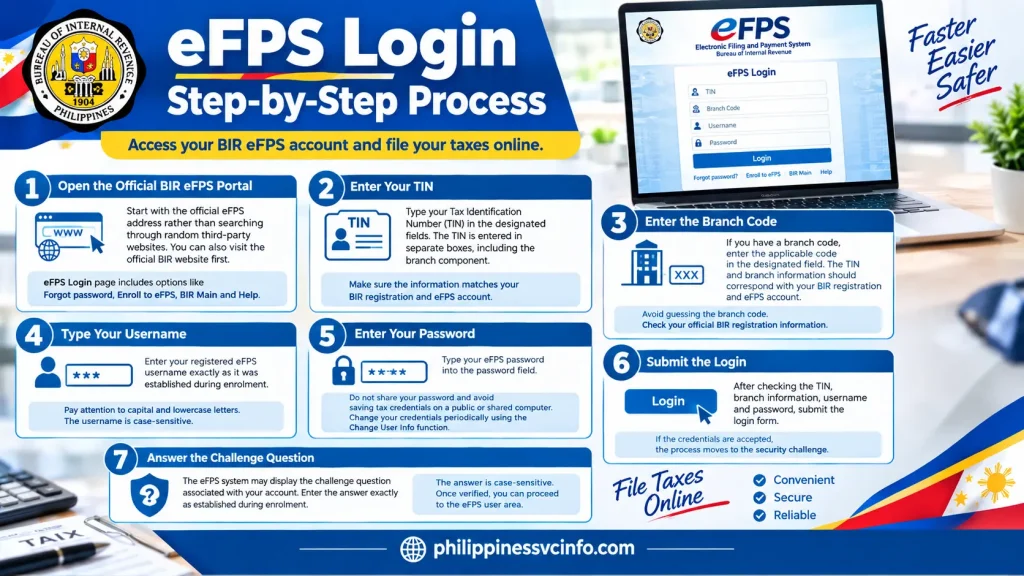
Step 1: Open the Official BIR eFPS Portal
Start with the official eFPS address rather than searching through random third-party websites.
You can also visit the official BIR website first:
The current eFPS login page provides an eFPS Login interface together with options including Forgot password, Enroll to eFPS, BIR Main and Help.
Step 2: Enter Your TIN
The login screen asks for your Tax Identification Number.
Enter the TIN information associated with your registered eFPS account. Take care when entering each portion because a mismatch can prevent successful authentication.
The eFPS interface displays the TIN as separate fields, including the branch component.
Step 3: Enter the Branch Code
If your taxpayer registration includes a branch code, enter the applicable code in the designated field.
The TIN and branch information should correspond with your BIR registration and eFPS account.
A useful practice is to avoid guessing the branch code when you are uncertain. Check your official BIR registration information instead.
Step 4: Type Your Username
Enter your registered eFPS username exactly as it was established during enrolment.
Pay attention to capital and lowercase letters. The current BIR eFPS login screen explicitly notes that the username is case-sensitive.
Step 5: Enter Your Password
Type your eFPS password into the password field.
Do not share the password with another person, and avoid saving tax credentials on a public or shared computer.
BIR also currently advises eFPS users to change their login credentials periodically through the Change User Info function.
Step 6: Submit the Login
After checking the TIN, branch information, username and password, submit the login form.
If the credentials are accepted, the process moves to the security challenge.
Step 7: Answer the Challenge Question
The eFPS system may display the challenge question associated with your account.
Enter the answer exactly as established during enrolment.
This detail is important because the official BIR challenge page states that the answer is case-sensitive.
Once the answer is successfully verified, you can proceed to the eFPS user area.
What Happens After eFPS Login?
A successful eFPS login takes the taxpayer to the eFPS user menu.
The current BIR eFPS user-menu page displays taxpayer information and functions including options associated with filing tax returns, tax-return inquiry and enrolling additional users.
Depending on the account and available functions, the system can be used for activities connected with:
- Electronic tax-return filing
- Tax-return inquiry
- Electronic payment
- User information management
- Additional user enrolment
- Related eFPS functions
The exact forms and functions available can depend on the taxpayer’s registration and the relevant BIR requirements.
eFPS Login Credentials Explained
Understanding what each credential does can make troubleshooting easier.
| Credential | Purpose | Key point |
|---|---|---|
| TIN | Identifies the taxpayer | Enter the registered TIN |
| Branch Code | Identifies the applicable branch | Use the correct registered code |
| Username | Identifies the eFPS user | Case-sensitive |
| Password | Authenticates the account | Case-sensitive |
| Challenge Answer | Additional security verification | Case-sensitive |
The official eFPS login interface confirms that usernames and passwords are case-sensitive, while the challenge-question page separately confirms that the challenge answer is also case-sensitive.
What If You Have Not Enrolled in eFPS?
If you do not yet have an active eFPS account, repeatedly attempting an eFPS login will not solve the problem.
You need to use the enrolment facility first.
The official eFPS enrolment page currently presents a multi-step process covering taxpayer details, account details and verification.
The BIR’s published eFPS FAQ explains that a prospective user accesses the BIR website, selects the eFPS service, chooses Enroll to eFPS, completes the enrolment form and submits it. The system then provides an acknowledgement while BIR processes the enrolment and communicates the status by email.
Official eFPS Enrolment
Do not create duplicate enrolments simply because an earlier request has not yet been processed.
The BIR FAQ states that an initial enrolment is followed by activation, after which additional users may be enrolled through the system’s Enroll More Users facility.
eFPS Login Browser Requirements
Browser compatibility can affect access to older government systems.
The current eFPS login page lists supported browsers including Mozilla Firefox and Google Chrome, and it also displays an older Internet Explorer compatibility reference.
For practical use, begin with an up-to-date browser and make sure JavaScript and cookies are functioning normally.
If the login page behaves unexpectedly, try:
- Refreshing the official eFPS page.
- Opening it in another supported browser.
- Clearing cached browser data.
- Checking your internet connection.
- Re-entering the credentials carefully.
- Confirming that you are using the official BIR domain.
Because government portals can change over time, use the browser information displayed on the live BIR eFPS portal as the current reference.
Official eFPS Job Aids
If you need detailed instructions beyond basic eFPS login, BIR provides an official eFPS Job Aids page.
eFPS Login Problems, Password Recovery and Tax Filing
Getting into the BIR Electronic Filing and Payment System is only the first step. If the eFPS login does not work, the error message can often point towards the part of the authentication process that needs attention.
The safest approach is to avoid repeated guesses. Check each credential carefully, use the recovery options provided by the official portal, and contact the appropriate BIR office when an account or registration issue cannot be resolved online.
What to Check Before Trying eFPS Login Again
Before making another attempt, review these details:
- Your TIN
- Branch code
- Registered username
- Password
- Challenge-question answer
- Internet connection
- Browser
- Correct BIR eFPS website
Both the username and password are case-sensitive on the eFPS login page. The challenge answer is also case-sensitive.
How to Fix a Failed eFPS Login
A failed eFPS login does not necessarily mean that your account has been permanently disabled. Start with the most basic checks before escalating the issue.

1. Recheck Your TIN and Branch Code
Make sure the TIN information corresponds to the account you are attempting to access.
A small typing error can prevent the system from recognising your account. If you manage several taxpayer records or branches, check the registration information before trying again.
2. Check Capitalisation
The eFPS system treats important authentication information as case-sensitive.
For example, if your registered username contains uppercase letters, entering the same characters entirely in lowercase may not produce the same result.
The same caution applies to your password and challenge-question answer.
3. Check the Browser
If your credentials appear correct but the page behaves unexpectedly, try another supported browser.
The official eFPS login page identifies Google Chrome and Mozilla Firefox among its supported browsers.
You can also clear temporary browser data and reopen the official portal.
4. Check Your Internet Connection
An unstable connection can interrupt a login session or prevent the next eFPS page from loading.
If the login page repeatedly times out, test another connection before assuming that your taxpayer account is the problem.
5. Do Not Keep Guessing the Challenge Answer
If you reach the security-question stage, enter the answer exactly as it was established during registration.
The BIR challenge page states that the answer is case-sensitive.
Repeatedly submitting uncertain answers can create additional access problems, so it is better to verify your registration information first.
What Does “User Does Not Exist on the Database” Mean?
One possible message encountered during eFPS login is:
“User does not exist on the database”
This can indicate that the information entered does not match the eFPS account record.
Instead of immediately assuming that your TIN is invalid, check the complete login information:
| Check | What to verify |
|---|---|
| TIN | Correct taxpayer identification number |
| Branch code | Correct registered branch |
| Username | Exact registered username |
| Password | Correct case and characters |
| Account status | Whether enrolment and activation have been completed |
If the information is correct but the message continues, the issue may require assistance from BIR rather than further login attempts.
Forgot Your eFPS Password? Use the Official Recovery Option
For users who cannot remember their password, the eFPS login page provides a Forgot password option.
Instead of registering another account, use the recovery facility available through the official BIR eFPS portal.
General Recovery Process
- Open the official eFPS login page.
- Select the password-recovery option.
- Provide the requested account information.
- Follow the instructions displayed by the system.
- Use the official recovery instructions to regain access.
- Return to the eFPS login page after completing the recovery process.
Do not give your password, recovery information or challenge answer to another person claiming to provide eFPS assistance.
What If Your eFPS Account Is Inactive?
An inactive or unactivated account is different from simply entering the wrong password.
If you recently enrolled, check whether the enrolment and activation process has been completed. The BIR eFPS FAQ explains that enrolment involves submitting the required information and that BIR processes the application before account activation.
If activation has not yet been completed, repeatedly attempting an eFPS login is unlikely to resolve the underlying issue.
For account-specific concerns, your assigned Revenue District Office (RDO) may be the appropriate point of contact.
How eFPS Tax Filing Works After Login
Once your eFPS login is successful, the system provides access to electronic tax-related functions.
BIR’s official eFPS job aids identify several major areas, including:
- Logging in
- Changing user information
- E-filing
- E-payment
- Tax-return inquiry
- User enrolment
The exact forms and options displayed depend on the taxpayer’s account and applicable BIR requirements.
Filing a Tax Return Through eFPS
Electronic filing begins after authentication.
The general workflow is to access the applicable return, provide the required tax information, review the entries, and submit the return through the eFPS system.
The official BIR job-aid section specifically includes E-Filing guidance, so taxpayers should consult the current instructions for the particular return they need to submit rather than relying on an old third-party walkthrough.
Before Submitting a Return
It is sensible to review:
- Taxpayer identification details
- Tax period
- Return type
- Income or transaction information
- Applicable deductions or adjustments
- Tax computation
- Required schedules
- Supporting information
A successful login does not by itself mean that a return has been correctly completed. Taxpayers remain responsible for providing accurate information and meeting applicable BIR filing requirements.
How eFPS Payment Works
The second major function of the system is electronic tax payment.
BIR’s eFPS job-aid resources include a dedicated E-Payment section.
Payment arrangements can depend on the taxpayer’s situation and the payment channels available through the BIR system.
The material supplied for this guide identifies the use of an eFPS Authorized Agent Bank (AAB) as part of the payment process for applicable taxpayers.
Important Payment Reminder
Do not assume that a successful return submission automatically means that every payment obligation has been completed.
After filing, review the applicable payment instructions and confirm the status of the transaction through the official BIR system or authorised payment channel.
Keep transaction records for your own tax files.
Tax Return Inquiry After eFPS Login
The eFPS environment also provides a Tax Return Inquiry function.
This can be useful when you need to review information associated with returns submitted through the system.
The official BIR eFPS job-aid page lists Tax Return Inquiry as one of its available instructional areas.
When reviewing a return, pay attention to the relevant:
- Tax period
- Return type
- Submission information
- Filing status
- Related transaction details
If something appears inconsistent with your records, retain the relevant reference information before contacting BIR for assistance.
Changing eFPS User Information
After an eFPS login, account holders may also need to maintain their registered information.
BIR’s current eFPS resources include a Change User Information function and a corresponding job aid.
The eFPS system also publishes a reminder that users should periodically change their login credentials through the Change User Info facility.
Keeping account information current is particularly important for taxpayers who rely on the system for regular electronic filing.
eFPS Security Practices Every Taxpayer Should Follow
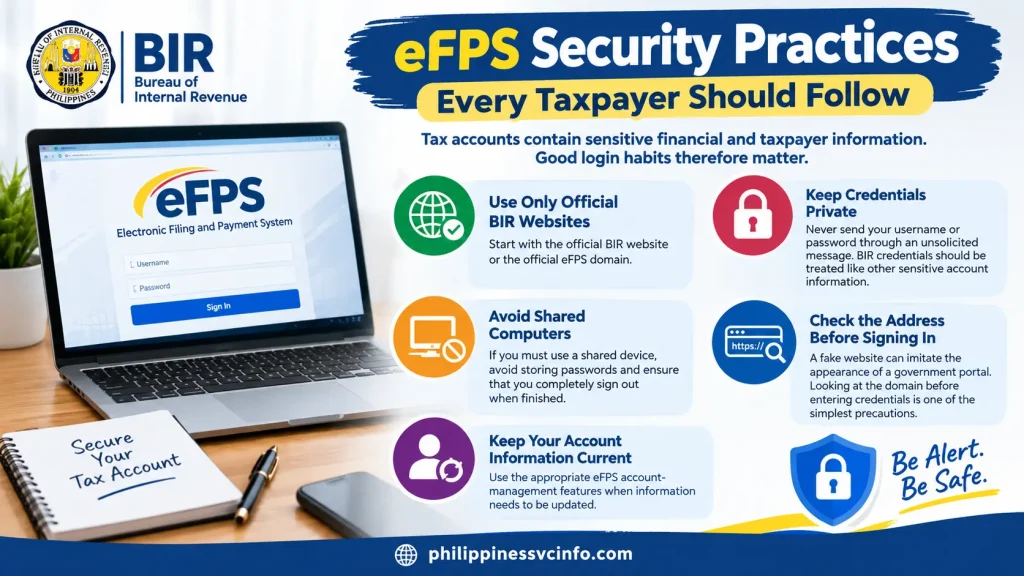
Tax accounts contain sensitive financial and taxpayer information. Good login habits therefore matter.
Use Only Official BIR Websites
Start with the official BIR website or the official eFPS domain.
Keep Credentials Private
Never send your username or password through an unsolicited message.
BIR credentials should be treated like other sensitive account information.
Avoid Shared Computers
If you must use a shared device, avoid storing passwords and ensure that you completely sign out when finished.
Check the Address Before Signing In
A fake website can imitate the appearance of a government portal. Looking at the domain before entering credentials is one of the simplest precautions.
Keep Your Account Information Current
Use the appropriate eFPS account-management features when information needs to be updated.
eFPS Login vs Other BIR Electronic Services
The BIR operates several electronic services, and taxpayers should not assume that all of them use the same account or perform the same function.
| BIR service | General purpose |
|---|---|
| eFPS | Electronic filing and payment |
| eBIRForms | Electronic preparation and filing of applicable BIR forms |
| ORUS | Online registration and related registration services |
| ePay | Electronic tax payment service |
BIR currently lists these services within its electronic-services information.
This distinction is useful when searching online for a tax service. A taxpayer looking for eFPS login should use the eFPS portal rather than assuming that another BIR electronic service will provide the same account functions.
When Should You Contact BIR?
Online troubleshooting is useful for simple login problems, but some issues require assistance from the tax authority.
Contact the appropriate BIR office when:
- Your account cannot be activated.
- Your registered information needs official correction.
- Your account remains inaccessible despite correct credentials.
- You cannot resolve a registration issue.
- You need clarification about a taxpayer-specific requirement.
- A filing or payment issue cannot be resolved through the available eFPS functions.
The BIR official website provides access to its contact and office information.
When contacting BIR about an account problem, have relevant taxpayer and transaction information available, but do not disclose your password to anyone.
eFPS Login Checklist
Before starting an important filing session, use this short checklist:
Account
- eFPS enrolment completed
- Account activated
- Correct TIN available
- Correct branch code available
- Username available
- Password available
- Challenge answer remembered
Technical
- Official BIR website confirmed
- Official eFPS domain confirmed
- Supported browser available
- Stable internet connection
- Browser functioning correctly
After login
- Correct tax period selected
- Correct return identified
- Information reviewed
- Filing submitted correctly
- Payment requirements checked
- Relevant records retained
This checklist can prevent a common mistake: discovering a missing credential only after beginning the filing process.
A Note for Foreign Residents and Non-Filipino Taxpayers
Foreign residents who have Philippine tax obligations should not assume that nationality alone determines whether eFPS is appropriate.
The relevant issue is the taxpayer’s BIR registration, tax obligations, enrolment status and applicable filing requirements.
If you are a foreign taxpayer, student, employee, investor or business operator with Philippine tax responsibilities, confirm your specific obligations with BIR or your authorised tax professional rather than relying solely on a general online guide.
The official BIR website should remain the primary source for taxpayer-specific requirements.
eFPS Login Requirements at a Glance
Before accessing the system, make sure the following information is available:
| Requirement | Why it matters |
|---|---|
| BIR TIN | Identifies the taxpayer |
| Branch Code | Connects the login with the applicable registration |
| eFPS Username | Identifies the registered user |
| Password | Authenticates the account |
| Challenge Answer | Provides an additional security check |
| Internet connection | Required to access the online portal |
| Compatible browser | Helps the eFPS pages function correctly |
| Activated eFPS account | Required for normal account access |
The eFPS login interface confirms that usernames and passwords are case-sensitive, while the challenge-question page states that the challenge answer is case-sensitive.
Frequently Asked Questions About eFPS Login
Conclusion
The eFPS login process gives enrolled BIR taxpayers access to an online environment for applicable tax filing, payment and related account functions. The most important starting point is to use the official BIR and eFPS domains and enter the registered TIN, branch information, username and password carefully.
If authentication reaches the security challenge, remember that the challenge answer is case-sensitive. For forgotten passwords or other account problems, use the recovery and support facilities provided by the official BIR system rather than creating unnecessary duplicate accounts.
BIR also provides official eFPS Job Aids covering enrolment, login, e-filing, e-payment, user information and tax-return inquiry. Because electronic tax procedures can change, taxpayers should use those official resources and the current BIR website when handling an actual filing or payment.
Discover What You Need to Know:
- MMDA NCAP Guide Philippines 2026 : Check Violations, Fines & May Huli Ka
- MMDA Guide Philippines 2026 : Traffic Violations, Services & Online Portal
- Philippine Coast Guard 2026 : Official Website, Services & Contact Guide
- Bangko Sentral ng Pilipinas 2026 : Official Website, Services, Regulations & Consumer Guide








