

The Metropolitan Manila Development Authority (MMDA) is a Philippine government agency responsible for coordinating services across Metro Manila. Its work includes traffic and transportation management, flood control, disaster response, road safety, sanitation, solid waste management, and urban development. The MMDA also provides online services and public information for motorists and residents.
What Is MMDA?
The Metropolitan Manila Development Authority, commonly known as MMDA, is a government agency responsible for coordinating certain metro-wide programmes and services across Metro Manila. Its work covers areas that require coordination beyond the boundaries of an individual city or municipality.
For the public, MMDA-related services can include:
- Traffic and transport management
- Road safety and traffic enforcement
- Flood control and related information
- Solid waste management coordination
- Urban planning and related metro-wide programmes
- Public safety and emergency-related operations
- Motorist services and traffic adjudication
The agency’s responsibilities therefore extend beyond simply issuing traffic citations. MMDA programmes also cover environmental and infrastructure-related concerns. Official MMDA project information, for example, describes work involving flood management, waterways, solid waste and flood-control operations.
What Can You Find on the MMDA Website?
The MMDA website is useful when you need agency announcements or want to locate information about a particular MMDA function. Instead of relying on screenshots, forwarded messages or unofficial social-media posts, motorists and residents can start with the agency’s official web presence.
Depending on the service or announcement, the website can help users find information related to:
| Area | What users may look for |
|---|---|
| Traffic | Traffic management information and advisories |
| Motorists | Violation-related services and instructions |
| Flood management | Flood-control information and updates |
| Public safety | Metro-wide safety announcements |
| Waste management | Solid-waste programmes and related information |
| Agency services | Offices, programmes and public information |
MMDA Traffic and Transport Services
The exact online process can differ from one service to another. A general MMDA webpage should therefore be treated as the starting point, while a specialised MMDA portal may be required for a particular transaction.
Traffic management is one of the most visible areas of MMDA operations. For motorists, this can involve traffic regulation, road-safety enforcement, accident response and the handling of traffic-related records.
If you are checking a traffic concern, identify the type of transaction first. A general traffic advisory is different from checking an individual citation, while a citation dispute follows a separate adjudication process.
This distinction matters because MMDA traffic violations may be handled through dedicated systems rather than through a general website form.
For example, the current May Huli Ka Vehicle Portal describes itself as a platform where registered users can view traffic violations, receive ticket updates, monitor case status and manage multiple vehicles. It also provides support for fleet registration.
How the May Huli Ka Portal Helps Motorists
The May Huli Ka Vehicle Portal is designed for motorists who need to review MMDA violation records. The official portal provides account registration and login functions and states that users can securely register vehicles to view violations and related updates.
A motorist may use the system to:
- Review recorded traffic violations
- Check ticket-related information
- View available violation evidence
- Monitor case status
- Manage more than one registered vehicle
- Access contest-related functions where applicable
Before Checking an MMDA Violation
The portal’s privacy statement also explains that the system may process vehicle information, violation identifiers, evidence, payment references and other information needed for official transactions.
Keep the relevant vehicle information available before starting. Depending on the transaction and the portal’s current requirements, you may need details associated with the vehicle or citation.
Useful information can include:
- Vehicle plate number
- LTO vehicle information
- Certificate of Registration details
- Ticket or violation reference number
- Registered account details
Always enter information directly into the official MMDA system. Avoid sending vehicle records or personal information to unknown websites claiming to provide an MMDA violation check.
Checking Traffic Records Through the Official Portal
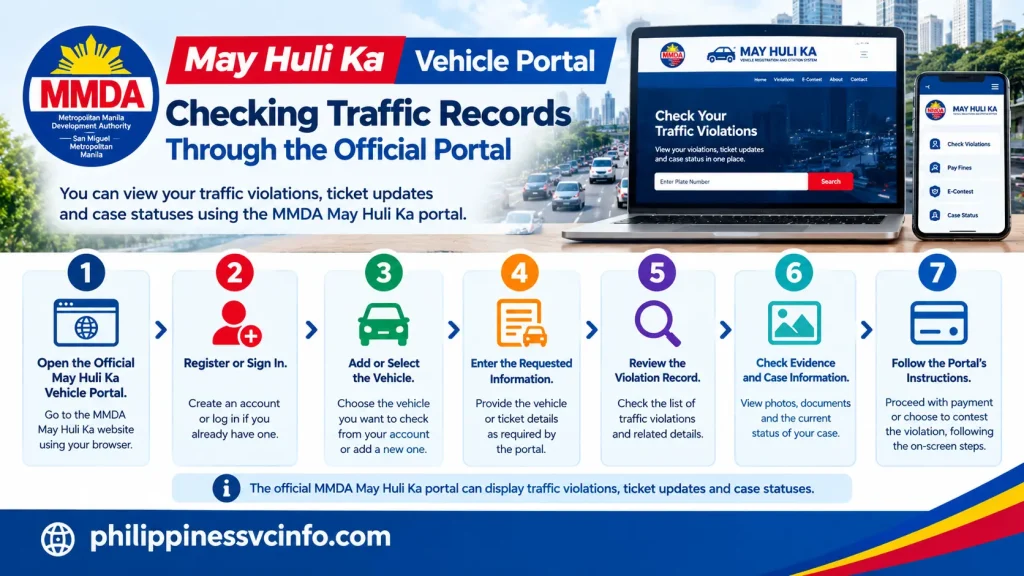
A typical process is:
- Open the official May Huli Ka Vehicle Portal.
- Register or sign in if an account is required.
- Add or select the relevant vehicle.
- Enter the requested vehicle or ticket information.
- Review the displayed violation record.
- Check the available evidence and case information.
- Follow the portal’s instructions for payment or contest procedures.
The official portal states that it can display traffic violations, ticket updates and case statuses.
Important: Portal procedures and available fields can change. Check the current instructions shown on the official MMDA system instead of relying on an old tutorial or screenshot.
MMDA Flood Control and Public Information
MMDA’s responsibilities also extend into flood-control and sewerage management. Official project material describes functions including drainage and waterways management, maintenance of flood-control infrastructure, operation of pumping stations and flood monitoring and information dissemination.
This makes the MMDA website relevant during periods of heavy rain, particularly when residents need official information about metro-wide conditions and agency operations.
The wider Metro Manila Flood Management Project also identifies solid waste in waterways as an important flood-management concern, with MMDA leading the project’s solid-waste component in cooperation with local governments and national agencies.
Where to Look for Flood Information
When severe weather affects Metro Manila, start with official government sources rather than forwarded messages. Check the MMDA website and relevant official MMDA project pages for announcements and operational information.
For broader flood-management information, the Metro Manila Flood Management Project also provides official project resources:
The most useful approach is to check the publication date and the specific location mentioned in an advisory. Flood conditions can vary significantly between cities and roads, so a general metro-wide announcement should not automatically be treated as a condition at every location.
MMDA and Metro Manila Waste Management
Another area connected with MMDA’s work is solid waste management. Official MMDA project information describes activities aimed at reducing waste entering waterways and improving waste-management practices across Metro Manila.
The agency’s role can include coordination, policy implementation and programmes designed to improve waste disposal and management. This is particularly relevant to flood management because waste accumulation in waterways can affect drainage and pumping operations.
How to Contest an MMDA Traffic Violation
Finding a traffic citation in the MMDA system does not necessarily mean the record cannot be challenged. The official May Huli Ka system includes a Contest function connected with the Traffic Adjudication Division (TAD), allowing motorists to submit a dispute through the authorised system.
A contest should be based on the circumstances of the citation and supported by relevant information. Rather than submitting a vague explanation, prepare the vehicle details, citation information and any evidence that helps explain why the violation should be reviewed.
Information to Prepare for an E-Contest
Before starting an MMDA violation dispute, have the following information available where applicable:
- May Huli Ka account
- Vehicle plate number
- Certificate of Registration details
- Violation or ticket reference
- Notice of Violation information
- Photographs or other supporting evidence
- Dashcam footage, when relevant
- Official documents that support your explanation
- A clear description of the reason for contesting the citation
The current May Huli Ka privacy statement confirms that the system can receive contest submissions and supporting materials such as photographs, videos, statements and documents. It also states that violation records and evidence may be processed for adjudication purposes.
MMDA E-Contest Process
If the portal presents an online contest option for your case, the general workflow is:
- Sign in to the official May Huli Ka portal.
- Locate the relevant violation or notice.
- Select the available contest option.
- Review the citation details carefully.
- Explain the grounds for your dispute.
- Attach relevant supporting evidence.
- Check the information before submission.
- Submit the contest through the official system.
- Keep the confirmation or reference information.
- Monitor the case status for subsequent updates.
The official system states that it supports case-status monitoring and contest-related transactions.
Important: Your supplied MMDA material specifies a 10-working-day period from receipt of the Notice of Violation for filing a contest. Because deadlines can depend on the applicable citation procedure, check the current notice and official portal instructions before relying on a deadline.
What Evidence Can Help With a Traffic Dispute?
Evidence should directly relate to the violation being challenged. For example, a motorist may have photographs showing road conditions, documents establishing relevant vehicle information or dashcam footage that provides additional context.
A useful submission should be:
- Clear
- Relevant to the specific citation
- Legible
- Complete
- Consistent with the explanation provided
Avoid uploading unrelated files simply to make the submission appear more detailed. The purpose of supporting evidence is to give the adjudicating authority information relevant to the particular case.
The May Huli Ka privacy statement specifically identifies submitted photographs, videos, statements and documents among the information the system may process for contest and adjudication purposes.
MMDA Payment Options for Traffic Penalties
Once a traffic citation has been confirmed and there is no pending dispute that prevents payment, motorists should use the payment channels authorised for the transaction.
Your supplied service information identifies several digital payment options, including:
- GCash
- Maya
- Bayad App
- iCash
- LANDBANK Link.BizPortal
The exact payment option presented to a motorist may depend on the current MMDA arrangement and the type of transaction. Always verify the payment instructions shown by the official MMDA system before transferring money.
How to Pay an MMDA Fine Online

A typical digital payment process is straightforward:
- Open the authorised payment application or website.
- Go to its Bills Payment or equivalent section.
- Search for the relevant MMDA biller or service.
- Enter the required ticket, assessment or reference number.
- Check the displayed details carefully.
- Confirm the payment amount.
- Complete the transaction.
- Save the electronic receipt or transaction reference.
Do not delete the receipt immediately after paying. A payment may take time to appear in the relevant record, and the reference can be useful if you need to follow up.
The official May Huli Ka privacy statement confirms that payment references from accredited payment channels can form part of the system’s transaction records.
What If an MMDA Payment Has Not Updated?
A common concern after paying a traffic penalty is seeing the citation still marked as unpaid.
If this happens, avoid paying a second time immediately. First:
- Check whether the payment was successfully completed.
- Compare the reference number with your MMDA record.
- Keep the digital receipt.
- Allow the relevant processing or clearing period.
- Check the official portal again.
- Contact the appropriate MMDA support channel if the status remains incorrect.
The most useful information when requesting assistance is usually the payment reference, ticket information, transaction date and proof of payment.
Keep your receipt until the MMDA record reflects the correct payment status.
When Do You Need to Visit an MMDA Office?
Many users can complete basic information checks and some motorist transactions online. However, not every MMDA matter can necessarily be completed digitally.
An in-person visit may be relevant when a transaction involves:
- Physical retrieval of an item or document
- A matter requiring an office appointment
- A hearing or adjudication proceeding
- A transaction that cannot be completed through the online system
- A complicated case requiring staff assistance
The exact office, counter and procedure can depend on the service involved. Check the latest instructions through the official MMDA website before travelling.
Documents to Prepare for an MMDA Office Visit
Arriving without the necessary records can turn a short transaction into another trip. Before visiting an MMDA office, prepare documents relevant to your specific transaction.
Depending on the case, useful documents may include:
| Document | Why it may be needed |
|---|---|
| Notice of Violation | Identifies the citation |
| Ticket or reference number | Helps staff locate the transaction |
| Government-issued ID | Supports identity verification |
| Passport | Useful identification for foreign residents |
| Driver’s licence | Relevant for motorist transactions |
| LTO Certificate of Registration | Confirms vehicle information |
| Official Receipt | May support vehicle or transaction records |
| Payment receipt | Helps verify a completed payment |
| Contest reference | Useful for an existing dispute |
Only bring documents relevant to the transaction. Requirements can vary, so confirm the current instructions before visiting.
MMDA Office Transactions for Foreign Residents
Foreign residents who drive in Metro Manila may also encounter MMDA traffic and vehicle-related services. The same basic principle applies: use the official vehicle and citation information rather than relying on informal registration details.
A foreign resident should keep relevant documents accessible, particularly:
- Passport or valid government identification
- Philippine driver’s licence, where applicable
- Vehicle Certificate of Registration
- Payment records
- Notice of Violation
- May Huli Ka account information
The May Huli Ka system’s privacy documentation indicates that it can process vehicle information, violation identifiers, account information and payment references as part of its official functions.
How MMDA Handles Personal Information
Motorists should understand that an online traffic system naturally handles personal and vehicle-related information. The official May Huli Ka privacy statement says MMDA processes information for purposes including identifying motorists, matching violation records, managing evidence, handling contests and facilitating payments.
The statement also describes security measures such as access controls, encryption where applicable, system monitoring, backups and staff training. It notes that no system is completely free from risk, so users should also protect their own accounts and devices.
Safe Practices When Using MMDA Online Services
Use these habits whenever accessing an MMDA portal:
- Type the official website address yourself when possible.
- Check that you are using an official MMDA domain.
- Avoid entering account details into unfamiliar websites.
- Do not send payment to a personal bank account.
- Be cautious of unexpected payment links.
- Keep receipts and transaction references.
- Do not share passwords or one-time authentication codes.
- Use a secure internet connection for sensitive transactions.
- Check the official portal when a message seems suspicious.
This is particularly important because traffic violations and payment requests can be attractive targets for fraudulent messages.
MMDA Online Services at a Glance
The following table gives a practical way to decide where to begin:
| Service | Where to start | Main purpose |
|---|---|---|
| General MMDA information | mmda.gov.ph | Agency news, programmes and public information |
| Traffic information | Official MMDA website | Traffic-related advisories and announcements |
| Vehicle violations | May Huli Ka Vehicle Portal | View violations and ticket information |
| Contest | May Huli Ka portal | Submit and monitor eligible violation contests |
| Flood information | MMDA and flood-management resources | Flood-control and operational information |
| Payment | Authorised MMDA payment channels | Settle eligible traffic penalties |
| Office transaction | Official MMDA information | Determine current location and requirements |
The May Huli Ka portal currently states that users can register vehicles, view traffic violations, receive ticket updates and monitor case status. It also supports multiple vehicles under one account, including fleet management for businesses.
Common MMDA Portal Problems and What to Do

The Vehicle Is Not Showing
First, check that the plate and vehicle information were entered correctly. If the problem continues, review the portal’s current registration instructions or use its official support channel.
The Ticket Information Looks Incorrect
Do not alter or ignore the record. Save the relevant details and review the available contest process if you believe the citation is inaccurate.
A Payment Has Been Made but the Violation Remains
Keep your payment receipt and reference number. Allow the applicable processing time, then verify the record again before contacting support.
The Website Looks Different From an Old Tutorial
Government portals are updated. A screenshot from an older article may no longer match the current interface. Follow the instructions displayed on the live official portal instead.
You Received a Suspicious Payment Message
Do not click an unfamiliar payment link or provide account credentials. Go directly to the official MMDA website or authorised portal and verify whether the alleged citation exists.
Quick Checklist Before Using an MMDA Service
Before starting an online MMDA transaction, check:
- I am using an official MMDA website or authorised portal.
- I have my plate or ticket information ready.
- My vehicle information is accurate.
- I have supporting documents if I need to contest a citation.
- I have saved previous payment references.
- I understand whether my transaction is online or requires an office visit.
- I have checked the latest instructions rather than relying on an old screenshot.
This small preparation step can prevent avoidable errors, particularly when dealing with traffic records and payment references.
How to Navigate the MMDA Website
The easiest way to use the MMDA website is to begin with the purpose of your visit rather than searching randomly through pages.
If you need general information, announcements or agency resources, start at the main MMDA website. If you need information about a particular traffic citation, move to the relevant authorised motorist portal instead.
A practical navigation pattern is:
General information → MMDA official website → relevant service → specialised portal → transaction or support
This approach reduces the chance of entering information on an unofficial website.
Official MMDA Resources
Keep these resources bookmarked if you regularly drive or live in Metro Manila:
The first is the main agency website, while the other resources serve more specialised purposes.
MMDA Services for Different Users
The information people need from MMDA can vary depending on why they are accessing the service.
For Motorists
Motorists are most likely to need:
- Traffic advisories
- Violation records
- Ticket information
- Payment instructions
- Contest procedures
- Case-status updates
- Vehicle-related information
Keep your plate, vehicle registration and ticket references available before beginning an online transaction.
For Foreign Residents
Foreign residents driving in Metro Manila should pay particular attention to identification and vehicle documentation. A passport or other accepted identification may be useful for an in-person transaction, while vehicle records are important for citation-related matters.
Do not assume that a process described for one type of applicant automatically applies to every foreign resident. Check the current requirements for the specific service.
For Students
Students who drive or travel around Metro Manila may use MMDA information for traffic advisories, road conditions and public announcements. Students who are new to the region should also become familiar with the difference between an MMDA-wide service and a service administered by their particular city or municipality.
For the General Public
Residents can use MMDA resources for information concerning traffic management, flood-control activities, public advisories, sanitation-related programmes and other metro-wide concerns.
During severe weather, always consider both the MMDA-wide information and the situation in the specific city or road where you are located.
Common Mistakes to Avoid When Using MMDA Services

A few simple mistakes can make a government transaction more difficult than necessary.
Using an Unofficial Website
Search results can contain third-party pages that look similar to official government services. Check the domain before entering personal, vehicle or payment information.
Relying on Old Screenshots
Online government portals can change their menus and forms. A guide published months or years ago may show an interface that no longer exists.
Losing Payment References
A successful payment should always be documented. Save the electronic receipt, reference number and relevant transaction details.
Waiting Too Long to Contest a Citation
If you believe a violation is incorrect, check the applicable contest deadline immediately. Do not wait until the last day to begin gathering evidence.
Paying Through an Unverified Link
Never assume that a payment request is legitimate because it contains your plate number or other familiar information. Verify the citation independently through an official MMDA system.
Practical MMDA Checklist
Before finishing an MMDA transaction, confirm the following:
- Website: Am I on an official MMDA or authorised portal?
- Vehicle: Did I enter the correct plate and vehicle information?
- Citation: Does the ticket or violation belong to the correct vehicle?
- Evidence: If contesting, have I attached relevant supporting material?
- Payment: Did I verify the biller, amount and reference number?
- Receipt: Did I save proof of payment?
- Deadline: Have I checked any applicable submission period?
- Follow-up: Do I know where to check the status of my transaction?
This checklist is particularly useful for first-time users because it separates the transaction into small, verifiable steps.
Recommended Visuals for an MMDA Guide
MMDA Website Screenshot or Official Homepage
ALT text: MMDA official website and Metro Manila government services
Filename: mmda-official-website-guide.jpg
Style: Clean website-focused informational image
Placement: After the introduction
May Huli Ka Traffic Portal
ALT text: May Huli Ka MMDA vehicle violation portal
Filename: may-huli-ka-mmda-vehicle-portal.jpg
Style: Motorist-service illustration or authorised portal screenshot
Placement: Traffic violations section
MMDA Traffic Management
ALT text: MMDA traffic management and road safety services in Metro Manila
Filename: mmda-traffic-management-services.jpg
Style: Professional government-service visual
Placement: Traffic services section
MMDA Flood Management
ALT text: MMDA flood control and monitoring operations in Metro Manila
Filename: mmda-flood-management-metro-manila.jpg
Style: Informational flood-management visual
Placement: Flood-control section
Frequently Asked Questions About MMDA
Final Takeaway for Using MMDA Services
The MMDA website is the best starting point when you need official information about the agency’s programmes, announcements and metro-wide services. For motorists, the specialised May Huli Ka Vehicle Portal provides a more focused route for checking traffic violations, reviewing ticket information and following available contest or case-status procedures.
The safest approach is straightforward: begin with an official MMDA source, confirm the exact service you need, prepare the correct vehicle or transaction information, and keep evidence of every payment or submission. If a citation needs to be challenged, review the applicable deadline and evidence requirements promptly.
For flood-related concerns, use official MMDA and flood-management resources while considering the conditions in your specific area. And whenever a message asks for payment or personal information, verify it independently through an official channel before taking action.
Discover What You Need to Know:
- Philippine Coast Guard 2026 : Official Website, Services & Contact Guide
- Bangko Sentral ng Pilipinas 2026 : Official Website, Services, Regulations & Consumer Guide
- LTFRB Philippines 2026 : Complete Guide Requirements, Registration, Franchise & Renewal
- PAIS Admin Philippine 2026: PNP Login, Registration, Website & Access Guide








