Davao City Portal: Complete Online Services, Registration, Login & Payment Guide 2026
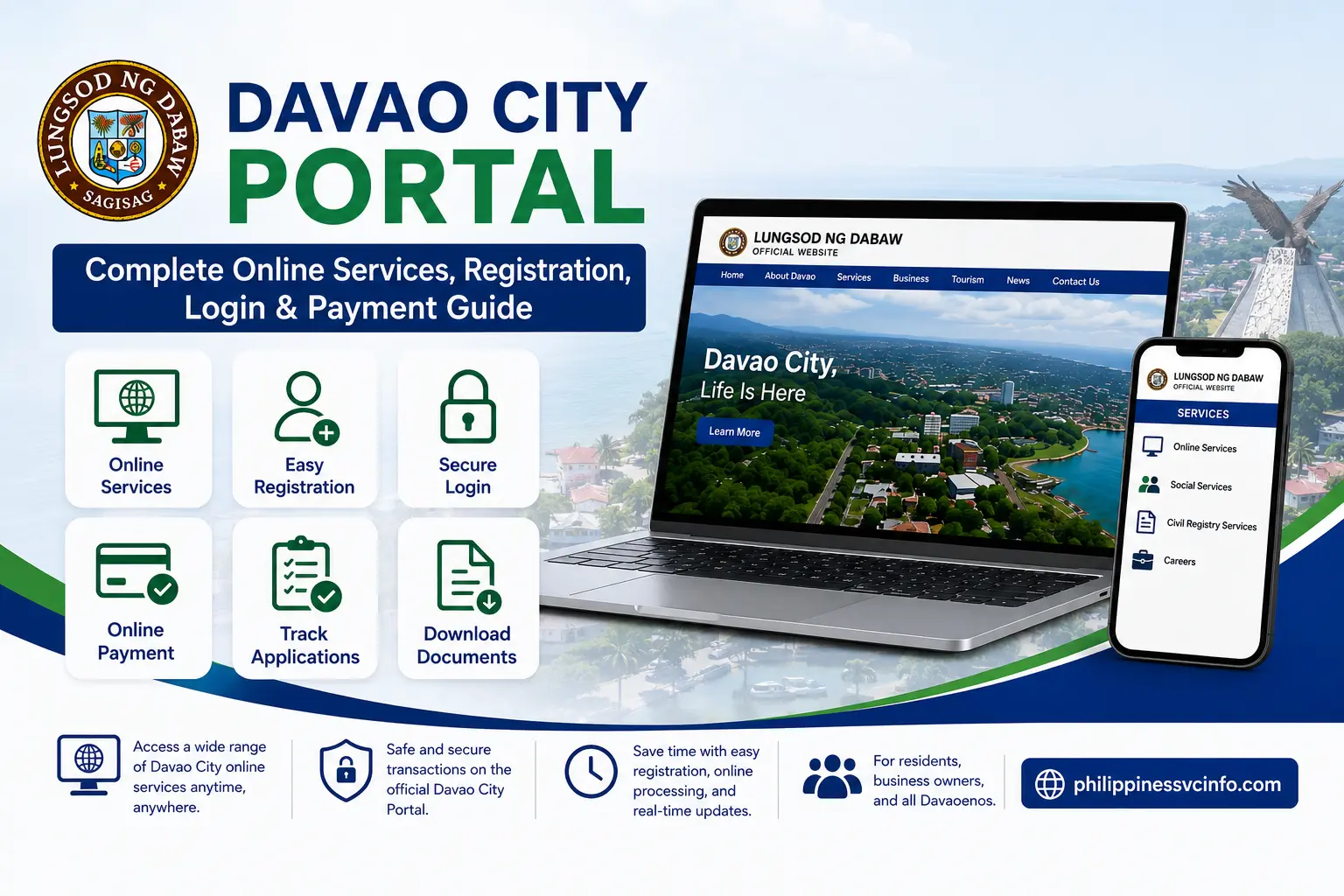
The Davao City Portal makes it easier for residents, businesses, professionals, and other members of the public to access selected local government services online. Instead of visiting a city office for every transaction, users can access digital systems for business permits, building permits, occupational permits, special permits, community tax certificates, professional tax receipts, payments, and other services.
The main official website is the City Government of Davao:
The city government also provides a dedicated online-services platform:
The official online-services page describes the platform as a digital way to process permits, pay taxes, and request public services.
Important: The Davao City Portal is not necessarily one single account system for every transaction. Different services can use their own online systems. Always follow the official link provided by the City Government of Davao for the particular service you need.
What Is the Davao City Portal?
The Davao City Portal refers broadly to the official digital services provided by the City Government of Davao. Through the city’s website and linked online systems, users can find information and access several government transactions without relying entirely on physical visits.
The official Davao City website currently highlights services including the Online Business Permit and Licensing System, Online Building Permit System, Online Cedula Application, Online Payment, Social Services, Civil Registry Services, and Career Opportunities.
The dedicated online-services page provides additional systems, including:
- Online Business Permit and Licensing System
- Occupational Permit System
- Online Building Permit System
- Special Permit System
- Online Professional Tax Receipt System
- Online Cedula Application
- Lingap Assistance
- Davao City Reports
- Online Payment
This means that when searching for Davao City Portal, users should first identify the exact government transaction they want to complete.
Davao City Portal Official Website
The primary official website is:
From the official homepage, users can navigate to Services, government departments, online transactions, announcements, contact information, and other city resources.
Using official government websites is important because online transactions can involve personal information, business records, payment details, and government documents.
Davao City Portal Registration
Registration requirements can vary depending on the specific online service. Some Davao City services may direct users to a dedicated application system rather than requiring registration on the main city website.
Before creating an account, identify the service you need and open it from an official Davao City page.
Step-by-Step Davao City Portal Registration
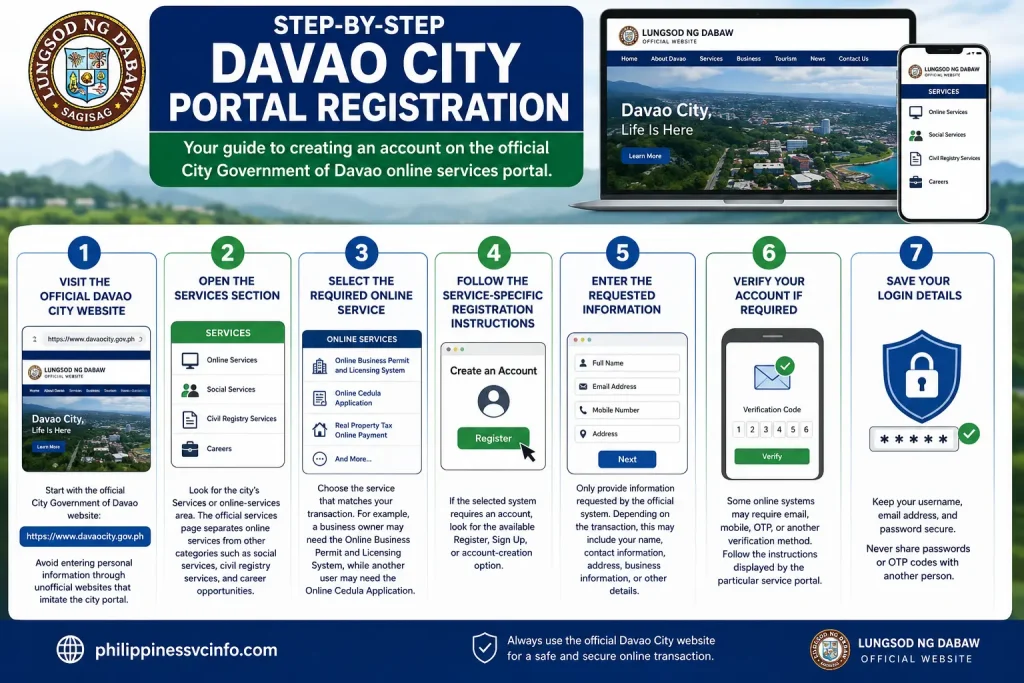
1. Visit the official Davao City website
Start with the official City Government of Davao website:
Avoid entering personal information through unofficial websites that imitate the city portal.
2. Open the Services section
Look for the city’s Services or online-services area. The official services page separates online services from other categories such as social services, civil registry services, and career opportunities.
3. Select the required online service
Choose the service that matches your transaction. For example, a business owner may need the Online Business Permit and Licensing System, while another user may need the Online Cedula Application.
4. Follow the service-specific registration instructions
If the selected system requires an account, look for the available Register, Sign Up, or account-creation option.
5. Enter the requested information
Only provide information requested by the official system. Depending on the transaction, this may include your name, contact information, address, business information, or other details.
6. Verify your account if required
Some online systems may require email, mobile, OTP, or another verification method. Follow the instructions displayed by the particular service portal.
7. Save your login details
Keep your username, email address, and password secure. Never share passwords or OTP codes with another person.
Important Registration Note
The exact registration fields, verification process, and account requirements can change between Davao City online systems. Therefore, do not assume that every Davao City Portal service uses identical registration requirements.
Davao City Portal Login
Once you have created an account on a particular Davao City online service, you can normally return to that service’s official portal and use its login option.
How to Login
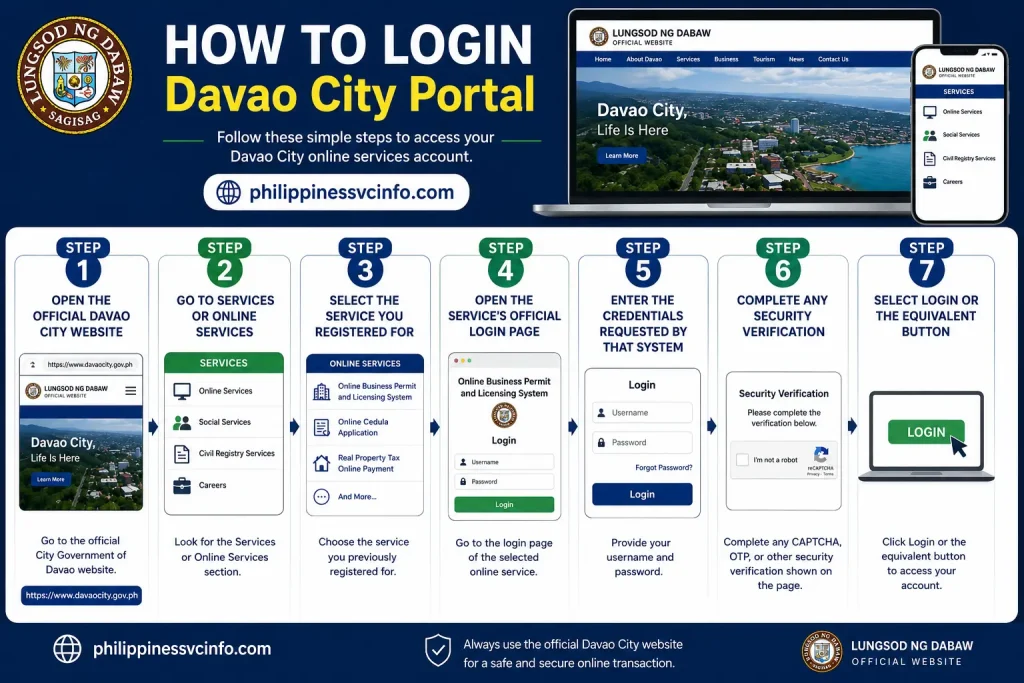
Step 1: Open the official Davao City website.
Step 2: Go to Services or Online Services.
Step 3: Select the service you previously registered for.
Step 4: Open the service’s official login page.
Step 5: Enter the credentials requested by that system.
Step 6: Complete any security verification shown on the page.
Step 7: Select Login or the equivalent button.
After successful authentication, the available dashboard or transaction features depend on the particular service.
Davao City Portal Login Problems
Users may occasionally experience problems when attempting to access an online government service. Before contacting support, check the following:
Incorrect Password
Make sure Caps Lock is not enabled and confirm that you are using the correct account credentials. If the system provides a Forgot Password option, use the official password-recovery process.
Account Verification Problem
If registration has not been completed, check whether the system requires email or mobile verification.
Website Not Loading
Try refreshing the page, checking your internet connection, or using an updated browser. If the service is temporarily unavailable, check the official Davao City website for announcements.
Wrong Portal
One common source of confusion is using the wrong online system. The Davao City government operates multiple digital services, so make sure the service you selected matches your transaction.
The city’s official website currently notes that some office websites may be under maintenance and advises users to contact the LGU through the published telephone number when necessary.
Davao City Portal Requirements
Requirements depend heavily on the service being requested. There is no single universal document list that applies to every Davao City Portal transaction.
For example, business permits, building permits, occupational permits, cedula applications, and professional tax receipts are separate services and can have different requirements.
The official Online Building Permit System, for example, supports online application, assessment, payment, release, processing-status tracking, and a pre-evaluation feature intended to help applicants determine appropriate documents.
General Preparation Checklist
Before starting an online transaction, prepare:
- Valid personal identification, when required
- Accurate personal information
- Active contact information
- Relevant business documents, if applying for a business service
- Application or reference number, when applicable
- Digital copies of supporting documents when requested
- Payment information if the transaction includes an online fee
- A working email address if the service requires electronic notifications
Always check the specific requirements displayed by the official service before submitting an application.
Davao City Portal Online Services
One of the main advantages of the Davao City Portal is the range of government transactions available through online systems.
The official Davao City online-services page confirms several important digital services.
1. Online Business Permit and Licensing System
The Online Business Permit and Licensing System (OBPLS) allows users to process business permit transactions through a web-based system.
According to the official Davao City website, the system supports applications for new business permits and renewals, online payments, and online issuance of approved business permits.
This can be particularly useful for business owners who want to reduce unnecessary office visits and monitor their permit transaction electronically.
2. Online Building Permit System
The Online Building Permit System provides digital processing for building permit transactions.
The official service supports:
- Online application
- Online assessment
- Online payment
- Online release of approved permits
- Processing-status tracking
- Optional pre-evaluation
Applicants should review the document requirements carefully before submitting plans or supporting materials.
3. Online Cedula Application
The Online Cedula Application allows individuals to apply for a Community Tax Certificate through a web-based system.
The official Davao City information states that the system also provides an option for online payment.
4. Occupational Permit
The Occupational Permit System allows applicants to submit an application and requirements online and print an approved permit through the system when available.
5. Special Permit
The Special Permit System provides a digital process for applying, submitting requirements, and printing an approved permit online.
6. Professional Tax Receipt
Professionals can use the Online Professional Tax Receipt System to register, make online payments, and request the issuance of their professional tax receipts.
Davao City Portal Appointment
Not every government transaction can be completed entirely online. Some applications may still require document verification, an inspection, an original document, or an in-person visit to the appropriate city office.
If your selected service requires an appointment, begin from the official Davao City website rather than using an unofficial booking page.
How to Check for an Appointment
- Open the official Davao City website.
- Go to the Services or relevant department section.
- Identify the office responsible for your transaction.
- Open the official online service or appointment facility provided for that department.
- Review the available appointment instructions.
- Select the service or transaction you need, if an appointment system is available.
- Enter the information requested by the system.
- Select an available schedule when the system provides appointment slots.
- Review the information before submitting the appointment.
- Save the confirmation or reference details provided by the system.
The exact appointment procedure can vary by department and service, so users should follow the instructions displayed on the official system rather than assuming that every Davao City Portal transaction uses the same booking process.
What to Bring to an Appointment
If an in-person visit is required, prepare the documents associated with your application. Depending on the transaction, you may need:
- Valid identification
- Application or reference number
- Printed or electronic confirmation
- Original supporting documents
- Copies of required documents
- Payment confirmation, when applicable
It is also useful to check the relevant department’s instructions before travelling to a city office.
Davao City Portal Payment
Online payment is another important part of the city’s digital services. Certain Davao City online systems allow applicants to complete payments electronically instead of paying entirely through an office counter.
The official Davao City online-services information includes Online Payment among its available services.
How to Make an Online Payment
The exact payment procedure depends on the service and payment system being used.
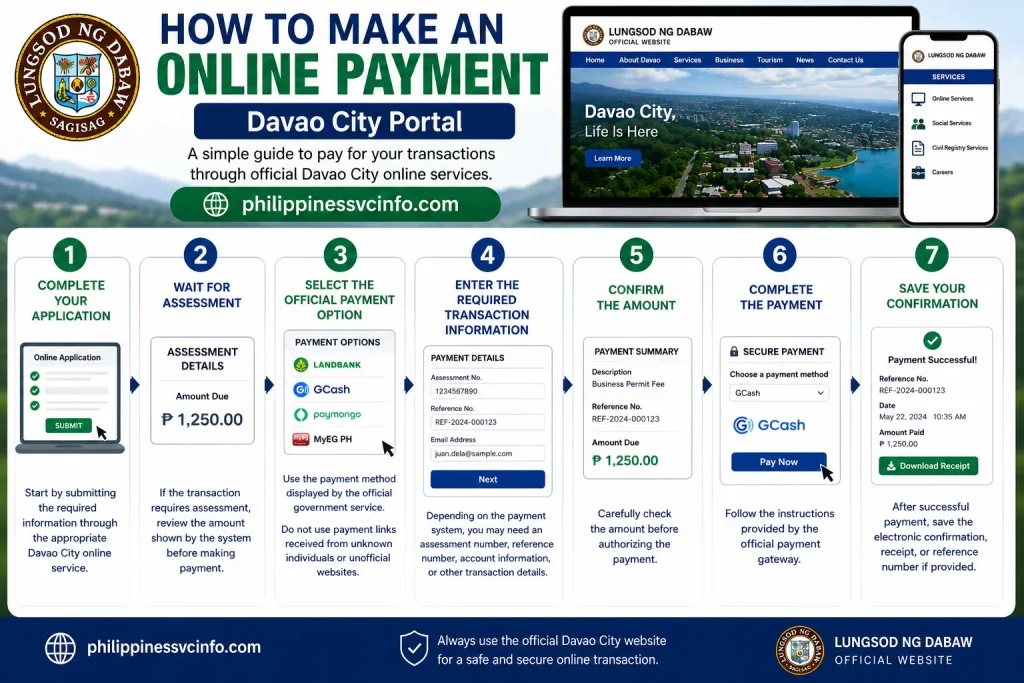
Step 1: Complete your application
Start by submitting the required information through the appropriate Davao City online service.
Step 2: Wait for assessment
If the transaction requires assessment, review the amount shown by the system before making payment.
Step 3: Select the official payment option
Use the payment method displayed by the official government service. Do not use payment links received from unknown individuals or unofficial websites.
Step 4: Enter the required transaction information
Depending on the payment system, you may need an assessment number, reference number, account information, or other transaction details.
Step 5: Confirm the amount
Carefully check the amount before authorizing the payment.
Step 6: Complete the payment
Follow the instructions provided by the official payment gateway.
Step 7: Save your confirmation
After successful payment, save the electronic confirmation, receipt, or reference number if provided.
Payment Safety Tips
When using the Davao City Portal for online payments:
- Confirm that you are on an official government website.
- Check the website address before entering payment information.
- Never share your OTP or password with another person.
- Do not send payment to a personal bank account unless the official system specifically instructs you to do so.
- Keep your transaction reference number.
- Save your electronic receipt.
- Contact the relevant government office if payment status does not update.
The payment options shown to you can depend on the specific Davao City service, so avoid assuming that every service supports the same payment methods.
Davao City Business Permit Online
Business owners are among the users who can benefit significantly from Davao City’s online services.
The official city website provides access to the Online Business Permit and Licensing System (OBPLS). The system supports new business permit applications and renewals, online payment, and online issuance of approved business permits.
How to Start a Business Permit Transaction
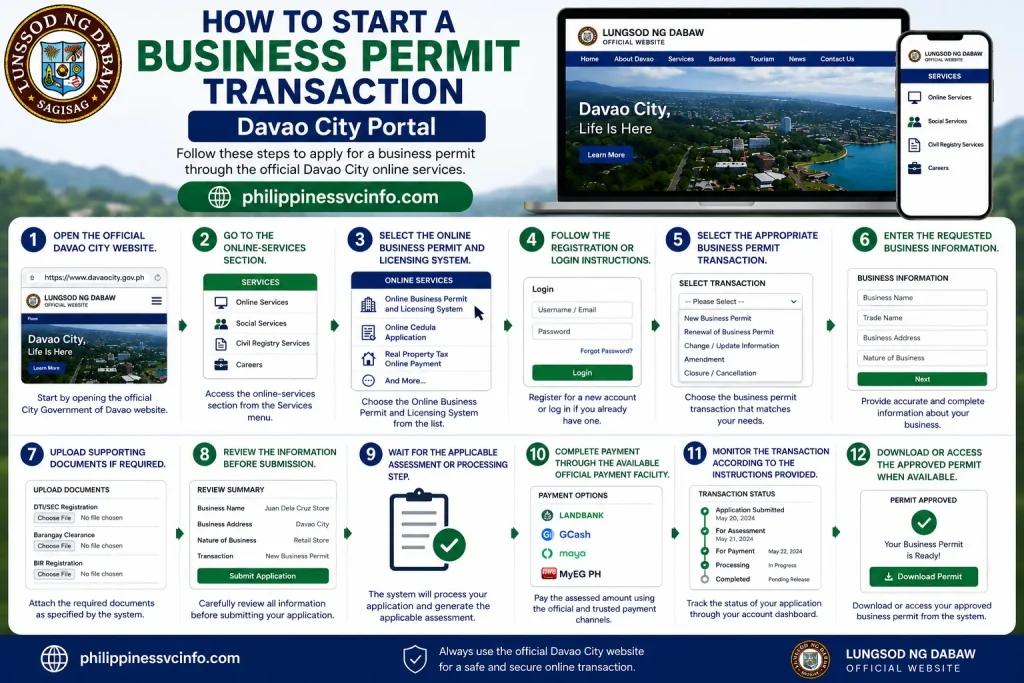
- Open the official Davao City website.
- Go to the online-services section.
- Select the Online Business Permit and Licensing System.
- Follow the registration or login instructions shown by the system.
- Select the appropriate business permit transaction.
- Enter the requested business information.
- Upload supporting documents if required.
- Review the information before submission.
- Wait for the applicable assessment or processing step.
- Complete payment through the available official payment facility.
- Monitor the transaction according to the instructions provided.
- Download or access the approved permit when the system makes it available.
The required documents and processing steps can depend on the type of business and the transaction being submitted. Applicants should therefore check the current requirements in the official system before beginning an application.
Davao City Building Permit Online
The Online Building Permit System is another important service available through the Davao City online-services infrastructure.
According to the city’s official information, the system supports online application, assessment, payment, release, processing-status tracking, and pre-evaluation.
This can help applicants handle several stages of the building permit process electronically.
General Process
1. Access the official building permit service
Begin from the Davao City Government’s official website.
2. Review the requirements
Before starting an application, check what plans, forms, technical documents, and other materials are required for your project.
3. Submit the application online
Enter the requested project and applicant information.
4. Upload supporting documents
Submit the digital files requested by the system.
5. Complete assessment
The application may undergo evaluation and assessment through the relevant city process.
6. Pay applicable fees
If the system provides an online payment option for your transaction, follow its official payment instructions.
7. Track processing
The official system provides processing-status functionality, allowing applicants to monitor the progress of their application.
8. Receive or access the permit
When the application is approved and the permit is released through the system, follow the displayed instructions for accessing it.
Davao City Cedula Online
A Cedula, or Community Tax Certificate, is another service connected with Davao City’s online systems.
The official city website lists an Online Cedula Application and states that users can apply for a Community Tax Certificate online and make an online payment.
General Online Cedula Process
- Open the official Davao City online-services platform.
- Select Online Cedula Application.
- Follow the instructions displayed by the system.
- Enter the requested personal information.
- Review your information carefully.
- Submit the application.
- Complete the applicable payment process.
- Save your transaction details.
- Follow the system’s instructions for receiving or accessing the certificate.
Because government systems can be updated, always use the requirements and instructions currently displayed on the official portal.
Davao City Occupational Permit
The city also provides an Occupational Permit System as part of its online services.
The official Davao City website states that applicants can submit applications and requirements online and print an approved occupational permit through the system when the transaction has been completed.
Basic Process
- Open the official online-services platform.
- Select the Occupational Permit System.
- Register or log in if required.
- Complete the application.
- Submit the required documents.
- Follow the assessment and payment instructions.
- Monitor the application.
- Access or print the approved permit when available.
The specific requirements can vary, so applicants should use the official system’s current instructions.
Davao City Professional Tax Receipt
Professionals can also access the Online Professional Tax Receipt System.
The official city information says the system allows users to register, make online payments, and request issuance of their professional tax receipts.
This is particularly useful for professionals who want to complete eligible parts of their tax-receipt transaction electronically.
Steps
- Visit the official Davao City online-services page.
- Open the Professional Tax Receipt System.
- Create an account or log in when required.
- Enter the requested professional information.
- Review the transaction.
- Follow the assessment instructions.
- Complete the available payment process.
- Keep your payment reference.
- Follow the system instructions for receipt issuance.
Davao City Civil Registry Services
The official Davao City website also provides a Civil Registry Services section.
Civil registry transactions can involve important personal records, so applicants should carefully follow the instructions of the relevant city office.
Before submitting a request, check:
- Type of document required
- Applicant information
- Identification requirements
- Supporting documents
- Applicable fees
- Delivery or claiming instructions
- Whether an online request or appointment is available
Do not rely on an old requirements list if the official portal has published updated instructions.
Davao City Social Services
The Davao City Government also provides online information and access points for social services.
The official website includes social-service resources among its city services, while the online-services platform lists Lingap Assistance as a digital service.
If you are applying for assistance, review the current eligibility requirements and documentary requirements carefully. Some assistance programs may require additional verification or an in-person step.
How to Track a Davao City Portal Application
Application tracking depends on the specific online system.
If the service provides a tracking facility:
- Log in to the relevant official portal.
- Open your application or transaction dashboard.
- Locate the relevant application.
- Check its current status.
- Review any messages or requests for additional documents.
- Complete any outstanding requirement.
- Save the reference number for future inquiries.
The Online Building Permit System, for example, specifically includes processing-status tracking.
If you cannot find a tracking option, contact the department responsible for the transaction rather than assuming that an application is cancelled or rejected.
Common Davao City Portal Problems
Website Is Not Opening
First, check your internet connection and reload the page. You can also try another modern browser.
If the problem continues, check the official Davao City website for maintenance notices or announcements.
Login Does Not Work
Verify your username, email address, and password. If a password-recovery option is available, use the official recovery process.
Payment Is Successful but Status Is Pending
Keep your payment confirmation and reference number. Avoid making a second payment immediately. Contact the relevant office or payment support channel if the transaction does not update.
Document Upload Fails
Check the file format, file size, image quality, and other requirements displayed by the particular service.
You Cannot Find the Service
Return to the official Davao City website and use its Services section. Different transactions can be located in different systems.
Davao City Portal Fees
There is no single standard fee for every transaction available through the Davao City Portal.
The amount you pay depends on the service, application type, assessment, and applicable local government charges. For this reason, users should check the amount displayed by the official system before making a payment.
For business permits, building permits, professional tax receipts, cedula applications, and other services, the applicable amount may be calculated or assessed differently.
Before Paying
Always check:
- Your transaction or application number.
- The service you are paying for.
- The assessed amount.
- Any applicable additional charges.
- The payment method available through the official system.
- The payment confirmation after completing the transaction.
Never rely on a fee quoted by an unofficial website when the official government system provides the current assessment.
Davao City Portal Account Security
Because online government services can involve personal and business information, account security is important.
Use a Strong Password
Create a password that is difficult for other people to guess. Avoid using obvious information such as your name, birthday, phone number, or simple sequences.
Protect Your OTP
If the system sends a one-time password, treat it as private information. Never provide your OTP to someone claiming to be a government employee unless the official system itself requires you to enter it.
Check the Website Address
Before logging in, check that you are using the official Davao City website or an official service linked from it.
The main official website is:
Avoid Suspicious Links
Do not enter your password, identification details, or payment information into links received from unknown social media accounts, messages, or emails.
How to Download Documents From the Davao City Portal
Some Davao City online systems may allow users to access or print documents after an application has been approved.
The exact download process depends on the service.
General Steps
- Open the official online service.
- Sign in if the service requires an account.
- Open your application or transaction.
- Check the current status.
- If the document has been issued, look for the available download, print, or release option.
- Download the document.
- Open the file and confirm that it is readable.
- Keep a secure copy for your records.
If there is no download option, follow the instructions provided by the relevant government office.
How to Check Davao City Portal Application Status
Application tracking is available for some online services, but the exact process differs between systems.
For example, the official information for the Online Building Permit System specifically identifies processing-status tracking as one of its features.

General Status-Checking Process
Step 1: Open the relevant official Davao City online service.
Step 2: Log in if required.
Step 3: Open your application dashboard.
Step 4: Find the relevant transaction.
Step 5: Review the displayed application status.
Step 6: Check whether additional documents or action are required.
Step 7: Keep your reference number until the transaction is completed.
If your application remains unchanged for longer than the timeframe provided by the relevant department, contact that department using its official contact information.
Davao City Portal Troubleshooting Guide
I Forgot My Password
Use the password-recovery option provided by the particular online service. Follow the instructions sent to your registered email or other verified contact method.
Do not create a second account simply because you forgot your password unless the official system specifically instructs you to do so.
I Cannot Register
Check whether you are using the correct service portal. Some Davao City transactions are handled through separate systems.
Also check that all required fields have been completed correctly.
My Application Was Not Submitted
Review the form for missing information, invalid fields, or documents that were not uploaded correctly. If the problem continues, save any reference information and contact the relevant office.
My Payment Did Not Appear
Keep your payment receipt or confirmation. Do not immediately submit another payment if the first transaction may have succeeded.
Contact the responsible office or payment provider using an official support channel.
The Portal Is Temporarily Unavailable
The city website or an individual online service may occasionally undergo maintenance. Check the official website for current notices before repeatedly attempting the same transaction.
Davao City Portal for Foreign Residents
Foreign residents may also need to use Davao City government services depending on their situation.
However, eligibility and documentary requirements can differ between services. A passport or immigration-related document may be relevant for some transactions, but users should not assume that every Davao City service accepts the same documents.
Before applying:
- Identify the exact service.
- Read its current requirements.
- Prepare the documents specifically requested.
- Check whether an in-person verification step is required.
- Use the official government contact channel if you need clarification.
Davao City Portal for Students
Students may interact with city government services for different reasons, including certain public assistance programs, civil registry transactions, permits, or other local services.
A student should first determine which government department provides the required service.
For applications involving personal records, assistance, or official documents, prepare the identification and supporting documents requested by the relevant service.
The main Davao City website provides access to city services and information for residents and other members of the public.
Davao City Portal for Business Owners
Business owners can use the city’s digital services for eligible permit and licensing transactions.
The Online Business Permit and Licensing System is designed to support business permit applications and renewals, payment, and online issuance of approved permits.
For a smoother application:
- Prepare business registration information.
- Check the current permit requirements.
- Make sure uploaded documents are readable.
- Review your business details before submitting.
- Keep your application reference number.
- Monitor your application status.
- Save payment confirmations.
- Download approved documents when available.
Davao City Portal Contact and Assistance
If you encounter a problem that cannot be resolved through the online system, contact the relevant Davao City government office through an official channel.
The official Davao City website provides government contact information and department resources.
For general city-government information, the official website is the best starting point because it can direct users to the appropriate department or service.
Frequently Asked Questions About Davao City Portal
Final Thoughts
The Davao City Portal provides a central starting point for accessing digital services offered by the City Government of Davao, including business permits, building permits, occupational permits, special permits, professional tax receipts, cedula applications, online payments, and other city services. Users should identify the specific service they need and follow the appropriate official government link, review the current requirements, complete the application carefully, use the official payment method when applicable, and save their transaction or application reference. For a safe and reliable experience, always start with the Davao City Government Official Website, helping residents, students, business owners, professionals, and other users navigate the Davao City Portal without relying on unofficial or third-party websites.
Discover What You Need to Know:
- PRC Renewal Complete Guide to Online License Renewal, Requirements, Fees & Appointment 2026
- NBI Online Registration: Complete Guide to Appointment, Account Creation, Application & Requirements
- PRC Online Appointment 2026: Registration, Booking and Requirements
- GSIS Website 2026: Complete Guide to Registration, Login, Loans, Benefits & Pension
- May Huli Ka Portal: Check MMDA Violations, Fines & E-Contest