
The Professional Regulation Commission (PRC) online appointment system lets professionals arrange various transactions through the LERIS portal without having to start the process entirely at a PRC office. Appointments may be used for services such as licensure applications, initial registration, PRC ID renewal, certifications, and other available transactions.
What Is a PRC Online Appointment?
A PRC online appointment is a scheduling service available through the LERIS portal that allows professionals to reserve a slot for selected transactions at a PRC branch or service centre. Booking an appointment helps applicants arrange their visit before going to the office and is generally required for PRC transactions that use the appointment system.
Common transactions that may require a PRC appointment include:
- Board exam applications – Submit an application for a professional licensure examination.
- Initial registration – Process registration after passing a licensure examination.
- PRC ID renewal – Schedule a visit to renew your Professional Identification Card.
- Certificate of Board Rating or Passing – Request applicable certification documents.
- License or board rating verification – Have professional records verified.
- Duplicate or replacement ID – Apply for a replacement PRC ID when applicable.
- Name or personal-record corrections – Request updates to information in PRC records.
- Document authentication or certification – Arrange applicable certification and authentication services.
Requirements Before Booking a PRC Online Appointment
Getting your information and documents ready before booking can make the PRC appointment process easier. The main preparations include setting up your LERIS account, checking your personal details, gathering service-specific documents, and making sure you have a reliable internet connection.

1. Create a LERIS Account
An active account on the PRC LERIS portal is required before you can proceed with online appointment scheduling. Prepare the following information and file:
- Valid email address
- Mobile number
- Personal details, including your name, date of birth, and address
- Recent 2×2 ID photo with a plain white background in JPEG format
2. Check Your Personal Information
Review your account details carefully before making an appointment. Make sure your information contains:
- Correct spelling of your name
- Accurate date of birth
- Properly entered address
- Correct gender and civil status
- Government-issued ID number, when required
Accurate information can help prevent issues when your appointment and supporting documents are checked.
3. Prepare the Required Documents
The documents you need depend on the PRC service you intend to book. Depending on your transaction, you may need:
- PSA Birth Certificate
- School credentials such as TOR, diploma, or RLE for certain courses
- Valid government-issued ID
- Payment for applicable PRC fees
- Other documents required for your specific transaction
Check the requirements for your particular service before booking so you can avoid delays during your PRC appointment.
4. Use a Stable Internet Connection
A reliable internet connection is useful when scheduling an appointment, particularly during busy periods when available slots may fill quickly. A stable connection can help you complete the booking process without interruptions and select an available schedule more smoothly.
Step-by-Step Guide to Booking a PRC Online Appointment
Once your LERIS account is ready, you can proceed with the appointment process. Follow each stage carefully, particularly when selecting the service, office, schedule, and payment method.
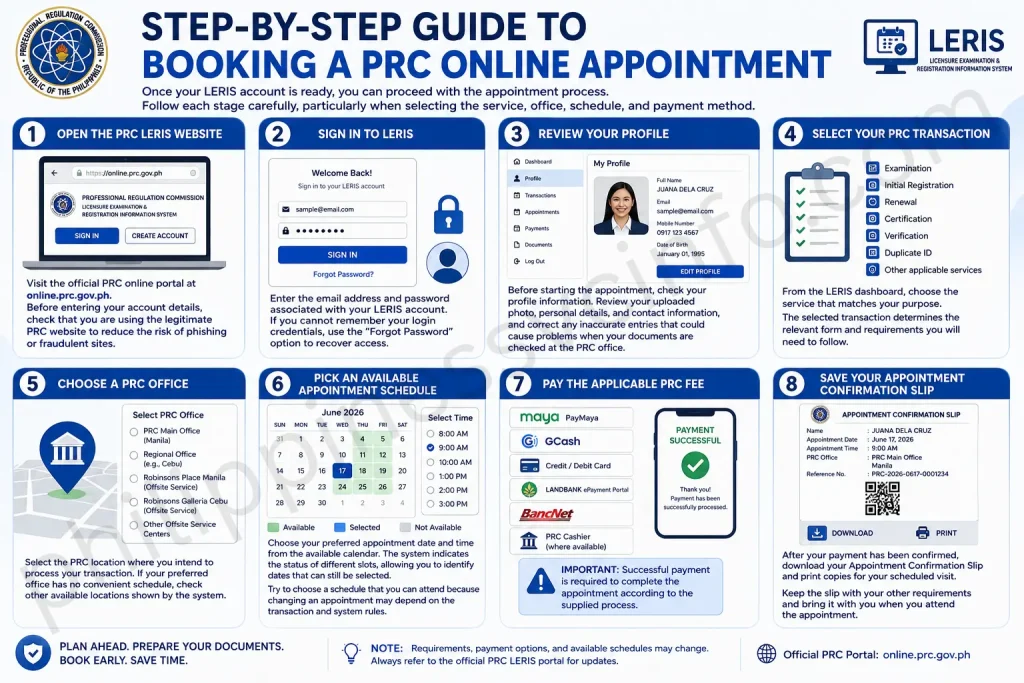
Step 1: Open the PRC LERIS Website
Visit the official PRC online portal at online.prc.gov.ph. Before entering your account details, check that you are using the legitimate PRC website to reduce the risk of phishing or fraudulent sites.
Step 2: Sign In to LERIS
Enter the email address and password associated with your LERIS account. If you cannot remember your login credentials, use the “Forgot Password” option to recover access.
Step 3: Review Your Profile
Before starting the appointment, check your profile information. Review your uploaded photo, personal details, and contact information, and correct any inaccurate entries that could cause problems when your documents are checked at the PRC office.
Step 4: Select Your PRC Transaction
From the LERIS dashboard, choose the service that matches your purpose. Available options may include:
- Examination
- Initial Registration
- Renewal
- Certification
- Verification
- Duplicate ID
- Other applicable services
The selected transaction determines the relevant form and requirements you will need to follow.
Step 5: Choose a PRC Office
Select the PRC location where you intend to process your transaction. Depending on the available options, this may include:
- PRC Main Office in Manila
- Regional Offices
- Offsite service centres, including selected Robinsons and other mall locations
If your preferred office has no convenient schedule, check other available locations shown by the system.
Step 6: Pick an Available Appointment Schedule
Choose your preferred appointment date and time from the available calendar. The system indicates the status of different slots, allowing you to identify dates that can still be selected.
Try to choose a schedule that you can attend because changing an appointment may depend on the transaction and system rules.
Step 7: Pay the Applicable PRC Fee
After selecting your appointment, proceed with the required payment. The supplied information lists these payment methods:
- PayMaya/Maya
- GCash
- Credit or debit card
- LandBank ePayment Portal
- BancNet
- PRC Cashier, where available
Important: Successful payment is required to complete the appointment according to the supplied process.
Step 8: Save Your Appointment Confirmation Slip
After your payment has been confirmed, download your Appointment Confirmation Slip and print copies for your scheduled visit.
The slip contains important appointment details, including:
- Your name
- Appointment date and time
- PRC office location
- QR code
- Reference number
Keep the slip with your other requirements and bring it with you when you attend the appointment.
What to Do on Your PRC Appointment Day
Your appointment day is the final stage of the online booking process. Arriving prepared can help you complete your transaction with fewer delays.
1. Arrive Before Your Scheduled Time
Plan to reach the PRC office around 30–60 minutes before your appointment. This gives you time to find the correct service area, organise your documents, and follow any instructions from onsite personnel.
2. Bring Your Complete Requirements
Carry your appointment confirmation slip together with all documents required for your transaction. Depending on the service, you may need:
- Valid IDs
- Original documents
- Photocopies of required documents
- Payment receipts, if you paid in advance
Check your requirements before leaving home so you don’t have to return because of a missing document.
3. Follow the Onsite Queue
After arriving, follow the queue or service procedure provided by PRC personnel. Transactions may be organised according to services such as:
- Renewal
- Examination application
- Initial registration
- Certification
Listen to the instructions of the staff, as the exact process may vary between transactions and offices.
4. Complete Biometrics and Photo Capture
Some transactions, particularly initial registration, may require additional identity-related procedures. PRC personnel may capture your:
- Digital signature
- Photograph
- Thumbmark
Follow the staff’s instructions during this stage to ensure the information is recorded correctly.
5. Receive Your Document or PRC ID
The release time depends on the type of transaction and whether additional verification is required. Based on the supplied information, some certificates may be released on the same day, renewal transactions may take around 1–2 hours, while documents requiring verification may take several days.
Before leaving the office, confirm whether your document or PRC ID is ready for release or whether you need to return on another date.
Common PRC Online Appointment Issues and Solutions
Even after following the correct booking process, applicants may encounter problems with appointment slots, payments, personal information, or the LERIS website. The following solutions can help you handle the most common issues.
1. No Available Appointment Slots
A “No Available Slots” message can appear when many applicants are trying to book appointments at the same time. You can try the following:
- Check the system again during early morning or late evening.
- Look for available schedules at another PRC office.
- Try booking around 2–3 weeks in advance when possible.
If your preferred branch is fully booked, checking other locations may give you more scheduling options.
2. Payment Is Not Reflected
If your payment does not immediately appear in your LERIS account, allow around 2–4 hours for the transaction to update. If the status remains unchanged, you can:
- Open the Payment section again to refresh the transaction.
- Check your email for a payment confirmation.
- Contact PRC support and provide your appointment or payment reference number.
Keep your payment receipt or confirmation until the transaction has been successfully reflected.
3. Incorrect Personal Information
If you discover incorrect information in your LERIS profile or PRC records, you may need to submit a request for correction to PRC. Depending on the information being changed, supporting documents may also be required.
Review your details carefully before proceeding with an appointment to reduce the risk of delays.
4. LERIS Website Errors or Downtime
The LERIS system may occasionally be unavailable while technical updates or maintenance are being carried out. If you experience a website error, try:
- Clearing your browser cache.
- Opening LERIS in another browser.
- Returning during off-peak hours.
If the problem continues, wait and try again later rather than repeatedly submitting the same transaction.
Tips for Securing a PRC Online Appointment
A little preparation can make it easier to find a suitable appointment slot and avoid problems on the day of your PRC transaction. Keep these practical points in mind:
- Avoid peak months: If possible, don’t wait until busy periods such as June or December to arrange your appointment.
- Apply early for board exams: Applicants planning to take a licensure examination should schedule their transaction as early as possible.
- Consider mall-based PRC centres: Check selected mall-based service centres, as they may offer additional appointment availability.
- Save your payment records: Keep digital copies of receipts, confirmation messages, and reference numbers so you can access them if a payment or appointment issue occurs.
- Review your documents: Before travelling to the PRC office, double-check your appointment details and make sure all required documents are complete.
FAQs About PRC Online Appointment
Conclusion
A PRC Online Appointment allows applicants to arrange selected PRC transactions through the LERIS system before going to a PRC office. Preparing your account, reviewing your personal information, and gathering the documents for your specific service can help prevent avoidable delays.Once you have selected the appropriate transaction, PRC office, appointment date, and available time, complete the applicable payment and save your Appointment Confirmation Slip. Keep this document accessible because it contains key details such as your appointment schedule, office location, QR code, and reference number.On the day of your appointment, bring the confirmation slip along with your valid IDs, original or photocopied requirements, receipts, and any other documents applicable to your transaction. If you encounter issues such as unavailable slots, delayed payment updates, or LERIS errors, use the recommended troubleshooting steps and check other PRC locations when appropriate.Good preparation is the key to a smoother PRC Online Appointment experience. By checking your information and requirements in advance and keeping your transaction records, you can reduce the chances of unnecessary delays during your PRC visit.
Discover What You Need to Know:
- GSIS Website 2026: Complete Guide to Registration, Login, Loans, Benefits & Pension
- May Huli Ka Portal: Check MMDA Violations, Fines & E-Contest
- PAIS PNP: Complete Guide to Login, Registration, Requirements & Account Access 2026
- DILG MISMO Portal Philippines: Registration, Login, Requirements & Online Services 2026
- DILG Official Website Guide: Services, Requirements, Online Applications & Forms 2026








