May Huli Ka is an MMDA online service in the Philippines for checking and managing applicable traffic violations. It allows motorists to search violation records using vehicle details, review citation information, pay eligible fines through available channels, manage vehicles, and submit an E-Contest when disputing a traffic citation.
What Is May Huli Ka?
May Huli Ka is an MMDA online service associated with the digital processing of traffic violations. The system uses information captured through traffic-monitoring technologies to support the recording and management of applicable violations.
Instead of relying entirely on a physical notice, motorists can use the May Huli Ka portal to look for available records and review information connected with a citation. The portal is particularly useful when a vehicle owner needs to confirm the status of a suspected violation before deciding what action to take.
The available functions can include:
- Checking recorded traffic violations
- Reviewing violation details
- Managing vehicles through the vehicle portal
- Receiving violation-related notifications
- Paying eligible fines through available payment channels
- Filing an online contest when a citation is disputed
The exact options shown can depend on the record and service available through the portal.
What Can You Do on the May Huli Ka Portal?
The main purpose of the May Huli Ka MMDA portal is to give motorists a digital route for handling traffic-violation information. A user who does not have an account may be able to perform a quick violation search, while registered users can access additional vehicle-management functions.

1. Check an MMDA Traffic Violation
The quickest reason to visit May Huli Ka is usually to determine whether a vehicle has a recorded violation. The search process uses identifying vehicle information so that the system can locate the relevant record.
Depending on the search option displayed, you may need your:
- Plate Number or Conduction Sticker
- MV File Number
The MV File Number can be found on the vehicle’s LTO documents, including the Official Receipt (OR) or Certificate of Registration (CR).
2. Review Violation Information
When a record is found, the available information may include details such as the date of the citation, location, type of offence, and applicable fine.
Review these details carefully before making a payment or filing a contest. If the information does not appear to match your vehicle or circumstances, keep the relevant documents and evidence before taking further action.
3. Manage Vehicles Through the Vehicle Portal
Vehicle owners with more than one unit may use the May Huli Ka Vehicle Portal to manage their registered vehicles from an account.
After registration, users can add vehicle information using the required identifiers. The account can also support notifications relating to recorded violations.
This can be useful for motorists who regularly manage several vehicles and want a central place to monitor their records.
May Huli Ka Information Needed
Before starting a May Huli Ka violation check, gather the vehicle information shown on your official documents. Having the correct details ready reduces the chance of receiving an input error or an unsuccessful search.
| Purpose | Information You May Need |
|---|---|
| Traffic violation search | Plate Number or Conduction Sticker |
| Alternative vehicle search | MV File Number |
| Vehicle portal account | Name, date of birth, email and mobile number |
| Payment | Notice of Violation reference and supported payment account |
| E-Contest | NOV, valid ID, OR/CR and supporting evidence |
For an ordinary violation search, begin with the information requested directly by the official portal. Do not enter additional information into unofficial websites that claim to provide an MMDA violation lookup.
How to Check a Traffic Violation on May Huli Ka
You can begin the May Huli Ka traffic violation check from the official website.

Step 1: Open the Official May Huli Ka Website
Go directly to:
Using the official domain is important because traffic violations and payment information can involve personal and vehicle-related data. Avoid links received from unknown messages or websites that imitate the MMDA service.
Step 2: Find the Violation Search Area
On the May Huli Ka homepage, look for the section intended for checking or paying a traffic fine.
The wording and layout of an online portal can change, so follow the options currently displayed on the official website rather than relying on an old screenshot.
Step 3: Select the Available Search Method
Enter the vehicle information requested by the portal.
A search may require a combination such as:
Plate Number / Conduction Sticker + MV File Number
If an alternative MV File Number search is available, you can use that option according to the instructions displayed by the system.
Step 4: Enter the Details Carefully
Check every character before submitting the search.
An incorrect plate number, conduction sticker, or MV File Number can prevent the system from finding the correct record. When copying the MV File Number, compare it with the vehicle’s official LTO documentation.
Step 5: Review the Search Result
If the system finds a record, examine the available citation information. Look for the date, location, alleged offence, fine information, and any available Notice of Violation details.
If no record is displayed, that does not necessarily mean you should ignore a physical notice you have received. Keep the notice and verify that the information entered into the search was correct.
What If May Huli Ka Shows No Record?
A “No Record Found” result can occur for several reasons, including incorrect information or a record that has not yet appeared in the online system.
First, check the plate number, conduction sticker, and MV File Number against your documents. If the information is correct but you have already received a physical Notice of Violation, retain the notice and follow the official MMDA instructions for further verification.
Do not create a second account or make an unrelated payment simply because a search does not immediately display a record.
Before You Continue
Keep these items available:
- Notice of Violation (NOV), if received
- Vehicle OR/CR
- Plate or conduction-sticker information
- MV File Number
- Government-issued identification, where required
Having the original documents nearby makes it easier to compare the online record with the information supplied by MMDA.
May Huli Ka and the Notice of Violation
The Notice of Violation (NOV) is important when dealing with an MMDA traffic citation. It provides information that can help you identify the relevant violation and determine what action is appropriate.
If you intend to pay, use the official payment options presented through the authorised process. If you believe the citation is incorrect, review the available contest or adjudication procedure instead of simply ignoring the notice.
The next stage of this guide covers the May Huli Ka account registration process, vehicle portal login, available payment methods, and what to prepare before paying a fine.
How to Create a May Huli Ka Vehicle Portal Account
A registered May Huli Ka account can be useful if you manage one or more vehicles and want to keep their information in one place. The vehicle portal is designed to let users link vehicles to an account and receive notifications associated with recorded violations.
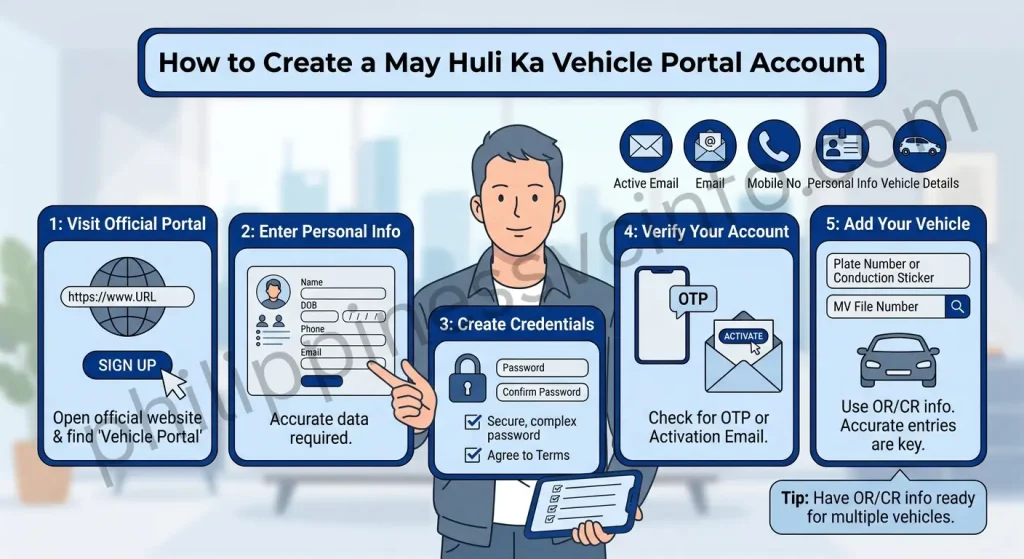
Before registering, prepare an active email address, mobile number, personal information, and the vehicle details you intend to add.
Step 1: Visit the Official May Huli Ka Portal
Open the official MMDA website:
Look for the Vehicle Portal, Sign Up, or equivalent registration option currently displayed on the website.
Step 2: Enter Your Personal Information
The registration form may request information such as:
- First name
- Middle name
- Last name
- Date of birth
- Mobile phone number
- Active email address
Enter the information accurately. Your account details should correspond with the information you are authorised to provide.
Step 3: Create Your Login Credentials
Choose a secure password and complete the required terms, privacy, or consent fields shown during registration.
Avoid using an easily guessed password, especially one based only on your name, birthday, plate number, or mobile number.
Step 4: Verify Your Account
Depending on the verification method available, the portal may require email activation or an OTP.
If an activation email does not appear in your inbox, check the Spam or Junk folder. For an OTP, make sure your mobile number has an active signal before requesting another code.
Step 5: Add Your Vehicle
After signing in, use the vehicle-management option to add a vehicle.
You may need to provide:
- Plate Number or Conduction Sticker
- MV File Number
Review the details before saving them. Correct vehicle information is essential if you want the account to display the appropriate records and notifications.
Practical tip: If you manage several vehicles, keep each vehicle’s OR/CR information available while setting up the account. It reduces the chance of entering the wrong identifier.
How to Log In to the May Huli Ka Vehicle Portal
Once your account has been activated, return to the official May Huli Ka service and open the vehicle portal login area.
The login process generally involves entering your registered email address or other accepted account identifier and your password. A CAPTCHA or additional security check may also appear.
After successful login, the dashboard can provide access to account information, linked vehicles, available notices, and payment-related records.
Use the official MMDA portal rather than third-party pages claiming to provide a May Huli Ka login.
How to Manage Multiple Vehicles
One advantage of the May Huli Ka Vehicle Portal is the ability to associate multiple vehicles with one user account where the service permits it.
For each vehicle, enter the required plate or conduction-sticker information and the corresponding MV File Number. Check the information carefully before saving.
If a vehicle has changed ownership, do not assume that removing or adding it to your online account changes the official LTO ownership record. Ownership and registration matters should be handled through the appropriate government process.
How to Pay a May Huli Ka Traffic Fine Online
If a valid violation appears in your May Huli Ka account or search result and you decide to settle it, use the payment route presented by the official portal.
Available payment channels can include digital wallets, online banking services, or other authorised payment gateways. The exact options shown may change, so rely on the payment choices displayed by the official system at the time of payment.
Digital Payment Process
A typical online payment flow is:
- Open the relevant violation.
- Review the citation and amount due.
- Select the available Pay Fine option.
- Choose one of the payment channels displayed by the portal.
- Review the amount and any applicable processing charge.
- Complete the payment through the authorised gateway.
- Save the transaction reference and electronic receipt.
The information supplied in your source identifies GCash, Maya, iCash, Bayad App, and LandBank LinkBizPortal among the payment channels associated with the process. However, users should confirm which options are currently available on the official May Huli Ka payment page before starting a transaction.
What Should You Save After Paying?
Do not close the payment page immediately after completing a transaction.
Keep a copy of:
- Payment reference number
- Electronic receipt
- Date and time of payment
- Amount paid
- Notice of Violation reference
- Screenshot of the successful transaction, if available
These records can be useful if the payment status does not update immediately.
Payment Status Still Says Pending?
A successful payment may not always appear instantly in the violation record.
If your payment remains marked as pending, first check whether the transaction was actually completed by the payment provider. Keep the reference number and receipt rather than paying the same citation again immediately.
If the status remains unresolved, use the official MMDA support channels for assistance.
Can You Contest a May Huli Ka Violation?
Yes, the supplied information indicates that motorists who believe a citation was issued incorrectly may use the E-Contest process associated with the MMDA Traffic Adjudication Division (TAD).
A contest may be relevant in circumstances such as:
- The vehicle was sold before the alleged violation
- The plate was incorrectly identified
- The vehicle was not involved in the alleged offence
- There was another circumstance supporting the dispute
- You have documentary, photographic, video, or other evidence relevant to the citation
A contest is different from simply refusing to pay. It is a formal process through which the motorist presents the grounds and supporting evidence for review.
What Documents Are Needed for an E-Contest?]
Before starting an MMDA May Huli Ka e-contest, gather the documents that support your case.
The supplied requirements include:
| Document or Evidence | Why It May Be Needed |
|---|---|
| Notice of Violation | Identifies the disputed citation |
| Valid government-issued ID | Helps establish the identity of the person filing |
| Certificate of Registration | Supports vehicle information |
| Official Receipt | Provides registration/document details |
| Photo or video evidence | May support the circumstances of the dispute |
| Notarised Deed of Sale | Useful when ownership had already been transferred |
| Police report | May be relevant in applicable circumstances |
Make sure uploaded documents are clear enough to read. Blurry photographs or incomplete pages can make it harder to evaluate the information.
How to File a May Huli Ka E-Contest
If you decide to dispute a violation, use the contest function provided through the official MMDA process.

Step 1: Review the Violation
Confirm that you are contesting the correct Notice of Violation. Check the date, vehicle details, and other citation information before proceeding.
Step 2: Open the Contest Option
After accessing the relevant record, look for the File a Contest or E-Contest option.
The exact button name and location may change as the portal is updated.
Step 3: Explain the Grounds
Provide a clear explanation of why you believe the citation should be reviewed.
Avoid submitting a vague statement when you have specific supporting facts. For example, if ownership had already transferred, provide the relevant documentation rather than simply stating that the vehicle was no longer yours.
Step 4: Upload Supporting Documents
Attach the available evidence requested by the system, such as your government ID, OR/CR, photographs, video evidence, deed of sale, or applicable police documentation.
Step 5: Submit the Contest
Review the information before final submission.
After submitting, retain the E-Contest Tracking Number supplied by the system. This number can help you refer to the case in future communications.
E-Contest Filing Deadline
The information supplied for this article states that a contest should be filed within 10 working days from the date the Notice of Violation was received.
Because deadlines can affect your ability to pursue a dispute, do not wait until the final day if you intend to contest a citation. Check the current official MMDA instructions and the Notice of Violation for the applicable requirements.
Can You Contest in Person?
The supplied information also identifies an in-person alternative through the Traffic Adjudication Division (TAD) at the MMDA New Building in Pasig City.
According to the supplied details, the TAD is located on the 11th Floor of the MMDA New Building, Julia Vargas Avenue corner Molave Street, Barangay Ugong, Pasig City.
If you choose an in-person route, bring the relevant Notice of Violation, identification, vehicle documents, and supporting evidence.
Common May Huli Ka Problems and What to Do
Online government portals can sometimes produce confusing results. The best response is to identify whether the problem comes from the information entered, account verification, payment processing, or record synchronisation.
“No Record Found”
If you received a physical notice but cannot find the violation online, first verify the information entered into May Huli Ka.
Check the plate or conduction-sticker information and try the available MV File Number search where applicable. If the problem continues, keep the physical notice and contact MMDA through its official support channels.
Invalid MV File or Plate Combination
This usually means the information entered does not match the format or record expected by the system.
Compare the characters against your LTO OR/CR and enter the information exactly as requested. Avoid adding unnecessary spaces, hyphens, or special characters.
Payment Is Still Pending
Keep your payment reference and electronic receipt. Do not immediately submit another payment simply because the online status has not changed.
If the transaction was completed successfully but the May Huli Ka record remains pending, contact the appropriate MMDA support channel with your reference details.
OTP or Email Verification Does Not Arrive
Check your email’s Spam or Junk folder and confirm that the registered mobile number is correct.
If the portal provides a resend option, use it according to the instructions displayed. Avoid repeatedly requesting codes within a very short period if the system imposes a waiting interval.
May Huli Ka Support and Contact Information
If you encounter a problem that cannot be resolved through the May Huli Ka portal, use the official MMDA support channels rather than relying on social-media accounts, unofficial websites, or third-party payment agents.
The contact information supplied for this guide includes the following:
- MMDA Hotline: 136
- MMDA Trunk Line: (02) 8898-4200
- Traffic Adjudication Division: 11th Floor, MMDA New Building, Julia Vargas Avenue corner Molave Street, Barangay Ugong, Pasig City
For a dispute, keep your Notice of Violation, vehicle documents, payment references, and any evidence relevant to your case. Having these details ready can make it easier to explain the problem.
Important Safety Tips When Using May Huli Ka
Traffic-violation services involve personal information and vehicle records, so security should be part of the process.
Use the Official Website
Always start from the official May Huli Ka MMDA website:
Be cautious with links sent through unsolicited text messages, emails, social-media posts, or messaging applications. A website can look convincing while still being unrelated to the government service.
Protect Your Account
If you create a May Huli Ka account:
- Use a strong, unique password.
- Do not share your password with other people.
- Never disclose an OTP to someone claiming to be support.
- Check the website address before entering personal information.
- Log out when using a shared computer.
Keep Payment Evidence
After paying a May Huli Ka fine, save the receipt and transaction reference. Digital records can be particularly useful if your payment status takes time to update.
Never send your payment credentials or one-time verification code to another person simply because they claim they can process your MMDA violation.
Sold Vehicle but Still Got a Violation?
A sold vehicle can create a confusing situation when government records have not yet reflected the change in ownership.
If a May Huli Ka citation concerns a vehicle that you had already sold, gather evidence showing the transfer. The supplied information specifically identifies a notarised Deed of Sale and proof of delivery or transfer as potentially relevant supporting documents.
If you intend to dispute the citation, follow the applicable E-Contest procedure and pay attention to the stated filing deadline.
The key point is to document the timeline clearly. Evidence showing when ownership or possession changed can be important when explaining why you believe the citation should be reviewed.
May Huli Ka vs. Physical Traffic Notices
The online May Huli Ka portal does not mean motorists should ignore physical documents received from MMDA or another authorised authority.
Instead, use the information from the notice to cross-check the online record. Compare details such as:
- Vehicle identification
- Date of violation
- Location
- Notice reference
- Alleged offence
- Amount stated
If the online result and physical notice appear inconsistent, keep copies of both and contact the appropriate MMDA office for clarification.
A Simple May Huli Ka Checklist
Before finishing your traffic-violation transaction, check the following:
- You opened the official May Huli Ka website.
- You entered the correct plate or conduction-sticker information.
- You checked the MV File Number against your LTO documents.
- You reviewed the violation details before paying.
- You verified the payment amount and available payment channel.
- You saved your payment reference and electronic receipt.
- You retained your Notice of Violation.
- You prepared supporting evidence if you intend to contest.
- You noted the applicable contest deadline.
- You used official MMDA contact channels when assistance was required.
Frequently Asked Questions About May Huli Ka
Conclusion
The May Huli Ka MMDA portal provides motorists with a convenient online way to check applicable traffic violations, review citation details, manage vehicle information, pay eligible fines, and access the E-Contest process when a violation needs to be disputed. Using the correct vehicle information and reviewing all citation details carefully can help avoid unnecessary errors.If you receive a May Huli Ka violation, keep your Notice of Violation, payment receipts, reference numbers, and supporting documents for your records. When you believe a citation is incorrect, follow the applicable May Huli Ka E-Contest procedure and observe the stated filing deadline. For unresolved account, payment, or violation concerns, use the official MMDA support channels.
Discover What You Need to Know:
- PAIS PNP: Complete Guide to Login, Registration, Requirements & Account Access 2026
- DILG MISMO Portal Philippines: Registration, Login, Requirements & Online Services 2026
- DILG Official Website Guide: Services, Requirements, Online Applications & Forms 2026
- SSS Employer Philippines Complete Guide of Registration, Contributions & Payment Guide
- DTR (Daily Time Record) Philippines: CSC Form 48 Guide, Download, Requirements & FAQs (2026)