eGovPH is the official digital government platform of the Philippines that brings multiple public services into one secure online system. Managed by the Department of Information and Communications Technology (DICT), the eGovPH App and portal allow citizens, foreign residents, students, and business owners to access services such as Digital National ID, eTravel registration, LGU transactions, government contributions, and online payments. Through a single verified account, users can manage government-related activities more conveniently while reducing the need for separate platforms and physical visits. The official eGovPH website is available at eGovPH Official Website.
What Is eGovPH?
eGovPH is the official digital government platform of the Philippines that combines multiple public services into a single online environment. Instead of visiting different websites or offices for every transaction, users can use the eGovPH system to connect with various government agencies through one account. The platform uses a secure identity system that helps verify users and provide access to authorised government services.
eGovPH Official Website and Portal Access
Users can access the official eGovPH portal through:
The website provides information about available digital government services and allows users to explore the eGovPH ecosystem.
The platform is designed for:
| User Group | Possible Uses |
|---|---|
| Filipino Citizens | Digital ID, government services, payments |
| OFWs | Travel-related services and government access |
| Foreign Residents | Verified government transactions |
| Students | Education and professional services |
| Business Owners | LGU permits and business-related services |
Before entering personal information, users should always confirm they are accessing the official eGovPH website or official mobile application.
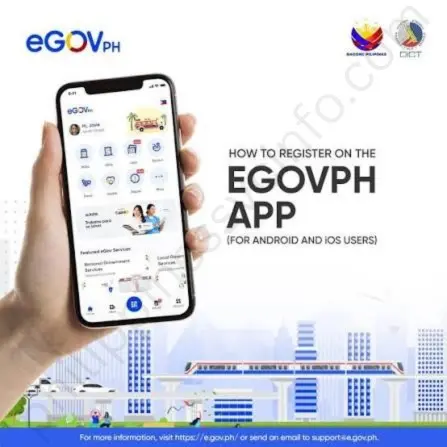
How to Register an eGovPH Account
Creating an account on eGovPH is the first step to accessing connected government services. The registration process requires a valid mobile number, OTP verification, and security setup.
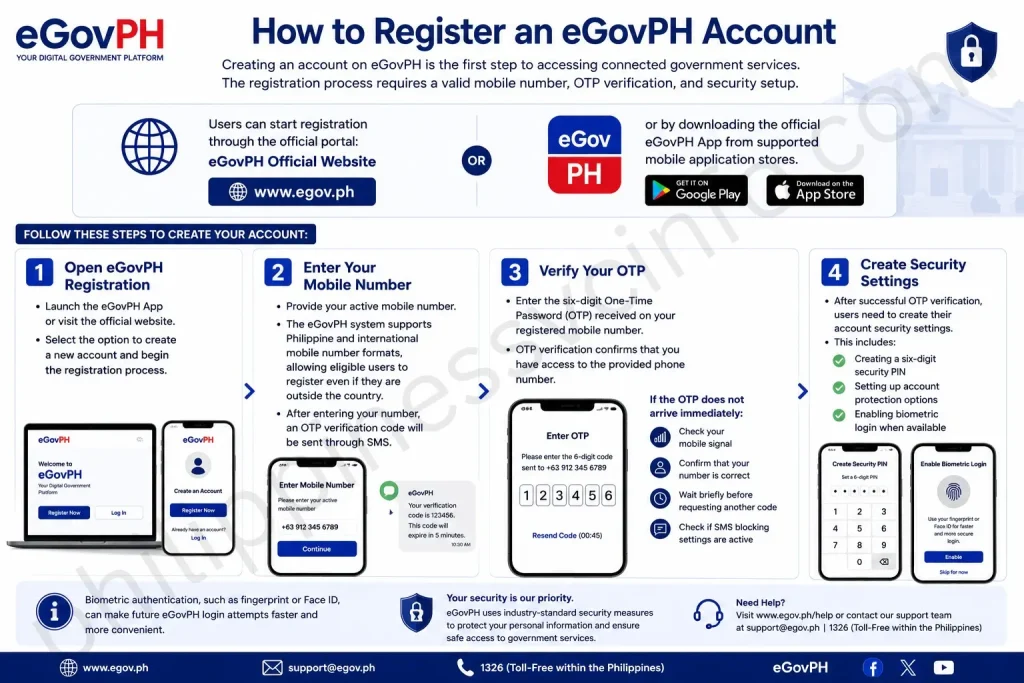
Users can start registration through the official portal:
or by downloading the official eGovPH App from supported mobile application stores.
Follow these steps to create your account:
Step 1: Open eGovPH Registration
Launch the eGovPH App or visit the official website.
Select the option to create a new account and begin the registration process.
Step 2: Enter Your Mobile Number
Provide your active mobile number.
The eGovPH system supports Philippine and international mobile number formats, allowing eligible users to register even if they are outside the country.
After entering your number, an OTP verification code will be sent through SMS.
Step 3: Verify Your OTP
Enter the six-digit One-Time Password (OTP) received on your registered mobile number.
OTP verification confirms that you have access to the provided phone number.
If the OTP does not arrive immediately:
- Check your mobile signal
- Confirm that your number is correct
- Wait briefly before requesting another code
- Check if SMS blocking settings are active
Step 4: Create Security Settings
After successful OTP verification, users need to create their account security settings.
This includes:
- Creating a six-digit security PIN
- Setting up account protection options
- Enabling biometric login when available
Biometric authentication, such as fingerprint or Face ID, can make future eGovPH login attempts faster and more convenient.
How to Login to eGovPH
After registration, users can access their account through the eGovPH App or official website.
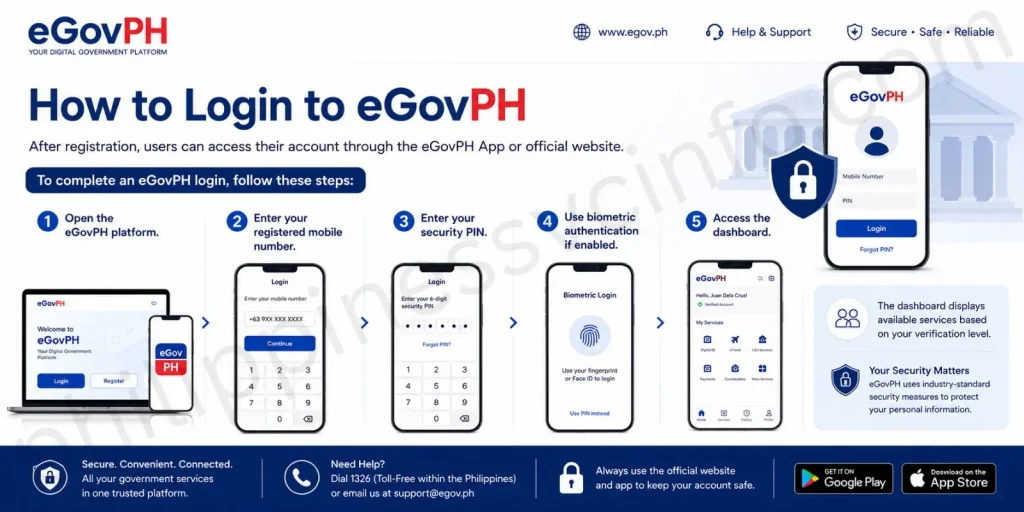
To complete an eGovPH login, follow these steps:
- Open the eGovPH platform.
- Enter your registered mobile number.
- Enter your security PIN.
- Use biometric authentication if enabled.
- Access the dashboard.
The dashboard displays available services based on your verification level.
eGovPH Identity Verification (eVerify)
Basic registration allows users to access limited features. To unlock additional government services, users need to complete identity verification through eVerify.
The verification process confirms the user’s identity using official identification documents and facial verification technology.
How to Verify Your eGovPH Account
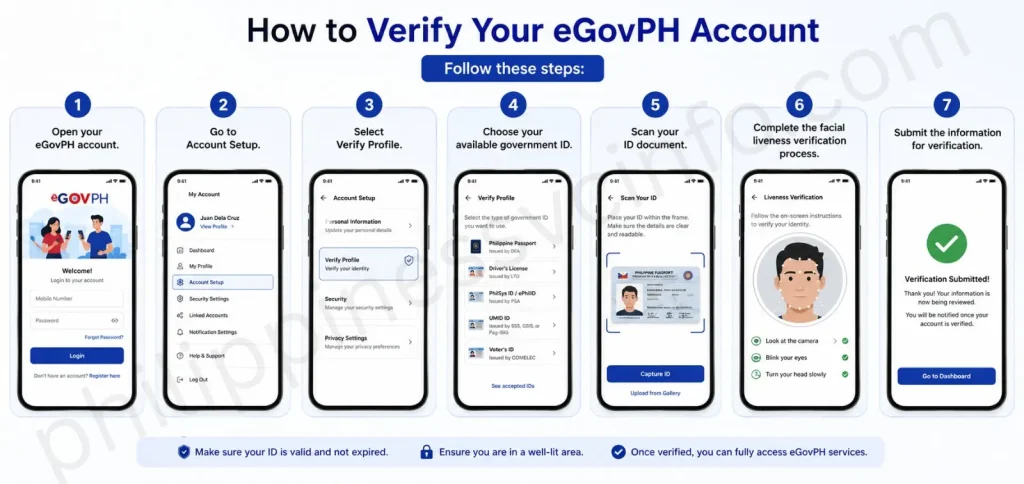
Follow these steps:
- Open your eGovPH account.
- Go to Account Setup.
- Select Verify Profile.
- Choose your available government ID.
- Scan your ID document.
- Complete the facial liveness verification process.
- Submit the information for verification.
Accepted IDs for eGovPH Verification
Users may verify their identity using accepted government-issued identification documents, including:
| Identification Document | Available Users |
|---|---|
| PhilID / ePhilID | Filipino citizens |
| Philippine Passport | Filipino citizens |
| Driver’s License | Eligible residents |
| UMID Card | Eligible members |
| Postal ID | Eligible applicants |
| ACR I-Card | Foreign residents |
The verification process helps protect user accounts and ensures that government services are provided to the correct individual.
eGovPH Account Verification Levels
The eGovPH system provides different access levels depending on verification status.
| Verification Level | Requirement | Available Access |
|---|---|---|
| Tier 1: Basic Account | Mobile number and OTP verification | Agency information, government announcements, FAQs, public updates |
| Tier 2: Fully Verified Account | Government ID and facial verification | Digital National ID, eTravel, LGU services, government integrations, online payments |
A fully verified eGovPH account provides access to more digital government features.
How to Access Digital National ID in eGovPH
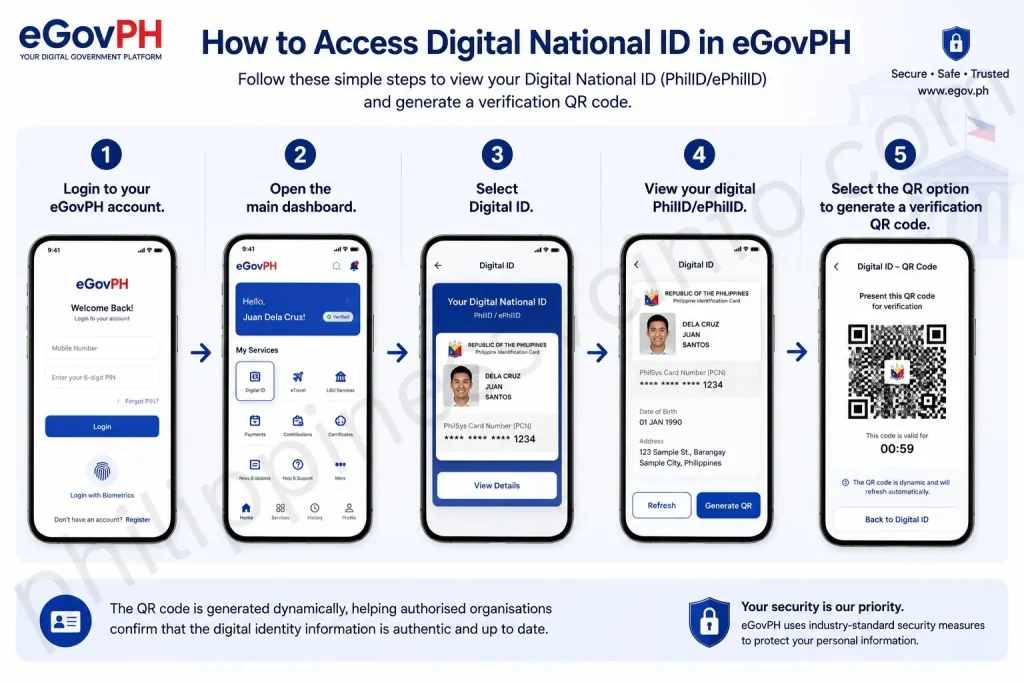
Follow these steps:
- Login to your eGovPH account.
- Open the main dashboard.
- Select Digital ID.
- View your digital PhilID/ePhilID.
- Select the QR option to generate a verification QR code.
The QR code is generated dynamically, helping authorised organisations confirm that the digital identity information is authentic.
eGovPH eTravel Registration Guide
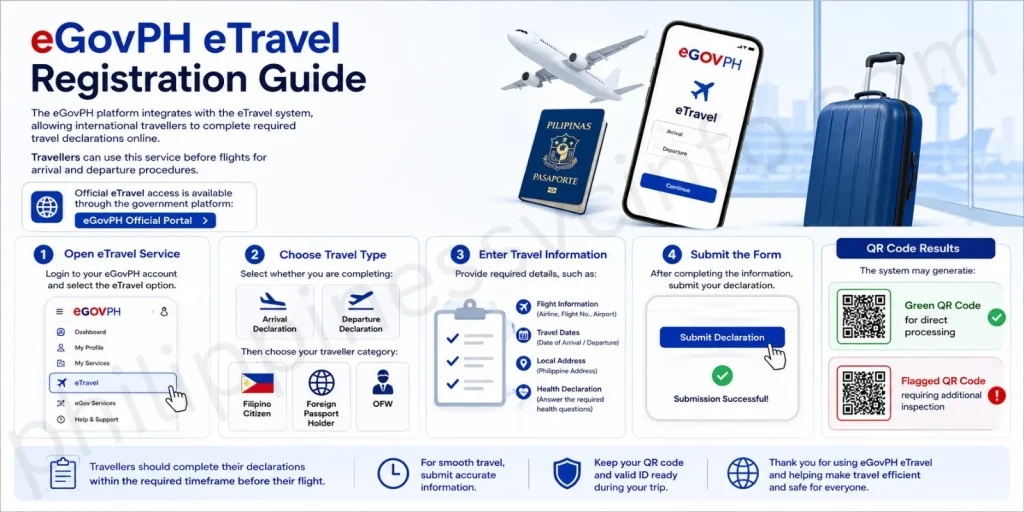
The eGovPH platform integrates with the eTravel system, allowing international travellers to complete required travel declarations online.
Travellers can use this service before flights for arrival and departure procedures.
Official eTravel access is available through the government platform:
Step 1: Open eTravel Service
Login to your eGovPH account and select the eTravel option.
Step 2: Choose Travel Type
Select whether you are completing:
- Arrival declaration
- Departure declaration
Then choose your traveller category:
- Filipino citizen
- Foreign passport holder
- OFW
Step 3: Enter Travel Information
Provide required details, such as:
- Flight information
- Travel dates
- Local address
- Health declaration answers
Step 4: Submit the Form
After completing the information, submit your declaration.
The system may generate:
- Green QR Code for direct processing
- Flagged QR Code requiring additional inspection
Travellers should complete their declaration within the required timeframe before their flight.
eGovPH Government Services and Digital Transactions
The main purpose of eGovPH is to bring multiple government services together in one digital platform. Instead of managing different accounts across separate systems, users can access connected services through their verified eGovPH profile.
Available services may include identity verification, travel services, local government transactions, contribution monitoring, education-related services, and digital payments.
The availability of specific services may depend on user verification status and agency integration.
Digital Identity Services
The eGovPH App allows verified users to access their Digital National ID, providing a convenient way to present identity information electronically.
This feature is useful for:
- Identity verification
- Government transactions
- Digital authentication
- Online service access
The dynamic QR code helps authorised institutions verify the authenticity of the displayed digital identity.
Social Insurance and Contribution Services
The eGovPH ecosystem connects users with selected government contribution and benefit services.
Users may access information related to:
- Social Security System (SSS)
- Government Service Insurance System (GSIS)
- PhilHealth
- Pag-IBIG
Possible functions include:
- Checking contribution records
- Viewing available services
- Monitoring account-related information
- Accessing connected government platforms
Education and Professional Services
Students, professionals, and job seekers may benefit from connected education and career-related government services.
Possible services include:
- Professional licence-related information
- Civil service records
- Job matching services
- Educational resources
These integrations help users manage important records digitally.
eGovPH Digital Payment Options
The eGovPH platform supports digital payment options to make government transactions more convenient.
Users may be able to complete payments using:
- GCash
- Maya
- LandBank Pay
- Credit cards
- Debit cards
- Over-the-counter payment channels
Digital payments reduce the need for physical visits and provide electronic records for completed transactions.
After completing payments, users should keep their electronic receipts or confirmation details for future reference.
How to Use LGU Services Through eGovPH
Local government services are another important part of the eGovPH system.
Residents and business owners may access available LGU services such as:
- Business permit renewal
- Real Property Tax payments
- Local clearances
- Other municipal or city services
Steps to Process LGU Transactions
- Open the eGovPH App.
- Select the LGU Services section.
- Choose your city or municipality.
- Select the required service.
- Enter requested information.
- Review transaction details.
- Choose a payment method if applicable.
- Save your electronic official receipt.
For example, business owners may need to provide their Business Account Number (BAN), while property owners may need tax-related information.
Main Features of eGovPH
The eGovPH platform connects several government services through a unified digital system. Its main features include:
1. Single Sign-On Account
One of the biggest advantages of eGovPH is the ability to use one verified account for multiple connected services.
Instead of creating separate accounts for every government platform, users can access integrated services through their eGovPH credentials.
Benefits include:
- One account management system
- Faster access to government platforms
- Easier identity verification
- Reduced repeated registration processes
2. Digital National ID Integration
The eGovPH App provides access to the Digital National ID, allowing verified users to display their digital PhilID or ePhilID through their mobile device.
The Digital National ID includes:
- Personal identification details
- Photo information
- PhilSys Card Number (PCN)
- Dynamic QR code verification
The QR code allows authorised organisations to verify the authenticity of the digital identity.
Users can access this feature after completing the required verification process inside eGovPH.
3. eTravel Portal Integration
International travellers can use eGovPH to access connected travel services through the integrated eTravel system.
The eTravel service helps passengers complete required online travel declarations before arrival or departure.
It supports:
- Filipino travellers
- Foreign passport holders
- OFWs
- International passengers
Users can complete travel-related forms digitally instead of filling out manual paperwork during travel procedures.
4. LGU Digital Services
The eGovPH platform also connects users with local government services.
Depending on availability, users may access services such as:
- Business permit renewal
- Real Property Tax payments
- Local clearances
- Other LGU transactions
This helps residents and business owners com
Common eGovPH Problems and Solutions
Although eGovPH is designed to simplify government transactions, some users may experience technical issues during registration, verification, or login.
Below are common problems and possible solutions.
| Problem | Possible Cause | Solution |
|---|---|---|
| OTP not received | Network delay or SMS filtering | Check signal, wait, and request a new OTP |
| ID scan failure | Poor lighting or unclear image | Use better lighting and clean the camera lens |
| Facial verification error | Camera or environment issue | Face the camera clearly and follow instructions |
| Account information mismatch | Incorrect details entered | Check information against official documents |
| Login problems | Incorrect PIN or account issue | Use account recovery options |
eGovPH eVerify Troubleshooting Tips
If identity verification fails, users should check the following:
Use Good Lighting
Dark environments can affect ID scanning and facial recognition.
Keep Documents Clear
Make sure:
- The entire ID is visible
- Text is readable
- There is no glare
- The camera lens is clean
Check Personal Information
Names, dates, and identification numbers should match official records.
Small differences, such as missing spaces or incorrect spelling, can prevent successful verification.
eGovPH Security and Privacy
Security is a major part of the eGovPH system because it handles personal information and government records.
The platform follows data protection requirements under the Republic Act No. 10173 (Data Privacy Act of 2012).
Security practices include:
- Protected account access
- Identity verification procedures
- Secure handling of personal information
- Controlled sharing of user data
Users should also protect their own accounts by:
- Keeping their PIN private
- Avoiding sharing OTP codes
- Using official eGovPH platforms only
- Updating security settings when needed
eGovPH Support and Help Resources
Users who experience problems with their account, verification, or services can use official support channels.
Available support options may include:
- In-app Help and Support
- Support ticket submission
- Official announcements
- Government assistance channels
Users should avoid unofficial websites or third-party services claiming to provide eGovPH registration assistance.
Frequently Asked Questions About eGovPH
Final Thoughts
The eGovPH platform represents a major step toward a more connected digital government system in the Philippines. By combining identity services, travel processing, LGU transactions, payments, and other government features into one platform, eGovPH makes many everyday government processes more accessible.For the best experience, users should complete account verification, keep their information accurate, and always use the official eGovPH website or application when accessing government services. eGovPH Official Website
Discover What You Need to Know:
- NBI Appointment Philippines 2026: Online Booking, Registration & Requirements Guide
- LIS Philippines: DepEd Learner Information System Guide, Login & LRN
- LERIS PRC Philippines 2026: Registration, Login & License Renewal Guide
- Metrobank Philippines 2026: Online Banking, Login, Accounts & Loans
- NBI Clearance Philippines 2026: Complete Guide to Registration, Fees & Requirements