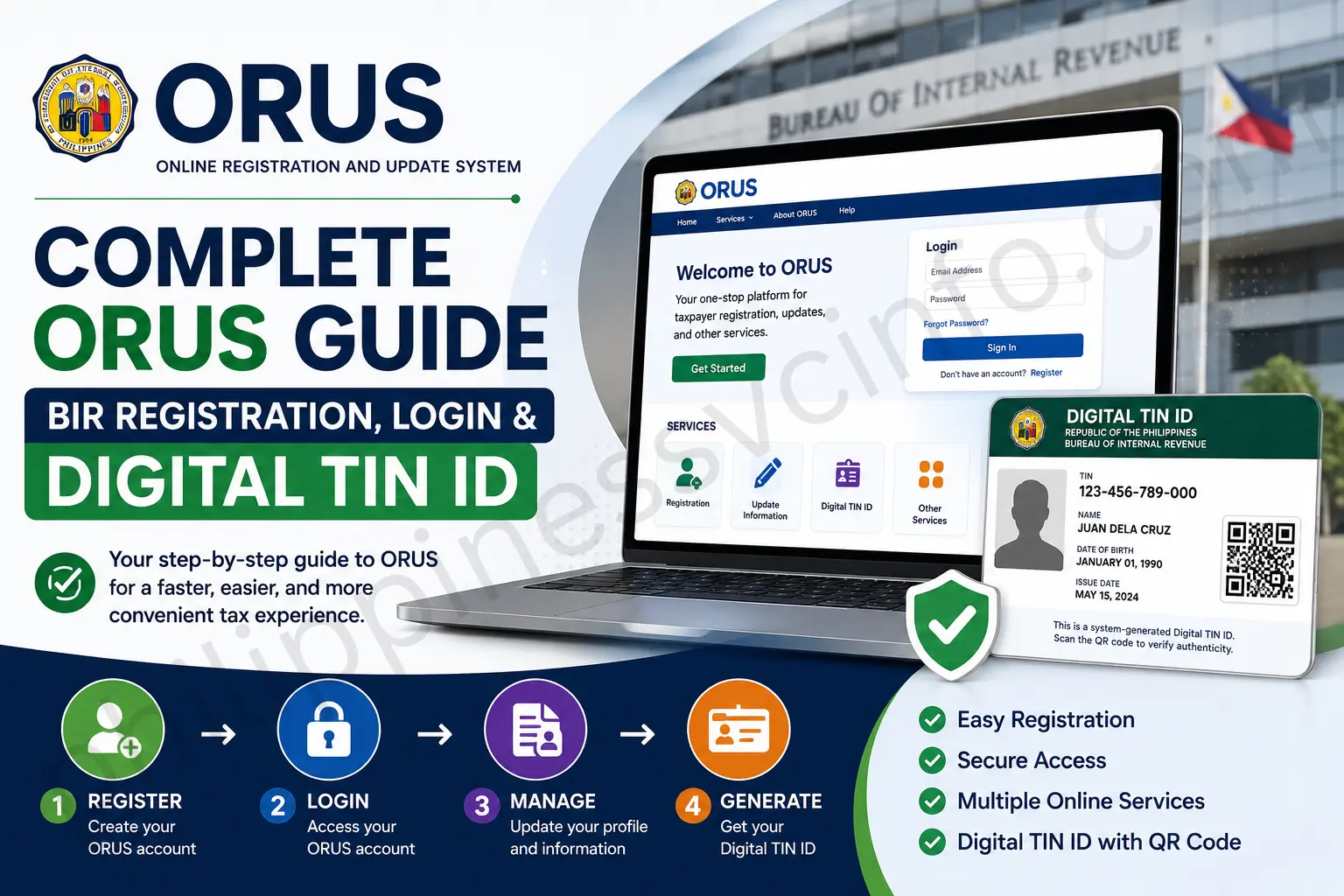
ORUS (Online Registration and Update System) is the Bureau of Internal Revenue’s secure online platform that enables taxpayers in the Philippines to manage various tax-related services without visiting a Revenue District Office (RDO). Through the official ORUS portal, eligible users can register for a Taxpayer Identification Number (TIN), update personal information, recover account access, and obtain a Digital TIN ID using a web browser. Whether you are a first-time employee, freelancer, self-employed professional, business owner, or eligible foreign resident, ORUS simplifies many BIR transactions by making them available online.

What Is ORUS?
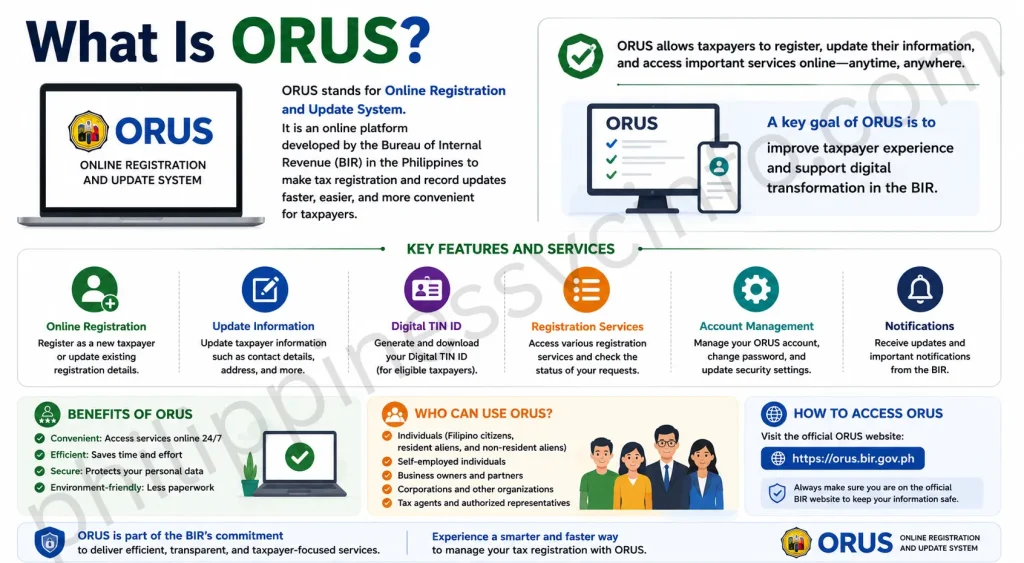
The Online Registration and Update System (ORUS) is an official digital service developed by the Bureau of Internal Revenue (BIR) to modernise taxpayer registration and account management.
Instead of completing many registration tasks in person, qualified users can perform several transactions electronically, reducing paperwork and saving time.
Some of the most commonly used ORUS services include:
- Online TIN registration
- Account creation
- Existing taxpayer registration
- Digital TIN ID generation
- Profile updates
- Password recovery
- Email verification
- Registration information management
Because ORUS is connected with BIR’s taxpayer database, users should always access the system through the official website rather than unofficial third-party pages.
Who Can Use ORUS?
ORUS serves different categories of taxpayers. Depending on eligibility and transaction type, the platform may be used by:
| User Type | Typical Purpose |
|---|---|
| First-time employees | Apply for a new TIN (where eligible) |
| Self-employed individuals | Register taxpayer information |
| Freelancers | Manage tax registration |
| Business owners | Update registration records |
| Existing taxpayers | Access online services |
| Foreign nationals with Philippine tax obligations | Eligible registration and account management |
Some transactions may still require supporting documents or approval from the appropriate Revenue District Office (RDO).
Requirements Before Registering
Preparing the required information in advance makes the registration process smoother.
Generally, users should have:
- A valid email address
- Personal identification details
- Mobile phone number
- Government-issued identification (when required)
- Stable internet connection
- Modern web browser such as Google Chrome, Microsoft Edge, Firefox, or Safari
Certain transactions may require additional documents depending on taxpayer classification.
How to Register for an ORUS Account
Follow these general steps to create your account.
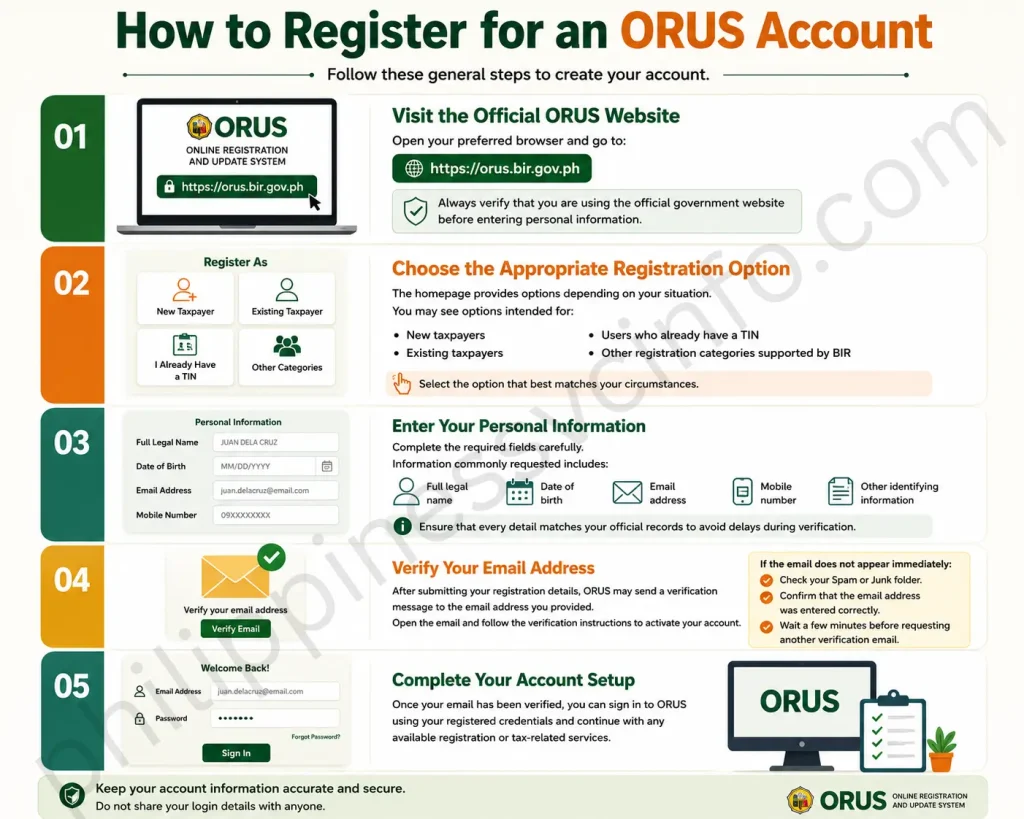
Step 1: Visit the Official ORUS Website
Open your preferred browser and go to:
Always verify that you are using the official government website before entering personal information.
Step 2: Choose the Appropriate Registration Option
The homepage provides options depending on your situation.
You may see options intended for:
- New taxpayers
- Existing taxpayers
- Users who already have a TIN
- Other registration categories supported by BIR
Select the option that best matches your circumstances.
Step 3: Enter Your Personal Information
Complete the required fields carefully.
Information commonly requested includes:
- Full legal name
- Date of birth
- Email address
- Mobile number
- Other identifying information required by BIR
Ensure that every detail matches your official records to avoid delays during verification.
Step 4: Verify Your Email Address
After submitting your registration details, ORUS may send a verification message to the email address you provided. Open the email and follow the verification instructions to activate your account.
If the email does not appear immediately:
- Check your Spam or Junk folder.
- Confirm that the email address was entered correctly.
- Wait a few minutes before requesting another verification email.
Step 5: Complete Your Account Setup
Once your email has been verified, you can sign in to ORUS using your registered credentials and continue with any available registration or taxpayer services applicable to your account.
How to Log In to ORUS
After creating and activating your account, you can access the available online services through the official ORUS portal.
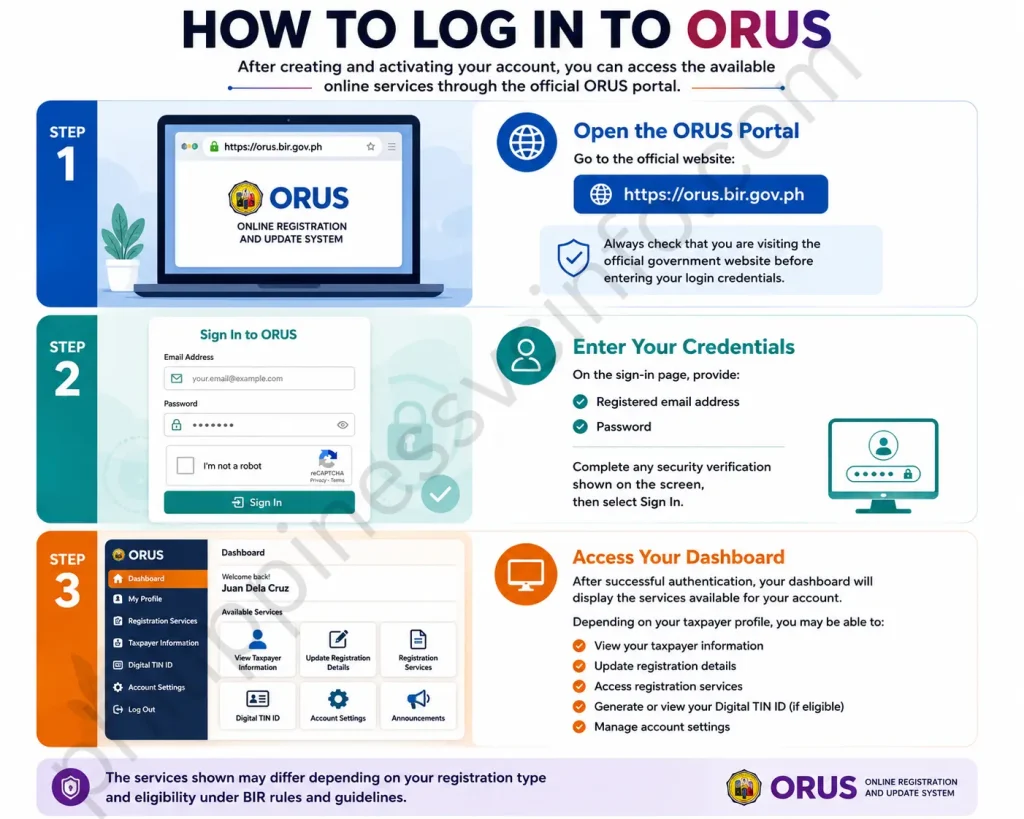
Step 1: Open the ORUS Portal
Go to the official website:
Always check that you are visiting the official government website before entering your login credentials.
Step 2: Enter Your Credentials
On the sign-in page, provide:
- Registered email address
- Password
Complete any security verification shown on the screen, then select Sign In.
Step 3: Access Your Dashboard
After successful authentication, your dashboard will display the services available for your account. Depending on your taxpayer profile, you may be able to:
- View your taxpayer information
- Update registration details
- Access registration services
- Generate or view your Digital TIN ID (if eligible)
- Manage account settings
The services shown may differ depending on your registration status and eligibility.
Forgot Your ORUS Password?
If you cannot remember your password, ORUS provides a password reset option.
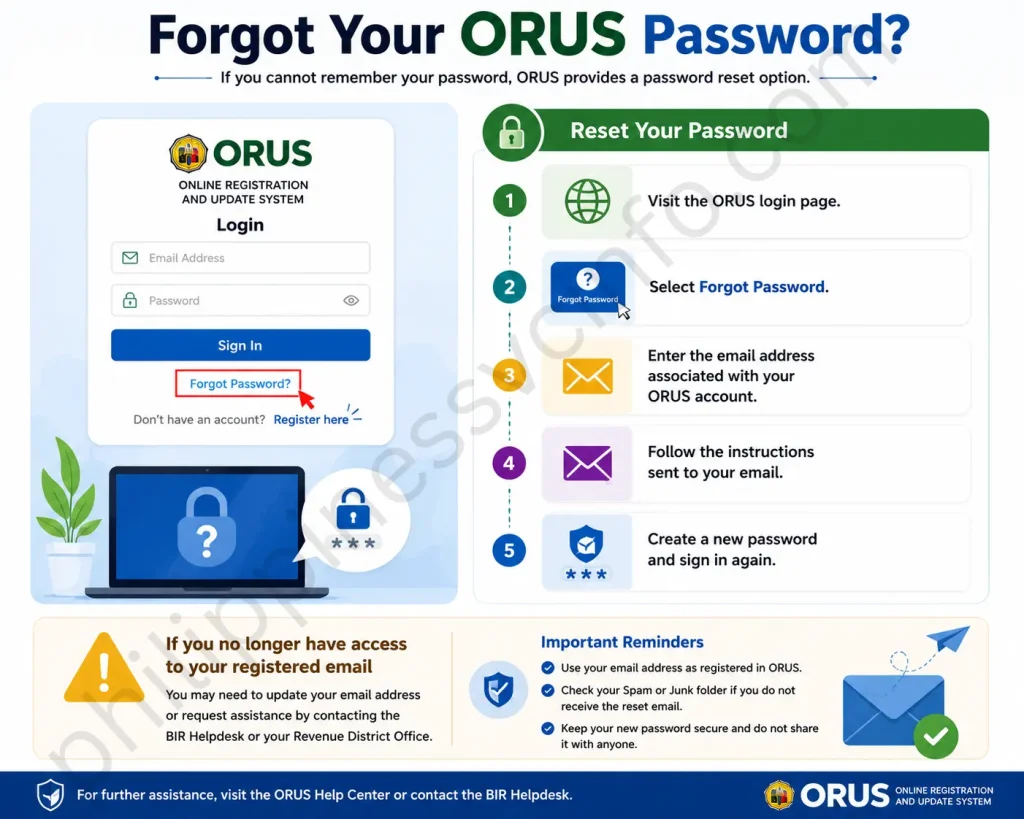
Reset Your Password
- Visit the ORUS login page.
- Select Forgot Password.
- Enter the email address associated with your ORUS account.
- Follow the instructions sent to your email.
- Create a new password and sign in again.
If you no longer have access to your registered email address, BIR advises contacting its customer service for assistance.
Common Login Problems and Solutions
| Problem | Possible Solution |
|---|---|
| Forgot password | Use the Forgot Password option. |
| No verification email | Check Spam or Junk folders and confirm your email address. |
| Incorrect login details | Re-enter your email and password carefully. |
| Digital TIN ID option unavailable | Ensure your account is fully enrolled and your taxpayer records meet the eligibility requirements. |
| Registered email needs updating | Follow BIR’s guidance for submitting Form S1905. |
Expert Tips
- Always use the official ORUS portal for registration and account access.
- Keep your registered email active because it is used for verification and password recovery.
- Review all information before submitting online forms.
- Save copies of confirmation emails and downloaded documents for future reference.
How to Apply for a TIN Through ORUS
ORUS supports online registration for certain taxpayer categories. The application process and required forms depend on your taxpayer classification.
Before You Apply
Prepare:
- Valid government-issued identification
- Active email address
- Mobile phone number
- Required supporting documents for your taxpayer category
Make sure all information matches your official records.
General Application Process
| Step | What to Do |
|---|---|
| 1 | Visit the official ORUS website |
| 2 | Select the appropriate registration option |
| 3 | Complete the required online registration form |
| 4 | Upload supporting documents if requested |
| 5 | Review your information carefully |
| 6 | Submit your application |
| 7 | Monitor your registered email for updates |
Processing times may vary depending on the transaction and any verification required by BIR.
How to Generate Your Digital TIN ID
One of ORUS’s most useful features is the Digital TIN ID, which is available to eligible taxpayers with an ORUS account.
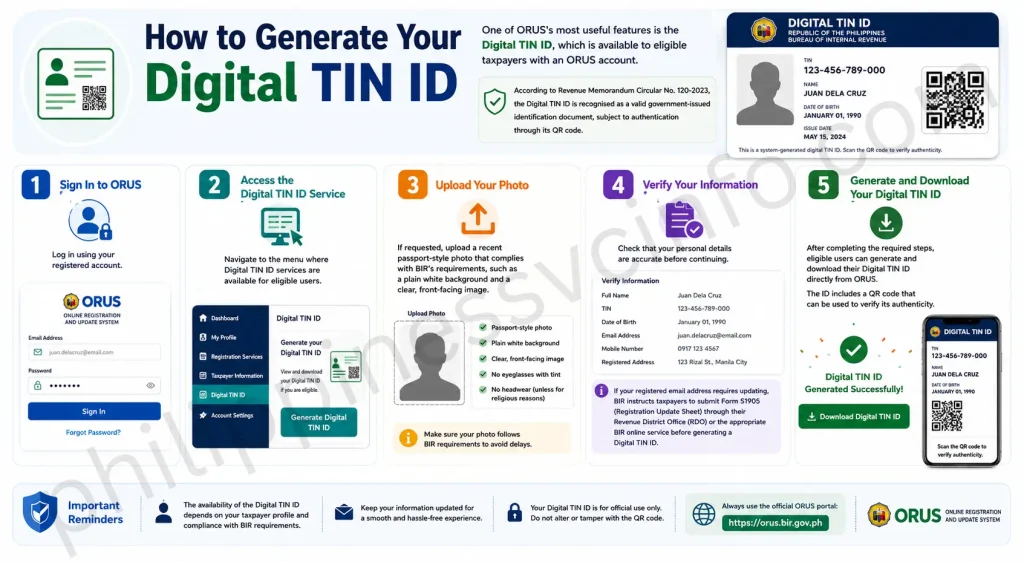
According to Revenue Memorandum Circular No. 120-2023, the Digital TIN ID is recognised as a valid government-issued identification document, subject to authentication through its QR code.
Step 1: Sign In to ORUS
Log in using your registered account.
Step 2: Access the Digital TIN ID Service
Navigate to the menu where Digital TIN ID services are available for eligible users.
Step 3: Upload Your Photo
If requested, upload a recent passport-style photo that complies with BIR’s requirements, such as a plain white background and a clear, front-facing image.
Step 4: Verify Your Information
Check that your personal details are accurate before continuing.
If your registered email address requires updating, BIR instructs taxpayers to submit Form S1905 (Registration Update Sheet) through their Revenue District Office (RDO) or the appropriate BIR online service before generating a Digital TIN ID.
Step 5: Generate and Download Your Digital TIN ID
After completing the required steps, eligible users can generate and download their Digital TIN ID directly from ORUS.
The ID includes a QR code that can be used to verify its authenticity.
Updating Your Taxpayer Information
Keeping your registration details current helps prevent delays when using ORUS services.
You may need to update information such as:
- Email address
- Contact number
- Residential address
- Other registration details permitted by BIR
Some updates can be initiated online, while others may require additional documentation or approval. Follow the latest instructions provided by BIR for your specific transaction.
Best Practices for Using ORUS Safely
Protecting your taxpayer account is essential. Follow these recommendations whenever you use ORUS.
Use Only the Official Website
Always access ORUS through the official government portal:
Avoid unofficial websites or social media posts asking for your TIN, password, or personal information.
Create a Strong Password
A secure password should:
- Include uppercase and lowercase letters.
- Contain numbers and special characters.
- Be unique to your ORUS account.
- Never be shared with anyone.
Keep Your Email Address Updated
Your registered email is used for:
- Account verification
- Password recovery
- Official notifications
- Digital TIN ID services
For existing taxpayers, BIR requires that the email address on file be updated before certain online services, including Digital TIN ID generation, can be completed. This update can be made by submitting Form S1905 (Registration Update Sheet) to your Revenue District Office (RDO) or through the appropriate BIR online service.
Review Information Before Submission
Before submitting any online form:
- Verify your name exactly matches your official records.
- Double-check your TIN (if applicable).
- Confirm your contact details.
- Review uploaded documents for clarity and accuracy.
Correct information helps avoid processing
Benefits of Using ORUS
The Online Registration and Update System (ORUS) has transformed many taxpayer services by allowing eligible transactions to be completed online instead of requiring visits to a Revenue District Office (RDO).
Some of the key benefits include:
- Convenient online registration from any location with internet access.
- Faster account management for eligible taxpayers.
- Secure access to registration records through a verified account.
- Ability to generate a Digital TIN ID for eligible individual taxpayers.
- Reduced paperwork for many registration-related services.
- Official online platform managed by the Bureau of Internal Revenue (BIR).
Main Features of ORUS
The ORUS portal provides several digital services that help taxpayers manage their BIR records more efficiently.
Online Registration
Eligible individuals can create an online account and begin selected registration processes without visiting a BIR office.
Digital TIN ID
Qualified users can generate and access their Digital TIN ID through their ORUS account after completing the required processes.
Account Management
Users can maintain accurate taxpayer information by updating permitted personal details whenever necessary.
Secure Login
ORUS uses account authentication and email verification to help protect taxpayer information.
Online Updates
Instead of completing every update manually at an RDO, many profile changes can be initiated through the online portal.
Common ORUS Issues and Practical Solutions
| Issue | Recommended Action |
|---|---|
| Forgot password | Use the Forgot Password feature on the login page. |
| Verification email not received | Check your Spam or Junk folder, then request another verification email if necessary. |
| Unable to generate a Digital TIN ID | Ensure your ORUS account is enrolled correctly, your email is updated with your RDO if required, and you meet the eligibility requirements. |
| Incorrect registration details | Contact your Revenue District Office (RDO) and follow the appropriate registration update procedure. |
| Login problems | Confirm you are using the correct registered email and password before attempting another sign-in. |
Frequently Asked Questions
Final Thoughts
ORUS has transformed the way eligible taxpayers interact with the Bureau of Internal Revenue (BIR) by making many registration and account management services available online. Instead of relying solely on in-person visits to BIR offices, taxpayers can now complete essential tasks such as creating an ORUS account, updating registration information, recovering account access, and generating a Digital TIN ID through a secure and convenient digital platform. This initiative not only saves time but also supports the BIR’s commitment to improving public services through digital innovation. To enjoy a smooth and hassle-free experience, always use the official ORUS portal when accessing BIR services and ensure that your personal and registration details remain accurate and up to date. Before submitting any requests, review the latest BIR requirements and guidelines that apply to your specific taxpayer category, as procedures and eligibility may change over time. By staying informed and following the correct steps, you can make the most of ORUS while ensuring your tax records remain accurate, secure, and fully compliant with current BIR regulations.
Discover What You Need to Know:
- eGovPH Philippines 2026: Registration, Login & Services Guide
- NBI Appointment Philippines 2026: Online Booking, Registration & Requirements Guide
- LIS Philippines: DepEd Learner Information System Guide, Login & LRN
- LERIS PRC Philippines 2026: Registration, Login & License Renewal Guide
- Metrobank Philippines 2026: Online Banking, Login, Accounts & Loans