What Is LERIS PRC?
LERIS, short for Licensure Examination and Registration Information System, is the official online portal of the Professional Regulation Commission (PRC) in the Philippines. It enables professionals and aspiring license holders to complete a wide range of PRC transactions online, including licensure examination applications, initial registration, licence renewal, appointment scheduling, and credential verification.

Using the LERIS PRC portal, professionals such as nurses, teachers, engineers, architects, accountants, and other PRC-regulated practitioners can manage their applications and records from a computer, tablet, or smartphone. This digital platform reduces the need for in-person visits by allowing users to complete most of the initial application process online before attending their scheduled PRC appointment.
Important: If you previously created an account on the old PRC Online portal (www.prc-online.com), that account is no longer valid. You must register a new account on the current LERIS PRC portal to access online services and complete PRC transactions.
Understanding LERIS 2.0
There is no officially released PRC product called “LERIS 2.0.” The term is commonly used by users to describe the updated version of the PRC online system after changes were made over time. PRC moved from the old prc-online.com platform to the current online.prc.gov.ph system, and many users began referring to the newer platform as “LERIS 2.0” or “LERIS v2.”
The mirror portals, such as online1.prc.gov.ph and online2.prc.gov.ph, are also sometimes mistaken for different versions. They are only backup access points, not separate LERIS versions. If you are searching for “LERIS 2” because you are unsure whether you need a new account, remember that the active PRC system is the current LERIS portal at online.prc.gov.ph.
Why LERIS PRC Is Important
The LERIS PRC portal plays an essential role in managing your professional journey in the Philippines. It is the main online system required for accessing many PRC services, from applying for your first licensure examination to maintaining your professional licence over time.
Here are the main reasons why LERIS matters:
- Required for PRC Transactions – Most PRC services now begin through LERIS. Walk-in applications without an online appointment are generally not accepted for transactions that require scheduling.
- One Account for Your Professional Records – Your LERIS account stays connected to your professional activities, allowing you to manage services from your initial board examination application to future licence renewals.
- Keeps Your Official Information Organised – LERIS stores important PRC-related details, including your licence number, examination records, ratings, registration information, and other professional data.
By keeping your LERIS account updated and secure, you can access PRC services more conveniently throughout your career.
Who Needs a LERIS PRC Account?
A LERIS PRC account supports professionals throughout their entire career. The same account can be used for various PRC services, from applying for a licensure examination to managing future licence renewals.
You need a LERIS account if you are:
- Board Examination Applicant
Anyone applying for a PRC licensure examination must use LERIS. This includes applicants for exams such as the Licensure Examination for Teachers (LET), Nurse Licensure Examination (NLE), Criminologist Licensure Examination (CLE), CPA Board Examination, and other PRC-regulated professions. - Newly Passed Board Examinee
After passing a board exam, successful candidates use LERIS for Initial Registration, oath-taking registration, and processing their first Professional Identification Card (PRC ID). - Licensed Professional
Registered professionals use LERIS for ongoing PRC services, including Professional Identification Card (PIC) renewal, which is generally required every three years. - Teacher or Education Professional
Teachers with a PRC-issued licence, including Licensed Professional Teachers (LPTs), use the standard LERIS portal for licence management, renewals, and certificate requests. There is no separate “DepEd LERIS” system. - Professional Working Abroad
Filipino professionals overseas can use their LERIS account for transactions such as renewals, certifications, and licence verification when required by foreign employers or organisations.
Note: If you only need to verify a professional licence or check board ratings, you do not need a LERIS account. Public verification services are available through the official PRC verification portal.
The Official LERIS PRC Website and Alternative Access Portals
The official LERIS PRC website is:
Always enter the address directly into your browser instead of relying on random search results. Unofficial or outdated websites may appear online and can create confusion when trying to access PRC services.
PRC also provides additional portal addresses that use the same LERIS system. These alternative portals can be helpful when the main website experiences heavy traffic or temporary issues:
- online1.prc.gov.ph
- online2.prc.gov.ph
These are not separate systems. They are alternative access points connected to the same PRC online platform.
Other Official PRC Websites to Know
Besides LERIS, PRC maintains other official online services:
- verification.prc.gov.ph – Used to verify professional licences and ratings without logging in.
- www.prc.gov.ph – The main PRC website for official announcements, examination schedules, news, and public advisories.
What Happened to the Old PRC Online Portal?
The previous system at www.prc-online.com is no longer active. Accounts created on the old platform were not transferred to the current LERIS system.
If you previously used PRC services years ago, you need to create a new account through the active LERIS portal at online.prc.gov.ph.
LERIS Photo and Valid ID Requirements
When creating or updating your LERIS PRC profile, two details require extra attention: your uploaded photo and the accuracy of your identification information. Incorrect photos or mismatched personal details can lead to delays during PRC transactions.
LERIS Photo Requirements
Your digital photo should meet the following PRC guidelines:
- Size and Format: 2×2 photo in JPG format with a file size below 2MB
- Background: Plain white background
- Appearance: Front-facing photo with a neutral expression
- Attire: Proper clothing with a collar
- Restrictions: No filters, eyeglasses, or accessories that cover any part of your face
Accepted Valid IDs for LERIS
You may use accepted identification documents for verification, including:
- PSA Birth Certificate
- Philippine Passport
- Driver’s License
- UMID Card
- SSS ID or GSIS ID
- PhilHealth ID
- Voter’s ID
- Existing PRC ID
Important Name Matching Reminder
The information on your LERIS profile must match your valid ID exactly. This includes your:
- Full name
- Middle name
- Suffix (such as Jr. or III)
Even a small difference in spelling or missing details may cause record mismatches and create problems during future PRC transactions.
How to Create a LERIS PRC Account: Step-by-Step Process
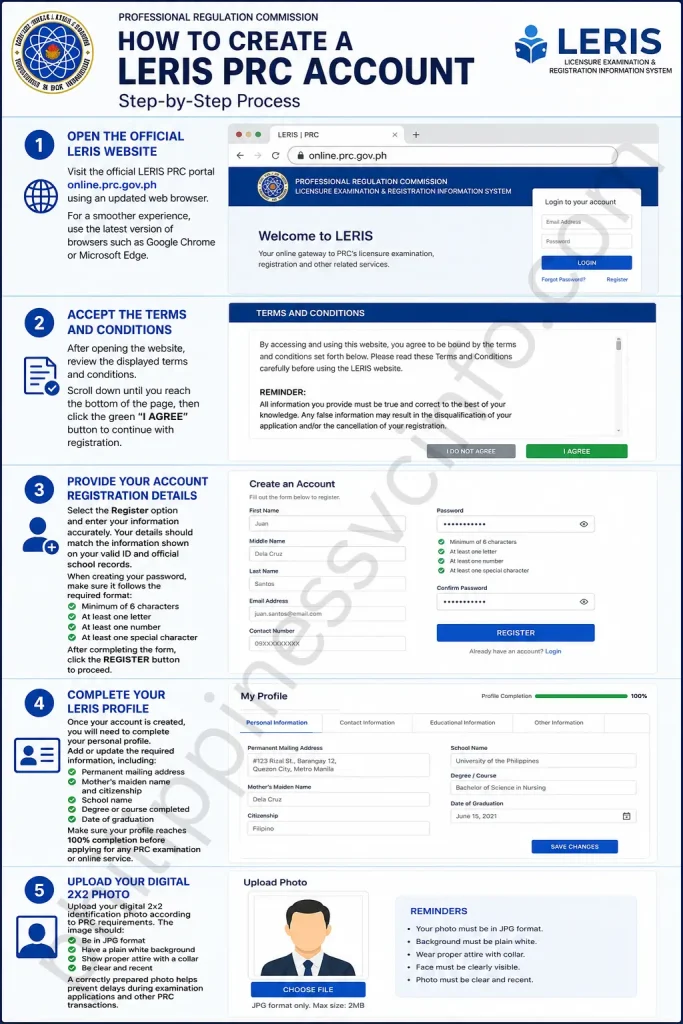
Creating a LERIS PRC account is the first step before applying for licensure examinations, renewing your Professional Identification Card, or accessing other PRC online services. Follow these steps carefully to set up your account successfully.
Step 1: Open the Official LERIS Website
Visit the official LERIS PRC portal at online.prc.gov.ph using an updated web browser. For a smoother experience, use the latest version of browsers such as Google Chrome or Microsoft Edge.
Step 2: Accept the Terms and Conditions
After opening the website, review the displayed terms and conditions. Scroll down until you reach the bottom of the page, then click the green “I AGREE” button to continue with registration.
Step 3: Provide Your Account Registration Details
Select the Register option and enter your information accurately. Your details should match the information shown on your valid ID and official school records.
When creating your password, make sure it follows the required format:
- Minimum of 6 characters
- At least one letter
- At least one number
- At least one special character
After completing the form, click the REGISTER button to proceed.
Step 4: Complete Your LERIS Profile
Once your account is created, you will need to complete your personal profile. Add or update the required information, including:
- Permanent mailing address
- Mother’s maiden name and citizenship
- School name
- Degree or course completed
- Date of graduation
Make sure your profile reaches 100% completion before applying for any PRC examination or online service.
Step 5: Upload Your Digital 2×2 Photo
Upload your digital 2×2 identification photo according to PRC requirements. The image should:
- Be in JPG format
- Have a plain white background
- Show proper attire with a collar
- Be clear and recent
A correctly prepared photo helps prevent delays during examination applications and other PRC transactions.
How to Log In to Your LERIS PRC Account
After creating your LERIS PRC account, you can access the portal anytime to manage your PRC-related transactions. Logging in only requires your registered email address and password.

Follow these steps:
Step 1: Visit the LERIS Portal
Open the official PRC LERIS website at online.prc.gov.ph using an updated browser.
Step 2: Enter Your Account Details
Provide the email address and password that you used during registration. Make sure your login details are entered correctly to avoid account access issues.
Step 3: Access Your Dashboard
Click the Log In button. Once your credentials are verified, you will be redirected to your LERIS dashboard, where you can choose available services and complete PRC transactions.
How to Reset Your LERIS Password and Recover Your Account
If you cannot access your LERIS PRC account, you can reset your password or recover your account by following the correct steps. The process depends on whether you still have access to your registered email address.
Reset Your LERIS Password

Follow these steps to create a new password:
- Select “Forgot Password” on the LERIS sign-in page.
- Enter the email address registered with your account.
- Open the password reset message sent to your email and follow the provided link.
- Create a new password that you have not used previously.
- Sign in again and review your profile information to make sure your details are correct.
Recover Your LERIS Account Without Email Access

If you no longer have access to your registered email address:
- Try recovering your email account first through your email service provider.
- If email recovery is not possible, contact PRC support for assistance.
- Provide your account details, including:
- Full name
- Date of birth
- Registered email address
- Previous transaction reference numbers (if available)
- Prepare a clear photo of a valid ID and your PRC ID, if you already have one.
- Request an email update after your identity has been verified.
- Confirm the email change by logging in again with your updated account details.
Keeping your LERIS email updated is important because PRC sends OTPs, confirmations, and important account notifications through your registered email address.
How to Schedule a PRC Appointment for a Board Examination Application
Before applying for a PRC board examination, you must first log in to your LERIS account and make sure your profile is fully completed. The appointment system allows you to select your preferred PRC office, available schedule, and examination details online.

Follow these steps to book your appointment:
Step 1: Open the Transaction Menu
After logging in, go to the left-side menu and select “Select Transaction” to view the available PRC services.
Step 2: Choose Examination Application
Select Examination as your transaction type. This option is used when applying for PRC licensure examinations.
Step 3: Select Your Desired Board Exam
Choose the specific examination you want to take, such as:
- Nurse Licensure Examination (NLE)
- Licensure Examination for Teachers (LET)
- Criminologist Licensure Examination (CLE)
- Other PRC-regulated professional examinations
Make sure you select the correct exam before continuing.
Step 4: Choose a PRC Office and Appointment Schedule
Select your preferred PRC branch, appointment date, and available time slot. LERIS will display the schedules currently open for booking.
Appointment Tips:
- Pick a PRC office that is convenient for you to visit.
- Morning schedules are usually taken quickly.
- High-demand examinations, including nursing, teaching, and engineering exams, often have limited slots.
- If your preferred date is unavailable, check again later because new appointment slots may be released in batches.
Step 5: Receive Your Reference Number
After confirming your appointment details, LERIS will generate a Reference Number that you can use for payment.
Step 6: Complete the Payment
Pay the required examination fee using the available payment options. After successful payment, allow time for the transaction status to update in your LERIS account.
Step 7: Print Your PRC Application Form
Once your payment has been confirmed, download and print your PRC Application Form. Bring this form, along with your required documents and valid identification, when you visit the selected PRC office for verification and submission.
How to Renew Your PRC Licence Through LERIS
Renewing your PRC Professional Identification Card (PIC) can be completed online through the LERIS PRC portal. The system allows licensed professionals to submit renewal requests, choose an appointment schedule, and manage the renewal process before visiting a PRC office.

Follow these steps to renew your licence:
Step 1: Log In to Your LERIS Account
Visit the official LERIS portal and sign in using your registered email address and password.
Step 2: Select the Renewal Transaction
From your account dashboard, open the “Select Transaction” option and choose Renewal to begin the PIC renewal process.
Step 3: Provide Renewal Details
Complete the required renewal information and review your details carefully before proceeding. Make sure your records are accurate to avoid delays.
Step 4: Choose Your PRC Appointment Schedule
Select your preferred PRC office, appointment date, and available time slot. Even for licence renewals, an online appointment is required before visiting a PRC service centre.
Step 5: Pay the Renewal Fee
Complete the required payment using the available payment methods. Wait for the transaction status to update in your LERIS account after successful payment.
Step 6: Print Your Renewal Documents
After confirmation, print your renewal slip or appointment document. Bring it along with your required documents and valid ID when attending your scheduled PRC appointment.
CPD Requirement Reminder
Continuing Professional Development (CPD) units are generally part of the PRC licence renewal requirements. However, PRC may provide certain allowances or alternative arrangements depending on current policies and the profession involved. Always check the latest CPD guidelines applicable to your licence before renewing.
Common LERIS PRC Issues and Solutions
While using the LERIS PRC portal, users may sometimes encounter errors related to account details, appointments, payments, or document uploads. Most problems can be resolved by checking your information carefully or following the recommended troubleshooting steps below.
“No Record Found” Error
This issue usually happens when the details entered do not match PRC records.
Possible solutions:
- Check that your name and birthdate match your valid ID and official records exactly.
- Avoid creating multiple LERIS accounts using different email addresses.
- If you accidentally created a duplicate account, contact PRC support for assistance with correcting or managing your records.
Fully Booked PRC Office
Some PRC branches may show no available schedules because all appointment slots have been taken.
What you can do:
- Select another appointment date.
- Try a different PRC office or branch.
- Check the portal regularly, as new appointment slots may become available in batches.
Payment Status Still Pending
Sometimes payment confirmation may take time before appearing in your LERIS account.
Recommended steps:
- Wait for a few minutes and refresh your dashboard.
- Keep your payment receipt or transaction proof.
- If the status remains pending beyond the expected processing period, contact PRC support and provide your reference number along with payment details or a screenshot.
Forgotten Password
If you cannot access your account because of a forgotten password:
- Use the password reset option on the LERIS login page.
- Follow the instructions sent to your registered email.
- For continued login issues or account record mismatches, contact the PRC Licensure Examination Division for assistance.
Photo Upload Rejected
LERIS may reject photos that do not follow PRC requirements.
Make sure your photo:
- Is saved in JPG format
- Has a plain white background
- Shows proper and decent collared attire
- Is clear, recent, and properly sized
After correcting the image, upload the updated photo again.
Important Reminders for PRC Examination Applicants
Before completing your application, keep these points in mind:
- Your LERIS profile must be 100% complete before submitting an examination application.
- Print your PRC application form and bring it on your scheduled appointment date.
- Arrive at least 15 minutes before your appointment time.
- Carry valid identification documents for verification.
- Check transaction instructions carefully because some services may not allow representatives.
- Use the same name format shown in your school records and official documents to prevent record mismatches.
What Happens After Passing a PRC Board Examination?
Passing a PRC board examination is an important milestone, but there are still a few steps to complete before you can officially practise your profession. After receiving your passing result, you need to return to the LERIS PRC portal to process your Initial Registration.
Through Initial Registration, newly licensed professionals can apply for their Professional Identification Card (PRC ID) and Certificate of Registration (COR). These documents serve as official proof that you are recognised as a licensed professional by PRC.
Online Oath-Taking Through LERIS
Some professions may allow successful examinees to complete their oath-taking online through LERIS. If online oath-taking is available for your profession, prepare the following:
- Keep your camera turned on during the session.
- Use the same registered name shown in your PRC records.
- Have a valid ID available for verification.
- Follow the instructions provided by PRC for the virtual oath process.
After completing the required registration and oath-taking steps, you can proceed with receiving your professional documents and begin your journey as a PRC-licensed practitioner.
Prepare for Your PRC Board Exam with LisensyaPrep
While completing your LERIS PRC application, it is also a good time to begin preparing for your upcoming board examination. A well-planned review schedule can help you build confidence and improve your chances of success.
LisensyaPrep provides free, gamified board exam review materials designed to make studying more engaging and interactive. It offers review resources for various professional and government examinations, including:
- Philippine Nurse Licensure Examination (PNLE)
- Licensure Examination for Teachers (LET)
- Criminologist Licensure Examination (CLE)
- Pharmacy Licensure Examination
- Medical Technology Licensure Examination
- Agriculture Licensure Examination
- Civil Service Examination
By combining exam preparation with your LERIS application process, you can stay organised and make steady progress towards your professional goals.
Start Your Free Board Exam Review with LisensyaPrep
Tips for Using LERIS PRC Smoothly
Using the LERIS PRC portal becomes much easier when you prepare ahead of time and keep your account information organised. These practical tips can help you avoid common delays and last-minute problems.
Create Your Account Early
Do not wait until the day before an application deadline to register. Set up your LERIS account in advance, complete your profile, and make sure all details are accurate. Account issues or record corrections may take time to resolve.
Use Your PSA Birth Certificate Details
Make sure your LERIS information matches your PSA Birth Certificate records. If another ID shows a different spelling of your name, use the PSA version to prevent PRC record mismatches.
Save the Official LERIS Website
Bookmark the official portal:
online.prc.gov.ph
Avoid accessing LERIS through random search results, as unofficial or outdated websites may appear online.
Keep Records of Reference Numbers
Save screenshots of every important transaction detail, including:
- Payment reference numbers
- Appointment confirmations
- Transaction details
These records can help if a payment or appointment status does not update correctly.
Schedule Appointments Early
Try booking appointments early, especially for popular examinations and busy PRC offices. If your preferred branch has no available slots, check nearby PRC offices or return later for newly released schedules.
Use One Permanent Email Address
Use the same personal email address for your LERIS account throughout your professional career. Your email receives important messages, including OTPs, confirmations, and account notifications.
Renew Your PRC ID Before It Expires
PRC Professional Identification Card renewal can usually be started before the expiration date. Renewing early helps you avoid expired licence issues and last-minute processing concerns.
Check Official PRC Announcements
Before assuming there is an issue with your account, check official PRC announcements for updates about website maintenance, appointment availability, or fee changes. Official PRC channels provide the latest service information.
| Concern | Contact |
|---|---|
| LERIS technical or account issues | [email protected] |
| General PRC inquiries | [email protected] |
| Licensure examination applications | [email protected] |
| Registration and licence renewal concerns | [email protected] |
| Feedback and complaints (CRMS) | crms.prc.gov.ph/feedbackform |
Main Transactions You Can Complete Through LERIS PRC
LERIS provides access to various PRC services through one online platform. The most common transactions include:
1. Board Examination Application
Applicants can submit their application for PRC licensure examinations, select their preferred schedule, pay required fees, and prepare their examination documents through LERIS.
2. Initial Registration
New board passers can complete their professional registration, receive their licence number, and process their first PRC ID after meeting the requirements.
3. Professional ID Card Renewal
Licensed professionals can renew their Professional Identification Card (PIC) through LERIS and schedule their required PRC appointment.
4. Licence and Rating Verification
Users can check examination ratings or verify the professional registration details of a PRC-licensed individual.
5. Oath-Taking Registration
New professionals can register for their oath-taking ceremony through LERIS. Some professions may also qualify for online oath-taking options.
6. Replacement of Lost or Damaged PRC ID
Professionals can request a replacement Professional Identification Card if their original ID is lost, damaged, or no longer usable.
7. Certificate Requests
LERIS allows professionals to request official documents, including certificates of registration, board ratings, passing certificates, and certificates of good standing.
8. Document Authentication
Professionals can request authentication of PRC documents for official use, including requirements for local or international purposes.
9. Record Corrections and Status Updates
Users can submit requests for corrections to personal records or update professional information, including changes related to civil status.
| Transaction | Who It’s For | Typical Fee | Personal Appearance Required? |
|---|---|---|---|
| Exam Application | Board examination applicants | ₱600–₱900 (varies by examination) | Yes — for document verification |
| Initial Registration | Newly passed board examinees | ₱600–₱1,050 (varies by profession) | Yes — for biometrics and PRC ID processing |
| PIC Renewal | Licensed professionals | ₱450 (3-year renewal cycle) | Yes — for ID claiming |
| Verification of Rating or Licence | Anyone checking professional records | Free online | No — available online |
| Oath Taking | New board passers | Depends on the ceremony | Yes — e-Oath available for some professions |
| Duplicate PIC Request | Professionals with lost or damaged IDs | ₱250 + convenience fee | Yes — same-day release is commonly available |
| Certifications | Professionals requesting official documents | ₱75–₱150 per copy | Yes — for document claiming |
| Authentication | Users needing PRC documents for local or overseas purposes | Varies by document type | Yes — for submission and claiming |
What Services Are Available Through LERIS PRC?
The LERIS PRC portal provides access to a wide range of Professional Regulation Commission services, allowing professionals and applicants to complete important transactions online. From applying for licensure examinations to maintaining professional records, users can manage many PRC-related processes through the digital platform.
Key services available on LERIS include:
- Licensure Examination Application – Submit applications for PRC board examinations such as the Philippine Nurse Licensure Examination (PNLE), Licensure Examination for Teachers (LET), Criminologist Licensure Examination (CLE), and other professional exams.
- Initial Registration – Complete the registration process after successfully passing a PRC licensure examination and apply for professional recognition.
- Professional ID Card Renewal – Renew your Professional Identification Card (PIC) and manage your licence validity through the online system.
- Certificate Requests – Request official documents such as certificates of registration, board ratings, and certificates of good standing.
- Document Authentication – Apply for authentication services for PRC-issued documents when required.
- Personal Information Updates – Request changes to your professional records, including name corrections, updates after marriage, or other status modifications.
- Replacement of Lost or Damaged ID – Apply for a replacement Professional Identification Card if your original card is lost, damaged, or unavailable.
- Professional Licence Verification – Verify the registration status and professional credentials of PRC-licensed individuals.
Important Note: Most PRC transactions require users to schedule an online appointment through LERIS before visiting a PRC office. This requirement also applies to many renewal services.
Frequently Asked Questions About LERIS PRC
Final Thoughts
LERIS PRC is an important platform for managing your professional journey in the Philippines, from board examination applications and initial registration to licence renewals, certifications, and verification services. Most LERIS issues can be avoided by keeping your personal information accurate, matching your PSA records, using a permanent email address, and maintaining a complete profile. Once your account is properly set up through the official LERIS portal, future PRC transactions become much easier. Keep your details updated, secure your login information, and follow official PRC announcements to stay informed about any changes in the process.
Discover What You Need to Know:
- Metrobank Philippines 2026: Online Banking, Login, Accounts & Loans
- NBI Clearance Philippines 2026: Complete Guide to Registration, Fees & Requirements
- DITO SIM Registration 2026: Official Registration Link, Requirements & Guide
- Digital National ID Philippines: Complete Guide to Download, Access & Use (2026)
- ARCarrierPoint.net 2026 Complete Guide With Features, Services, Benefits & How to Use