
The Learner Information System (LIS) is the official online registry developed by the Department of Education (DepEd) Philippines to manage and maintain accurate records of learners enrolled in basic education. It provides authorised school personnel with a secure platform to register students, generate and manage the 12-digit Learner Reference Number (LRN), process enrolments and transfers, update learner information, and record end-of-school-year statuses. By centralising learner data across public and private schools, SUCs, LUCs, and Alternative Learning System (ALS) centres, the LIS helps DepEd improve data accuracy, streamline school administration, and support evidence-based education planning nationwide.
What Is LIS (Learner Information System)?
The LIS (Learner Information System) is the official online registry developed and managed by the Department of Education (DepEd) Philippines to maintain accurate records of learners enrolled in basic education institutions. The Learner Information System serves as a central database where authorised DepEd users can manage learner profiles, monitor enrolment information, track learner movement between schools, and maintain important academic records.
The official LIS portal can be accessed through:

The system is used by public schools, private schools, State Universities and Colleges (SUCs), Local Universities and Colleges (LUCs), and Alternative Learning System (ALS) centres to organise learner information efficiently.
Unlike traditional paper-based records, the LIS provides a digital platform that allows schools and DepEd offices to access updated enrolment information and generate reliable education statistics.
Why Is the DepEd Learner Information System Important?
The Learner Information System plays an important role in managing education data across the Philippines. It helps schools maintain correct learner details and supports DepEd in making decisions based on verified information.
The main purposes of LIS include:
1. Learner Reference Number (LRN) Management
One of the most important functions of the LIS is creating and maintaining the 12-digit Learner Reference Number (LRN).
The LRN is a unique identification number assigned to every basic education learner. It remains connected to the learner’s official records throughout their education journey.
The LRN helps prevent:
- Duplicate learner records
- Incorrect student identification
- Problems during school transfers
- Loss of academic history
2. Online Enrolment Management
The Learner Information System allows schools to record and manage learner enrolment information digitally.
Through the LIS portal, authorised users can:
- Add learners to classes
- Update enrolment status
- Manage grade-level sections
- Process learner transfers
- Monitor school population
This makes school administration faster and reduces errors caused by manual record keeping.
3. Academic Status Monitoring
The LIS also helps schools record learner progress at the end of each school year.
Schools can update learner status such as:
| Status | Meaning |
|---|---|
| Promoted | Learner successfully advances to the next grade level |
| Retained | Learner continues the same grade level |
| Transferred Out | Learner moved to another recognised school |
| Dropped Out / NLPA | Learner stopped attending school |
These records help DepEd understand learner movement and education trends nationwide.
Who Can Use the LIS Portal?
The LIS portal is not a public registration website. Access is limited to authorised education personnel who manage learner information.
Common LIS users include:
| User Role | Main Responsibility |
|---|---|
| School Head | Oversees school LIS activities |
| Class Adviser | Updates class and learner records |
| School LIS Administrator | Manages LIS operations within the school |
| Division LIS Coordinator | Provides administrative support |
| Division Information Technology Officer | Handles technical concerns |
Students and parents normally do not create personal LIS accounts. Learner records are managed through schools and authorised DepEd personnel.
LIS Portal Requirements Before Access
Before using the DepEd Learner Information System, users should prepare the required technical access and supporting documents.
Technical Requirements
| Requirement | Details |
|---|---|
| Web Browser | Google Chrome, Mozilla Firefox, Microsoft Edge, or Safari |
| Internet Connection | Stable broadband or 4G LTE connection |
| Account Access | Official DepEd LIS username and password |
| Authorisation | Approved role from the Division LIS Coordinator |
Using an updated browser is recommended because older browser versions may cause display problems or login errors.
Documents Used in LIS Learner Management
Schools may need official learner documents when creating or updating records.
Common supporting documents include:
- PSA Birth Certificate
- Form 137 / School Form 10 (SF10)
- Form 138 / School Form 9 (SF9)
- Other authorised school records
Learner information should always match official documents to avoid correction requests later.
How to Register a New Learner in LIS
The Learner Information System (LIS) allows authorised school personnel to create new learner records when a student does not yet have an existing record. New learner registration is commonly used for first-time enrollees, including Kindergarten learners.
Before creating a new learner profile, schools must carefully check whether the learner already exists in the system. Creating duplicate learner records can create problems with learner history and LRN management.

Step 1: Open the Learner Registry
After logging into the DepEd LIS portal, go to:
Learner Registry → Register New Learner
This section is used for adding learners who do not have an existing record.
Step 2: Perform a Learner Search
Before creating a new profile, the system requires users to search existing records.
Enter details such as:
- Full name
- Date of birth
- Other identifying information
The purpose of this search is to check whether the learner already has an existing Learner Reference Number (LRN).
Important Note:
Never create a new LIS record if the learner already has an LRN.
A duplicate LRN can affect:
- School transfer processing
- Academic records
- Learner history
- Official DepEd statistics
Step 3: Complete Learner Information
If no matching record is found, continue with new registration.
Enter learner details based on official documents, including:
| Information Required | Details |
|---|---|
| Full Name | Last name, first name, middle name, extension name |
| Date of Birth | Must match official records |
| Sex | Learner gender information |
| Place of Birth | Official birth location |
| Parents Information | Mother’s maiden name and father’s/guardian details |
| Address | Current learner residence |
| IP Affiliation | Indigenous People information if applicable |
| 4Ps Household ID | If applicable |
All information should match the learner’s official documents.
Step 4: Generate LRN and Submit Enrolment
After reviewing all details:
- Confirm the learner information.
- Select the option to generate LRN.
- Submit the enrolment record.
The system will create the learner profile and assign a unique 12-digit Learner Reference Number.
How to Login to the LIS Portal
Authorised users can access the LIS Philippines portal by following these steps.

Step 1: Visit the Official LIS Website
Open a supported web browser and go to:
Always check that you are using the official DepEd LIS website before entering account credentials.
Step 2: Enter Your Login Details
On the LIS login page:
- Enter your assigned username.
- Enter your password.
- Click the Sign In button.
Only authorised DepEd accounts can access the system.
Step 3: Select School Profile (If Applicable)
Some users manage multiple school roles or school profiles.
After login, select the correct school profile from the available dashboard options before performing any learner-related activity.
How to Reset LIS Password
Users who forget their LIS password can recover access through the login page.
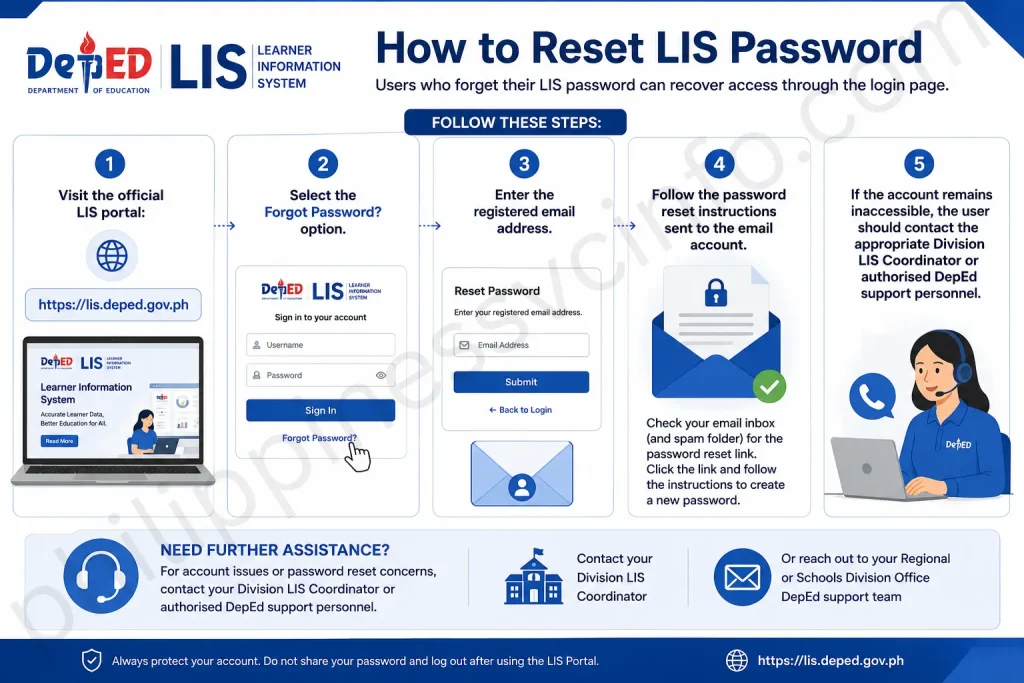
Follow these steps:
- Visit the official LIS portal:
- Select the Forgot Password? option.
- Enter the registered email address.
- Follow the password reset instructions sent to the email account.
If the account remains inaccessible, the user should contact the appropriate Division LIS Coordinator or authorised DepEd support personnel.
LIS Account Security Best Practices
Because the LIS portal contains official learner information, account security is essential.
Users should follow these practices:
✅ Create a strong password
✅ Keep login credentials confidential
✅ Avoid sharing accounts between users
✅ Log out after completing tasks
✅ Use secure internet connections when accessing learner records
Protecting LIS accounts helps maintain the accuracy and confidentiality of learner data.
How to Enrol an Existing Learner in LIS
If a learner already has an LRN, schools do not need to create a new record.

Instead, the existing learner profile can be added to the current class.
Follow these steps:
Step 1: Open List of Classes
From the LIS dashboard:
List of Classes → Select Grade Level → Select Section
Choose the correct class section where the learner will be enrolled.
Step 2: Add Learner Information
Enter either:
- 12-digit LRN, or
- Learner name and date of birth
The system will search the existing learner profile.
Step 3: Verify Learner Details
Before completing enrolment, confirm:
- Name spelling
- Birth date
- Learner identity
- Existing school records
This step prevents enrolling the wrong learner profile.
Step 4: Save Enrolment Details
Select:
- Enrolment status
- Enrolment date
Then click:
Save & Enrol
The learner will be added to the selected class.
Managing Learner Transfers Through LIS
The LIS portal also supports learner transfer management between schools.
This feature helps schools maintain accurate learner movement records.
There are two main transfer processes:
- Transfer-In
- Transfer-Out
Transfer-In Process for Receiving Schools
A school receiving a transferred learner should:
- Search the learner using the LRN.
- Open the learner profile.
- Select the transfer request option.
- Submit the required transfer information.
- Attach supporting documents if required.
Common documents may include:
- Form 138 / SF9
- Written transfer request
- Other school verification documents
Transfer-Out Process for Previous Schools
The originating school manages outgoing transfers.
Steps include:
- Open the Transfers section.
- Check pending outgoing transfer requests.
- Verify learner details.
- Confirm the learner is cleared according to school procedures.
- Approve and release the transfer.
Once approved, the receiving school can continue the learner enrolment process.
Understanding LIS Main Dashboard Features
After successful login, users can access different sections of the Learner Information System dashboard.
Each menu has a specific purpose.
| LIS Menu | Purpose |
|---|---|
| Dashboard | Displays school enrolment overview and system notices |
| List of Classes | Creates sections and manages class enrolment |
| Learner Registry | Searches, creates, and updates learner profiles |
| Transfers | Handles learner movement between schools |
| Data Corrections | Submits requests for record corrections |
LIS Data Corrections and Record Updates
Sometimes learner information may contain errors, such as:
- Incorrect spelling of names
- Wrong birth date
- Duplicate learner records
- Incorrect personal information
The LIS provides a Data Corrections process to request official changes.
Duplicate LRN Correction
If a learner has more than one record, schools should request an official LRN correction or merge process through the proper DepEd channel.
Demographic Information Correction
Some learner fields become locked after verification.
In these cases, schools may need to submit correction requests with supporting documents, such as a PSA Birth Certificate.
End-of-School-Year (EOSY) Updates in LIS
At the end of every academic year, class advisers update learner outcomes through the Learner Information System.
EOSY updates help DepEd maintain accurate education records.
The common learner status categories are:
| EOSY Status | Description |
|---|---|
| Promoted | Learner meets requirements and moves to the next level |
| Retained | Learner remains in the same grade level |
| Transferred Out | Learner moved to another institution |
| Dropped Out / NLPA | Learner stopped attending before completion |
Accurate EOSY updates help schools prepare reliable enrolment reports.
Common LIS Problems and Solutions
Although the Learner Information System (LIS) helps schools manage learner records efficiently, users may sometimes experience technical or record-related issues.
Below are common LIS problems and recommended solutions.
| Problem | Possible Cause | Solution |
|---|---|---|
| Duplicate LRN Warning | Learner already has an existing record | Submit an LRN correction or merge request through the Data Corrections process |
| Transfer Pending Approval | Previous school has not released the learner record | Contact the originating school’s LIS administrator |
| Locked Profile Information | Verified details cannot be edited directly | Submit an official demographic correction request with supporting documents |
| Portal Session Expired | Long period of inactivity | Refresh the page, clear browser cache, and log in again |
| Login Failure | Incorrect username or password | Use password recovery or contact the LIS administrator |
Official LIS Support and Assistance
For technical concerns, account issues, or system-related problems, users should contact official support channels.
LIS Support Email
Users can contact the official DepEd LIS support team through email for assistance with account issues, learner records, technical concerns, and other portal-related inquiries.
Administrative Support
For concerns involving:
- Account access
- Profile unfreezing
- LRN correction requests
- User role changes
users should coordinate with:
- Division LIS Coordinator
- Division Information Technology Officer (ITO)
Benefits of Using the DepEd Learner Information System
The Learner Information System provides several advantages for schools and education administrators.
1. Centralised Learner Records
The LIS creates a single digital record system where learner information can be stored, updated, and managed.
This reduces dependence on manual paperwork and improves record organisation.
2. Accurate Education Data
Because schools update learner information directly, DepEd receives more reliable enrolment statistics.
This supports better planning for:
- School resources
- Teacher allocation
- Education programmes
- Government initiatives
3. Easier Learner Tracking
The LRN allows authorised users to track learner records even when students transfer between recognised institutions.
This helps maintain continuity in education history.
4. Improved School Administration
The LIS simplifies several school processes, including:
- Enrolment management
- Class organisation
- Transfer processing
- End-of-year reporting
Teachers and school administrators can manage information more efficiently.
Tips for Using LIS More Effectively
To avoid common problems while working with the DepEd LIS portal, consider these recommendations:
Verify Information Before Submission
Always review learner details before saving records. Incorrect information can require additional correction procedures later.
Search Before Creating New Records
Always perform a learner search before generating a new LRN.
This prevents duplicate learner profiles.
Keep Documents Ready
Having supporting documents available makes correction requests and verification processes easier.
Use Updated Browsers
Modern browsers such as Google Chrome, Mozilla Firefox, Microsoft Edge, and Safari provide better compatibility with online systems.
Frequently Asked Questions About LIS
Final Thoughts
The Learner Information System (LIS) is an essential DepEd platform that supports accurate learner record management throughout the Philippines. By combining enrolment tracking, LRN management, transfer processing, and academic status monitoring, the system helps schools maintain organised and reliable education data. For authorised users, understanding how the LIS portal works makes daily administrative tasks smoother and reduces errors in learner records. Always use the official DepEd website and follow proper procedures when creating, updating, or correcting learner information.
Discover What You Need to Know:
- LERIS PRC Philippines 2026: Registration, Login & License Renewal Guide
- Metrobank Philippines 2026: Online Banking, Login, Accounts & Loans
- NBI Clearance Philippines 2026: Complete Guide to Registration, Fees & Requirements
- DITO SIM Registration 2026: Official Registration Link, Requirements & Guide
- Digital National ID Philippines: Complete Guide to Download, Access & Use (2026)








