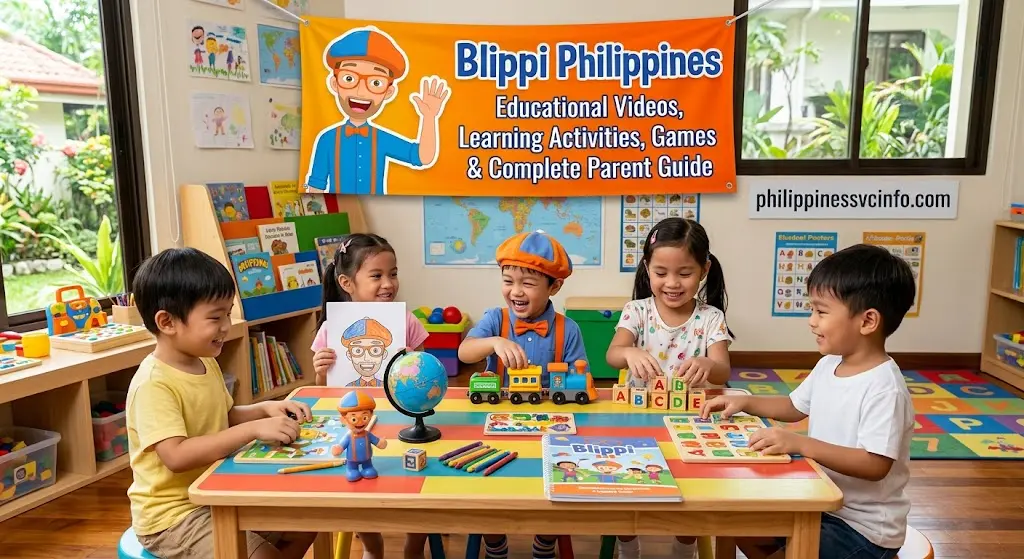
Blippi is a popular live-action educational entertainment character and preschool programme designed to make learning fun for young children. Through colourful videos, songs, real-world adventures, and interactive activities, Blippi introduces children to topics such as colours, numbers, shapes, vehicles, animals, science, occupations, and everyday life. The content is mainly aimed at preschool-aged children and encourages curiosity, exploration, and early learning.
What Is Blippi?
Blippi is a children’s educational entertainment brand built around a curious character who explores the world through playful adventures. The official site describes the programme as a live-action preschool experience that turns the world into a playground.
The central idea behind Blippi is exploration. Instead of presenting every lesson as a traditional classroom activity, the programme often places learning in familiar or exciting real-world settings.
Children may encounter subjects such as:
- Fire trucks and emergency services
- Construction vehicles and machinery
- Zoos and animal habitats
- Aquariums and marine life
- Farms and food
- Museums and children’s attractions
- Colours, shapes and numbers
- Music and movement
- Everyday jobs and community helpers
The official Blippi website says its mission is to encourage preschoolers to discover the wonders of the world and develop a lifelong love of learning.
That approach makes Blippi educational content particularly useful for children who learn well through seeing, hearing and experiencing ideas rather than simply listening to explanations.
Where Can Parents Watch Blippi?
Parents looking for Blippi learning videos can begin with the official website’s Watch section. The site currently features Blippi and Meekah programmes and directs families towards online viewing options.
According to Blippi’s official FAQ, the videos are available through major children’s streaming services including YouTube, Netflix and Prime Video. Availability can vary by country and platform.
A useful starting point is:
Parents can use the official site to discover current programmes rather than relying on old third-party lists that may no longer reflect the available catalogue.
What Do Blippi Videos Teach?
One of the strongest features of Blippi is the wide range of subjects that can appear within its adventures.
The learning experience can include several broad areas.
Colours, Shapes and Numbers
Younger children can practise recognising colours, shapes and numbers while watching objects being used in real environments.
Parents can make this more interactive by asking questions such as:
- What colour is that truck?
- How many wheels can you see?
- Can you find a circle?
- Which object is bigger?
- What comes next?
These simple questions turn passive viewing into a shared learning activity.
Science and Discovery
Blippi also explores basic scientific ideas. Depending on the episode, children may encounter animals, habitats, movement, machines, materials and simple cause-and-effect relationships.
For example, a Blippi learning activity based on sinking and floating can introduce children to prediction and observation.
Before placing an object in water, ask:
“Do you think it will sink or float?”
The child then makes a prediction, observes what happens and compares the result with the original idea.
That process introduces an early form of scientific thinking without requiring complicated terminology.
Vehicles and Machinery
Vehicles are a recurring interest for many young children, and Blippi frequently uses that interest as an entry point for learning.
Construction equipment, fire engines and other machines can introduce vocabulary about:
- Wheels
- Engines
- Tools
- Safety equipment
- Vehicle functions
- Different types of work
A child who already loves trucks may be much more interested in learning a new word when that word is connected to a machine they find exciting.
Blippi for Toddlers
Blippi for toddlers works best when parents choose content that matches a child’s attention span and developmental stage.
Younger children often benefit from short, focused viewing followed by real-world interaction. Rather than expecting a toddler to remember everything in an episode, parents can select one or two concepts and reinforce them afterwards.
For example, if an episode focuses on colours, the follow-up activity could simply be a colour hunt around the home.
A Simple Toddler Viewing Routine
Watch → Talk → Move → Explore
During a video, parents can pause occasionally and ask the child to identify an object. After watching, they can find a similar object in the real world.
For example:
Video: A red fire truck
Question: “What colour is the truck?”
Real-world activity: Find three red objects at home.
This approach helps connect Blippi for toddlers with everyday experiences instead of treating screen content as an isolated activity.
Blippi for Preschoolers
As children move towards preschool and kindergarten, they can begin exploring more detailed questions.
Blippi for preschoolers can be used as a starting point for discussions about how things work, why people perform certain jobs and what happens during a process.
For example, instead of asking only:
“What is this?”
parents can ask:
“What does it do?”
“Why do workers need it?”
“What might happen next?”
These questions encourage children to move from identification towards reasoning.
The official Blippi site also highlights curiosity, learning through play and exploration as central values of the brand.
Blippi Learning Videos and Educational Subjects
The educational value of Blippi learning videos often comes from combining visual demonstrations with spoken explanations, music, repetition and physical movement.
| Learning area | Examples of concepts |
|---|---|
| Early maths | Counting, numbers, size and sorting |
| Early literacy | Letters, sounds and vocabulary |
| Science | Animals, habitats, materials and simple experiments |
| Technology | Machines and how equipment works |
| Community learning | Jobs, workplaces and community helpers |
| Health and hygiene | Everyday routines and safety |
| Physical development | Movement, dancing and coordination |
| Language | New words and descriptive vocabulary |
The official Blippi website describes its content as educational, fun, adventurous and relatable, with children encouraged to explore real places and learn from experts.
Is Blippi Educational?
Blippi is designed as educational entertainment for preschool audiences, but parents should still think about how the content fits into a child’s wider learning routine.
A video can introduce a concept, demonstrate vocabulary or spark curiosity. Real learning can become stronger when children subsequently talk about the subject, play with related objects, draw pictures, conduct a simple activity or explore the real world.
For instance, after watching a video about construction vehicles, a parent could give a child toy vehicles and a cardboard box and ask them to create a pretend construction site.
That small extension changes the experience from simply watching to watching plus doing.
The official Blippi mission specifically focuses on encouraging children to learn through play and exploration.
Blippi Educational Activities at Home
One of the easiest ways to extend Blippi educational content is to turn an episode’s theme into an offline activity.
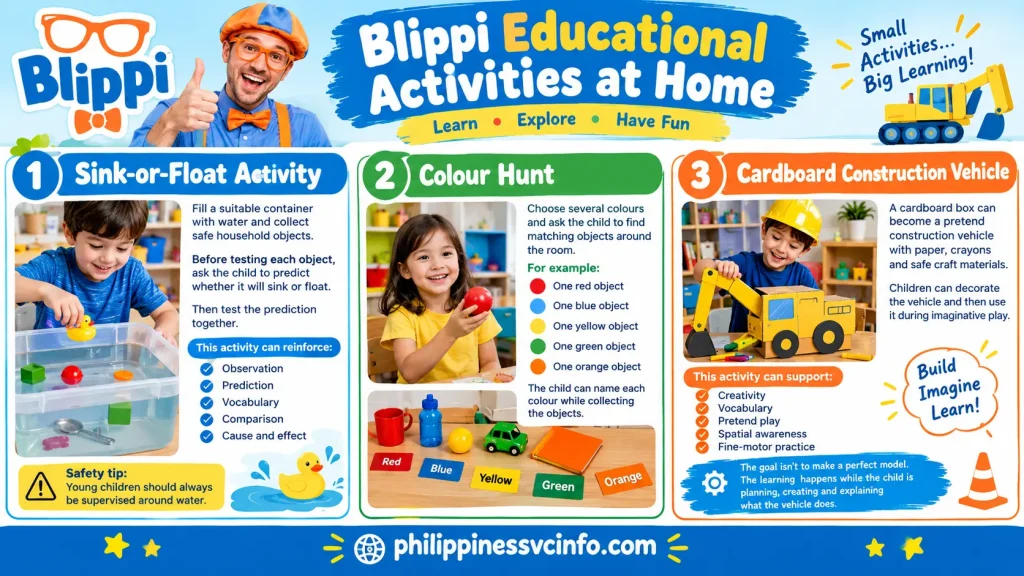
1. Sink-or-Float Activity
Fill a suitable container with water and collect safe household objects.
Before testing each object, ask the child to predict whether it will sink or float.
Then test the prediction together.
This activity can reinforce:
- Observation
- Prediction
- Vocabulary
- Comparison
- Cause and effect
Safety tip: Young children should always be supervised around water.
2. Colour Hunt
Choose several colours and ask the child to find matching objects around the room.
For example:
- One red object
- One blue object
- One yellow object
- One green object
- One orange object
The child can name each colour while collecting the objects.
3. Cardboard Construction Vehicle
A cardboard box can become a pretend construction vehicle with paper, crayons and safe craft materials.
Children can decorate the vehicle and then use it during imaginative play.
This can support:
- Creativity
- Vocabulary
- Pretend play
- Spatial awareness
- Fine-motor practice
The goal isn’t to make a perfect model. The learning happens while the child is planning, creating and explaining what the vehicle does.
Turning Blippi Into Interactive Learning
A useful technique is to pause a Blippi video at selected moments.
Ask the child what they notice before continuing.
For example:
Pause: Blippi shows a large machine.
Ask: “What do you think this machine is used for?”
Continue watching and then discuss whether the child’s prediction was correct.
This simple method encourages children to observe rather than simply wait for the next scene.
Parents can also introduce movement. If a video involves dancing, jumping or pretending to operate a machine, children can safely copy suitable movements away from furniture and other hazards.
What Makes Blippi Different From Traditional Lessons?
Traditional preschool learning may involve books, worksheets, classroom demonstrations and teacher-led activities. Blippi learning videos use a different route: entertainment and real-world exploration are used to create curiosity first.
The official site describes Blippi as an upbeat, enthusiastic and curious character who learns through play and exploration.
That means the programme can work particularly well as a conversation starter.
A child might watch a fire-station adventure and then become interested in firefighters. A parent can follow that interest by looking at pictures of fire engines, discussing safety equipment or visiting a local community facility where appropriate.
The important point is to let curiosity lead the next activity.
Official Blippi Resources
Parents can explore the official website for current content and activities:
- Blippi Official Website
- Blippi Watch
- Blippi Play & Games
- Blippi About Page
- Blippi FAQs
- Blippi Interactive Map
The official Play section currently includes Blippi’s Curiosity Club, games and interactive experiences, while the website’s map lets families explore places Blippi and Meekah have visited.
How Blippi Supports Early Childhood Learning
Young children learn by connecting new ideas with things they can already see, touch and experience. This is where Blippi can be useful. Rather than presenting every concept as an abstract lesson, many episodes place learning inside familiar environments such as a bakery, zoo, construction area, playground or fire station.
A child might first see a vehicle, then learn its name, observe how it works and hear related vocabulary. That sequence gives the child several ways to connect the new information with an experience.
Blippi educational content can therefore be used as a starting point for conversations and play rather than as a replacement for hands-on learning.
Learning Through Seeing, Hearing and Doing
Children have different interests and ways of engaging with information. Blippi learning videos commonly combine several forms of stimulation:
- Visual learning: Bright colours, objects, vehicles, animals and real-world locations provide visual cues.
- Auditory learning: Songs, repeated words and spoken explanations reinforce vocabulary.
- Movement: Music and physical actions give children opportunities to participate.
- Observation: Children can watch demonstrations and notice differences between objects.
- Conversation: Parents can pause a video and ask questions about what is happening.
This combination can make a lesson more memorable, particularly when the parent follows the video with an activity.
Blippi Educational Content for Different Ages
Not every child will respond to the same video in the same way. Age, attention span, language development and individual interests all matter when selecting Blippi educational content.
The material supplied for this guide identifies the main audience as young children, particularly toddlers through kindergarten.
| Age group | Suitable learning focus | Parent approach |
|---|---|---|
| 18–24 months | Objects, colours, sounds and simple words | Brief co-viewing and naming |
| 2–3 years | Colours, numbers, animals and familiar places | Ask simple identification questions |
| 4–5 years | Science, machines and processes | Ask “how” and “why” questions |
| 5–6 years | Reasoning, sequencing and vocabulary | Connect videos with practical activities |
These are useful guidelines rather than strict rules. A child’s developmental stage and interests should guide viewing choices.
Blippi for Toddlers: What Should They Learn?
For toddlers, Blippi for toddlers content can focus on recognition and basic vocabulary.
A toddler may not need a detailed explanation of how a machine operates. It can be enough to identify the machine, learn its name and understand what it does.
Good Toddler Learning Themes
Parents can concentrate on:
- Colours
- Shapes
- Simple counting
- Animals
- Everyday objects
- Basic body and hygiene vocabulary
- Vehicles
- Familiar community helpers
- Movement and songs
Repetition is especially useful at this stage. Hearing a word several times in a meaningful setting can help a child become familiar with its sound and meaning.
Make the Video Interactive
Instead of allowing a toddler to watch continuously, occasionally ask:
“What is that?”
“Can you find the red one?”
“How many do you see?”
“Where is the dog?”
The questions should be easy enough for the child to participate successfully. The purpose is engagement, not testing.
Blippi for Preschoolers: Moving Beyond Recognition
Older preschool children can begin to explore more complex ideas through Blippi for preschoolers content.
At this stage, parents can shift from simple identification towards explanation and prediction.
For example, when watching a construction episode, instead of asking only “What is that?”, try:
- What does the machine do?
- Why does the worker need it?
- What might happen next?
- Which part moves?
- What safety equipment is being used?
These questions encourage children to explain their thinking.
Sequencing Is Another Useful Skill
Many real-world activities have a clear order.
For example:
Choose ingredients → Mix → Bake → Decorate
A parent can ask the child to remember the sequence after watching a food-related episode.
This supports early sequential thinking, which is useful when children later encounter multi-step instructions in school.
What Does Blippi Teach?
The subjects covered by Blippi are broad enough to support several areas of early learning.
1. Basic Concepts
Children can practise recognising:
- Colours
- Numbers
- Letters
- Shapes
- Sizes
- Basic comparisons
These concepts can easily be reinforced away from the screen.
For example, after watching a colour-focused video, ask the child to sort household objects into colour groups.
2. Community and Occupations
Real-world exploration can introduce children to different jobs and workplaces.
Topics may include:
- Firefighters
- Construction workers
- Mechanics
- Bakers
- Chefs
- Other community helpers
This can help children understand that different people perform different roles in their communities.
3. Science and Technology
Some Blippi learning videos introduce simple scientific and mechanical ideas.
Examples include:
- Floating and sinking
- Animals and habitats
- Movement
- Machinery
- Simple mechanisms
- Materials
- How equipment is used
The explanations should be treated as early introductions rather than formal science lessons.
4. Physical Movement
Music and movement sections can encourage children to:
- Jump
- Dance
- Move their arms
- Follow simple actions
- Practise balance
- Coordinate movements
Parents can make this even more useful by creating a safe open space before starting a movement-based activity.
Blippi Educational Activities for Kids
Watching Blippi can be the first step in a larger learning activity.
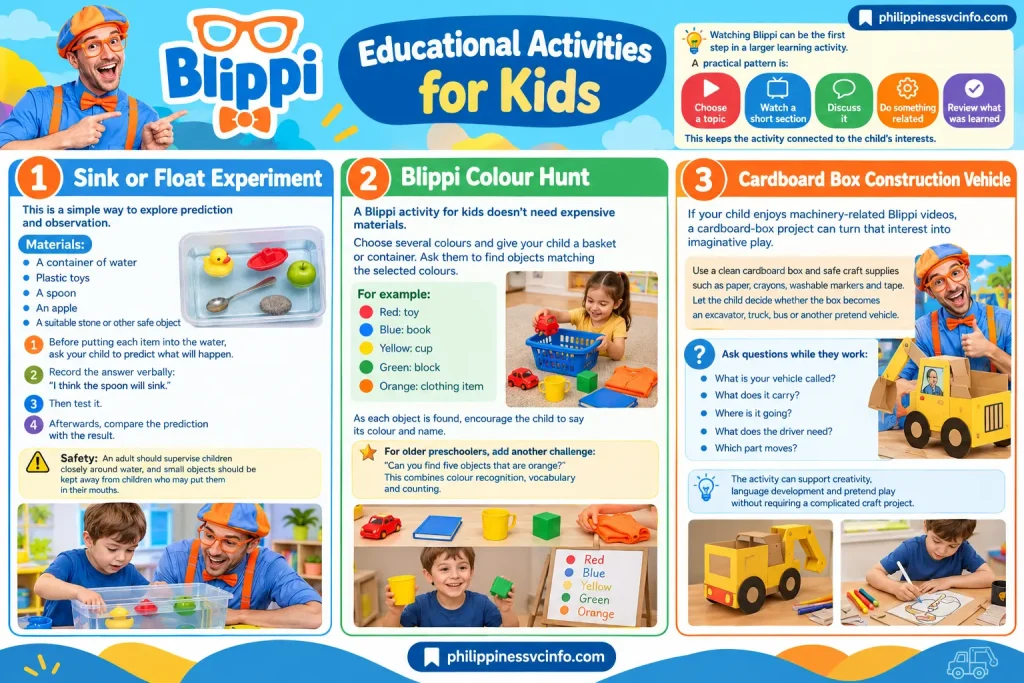
A practical pattern is:
Choose a topic → Watch a short section → Discuss it → Do something related → Review what was learned
This keeps the activity connected to the child’s interests.
Activity 1: Sink or Float Experiment
This is a simple way to explore prediction and observation.
Materials:
- A container of water
- Plastic toys
- A spoon
- An apple
- A suitable stone or other safe object
Before putting each item into the water, ask your child to predict what will happen.
Record the answer verbally:
“I think the spoon will sink.”
Then test it.
Afterwards, compare the prediction with the result.
Safety: An adult should supervise children closely around water, and small objects should be kept away from children who may put them in their mouths.
Activity 2: Blippi Colour Hunt
A Blippi activity for kids doesn’t need expensive materials.
Choose several colours and give your child a basket or container. Ask them to find objects matching the selected colours.
For example:
Red: toy
Blue: book
Yellow: cup
Green: block
Orange: clothing item
As each object is found, encourage the child to say its colour and name.
For older preschoolers, add another challenge:
“Can you find five objects that are orange?”
This combines colour recognition, vocabulary and counting.
Activity 3: Cardboard Box Construction Vehicle
If your child enjoys machinery-related Blippi videos, a cardboard-box project can turn that interest into imaginative play.
Use a clean cardboard box and safe craft supplies such as paper, crayons, washable markers and tape. Let the child decide whether the box becomes an excavator, truck, bus or another pretend vehicle.
Ask questions while they work:
- What is your vehicle called?
- What does it carry?
- Where is it going?
- What does the driver need?
- Which part moves?
The activity can support creativity, language development and pretend play without requiring a complicated craft project.
Blippi Learning Activities Using Everyday Objects
Parents don’t need special educational equipment to create useful Blippi learning activities.
A kitchen can become a maths activity. A garden can become a science activity. A trip outside can become a colour or shape hunt.
At Home
Try:
- Counting spoons
- Sorting socks by colour
- Finding circles around the room
- Comparing large and small toys
- Naming household tools
- Sorting objects by texture
Outdoors
Children can:
- Count leaves
- Look for different colours
- Identify birds or insects
- Compare big and small objects
- Look for shapes in buildings
- Talk about weather
The purpose is to connect what children see on screen with what they encounter in everyday life.
Blippi Lessons for Toddlers
Parents looking for short Blippi lessons for toddlers can organise learning around four simple areas.
Colours and Shapes
Ask children to identify common colours and shapes in toys, books and household objects.
Numbers and Counting
Count objects together rather than simply asking a child to repeat numbers.
For example:
“Let’s count the blocks. One, two, three…”
This connects spoken numbers with actual quantities.
Sensory Vocabulary
Everyday experiences provide opportunities to compare:
- Soft and hard
- Heavy and light
- Hot and cool
- Rough and smooth
- Wet and dry
Adults should of course handle anything that could be hot, sharp or unsafe.
Vocabulary Building
Children can learn names for:
- Animals
- Vehicles
- Tools
- Food
- Body parts
- Community workers
- Everyday objects
When a new word appears in a video, parents can repeat it later in a real-life situation.
How Parents Can Get More Educational Value From Blippi
The most useful approach is not necessarily watching more. It is making the viewing experience more purposeful.
Use the Three-Question Method
During or after an episode, ask:
1. What did you see?
This checks observation.
2. What did you learn?
This encourages recall.
3. Can we try something similar?
This connects screen learning with real-world activity.
For a construction episode, the final question might lead to building a pretend construction site from blocks.
For an animal episode, it could lead to drawing an animal and discussing where it lives.
Blippi and Vocabulary Development
One potential strength of Blippi educational videos is the introduction of words that children may not hear frequently in ordinary conversation.
A child may encounter terminology connected with machines, animals, workplaces, tools or processes.
Parents can make these words easier to remember by explaining them in everyday language.
For example:
Hydraulic: A system that uses liquid under pressure to help move something.
The goal is not to make a toddler memorise technical definitions. Instead, the parent can explain the word briefly and then point out the relevant part of the machine.
This gives the vocabulary a meaningful context.
Can Blippi Help Prepare Children for Preschool?
Blippi preschool learning can support some early readiness skills, particularly when videos are combined with practical activities.
Useful areas include:
Sorting
Group objects according to colour, shape, size or function.
Counting
Count toys, snacks or household objects.
Sequencing
Put familiar events into the correct order.
Vocabulary
Name objects, actions and occupations.
Following Instructions
Complete a short activity using two or three simple steps.
Safety Awareness
Discuss why people wear helmets, use seatbelts or follow safety rules.
These activities don’t replace preschool instruction. They simply provide opportunities for children to practise foundational skills in familiar settings.
Blippi Activities That Encourage Creativity
Not every activity needs to have one correct answer.
Creative play is especially useful because children can explain their own ideas.
For example, after watching a vehicle-related Blippi episode, ask:
“If you could build your own machine, what would it do?”
There is no single correct answer.
The child might invent a machine that cleans toys, carries animals or helps firefighters. Ask them to draw it, build a model from blocks or explain how it works.
This combines imagination with language and problem-solving.
Screen Time and Co-Viewing Tips
Parents should consider screen use as part of the child’s wider routine.
For younger children, co-viewing can make the experience more meaningful because an adult can explain unfamiliar words, ask questions and notice when the child is losing interest.
Rather than treating an episode as a substitute for play, balance Blippi learning videos with:
- Outdoor play
- Books
- Conversation
- Creative activities
- Physical movement
- Hands-on exploration
- Social interaction
For toddlers, shorter sessions may be easier to manage than long viewing periods. The supplied guidance suggests using approximately 15–30-minute blocks for toddler viewing, while keeping the child’s individual needs and overall screen routine in mind.
Common Mistakes Parents Should Avoid

Watching Without Interaction
A child may remember more when a parent talks about what is happening.
Choosing Content Only Because It Is Popular
A popular episode isn’t automatically the best match for every child. Consider the child’s age and interests.
Making Every Activity a Test
Questions should encourage curiosity rather than create pressure to give the correct answer.
Forgetting Offline Play
The strongest extension of educational media is often real-world practice.
Using Screen Content as the Entire Learning Routine
Blippi can complement early learning, but children also need conversation, movement, social interaction, creative play and direct experiences.
A Simple Weekly Blippi Learning Plan
Parents who want structure can use a different theme each day.
| Day | Blippi theme | Follow-up activity |
|---|---|---|
| Monday | Colours | Colour scavenger hunt |
| Tuesday | Vehicles | Build a cardboard vehicle |
| Wednesday | Animals | Draw an animal habitat |
| Thursday | Science | Sink-or-float experiment |
| Friday | Food | Count and sort safe ingredients |
| Saturday | Community helpers | Pretend-play a community job |
| Sunday | Review | Talk about the week’s favourite topic |
This approach prevents the experience from becoming repetitive and gives children opportunities to revisit ideas.
Why Real-World Exploration Matters
One of the defining features of Blippi is the use of real-world environments. A child can see an actual vehicle, workplace, animal or object rather than only seeing a simplified illustration.
That context can make a new word easier to understand.
For example, learning the word “excavator” becomes more meaningful when the child sees an excavator moving earth and can observe its different parts.
Parents can extend this learning by pointing out similar objects in their own community.
Video → Real object → Conversation → Play
That four-step pattern is a practical way to turn children’s curiosity into an ongoing learning experience.
Blippi Benefits for Kids
The possible learning benefits depend on the individual child and how the content is used. When combined with active participation, Blippi educational content can provide opportunities to practise several foundational skills.
Curiosity
Children are encouraged to notice ordinary objects and ask how they work.
Vocabulary
Repeated exposure to words in context can support language development.
Observation
Children can practise noticing colours, shapes, movement, sounds and differences.
Early Science Thinking
Prediction-and-testing activities introduce simple scientific habits.
Physical Participation
Songs and movement can encourage children to get up and move.
Social Learning
Discussions about jobs, safety and everyday interactions can introduce social concepts.
Confidence With New Environments
Seeing places such as museums, workplaces and community locations through children’s media may help make unfamiliar settings feel more understandable.
These should be viewed as potential educational benefits, not guarantees of specific developmental outcomes.
Blippi as a Starting Point for Parent-Led Learning
The biggest opportunity is to use a child’s enthusiasm as a bridge to something else.
If a child becomes fascinated by animals, explore animal books together. If they love construction vehicles, visit a suitable public place where machinery can be observed safely. If they enjoy colours, turn the next walk into a colour hunt.
In this way, Blippi learning becomes one part of a much broader learning environment.
The official website also provides games and interactive experiences that can complement the video content. Parents can explore the current offerings directly through Blippi’s official Play section.
How to Use the Official Blippi Website
The official Blippi website is the best starting point for parents who want to explore the brand’s current content and activities.
The website currently provides access to different parts of the Blippi experience, including videos, interactive activities, music, live experiences and other resources.

Watch Blippi Videos
Parents can use the official Watch section to explore available Blippi learning videos and related programmes.
The official site describes Blippi as a live-action preschool programme that uses real-world exploration to introduce children to new people, places and facts.
Availability can vary by platform and region, so parents should check the official website or their preferred authorised streaming service.
Explore Blippi Play Activities
The official Play section offers interactive experiences and activities alongside the video content.
The current Play area includes options such as interactive games, colouring activities, sticker scenes and other child-friendly experiences.
Discover the Interactive Map
Another useful feature is the official interactive map, which allows families to explore the wider Blippi world.
Parents can use this alongside conversations about places, communities and real-world exploration.
Blippi Job Show and Real-World Careers
The Blippi Job Show can be useful for children who are curious about what adults do at work.
Career-focused content gives parents an opportunity to discuss occupations in simple language.
For example:
“What does this person do?”
“What tools do they use?”
“How does this job help other people?”
This can introduce children to different occupations while expanding their vocabulary.
It can also lead naturally into pretend play. After watching a job-related episode, children might pretend to be firefighters, mechanics, builders, doctors or other professionals.
Blippi Music and Songs
Music is another part of the wider Blippi learning experience. Songs can be useful for repetition, movement and vocabulary practice.
According to the official FAQ, Blippi music is available through services including Amazon Music, Spotify, Apple Music and SiriusXM. Availability may depend on location and platform.
Parents can turn a song into an active learning moment by encouraging children to move, clap, count or identify objects mentioned in the song.
Blippi Games and Interactive Experiences
Children who enjoy Blippi activities may also find interactive games useful as an extension of the brand’s content.
The official FAQ lists Blippi games across platforms including Roblox, the App Store, Amazon Appstore and Google Play.
Parents should check the specific platform, age information and parental controls before allowing children to use an app or game.
The important point is to keep digital play balanced with offline experiences.
A simple routine could be:
Watch → Talk → Play → Create → Review
This gives a child several opportunities to interact with the same idea.
Blippi Live Experiences
For families interested in experiences beyond the screen, the official website also provides information about Blippi live shows.
The official Experience section describes live interactive events where children can participate in the Blippi world.
Parents should check the official event information for current dates, locations and availability rather than relying on old event listings.
Is Blippi Suitable for Every Child?
No single children’s programme will suit every child.
Some children may be especially interested in vehicles and machinery, while others may prefer animals, music, colours or community jobs.
Parents can observe:
- Which topics hold the child’s attention
- Whether the child repeats new words
- Whether they ask questions
- Whether they want to recreate activities
- Whether they become overstimulated
- Whether they remain interested after the video ends
If a child is not engaged, there is no need to force the activity.
The goal of Blippi educational content should be to encourage curiosity and provide opportunities for meaningful learning.
How Parents Can Choose the Right Blippi Content
A simple selection method can make viewing more purposeful.
Step 1: Start With the Child’s Interest
Choose a subject the child already enjoys.
For example:
Cars → transportation content
Animals → animal exploration
Building → construction and machinery
Music → songs and movement
Step 2: Match the Activity to Development
Younger children may benefit from simple naming and recognition.
Older preschoolers can handle more questions about causes, functions and sequences.
Step 3: Keep the Follow-Up Simple
There is no need to create a complicated lesson plan.
A five-minute conversation or hands-on activity can be enough to reinforce the topic.
Step 4: Let the Child Lead
If the child asks a question, follow that curiosity.
A question such as “Why does it float?” can become a simple science activity.
Blippi vs Traditional Preschool Learning
Blippi is different from a formal classroom.
A preschool teacher can assess progress, adapt instruction, manage group activities and provide personalised support. A video programme cannot perform all of those functions.
Instead, Blippi can complement other learning experiences by providing:
- Visual demonstrations
- Repetition
- Songs
- Real-world examples
- Vocabulary exposure
- Conversation starters
- Activity ideas
For this reason, parents should think of Blippi learning videos as one resource within a wider early-learning routine.
A Parent-Friendly Blippi Learning Routine
Families who want a simple routine can use the following structure.
1. Choose One Topic
Pick one subject such as animals, colours, vehicles, numbers or jobs.
2. Watch Together
Select an appropriate video and stay involved when practical.
3. Ask Two or Three Questions
Keep the questions short and suitable for the child’s age.
4. Do an Offline Activity
Draw, sort, count, build, move or explore.
5. Review Later
Return to the topic during everyday conversation.
For example, after watching a vehicle episode, point out a similar vehicle during a walk.
This repeated connection between media and real life can make learning more meaningful.
Tips for Parents Using Blippi at Home
To make Blippi learning more effective, parents can follow a few simple principles:
- Choose content that matches the child’s interests.
- Watch together when possible.
- Ask questions without turning the experience into a test.
- Repeat useful vocabulary in daily conversation.
- Follow videos with hands-on activities.
- Include books, outdoor play and creative activities.
- Keep physical movement part of the child’s routine.
- Use appropriate parental controls and supervision.
- Check official sources for current programmes and platform availability.
The official Blippi Terms of Use state that the website is designed for parents and guardians and that children under 13 require parental or guardian consent and supervision when using the site.
Frequently Asked Questions About Blippi
Final Thoughts on Blippi
Blippi offers parents a colourful way to introduce young children to real-world subjects through entertainment, exploration, songs and playful learning. From vehicles and animals to occupations, numbers, colours and simple science, the content can provide useful starting points for conversations and activities.
The greatest value comes when screen-based content is connected with real experiences. A child can watch a construction vehicle, talk about how it works, build a pretend version from a box and then recognise a similar vehicle outside. That combination turns passive viewing into a broader learning opportunity.
For current programmes, games, activities, live experiences and other resources, parents should use the official website as the primary reference.
Discover What You Need to Know:
- myMapúa Student Portal Guide 2026: Login, Enrollment, Grades, Schedule & Account Help
- CEU Portal Philippines 2026 : Complete Guide of Login, Student Portal and Registration Guide
- CEU Cares Philippines 2026: Guide of Requirements, Application, Registration, Login & Enrollment
- Quipper Guide 2026: Official Website, Student Portal, and Account Help, Login & Registration
- AIMS ICCT Student Portal Guide 2026: Login, Enrollment, Grades & Registration