
As a DITO SIM user, I learned firsthand how important SIM registration is when my mobile data suddenly stopped working after I missed the registration deadline. Under the Philippines‘ SIM Registration Act, enforced by the National Telecommunications Commission (NTC) and the Department of Information and Communications Technology (DICT), all subscribers of major mobile networks—including DITO, Globe, and Smart—must register their SIM cards to keep their services active and avoid disruptions.
What Is DITO SIM Registration?
DITO SIM Registration is a legal requirement for all DITO subscribers under the Philippines’ SIM Registration Act. It helps verify the identity of every SIM card owner, promoting safer mobile services and reducing scams, fraud, and other mobile-related crimes.
Having registered several DITO SIM cards myself, I found the process quick and hassle-free. As long as you have a valid government-issued ID and the required information ready, you can complete the registration in just a few minutes.
Why Choose DITO SIM?
DITO Telecommunity has emerged as a competitive choice in the Philippine telecommunications industry by offering modern network technology, flexible mobile services, and improved connectivity solutions. With features such as 5G support, advanced voice technologies like VoLTE and VoWiFi, and continuously growing network coverage, DITO provides users with a reliable option for everyday communication and internet needs.
The combination of faster connectivity, enhanced calling features, and affordable mobile offers makes DITO SIM a suitable choice for users who want a modern digital experience.
Who Is Eligible for DITO SIM Registration?
Under the Philippines’ SIM Registration Act, all DITO subscribers are required to register their SIM cards. The registration requirement applies to the following groups:
- Prepaid and postpaid DITO subscribers who use DITO mobile services.
- Foreign nationals using a DITO SIM while staying in the Philippines, subject to the applicable registration requirements.
- Businesses, organizations, and corporate entities that use DITO SIM cards for business or operational purposes.
If you fall into any of these categories, you should complete your DITO SIM registration to ensure uninterrupted access to calls, texts, and mobile data services.
DITO SIM Registration Requirements
Before starting your DITO SIM registration, it’s important to prepare all the required documents in advance. Having everything ready helped me complete the process much faster and without any errors or delays.
For Citizens / Locals
- Valid government-issued ID (e.g., National ID, Driver’s License, Passport, UMID, etc.)
- Full name, date of birth, and complete address
- Active mobile number for OTP verification
For Businesses
- Business registration documents (DTI, SEC, or equivalent)
- Authorized representative’s valid government-issued ID
- Company name, address, and contact details
- Authorization letter from the company
For Tourists
- Passport (valid and unexpired)
- Proof of address in the Philippines (hotel booking or temporary residence)
- Return ticket or travel documents (if required)
- Active local contact number for verification
For Foreigners
- Passport with valid visa or ACR I-Card (if applicable)
- Proof of residence in the Philippines
- Valid government-issued ID from home country (if required)
- Personal details for registration and verification
Preparing these requirements in advance ensures a smooth and hassle-free DITO SIM Registration process, helping you avoid delays and complete verification successfully.
For Minors
- Valid ID of the parent or legal guardian
- Proof of guardianship or parental consent
- Birth certificate of the minor
- Personal details of both the minor and guardian
How to Register a DITO SIM?
Registering your DITO SIM is quick and easy. DITO provides three official ways to complete the registration process, allowing you to choose the method that works best for you:
- Using the DITO App
- Through the Official DITO Website
- Via SMS Registration (where available)
Before you begin, make sure your smartphone is compatible with the DITO network. I recommend checking the DITO Compatible Phones List first to verify that your device supports DITO services. A quick compatibility check can help you avoid activation issues and ensure a smooth registration experience.
DITO SIM Registration via the DITO App
Based on my experience, the official DITO App is the fastest and most convenient way to register your DITO SIM. The process is simple, your information is securely verified, and your registration status is updated shortly after submission.

Follow these steps to register your DITO SIM through the app:
- Download and install the DITO App from the Google Play Store or Apple App Store.
- Open the app and sign in to your DITO account.
- Tap the “Register Here” banner on the home screen.
- Select your identity type (Filipino, Minor, Foreign National, or other applicable category).
- Enter your DITO mobile number.
- Fill in your personal details, including your full name, date of birth, gender, and residential address.
- Upload a valid government-issued ID along with a clear selfie for identity verification.
- Tap “Get OTP” to receive a one-time password via SMS.
- Enter the OTP to verify your mobile number.
- Carefully review all the information you have entered.
- Read and accept the terms by tapping “I Agree”, then select “Submit” to complete your registration.
Registration Complete
Once your application is successfully submitted and verified, your DITO SIM Registration is complete. You can continue using DITO’s calls, texts, and mobile data services without interruption.
DITO SIM Registration via the Official Website
If you prefer using a web browser, you can start your DITO SIM Registration through the official DITO website. During my testing, the process was straightforward, but the website eventually redirects you to the DITO App to complete identity verification and submit your registration.

Follow these steps:
- Visit the official DITO SIM Registration website.
- Click the “SIM Registration” link on the homepage.
- A QR code will appear on your screen.
- Scan the QR code using your smartphone to open the official DITO App.
- If you don’t have the app installed, download it from the Google Play Store or Apple App Store.
- Sign in to the app and complete the registration by following the same steps outlined in the DITO SIM Registration via the DITO App section.
Important Note
The website serves as the starting point for the registration process, but the final identity verification and submission are completed through the official DITO App. For the quickest experience, you may prefer registering directly in the app from the beginning.
DITO SIM Registration via SMS
If you’re activating a new DITO SIM, you may be able to complete the registration through an SMS invitation. Based on my experience, this option isn’t available for every user, as it can vary depending on your device, SIM status, and activation process. If you receive the registration message, simply follow these steps:

Steps to Register Your DITO SIM via SMS
- Insert your new DITO SIM into your mobile phone.
- Activate the SIM and wait for the registration SMS from DITO.
- Tap the SIM Registration link included in the message.
- Fill in the required information, including your full name, residential address, and valid government-issued ID details.
- Request and enter the One-Time Password (OTP) sent to your DITO mobile number.
- Review your information and tap “Register” to submit your application.
Registration Successful
Once your details have been verified, your DITO SIM Registration is complete, and you can continue using DITO’s mobile services without interruption.
Important Note
The website serves as the starting point for the registration process, but the final identity verification and submission are completed through the official DITO App. For the quickest experience, you may prefer registering directly in the app from the beginning.
Security Tips for DITO SIM Registration
Protecting your personal information is just as important as completing your DITO SIM registration. Follow these simple security tips to keep your account safe:
- Never share your OTP (One-Time Password) with anyone, even if they claim to be from DITO.
- Use only a valid government-issued ID during registration. Submitting fake or altered documents may result in your registration being rejected.
- Keep a copy of your registration confirmation or reference number for future verification or support requests.
- Register only through official DITO channels, such as the DITO App, the official DITO website, or links sent by DITO. Avoid clicking on suspicious or unofficial links that could lead to phishing scams.
How to Activate DITO SIM in 3 Easy Steps
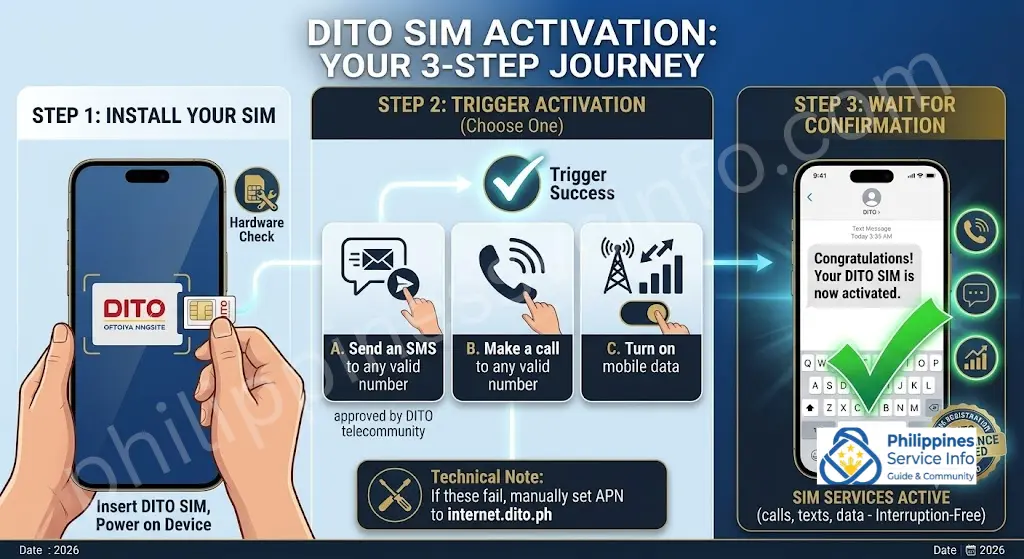
Activating your DITO SIM card is quick and easy. Here’s how to get started:
- Step 1: Insert the DITO SIM into Your Mobile Device
Insert the SIM into your phone’s SIM slot and turn on the device.
- Step 2: Trigger SIM Activation (3 Methods)
Perform any of the following:
- Send an SMS to any valid number
- Make a call to any valid number
- Turn on mobile data
- By the way, my personal favorite is “Send an SMS to any valid number” & it is approved by DITO telecommunity.
If it doesn’t work, manually set your APN to internet.dito.ph.
- Step 3: Wait for the Welcome Message
You’ll receive a confirmation SMS:
“Congratulations! Your DITO SIM is now activated.”
DITO SIM Validity and Expiry: Understanding Load and SIM Expiration Rules
Many DITO users confuse SIM validity with load balance expiry, but these are two separate things. A registered DITO SIM can remain active based on usage activity, while prepaid load and promotional offers follow their own expiration schedules.
Knowing the difference helps prevent unexpected service interruptions and allows you to manage your SIM properly.
DITO Load Validity vs SIM Validity
Your prepaid load balance and your SIM card’s active status do not expire in the same way.
Load Validity
The expiration period of your DITO load depends on the type of load or offer you purchase.
Common rules include:
- Regular load expires according to the validity period assigned to the purchased denomination.
- Promo subscriptions remain active only until the stated promo duration ends.
- Unused promo benefits may expire once the promo period is completed.
Always check the specific validity period before purchasing a load package or promo.
SIM Validity Rules
Your DITO SIM remains active as long as there is regular usage activity on the account.
A SIM can stay active when you perform at least one outgoing activity, such as:
- Making a call
- Sending an SMS
- Using mobile data
If no outgoing activity is recorded for 365 consecutive days, your SIM may become inactive and can eventually be permanently deactivated.
How to Check Your DITO SIM Registration Status Online
Checking your DITO SIM registration status helps you confirm whether your SIM is properly activated and ready to use. Instead of waiting for possible service issues, you can verify your registration details online or through SMS using a few simple steps.
Keeping track of your SIM status is also useful if you need to confirm whether your registration has been completed successfully or requires further verification.
Check Your DITO SIM Registration Status Online
You can check your DITO SIM registration status through the official registration platform by following these steps:
Step 1: Visit the DITO Registration Portal
Open the official DITO SIM registration website and access the registration page.
Step 2: Log In Using Your Mobile Number
Enter your registered DITO mobile number and complete the login process. This allows you to access your account information and view your SIM details.
Step 3: Open Your SIM Status Section
After logging in:
- Go to Account
- Select SIM Status
- Review your current registration status
Your status may appear as:
- Active — Your SIM registration is complete and your SIM is ready for use.
- Inactive — Your SIM may not currently be active.
- Pending Re-verification — Additional verification may be required.
Check DITO SIM Registration Status Through SMS
You can also check your SIM status by using SMS:
- Open your phone’s Messages app.
- Create a new message.
- Type STATUS.
- Send it to 3732.
- Wait for the status update message.
The response will provide information about your current DITO SIM registration status.
Common Reasons to Check Your SIM Status
Users may want to verify their DITO SIM status when:
- They recently completed registration
- They are experiencing connection problems
- They changed devices
- They want to confirm their SIM is still active
- They need to check whether further verification is needed
Final Reminder
Checking your DITO SIM registration status online or through SMS is a simple way to stay informed about your account. Regularly monitoring your SIM activity and keeping your registration details updated can help ensure uninterrupted access to DITO services.
How to Download the DITO SIM Registration App
Using the DITO SIM Registration App can make the registration process more convenient by allowing users to complete their SIM activation steps directly from their mobile devices. Before starting, make sure you have a compatible smartphone, a stable internet connection, and the correct DITO application.
Follow these steps to download and use the app properly.
Step 1: Open Your App Store
Depending on your device, open:
- Google Play Store for Android users
- App Store for iPhone users
Make sure you are downloading applications only from official app stores.
Step 2: Search for the DITO App
Use the search bar and type:
DITO SIM App
Review the available results and select the official DITO application.
Step 3: Download and Install the App
Tap the download or install button and wait for the application to finish installing on your device.
A stable internet connection will help prevent interruptions during installation.
Step 4: Open the DITO App and Log In
After installation:
- Launch the DITO app
- Enter your account details
- Complete the login process
Make sure you use the correct mobile number and account information.
Step 5: Complete the SIM Registration Process
Inside the app, follow the provided instructions to complete your DITO SIM registration. Enter the required information, upload necessary documents if requested, and submit your details for verification.
DITO SIM Data Promos and Plans: How to Choose and Buy the Right Offer
DITO provides a variety of data promos and plans designed for different types of users. Whether you need internet access for daily browsing, online entertainment, gaming, work, or staying connected with family and friends, DITO offers options that can fit different usage needs.
From short-term data packages to larger plans for heavy internet users, choosing the right promo helps you get better value from your mobile connection.
Types of DITO SIM Data Promos and Plans
DITO offers different categories of data packages depending on how frequently and how much you use mobile internet.
DITO Data Sachets
DITO Data Sachets are short-term data packages suitable for users who only need occasional internet access.
They are useful for:
- Quick browsing sessions
- Temporary data needs
- Users who do not regularly consume large amounts of data
DITO Unlimited Data Plans
Unlimited data plans are designed for users who frequently use mobile internet throughout the day.
These plans may be suitable for:
- Video streaming
- Online gaming
- Social media usage
- Regular downloads and uploads
Heavy data users can choose these options when they need more consistent connectivity.
DITO Home Bro
DITO Home Bro provides fixed wireless broadband solutions for home internet needs.
It is designed for users who want a dedicated internet connection at home for activities such as:
- Online learning
- Remote work
- Entertainment
- Connecting multiple devices
How to Buy DITO Promos

Purchasing a DITO promo can be done through the official DITO website or the DITO app. Follow these steps:
Step 1: Open the DITO Website or App
Access the official DITO platform or launch the DITO mobile application.
Step 2: Log In to Your Account
Sign in using your registered DITO mobile number and account password.
Step 3: Select “Buy Promo”
After logging in, choose the Buy Promo option to view available offers.
Step 4: Choose Your Preferred Promo
Browse the available packages and select the offer that matches your needs, such as:
- Unlimited data options
- Data with call and text inclusions
- Other available bundles
Step 5: Select Your Payment Method
Choose how you want to pay for the promo. Available options may include:
- Pay using load balance
- Digital payment methods
- Other supported payment options
Step 6: Confirm and Activate the Promo
Review your selection and confirm the purchase. Once the transaction is completed, your selected DITO promo will be activated.
Keep Your DITO App Updated
Updating the DITO app regularly can help you access the latest offers, new features, and limited-time promotions.
The app also provides a convenient way to manage your account, monitor usage, and purchase available promos.
Final Reminder
DITO SIM data promos and plans provide flexible options for different internet needs. Whether you need occasional connectivity or a stronger everyday data solution, selecting the right package and purchasing through official channels can help you stay connected more efficiently.
DITO Rewards for New Users: Benefits After SIM Registration
New DITO users can enjoy additional benefits after completing their SIM registration. By properly registering your DITO SIM, you can unlock special rewards and offers designed to help you get started with your mobile experience.
These rewards provide extra value for new subscribers and encourage users to stay connected through DITO services.
Free Data Reward After SIM Registration
Once you successfully complete your DITO SIM Registration, you may receive an instant data reward as part of the new user benefits.
Registered users can get:
- 2 GB of free data after completing SIM registration
This bonus data allows new users to start using mobile internet immediately after activation.
Earn Loyalty Points Through DITO Promos
DITO users can also collect loyalty points when purchasing promos through supported DITO payment partners.
You can earn rewards by:
- Buying eligible DITO promos
- Using available payment partners
- Continuing to use DITO services
Accumulated loyalty points may provide access to additional benefits depending on the available DITO rewards programme.
How to Maximise Your DITO Rewards
To make the most of your new user benefits:
- Complete your SIM registration correctly
- Check your DITO app regularly for available offers
- Purchase promos through supported channels
- Keep your account active by using DITO services
Staying updated helps you discover new rewards and promotional opportunities.
Final Reminder
DITO SIM registration does more than activate your mobile service. It can also give new users access to rewards such as free data and loyalty benefits. Completing registration and regularly checking DITO offers can help you get more value from your SIM.
DITO SIM vs Globe vs Smart Comparison
The Philippine telecom market offers several options, with DITO competing alongside established providers such as Globe and Smart. Each network has different advantages depending on coverage, technology, and available mobile offers.
| Feature | DITO | Globe | Smart |
|---|---|---|---|
| Network Technology | 4G/5G | 2G/3G/4G/5G | 2G/3G/4G/5G |
| Coverage | Expanding network availability | Nationwide coverage | Nationwide coverage |
| Data Promos | Competitive offers | Wide variety of promos | Wide variety of promos |
| SIM Registration | Required | Required | Required |
Network Technology Comparison
DITO focuses on newer network technology by providing 4G and 5G services for supported devices.
Globe and Smart offer a wider range of network generations, including older technologies alongside modern 4G and 5G connections.
The actual network experience depends on factors such as:
- Your location
- Device compatibility
- Signal availability
- Network conditions
Coverage Comparison
Coverage plays an important role when selecting a mobile provider.
- DITO: Offers expanding coverage and continues to improve availability in different areas.
- Globe: Provides nationwide coverage through its established network infrastructure.
- Smart: Offers nationwide coverage with a large mobile network presence.
Before choosing a SIM provider, users should check which network provides the strongest signal in their area.
Data Promos and Mobile Offers
DITO, Globe, and Smart all provide different prepaid data packages for various user needs.
- DITO offers competitive data promos focused on affordability and value.
- Globe provides a wide selection of prepaid and mobile data bundles.
- Smart offers multiple data plans designed for different usage patterns.
The best option depends on your preferred data allowance, promo validity, budget, and daily internet usage.
SIM Registration Requirements
All major Philippine telecom providers, including DITO, Globe, and Smart, require SIM registration under Philippine SIM registration regulations.
Subscribers must provide the required personal information and complete verification before using their SIM services.
Which SIM Should You Choose?
Your ideal SIM provider depends on your priorities:
- Choose DITO if you want modern network features, 5G access, and competitive data offers.
- Choose Globe if you prefer an established provider with broad network availability.
- Choose Smart if you want nationwide coverage and a wide range of mobile services.
Consider your location, device compatibility, internet habits, and preferred promos before making a decision.
Final Thoughts
DITO, Globe, and Smart each provide valuable options for Filipino mobile users. DITO stands out as a newer telecom provider focused on advanced connectivity features, while Globe and Smart benefit from long-established networks and wider coverage. Comparing features, coverage, and available promos can help you choose the SIM card that best matches your communication and internet requirements.
Common DITO SIM Registration and Network Issues: Troubleshooting Guide
Even after completing your DITO SIM Registration, you may occasionally experience technical problems related to network connection, verification, or device settings. Most issues can be resolved by checking a few basic settings and following simple troubleshooting steps.
This guide covers common DITO SIM problems and practical solutions to help restore your connection quickly.
1. No Signal on Your DITO SIM
If your DITO SIM is not receiving a signal, try these solutions:
Check Network Coverage
Make sure you are located in an area where DITO services are available. Signal strength can vary depending on your location, surroundings, and network availability.
Check Your Network Settings
Confirm that your device is using the correct network mode:
- Set your preferred network to 4G/LTE or 5G if supported.
- Make sure mobile network settings are enabled.
- Check that your device is compatible with DITO network requirements.
Restart Your Device
A simple restart can refresh your phone’s network connection. You can also try connecting to WiFi temporarily while checking your device settings.
2. Slow Internet Connection
If your DITO mobile data feels slower than usual, try these steps:
Check Your Data Usage
Confirm that you still have available data. Reaching your data limit can affect your browsing experience.
Move to a Better Location
Signal strength can change depending on your surroundings. Moving to an open area or a location with better reception may improve your connection.
Restart Your Network Connection
Try one of these options:
- Restart your phone
- Turn Airplane Mode on and off
- Reconnect your mobile data
These actions can refresh your connection to the network.
3. Registration Failed When Uploading Photos
Photo upload errors during DITO SIM registration are usually caused by unclear images, incorrect details, or app-related issues.
Try the following fixes:
Update the DITO App
Download the latest version of the official DITO App from the Play Store or App Store. An outdated app may cause registration problems.
Review Your Information
Use the edit option to check your details before submitting. Make sure all information matches your documents.
Refresh Your Account Session
If the app is not working correctly:
- Log out of your account.
- Close and reopen the app.
- Log in again.
Upload Clear Images
For successful verification:
- Use a clear ID photo
- Make sure the entire document is visible
- Avoid blurry images
- Upload a clear selfie when required
Check Image File Size
Large images may fail during upload. Keep photo files below 2 MB by compressing them if necessary.
If the issue continues, contact DITO customer support by calling 185 for assistance.
4. Unable to Make Calls
If your DITO SIM cannot make outgoing calls, check the following:
Confirm Your Balance or Promo
Make sure you have:
- Enough prepaid balance, or
- An active call promo
Without available credit or a valid offer, calls may not work.
Enable VoLTE Support
Check that your phone supports and has VoLTE enabled, as voice services may depend on device compatibility.
Update Your Phone Software
Keeping your device software updated can help resolve compatibility issues and improve network performance.
Quick Troubleshooting Checklist
Before contacting support, try these basic steps:
✓ Restart your phone
✓ Check network coverage
✓ Confirm mobile data settings
✓ Verify your balance or active promo
✓ Update the DITO app
✓ Use clear registration images
✓ Check device compatibility
Final Reminder
Most DITO SIM problems can be fixed by checking simple settings, improving image quality, updating apps, or refreshing your network connection. If you continue experiencing issues after trying these solutions, DITO support can provide further assistance.
What Happens If a DITO SIM Becomes Inactive?
A SIM that has not been used for an extended period may lose access to DITO services. Once a SIM is permanently deactivated, recovery options may be limited.
To avoid losing your number:
- Use your SIM regularly
- Make occasional calls or send messages
- Use mobile data from time to time
- Check your SIM activity status
Small usage actions can help maintain an active connection.
How to Avoid Unexpected SIM Expiry
Following a few simple habits can help keep your DITO SIM active:
- Monitor your SIM usage regularly
- Avoid leaving the SIM unused for long periods
- Keep track of promo and load expiration dates
- Confirm that your SIM registration details are complete
Regular activity is the easiest way to reduce the risk of service interruption.
Final Reminder
DITO load expiration and SIM validity are different processes. Your load follows the validity period of the purchased denomination or promo, while your SIM’s active status depends on usage activity. Keeping your DITO SIM active through occasional calls, texts, or data usage can help you continue using your number without unexpected deactivation issues.
How to Reactivate an Expired DITO SIM: Complete Guide
If your DITO SIM has become inactive because of long-term non-use or registration-related issues, you may still be able to restore your mobile service. Before attempting reactivation, it is important to check your current SIM status and determine whether your number is fully deactivated or only requires additional verification.
Following the correct reactivation method can help you recover your connection without unnecessary delays.
Check Your DITO SIM Status Before Reactivation
Before starting the reactivation process, confirm your SIM status first.
Visit the official DITO registration portal and log in through your account to check whether your SIM is:
- Deactivated due to inactivity
- Pending re-verification
- Still active but requiring updates
Checking your status first helps you choose the right solution and avoid unnecessary store visits.
Method 1: Reactivate Your DITO SIM Online
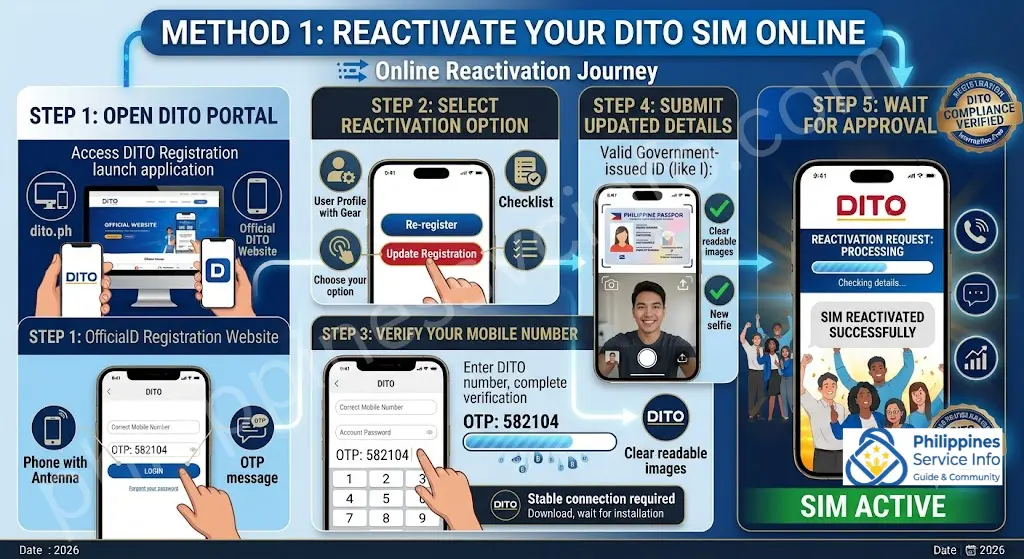
If your account details are still accessible, you may be able to complete the reactivation process online.
Follow these steps:
Step 1: Open the DITO Registration Portal
Access the official DITO registration website.
Step 2: Select Reactivation Option
Choose the available option such as:
- Re-register
- Update Registration
Step 3: Verify Your Mobile Number
Enter your DITO SIM number and complete OTP verification.
Step 4: Submit Updated Verification Details
Upload the required information, including:
- A valid government-issued ID
- A new selfie for identity confirmation
Make sure all images are clear and readable before submission.
Step 5: Wait for Approval
After submitting the reactivation request, wait for confirmation. Processing may take around 24 to 48 hours.
You will receive an SMS notification once your SIM has been successfully reactivated.
Method 2: Reactivate Through a DITO Store

If you cannot access your account or prefer in-person assistance, visit a DITO Store or authorised service centre.
Bring:
- A valid government-issued ID
- Your original registration details if available
At the store:
- Request SIM reactivation assistance.
- Complete the reactivation form provided by the representative.
- Allow the verification process to complete.
- Wait for confirmation through SMS.
The verification process may take approximately 24 to 48 hours.
Final Reminder
Reactivating an expired DITO SIM is often possible when the number is still available and your registration information can be verified. Checking your status first, preparing valid documents, and following the correct reactivation method can make the process faster and easier.
DITO Customer Support Contact Details
Having access to reliable customer support is important when managing your DITO SIM, especially when you need help with registration, account issues, network concerns, or service-related questions. DITO provides several support channels where users can request assistance and get updates about their mobile services.
Users can reach DITO through the following support options:
| Contact Method | Details |
|---|---|
| 📞 Customer Service Number | 0991 481 4225 |
| ☎️ DITO Hotline | 185 (Free from a DITO SIM) |
| 📧 Email Support | [email protected] |
| 🌐 Official Website | https://dito.ph |
These channels can help users with common concerns related to SIM registration, account management, connectivity issues, and other DITO services.
When to Contact DITO Support
You may contact DITO customer service if you experience issues such as:
- SIM registration problems
- Account verification concerns
- Network connection issues
- Unable to make calls or send messages
- Data connection problems
- SIM reactivation requests
- Questions about promos and services
Before contacting support, prepare your mobile number and any relevant account details to help the support team assist you faster.
Key Features and Benefits of DITO SIM Registration
DITO SIM Registration is designed to provide a secure and organised way for subscribers to verify their identity, protect their mobile accounts, and maintain uninterrupted access to communication services. The registration process includes several security features that help create a safer mobile environment for users across the Philippines.
Key Features of DITO SIM Card Registration
1. Government ID Verification System
DITO uses an official identification verification process to confirm subscriber identity. This helps ensure that SIM cards are registered under legitimate users and reduces the risk of unauthorised account ownership.
2. Multiple Registration Methods
Subscribers can complete their DITO SIM registration through different available channels, making the process more accessible.
Registration options may include:
- DITO mobile application
- Online registration portal
- Supported registration methods for eligible users
This flexibility allows users to choose the method that works best for them.
3. SIM Activation After Approval
Once registration is successfully completed and approved, users can continue accessing their DITO services, including:
- Calls
- Text messaging
- Mobile data
- Supported voice features such as VoLTE
Proper registration helps maintain uninterrupted service access.
4. Selfie Facial Verification
Selfie verification adds an additional security layer by helping confirm that the person registering the SIM matches the submitted identity information.
This feature helps reduce fraudulent registrations and protects users from unauthorised SIM ownership.
5. Support for Minors and Foreign Users
DITO provides registration guidelines for different user groups, including:
- Minors registering with parent or guardian assistance
- Foreign residents
- Tourists and eligible visitors
These additional procedures help ensure proper verification for different subscriber categories.
6. Business SIM Registration
Businesses and organisations can register SIM cards for corporate use. This allows companies to manage their mobile accounts while maintaining proper ownership verification.
7. Registration Status Tracking
Users can monitor their registration progress and check updates related to:
- Pending verification
- Successful approval
- Required re-verification steps
Tracking registration status helps users stay informed throughout the process.
8. 4G and4 5G Network Ready
A registered DITO SIM allows users to access available network services, including 4G and 5G connectivity on compatible devices and supported locations.
This enables faster mobile internet experiences for browsing, streaming, gaming, and other online activities.
Benefits of DITO SIM Registration
Completing your DITO SIM registration provides several advantages beyond simply activating your mobile service.
Prevents SIM Deactivation and Service Loss
Registered users can avoid service interruptions caused by incomplete registration requirements. Keeping your SIM details updated helps maintain access to:
- Calls
- Messages
- Mobile internet services
Provides Stronger Identity Protection
SIM registration helps connect mobile numbers with verified users, making it harder for scammers to misuse anonymous SIM cards for fraudulent activities.
Improves Digital Security
By reducing the use of unverified SIM cards, registration supports efforts to minimise:
- Spam messages
- Scam attempts
- Phishing activities
- Unauthorised mobile account use
Access to Rewards and Promotions
Registered DITO users may gain access to available subscriber benefits, including:
- Welcome data offers
- Reward programmes
- Promotional data packages
Available rewards may vary depending on current DITO offers.
Easier SIM Recovery
If your phone or SIM card is lost, verified ownership details can make the recovery process easier by helping confirm that you are the rightful account holder.
Better Customer Support Experience
Having verified registration details can help customer service teams assist with account-related concerns more efficiently.
Compliance with SIM Registration Requirements
Registering your DITO SIM helps subscribers follow the requirements of the Philippine SIM Registration Act and avoid possible service suspension due to incomplete registration.
Final Thoughts
DITO SIM Registration provides important security and convenience features for subscribers. Through identity verification, flexible registration methods, and account protection measures, the process helps create a safer mobile environment while allowing users to continue enjoying DITO communication services. Completing registration correctly and keeping your information updated is an important step toward maintaining secure and reliable mobile access.
Frequently Asked Questions About DITO SIM Registration
Conclusion
DITO SIM Registration is an important step to comply with the Philippine SIM Registration Act and maintain uninterrupted access to calls, texts, mobile data, and other services. By registering through the official DITO app, website, or approved channels, users can keep their SIM active while improving account security and protection against misuse. For accurate and safe registration, always use official DITO platforms and trusted government resources such as DITO Telecommunity, NTC, and DICT guidelines. Avoid unofficial websites claiming to offer free registration services, as they may put your personal information at risk.
Discover What You Need to Know:
- Digital National ID Philippines: Complete Guide to Download, Access & Use (2026)
- ARCarrierPoint.net 2026 Complete Guide With Features, Services, Benefits & How to Use
- Smart SIM Registration Guide 2026: Register, Verify & Activate Your SIM
- STL Result Today: Official PCSO Winning Numbers (10:30 AM, 3 PM, 7 PM & 8 PM)
- SSS Portal Guide 2026: Registration, Login & Online Services in the Philippines








