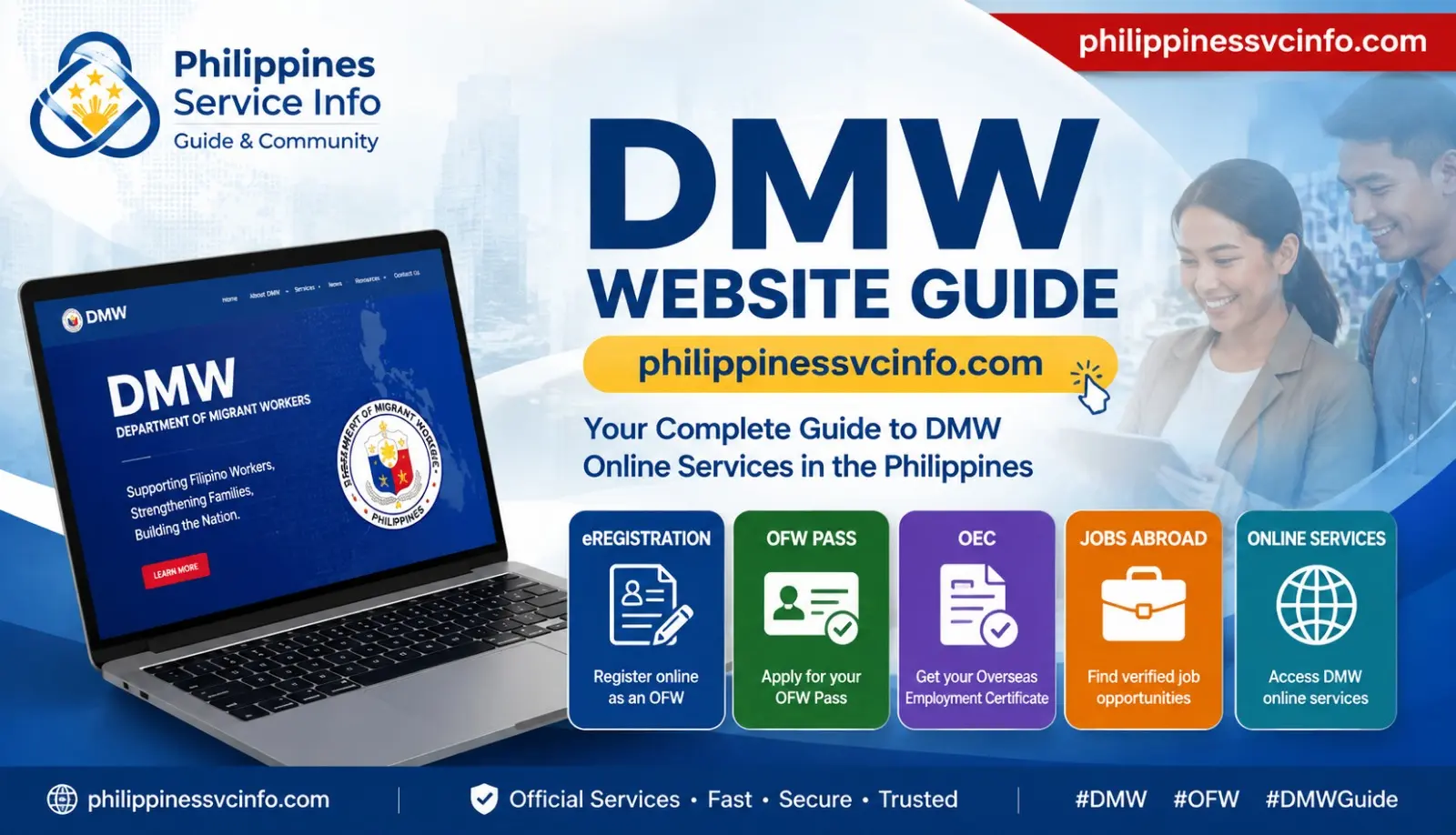
If you are a Filipino worker planning to work abroad, returning to an overseas job, or looking for official employment information, the DMW website is one of the most important government resources to know. The Department of Migrant Workers (DMW) manages online services and information designed for Overseas Filipino Workers (OFWs), job applicants, recruitment agencies, employers, and their families.
The DMW website currently provides access to Online Services, OFW Pass information, Licensed Recruitment Agencies, Approved Job Orders, FAQs, issuances, government placement opportunities, and other migrant-worker services.
This guide explains the main DMW services, how to access your online account, what to prepare before registration, and where to find official DMW resources.
What Is the DMW Website?
The DMW website is the official online platform of the Philippine Department of Migrant Workers. It brings together information and digital services connected with overseas employment and the protection and welfare of Filipino migrant workers.
The DMW e-Services system is designed to provide online access to services such as worker registration, overseas employment processing, OEC-related transactions, transaction-status checking, and other overseas-employment functions.
For workers, the DMW website can be useful at several stages:
- Before applying for an overseas job
- While preparing employment documents
- When creating or updating an e-Registration profile
- When processing overseas employment requirements
- When returning to an existing overseas employer
- When checking recruitment agencies and approved job orders
- When seeking DMW assistance or official announcements
Important: Always use the official DMW domain when entering personal information. Avoid websites that imitate government portals or ask you to pay unofficial processing charges.
DMW Online Services at a Glance
The DMW website works as a central starting point, while some services open in dedicated government portals.
| DMW Service | Main Purpose |
|---|---|
| e-Registration | Create and maintain an OFW profile |
| Balik-Manggagawa / POPS-BaM | Services for returning overseas workers |
| OFW Pass | Digital OFW travel and employment credential |
| Direct Hire | Processing for eligible direct-hire workers |
| Government-to-Government Jobs | Access selected government placement opportunities |
| Approved Job Orders | Check overseas job-order information |
| Licensed Recruitment Agencies | Verify recruitment agencies |
| DMW Helpdesk | Get technical or service assistance |
| FAQs | Find answers to common DMW questions |
The official DMW online portal identifies eRegistration, Balik-Manggagawa, Direct Hire, Government-to-Government processing, Helpdesk support and other services for OFWs.
Who Can Use DMW Online Services?
The DMW system is not limited to workers who are already employed overseas. Different users may use different parts of the website depending on their situation.
First-Time OFW Applicants
A person preparing for overseas employment may need to create an e-Registration profile and provide personal and employment-related information. The DMW registration system is intended for Filipino worker applicants pursuing overseas employment through authorised channels.
Returning OFWs
Workers returning to the same overseas employment may need DMW services connected with their employment record, travel clearance, or OFW Pass.
Direct-Hire Applicants
Eligible workers hired directly by foreign employers can find DMW information and processing instructions for direct-hire cases. The DMW FAQ section also provides dedicated direct-hiring information and questions.
Job Seekers
People looking for legitimate overseas employment can use DMW resources to check official recruitment information and government placement opportunities rather than relying only on social-media advertisements.
Families and the General Public
Family members can also use public DMW information to understand recruitment processes, verify available information, and locate official assistance channels.
Prepare Before Using DMW Online Services
Having your information ready can make the registration process easier. Requirements can vary according to the service and your employment situation, so check the specific DMW instructions before submitting documents.
For general e-Registration, prepare accurate personal information and an active email address. The official registration page asks for details including your first name, middle name, last name, birth date, gender, and email address.
Depending on the transaction, you may also need documents such as:
- Valid passport
- Employment information
- Employment contract or related employment documents
- Work or employment details
- Personal information
- Previous DMW or overseas employment records
- Other documents specified for your particular application
Do not assume that every DMW service requires the same documents. A returning worker, direct-hire applicant, and first-time applicant may have different requirements.
How to Open the Official DMW Website
Starting from the main website is the safest way to locate current DMW services.
Step 1: Visit the DMW Official Website
Open a current browser such as Google Chrome, Microsoft Edge, Firefox, or Safari.
Then visit:
Check that the address belongs to the official dmw.gov.ph domain before entering any personal information.
Step 2: Select Online Services
From the DMW homepage, open Online Services to see the services currently available to migrant workers.
The official Online Services page is intended to help users register, apply for services, and manage their records online.
Step 3: Select the Right Service
Do not automatically select the first available option. First identify whether you need e-Registration, Balik-Manggagawa services, Direct Hire processing, Government-to-Government opportunities, OFW Pass information, or another DMW service.
This is especially important because overseas employment procedures depend on your circumstances.
How to Create a DMW e-Registration Account
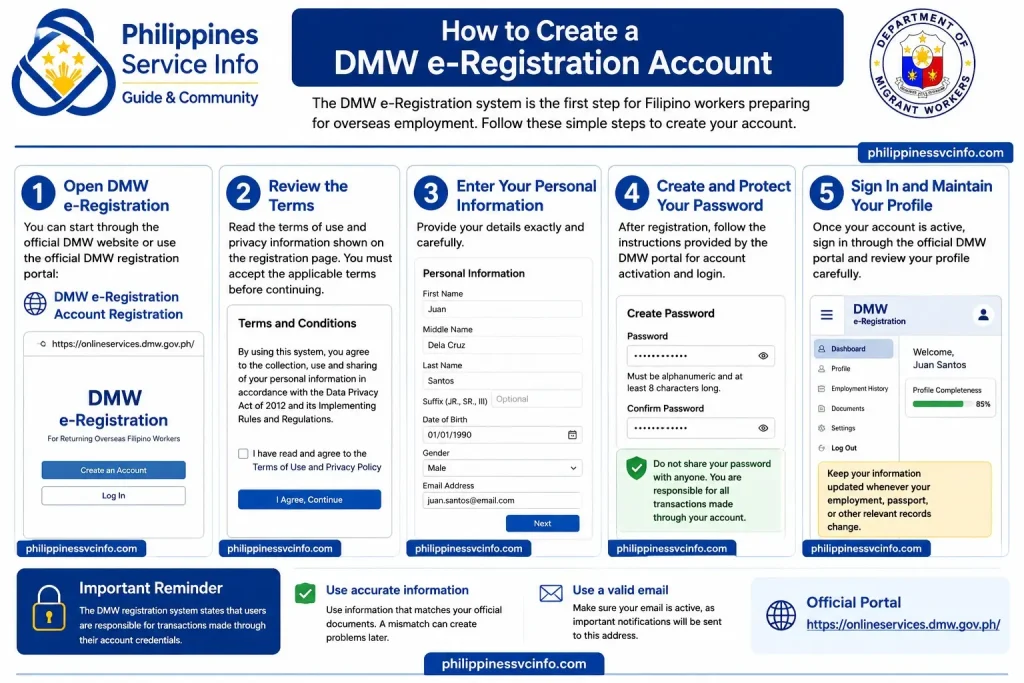
The DMW e-Registration system is one of the key starting points for Filipino workers preparing for overseas employment. The official registration page provides fields for your personal information and requires acceptance of the applicable terms and privacy statement.
Step 1: Open DMW e-Registration
You can start through the official DMW website or use the official DMW registration portal:
Step 2: Review the Terms
Read the terms of use and privacy information shown on the registration page. You must accept the applicable terms before continuing.
The DMW registration system also states that users are responsible for transactions made through their account credentials, so your login information should be kept private.
Step 3: Enter Your Personal Information
Provide your details exactly and carefully. The registration page includes fields for:
- First name
- Middle name
- Last name
- Suffix, where applicable
- Date of birth
- Gender
- Active email address
Use information that matches your official documents. A mismatch can create problems when your profile is later used for employment-related transactions.
Step 4: Create and Protect Your Password
After registration, follow the instructions provided by the DMW portal for account activation and login.
Use a password that you do not share with recruiters, agents, friends, or other people. The current DMW login page indicates that passwords should be alphanumeric and at least eight characters long.
Step 5: Sign In and Maintain Your Profile
Once your account is active, sign in through the official DMW portal and review your profile carefully.
Keep your information updated whenever your employment, passport, or other relevant records change, following the instructions of the particular DMW service you are using.
DMW Account Login
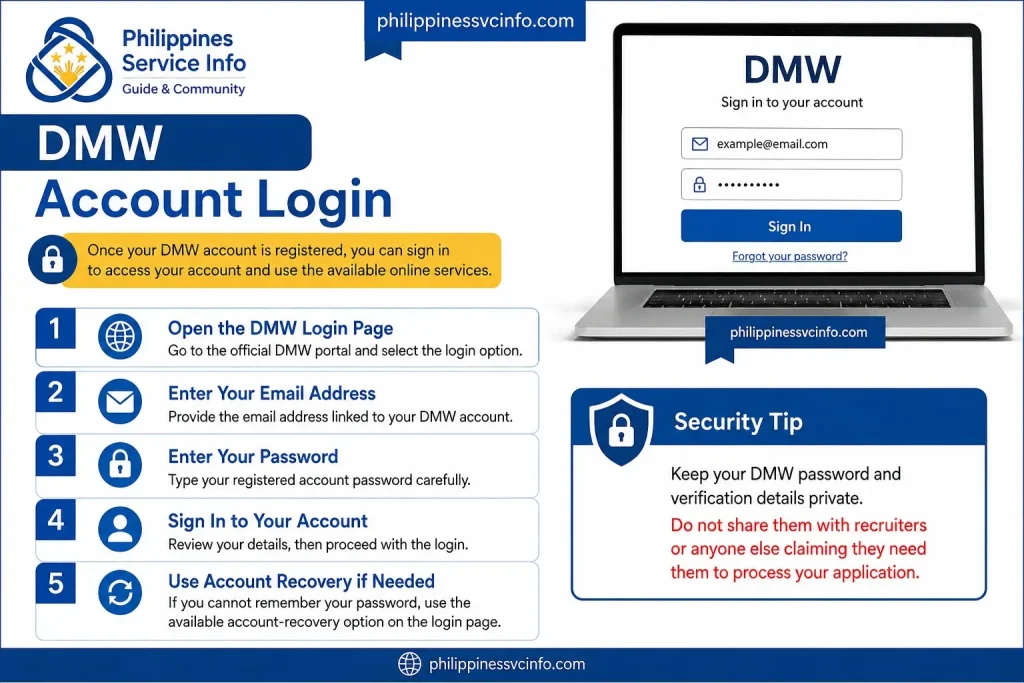
Once your DMW account is registered, you can sign in to access your account and use the available online services.
1. Open the DMW Login Page
Go to the official DMW portal and select the login option.
2. Enter Your Email Address
Provide the email address linked to your DMW account.
3. Enter Your Password
Type your registered account password carefully.
4. Sign In to Your Account
Review your details, then proceed with the login.
5. Use Account Recovery if Needed
If you cannot remember your password, use the available account-recovery option on the login pag
Security Tip: Keep your DMW password and verification details private. Do not share them with recruiters or anyone else claiming they need them to process your application.
How to Access Balik-Manggagawa Services
Returning OFWs may need to use the Balik-Manggagawa service when preparing to return to an overseas employer. The process is designed for workers who already have an overseas employment record and need to complete the applicable documentation before travelling.
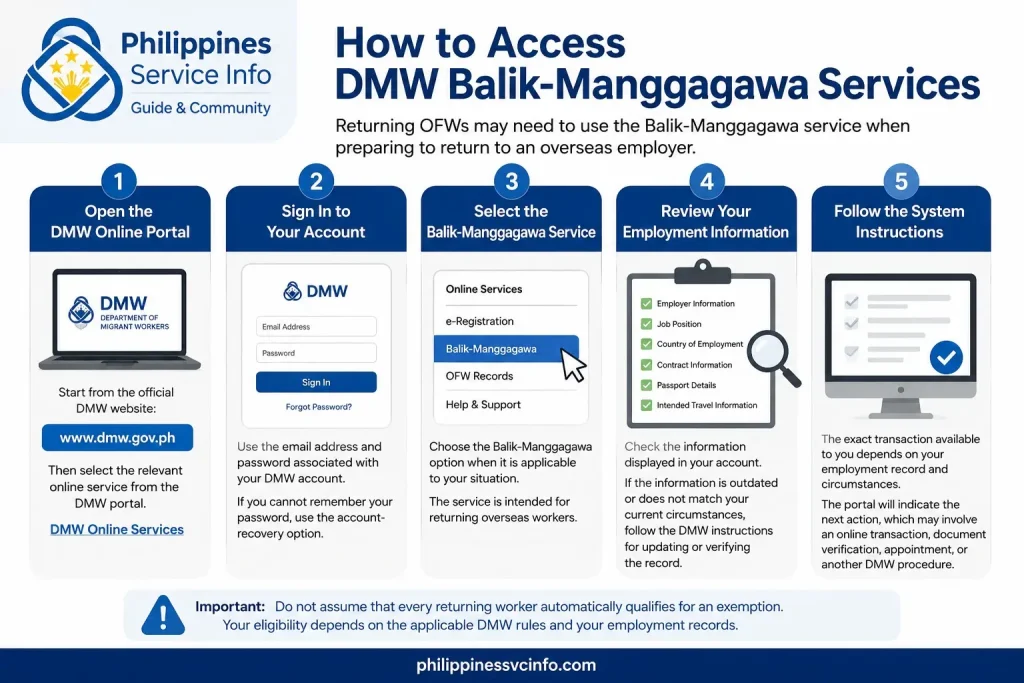
Step 1: Open the DMW Online Portal
Start from the official DMW website:
You can then select the relevant online service from the DMW portal.
Step 2: Sign In to Your Account
Use the email address and password associated with your DMW account. If you cannot remember your password, use the account-recovery option rather than creating another account.
Your DMW account should contain accurate information because the system may use your existing worker and employment records when processing a transaction.
Step 3: Select the Balik-Manggagawa Service
Choose the Balik-Manggagawa option when it is applicable to your situation.
The service is intended for returning overseas workers and can be used for transactions related to their return to employment.
Step 4: Review Your Employment Information
Before proceeding, check the information displayed in your account.
Pay particular attention to:
- Employer information
- Job position
- Country of employment
- Contract information
- Passport details
- Intended travel information
If the information is outdated or does not match your current circumstances, follow the DMW instructions for updating or verifying the record.
Step 5: Follow the System Instructions
The exact transaction available to you depends on your employment record and circumstances. The portal will indicate the next action, which may involve an online transaction, document verification, appointment, or another DMW procedure.
Important: Do not assume that every returning worker automatically qualifies for an exemption. Your eligibility depends on the applicable DMW rules and your employment records.
Understanding the OFW Pass
The OFW Pass is a digital credential associated with DMW’s overseas employment system. It is intended to make the documentation process more convenient for eligible Filipino migrant workers.
Rather than relying on unofficial websites or social-media instructions, workers should obtain current OFW Pass information directly from DMW.
What the OFW Pass Is Used For
Depending on the applicable DMW process, the OFW Pass may serve as a digital proof or credential connected with a worker’s overseas employment documentation.
The availability and exact use of the OFW Pass can depend on the worker’s circumstances and the current DMW implementation.
OFW Pass and OEC Are Not Simply the Same Term
A common mistake is to treat OFW Pass and OEC as interchangeable terms in every situation.
The OEC has traditionally been associated with overseas employment clearance and documentation for Filipino workers leaving the Philippines for employment. The OFW Pass is a digital credential introduced as part of DMW’s efforts to modernise overseas worker documentation.
For any upcoming trip, check the current DMW instructions to determine exactly what documentation applies to you.
OEC and Returning OFWs
The Overseas Employment Certificate (OEC) is an important overseas employment document for Filipino workers. DMW’s online systems provide services associated with OEC processing for eligible workers.
The correct process depends on factors such as your employment status, employer, job site, and whether you are returning to the same employment.
Returning to the Same Employer
A worker who is returning to the same employer and job site may be eligible for an applicable online process or exemption, subject to current DMW rules.
Before travelling, review the information in your DMW account and follow the instructions displayed by the system.
Changing Employer or Job Site
A change in employer or job site can result in a different processing requirement.
Do not select an exemption simply because you previously received one. If your employment circumstances have changed, check the DMW requirements for your new situation.
This is one reason keeping your DMW profile and employment records accurate is so important.
How to Check a Recruitment Agency
One of the most useful features of the DMW website is the public information relating to recruitment agencies.
Before paying a recruiter, signing an employment agreement, or submitting sensitive documents, verify that the recruitment agency is legitimate.
Step 1: Visit the DMW Website
Go directly to:
Avoid using links sent through unknown social-media accounts when you can reach the service directly from the government website.
Step 2: Find Recruitment Agency Information
Look for the section relating to Licensed Recruitment Agencies or recruitment-agency verification.
The exact page layout may change as the DMW website is updated.
Step 3: Search for the Agency
Enter the agency information requested by the DMW search system.
Check whether the agency appears in the official records and review the information displayed.
Step 4: Compare the Details
Do not check only the agency name. Where information is available, compare details such as:
- Agency name
- Licence status
- Address
- Contact information
- Other identifying information shown by DMW
A recruiter may use a legitimate company’s name without actually representing that company.
Step 5: Investigate Before Paying
A recruitment agency appearing in an official directory does not mean that every person claiming to work for that agency is genuine.
Be cautious if someone:
- Demands unusual fees
- Promises a guaranteed overseas job
- Requests your password
- Asks for money through a personal account
- Uses only a social-media profile
- Pressures you to make an immediate payment
- Refuses to provide written employment information
If something looks suspicious, verify it through official DMW channels before continuing.
How to Check Approved Job Orders
A job order refers to an overseas employment opportunity processed through the appropriate Philippine overseas employment system.
For job seekers, checking official job-order information can help distinguish legitimate recruitment opportunities from advertisements that have no verified basis.
A Safer Way to Check an Overseas Job
Start with the DMW website:
Look for Approved Job Orders or the relevant overseas employment search service.
Depending on the search interface, you may be able to review information connected with:
- Country
- Position
- Recruitment agency
- Employer
- Number of available positions
- Job-order information
Use the information displayed by DMW as a reference before dealing with a recruiter.
Why Job-Order Verification Matters
Online advertisements can contain misleading information. A post may use attractive salary figures, company logos, or photographs without proving that the advertised position is genuinely available.
Checking DMW records gives a job seeker an official starting point for verification.
Best practice: Verify the agency, check the job-order information, understand the employment terms, and confirm the applicable fees before committing money or documents.
Direct-Hire Services on the DMW Website
Some Filipino workers are hired directly by foreign employers rather than through a Philippine recruitment agency.
DMW provides information and processing services for eligible Direct Hire cases.
The applicable requirements can depend on the worker’s circumstances, employer, destination country, and the type of employment.
General Direct-Hire Process
A typical starting point is:
- Open the official DMW website.
- Go to Online Services.
- Select the Direct Hire service or information relevant to your case.
- Review the current eligibility and document requirements.
- Prepare the required employment documents.
- Follow the DMW instructions for submission and verification.
- Complete any appointment or additional processing required by DMW.
Do not rely on an old checklist found on a third-party website if the DMW portal provides newer instructions.
Government-to-Government Overseas Jobs
The DMW website can also provide information about Government-to-Government (G2G) employment opportunities.
These programmes can provide an official route for selected overseas vacancies and may have specific requirements, deadlines, qualifications, and application procedures.
How to Find G2G Opportunities
Visit the official DMW website and open the relevant online-services or job-opportunity section.
Read the announcement carefully before applying. Check:
- Position
- Country
- Employer
- Qualifications
- Required documents
- Application period
- Application method
- Assessment or interview requirements
Never pay an unofficial person simply because they claim they can guarantee selection for a government-to-government position.
Using the DMW Helpdesk
Technical problems can happen when registering, signing in, updating records, or using an online service.
The DMW Helpdesk is intended to provide assistance for online-service concerns and other questions handled through the department’s support channels.
When submitting a support request, describe the problem clearly. Include the relevant transaction or account information requested by the official helpdesk, but never disclose your password.
What to Include in a Support Request
A useful support request should explain:
- Your name
- Registered email address, where requested
- Service you are trying to use
- Description of the problem
- Error message displayed
- Date and approximate time of the failed transaction
- Screenshot, if the official system allows attachments
A clear description can make it easier for support personnel to understand what went wrong.
Common DMW Website Problems and Solutions
| Problem | What to Try |
|---|---|
| Cannot log in | Check your email and password, then use account recovery if necessary |
| Verification email missing | Check Spam/Junk and confirm that you entered the correct email |
| Existing account message | Avoid creating duplicate accounts; use the appropriate recovery or helpdesk process |
| Profile information is incorrect | Follow DMW instructions for profile correction |
| Portal is slow | Refresh later, check your connection, or try another supported browser |
| Upload fails | Check the file type, size and quality requirements shown by DMW |
| Transaction does not continue | Review required fields and make sure the information matches your records |
| Unsure which service to choose | Check the official DMW service description or contact DMW support |
“Account Already Exists” Error
If the system indicates that your account already exists, creating another profile may make the situation more complicated.
Instead, try the official account-recovery process or contact DMW support for assistance.
Password Problems
Use the official password-recovery feature rather than asking another person to access your account.
Never send your password to a recruiter, agent, friend, or supposed technical-support representative.
Website Errors
A temporary server problem does not necessarily mean your account is defective.
Try:
- Closing and reopening the browser.
- Clearing the browser cache if appropriate.
- Switching to another supported browser.
- Checking your internet connection.
- Trying again later if the DMW portal is experiencing heavy traffic.
If the problem continues, record the error message and contact the appropriate official DMW support channel.
DMW Website Safety Tips for OFWs
Because DMW services involve personal and employment information, online security should be treated seriously
Use Only Official DMW Domains
The safest starting point is:
For a specific online transaction, follow links from the official DMW website whenever possible.
Never Share Your Password
DMW staff, recruiters, or agents should not need your personal account password simply to discuss an application.
If someone asks for your login credentials, stop and verify the request.
Verify Before Paying
A person claiming to be a recruiter does not automatically represent a licensed agency.
Check the official DMW information first and understand the legitimate recruitment process before paying any amount.
Be Careful With Social Media Offers
Facebook posts, Messenger messages, WhatsApp conversations, TikTok videos, and other social-media advertisements are not substitutes for official verification.
Use them only as leads and confirm the opportunity through DMW or other appropriate official sources.
Quick DMW Service Map
| If You Need To… | Start With… |
|---|---|
| Create an OFW profile | DMW e-Registration |
| Access your account | DMW Login |
| Return to an overseas employer | Balik-Manggagawa services |
| Learn about OFW Pass | Official DMW Online Services |
| Process applicable OEC services | DMW online employment services |
| Check a recruitment agency | Licensed Recruitment Agencies |
| Check overseas vacancies | Approved Job Orders |
| Apply through selected government programmes | Government-to-Government Jobs |
| Process eligible direct-hire cases | Direct Hire |
| Report an online-service problem | DMW Helpdesk |
The exact services and requirements available to you can depend on your employment circumstances, so use the current instructions shown in the official DMW portal rather than relying on a generic checklist.
DMW Requirements: What Should You Prepare?
There is no single document checklist that applies to every DMW transaction. Requirements depend on the service, your employment status, destination, employer, and whether you are a first-time or returning worker.
For many online transactions, it is useful to have the following information readily available:
- Valid Philippine passport
- Active email address
- Personal information matching official records
- Overseas employer information
- Job position and employment details
- Employment contract or related documents, when required
- Previous overseas employment information, when applicable
- Clear digital copies of documents requested by the specific DMW service
Before uploading anything, read the current instructions displayed by DMW. Do not upload unnecessary documents simply because another website lists them.
How to Keep Your DMW Profile Accurate
Keeping your DMW profile up to date helps ensure that your overseas employment records match your current documents and circumstances.
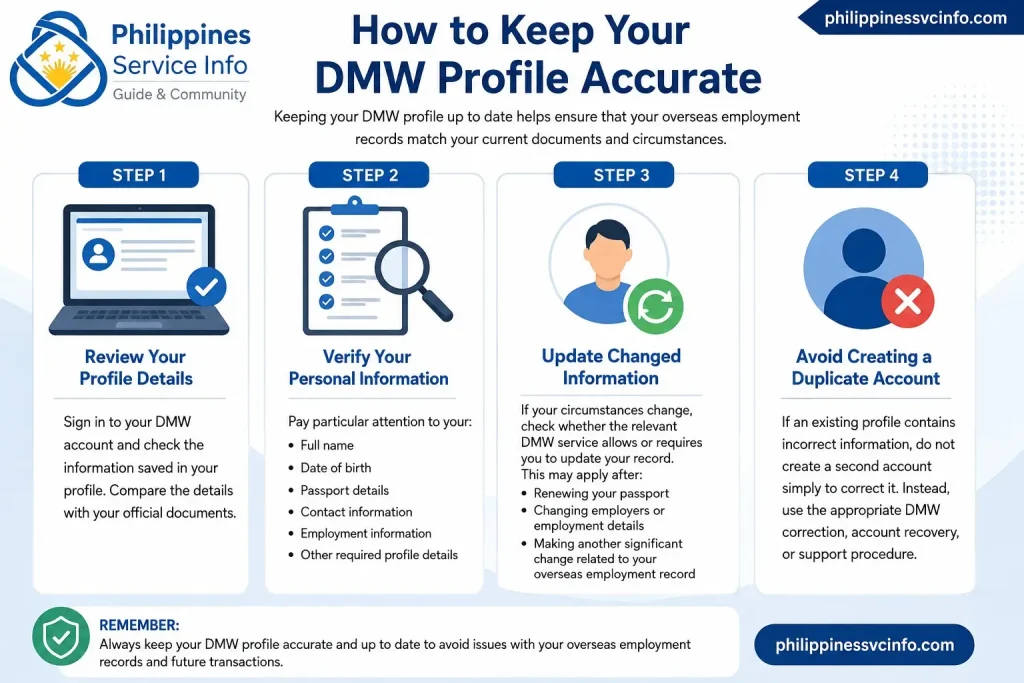
Step 1: Review Your Profile Details
Sign in to your DMW account and check the information saved in your profile. Compare the details with your official documents.
Step 2: Verify Your Personal Information
Pay particular attention to your:
- Full name
- Date of birth
- Passport details
- Contact information
- Employment information
- Other required profile details
Step 3: Update Changed Information
If your circumstances change, check whether the relevant DMW service allows or requires you to update your record. This may apply after:
- Renewing your passport
- Changing employers or employment details
- Making another significant change related to your overseas employment record
Step 4: Avoid Creating a Duplicate Account
If an existing profile contains incorrect information, do not create a second account simply to correct it. Instead, use the appropriate DMW correction, account recovery, or support procedure for your situation.
DMW and OFW Protection
The role of DMW goes beyond online registration. The department is responsible for functions connected with the protection, welfare, and overseas employment of Filipino migrant workers.
This is particularly important when dealing with recruitment.
A legitimate overseas job should not depend solely on a social-media advertisement or a verbal promise. Workers should check official information and understand the employment arrangement before handing over money or personal documents.
How to Avoid Fake Overseas Job Offers
Fraudulent recruitment offers can look convincing. Some may copy the name or logo of a real company or recruitment agency.
Use these precautions when evaluating an overseas job:
1. Verify the Recruitment Agency
Search for the agency through the official DMW resources and check the information shown there.
2. Check the Job Order
Where applicable, verify whether the advertised position appears in official job-order information.
3. Examine the Employment Details
Be cautious if the recruiter refuses to provide clear information about the employer, position, salary, workplace, contract, or applicable processing requirements.
4. Avoid Pressure Tactics
A recruiter who says you must pay immediately or lose the position is a reason to slow down and verify the offer.
5. Protect Your Personal Information
Do not casually send passport scans, identity documents, passwords, banking information, or account credentials to unknown people.
6. Confirm Through Official Channels
If you are uncertain, use the official DMW website and its available support channels to verify the situation.
DMW Website: Mobile or Computer?
You can access the DMW website from a smartphone, tablet, or computer. However, a computer can be more convenient for transactions that involve multiple form fields or document uploads.
Mobile Access
A mobile browser is useful when you need to:
- Check DMW announcements
- Read service information
- Access your account
- Review application information
- Check public recruitment information
Desktop Access
A laptop or desktop computer may be preferable when you need to:
- Upload several documents
- Complete lengthy forms
- Review PDF files
- Keep multiple official pages open
- Save or print transaction records
Regardless of the device, use an updated browser and a stable internet connection.
How to Find Current DMW Announcements
DMW procedures can change. A process that was available in one form previously may later move to another portal or use a different digital credential.
For this reason, check current announcements before beginning an important overseas-employment transaction.
Look for official notices, online-service updates, advisories, and other information published by DMW.
Avoid treating an old Facebook post, blog article, or video as the final authority when the current DMW website provides different instructions.
Useful Official DMW Links
| Resource | Official Link |
|---|---|
| DMW Main Website | dmw.gov.ph |
| DMW Online Services | DMW Online Services |
| DMW e-Registration | DMW Registration Portal |
| DMW Login | DMW Account Login |
| DMW FAQs | DMW Frequently Asked Questions |
Use the main DMW website as your starting point if a particular link stops working or the portal structure changes.
Frequently Asked Questions About DMW
DMW Website Checklist for OFWs
Before starting an online DMW transaction, review this quick checklist:
- Open the official DMW website.
- Confirm that the website address is an official government domain.
- Identify the service you actually need.
- Use your existing account if you already have one.
- Keep your personal information accurate.
- Prepare only the documents requested for your transaction.
- Check recruitment agencies before dealing with recruiters.
- Verify job-order information where applicable.
- Keep passwords and account credentials private.
- Save legitimate transaction records and receipts.
- Read current DMW announcements before an important transaction.
- Contact official DMW support when you cannot resolve an account or processing issue.
Final Takeaway
The DMW website is the best starting point for Filipino workers who need official information about overseas employment, worker registration, returning-worker services, recruitment verification, job orders, and other migrant-worker transactions.
The most important habit is simple: start with the official DMW website, identify the correct service, and follow the current instructions shown by DMW. Requirements and online procedures can change, so an older third-party guide should never take priority over the department’s latest instructions.
Discover What You Need to Know:
- UM Portal Philippines 2026: Login, Registration, Grades, Fees & Student Services
- CHED Philippine (2026): Complete Guide to Scholarships, Requirements, Application Steps, and Official Resources
- DICT Philippines: Official Website, Services, Programs & Online Guide 2026
- Globe Plan with Device Philippines 2026: GPlan Prices, Requirements, Devices & How to Apply
- PUP Portal Guide 2026: Login, Admission, Enrollment & Student Services