LTO Online Portal Complete Guide for License Renewal, Registration & Services 2026
Complete your LTO transactions online with the LTO Online Portal. Create your account, renew your driver’s licence, manage vehicle registration, schedule appointments, access important documents, and complete various Land Transportation Office services from anywhere. Once you start using the portal, you can enjoy a faster, easier, and more convenient way to handle licence and vehicle-related requirements without frequent visits to LTO branches.
What Is the LTO & LTMS Portal?
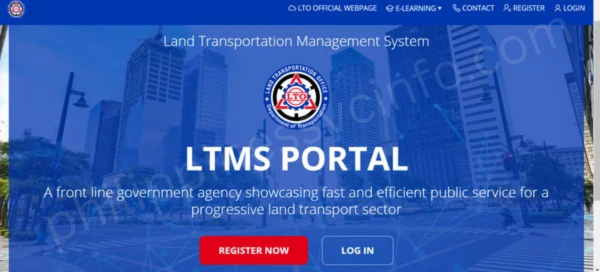
The Land Transportation Management System (LTMS) Portal is the official online platform of the Land Transportation Office (LTO) in the Philippines. Introduced in 2020, it was created to provide contactless access to LTO services during the COVID-19 pandemic. Today, the LTMS Portal is the primary platform for managing LTO transactions, including driver’s license renewal, vehicle registration, appointment scheduling, and updating personal records. Many LTO services now require users to have an LTMS account before visiting an LTO branch.m
How to Create an LTMS Portal Account
Creating an LTMS Portal account is required to access most online services offered by the Land Transportation Office (LTO), including driver’s license applications, renewals, vehicle-related transactions, and appointment booking. Once your account is verified, you can securely manage your LTO records and complete eligible transactions online.
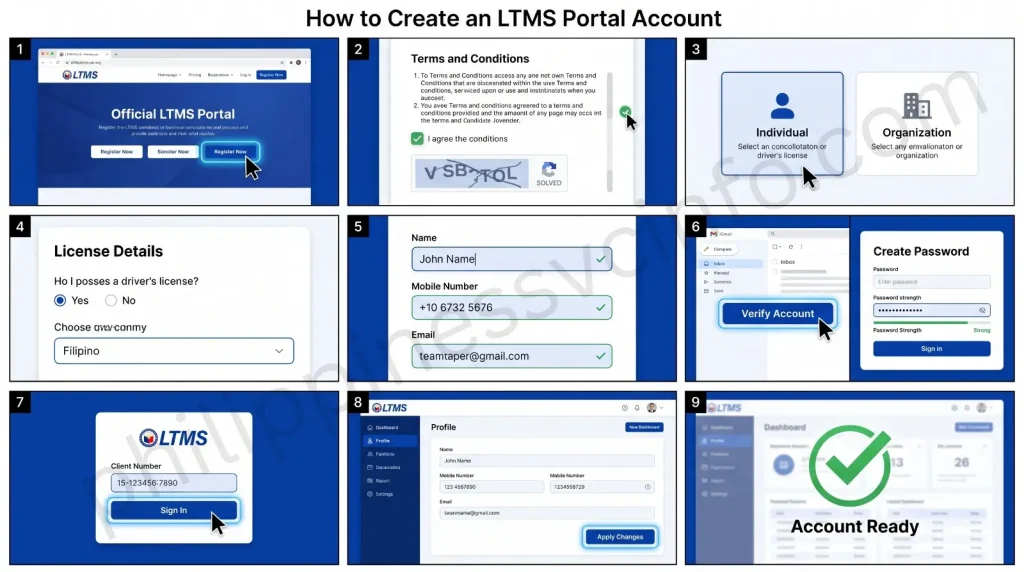
1. Visit the LTMS Portal
Open your web browser and go to the official LTMS Portal website. On the homepage, click
o begin creating your account. You can register even if you do not yet have a driver’s license.
2. Accept the Terms and Conditions
Read the Terms of Agreement carefully, then tick the
checkbox. Complete the CAPTCHA verification and click “Next” to continue.
3. Choose Your Registration Type
Select “Enroll as an Individual” if you are registering a personal account. Organizations and businesses should choose the appropriate enrollment option for company accounts.
4. Provide Your License and Citizenship Details
Indicate whether you already have a driver’s license. If you do, enter the required license information. If not, select “No” and continue. You will also need to confirm your citizenship or provide your Alien Certificate of Registration (ACR) details if you are a foreign national.
5. Fill Out the Registration Form
Enter your personal information, including your full name, mobile number, and a valid email address. Use an active email account since it will be used for account verification, password recovery, and important LTO notifications.
6. Verify and Activate Your Account
Check your email for the verification link and activate your account within 24 hours. After verification, create a strong password with at least eight characters, including uppercase letters and numbers. Store your login details in a safe place for future use.
7. Sign In to Your LTMS Account
Once your account is activated, you will receive a 15-digit LTO Client Number that serves as your username. Log in using this client number and your password.
8. Complete Your Profile
After signing in, open the Profile section and provide all required information accurately. Review your details before clicking “Apply Changes” to save your profile. Your LTMS account is now ready for license renewal, vehicle registration, appointment booking, and other available LTO online services.
How to Register for an LTMS Portal Account
Registering for an LTMS Portal account allows you to access a wide range of online LTO services, including driver’s license renewal, vehicle registration, appointment scheduling, and more. Follow these simple steps to create your account.
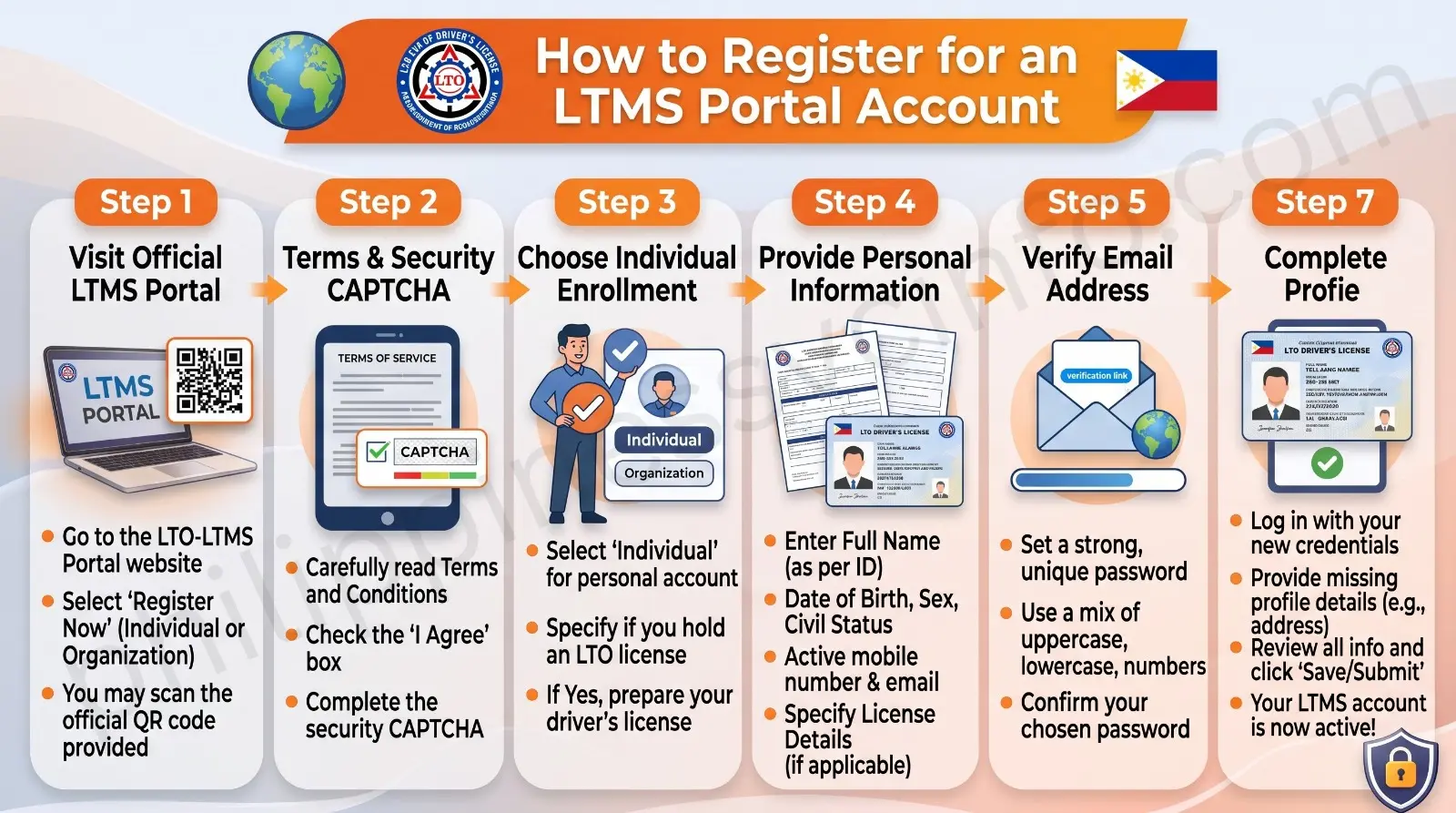
Step 1: Visit the LTMS Portal
Go to the official LTMS Portal website and click
to begin the registration process.
Step 2: Accept the Terms
Read the Terms of Agreement, tick the
checkbox, complete the CAPTCHA verification, and click “Next.”
Step 3: Choose Your Enrollment Type
Select “Enroll as an Individual.” This option is for personal accounts and is suitable whether you already have a driver’s license or are applying for one for the first time.
Step 4: Enter Your Personal Information
Complete the registration form by providing your nationality, full name, date of birth, email address, mobile number, and, if applicable, your existing driver’s or conductor’s license details. Review your information and click “Create Account.”
Step 5: Verify Your Email
LTO will send a verification email containing your 15-digit LTO Client Number and an activation link. Open the email and click the verification link within 24 hours. If the link expires, you’ll need to register again.
Step 6: Create Your Password
After verifying your account, create a strong password that meets the portal’s security requirements. Your account will then be ready to use.
Step 7: Complete Your Profile
Sign in using your 15-digit LTO Client Number and password. Complete your profile by entering all required information accurately before using any online LTO services.
How to Log In to the LTO LTMS Portal
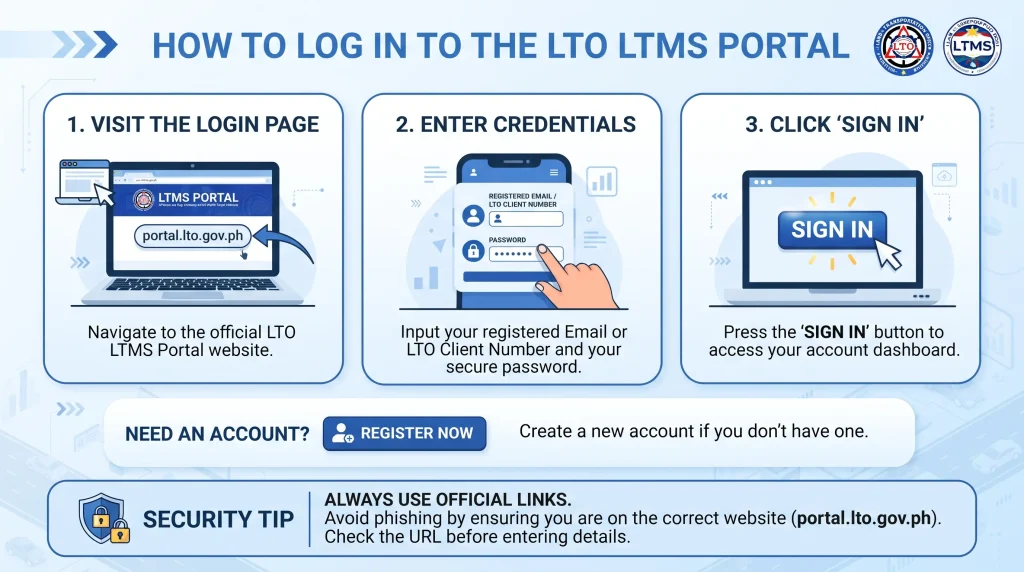
Once your LTMS Portal account has been created and activated, you can log in to access various LTO online services. Follow these simple steps:
Step 1: Visit the LTMS Portal Login Page
Open your web browser and go to the official LTO & LTMS Portal login page.
Step 2: Enter Your Login Credentials
Type your registered email address or 15-digit LTO Client Number, then enter your password in the appropriate fields.
Step 3: Click “Sign In”
After entering your login details, click the
button to access your LTMS Portal account.
Step 4: Access Your Dashboard
Once logged in successfully, you’ll be taken to your LTMS Portal dashboard, where you can manage driver’s license renewal, vehicle registration, appointments, violations, and other available online LTO services.
Step 5: Forgot Your Password? (Optional)
If you can’t remember your password, click the “Forgot Password?” link on the login page and follow the instructions to reset it using your registered email address.
Step 6: Don’t Have an Account Yet?
If you don’t have an account yet, click
and complete the registration process before logging in.
Security Tip: Always access the official LTMS Portal directly and avoid logging in through links shared on social media, emails, or unofficial websites to protect your personal information from phishing scams.
How to Use the LTMS Portal: Complete Guide
After creating your LTMS Portal account, you can access different LTO online services, manage your records, apply for licenses, renew registrations, view documents, and complete other transactions online. Below are the main features and steps for using the LTMS Portal.
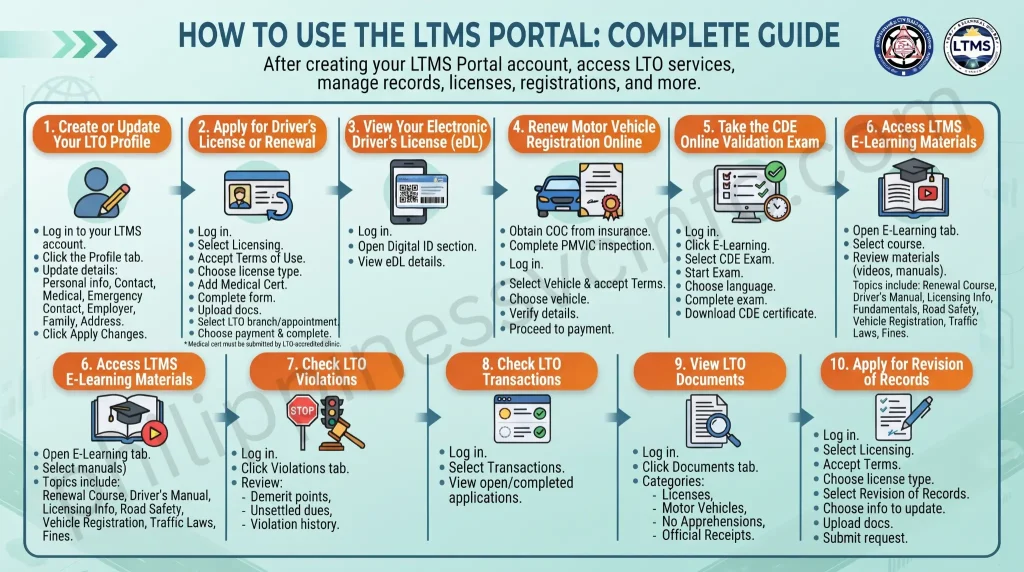
1. Create or Update Your LTO Profile
Before using major LTMS services, you need to complete your profile. Keeping your information updated ensures that you receive important LTO notifications and transaction updates.
Steps:
- Log in to your LTMS account.
- Click the Profile tab.
- Enter or update your:
- Personal information
- Contact details
- Medical information
- Emergency contact information
- Employer details
- Family information
- Address
- Click Apply Changes to save your details.
2. Apply for Driver’s License or Renewal
The LTMS Portal allows users to apply for a new driver’s license, student permit, or renew an existing license online.
Steps:
- Log in to your LTMS account.
- Select Licensing.
- Accept the Terms of Use.
- Choose your license type.
- Add and verify your medical certificate.
- Select whether you are applying for a new license or renewal.
- Complete the application form.
- Upload required documents.
- Select your preferred LTO branch and appointment schedule.
- Choose your payment method and complete the transaction.
Note: Your medical certificate must be submitted by an LTO-accredited clinic before verification.
3. View Your Electronic Driver’s License (eDL)
Users with a valid LTO-issued license can access their digital driver’s license through the LTMS Portal.
Steps:
- Log in to your account.
- Open the Digital ID section.
- View your electronic driver’s license details, including your QR code and barcode for verification.
4. Renew Motor Vehicle Registration Online
Eligible vehicle owners can renew their registration through the LTMS Portal if their previous renewal was processed online.
Steps:
- Obtain a Certificate of Coverage (COC) from your insurance provider.
- Complete vehicle inspection at an authorized PMVIC.
- Log in to the LTMS Portal.
- Select Vehicle and accept the Terms of Use.
- Choose the vehicle for renewal.
- Verify vehicle details.
- Proceed to payment.
5. Take the CDE Online Validation Exam
The Comprehensive Driver’s Education (CDE) Exam is required for driver’s license renewal. The online exam helps motorists review road safety rules and regulations.
Steps:
- Log in to the LTMS Portal.
- Click E-Learning.
- Select CDE Online Validation Exam.
- Click Start Exam.
- Choose your preferred language.
- Complete the multiple-choice exam.
- Download your CDE certificate after passing.
6. Access LTMS E-Learning Materials
The LTMS Portal provides learning resources to help drivers prepare for licensing exams and improve road knowledge.
Available topics include:
- Driver’s License Renewal Course
- Driver’s Manual
- Licensing Information
- Driving Fundamentals
- Road Courtesy and Safety
- Driver Responsibilities
- Vehicle Registration
- Traffic Laws
- Fines and Penalties
To access learning materials:
- Open the E-Learning tab.
- Select your preferred course.
- Review the available videos and study materials.
7. Check LTO Violations
You can view your traffic violations, penalties, and demerit points through your LTMS account.
Steps:
- Log in to LTMS.
- Click the Violations tab.
- Review:
- Demerit points
- Unsettled dues
- Violation history
8. Check LTO Transactions
The LTMS Portal keeps a record of your completed and ongoing LTO transactions.
Steps:
- Log in to your account.
- Select Transactions.
- View your open and completed applications.
9. View LTO Documents
Your submitted LTO documents are stored in your account for easy access.
Steps:
- Log in to LTMS.
- Click the Documents tab.
- View documents under categories such as:
- Licenses
- Motor Vehicles
- No Apprehensions
- Official Receipts
10. Apply for Revision of Records
If you need to update information on your driver’s license, you can request a revision of records through LTMS.
Steps:
- Log in to your account.
- Select Licensing.
- Accept the Terms of Use.
- Choose your license type.
- Select Revision of Records.
- Choose the information you want to update.
- Upload required documents.
- Submit your request.
Common LTMS Portal Issues and How to Fix Them
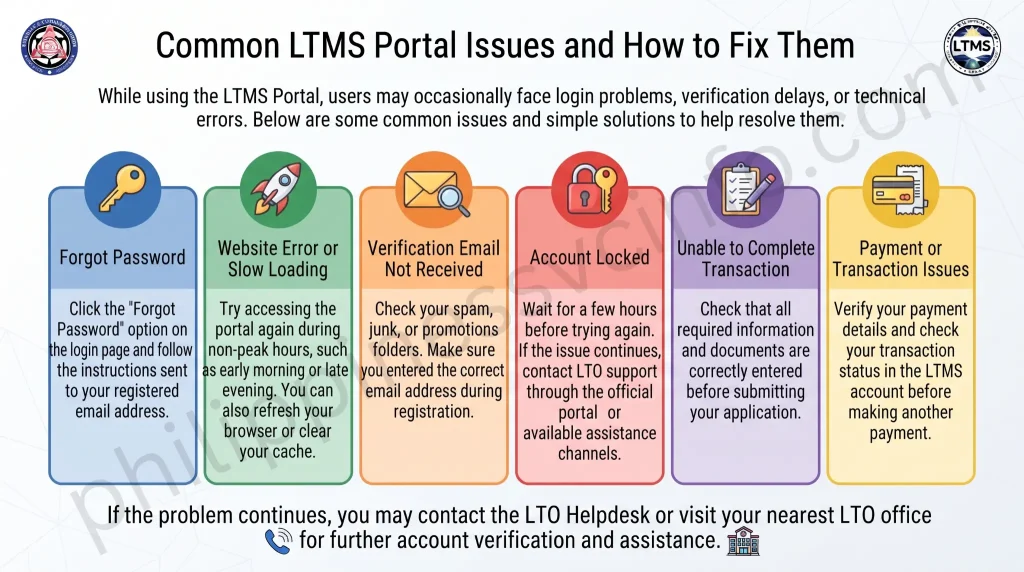
While using the LTMS Portal, users may occasionally face login problems, verification delays, or technical errors. Below are some common issues and simple solutions to help resolve them.
| Issue | Solution |
|---|---|
| Forgot Password | Click the “Forgot Password” option on the login page and follow the instructions sent to your registered email address. |
| Website Error or Slow Loading | Try accessing the portal again during non-peak hours, such as early morning or late evening. You can also refresh your browser or clear your cache. |
| Verification Email Not Received | Check your spam, junk, or promotions folders. Make sure you entered the correct email address during registration. |
| Account Locked | Wait for a few hours before trying again. If the issue continues, contact LTO support through the official portal or available assistance channels. |
| Unable to Complete Transaction | Check that all required information and documents are correctly entered before submitting your application. |
| Payment or Transaction Issues | Verify your payment details and check your transaction status in the LTMS account before making another payment. |
If the problem continues, you may contact the LTO Helpdesk or visit your nearest LTO office for further account verification and assistance.
LTO Online Services and Supported Branches
The LTMS Portal provides motorists with convenient access to a variety of online LTO services, reducing the need to visit an LTO branch for many transactions. Through your LTMS account, you can manage driver’s license and vehicle-related services, make payments, book appointments, access learning materials, and view important LTO records. While many services are available online nationwide, some transactions still require you to visit selected LTO branches that support the LTMS system.
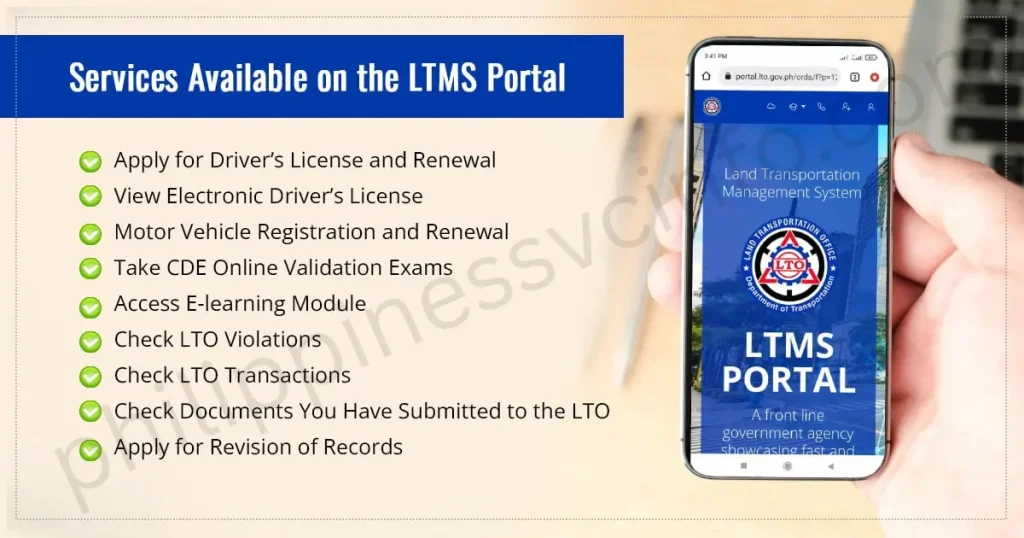
Online Services Available on the LTMS Portal
| Service | Description |
|---|---|
| Driver’s License Services | Apply for a student permit, renew or replace your driver’s license, request additional restriction codes, convert a foreign license, and update personal information. |
| Vehicle Services | Check vehicle registration status, renew registration (where available), verify ownership details, and manage vehicle records. |
| Online Payments | Pay license fees, vehicle registration charges, traffic fines, and other LTO fees securely online. |
| Appointments | Schedule appointments for license renewal, vehicle inspection, plate release, and other LTO transactions. |
| Violations & Records | View traffic violations, demerit points, penalties, and driving history linked to your account. |
| E-Learning & CDE Exam | Study LTO learning modules and complete the Comprehensive Driver’s Education (CDE) Online Exam required for license renewal. |
| Documents & Certificates | Access or request documents such as the Certificate of No Apprehension, Driver’s Record Certificate, TDC, and PDC certificates. |
LTO Branches Supporting the LTMS Portal
The LTMS Portal is supported by selected LTO offices across the Philippines. Some transactions may require you to visit one of these branches to complete processing.
| Region | Supported LTO Offices |
|---|---|
| Metro Manila | Central Office License Section, Eastwood DLRO, Ever Gotesco DLRO, Muntinlupa District Office, Quezon City Licensing Center |
| Luzon | Angeles, Baguio, Bayombong, Biñan, Calapan, Laoag, Lipa, Naga, and San Fernando Licensing Center |
| Visayas | Dumaguete, Ormoc, Roxas, and Tagbilaran District Offices |
| Mindanao | Butuan, Davao, General Santos, Malaybalay, Pagadian, and Tagum District Offices |
Note: Available services and participating branches may change as the LTO expands the LTMS system. Always check the official LTO website or your LTMS account for the latest information before visiting an LTO office.
Benefits of Creating an LTMS Portal Account
| Benefit | Description |
|---|---|
| 24/7 Online Access | Access LTO services anytime and anywhere using your LTMS account. |
| Faster Transactions | Renew licenses, register vehicles, and complete other transactions online, reducing waiting time at LTO offices. |
| Online Appointment Booking | Schedule appointments in advance to avoid long queues at LTO branches. |
| eLearning & CDE Exam | Study through free learning modules and take the Comprehensive Driver’s Education (CDE) Online Exam for license renewal. |
| Track Applications | Monitor the status of your applications, appointments, and transactions in real time. |
| Secure Online Payments | Pay LTO fees, vehicle registration charges, and eligible penalties online while receiving digital receipts. |
| Digital Document Storage | View and manage your driver’s license, vehicle records, permits, certificates, and transaction history in one account. |
| Violation Monitoring | Check traffic violations, demerit points, and outstanding penalties linked to your account. |
| Protection from Fixers | Complete transactions directly through the official LTMS Portal, helping you avoid unauthorized fixers and scams. |
| Greater Transparency | Keep all your LTO records, payments, and driving history organized and accessible whenever you need them. |
Driver Education Materials Available on the LTMS Portal
The LTMS Portal features an LTO eLearning section that provides free educational resources to help motorists improve their driving knowledge and prepare for licensing requirements. These materials are useful for first-time drivers, license renewals, and anyone who wants to stay informed about Philippine traffic laws and road safety.
Through the portal, users can access video lessons, study guides, and learning modules covering driver’s licensing procedures, road signs and markings, traffic rules and regulations, safe driving practices, and defensive driving techniques. The eLearning section also includes the Comprehensive Driver’s Education (CDE) course and online exam required for driver’s license renewal, along with reference materials on land transportation laws and other official LTO guidelines.
LTO Documents You Can View Through the LTMS Portal
The LTMS Portal allows users to access and manage important LTO records and documents from a single online account. Once your account is linked, you can view your driver’s license information, vehicle registration records, permits, transaction history, and other LTO-issued documents associated with your profile.
The portal also lets you review your traffic violations, outstanding penalties, and previous apprehension records. In addition, eligible users can apply for a Certificate of No Apprehension (CNA) for their driver’s license or registered vehicle, making it easier to obtain official LTO documents without unnecessary office visits. Availability of some features may vary depending on the service and current LTO system updates.
LTO eLearning Resources Available on the LTMS Portal
The LTO eLearning section of the LTMS Portal offers free learning materials to help motorists understand traffic laws, improve driving skills, and prepare for licensing requirements. These resources are especially useful for new drivers, license applicants, and motorists renewing their driver’s licenses through the Comprehensive Driver’s Education (CDE) program.
Licensing Information
Learn about the different types of driver’s licenses and permits, license classifications, vehicle categories, medical requirements, eligibility, documentary requirements, application procedures, and the fees associated with licensing services.
Driving Lessons and Road Safety
Access educational materials covering driving fundamentals, road signs and pavement markings, vehicle inspections, safe driving techniques, lane discipline, roundabouts, right-of-way rules, defensive driving, emergency situations, collision prevention, vehicle maintenance, road courtesy, and road rage awareness.
Driver Responsibilities
Understand the legal duties and responsibilities of all motorists, including professional drivers such as bus, taxi, jeepney, TNVS, UV Express, tricycle, motorcycle, school bus, and truck drivers. The portal also explains drivers’ rights during traffic apprehensions and highlights common traffic violations.
Vehicle Registration
Find detailed guidance on new vehicle registration, renewal requirements, registration schedules, motor vehicle user’s charges, assigned plate numbers by region, documentary requirements for different vehicle types, and applicable registration fees and penalties.
Traffic Laws and Regulations
Study important Philippine land transportation laws, including Republic Act No. 4136, RA 8749, RA 8750, RA 8794, RA 10054, RA 10586, RA 10666, RA 10913, RA 10916, and RA 10930. The portal also provides information on traffic fines, penalties, temporary operator’s permits, vehicle operation rules, and franchise regulations.
Tip: Reviewing the eLearning materials before taking the CDE Online Exam can improve your understanding of road safety and increase your chances of passing the assessment required for driver’s license renewal.
List of LTO Violations, Fines, and Penalties in the Philippines (2026 Guide)
Driving in the Philippines requires responsibility, proper documentation, and compliance with road safety rules. The Land Transportation Office (LTO) imposes different fines and penalties for traffic violations, licence issues, and vehicle-related offences.
The table below provides a quick overview of the most common LTO violations, fines, and penalties for 2026.
Traffic and Administrative Violations
| LTO Violation | Fine / Penalty |
|---|---|
| Driving without a valid driver’s licence | ₱3,000 |
| Failure to carry Official Receipt (OR) and Certificate of Registration (CR) | ₱1,000 |
| Not wearing a motorcycle helmet | 1st offence: ₱1,500 2nd offence: ₱3,000 3rd offence: ₱5,000 4th and succeeding offences: ₱10,000 |
| Using a substandard helmet or helmet without ICC sticker | 1st offence: ₱3,000 2nd offence: ₱5,000 |
| Failure to wear a seat belt | 1st offence: ₱1,000 2nd offence: ₱2,000 3rd offence: ₱5,000 + one-week licence suspension |
| Reckless driving | 1st offence: ₱2,000 2nd offence: ₱3,000 + 3-month licence suspension 3rd offence: ₱10,000 + 6-month suspension or possible revocation |
| Driving under the influence of alcohol or prohibited drugs | ₱50,000 to ₱500,000 + imprisonment or licence revocation |
Vehicle-Related LTO Violations and Penalties (2026)
Vehicle owners must ensure that their vehicles are properly registered, safe to operate, and compliant with LTO requirements. Violations related to registration, modifications, equipment, and vehicle condition may result in fines or vehicle impoundment.
| Vehicle Violation | Fine / Penalty |
|---|---|
| Driving an unregistered motor vehicle | Driver: ₱2,000 Owner: ₱10,000 + possible vehicle impoundment |
| Unauthorised motor vehicle modification | ₱5,000 + vehicle impoundment |
| Operating a right-hand-drive motor vehicle | ₱50,000 + vehicle impoundment |
| Vehicle with defective or unauthorised accessories, devices, equipment, or parts | ₱5,000 + vehicle impoundment |
| Missing, improperly attached, or tampered licence plates | ₱5,000 |
| Smoke-belching vehicle | 1st offence: ₱2,000 2nd offence: ₱4,000 3rd and succeeding offences: ₱6,000 + one-year Motor Vehicle Registration suspension |
| Fraudulent vehicle registration or renewal | ₱3,000 + vehicle impoundment + one-year registration restriction |
Detailed LTO Violations and Penalties Summary
| Violation | Details / Consequences |
|---|---|
| Driving Without a Valid Driver’s Licence | A ₱3,000 fine applies when driving without a valid licence, using an expired, suspended, revoked, fake licence, or operating a vehicle that does not match the licence classification. |
| Failure to Carry OR and CR | Drivers who cannot present their Official Receipt and Certificate of Registration during inspections may receive a ₱1,000 fine. These documents prove that the vehicle is legally registered. |
| Not Wearing a Motorcycle Helmet | Riders without a proper motorcycle helmet may receive fines from ₱1,500 to ₱10,000 depending on the number of offences. Helmets must meet safety requirements. |
| Substandard Helmet or No ICC Sticker | Using helmets without proper certification may result in a ₱3,000 fine for the first offence and ₱5,000 for the second offence. |
| Failure to Wear Seat Belt | Drivers and front passengers must wear seat belts. Violations may result in fines from ₱1,000 to ₱5,000, with possible licence suspension for repeated offences. |
| Reckless Driving | Unsafe driving behaviour such as speeding, ignoring traffic signs, and dangerous manoeuvres may lead to fines up to ₱10,000 and licence suspension. |
| Driving Under the Influence | Driving while affected by alcohol or prohibited drugs may result in heavy fines ranging from ₱50,000 to ₱500,000, imprisonment, and possible licence revocation. |
| Driving an Unregistered Vehicle | Expired registration is treated as an unregistered vehicle. Penalties may include driver and owner fines, vehicle impoundment, or registration restrictions. |
| Unauthorised Vehicle Modification | Vehicle changes must follow LTO rules. Illegal modifications may result in a ₱5,000 fine and vehicle impoundment. |
| Operating a Right-Hand-Drive Vehicle | Right-hand-drive vehicles are prohibited under Philippine law and may receive a ₱50,000 fine plus vehicle impoundment. |
| Defective or Unauthorised Vehicle Parts | Vehicles with missing safety equipment, illegal devices, or defective parts may receive a ₱5,000 fine and possible impoundment. |
| Missing or Tampered Licence Plates | Vehicles must have properly attached and visible licence plates. Violations may result in a ₱5,000 fine and confiscation of illegal plates or accessories. |
| Smoke-Belching Vehicle | Excessive vehicle emissions may result in fines from ₱2,000 to ₱6,000, with possible suspension of vehicle registration. |
| Fraudulent Registration or Renewal | Fake documents or incorrect registration information may result in a ₱3,000 fine, vehicle impoundment, and one-year registration restrictions. |
How to Avoid LTO Violations and Penalties in the Philippines
Avoiding LTO violations starts with following traffic laws and being prepared before you drive. Many penalties happen not because drivers intentionally break the rules, but because they forget important documents, ignore vehicle maintenance, or are unaware of specific requirements.
By developing responsible driving habits and keeping your vehicle compliant with LTO standards, you can reduce the risk of receiving fines, delays, or other penalties.
Here are some practical ways to avoid common LTO violations.
1. Always Carry Your Valid Driver’s Licence
Before driving, make sure your driver’s licence is with you and still valid. Operating a vehicle without a proper licence can result in a fine and may cause unnecessary problems during inspections or checkpoints.
A simple habit, such as keeping your licence safely inside your vehicle when appropriate, can help prevent situations where you accidentally leave it at home.
Helpful tips:
- Check your licence before starting your trip.
- Keep it in a secure place that is easy to access.
- Renew your licence before it expires.
- Ensure your licence type matches the vehicle you are driving.
Being prepared only takes a few seconds but can save you from paying penalties later.
2. Keep Your OR and CR Documents Updated
The Official Receipt (OR) and Certificate of Registration (CR) confirm that your vehicle is properly registered with the LTO. Drivers should always make sure these documents are updated and available when needed.
For better preparation:
- Keep the original OR inside your vehicle.
- Carry a copy of the CR while storing the original document safely at home.
- Renew your vehicle registration before the deadline.
- Check your documents before long trips.
This is especially important for motorcycle riders, as they are often subject to roadside inspections and checkpoints. Having updated OR and CR documents can help avoid delays and possible violations.
3. Maintain Your Vehicle Regularly
A well-maintained vehicle is safer and less likely to violate LTO requirements. Regular inspections and servicing help ensure that your vehicle remains roadworthy.
Make sure to check important components such as:
- Engine condition
- Brakes
- Lights
- Side mirrors
- Tyres
- Exhaust system
- Required safety equipment
Regular oil changes, engine tuning, and maintenance checks can help prevent problems such as smoke-belching violations and defective equipment penalties.
A vehicle that looks neglected or poorly maintained may attract additional attention during checkpoints, so keeping it in good condition benefits both safety and compliance.
4. Never Offer Bribes During Traffic Enforcement
Attempting to bribe an LTO officer or traffic enforcer is illegal and can lead to more serious consequences. If you receive a violation, follow the official process and settle penalties through authorised channels.
Bribery is considered a criminal offence under the Revised Penal Code and may result in:
- Criminal charges
- Possible imprisonment
- Monetary fines
- Potential driver’s licence consequences
Respecting traffic enforcement procedures helps maintain a fair system and protects you from additional legal problems.
Final Tips to Stay LTO-Compliant
A few simple habits can help you avoid most LTO penalties:
✅ Check your documents before driving
✅ Follow speed limits and traffic signs
✅ Keep your vehicle properly maintained
✅ Use approved safety equipment
✅ Renew registrations and licences on time
✅ Drive responsibly and respect other road users
Responsible driving is not only about avoiding fines. It is about creating safer roads for everyone in the Philippines. A little preparation before every trip can prevent costly violations and make every journey smoother.
Frequently Asked Questions About LTMS Portal and LTO Violations
Conclusion
The LTO Online Portal (LTMS) has made managing Land Transportation Office services easier, faster, and more convenient for Filipino motorists. From creating an account and renewing driver’s licenses to managing vehicle records, checking documents, taking the CDE exam, and tracking transactions, users can now access many essential services online. Although the system continues to improve, the LTMS Portal provides a more organized and time-saving way to complete LTO transactions while reducing the need for long queues and repeated office visits. By keeping your account information updated and using the official portal, you can enjoy a smoother, safer, and more efficient experience with LTO services.