QCeServices Guide 2026: Login, Registration, Services & Applications
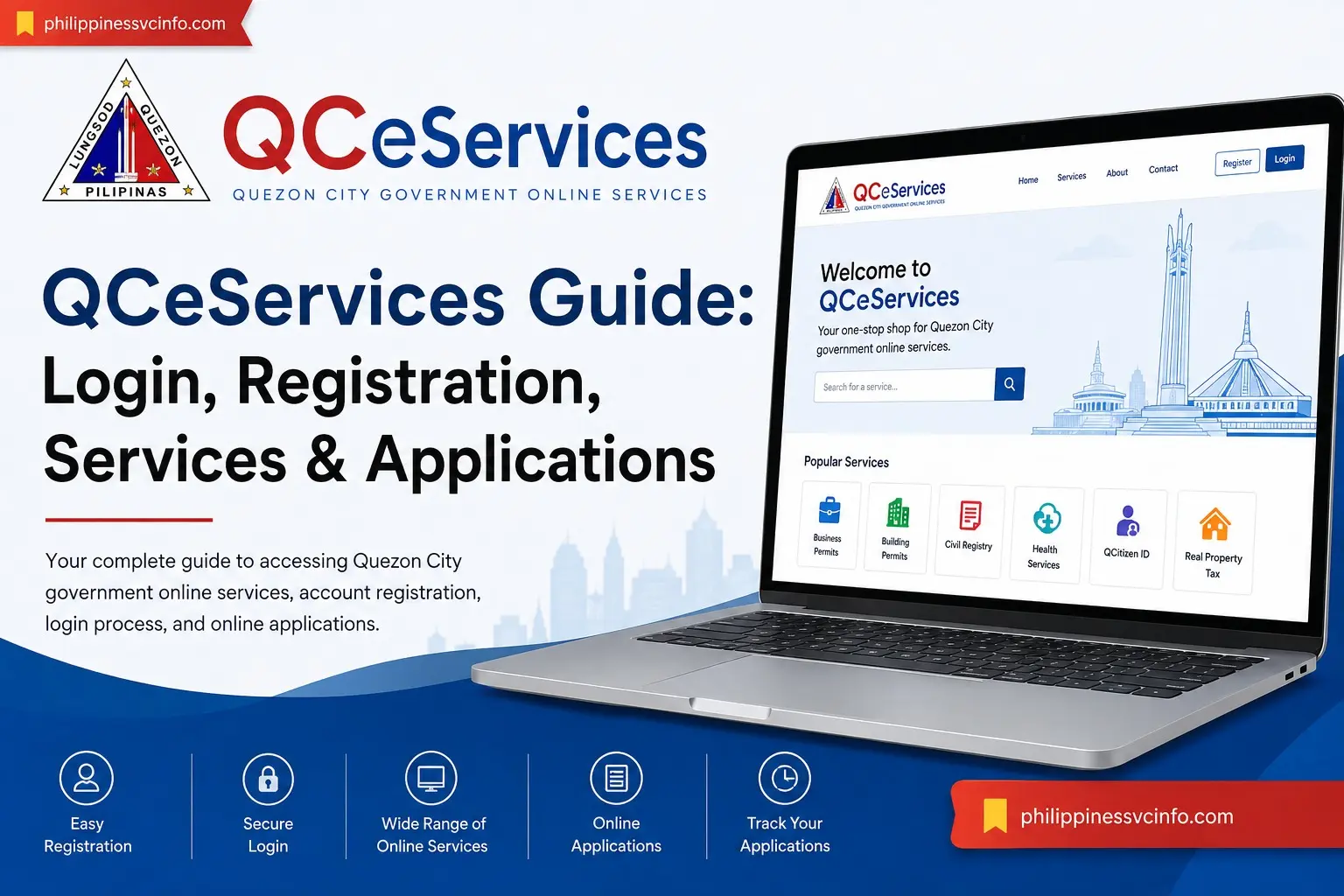
Quezon City residents and businesses can handle many local government transactions online through QCeServices, the city’s digital service portal. Instead of visiting a government office for every transaction, users can access selected Quezon City services through the official online platform, depending on the service and its current requirements.
Official Quezon City government materials also reference the QCeServices website for online registration and applications, including business-related transactions and QCitizen services.
This guide explains what QCeServices is, how to access the portal, how registration and login work, and what users should know before starting an online transaction.
What Is QCeServices?
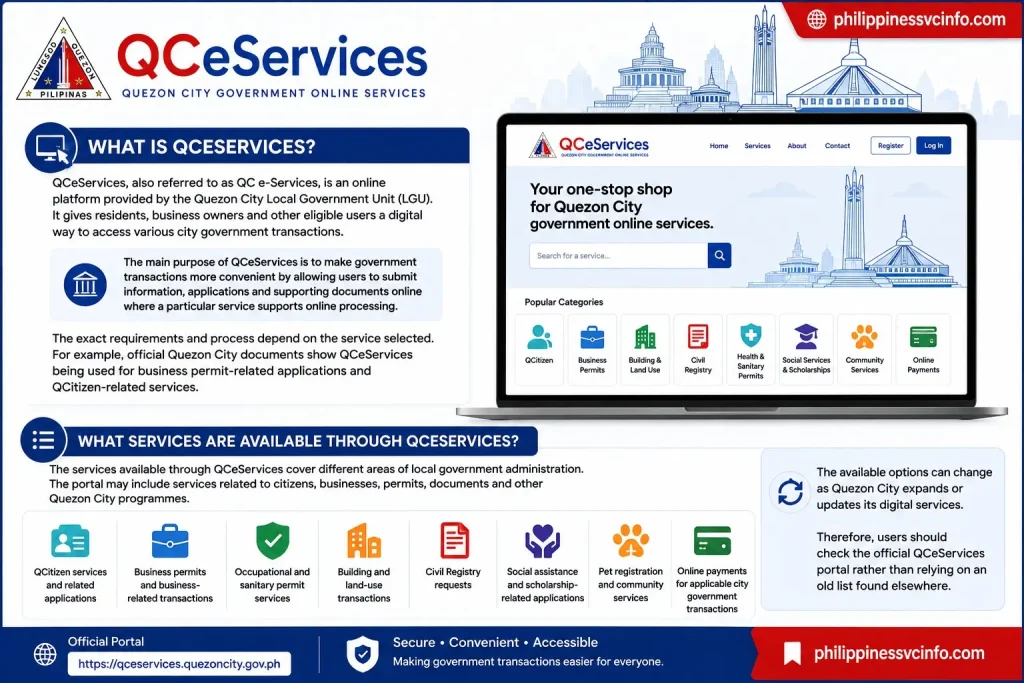
QCeServices, also referred to as QC e-Services, is an online platform provided by the Quezon City Local Government Unit (LGU). It gives residents, business owners and other eligible users a digital way to access various city government transactions.
The main purpose of QCeServices is to make government transactions more convenient by allowing users to submit information, applications and supporting documents online where a particular service supports online processing. The platform is particularly useful for transactions that would otherwise require a visit to a Quezon City government office.
The exact requirements and process depend on the service selected. For example, official Quezon City documents show QCeServices being used for business permit-related applications and QCitizen-related services.
What Services Are Available Through QCeServices?
The services available through QCeServices cover different areas of local government administration. The portal may include services related to citizens, businesses, permits, documents and other Quezon City programmes.
Common areas referenced in the supplied information include:
- QCitizen services and related applications
- Business permits and business-related transactions
- Occupational and sanitary permit services
- Building and land-use transactions
- Civil Registry requests
- Social assistance and scholarship-related applications
- Pet registration and community services
- Online payments for applicable city government transactions
The available options can change as Quezon City expands or updates its digital services. Therefore, users should check the official QCeServices portal rather than relying on an old list found elsewhere.
For example, an official Quezon City government document describes QCeServices registration and login as part of the process for an online business permit application.
How to Access QCeServices Online
Accessing QCeServices is straightforward, but users should make sure they are using the official government website before entering personal information.

Step 1: Open a Reliable Web Browser
Use a current browser such as Google Chrome, Microsoft Edge, Mozilla Firefox or Safari. A stable internet connection is also recommended, particularly when uploading documents or completing an application.
Step 2: Visit the Official QCeServices Website
Enter the official address:
Check the browser address bar carefully. The official portal uses the quezoncity.gov.ph government domain.
Step 3: Select the Service You Need
Once inside QCeServices, look through the available service options and select the transaction relevant to your situation.
Depending on the service, you may need to register or log in before continuing. Some government procedures documented by Quezon City specifically instruct applicants to create a QCeServices account and then select the relevant service from the portal.
Step 4: Follow the Service-Specific Instructions
Read the requirements shown for your selected transaction before submitting anything. Some applications require supporting documents, identification, payment or additional verification.
Important: Do not assume that the requirements for one QCeServices service apply to another. Each Quezon City government service can have its own eligibility rules, documents, fees and processing procedure.
QCeServices Login Guide
A QCeServices account can be useful when a transaction requires an authenticated user profile. The general login process is designed to take users from the official portal to their account and then to the appropriate online service.
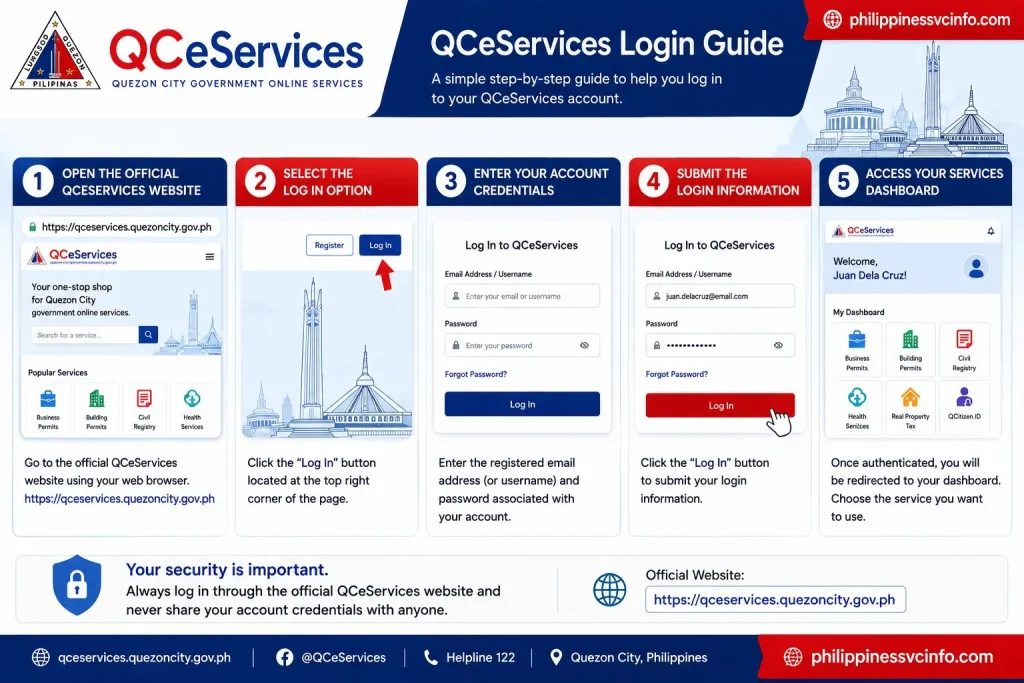
How to Log In to QCeServices
- Open the official QCeServices website.
- Select the Log In option.
- Enter the registered account credentials requested by the portal.
- Submit the login information.
- Once authenticated, open the service you want to use from the available options.
If you are applying for a service such as a QCitizen or scholarship-related programme, the official Quezon City instructions may specify exactly how your QCeServices account should be used. For example, the city’s scholarship instructions tell applicants to log in with the email registered with QC e-Services and select the appropriate scholarship service.
What If You Cannot Log In?
Login problems can happen because of incorrect credentials, account verification issues, browser problems or temporary technical difficulties.
Before contacting support, check that:
- Your login details are entered correctly.
- You are using the official QCeServices website.
- Your internet connection is stable.
- Your browser is updated.
- You have completed any required account verification.
- You have not accidentally registered with a different email address.
If the problem continues, use the official Quezon City support channels rather than entering your credentials into an unofficial website.
How to Register for QCeServices
Registration requirements can depend on the account and service involved. In general, users should have their personal information and any documents required by the particular Quezon City service ready before starting.
The supplied source material identifies an active email address, mobile number and valid government-issued identification among the information that may be required. However, users should confirm the current requirements directly on the official portal because requirements can change.

Basic QCeServices Registration Process
1. Open QCeServices
Go to the official portal:
2. Choose the Registration Option
Select the account creation or registration option shown on the official website.
3. Enter Your Information
Provide the personal details requested by the registration form. Make sure your information matches your official documents where applicable.
4. Complete Verification
If the system requests email, mobile or OTP verification, follow the instructions displayed on screen.
5. Sign In to Your Account
After registration is completed, return to the QCeServices login page and access your account.
6. Select Your Required Service
Once inside the portal, locate the service you need and review its specific instructions before beginning the application.
Official Quezon City materials confirm that creating a QC e-Services profile is part of certain online processes, including QCitizen applications and business-related transactions.
What Can You Do After Logging In to QCeServices?
Once your account is set up, the dashboard becomes the starting point for available online transactions. The exact options shown can depend on the service you need and the eligibility requirements attached to it.
Some of the major service categories currently identified by the Quezon City Government include:
|
Service category |
Examples of online transactions |
|---|---|
|
Business |
Business permits and related transactions |
|
Building |
Building permit transactions and payments |
|
Civil Registry |
Online civil registry services |
|
Health |
Health certificate and sanitary permit services |
|
Social Services |
Medical assistance and social welfare applications |
|
Education |
QC scholarship application and renewal |
|
QCitizen |
QCitizen ID application |
|
Property |
Real property tax payments |
|
Community |
Pet registration and appointments |
|
Employment |
Occupational work permit transactions |
The city says the platform is intended to make government transactions faster, more convenient and more efficient while reducing red tape.
How to Request a Service Through QCeServices
If you need to submit a general service request, the official Quezon City instructions provide a simple process.
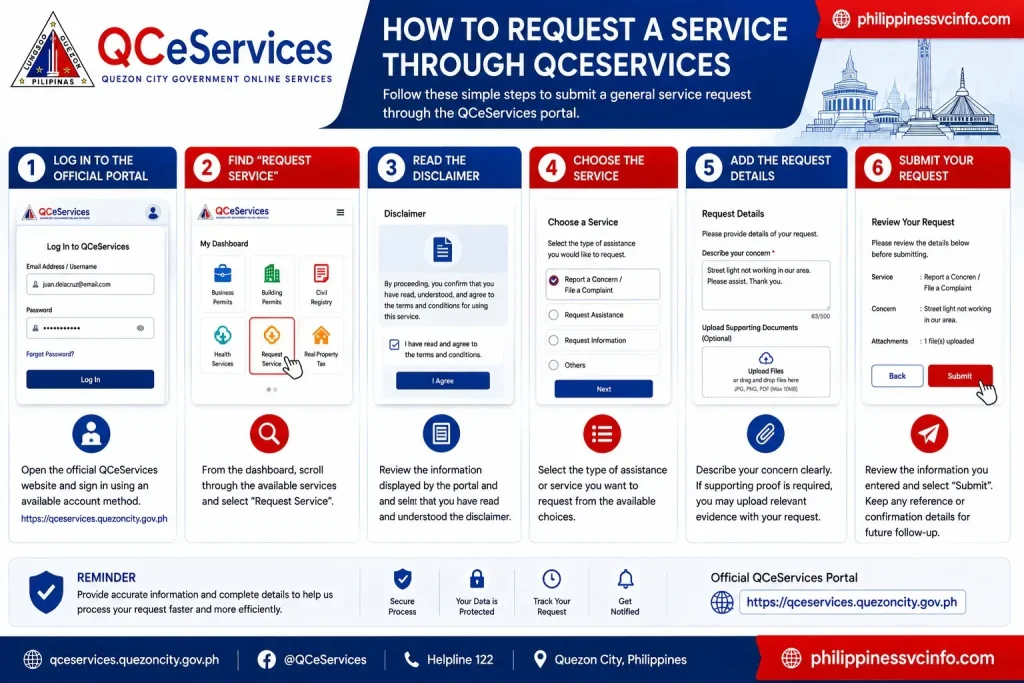
Step 1: Log In to the Official Portal
Open the official QCeServices website and sign in using an available account method.
Step 2: Find “Request Service”
From the dashboard, scroll through the available services and select Request Service.
Step 3: Read the Disclaimer
Review the information displayed by the portal and confirm that you have read and understood the disclaimer.
Step 4: Choose the Service
Select the type of assistance or service you want to request from the available choices.
Step 5: Add the Request Details
Describe your concern clearly. If supporting proof is required, the official guide says you may upload relevant evidence with the request.
Step 6: Submit
Review the information you entered and select Submit. Keep any reference or confirmation details provided by the system for future follow-up.
QCeServices for Business Permits
One of the important uses of QCeServices is business-related government transactions.
The Quezon City Government’s Business One-Stop-Shop system allows business owners to access online business permit processes through QCeServices. The city’s official instructions direct applicants to log in to the portal, select the Business One-Stop-Shop and follow the instructions provided there.
New Business Permit Application
For a new business permit, the requirements can include proof of business registration, such as DTI registration for a sole proprietorship or SEC documents for a corporation or partnership. Depending on the situation, other documents such as a lease contract, tax declaration, authorisation letter or government-issued ID may also be required.
A typical online workflow is:
- Register and log in to QCeServices.
- Open Business One-Stop-Shop.
- Start the appropriate business permit transaction.
- Complete the online application.
- Attach the required supporting documents.
- Submit the application for evaluation.
- Complete any additional requirements identified by the relevant city offices.
- Follow the instructions for payment and permit release.
The exact process should always be checked against the current instructions displayed by Quezon City because requirements can vary according to the business and transaction.
QCeServices Building Permit Transactions
QCeServices is also used for certain building permit processes.
The Quezon City Department of the Building Official currently directs applicants to register or log in to QCeServices, choose Building Permit: One-Stop Shop, select the relevant permit category and generate the applicable checklist and forms.
For an example such as an electrical permit, the official workflow includes completing the required information, generating and printing the checklist and forms, submitting documents for pre-evaluation, scheduling an appointment and presenting the documentary requirements.
This is a good example of why users should not assume that every QCeServices transaction is completely paperless. Some services may still require physical document submission or an appointment after the online portion has been completed.
How to Check an Application or Permit Status
Status checking depends on the specific service.
For building permit applications, the Quezon City Department of the Building Official states that applicants can use the Application Status Generator through the QCeServices Building Permit: One-Stop Shop section.
For other applications, look for a transaction history, application-status option or service-specific tracking feature after signing in.
Tip: Keep your application number, transaction number or other reference information. Having the correct reference makes it easier to follow up on a pending transaction with the relevant Quezon City office.
QCeServices QCitizen ID Application
QCeServices also provides access to QCitizen ID applications.
The Quezon City Government’s current FAQ says residents and eligible applicants may apply for a QCitizen ID online through QCeServices or use assisted in-person application options at designated city locations. The same FAQ states that the ID application itself is free.
The city also provides an official guide explaining that users can go to QCeServices, select the QC ID e-Application option, create an account and follow the instructions displayed by the system.
QCeServices Payments
Some QCeServices transactions involve government fees or payments. The available payment method depends on the particular service.
For example, Quezon City has moved certain business tax and permit-related transactions online through the QCeServices platform. The city’s information on online business tax assessment says taxpayers can request their local business tax assessment through the Pay Business Tax menu.
For payment-related transactions, always check the official service page for the accepted payment channels and the amount due. Do not rely on an old fee list when the portal generates a current assessment.
Common QCeServices Problems and What to Check
Even when the portal is working normally, users may encounter difficulties while registering, logging in, uploading documents or submitting applications.
Registration or Verification Problems
If you have not received a verification email, first check your spam or junk folder. Also confirm that the email address entered during registration was correct.
The official QCeServices account setup guide specifically requires an active and valid email address and instructs users to verify their email before logging in.
Login Issues
If your credentials are rejected, carefully re-enter them and check for typing mistakes. If the issue continues, use the account-recovery option provided on the official portal or contact the appropriate Quezon City support channel.
Upload or Submission Errors
Large files, unsupported formats or unstable internet connections can interfere with document uploads. Make sure your documents meet the requirements displayed for your particular application before trying again.
Service-Specific Problems
A problem with one service does not necessarily mean the entire QCeServices portal is unavailable. Some transactions are managed by different Quezon City departments, so the correct office may need to handle the concern.
QCeServices Support and Official Assistance
For account or service concerns, use official Quezon City Government contact channels.
The city’s account setup guide lists the Office of the City Administrator contact details, while the official community service guide provides the Quezon City Services Department’s helpdesk information.
For general assistance, the Quezon City Government’s current QCeServices programme page advises users with concerns or inquiries to call Helpline 122. It also notes that people who prefer in-person processing can visit their nearest District Action Office.
Official resources:
QCeServices Security Tips
Online government transactions involve personal information, identification documents and sometimes payment details. A few simple precautions can help protect your account.
Use the Official Website
Always start from the official QCeServices domain:
Be cautious of websites, social media accounts or messages that imitate Quezon City Government services.
Protect Your Password and OTP
Never share your password, verification code or OTP with someone else. Legitimate support should not require you to publicly disclose sensitive account credentials.
Check Documents Before Uploading
Make sure the document belongs to the correct application and contains the information required by the service. Avoid uploading unnecessary personal documents.
Keep Your Reference Details
After submitting an application, save the confirmation page, reference number, receipt or other transaction information provided by the portal. These details can make future follow-up much easier.
Things to Remember Before Submitting a QCeServices Application
A little preparation can prevent many avoidable problems.
Before you submit:
- Confirm that you are on the official QCeServices website.
- Read the requirements for your selected service.
- Check your personal information for spelling errors.
- Make sure uploaded documents are readable.
- Review any applicable fees before payment.
- Save your transaction or reference number.
- Follow additional instructions from the responsible Quezon City department.
The most important point is that QCeServices is a platform containing many different government services, not one single application with one universal set of requirements. Your eligibility, documents, fees and next steps depend on what you are applying for.
Frequently Asked Questions About QCeServices
Final Thoughts on QCeServices
QCeServices gives Quezon City residents, businesses and other eligible users a central online route to a wide range of local government transactions. From business permits and building-related services to civil registry, social services, QCitizen applications and other city programmes, the portal can reduce the amount of routine processing that would otherwise require a government-office visit. The safest way to use QCeServices is to begin with the official portal, identify the exact service you need, read its current requirements and follow the instructions provided by the responsible Quezon City Government department. Keep your application details after submission and use official support channels if you encounter a problem.
Discover What You Need to Know:
- VFS Global Visa Application Guide: Appointments, Requirements, Fees & Tracking 2026
- Oxecure Philippines 2026: Official Website, Products, Acne Care & Skincare Guide
- DMW Website Guide philippiness (2026): eRegistration, OFW Pass, OEC, Jobs & Online Services
- CHED Philippine (2026): Complete Guide to Scholarships, Requirements, Application Steps, and Official Resources
- DICT Philippines: Official Website, Services, Programs & Online Guide 2026
- DENR Website Philippines 2026: Permits, Requirements, Registration, Fees & Online Applications