If you are looking for a practical way to find teaching materials, classroom activities, worksheets, lesson plans, or home-learning resources, Twinkl is one of the most comprehensive educational platforms available online. Designed for teachers, parents, tutors, homeschool educators, and learners, Twinkl brings a large collection of educational resources together in one place.
From printable worksheets and PowerPoints to interactive activities, games, assessment materials, classroom displays, and creative resources, Twinkl can help reduce the amount of time spent searching for suitable learning materials. Instead of creating every resource from scratch, educators can use Twinkl to discover ready-made materials and adapt them to their individual needs. This guide explains what Twinkl is, how its website is organized, how to create an account, how to search for resources, and how to make better use of the platform.
What Is Twinkl?
Twinkl is an online educational publishing platform that provides teaching and learning resources for different ages, subjects, curricula, and educational settings. The Twinkl resource library includes materials designed for classroom teaching as well as resources that can be used at home. One of the main advantages of Twinkl is the variety of formats available. Depending on the resource, users may find worksheets, lesson plans, presentations, games, posters, flashcards, certificates, display materials, assessments, reading activities, and other classroom resources.

Twinkl is particularly useful when an educator needs a resource quickly. For example, a teacher preparing a lesson on fractions can search Twinkl for fraction worksheets, presentations, activities, games, or supporting materials. A parent supporting a child at home can also use Twinkl to find age-appropriate learning activities. The platform is also organized around different educational stages and needs, making it easier to narrow a search instead of browsing an enormous library without direction.
Understanding the Twinkl Website
When you first visit Twinkl, the amount of available content can seem overwhelming. The easiest way to use Twinkl efficiently is to understand how its resources are organized.
The Twinkl website uses categories, search tools, age ranges, subjects, resource types, and curriculum-related filters to help users find appropriate materials.
Key Stages and Age Groups
A major part of the Twinkl experience is its organization by educational stage. Depending on the region and curriculum selected, you may encounter categories such as EYFS, KS1, KS2, and KS3/4.
This structure makes Twinkl especially useful for teachers who already know the age group or year group they are teaching. Instead of searching through unrelated resources, users can narrow their results according to the relevant educational level.
Subjects and Topics
Twinkl resources cover a wide range of subjects. These can include English, Maths, Science, History, Geography, Art and Design, Computing, Languages, and other areas of learning.
For example, someone looking for phonics materials can search Twinkl specifically for phonics resources, while a teacher preparing a science lesson can search for materials connected to a particular topic or curriculum objective.
Resource Types
Another useful feature of Twinkl is the ability to look for specific types of resources.
Depending on what you need, Twinkl can help you locate:
- Worksheets
- PowerPoint presentations
- Interactive activities
- Games
- Posters
- Flashcards
- Display materials
- Assessments
- Lesson-planning resources
- Certificates
- Reading resources
- Craft activities
Using resource-type filters can save considerable time because you can focus on the format that best suits your lesson or learning activity.
Official Twinkl Resources
For the safest and most up-to-date information, use official Twinkl channels:
- Twinkl Official Website
- Twinkl Help and Support
- Twinkl Educational Publishing Store
- TwinklCares Contact Page
Whether you are preparing tomorrow’s lesson, supporting a child with home learning, or looking for an engaging classroom activity, Twinkl can be a useful starting point. With focused searching and thoughtful resource selection, you can use Twinkl to save preparation time while still keeping learning purposeful, flexible, and appropriate for your learners.
How to Create a Twinkl Account
You can begin exploring Twinkl by visiting the official website and following the account-registration process. A free account can provide access to selected resources, while membership options can provide access to a wider range of materials and features.
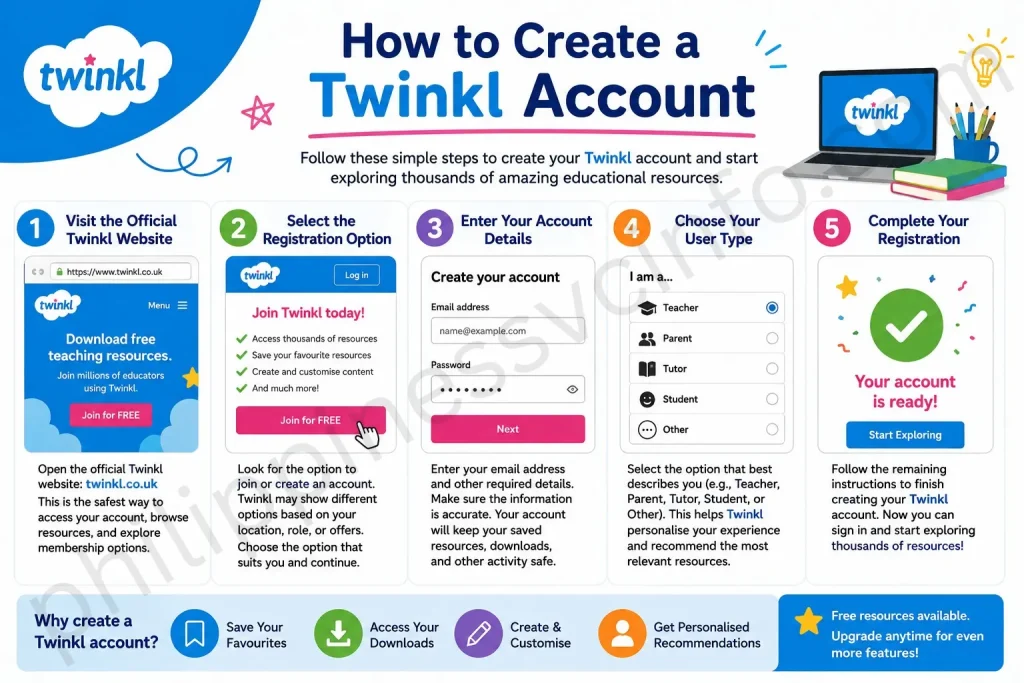
To get started with Twinkl, follow these general steps.
Step 1: Visit the Official Twinkl Website
Open the official Twinkl website:
Using the official website is the safest way to access your Twinkl account, browse resources, and review the membership options available to you.
Step 2: Select the Registration Option
Look for the option to join or create an account. Twinkl may present account and membership options according to your location, role, or current offers.
Select the appropriate registration option and continue through the on-screen instructions.
Step 3: Enter Your Account Details
The Twinkl registration process requires basic information such as an email address and other account details. Follow the prompts displayed on the official Twinkl website and make sure the information you provide is accurate.
Your account allows Twinkl to associate saved resources, downloads, and other activity with your profile.
Step 4: Choose Your User Type
Depending on the registration flow available to you, Twinkl may ask about your role or how you intend to use the platform.
For example, you may be using Twinkl as a teacher, parent, tutor, student, or another type of educator.
Providing the correct information can help Twinkl present resources and recommendations that are more relevant to your needs.
Step 5: Complete Your Registration
Follow the remaining instructions to finish creating your Twinkl account. Once your account has been created, sign in and explore the available resources.
Remember that access can vary depending on whether you are using free content, a trial, or a paid Twinkl membership.
Free Resources and Twinkl Memberships
One important point for new users is that not every Twinkl resource necessarily requires the same level of access. Twinkl provides free resources alongside membership-based access, and the resources or features available to you can depend on your account and subscription.
If you are considering a paid membership, check the current information directly on the official Twinkl website rather than relying on older descriptions of membership packages. Educational platforms can update their plans, features, pricing, and included resources over time.
This is particularly important because older references to Twinkl membership packages may not accurately describe the options currently available.
What Comes Next?
Once your Twinkl account is ready, the next important skill is learning how to search the platform effectively. A good search strategy can make the difference between finding the perfect resource in seconds and spending much longer browsing unrelated results.
In the next part of this guide, we will look at how to search Twinkl, use filters, find specific worksheets and activities, and download or access Twinkl resources efficiently. We will also cover practical tips for teachers and parents who want to get more value from the platform.
How to Find and Use Twinkl Resources
Once you have created your Twinkl account, the next step is learning how to find the right resource without wasting time. The Twinkl platform contains resources across different ages, subjects, topics, and formats, so using the search and filtering tools effectively can make your experience much easier.
The official Twinkl website currently provides a search function for educator-created resources, while its main navigation is organized around age groups, subjects, topics, planning, assessment, and other educational needs.
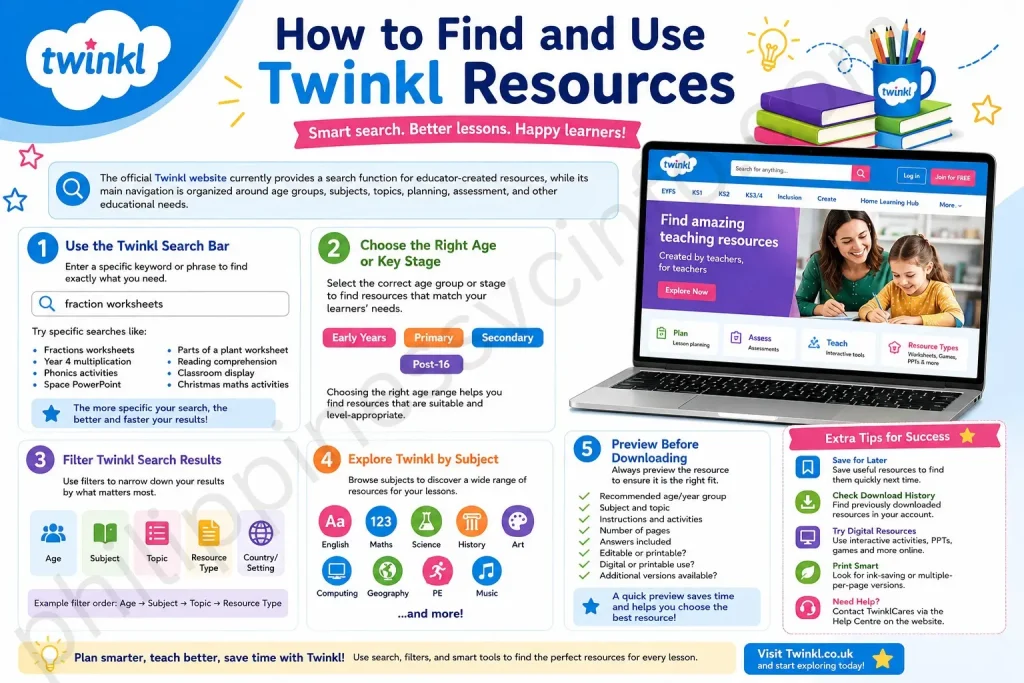
1. Use the Twinkl Search Bar
The quickest way to find a specific Twinkl resource is usually the search bar. Rather than browsing every category manually, enter a phrase that describes exactly what you need.
For example, instead of searching for a very broad term such as “Maths,” try a more specific search such as:
- Fractions worksheets
- Year 4 multiplication
- Phonics activities
- Space PowerPoint
- Parts of a plant worksheet
- Reading comprehension
- Classroom display
- Christmas maths activities
The more specific your search phrase is, the easier it can be to narrow down the results.
Twinkl also provides an official search guide explaining how users can enter keywords, refine results by resource type and area, use Advanced Search, and change how results are displayed.
2. Choose the Right Age or Key Stage
One of the most useful ways to narrow your Twinkl search is to choose the appropriate age group or educational stage.
The current Twinkl website organizes resources for different age ranges, including early years, primary, secondary, and post-16 learning. Within these areas, users can access subject-specific materials and additional categories.
For example, a primary teacher might begin with an age group and then select English or Maths. A secondary teacher may instead select KS3 or GCSE-related content before narrowing the search to a particular subject.
Choosing the appropriate age range is important because a resource may be excellent in itself but unsuitable for a particular learner if the language, activity, or level of difficulty is too advanced or too simple.
3. Filter Twinkl Search Results
If your initial search produces too many results, use the available filters.
According to the official Twinkl search guide, users can refine results by resource type and by areas such as age group, country, or setting. Advanced Search can provide additional ways to narrow the results.
This is particularly useful when you are looking for a specific type of Twinkl resource.
For example, suppose you search for “fractions.” You may find hundreds of results. Instead of opening every result, refine your search based on factors such as:
Age → Subject → Topic → Resource Type
This approach can significantly reduce the number of irrelevant results.
Example Search
Imagine you are preparing a lesson for a primary class about equivalent fractions.
A broad search would be:
Fractions
A better search would be:
Equivalent fractions worksheet
An even more targeted approach could involve selecting the relevant age group and then choosing worksheets or activities from the search results.
This is one of the simplest ways to make Twinkl work more efficiently for lesson preparation.
4. Explore Twinkl by Subject
You do not always need to use the search bar. The Twinkl navigation system also allows users to browse subjects and educational areas.
For primary learners, the current website includes dedicated sections for subjects such as English and Maths, alongside Science, History, Geography, Art, Computing, Languages, Music, PE, and other areas.
This can be useful when you are planning an entire lesson or topic rather than looking for one specific worksheet.
For example, selecting Maths may reveal areas such as planning, assessment, interactive teaching tools, games, quizzes, and learning aids. English resources can include phonics, reading, writing, grammar, punctuation, spelling, handwriting, and interactive games.
Browsing by subject can therefore help you discover supporting materials you may not have thought to search for.
5. Check the Resource Preview Before Downloading
Before downloading a Twinkl resource, take a moment to review its preview and description.
This helps you determine whether the resource is appropriate for your learners and whether it matches your lesson objective.
Look at factors such as:
- The recommended age or year group
- The subject and topic
- The activity instructions
- The number of pages
- Whether answers are included
- Whether the resource is editable
- Whether it is designed for printing or digital use
- Whether additional files or versions are available
Taking a few seconds to check the preview can save time later.
For example, you may find two similar Twinkl worksheets, but one might contain differentiated versions while another might be designed specifically for independent practice. Choosing the correct version before downloading can make lesson preparation easier.
6. Download Twinkl Resources
When you find a suitable Twinkl resource, open its resource page and look for the available download options.
The exact options can differ depending on the resource. Some materials may provide downloadable files, while others may be designed for interactive or digital use.
If several versions are available, check them before choosing one.
Official Twinkl guidance has also highlighted the availability of different versions of some resources, including editable formats and versions designed to reduce printing.
This can be especially helpful if you want to customize a worksheet rather than use it exactly as provided.
7. Save Twinkl Resources for Later
You do not have to download every useful Twinkl resource immediately.
If you find something that may be useful in a future lesson, use the platform’s save functionality when available.
The official Twinkl user guide explains that resources can be saved for later and subsequently accessed through the My Saved Resources area.
This is particularly useful when planning ahead.
For example, you might discover a collection of summer activities while preparing a lesson in spring. Rather than downloading everything immediately, save the resources you want to revisit.
You can then return to your saved resources when the relevant topic becomes part of your teaching schedule.
8. Find Previously Downloaded Twinkl Resources
Another useful account feature is the ability to find resources you have already downloaded.
According to the official Twinkl user guide, the My Downloads area allows users to review their download history and locate previously downloaded resources.
This can save you from searching for the same Twinkl resource again.
For instance, imagine you downloaded a classroom display several months ago but cannot remember the exact title. Instead of starting a completely new search, checking your download history may help you locate it.
This is especially useful for educators who use Twinkl regularly and accumulate a large collection of teaching materials.
9. Use Twinkl for Digital Learning
Although many people associate Twinkl with printable worksheets, the platform also offers resources intended for digital learning.
Depending on the resource, you may find PowerPoints, interactive PDFs, games, quizzes, videos, and other digital materials.
Official Twinkl guidance describes resources that can be used without printing, including PowerPoints, spreadsheets, PDFs, interactive PDFs, and digital activities.
This means you do not necessarily need to print every resource you find on Twinkl.
For example, a teacher using an interactive whiteboard might display a PowerPoint during a whole-class lesson. Students could then participate in discussions, complete activities, or respond to questions without each child receiving a printed worksheet.
Digital resources can also be useful for home learning.
10. Use Twinkl Resources for Home Learning
Parents and guardians can also use Twinkl to support learning outside the classroom.
The current Twinkl website includes areas specifically intended for parents and home education, alongside resources for different age groups.
When using Twinkl at home, it is generally better to focus on a child’s particular learning need rather than downloading large numbers of unrelated worksheets.
For example, if a child needs additional spelling practice, search for spelling activities appropriate to their age. If they need help with multiplication, look for multiplication games, practice activities, or supporting resources.
The goal should be to make learning useful and manageable rather than turning home learning into a long list of worksheets.
11. Make Use of Curriculum-Based Twinkl Resources
Another advantage of Twinkl is its curriculum-oriented organization.
The platform currently includes planning, assessment, schemes of work, subject resources, and curriculum-related collections. Its website also provides a curriculum browser intended to help users access planning and assessment materials connected with different areas of the curriculum.
This can be particularly useful for teachers who are planning several lessons around the same topic.
Instead of treating each worksheet as an individual resource, consider using Twinkl as part of a wider planning process:
Curriculum objective → Lesson plan → Teaching presentation → Student activity → Assessment → Follow-up
This approach allows Twinkl resources to support the lesson rather than becoming the lesson itself.
12. Use Twinkl to Save Planning Time
The biggest practical benefit of Twinkl is the time it can save.
Teachers often need to prepare resources while also managing marking, assessment, classroom organization, communication, and other responsibilities. A well-organized educational resource platform can reduce the amount of time spent creating routine materials.
However, the most efficient approach is to search with a clear purpose.
Before opening Twinkl, ask:
What do I need this resource to help students achieve?
Then search according to that objective.
For example:
Instead of searching:
Maths
Try:
Year 5 fractions equivalent fractions worksheet
Instead of:
English
Try:
Year 3 reading comprehension inference
Instead of:
Science
Try:
KS2 food chain activity
Specific searches generally make it easier to identify relevant Twinkl materials.
13. Check Whether Your School Already Provides Twinkl Access
If you are a teacher working in a school, check whether your school already has a Twinkl membership before purchasing an individual subscription.
The official Twinkl website currently provides a school-solutions option for organizations that want wider access.
A school-wide arrangement may provide access to resources for multiple staff members or learners, depending on the agreement.
Therefore, before paying for an individual account, it can be worth asking your school administrator, ICT coordinator, department head, or school leadership team whether your institution already has access.
14. Get Help From TwinklCares
If you experience a technical problem, cannot find a particular resource, or need help using the website, Twinkl provides customer support through its TwinklCares service.
The official Twinkl contact information identifies TwinklCares as a support service and directs users to the online Help Centre. The website also identifies a Help button that can be used to get assistance.
When contacting support, explain the problem clearly. If you are experiencing a technical issue, including the device or browser you are using and describing what happens on screen can make troubleshooting easier.
Why Resource Versions Matter
Suppose you find a worksheet that is almost perfect for your class but contains too many questions.
If an editable version is available, you may be able to modify the resource before using it. Similarly, a two-per-page or other print-friendly version may be more convenient when preparing physical classroom materials.
Always check the options presented on the individual Twinkl resource page because available formats can vary.
Best Practices for Using Twinkl Efficiently
To get the most value from Twinkl, consider these simple habits:
- Search specifically. Use topic, age, year group, and resource type in your search.
- Preview before downloading. Make sure the resource matches your learning objective.
- Use filters. Narrow large search results instead of browsing everything manually.
- Save useful resources. Keep future materials organized in your saved resources.
- Check download history. Revisit resources you have previously used through your account.
- Look for editable versions. Customize resources where appropriate.
- Consider digital options. Not every activity needs to be printed.
- Check school access. Your institution may already provide a membership.
- Use curriculum categories. They can make lesson planning more systematic.
- Ask TwinklCares for support. Use official support channels when you need assistance.
Used this way, Twinkl becomes more than a place to download worksheets. It can function as a planning and teaching resource hub that helps educators find, organize, adapt, and use learning materials according to their specific needs.
In the final part of this guide, we will cover Twinkl account management, saved and downloaded resources, membership considerations, personalization, support options, common questions, and a practical conclusion for teachers and parents.
Managing Your Twinkl Account
Your Twinkl account acts as the central place for managing your access to the platform. Depending on your account and membership, you may be able to access saved resources, downloads, and other features associated with your account. If you use Twinkl regularly, it is worth becoming familiar with the account area rather than treating the website as a simple collection of downloadable worksheets.
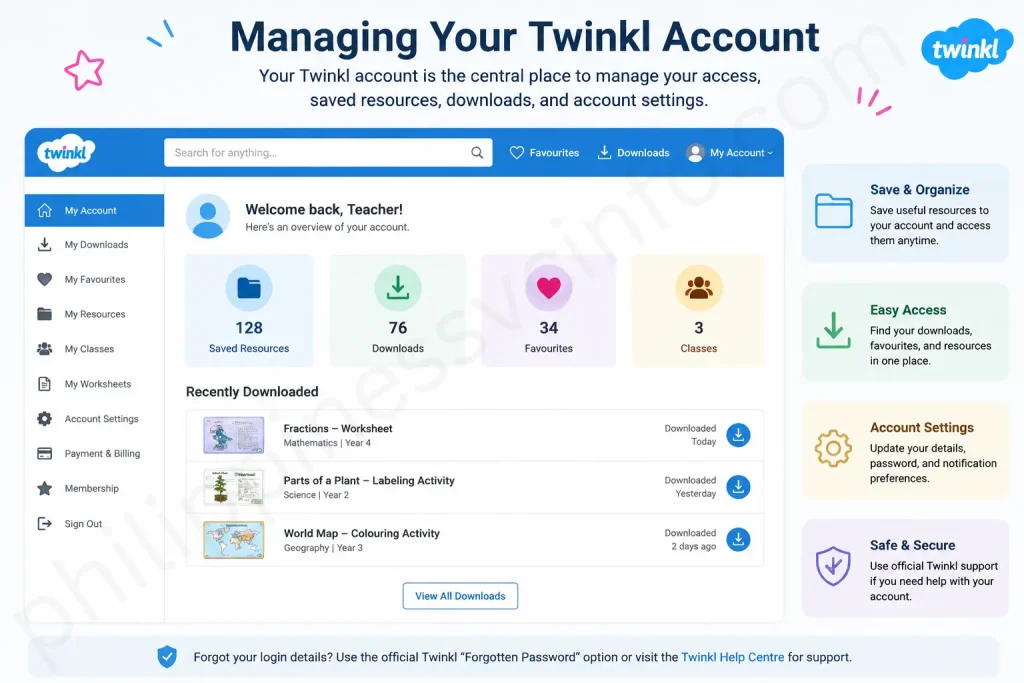
For example, if you repeatedly use resources for the same year group or subject, saving useful materials and returning to your account can make future planning much faster. If you have forgotten your login information or experience difficulty accessing your account, use the official Twinkl support options rather than relying on unofficial websites or third-party instructions.
Twinkl Membership: What Should You Consider?
One of the most common questions from new users is whether a paid Twinkl membership is worthwhile.
The answer depends on how frequently you use educational resources and what type of content you need.
A teacher who prepares several lessons every week may benefit more from extensive access to Twinkl resources than someone who only needs an occasional worksheet. Similarly, a parent may find a membership useful if they regularly use Twinkl for home learning.
The current Twinkl store describes its Ultimate Membership as providing access to a large library of ready-to-use teaching and learning resources, including printable activities, worksheets, games, and curriculum-aligned planning support.
Because membership names, prices, features, and promotions can change, it is best to check the current information directly on the official website before subscribing.
Before Paying for Twinkl
Before purchasing a membership, consider the following:
- How frequently will you use Twinkl?
- Which age groups do you teach or support?
- Which subjects do you need most often?
- Do you need editable resources?
- Do you regularly need lesson-planning materials?
- Will you use printable or digital resources?
- Does your school already provide access?
- Is there currently a trial or promotional offer available?
Answering these questions can help you determine whether a Twinkl membership fits your needs.
Twinkl for Teachers
For teachers, Twinkl can be particularly useful during lesson preparation.
Instead of beginning every lesson by creating a worksheet, presentation, display, activity, and assessment from scratch, you can search for existing Twinkl materials and then adapt your approach around the resources that best fit your learning objective.
This does not mean that every Twinkl resource should be used exactly as provided.
A better approach is to treat Twinkl as a resource bank.
For example:
Curriculum objective → Select Twinkl resource → Review and adapt → Teach → Assess → Follow up
This approach gives teachers more control while still taking advantage of the time-saving benefits of Twinkl.
The platform also includes creation and planning-related tools. An official Twinkl user guide, for example, describes Twinkl Create as a resource-creation tool for making personalized labels, posters, word cards, and similar materials.
Personalizing Twinkl Resources
One of the strongest reasons to use Twinkl is that you do not always have to use a resource exactly as you find it.
Some resources have additional versions or editable formats. Official Twinkl guidance describes options such as editable versions, multiple resources per page, and other versions designed to help users tailor resources and reduce unnecessary printing.
This can be useful when your class has different learning needs.
For example, you could adapt an activity by:
- Removing questions that are not relevant
- Adding additional practice
- Changing instructions
- Adjusting the amount of text
- Creating a simplified version
- Adding extension questions
- Personalizing classroom displays
Always check the individual Twinkl resource to see which editing or download options are actually available.
Twinkl and Differentiated Learning
A classroom rarely contains learners who all work at exactly the same level.
For that reason, selecting resources based solely on year group may not always be enough.
When using Twinkl, consider whether the resource can be adapted for different learners.
For example, you might use:
Support version: fewer questions, additional prompts, simpler instructions.
Core version: standard activity aligned with the lesson objective.
Extension version: additional questions requiring explanation, reasoning, or application.
This approach can turn one Twinkl resource into a more flexible classroom activity.
The important point is that the teacher remains responsible for deciding whether the resource is appropriate. A resource being labeled for a particular age group does not automatically mean it will meet every learner’s needs.
Twinkl for Parents and Home Educators
Parents can also use Twinkl without approaching the platform like a classroom teacher.
At home, shorter and more engaging activities can often be more effective than giving children a large collection of worksheets.
For example, a parent could use Twinkl to support:
- Reading practice
- Spelling
- Phonics
- Times tables
- Fractions
- Handwriting
- Creative writing
- Science topics
- Seasonal activities
- Educational games
The current Twinkl store also highlights products and resources designed for learning at home, including books and accompanying activities.
A useful strategy is to identify one learning goal and then choose two or three suitable Twinkl activities around it.
For example:
Goal: Improve multiplication fluency.
Activity 1: Short practice worksheet.
Activity 2: Multiplication game.
Activity 3: Quick oral quiz.
This provides variety without overwhelming the learner.
Twinkl Books and Additional Learning Materials
Although Twinkl is widely known for its digital teaching resources, the wider Twinkl ecosystem also includes books and other educational products.
The official Twinkl store currently features collections such as Twinkl Originals, Rhino Readers, phonics materials, bundles, and resources intended for classroom or home use.
Some books also have accompanying activities and resources that can be used in the classroom or at home.
This can make Twinkl useful for educators who want to combine digital activities with physical reading materials.
However, remember that the educational website and the Twinkl online store are related but not identical experiences. When looking for teaching resources, start with the main Twinkl website; when specifically looking for physical books or merchandise, the official store may be more appropriate.
TwinklCares: Getting Help
Even experienced users may occasionally encounter a technical problem or have a question about an account, subscription, resource, or website feature.
This is where TwinklCares can help.
The official Twinkl contact page states that TwinklCares provides support throughout the year and directs users to the online Help Centre. It also identifies a Help button available on Twinkl pages.
When contacting TwinklCares, provide as much useful information as possible. If your problem involves a resource, include the resource name or page. If it is a technical issue, explain what you clicked and what happened afterward.
Clear information can help support staff understand the issue more quickly.
Tips for Getting the Most From Twinkl
- Start With the Learning Objective: Decide what learners need to understand, practice, or achieve before downloading resources.
- Search With Specific Keywords: Use keywords that include the topic, age group, year group, and resource type. For example, “Year 4 fractions worksheet” is more useful than simply searching “Maths.”
- Preview Before Downloading: Check the resource’s difficulty level, instructions, format, number of pages, and suitability before using it.
- Use Editable Resources When Available: If a Twinkl resource is almost right but needs changes, an editable version can help you customize it without creating a new activity from scratch.
- Avoid Unnecessary Printing: Look for digital versions, ink-saving options, or multiple-per-page formats where available. These options can help reduce paper and ink usage.
- Organize Your Resources: Use saved resources and download history where available so you can quickly find useful Twinkl materials again.
- Check Your School Access: Teachers should check whether their school already provides Twinkl access before purchasing an individual membership.
- Adapt Rather Than Automatically Use: Choose Twinkl resources based on how well they support your learning objective rather than simply selecting the most attractive design. Adapt materials when necessary to suit your learners.
Common Twinkl Questions & Answer
Conclusion
Twinkl is a comprehensive educational resource platform that helps teachers, parents, tutors, and homeschool educators find useful learning materials in one place. From worksheets and lesson plans to interactive activities, games, presentations, and assessments, Twinkl can make lesson preparation and home learning more convenient while supporting different ages, subjects, and learning needs. To get the most from Twinkl, start with a clear learning objective and use specific searches, filters, previews, and available resource formats to find suitable materials. Rather than downloading everything, choose resources that match your learners’ needs and adapt them when appropriate. Saving useful resources can also make future lesson planning faster and more organized. Because Twinkl regularly updates its resources, memberships, features, and offers, always check the official Twinkl website for the latest information. Used thoughtfully, Twinkl can become a valuable part of classroom teaching, tutoring, homeschooling, and everyday learning. positioned to use Twinkl effectively.
Discover What You Need to Know:
- PEOS Certificate: Complete Guide to Online Registration, Download, Requirements & FAQs 2026
- Genyo E-learning: Complete Guide to Features, Login & Benefits 2026
- Microsoft Forms: Complete Guide to Creating Online Forms, Surveys, Quizzes & Business Forms (2026)
- STI ELMS Login Guide 2026: Official Website, Login, Account Activation & Complete Student Portal Guide
- Wayground: Complete Guide to Login, Features, Pricing & How to Use (2026)