DITO SIM Load 2026: Complete Guide to Buying Load, Promos, Payments & Balance
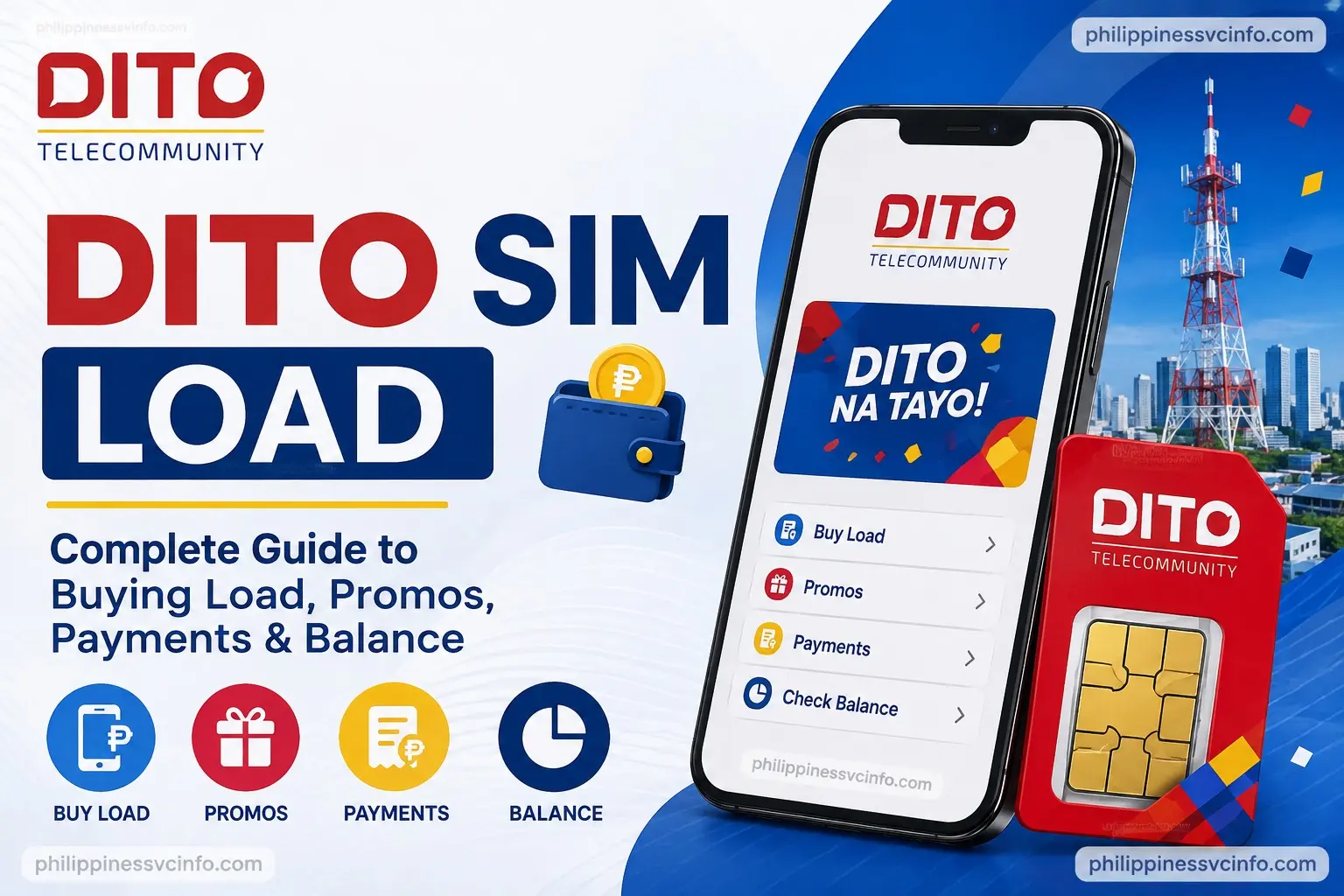
DITO SIM Load allows subscribers to conveniently add prepaid credit to their DITO SIM for calls, texts, mobile data and eligible promos. Users can purchase load through available digital channels such as the DITO App, MyDITO, supported e-wallets, online platforms, banking services and participating retailers. When buying DITO SIM Load, always double-check your mobile number and the selected load amount before confirming the transaction. Keeping the payment receipt or confirmation message is also recommended until the load is successfully credited to your account. For updated loading methods, promos and account services, refer to the official DITO Telecommunity website.
For official information, use the DITO Telecommunity official website rather than relying on unofficial loading pages.
What Is DITO SIM Load?
DITO SIM load refers to prepaid credit that you add to an active DITO mobile number. Depending on what you need, you can use regular load for eligible services or purchase a DITO promo designed around data, calls, texts or other benefits.
DITO provides several ways to purchase DITO SIM load, so customers aren’t limited to visiting a physical shop. The company’s official top-up page lists the DITO App and MyDITO among the main methods, while its Help Centre also identifies additional online and offline channels.
The DITO App is particularly useful because it lets subscribers manage their account, monitor balances and purchase load or promotional packages from one place. DITO says the app can display load and promo information in real time.
What You Need Before Buying DITO SIM Load
Before making a DITO SIM load purchase, prepare a few basic details.
1. An Active DITO SIM
You need the DITO mobile number that will receive the load. If you’re purchasing load for somebody else, check the recipient’s number carefully before confirming the transaction.
2. Your 11-Digit DITO Number
Have the complete mobile number available. A single incorrect digit can send the load to another number, so checking the number before payment is one of the most important steps.
3. A Supported Payment Method
Depending on the channel you use, DITO SIM load can be paid for using options such as debit or credit cards, GCash, Maya and other supported digital payment services. The exact choices can vary by platform. DITO’s official top-up page currently lists cards, GCash, GrabPay, Maya, WeChat and other payment options for supported channels.
4. Access to the DITO App or MyDITO
If you want to purchase DITO SIM load directly from DITO, you can use the official DITO App or MyDITO web service.
How to Buy DITO SIM Load Through the DITO App
The DITO App is one of the most convenient ways to purchase DITO SIM load. DITO’s official instructions show a straightforward process for buying regular load.
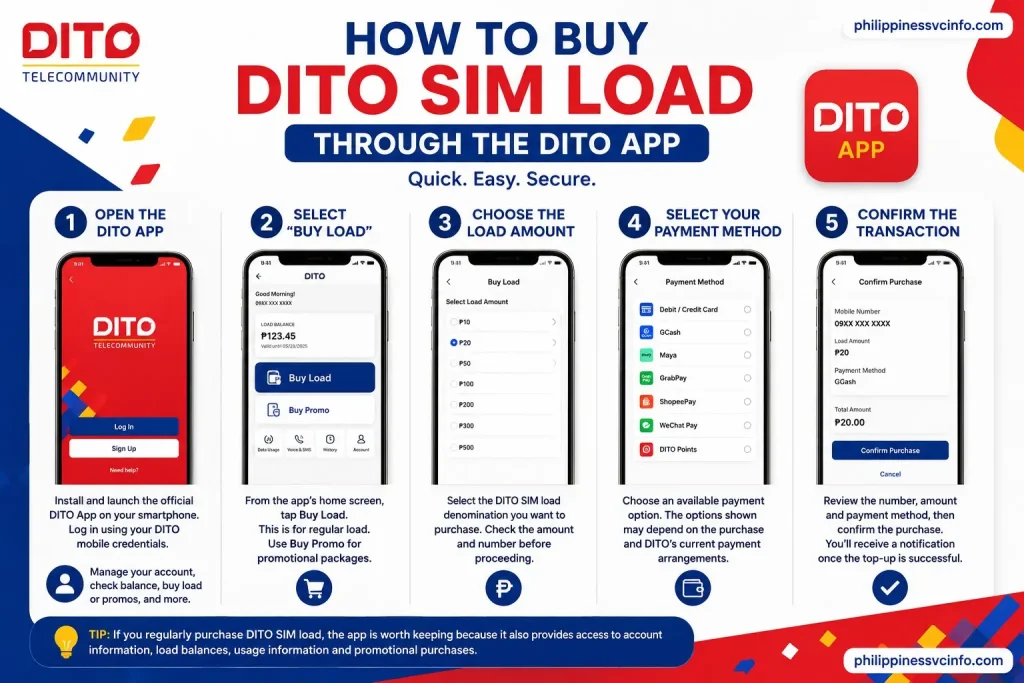
Step 1: Open the DITO App
Install and launch the official DITO App on your compatible smartphone. Log in using your DITO mobile credentials.
The app also provides account-management features, including balance monitoring and access to load and promo purchases.
Step 2: Select “Buy Load”
From the app’s home screen, tap Buy Load.
This is the main option for purchasing regular DITO SIM load. If you want a promotional package instead, DITO also provides a separate Buy Promo option.
Step 3: Choose the Load Amount
Select the DITO SIM load denomination you want to purchase.
Check the selected amount carefully before proceeding. If you’re loading another DITO subscriber, make sure the intended mobile number is also correct.
Step 4: Select Your Payment Method
Choose an available payment option. DITO currently lists payment methods that can include:
- Debit or credit card
- GCash
- Maya
- GrabPay
- ShopeePay
- WeChat Pay
- DITO Points
The options shown may depend on the particular purchase and DITO’s current payment arrangements.
Step 5: Confirm the Transaction
Review the number, amount and payment method, then confirm the purchase.
Once the DITO SIM load transaction is successful, DITO says you’ll receive a notification confirming the top-up.
Tip: If you regularly purchase DITO SIM load, the app is worth keeping because it also provides access to account information, load balances, usage information and promotional purchases.
How to Buy DITO SIM Load Through MyDITO
Another official route is MyDITO, DITO’s web-based account platform.

Step 1: Open MyDITO
Go to the official MyDITO portal and sign in with your DITO account.
Step 2: Choose “Buy Load”
After logging in, select the Buy Load option.
Step 3: Pick Your Denomination
Choose the preferred DITO SIM load amount from the available denominations.
Step 4: Select Payment
Choose an available payment method, such as a debit or credit card or supported e-wallet.
Step 5: Confirm the Purchase
Complete the payment process and wait for confirmation. DITO’s official top-up instructions state that successful purchases generate confirmation through the available notification channels, including SMS.
DITO SIM Load Through Other Online Channels
You don’t necessarily have to use the DITO App or MyDITO. DITO’s Help Centre lists several other online options, including Lazada, GrabPay, GCash, Maya, BPI, Coins.ph, Bayad App, WeChat, Alipay, ML Wallet and Load Central.
For example, an e-wallet may generally follow this flow:
Open the payment app → choose mobile load → select DITO → enter the 11-digit number → choose the amount → confirm payment.
The exact buttons and menu names can change as third-party apps update, so always follow the instructions displayed by the payment platform at the time of purchase.
How to Buy DITO SIM Load Using GCash
GCash is one of the official DITO-supported online loading channels. The process is useful when you want to send DITO SIM load to your own number or another DITO subscriber.
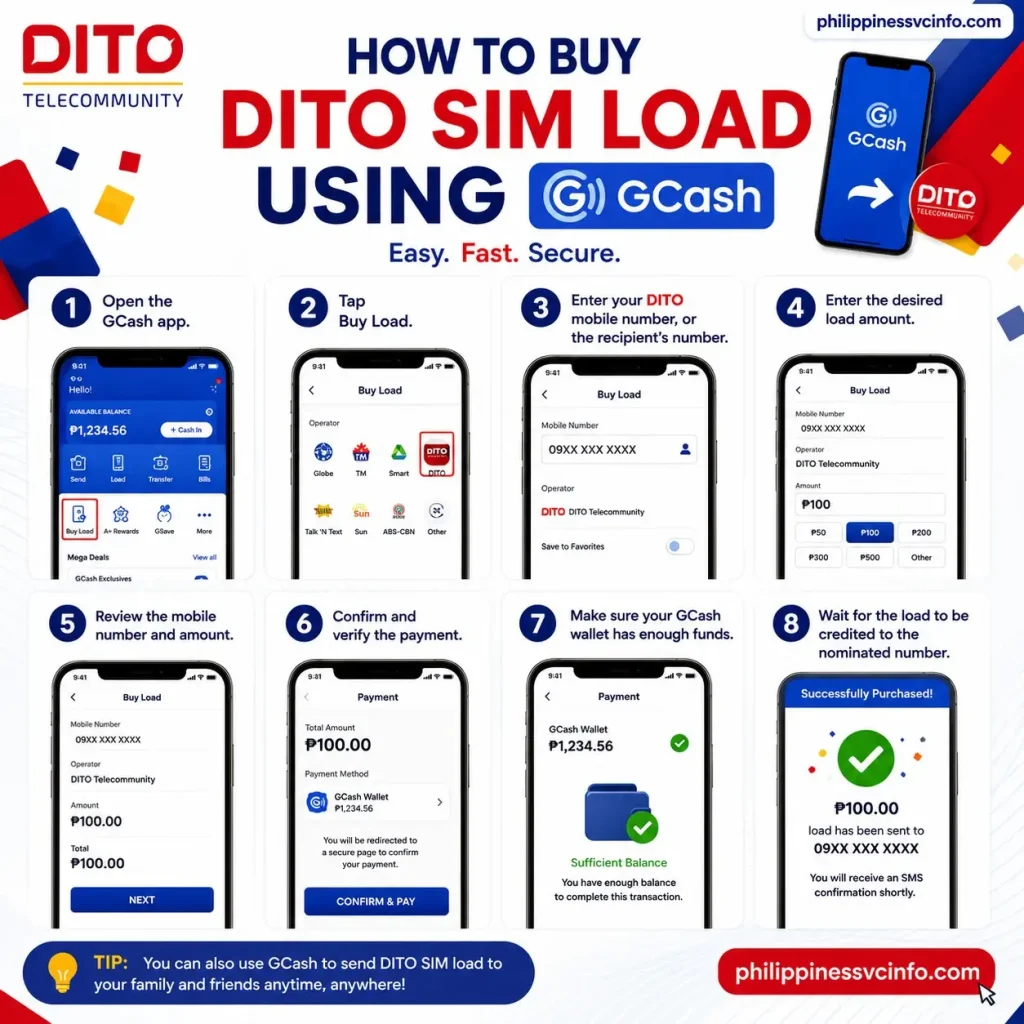
Follow these steps:
- Open the GCash app.
- Tap Buy Load.
- Enter your DITO mobile number, or the recipient’s number.
- Enter the desired load amount.
- Review the mobile number and amount.
- Confirm and verify the payment.
- Make sure your GCash wallet has enough funds.
- Wait for the load to be credited to the nominated number.
DITO’s official top-up instructions confirm this GCash process.
Buying DITO SIM Load Through Maya
Maya provides another convenient route for DITO SIM load purchases.
The official DITO instructions indicate that you can:
- Open the Maya app.
- Tap Load or access the relevant Load section.
- Select the desired load item or data bundle.
- Enter your DITO number or the recipient’s mobile number.
- Review the transaction details.
- Confirm the purchase.
Maya’s available options and interface can change, so follow the current prompts displayed in the app when completing your transaction. DITO currently lists Maya among its supported top-up channels.
Other Ways to Purchase DITO SIM Load
If GCash or Maya isn’t convenient, you have several alternatives. DITO’s official support pages identify multiple online and offline channels, giving prepaid customers plenty of ways to purchase DITO SIM load.
|
Loading Channel |
General Process |
|---|---|
|
DITO App |
Log in → Buy Load → select amount → choose payment → confirm |
|
MyDITO |
Log in → Buy Load → choose denomination → pay |
|
GCash |
Buy Load → select/enter DITO number → choose amount → pay |
|
Maya |
Load → select DITO load → enter number → confirm |
|
GrabPay |
Open Load → enter DITO number → select amount → pay |
|
Lazada |
Load & eStore → Mobile Load → DITO → number → amount → payment |
|
Bayad App |
Buy Load → enter DITO number → select amount → confirm |
|
LandBank Pay |
Load → Regular Load → DITO → denomination → number → pay |
|
ML Wallet |
Buy eLoad → choose recipient/network → select amount or promo |
|
Physical partners |
Visit a participating store or kiosk and provide the DITO number |
The exact menus may vary between third-party applications. DITO’s own Help Centre should be treated as the reference point for supported channels.
Can You Buy DITO SIM Load Through Lazada?
Yes. DITO lists Lazada as an online channel for purchasing load. The official DITO top-up instructions describe the general process as opening Lazada, accessing Load & eStore, choosing Mobile Load, selecting DITO and entering the DITO mobile number.
After entering the required details, choose the available load amount and proceed with the payment option shown by Lazada.
This method can be useful if you already use Lazada for other digital purchases and prefer keeping your transactions within one platform.
Can You Buy DITO SIM Load in Physical Stores?
Yes. Online top-up isn’t your only choice.
DITO lists DITO Experience Stores and numerous partner retailers and payment kiosks as offline channels. These include Bayad Center, 7-Eleven/CLiQQ, Touch Pay, Pay & Go, Load Central, Load Manna, Telepreneur and other retail partners.
For an in-person DITO SIM load purchase, you generally need to provide:
- Your 11-digit DITO number
- The amount or load denomination you want
- Payment according to the retailer’s accepted methods
Before leaving the counter, check whether the transaction has been successfully processed and keep your receipt when one is provided.
How to Share DITO SIM Load With Another Number
DITO also allows prepaid subscribers to share their load credits with another DITO subscriber through the DITO App or MyDITO. According to DITO’s current official FAQ, load sharing is free.
The current limits stated by DITO are:
- Minimum transfer: ₱5
- Maximum per transaction: ₱1,000
- Maximum: 5 transactions per day
- Maintaining balance: ₱1
- You cannot transfer your entire load balance
This makes load sharing useful when a friend or family member needs credit and you already have sufficient DITO SIM load in your account.
How to Share Load
- Open the DITO App or log in to MyDITO.
- Access the load-sharing feature.
- Enter the recipient’s DITO number.
- Enter the amount you want to share.
- Review the recipient number carefully.
- Confirm the transfer.
- Wait for the transaction confirmation.
Because load transfers cannot be reversed simply because the wrong number was entered, check the recipient details before confirming.
Can You Share DITO Data?
Yes. DITO also supports data sharing between DITO subscribers through the DITO App or MyDITO. The official FAQ states that data sharing is free, with a minimum of 50MB per transaction and a maximum of five transactions per day.
Shared data has a 48-hour validity period according to DITO’s current FAQ.
This is different from transferring regular DITO SIM load. Load sharing transfers prepaid credit, while data sharing transfers part of your available data allowance.
DITO SIM Load vs DITO Promo
A regular DITO SIM load balance and a DITO promo are not necessarily the same thing.
Regular load gives you prepaid credit that can be used according to DITO’s applicable charging rules. A promo, on the other hand, packages services such as data, texts or calls with specific inclusions and validity.
If you’re mainly interested in internet access, compare the available promos before spending your regular load. The DITO App and MyDITO allow customers to view and purchase available offers.
When Should You Buy Regular Load?
Regular DITO SIM load can make sense when:
- You need flexible prepaid credit.
- You don’t want to commit to a particular promo.
- You plan to use load for an eligible service.
- You need to send credit to another DITO subscriber.
When Should You Buy a Promo?
A promo may be more suitable when you specifically need:
- Mobile data
- DITO-to-DITO calls
- All-network calls
- Text messages
- A defined validity period
Always check the current promo inclusions and validity before purchasing because DITO offers can change.
DITO Rewards on Load Purchases
DITO also has a rewards programme connected with eligible prepaid transactions. Its current Rewards page states that active DITO subscribers can earn points from load top-ups and promo purchases.
For the period stated on DITO’s current Rewards page, subscribers can earn:
- 3% DITO Rewards Points when buying load through the DITO App and MyDITO
- 1% DITO Rewards Points when buying load through other channels, including DITO Experience Stores, retail partners, Lazada, Shopee and other digital partners
DITO notes that rewards mechanics are subject to the applicable period and terms, so check the official Rewards page before relying on a particular earning rate.
What to Do If Your DITO SIM Load Does Not Arrive
Occasionally, a payment can appear successful while the expected load has not yet appeared. Don’t immediately make another purchase, as this could result in paying twice.
First, check:
- Whether your payment was successfully completed.
- Whether the correct DITO number was entered.
- Whether you received an SMS or in-app confirmation.
- Whether your balance has updated in the DITO App or MyDITO.
- Whether the payment provider shows the transaction as completed.
DITO’s official top-up page says successful transactions generate confirmation notifications. Its guidance also states that if you were charged but did not receive the load balance after a failed transaction, you should contact DITO Customer Service for escalation and resolution.
Practical Tips Before Buying DITO SIM Load
A few seconds of checking can prevent a surprisingly annoying prepaid headache.
Check the Number Twice
Whether you’re using GCash, Maya, the DITO App or a physical retailer, verify the recipient’s mobile number before paying.
Use Official Channels
For account-related transactions, start with the official DITO website, DITO App or MyDITO. DITO’s Help Centre provides the current list of supported loading channels.
Keep Your Transaction Record
Save your receipt, payment reference or confirmation message until the DITO SIM load has been credited successfully.
Check Your Balance
The DITO App and MyDITO can be used to monitor load and other account balances in real time.
How to Check Your DITO SIM Load Balance
After purchasing DITO SIM load, you can check your account to confirm that the transaction has been credited.
The DITO App is one of the most convenient options because it provides account and balance information. DITO describes the app as a way to monitor load and promo balances in real time.
You can also use the official MyDITO platform to manage your account and review available balances.
Using the DITO App
- Open the official DITO App.
- Sign in with your DITO mobile account.
- Open your account dashboard.
- Check the displayed load balance.
- If you recently purchased DITO SIM load, allow the transaction to update before attempting another purchase.
If the balance does not immediately reflect the purchase, check your SMS or transaction notification first. Avoid buying the same load again until you have confirmed whether the first transaction was successful.
What to Do When DITO SIM Load Is Not Received
A missing load transaction can be frustrating, particularly when your payment has already been deducted. Before contacting customer support, work through a few basic checks.

1. Check the DITO Number
Confirm that you entered the correct 11-digit mobile number. If the wrong number was submitted and the transaction was successfully processed, recovering the load may not be possible.
2. Check Your Payment Status
Open the payment app, banking application or website you used and check whether the transaction shows as successful, pending or failed.
3. Check Your DITO Balance
Open the DITO App or MyDITO and look for the updated balance.
4. Check Your SMS Notifications
A successful DITO SIM load transaction may generate a confirmation message. Keep this message because it can help when investigating a transaction.
5. Contact DITO Customer Support
If you’ve been charged but the load has not been credited, use DITO’s official customer-support channels for assistance.
Do not repeatedly submit the same transaction while the first one is still being investigated. You could end up with multiple successful purchases.
Common DITO SIM Load Problems
Most loading problems fall into a few familiar categories.
|
Problem |
What to Check |
|---|---|
|
Load not received |
Check transaction status, balance and SMS confirmation |
|
Payment failed |
Check your payment method and available funds |
|
Wrong number entered |
Review the transaction details and contact the payment provider/DITO if applicable |
|
Balance not updated |
Refresh the DITO App or account and allow time for processing |
|
Promo missing |
Check whether the promo purchase was successful and review its validity |
|
Duplicate purchase |
Check transaction history before making another payment |
|
App problem |
Update or restart the app and try again later |
The safest approach is to identify where the transaction failed. For example, if your GCash payment failed, the issue may be with the payment transaction rather than the DITO network itself.
Does DITO SIM Load Expire?
Regular load and promotional benefits can have different terms, so don’t assume that every type of credit follows the same validity rules.
When purchasing DITO SIM load, check the applicable validity and terms displayed by DITO or the platform you’re using. Promo packages may have their own expiry period, while regular prepaid credit can be subject to DITO’s current account policies.
It’s also important to distinguish between load validity, promo validity and SIM activity. They are separate concepts.
DITO SIM Dormancy and Deactivation
Keeping a prepaid SIM active is important even if you don’t regularly use it.
According to the information supplied for this guide, a DITO SIM with zero usage or top-up activity for 365 consecutive days may be permanently deactivated.
That means occasional use or a top-up can matter if you intend to keep a DITO number long term. If the number is important for banking, online accounts or two-factor authentication, don’t leave the SIM unused for extended periods.
Important: Check DITO’s current terms and conditions for the latest dormancy rules before relying on a specific validity period.
How to Avoid Losing DITO SIM Load
A few habits can make prepaid management much easier.
Verify Before Paying
Always check the mobile number and amount before confirming your DITO SIM load transaction.
Keep Payment Receipts
Don’t delete confirmation messages immediately. Keep your transaction reference until the load has appeared in your account.
Use Trusted Channels
When possible, use DITO’s official website, official DITO App, MyDITO or recognised DITO partner channels.
Don’t Share Your Account Details
Never give your account password, OTP or other security information to someone claiming they need it to process your load.
Check Promos Before Spending
If your main purpose is mobile data, compare available DITO promos before purchasing ordinary DITO SIM load. A promo may provide specific services and validity that better match your needs.
Frequently Asked Questions About DITO SIM Load
Final Takeaway
Getting DITO SIM load is convenient because you can top up your account through the DITO App, MyDITO, supported e-wallets, online platforms, banking services and participating physical retailers. Whether you need regular load, data promos, calls, texts or other available services, choosing the right loading channel can make the process quick and hassle-free. Before completing any DITO SIM load transaction, carefully check the 11-digit DITO mobile number and selected amount to avoid sending the load to the wrong account. After payment, keep your transaction receipt or confirmation message until the load is successfully credited and reflected in your balance. If there is a delay or an issue with the transaction, the confirmation details can also help when requesting assistance.
Discover What You Need to Know:
- Smart Plan Guide 2026: Plans, Registration, Benefits, Features & How to Use
- Globe Plan with Device Philippines 2026: GPlan Prices, Requirements, Devices & How to Apply
- GOMO eSIM Guide 2026 : How to Buy, Activate, Install, Register & Fix Common Issues
- DITO SIM Registration Number 2026: Check Your Number, Registration Status & Reference Number
- GOMO Unli Data Promos: Price, Validity, Registration & How to Avail 2026
- Globe Postpaid Guide: Plans, Requirements, Application, Billing & GlobeOne 2026