

Wayground is an interactive learning platform, formerly known as Quizizz, that helps teachers and students create quizzes, lessons, homework, and AI-powered activities. Used by millions worldwide, it simplifies classroom learning through engaging educational tools, detailed performance reports, and flexible teaching features for schools, educators, businesses, and independent learners.
What Is Wayground?
Wayground is an online educational platform that allows teachers, students, schools, and organizations to create, share, and participate in interactive learning activities. It combines quizzes, lessons, assessments, homework, flashcards, polls, and AI-powered educational tools into one easy-to-use platform.
Previously known as Quizizz, Wayground was rebranded to better represent its expanded mission of supporting every stage of learning—not just quizzes. While the name has changed, existing accounts, quizzes, classes, and educational resources remain available, allowing users to continue learning without interruption.
Today, Wayground is trusted by millions of educators worldwide because it helps improve classroom participation while making learning enjoyable through gamification.
Why Millions of Educators Choose Wayground
Digital learning has become an essential part of modern education, and teachers increasingly need tools that save time while keeping students engaged. Wayground addresses both needs by combining interactive learning activities with classroom management and AI-assisted content creation.
Originally recognised as Quizizz, the platform expanded well beyond quizzes. Today, Wayground supports complete lesson planning, assessments, homework, student practice, and performance tracking from one central dashboard.
Whether you’re teaching in a classroom, conducting online lessons, or supporting hybrid learning, Wayground provides flexible tools suitable for different teaching styles and age groups.
Key Facts About Wayground
| Feature | Details |
|---|---|
| Platform Type | Interactive Learning Platform |
| Previous Name | Quizizz |
| Best For | Teachers, Students, Schools |
| Supports AI | Yes |
| Live Quizzes | Yes |
| Homework | Yes |
| Interactive Lessons | Yes |
| Flashcards | Yes |
| Reports & Analytics | Yes |
| Official Website | https://wayground.com |
Understanding Wayground
Rather than being only a quiz platform, Wayground has evolved into a complete educational workspace where teachers can create learning experiences from start to finish.
The platform allows educators to:
- Build interactive quizzes
- Design complete digital lessons
- Assign homework
- Monitor classroom progress
- Generate questions using AI
- Share educational resources
- Analyse student performance
Students benefit from an engaging learning environment where they can practise concepts, receive immediate feedback, and participate in classroom activities using computers, tablets, or smartphones.
Why Quizizz Became Wayground
Many users still search for Quizizz, wondering whether it is different from Wayground.
The answer is simple.
Quizizz officially changed its brand name to Wayground to reflect the platform’s broader educational mission. While quizzes remain one of its most popular features, the platform now includes complete lesson creation, AI-powered educational tools, assessments, classroom management, and collaborative learning resources.
The rebranding did not require users to create new accounts.
If you previously used Quizizz, you can continue using:
- Existing quizzes
- Saved lessons
- Student reports
- Classroom data
- Collections
- Folders
- Libraries
Everything remains accessible through Wayground.
How to Create a Wayground Account
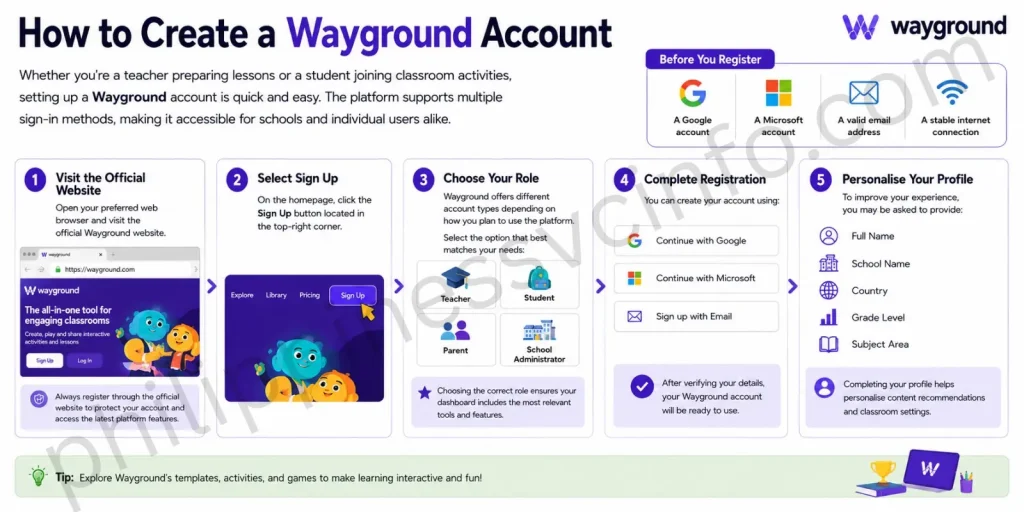
Whether you’re a teacher preparing lessons or a student joining classroom activities, setting up a Wayground account is quick and straightforward. The platform supports multiple sign-in methods, making it accessible for schools and individual users alike.
Before You Register
You’ll need one of the following:
- A Google account
- A Microsoft account
- A valid email address
- A stable internet connection
Step 1: Visit the Official Website
Open your preferred web browser and visit the official Wayground website.
Always register through the official website to protect your account and access the latest platform features.
Step 2: Select Sign Up
On the homepage, click the Sign Up button located in the top-right corner.
Step 3: Choose Your Role
Wayground offers different account types depending on how you plan to use the platform.
Select the option that best matches your needs:
- Teacher
- Student
- Parent
- School Administrator
Choosing the correct role ensures your dashboard includes the most relevant tools and features.
Step 4: Complete Registration
You can create your account using:
- Microsoft
- Email Address
After verifying your details, your Wayground account will be ready to use.
Step 5: Personalise Your Profile
To improve your experience, you may be asked to provide:
- Full Name
- School Name
- Country
- Grade Level
- Subject Area
Completing your profile helps personalise content recommendations and classroom settings.
Quick Summary
| Task | Time Required |
|---|---|
| Create Account | 2–3 Minutes |
| Login | Less than 1 Minute |
| Join Quiz | Under 30 Seconds |
| Create First Quiz | Around 10 Minutes |
How to Log In to Wayground

If you’ve already created an account, logging in is simple.
Login Steps
Step 1
Step 2
Choose your preferred sign-in method:
- Microsoft
- Email Address
Step 3
Enter your login details.
Step 4
You’ll be taken directly to your personalised Wayground Dashboard, where you can access quizzes, lessons, reports, classrooms, and assignments.
Forgot Your Password?
If you cannot access your account:
- Open the login page.
- Click Forgot Password.
- Enter your registered email address.
- Follow the instructions sent to your inbox.
Always use the official password reset process instead of third-party websites.
How Students Join a Wayground Quiz
One of the most searched questions about Wayground is how to join a classroom quiz.

The process is designed to be fast and beginner-friendly.
Step 1
Visit the official Join page:
Step 2
Ask your teacher for the Game Code.
Step 3
Enter the code into the provided field.
Step 4
Type your name or nickname, depending on your teacher’s instructions.
Step 5
Select Join and begin answering questions.
No complicated setup is required for most classroom activities.
Important Note
Some teachers may require students to sign in before joining, while others allow guest access using only a game code.
Creating Your First Quiz in Wayground
Quiz creation remains one of Wayground’s most popular features.
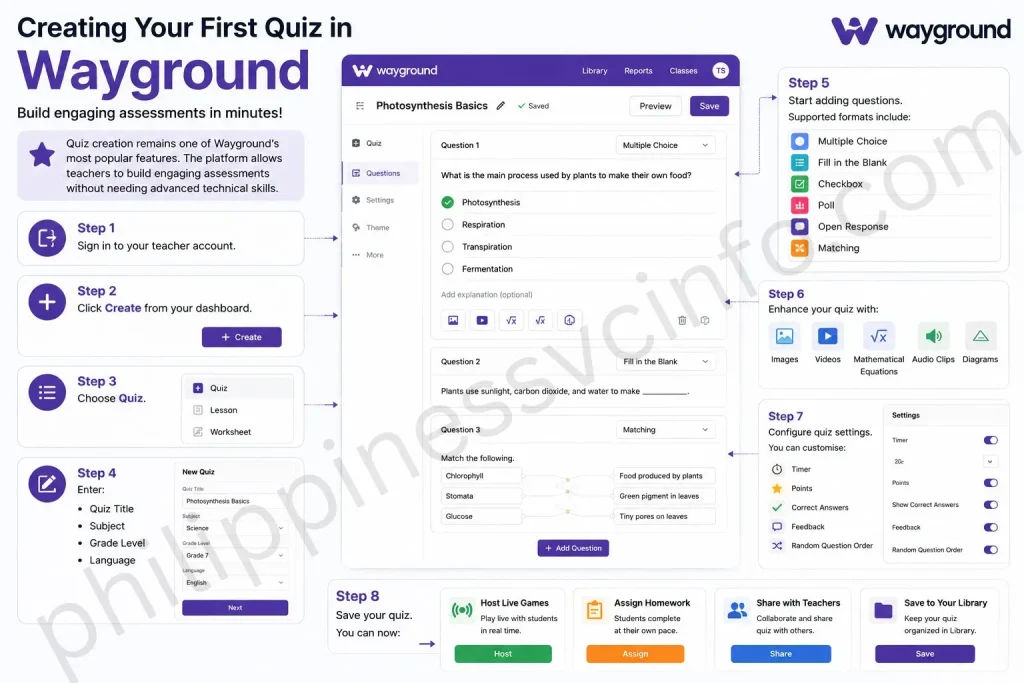
The platform allows teachers to build engaging assessments without needing advanced technical skills.
How to Create a Quiz
Step 1
Sign in to your teacher account.
Step 2
Click Create from your dashboard.
Step 3
Choose Quiz.
Step 4
Enter:
- Quiz Title
- Subject
- Grade Level
- Language
Step 5
Start adding questions.
Supported formats include:
- Multiple Choice
- Fill in the Blank
- Checkbox
- Poll
- Open Response
- Matching
Step 6
Enhance your quiz with:
- Images
- Videos
- Mathematical Equations
- Audio Clips
- Diagrams
Step 7
Configure quiz settings.
You can customise:
- Timer
- Points
- Correct Answers
- Feedback
- Random Question Order
Step 8
Save your quiz.
You can now:
- Host Live Games
- Assign Homework
- Share with Teachers
- Save to Your Library
AI Tools Available in Wayground
Artificial Intelligence has become one of the biggest advantages of Wayground.
Instead of spending hours preparing educational materials, teachers can generate content within minutes.
Popular AI tools include:
- AI Quiz Generator
- AI Lesson Creator
- AI Question Generator
- AI Worksheet Builder
- AI Practice Activities
- AI Reading Comprehension
- AI Content Suggestions
These tools are designed to save preparation time while supporting classroom instruction.
Expert Tip: AI-generated content should always be reviewed before assigning it to students to ensure it aligns with your curriculum.
Assignment Mode
Assignment Mode allows teachers to schedule work that students complete outside live classroom sessions.
Features include:
- Flexible due dates
- Automatic grading
- Progress tracking
- Completion reports
- Student performance monitoring
This makes Wayground suitable for homework, revision, and remote learning.
Live Classroom Mode
Live Mode transforms lessons into interactive classroom activities.
Teachers can:
- Launch live quizzes
- Display questions on classroom screens
- Monitor answers in real time
- View live leaderboards
- Increase classroom participation
The gamified experience encourages students to stay focused while making learning enjoyable.
Extensive Content Library
Wayground includes a large collection of ready-made educational resources.
Teachers can search for:
- Quizzes
- Lessons
- Flashcards
- Worksheets
- Assessments
Resources can be filtered by:
- Subject
- Grade
- Language
- Curriculum
Instead of starting from scratch, educators can customise existing materials to match their teaching objectives.
Wayground for Teachers
Modern classrooms require more than simple quizzes. Wayground gives teachers a complete set of digital teaching tools that help create engaging lessons, monitor student progress, and reduce preparation time.
Teachers can use Wayground to:
- Create interactive quizzes
- Design complete lessons
- Assign homework
- Generate AI-powered questions
- Organise multiple classrooms
- Monitor student performance
- Share learning resources
- Download classroom reports
- Review assessment results
- Save reusable teaching materials
Whether teaching in person or online, Wayground helps simplify lesson planning while improving classroom participation.
How Students Benefit from Wayground
Students learn more effectively when lessons are interactive. Wayground keeps learners actively involved through quizzes, games, flashcards, and practice activities instead of relying only on traditional worksheets.
Students can:
- Join live classroom games
- Complete homework online
- Review lessons anytime
- Practise using flashcards
- Receive instant feedback
- Track their own progress
- Prepare for quizzes and exams
- Learn at their own pace
This interactive approach encourages better participation and helps reinforce key concepts.
Wayground for Educational Institutions
Schools often need a platform that supports multiple classrooms, teachers, and students. Wayground provides tools that help administrators manage learning across an entire institution.
Schools can use Wayground for:
- School-wide assessments
- Shared question banks
- Teacher collaboration
- Curriculum-based learning
- Student progress tracking
- Classroom analytics
- Digital learning management
- Hybrid and remote education
These features make Wayground suitable for primary schools, secondary schools, colleges, and universities.
Wayground vs Quizizz
Since many users still search for Quizizz, it’s important to understand the relationship between the two platforms.
Quizizz officially became Wayground, but the core platform remains the same. Existing accounts, quizzes, classes, and reports continue to work without requiring users to create new accounts.
| Feature | Wayground | Quizizz (Previous Brand) |
|---|---|---|
| Interactive Quizzes | ✔ | |
| AI Tools | ✔ | Limited |
| Homework | ✔ | ✔ |
| Digital Lessons | ✔ | ✔ |
| Reports | ✔ | ✔ |
| Classroom Management | ✔ | ✔ |
| Flashcards | ✔ | ✔ |
Key Takeaway: If you previously used Quizizz, simply continue using your existing account on Wayground.
Wayground vs Kahoot
Both platforms are widely used in education, but they focus on slightly different experiences.
| Feature | Wayground | Kahoot |
|---|---|---|
| AI Quiz Generator | ✔ | Limited |
| Interactive Lessons | ✔ | Limited |
| Homework | ✔ | ✔ |
| Flashcards | ✔ | Limited |
| Question Types | More Variety | Standard |
| Classroom Reports | Detailed | Available |
| Content Library | Extensive | Extensive |
Teachers who want built-in AI tools and lesson creation may prefer Wayground, while both platforms remain effective for interactive classroom activities.
Key Features of Wayground
One of the biggest reasons for Wayground’s popularity is its comprehensive set of educational tools.
Some of the most important Wayground features include:
Interactive Quizzes
Teachers can create engaging quizzes using multiple question formats, including:
- Multiple choice
- Fill in the blank
- Polls
- Checkbox questions
- Open-ended questions
- Matching activities
Students receive instant feedback after answering each question.
AI Quiz Generator
One of the newest Wayground features is its AI-powered quiz generator.
Instead of creating quizzes manually, teachers can generate complete assessments from:
- A topic
- A lesson title
- A document
- A PDF
- Educational text
The AI significantly reduces preparation time.
Interactive Lessons
Instead of presenting static slides, teachers can create complete interactive lessons that include:
- Videos
- Images
- Questions
- Discussions
- Activities
Students remain engaged throughout the lesson.
Homework Assignments
Teachers can assign quizzes as homework.
Students can complete assignments:
- At home
- On tablets
- On laptops
- On smartphones
Teachers can also set deadlines and monitor completion.
Flashcards
Students can revise important concepts using built-in flashcards.
Flashcards improve:
- Memorization
- Vocabulary
- Exam preparation
- Concept review
Detailed Reports
Every completed activity generates detailed reports showing:
- Student scores
- Accuracy
- Question analysis
- Completion rates
- Time spent
- Class performance
These reports help teachers identify learning gaps.
Who Can Use Wayground?
One of the best things about Wayground is that it supports different types of users.
Teachers
Teachers can use Wayground to:
- Create quizzes
- Host live games
- Assign homework
- Build lessons
- Track student performance
- Save time using AI tools
Students
Students can use Wayground to:
- Join classroom games
- Practice lessons
- Review flashcards
- Complete homework
- Prepare for exams
- Improve learning through interactive activities
Schools
Schools use Wayground for:
- Digital classrooms
- Classroom assessments
- Student engagement
- School-wide competitions
- Progress tracking
Businesses
Many organizations also use Wayground for:
- Employee training
- Staff assessments
- Workshops
- Professional development
- Corporate learning
Benefits of Using Wayground
There are many reasons educators choose Wayground over traditional teaching methods.
Some of the biggest benefits include:
- Easy-to-use interface
- AI-powered lesson creation
- Interactive learning experience
- Automatic grading
- Real-time classroom participation
- Instant feedback
- Detailed performance analytics
- Cloud-based platform
- Works on computers and mobile devices
- Suitable for both online and in-person learning
Because of these features, Wayground helps teachers spend less time preparing materials while keeping students actively engaged in the learning process.
Official Wayground Resources
To ensure you’re using the genuine platform, always access Wayground through its official resources:
Using the official website helps protect your account and ensures you have access to the latest features, updates, and support.
Advantages of Wayground
There are several reasons why educators around the world choose Wayground.
Benefits
- Easy-to-use interface
- AI-powered content creation
- Interactive learning
- Automatic grading
- Live classroom games
- Homework assignments
- Mobile-friendly platform
- Cloud-based access
- Detailed analytics
- Large educational resource library
- Supports remote learning
- Regular platform updates
Best Practices for Using Wayground
To get the most value from Wayground, follow these recommendations:
✔ Organise quizzes by subject.
✔ Use folders to manage classroom resources.
✔ Review student reports after every assessment.
✔ Mix different question types to improve engagement.
✔ Include images and videos in lessons.
✔ Keep quizzes short and focused.
✔ Use AI tools to reduce preparation time.
✔ Regularly update learning materials.
✔ Encourage students to review with flashcards.
✔ Explore the public library before creating new resources.
Things to Consider
Although Wayground offers many useful features, users should keep a few points in mind.
- Some premium features require a paid subscription.
- A reliable internet connection improves performance.
- AI-generated content should always be reviewed before assigning it to students.
- Schools may require staff training to use advanced tools effectively.
Common Mistakes to Avoid
Many first-time users make simple mistakes that reduce the effectiveness of their lessons.
Avoid these common issues:
- Creating quizzes with too many questions.
- Using only one question format.
- Ignoring student performance reports.
- Not reviewing AI-generated content.
- Forgetting to set assignment deadlines.
- Using outdated classroom materials.
Frequently Asked Questions
Conclusion
Wayground has evolved into a comprehensive learning platform that goes far beyond interactive quizzes. By combining AI-powered content creation, engaging lessons, homework management, classroom analytics, and collaborative tools, it provides a complete solution for modern education.Whether you’re a teacher creating engaging classroom activities, a student preparing for exams, or a school looking for a scalable digital learning platform, Wayground offers flexible tools to support a wide range of educational needs. With its intuitive interface, extensive content library, and continued innovation, it remains one of the leading platforms for interactive learning in 2026.For the most accurate information, updates, pricing, and support, always use the official Wayground website and resources.
Discover What You Need to Know:
- Form 137 (SF10): Complete Guide to Requirements, Request Process, Fees & FAQs (2026)
- DTI Registration Philippines 2026: Complete Guide to Requirements, Fees, Online Application & Certificate
- National ID Digital Copy: Complete Guide PhilSys Registration Process, Download & Use (2026)
- Quizizz: Complete Guide to Online Quizzes, Login, Features & How It Works (2026)
- eRegistration: Complete Guide to Registration, Login, Requirements & Account Setup (2026)
- TNT SIM Registration 2026: Complete Guide to Online Registration, Requirements & Activation








