

TNT Load is prepaid credit used by TNT subscribers in the Philippines for calls, text messages, mobile data, and selected promos. Users can purchase TNT Load through various authorized channels and use it to register for available offers. Load options, promo benefits, validity periods, and registration methods may vary.
TNT Load Philippines: What You Need to Know
Running out of mobile credit can be inconvenient, particularly when you need to call someone, send a message, use mobile data or register a new promo. For TNT subscribers in the Philippines, TNT load can be purchased through several channels, while account and promo management can also be handled through official Smart/TNT services.
TNT, or Talk ‘N Text, operates within the Smart communications network. This means subscribers can use TNT-specific services alongside official Smart tools for checking balances, managing subscriptions and accessing available prepaid offers.
For visitors, international students, foreign residents and local subscribers, the main thing to understand is the difference between regular load and a prepaid promo. Regular load works as airtime credit, while a promo normally provides a defined combination of data, calls, texts or other inclusions for a stated validity period.
This distinction matters because adding money to your TNT number does not necessarily mean that you have purchased a data package. You may need to use your available load to register separately for an eligible promo.
What Does TNT Load Mean?
TNT load refers to prepaid airtime value credited to a TNT mobile number. Depending on how it is purchased, the credit can be used for eligible calls, texts, mobile services or to register available prepaid offers.
TNT also provides promo-based services where the subscriber purchases a package rather than simply adding ordinary airtime. The exact offers, prices, inclusions and registration methods can change, so subscribers should check the current official TNT or Smart channels before purchasing.
The official TNT website currently provides pages for different prepaid offers and services, while the Smart App can be used by TNT subscribers to view account information and available offers.
Regular Load vs Promo Load
| Type | What it provides | Typical purpose |
|---|---|---|
| Regular TNT load | Airtime credit | Calls, texts and registration of eligible promos |
| Data promo | A specified data allocation | Browsing, streaming or other internet use |
| Call & text promo | Allocated calls and/or messages | Regular communication |
| Combination promo | A mixture of data, calls and texts | Everyday mobile use |
The available choices are not fixed forever. A promotion shown on the official TNT website or Smart App should be treated as the current source for its price, inclusions and validity.
How to Buy TNT Load
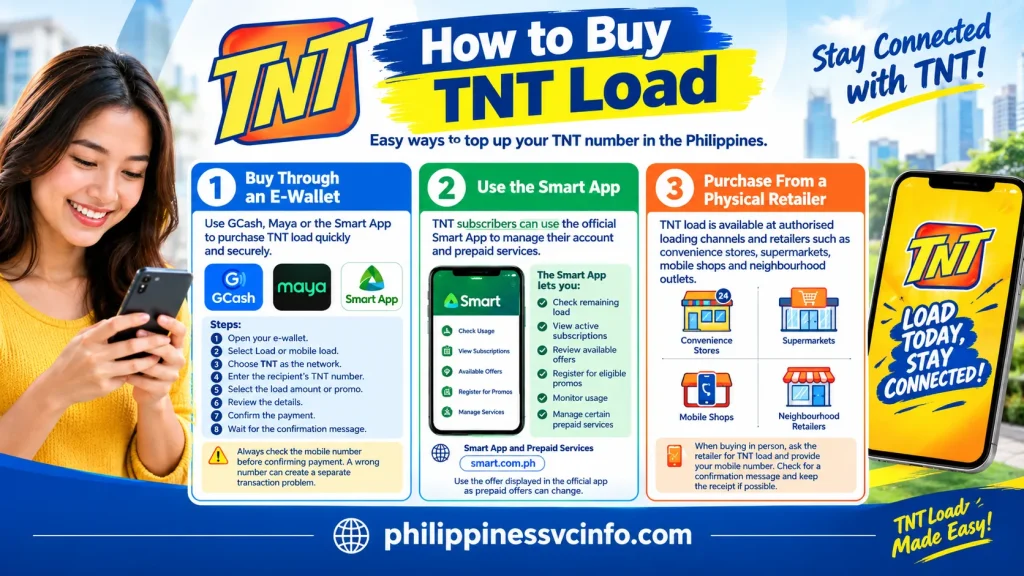
There are several practical ways to purchase TNT load in the Philippines. Your best option depends on whether you are buying for your own number, loading another person, using an e-wallet or purchasing through a physical retailer.
1. Buy Through an E-Wallet
Digital wallets can provide a convenient way to purchase prepaid credit or eligible TNT offers.
For example, TNT’s official pages show TNT offers being accessed through GCash and Maya, in addition to the Smart App and *123# for certain services.
A typical process is:
- Open your preferred e-wallet.
- Select the Load or mobile-load service.
- Choose TNT as the network.
- Enter the recipient’s TNT mobile number carefully.
- Select the available load amount or eligible promo.
- Review the number and purchase details.
- Confirm the payment.
- Wait for the transaction confirmation.
Important: Always check the mobile number before confirming payment. A mistake in the recipient number can create a separate transaction problem that may not be solved simply by buying another load.
2. Use the Smart App
TNT subscribers can also use the official Smart App for account and prepaid services. Smart’s current help information says TNT subscribers can log in to the Smart App and use Check Usage to view their remaining load and active subscriptions.
The app can be particularly useful when you want to do more than simply add credit. Depending on the offers currently available to your account, it may allow you to:
- Check remaining load
- View active subscriptions
- Review available offers
- Register for eligible promos
- Monitor usage
- Manage certain prepaid services
Because prepaid offers can change, use the offer displayed in the official app rather than relying on an old screenshot or outdated social-media post.
3. Purchase From a Physical Retailer
TNT load is also available through authorised loading channels and retailers. Depending on where you are in the Philippines, you may find electronic loading services at convenience stores, supermarkets, mobile shops and smaller neighbourhood retailers.
If you are visiting the Philippines and are unfamiliar with local loading, you can ask the retailer for TNT load and provide the mobile number.
Before leaving the shop, check whether you received a confirmation message. Keeping the receipt can also be useful if a transaction needs to be investigated later.
How to Load Your TNT Number
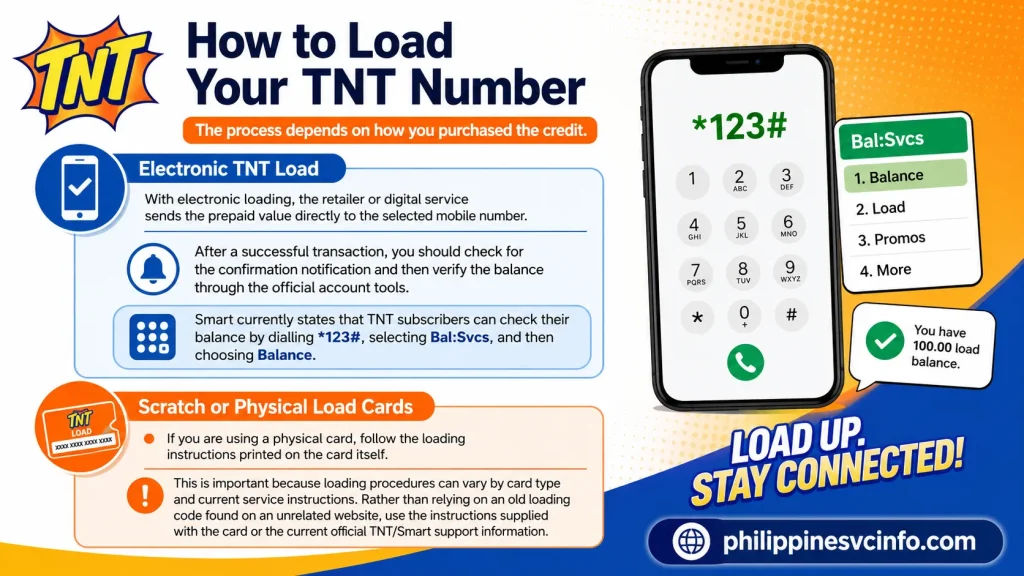
The process depends on how you purchased the credit.
Electronic TNT Load
With electronic loading, the retailer or digital service sends the prepaid value directly to the selected mobile number.
After a successful transaction, you should check for the confirmation notification and then verify the balance through the official account tools.
Smart currently states that TNT subscribers can check their balance by dialling *123#, selecting Bal:Svcs, and then choosing Balance.
Scratch or Physical Load Cards
If you are using a physical card, follow the loading instructions printed on the card itself.
This is important because loading procedures can vary by card type and current service instructions. Rather than relying on an old loading code found on an unrelated website, use the instructions supplied with the card or the current official TNT/Smart support information.
How to Check TNT Load Balance
Checking your remaining TNT load before registering another promo can prevent failed transactions and unexpected deductions.
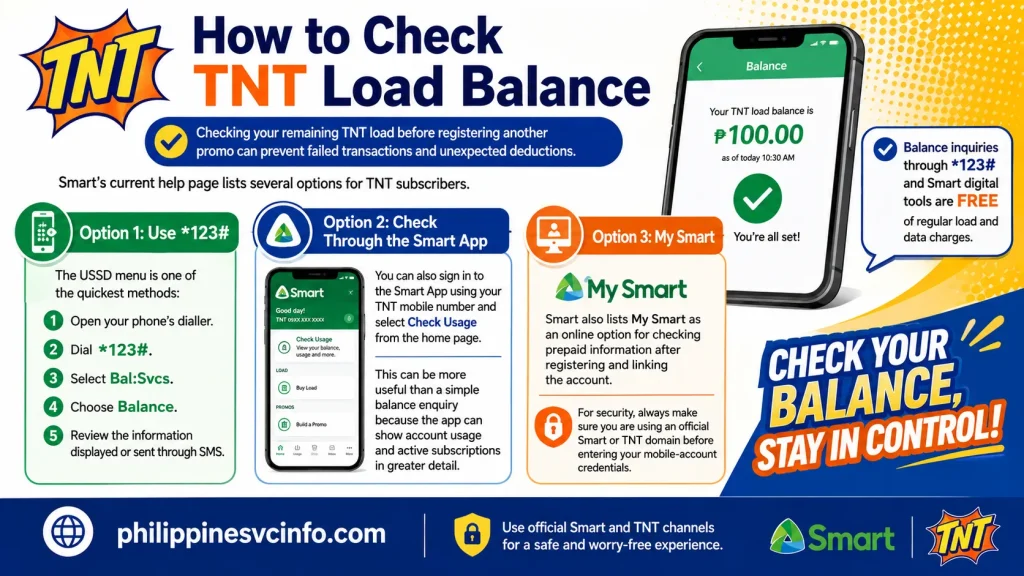
Smart’s current help page lists several options for TNT subscribers.
Option 1: Use *123#
The USSD menu is one of the quickest methods:
- Open your phone’s dialler.
- Dial *123#.
- Select Bal:Svcs.
- Choose Balance.
- Review the information displayed or sent through SMS.
Smart states that balance inquiries through *123# and its listed digital account tools are free of regular load and data charges.
Option 2: Check Through the Smart App
You can also sign in to the Smart App using your TNT mobile number and select Check Usage from the home page.
This can be more useful than a simple balance enquiry because the app can show account usage and active subscriptions in greater detail.
Option 3: My Smart
Smart also lists My Smart as an online option for checking prepaid information after registering and linking the account.
For security, always make sure you are using an official Smart or TNT domain before entering your mobile-account credentials.
TNT Load Validity: How Long Does It Last?
Load validity is an important part of managing a prepaid account.
Current Smart information says the value of Smart Prepaid, TNT and Smart Bro Prepaid call-and-text cards must generally be used within 365 days from the date the value is loaded.
The official Smart online store also currently lists several TNT-compatible regular-load products with one-year validity, including ₱50, ₱100, ₱200, ₱500 and ₱1,000 load products.
Promo validity is different. A data or combination offer has its own stated validity period, which should be checked before registration.
For example, an official TNT All Access+ page currently displays an offer with a 15-day validity, demonstrating why subscribers should check the specific offer rather than assuming every TNT promo lasts the same length of time.
A Useful Rule
Regular load validity and promo validity are not the same thing.
Your ordinary TNT load may remain available for its stated validity period, while a promo’s data, calls or texts can expire according to the individual offer’s conditions.
What Happens When TNT Load Reaches Zero?
There is another validity issue that prepaid subscribers should understand: account activity and load validity are separate matters.
Smart’s current help information states that when the account balance reaches zero, the subscriber has a period in which they must reload to keep the prepaid account active. Its current prepaid-card help page describes a 180-day reload period after the balance reaches zero.
However, TNT’s terms also contain specific permanent-disconnection conditions, including a condition relating to a TNT prepaid SIM having zero load balance for 120 consecutive days.
Because these official pages present different conditions in different contexts, subscribers should check the current terms applicable to their particular TNT service rather than assuming one general rule applies to every account.
Practical advice: keep some regular load on an active TNT prepaid number and check the official account status if you have not used the SIM for a long period.
How to Register a TNT Promo
Buying TNT load and registering a TNT promo are two different actions. A subscriber can first add regular load and then use that balance to register an available offer, provided the account meets the offer’s requirements.
The exact promo catalogue changes, so check the current offer shown through the official TNT website, Smart App or other authorised Smart/TNT channels before registering.
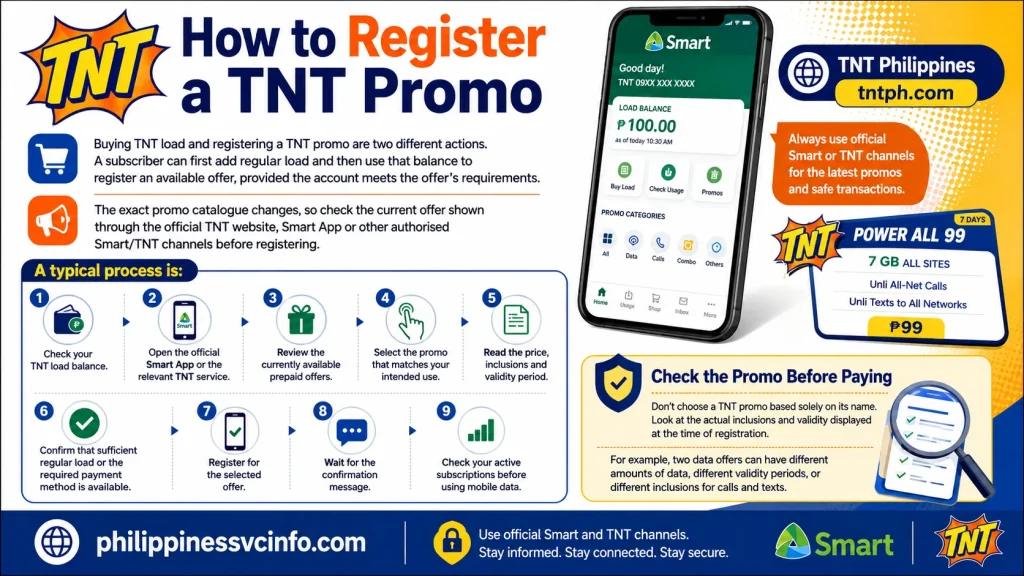
A typical process is:
- Check your TNT load balance.
- Open the official Smart App or the relevant TNT service.
- Review the currently available prepaid offers.
- Select the promo that matches your intended use.
- Read the price, inclusions and validity period.
- Confirm that sufficient regular load or the required payment method is available.
- Register for the selected offer.
- Wait for the confirmation message.
- Check your active subscriptions before using mobile data.
Check the Promo Before Paying
Don’t choose a TNT promo based solely on its name. Look at the actual inclusions and validity displayed at the time of registration.
For example, two data offers can have different validity periods, while one may be designed around a particular service or type of usage. This makes the current official offer description more useful than an old promotional list.
Which TNT Load Option Should You Use?
The right choice depends on what you need the phone for.
| If you mainly need… | Consider checking… |
|---|---|
| Calls and texts | Regular load or a current call/text offer |
| General internet access | An available all-data offer |
| Social or video use | A promo with relevant app/data inclusions |
| Short-term travel use | A promo whose validity covers your stay |
| Occasional emergency credit | Regular TNT load |
| Several days of regular mobile use | A current combination or data promo |
These are usage categories rather than a permanent TNT product list. Promo names, prices and inclusions can change, so verify the current offer before purchasing.
What to Do If Your TNT Load Does Not Arrive
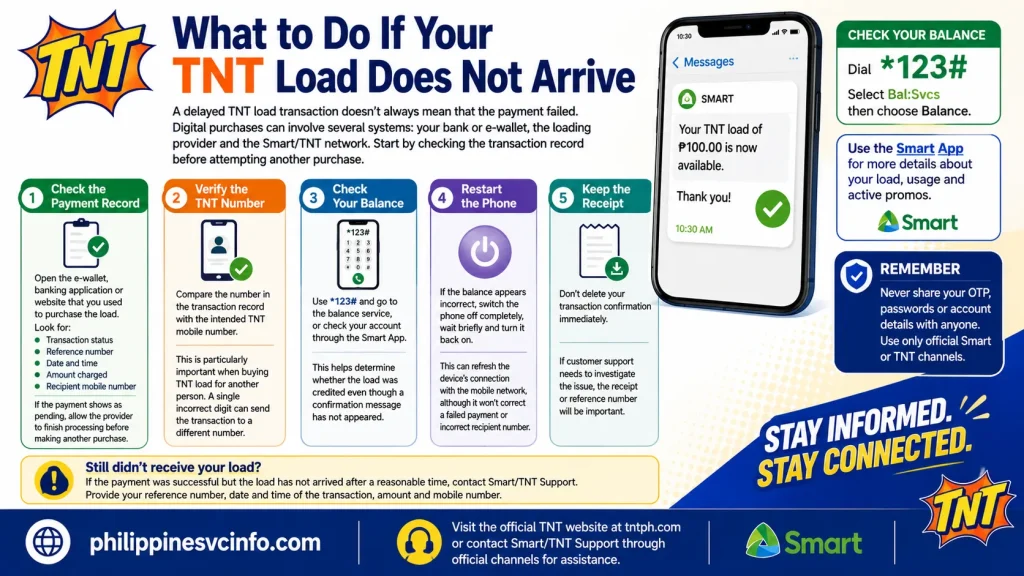
A delayed TNT load transaction doesn’t always mean that the payment failed.
Digital purchases can involve several systems: your bank or e-wallet, the loading provider and the Smart/TNT network. Start by checking the transaction record before attempting another purchase.
Step 1: Check the Payment Record
Open the e-wallet, banking application or website that you used to purchase the load.
Look for:
- Transaction status
- Reference number
- Date and time
- Amount charged
- Recipient mobile number
If the payment shows as pending, allow the provider to finish processing before making another purchase.
Step 2: Verify the TNT Number
Compare the number in the transaction record with the intended TNT mobile number.
This is particularly important when buying TNT load for another person. A single incorrect digit can send the transaction to a different number.
Step 3: Check Your Balance
Use *123# and go to the balance service, or check your account through the Smart App.
This helps determine whether the load was credited even though a confirmation message has not appeared.
Step 4: Restart the Phone
If the balance appears incorrect, switch the phone off completely, wait briefly and turn it back on.
This can refresh the device’s connection with the mobile network, although it won’t correct a failed payment or incorrect recipient number.
Step 5: Keep the Receipt
Don’t delete your transaction confirmation immediately.
If customer support needs to investigate the transaction, the reference number and payment details can help identify what happened.
Why Did My TNT Promo Registration Fail?
A promo registration can fail for several reasons.
Insufficient Regular Load
If the selected offer requires regular load and the available balance is too low, registration may not complete.
Check your balance before trying again.
The Offer Is No Longer Available
Promotional offers can change. An old code or offer mentioned on a third-party website may no longer be active.
Use the current official TNT or Smart channel to see what is available to your number.
An Existing Promo Is Still Active
Some offers have specific conditions relating to existing subscriptions. Before registering another package, check the active subscriptions associated with your account.
The Smart App’s usage tools can help you review current subscriptions.
Network or System Delay
A temporary service problem can also interfere with registration.
If your balance was deducted but the expected promo hasn’t appeared, avoid repeatedly registering the same offer. First check the account and transaction status.
Can You Borrow TNT Load?
TNT has offered emergency-load services under Utang na Load, allowing eligible subscribers to request certain emergency credit or offers and have the corresponding amount deducted from a future reload.
However, eligibility and available borrowing options can depend on the subscriber’s account.
If the service is presented as available to your number, follow the current instructions shown through official TNT/Smart channels rather than relying on an old code published elsewhere.
Before Using Emergency Load
Check:
- Whether your number is eligible
- How much you will receive
- Any applicable service charge
- What will be deducted from your next reload
- Whether the borrowed amount affects your next promo registration
The key point is that borrowed credit is not free additional balance. It is an advance that has to be settled according to the service’s current terms.
TNT Load and SIM Registration
A valid prepaid account also needs to comply with Philippine SIM-registration requirements.
The SIM Registration Act requires covered SIMs to be registered, subject to the rules and deadlines established by the Philippine government.
If a TNT SIM is not properly registered or has been restricted, ordinary troubleshooting steps such as restarting the phone will not resolve the underlying registration issue.
For account or registration concerns, use official Smart/TNT channels and the relevant government information rather than entering personal details into an unofficial website.
Security reminder: Never give your OTP, account password or other confidential credentials to someone claiming to be a TNT representative through an unsolicited message.
TNT Load Not Working? Use This Checklist
If your phone suddenly cannot make calls, send messages or use mobile data, work through the following checklist.
1. Check the Balance
Dial *123# and review your balance.
A zero balance may explain why certain prepaid services are unavailable.
2. Check Active Promos
A data promo may have expired even though your regular TNT load remains.
Likewise, having regular load does not automatically mean that you have an active mobile-data package.
3. Check Airplane Mode
Turn Airplane Mode on for several seconds and then switch it off.
This forces the phone to reconnect to the mobile network.
4. Restart the Device
A normal restart can resolve temporary connection problems.
5. Check Your Mobile Settings
If calls and texts work but data does not, check that:
- Mobile data is switched on.
- The correct SIM is selected for mobile data if you use two SIMs.
- Your phone has network coverage.
- Your active data package has not expired.
6. Try Again Later
A temporary network or service interruption can affect loading, registration or account information.
If the problem continues, use official TNT/Smart support.
TNT Customer Support Options
When a problem cannot be solved through the account tools, use official support channels.
The information supplied for this guide lists:
- *888 when calling from a TNT/Smart mobile number
- 02-8888-1111 from a landline
- The official TNT website and verified support channels
Before calling, prepare the relevant transaction information.
You may need:
- TNT mobile number
- Transaction date and time
- Load amount
- Payment method
- Transaction/reference number
- Screenshot or receipt, if available
Don’t share your account password or one-time password simply because someone claims that it is required to investigate a loading problem.
Common TNT Load Mistakes to Avoid
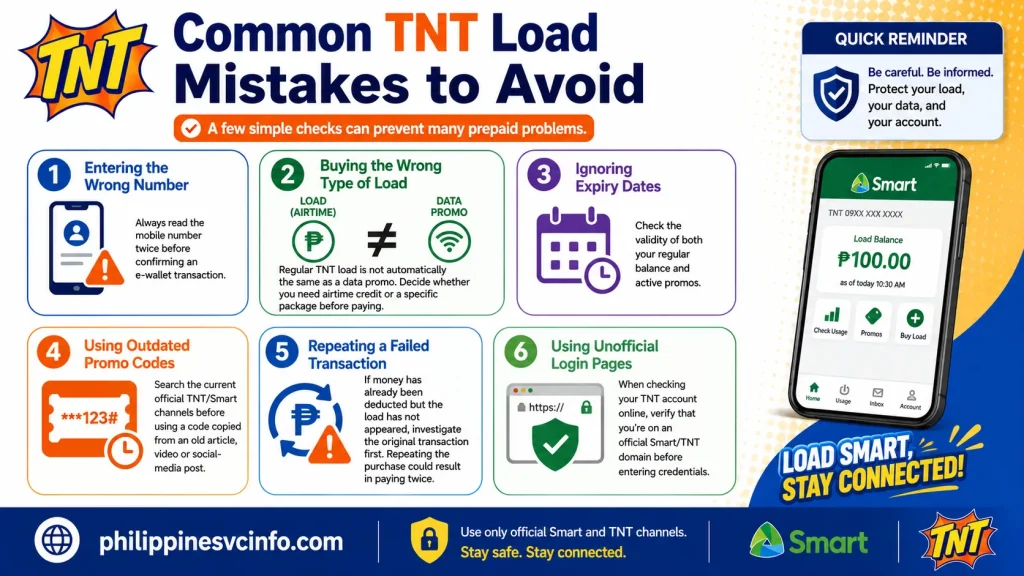
A few simple checks can prevent many prepaid problems.
Entering the Wrong Number
Always read the mobile number twice before confirming an e-wallet transaction.
Buying the Wrong Type of Load
Regular TNT load is not automatically the same as a data promo. Decide whether you need airtime credit or a specific package before paying.
Ignoring Expiry Dates
Check the validity of both your regular balance and active promos.
Using Outdated Promo Codes
Search the current official TNT/Smart channels before using a code copied from an old article, video or social-media post.
Repeating a Failed Transaction
If money has already been deducted but the load has not appeared, investigate the original transaction first. Repeating the purchase could result in paying twice.
Using Unofficial Login Pages
When checking your TNT account online, verify that you’re on an official Smart/TNT domain before entering credentials.
TNT Load for Visitors and International Students
Visitors and international students may use TNT prepaid services for everyday communication without needing a long-term postpaid plan.
If you’re new to the Philippines, a practical setup is to:
- Confirm that your SIM is properly registered.
- Keep your TNT mobile number accessible.
- Add an appropriate amount of TNT load.
- Check the balance using the official account tools.
- Review current prepaid promos.
- Choose a package based on your expected data, call and text usage.
- Monitor the validity period.
- Keep transaction receipts for digital purchases.
For short stays, pay particular attention to promo validity. Buying a package that expires before the end of your trip can leave you without the expected data or communication allowance.
A Simple TNT Load Management Routine
You don’t need to check your account constantly. A basic routine is enough.
Before purchasing:
Check the number, price and payment details.
After purchasing:
Confirm that the transaction succeeded.
Before registering a promo:
Check your available balance and existing subscriptions.
During use:
Monitor remaining data and expiry information.
When something goes wrong:
Check the transaction record first, then use official TNT/Smart support.
This approach reduces the chance of making a second purchase before you know what happened to the first one.
Frequently Asked Questions About TNT Load
Important Things to Remember About TNT Load
Managing a prepaid number is mostly about knowing what you purchased, when it expires and what is currently active.
Regular TNT load should not automatically be treated as a data package. If you need internet access, check whether your account has an active data allocation or whether you need to register for a suitable current promo.
Likewise, don’t assume that an old promo code, price or validity period is still available. Prepaid offers can change, so the current official TNT or Smart channel should take priority over older third-party information.
For digital transactions, the mobile number deserves particular attention. A successful payment sent to the wrong number can create a different problem from a failed transaction, which is why checking the recipient before pressing the final confirmation button is one of the simplest precautions.
A Practical TNT Load Routine for Everyday Users
A useful approach is to keep your prepaid account organised rather than waiting until the balance reaches zero.
Check → Choose → Purchase → Confirm → Monitor
- Check: Find out how much regular load and data you already have.
- Choose: Decide whether you need ordinary airtime or a specific current promo.
- Purchase: Use an authorised loading channel and verify the mobile number.
- Confirm: Look for the transaction confirmation and check your account.
- Monitor: Keep an eye on remaining data, active subscriptions and expiry dates.
This routine is especially useful for international visitors and students who may rely heavily on one Philippine mobile number for transport, messaging, online accounts and everyday communication.
Final Takeaway
A TNT prepaid account is easier to manage when regular load, promos and account validity are treated as separate parts of the service. Regular TNT load provides prepaid value, while a promo may give you a defined combination of mobile data, calls or texts for a specific period.For routine account management, check your balance with *123# or use the official Smart App. Before purchasing a promo, read the current price, inclusions and validity rather than relying on an old promotional list. If a loading transaction is delayed, check its payment status and recipient number before purchasing again.Most importantly, use official TNT and Smart channels for current information, account support and security-related matters. Keeping receipts, checking the number before payment and monitoring active subscriptions can prevent many common prepaid problems.
Discover What You Need to Know:
- TNT eSIM Philippines: Complete Guide to Purchase, Registration & Activation
- TNT SIM Registration 2026: Complete Guide to Online Registration, Requirements & Activation
- Smart Load Philippines 2026 : How to Buy, Reload & Check Balance Online
- Pasaload Smart Philippines 2026: How to Pasaload Smart Load, Codes, Fees & Complete Guide







