Globe Top Up ML Philippines 2026: GCash, Load & Postpaid Guide
Globe top up ML is a convenient way for Mobile Legends: Bang Bang players in the Philippines to purchase diamonds, passes, and other in-game items using supported payment methods such as GCash, Globe billing, or authorised gaming platforms. Players should verify their User ID, Zone ID, price, and payment details before completing transactions.
What Does Globe Top Up ML Mean?
Globe top up ML refers to topping up Mobile Legends: Bang Bang through a payment method connected with Globe or commonly used by Globe customers in the Philippines. The actual purchase can involve GCash, Globe-related billing, an app-store payment method, or an authorised gaming partner.
The important distinction is that your mobile network and your payment method are not always the same thing. You can play MLBB using a Globe SIM and still pay through GCash, for example. Likewise, a player may use a Globe postpaid account where supported by the relevant app-store billing arrangement.
Before paying, check which method is actually available on your device and account. Payment options can vary according to platform, account eligibility and the checkout service being used.
Common Payment Routes for MLBB Players
| Payment method | How it is generally used |
|---|---|
| GCash | Pay for MLBB diamonds through supported gaming or app-store channels |
| Globe prepaid | Use available load where a supported carrier-billing or gaming option is offered |
| Globe postpaid | Use supported carrier billing through the relevant app-store setup |
| Gaming partners | Purchase MLBB products through platforms such as Codashop |
| Other wallets/cards | Availability depends on the selected authorised platform |
Globe’s own gaming article also points users towards partner websites such as Codashop, UniPin and Razer Gold, while advising customers to be careful with third-party sellers.
Before You Start: Find Your MLBB User ID
One of the easiest mistakes to make during an ML top up is entering the wrong account details.
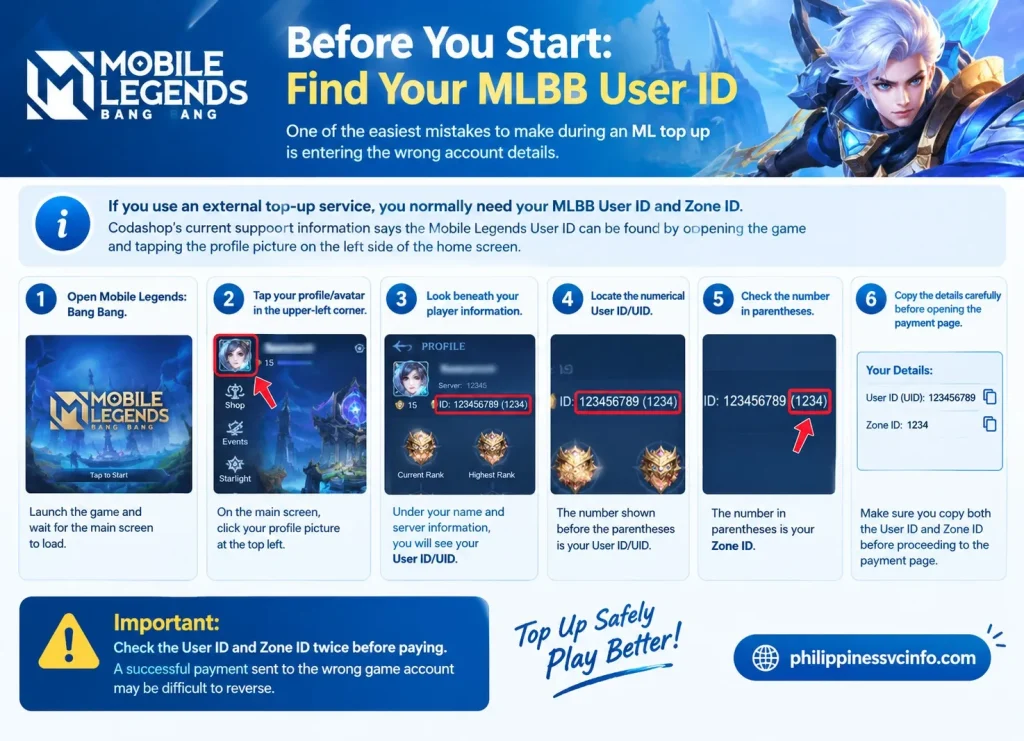
If you use an external top-up service, you normally need your MLBB User ID and Zone ID. Codashop’s current support information says the Mobile Legends User ID can be found by opening the game and tapping the profile picture on the left side of the home screen.
How to Check Your User ID and Zone ID
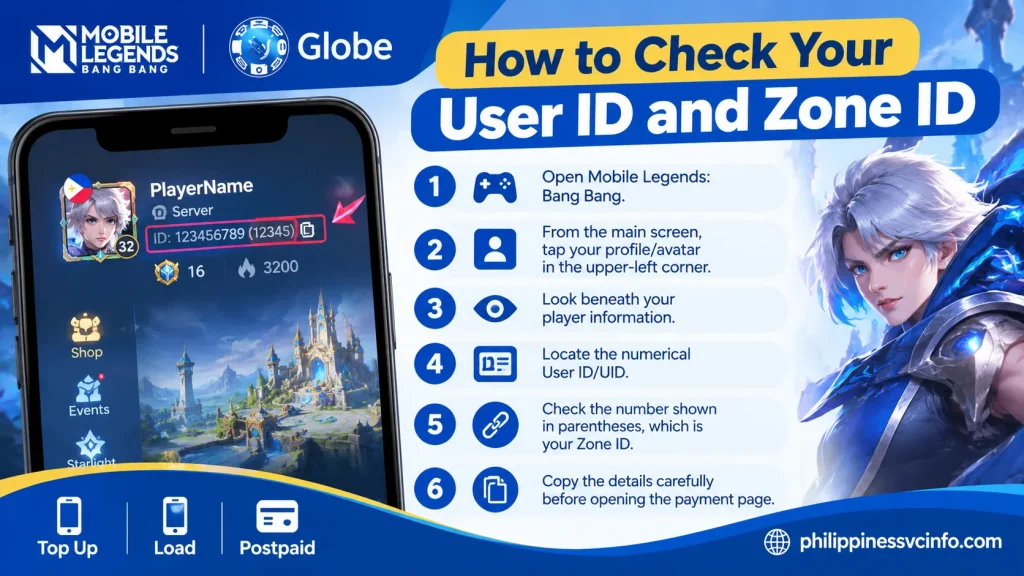
- Open Mobile Legends: Bang Bang.
- From the main screen, tap your profile/avatar in the upper-left corner.
- Look beneath your player information.
- Locate the numerical User ID/UID.
- Check the number shown in parentheses, which is your Zone ID.
- Copy the details carefully before opening the payment page.
The ID is different from your player name. Do not rely on your nickname alone when completing a globe top up ml transaction.
Important: Check the User ID and Zone ID twice before paying. A successful payment sent to the wrong game account may be difficult to reverse.
Globe Top Up ML With GCash
For many Filipino gamers, GCash is one of the most convenient ways to purchase digital game credits. Globe’s official gaming guide confirms that GCash can be used for MLBB purchases and describes several routes, including the GCash app, linked app-store payments, direct in-game purchases and partner websites.
This makes GCash useful whether you’re topping up a small number of diamonds before a match or purchasing a larger MLBB package.
Option 1: Use GCash Through the GCash App
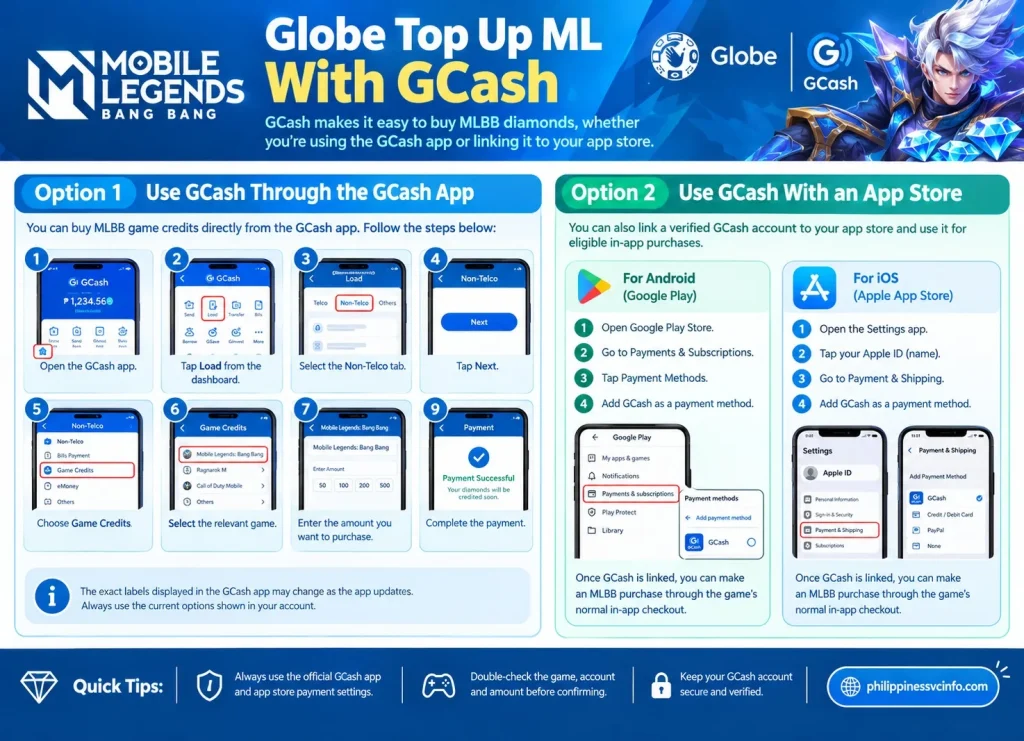
Globe’s published process allows users to access game credits directly from the GCash application. The menu path provided by Globe is:
- Open the GCash app.
- Tap Load from the dashboard.
- Select the Non-Telco tab.
- Tap Next.
- Choose Game Credits.
- Select the relevant game.
- Enter the amount you want to purchase.
- Review the transaction.
- Complete the payment.
The exact labels displayed in the app may change as GCash updates its interface, so use the current options shown in your account rather than relying only on an older screenshot or guide.
Option 2: Use GCash With an App Store
You can also link a verified GCash account to a supported app-store account and use it for eligible in-app purchases.
For Android, Globe’s instructions indicate that users can open Google Play, access Payments & Subscriptions, select Payment Methods, and add GCash. For Apple devices, GCash can be added through the Apple Account’s payment settings.
Once the payment method is properly connected, you can make an eligible MLBB purchase through the game’s normal in-app checkout.
Globe Top Up ML Through Codashop
Another practical route is an authorised gaming partner such as Codashop. Globe specifically mentions Codashop among partner websites where customers can purchase game credits and choose GCash as a payment method.
Codashop’s published MLBB instructions use the User ID and Zone ID rather than requiring your Mobile Legends password. Its GCash guide describes selecting the diamond amount, choosing GCash and completing the payment before the purchased diamonds are delivered to the game account.
For the current Philippines gaming catalogue, use Codashop Philippines and verify that the page is for Mobile Legends: Bang Bang, not another title with a similar name.
A Typical Codashop Checkout
The process generally looks like this:
MLBB → User ID + Zone ID → Diamond/package selection → GCash → Payment confirmation → Game delivery
You should never need to give a legitimate top-up service your MLBB account password simply to send diamonds to your game account. Globe also warns users against sellers who ask for login credentials or other sensitive information.
Can You Use Globe Load for MLBB?
Globe customers may encounter gaming or carrier-payment options that use mobile billing, but the exact availability depends on the payment platform, device, account and current service configuration.
This is why it is better not to assume that every Globe prepaid number can automatically pay for every MLBB package directly from load. Check the payment options shown at the actual checkout.
Globe confirms that its digital channels support prepaid load purchases and account management, including through the GlobeOne app.
If a supported gaming checkout displays a Globe or carrier-billing option, read the amount and confirmation screen carefully before approving the transaction.
Globe Prepaid vs GCash
These two options are easy to confuse:
- Globe prepaid: Your mobile account carries the relevant balance.
- GCash: Payment comes from your GCash wallet.
- GlobeOne: Mainly provides a way to manage eligible Globe services and transactions.
- MLBB checkout: Determines which payment sources are actually available for your purchase.
That distinction can prevent failed transactions and unexpected deductions.
Globe Postpaid Billing for Mobile Legends
Globe postpaid users may also encounter carrier billing through supported app-store arrangements. In this setup, the payment is associated with the applicable mobile billing account rather than being taken directly from a separate GCash wallet.
The practical steps are usually:
- Open Mobile Legends: Bang Bang.
- Tap the + button beside your diamond balance.
- Select the diamond package or available MLBB item.
- Continue to the app-store checkout.
- Review the available payment methods.
- Select the supported Globe/carrier billing option if it appears.
- Check the final amount.
- Authenticate the purchase using the required device or account verification.
- Wait for the purchase to be credited to your MLBB account.
The key point is simple: only use the payment method actually displayed by your current checkout screen. App-store and carrier-billing availability can change, so an option shown in an older tutorial may not appear for every player.
Which Globe Top Up ML Method Should You Choose?
There is no single best payment method for every player.
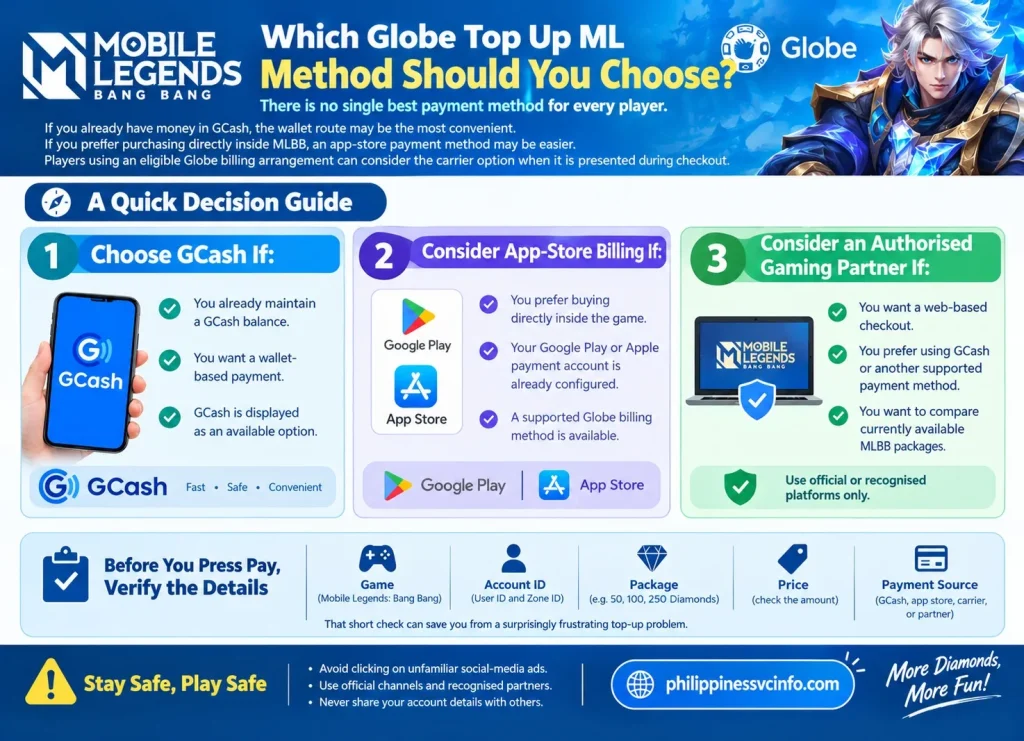
If you already have money in GCash, the wallet route may be the most convenient. If you prefer purchasing directly inside MLBB, an app-store payment method may be easier. Players using an eligible Globe billing arrangement can consider the carrier option when it is presented during checkout.
For external purchases, always start with the official or recognised platform rather than clicking an unfamiliar social-media advertisement.
A Quick Decision Guide
Choose GCash if:
- You already maintain a GCash balance.
- You want a wallet-based payment.
- GCash is displayed as an available option.
Consider app-store billing if:
- You prefer buying directly inside the game.
- Your Google Play or Apple payment account is already configured.
- A supported Globe billing method is available.
Consider an authorised gaming partner if:
- You want a web-based checkout.
- You prefer using GCash or another supported payment method.
- You want to compare currently available MLBB packages.
Before pressing Pay, verify the game, account ID, package, price and payment source. That short check can save you from a surprisingly frustrating top-up problem.
How Much Does an MLBB Top Up Cost?
There isn’t one fixed price for every globe top up ml purchase. Your final amount can depend on the package selected, promotional pricing and the payment channel.
As a reference, Codashop’s current Philippines listing shows packages such as:
| MLBB item | Example displayed price* |
|---|---|
| 5 Diamonds | From ₱5.50 |
| 56 Diamonds | From ₱53.20 |
| 112 Diamonds | From ₱106.40 |
| 223 Diamonds | From ₱212.80 |
| 336 Diamonds | From ₱319.20 |
| 570 Diamonds | From ₱532 |
| 1,163 Diamonds | From ₱1,064 |
| 2,398 Diamonds | From ₱2,128 |
| Weekly Diamond Pass | From ₱105 |
| Twilight Pass | From ₱532 |
*These are live displayed examples from the source checked for this article, not guaranteed permanent prices.
This is why it is better to check the current globe top up ml checkout rather than depending on a static price chart from an old article.
Is the Weekly Diamond Pass Better Value?
For players who regularly spend on MLBB, a pass can make more sense than repeatedly buying small diamond bundles. The Weekly Diamond Pass is designed around recurring rewards rather than giving you only a single lump-sum diamond purchase.
Codashop currently lists a Weekly Diamond Pass separately from ordinary diamond bundles, which means players can compare the pass with direct diamond purchases before deciding.
Ask yourself how often you play.
If you only occasionally need diamonds for a particular item, a small top-up may be enough. If you play every day and can claim the available rewards consistently, a weekly pass may be worth considering.
What About the Twilight Pass?
The Twilight Pass is another MLBB purchase option listed by Codashop. It should not be treated as identical to a normal diamond recharge because it is a different in-game product with its own rewards and progression mechanics.
Before purchasing it, read the current MLBB description and reward conditions. Don’t buy a pass simply because its headline price looks better than a diamond bundle.
First Recharge Bonuses and Extra Diamonds
Promotional recharge bonuses can substantially change the value of a globe top up ml transaction.
Codashop’s current MLBB page, for example, displays first-recharge offers such as:
- 100 Diamonds from a 50 + 50 structure
- 300 Diamonds from 150 + 150
- 500 Diamonds from 250 + 250
- 1,000 Diamonds from 500 + 500
The availability and eligibility of these offers can change, so the bonus should be confirmed on the checkout page before payment.
Don’t Assume Every Bonus Is Permanent
A common mistake is finding an old screenshot showing double diamonds and assuming the same promotion is still running.
Gaming promotions have start and end dates. They may also have eligibility requirements, such as being available only for a first recharge or only through a particular payment channel.
For that reason, check:
Package → Bonus → Eligibility → Final price → Payment method
before approving the transaction.
Globe Gamer Grounds and MLBB
Globe has also operated Gamer Grounds, a gaming-focused platform where customers can purchase game credits and participate in gaming-related offers.
Globe’s published information says Gamer Grounds supports games including Mobile Legends: Bang Bang and has offered payment through Globe/TM prepaid load and GCash.
Globe’s more recent gaming guide also directs users to Gamer Grounds through the GlobeOne app by going to Essentials → Passions/Engagement → Gamer Grounds.
This can be useful for Globe customers who prefer staying within a Globe-connected digital ecosystem.
However, don’t confuse buying Globe mobile load with buying MLBB diamonds. They are different transactions. Buying ₱100 of Globe load does not automatically mean you have ₱100 worth of MLBB diamonds.
Important Change: Globe Load on Codashop
There is an important detail that older globe top up ml articles may get wrong.
Codashop announced that Globe Prepaid and TM load stopped being available as payment methods on Codashop Philippines from July 16, 2024, because of a temporary pause in Globe Direct Carrier Billing operations. Codashop said other payment methods, including GCash, remained available.
So if you find an old tutorial telling you to select Globe/TM load on Codashop, don’t be surprised if that option isn’t displayed.
The safest rule is:
Use the payment options shown on the current checkout page, not an old screenshot.
This distinction is especially important for foreign residents and students who may be following older online tutorials.
What to Do If Your Globe Top Up ML Is Pending
A successful payment doesn’t always mean you should immediately purchase again.
Sometimes a transaction can take a short period to process, particularly when several systems are involved: MLBB, the payment provider, your mobile account or wallet, and an external top-up platform.
1. Check Your Payment Receipt
Start with the payment service you used.
For GCash, open your transaction history and look for the relevant payment. Check:
- Amount
- Date and time
- Merchant
- Transaction/reference number
- Payment status
If you used another payment channel, check its corresponding receipt or notification.
Don’t make another purchase simply because your diamonds haven’t appeared yet.
2. Check Your MLBB Account Details
Return to the User ID and Zone ID you entered during checkout.
Compare them carefully with the details displayed in your MLBB profile.
This is one of the most important checks for an external globe top up ml transaction because the payment platform may deliver the purchase according to the account information you supplied.
3. Restart Mobile Legends
Close MLBB completely and reopen it.
If the payment was successful but the balance hasn’t refreshed, logging back into the game can sometimes help the account display the updated balance.
4. Give the Transaction Time to Process
Don’t immediately repeat the payment.
If the first transaction eventually succeeds, making another purchase could result in two separate charges.
Instead, keep your receipt and transaction reference available while you check the status.
What If You Entered the Wrong User ID?
This is one of the most serious mistakes to avoid.
External top-up services use the player information entered during checkout. Codashop’s MLBB instructions require the User ID and Server ID, and its process asks customers to confirm the details before proceeding to payment.
If you accidentally enter another player’s information and the transaction is completed, don’t assume the purchase can automatically be moved to your account.
Contact the platform you used as soon as possible and provide:
- Payment receipt
- Transaction/reference number
- Date and time
- Amount paid
- Entered User ID
- Entered Zone/Server ID
- Correct MLBB account details
Never send your MLBB password to “fix” the transaction.
Globe Top Up ML Failed: Common Reasons
A failed transaction can happen for several reasons.
Insufficient GCash Balance
If you’re using GCash, make sure your wallet contains enough money for the full transaction. Don’t forget that the final amount shown at checkout is the amount that matters.
Globe’s own gaming guidance also advises users to be aware of possible transaction fees.
Payment Session Expired
Some payment pages give you a limited period to complete the transaction. If you leave the payment screen open too long, the session may expire.
Return to the official checkout and begin a fresh transaction.
Unsupported Payment Method
A payment option may disappear or become unavailable.
For example, Codashop currently supports several payment channels in the Philippines, but the available options can vary by product and checkout. Its support page specifically notes that not every payment method supports every option.
Incorrect Account Information
A wrong User ID or Server/Zone ID can cause problems with delivery.
Always copy the information directly from your MLBB profile instead of typing it from memory.
How to Contact Support About an MLBB Top Up
The right support team depends on where you made the purchase.
If You Paid Through Codashop
Contact Codashop support and provide your transaction information. Codashop’s official purchase instructions confirm that successful MLBB purchases are automatically credited to the specified account.
You can use the official Codashop Philippines website for the current support and purchase options.
If You Paid Through GCash
Check your GCash transaction record first. If the payment was successful but the game item was not delivered, keep the GCash receipt/reference number and contact the relevant support channel.
Globe’s official guide also directs users towards GCash-based gaming purchases and recognised partner platforms.
If You Used Globe Billing
Check your Globe account or billing notification to confirm whether the charge actually went through.
For general Globe account assistance, use the official Globe website.
Safety Rules for Globe Top Up ML
A cheap diamond offer is not necessarily a good deal.
Scammers often use social-media pages, fake websites and messages promising unusually large quantities of diamonds. Globe specifically warns users to check seller reputation, compare prices, avoid suspicious offers and never provide login credentials.
Never Give Anyone Your MLBB Password
A legitimate direct top-up generally needs information that identifies the game account, not your private login credentials.
Never provide a stranger with:
- MLBB password
- GCash MPIN
- GCash OTP
- Banking password
- Email password
- Verification codes
If someone says they need your password to “activate” diamonds, stop the transaction.
Check the Website Address
Before entering payment information, make sure you’re on the intended official or recognised platform.
For example, Codashop’s official Philippines site identifies itself as a game-credit platform and says registration or game login isn’t required for its standard top-up process.
Don’t click a random Facebook or TikTok link simply because it promises cheaper diamonds.
Can Globe Data Promos Help With MLBB?
This is slightly different from an actual diamond globe top up ml.
Globe offers gaming-focused data options. Its Go+ information currently identifies GoPLAY as an option for gaming apps including Mobile Legends, PUBG Mobile, Honor of Kings and Call of Duty.
That means a player can potentially choose a gaming-data option to support gameplay without confusing it with purchasing diamonds.
Think of it this way:
Data promo = internet access for playing MLBB
Diamond top-up = in-game currency/items
You may need both, but they serve completely different purposes.
Globe Top Up ML: Quick Troubleshooting Checklist
If your purchase hasn’t appeared, run through this list before paying again:
- Payment was actually successful
- Correct MLBB User ID was entered
- Correct Zone/Server ID was entered
- Correct game was selected
- Package was the one you intended to buy
- Payment receipt was saved
- You checked your MLBB balance again
- You waited for the transaction to process
- You contacted the payment/top-up provider if necessary
- You did not give anyone your password or OTP
This approach is safer than immediately starting another transaction.
Globe Top Up ML: Which Option Is Best?
There is no universal answer because different players have different payment preferences.
| Situation | Practical choice |
|---|---|
| You already use GCash | GCash checkout |
| You want to buy from a browser | Authorised gaming partner |
| You prefer purchasing inside MLBB | In-game/app-store checkout |
| You have eligible Globe billing | Supported carrier billing |
| You want gaming data | A suitable Globe gaming data promo |
| You are offered an unusually cheap unofficial deal | Avoid it |
For most users, convenience should not come at the expense of security. A slightly different price on an authorised platform is preferable to risking your account or payment information with an unknown seller.
Globe Top Up ML for Students and Foreign Residents
Students often want a small and convenient payment method rather than setting up complicated banking arrangements. GCash can be useful when available, while authorised gaming websites can provide another option.
Foreign residents and visitors should also remember that having a Globe SIM does not automatically mean every Globe payment option will be available to them. Eligibility can depend on the account, device, payment platform and current service rules.
If you’re using Globe primarily for mobile data, you can manage eligible prepaid services through Globe’s official channels. For gaming purchases, however, always follow the payment options presented by the actual MLBB checkout or authorised gaming platform.
Keep Your Gaming and Payment Accounts Separate
A useful security habit is to treat your MLBB account and payment account as two separate assets.
Your game profile may require a User ID and Zone/Server ID for an external top-up. Your payment account, such as GCash, requires much stronger security information.
Never confuse the two.
Safe to share when required by an authorised top-up:
Your public MLBB User ID and relevant Zone/Server ID.
Never share:
Your password, MPIN, OTP, authentication code or banking credentials.
Common Globe Top Up ML Mistakes to Avoid
Even experienced players can make mistakes when they’re in a hurry. Most problems are avoidable with a few checks.
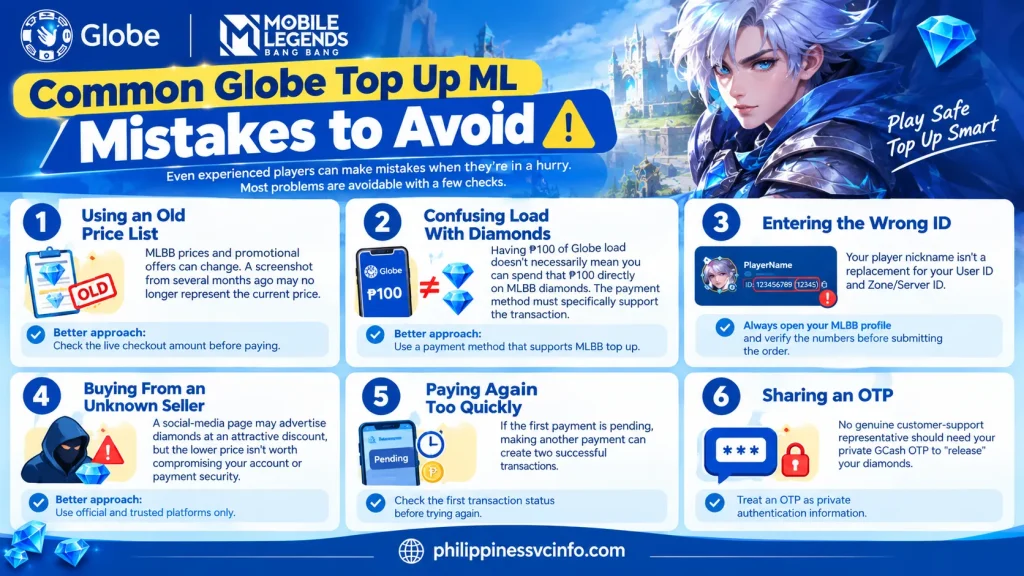
Mistake 1: Using an Old Price List
MLBB prices and promotional offers can change. A screenshot from several months ago may no longer represent the current price.
Better approach: Check the live checkout amount before paying.
Mistake 2: Confusing Load With Diamonds
Having ₱100 of Globe load doesn’t necessarily mean you can spend that ₱100 directly on MLBB diamonds. The payment method must specifically support the transaction.
Mistake 3: Entering the Wrong ID
Your player nickname isn’t a replacement for your User ID and Zone/Server ID.
Always open your MLBB profile and verify the numbers before submitting the order.
Mistake 4: Buying From an Unknown Seller
A social-media page may advertise diamonds at an attractive discount, but the lower price isn’t worth compromising your account or payment security.
Mistake 5: Paying Again Too Quickly
If the first payment is pending, making another payment can create two successful transactions.
Check the first transaction status before trying again.
Mistake 6: Sharing an OTP
No genuine customer-support representative should need your private GCash OTP to “release” your diamonds.
Treat an OTP as private authentication information.
How to Make Your Next MLBB Top Up Safer
A good globe top up ml routine can be surprisingly simple.
Before Payment
Check these five things:
- Website or app — Is it the official or recognised platform?
- Game — Does the page clearly say Mobile Legends: Bang Bang?
- Account — Are your User ID and Zone/Server ID correct?
- Package — Are you buying the diamonds or pass you actually want?
- Price — Does the final amount match what you expected?
During Payment
Read the payment confirmation rather than tapping through automatically.
Check the merchant name, amount and payment source. If you are using GCash, confirm the transaction inside the GCash payment flow before authorising it.
After Payment
Keep your receipt until the diamonds or purchased item appear in MLBB.
If something goes wrong, the receipt gives the support team useful information for investigating the transaction.
Frequently Asked Questions About Globe Top Up ML
A Simple Globe Top Up ML Checklist
Before every purchase, use this quick routine:
1. Open MLBB
Confirm the account you’re playing on.
2. Check your User ID and Zone/Server ID
Copy them directly from your profile.
3. Select a trusted payment channel
Use GCash, supported in-game/app-store billing or a recognised gaming partner.
4. Compare the current offer
Look at the final price and included diamonds or rewards.
5. Review the checkout
Make sure the account information and amount are correct.
6. Pay securely
Never disclose your MPIN, password or OTP.
7. Save the receipt
Keep the transaction/reference number until delivery is confirmed.
8. Don’t repeat a pending transaction immediately
Investigate the first payment before making another purchase.
Final Takeaway
A successful globe top up ml purchase is less about finding the flashiest discount and more about choosing the right payment route and checking every detail before payment. GCash remains a convenient option for many Philippine gamers, while in-game payments, supported Globe billing and recognised gaming partners provide alternative routes.
For a safer experience, verify your MLBB User ID and Zone/Server ID, review the live package price, use an authorised payment channel and keep your receipt. Most importantly, never hand over your MLBB password, GCash MPIN or OTP to a seller or stranger.
If you are unsure whether a particular globe top up ml offer is genuine, stop before paying and verify it through the official Globe or authorised platform website. That small extra step can protect both your gaming account and your money.
Discover What You Need to Know: