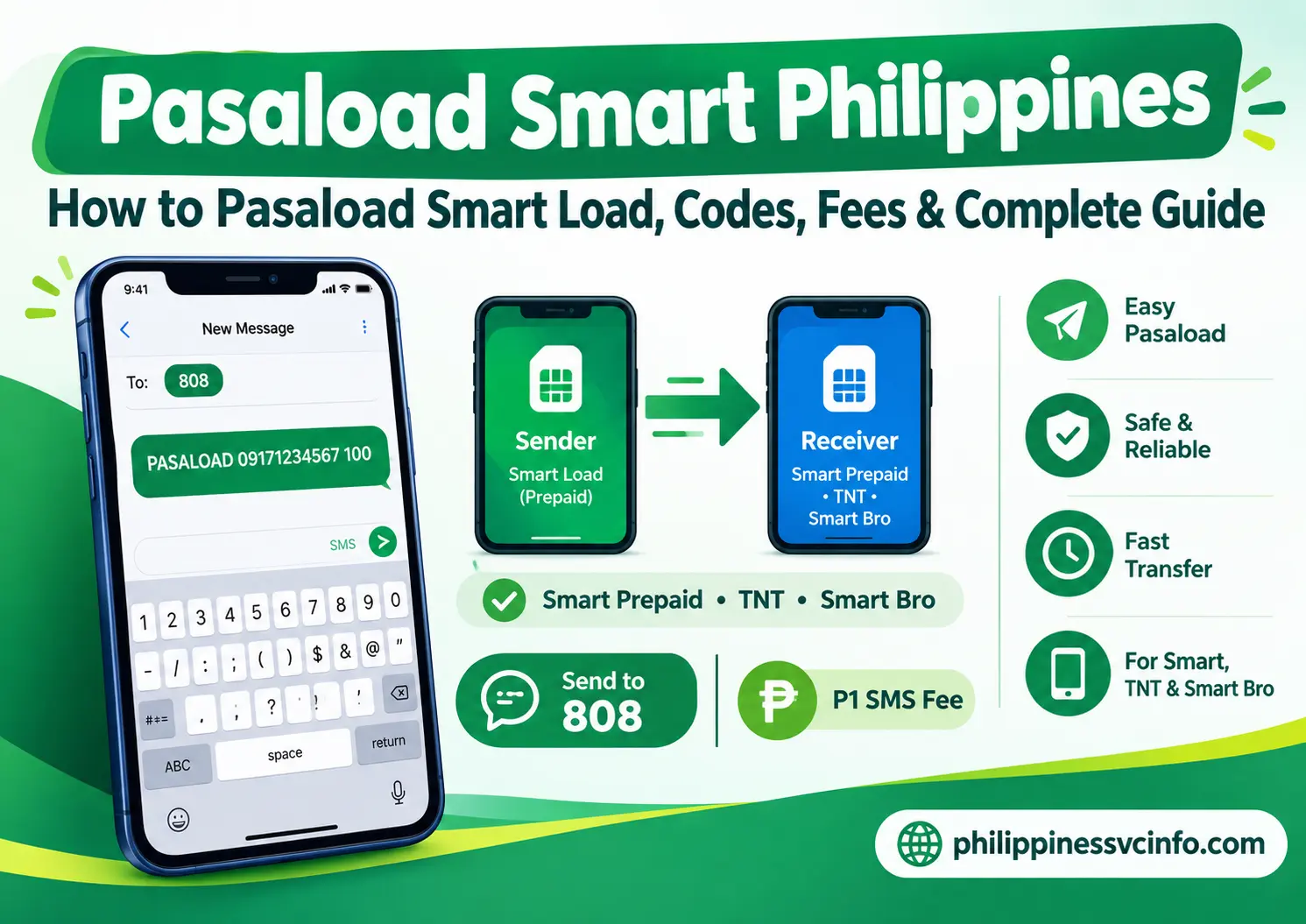
Smart Pasaload is a convenient Smart Communications service that lets eligible prepaid subscribers share their mobile load with another Smart number. It can be useful when family members or friends need extra credit for calls, texts, or mobile data, although transfers are subject to applicable limits, fees, and eligibility conditions.
What Is Smart Pasaload?
Pasaload Smart is a mobile balance-sharing service that enables eligible Smart subscribers to transfer prepaid load, selected mobile promos, or share data with another Smart network user. Instead of buying a physical load card or visiting a retailer, subscribers can instantly send credit through their mobile phones.
The pasaload smart service is especially useful when the recipient has no remaining balance but needs to make calls, send text messages, or purchase an internet promo.
Unlike ordinary mobile top-ups, pasaload smart works only within the Smart family of networks. This means you can send load between Smart, TNT, and Smart Bro subscribers, but not to other Philippine mobile networks.
Why Use Smart Pasaload?
Millions of Smart subscribers rely on pasaload smart because it provides a fast and convenient way to help others without leaving home.
Some common situations where pasaload smart becomes useful include:
- Sending emergency load to family members.
- Sharing prepaid balance with students.
- Helping tourists travelling around the Philippines.
- Sending internet data to friends.
- Purchasing a prepaid promo for another Smart subscriber.
- Assisting elderly family members who cannot reload online.
Because transactions are completed digitally, pasaload smart saves both time and effort compared with purchasing physical reload cards.
Who Can Use Pasaload Smart?
Not every mobile number supports the same transfer options. Smart has different rules depending on your subscription type.
| Subscriber Type | Can Send Load | Can Receive Load | Remarks |
|---|---|---|---|
| Smart Prepaid | ✔ Yes | ✔ Yes | Uses available prepaid balance |
| TNT | ✔ Yes | ✔ Yes | Fully compatible with Smart |
| Smart Bro Prepaid | ✔ Yes | ✔ Yes | Pocket Wi-Fi and broadband SIMs |
| Smart Postpaid | ✔ Yes | ❌ No | Charged to monthly bill with spending limits |
| Globe | ❌ No | ❌ No | Not supported |
| DITO | ❌ No | ❌ No | Cross-network transfers unavailable |
This means pasaload smart only works within the Smart network family.
Requirements Before Using Smart Pasaload
Before starting a pasaload smart transaction, make sure every requirement has been met.
Active SIM Cards
Both the sender and recipient must have active Smart network SIM cards. Suspended, blocked, or expired SIMs cannot complete a transfer.
Registered SIM
Following Philippine SIM Registration regulations, both mobile numbers should be properly registered before using services like pasaload smart.
Enough Available Balance
The sender must have sufficient prepaid load to cover:
- the amount being transferred, and
- the ₱1 transaction fee.
For example:
If you plan to send ₱100, your available balance should be at least ₱101.
Supported Smart Networks
Pasaload Smart currently supports transfers between:
- Smart Prepaid
- Smart Postpaid
- TNT
- Smart Bro Prepaid
Transfers to Globe, TM, DITO, or other telecom providers are not available.
Features of Smart Pasaload
Many subscribers think pasaload smart only transfers airtime, but the service now supports several sharing options.
Some of its major features include:
- Transfer prepaid load.
- Share selected mobile data.
- Purchase eligible prepaid promos for another subscriber.
- SMS-based transactions.
- Smart Menu support on compatible SIM cards.
- Fast confirmation process.
- Low transaction fee.
- Convenient emergency load sharing.
These features make pasaload smart one of Smart’s most practical prepaid services.
Benefits of Using Smart Pasaload
Choosing pasaload smart offers several advantages compared with traditional reload methods.
Quick Transactions
Most transfers are completed within a few moments after confirmation.
No Internet Required
Since pasaload smart mainly works through SMS, users can send load even without an internet connection.
Useful During Emergencies
If someone runs out of load while travelling or during an emergency, another Smart subscriber can immediately send credit.
Supports Multiple Smart Services
The service works with Smart Prepaid, TNT, Smart Bro, and selected Smart Postpaid accounts.
Affordable Service Fee
Each successful pasaload smart transaction only requires a small ₱1 fee, making it an economical option for helping others.
Things to Know Before Sending Load
Before performing your first pasaload smart transaction, keep these important reminders in mind.
- Double-check the recipient’s mobile number.
- Verify that the number belongs to Smart, TNT, or Smart Bro.
- Ensure you have enough balance.
- Wait for Smart’s confirmation message.
- Reply YES before the confirmation expires.
- Remember that completed transactions usually cannot be reversed.
Taking a few extra seconds to verify the information helps avoid sending load to the wrong number.
How Does Smart Pasaload Work?
The pasaload smart system follows a simple process:
- Enter the correct SMS command.
- Send the message to 808.
- Receive a confirmation request.
- Reply YES.
- Smart deducts the load and transaction fee.
- The recipient receives the transferred balance.
This verification step helps protect subscribers from accidental or unauthorised transfers.
How to Transfer Regular Load Using Pasaload Smart via SMS
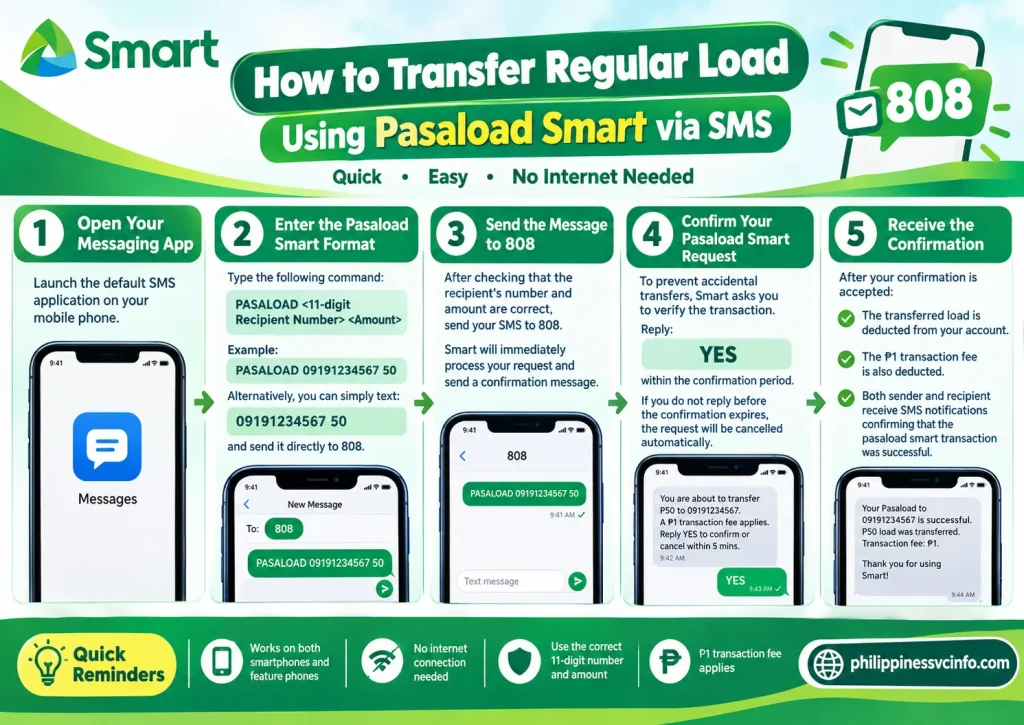
The SMS method remains the quickest and most widely used way to complete a pasaload smart transaction. It works on both smartphones and basic feature phones, so you do not need an internet connection to transfer load.
Step 1: Open Your Messaging App
Launch the default SMS application on your mobile phone.
Step 2: Enter the Pasaload Smart Format
Type the following command:
PASALOAD <11-digit Recipient Number> <Amount>Example
PASALOAD 09191234567 50Alternatively, Smart Prepaid users can simply text:
09191234567 50and send it directly to 808.
Step 3: Send the Message to 808
After checking that the recipient’s number and amount are correct, send your SMS to 808.
Smart will immediately process your request and send a confirmation message.
Step 4: Confirm Your Pasaload Smart Request
To prevent accidental transfers, Smart asks every sender to verify the transaction.
Reply:
YESwithin the confirmation period.
If you do not reply before the confirmation expires, the pasaload smart request will be cancelled automatically.
Step 5: Receive the Confirmation
After your confirmation is accepted:
- The transferred load is deducted from your account.
- The ₱1 transaction fee is also deducted.
- Both sender and recipient receive SMS notifications confirming that the pasaload smart transaction was successful.
How to Transfer Load Using the Smart Menu
(SIM Toolkit)
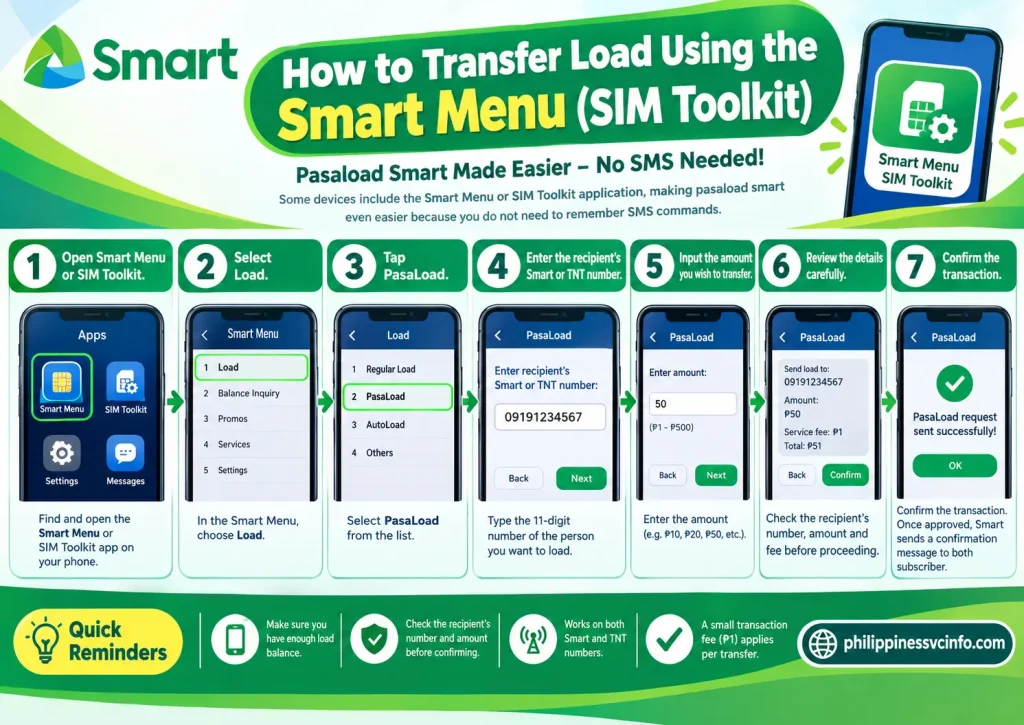
Some devices include the Smart Menu or SIM Toolkit application, making pasaload smart even easier because you do not need to remember SMS commands.
Follow These Steps
- Open Smart Menu or SIM Toolkit.
- Select Load.
- Tap PasaLoad.
- Enter the recipient’s Smart or TNT number.
- Input the amount you wish to transfer.
- Review the details carefully.
- Confirm the transaction.
Once approved, Smart sends a confirmation message to both subscribers.
How to Share Mobile Data with PasaData
Besides regular load, pasaload smart also supports sharing mobile internet through PasaData for eligible data promos.
This feature is useful when another Smart subscriber needs additional mobile data without purchasing a new package.
Steps to Use PasaData
Open your messaging app and type:
PASADATA <Recipient Number> <Data Amount>Example:
PASADATA 09191234567 500MBSend the message to 808.
If your subscription is eligible, the recipient receives the shared data after confirmation. Availability depends on the active promo supporting data sharing.
How to Send Smart Promos to Another Subscriber
Instead of transferring peso balance, pasaload smart also lets you purchase selected prepaid promos for another Smart user.
This option is often called Pasa Promo.
SMS Format
PASALOAD <Recipient Number> <Promo Code>Example
PASALOAD 09191234567 GST99Send the SMS to 808 and reply YES when prompted.
The recipient receives the selected promo after successful processing.
Pasaload Smart Transaction Charges
Every successful pasaload smart request includes a small service charge.
| Transaction | Fee |
|---|---|
| Load Transfer | ₱1.00 |
| Data Sharing | Depends on eligible promo |
| Recipient Fee | Free |
The sender pays the transaction fee.
For example:
| Amount Sent | Total Deduction |
|---|---|
| ₱20 | ₱21 |
| ₱50 | ₱51 |
| ₱100 | ₱101 |
| ₱200 | ₱201 |
This fixed ₱1 fee applies to successful Pasaload transactions.
Pasaload Smart Load Validity
The validity period of transferred load depends on the denomination received.
| Load Received | Validity |
|---|---|
| ₱2–₱10 | 3 Days |
| ₱15–₱30 | 15 Days |
| ₱60–₱100 | 30 Days |
| ₱200 | 60 Days |
If you share mobile data through PasaData, the transferred allocation is generally valid for 24 hours, subject to the terms of the eligible data promo.
Smart Postpaid Pasaload Limits
Smart Postpaid subscribers can also use pasaload smart, but transfers are billed to their monthly statement rather than deducted from prepaid balance.
Current monthly limits include:
| Monthly Service Fee (MSF) | Monthly Pasaload Limit |
|---|---|
| ₱1,200 or below | ₱300 |
| Above ₱1,200 | ₱500 |
Supported postpaid denominations include:
- ₱2
- ₱5
- ₱10
- ₱15
- ₱20
- ₱30
- ₱100
- ₱200
- ₱500
These caps help reduce fraudulent or excessive use of the service.
Best Practices Before Sending Pasaload Smart
To ensure a successful pasaload smart transaction:
- Confirm that the recipient uses Smart, TNT, or Smart Bro.
- Double-check the mobile number before sending.
- Keep enough balance to cover the transfer and the ₱1 fee.
- Reply YES promptly to the confirmation SMS.
- Save the confirmation message until the recipient verifies receipt.
Following these simple practices helps avoid failed transfers and unnecessary delays.
Troubleshooting Common Smart Pasaload Problems
Although pasaload smart is a reliable service, you may occasionally encounter an error during a transaction. Most issues can be resolved quickly by checking your balance, confirming the SMS format, or verifying the recipient’s number.
Insufficient Balance
This is the most common reason why a pasaload smart request fails.
Remember that Smart deducts:
- The amount you want to transfer.
- The ₱1 transaction fee.
For example:
| Load to Send | Minimum Required Balance |
|---|---|
| ₱20 | ₱21 |
| ₱50 | ₱51 |
| ₱100 | ₱101 |
| ₱200 | ₱201 |
If your remaining balance is lower than the required amount, the transfer will not proceed.
Confirmation SMS Expired
Every pasaload smart transaction requires confirmation.
If you receive a message from 808, you must reply:
YES
within the allowed time.
If you wait too long, the request expires automatically and you will need to send a new pasaload smart request.
Invalid Mobile Number
Always verify that:
- The recipient’s number contains 11 digits.
- The number begins with 09.
- The recipient is using Smart, TNT, or Smart Bro.
If you accidentally enter a Globe or DITO number, pasaload smart will not process the request because cross-network transfers are not supported.
Service Temporarily Unavailable
Sometimes Smart performs network maintenance.
If pasaload smart is temporarily unavailable:
- Wait a few minutes.
- Check your mobile signal.
- Retry the transaction.
- Visit Smart Help for any service advisories.
PasaData Not Working
If you cannot share mobile data:
- Ensure your current promo supports PasaData.
- Confirm you still have enough shareable data remaining.
- Check that the recipient is on the Smart network.
- Use the correct SMS format before sending to 808.
Smart Pasaload Tips for Successful Transfers
Using pasaload smart is simple, but following a few best practices can help you avoid mistakes.
Verify the Recipient’s Number
A completed pasaload smart transaction generally cannot be reversed, so always double-check the destination number before confirming.
Keep Extra Balance
Always leave enough load to cover both the transfer amount and the ₱1 transaction fee.
Confirm Quickly
Reply YES immediately after receiving the confirmation message to prevent the request from expiring.
Save Confirmation Messages
Keep the confirmation SMS until the recipient confirms receipt of the transferred load or data.
Use Official Smart Channels
Follow only the latest instructions published by Smart to avoid outdated commands or unsupported promo codes.
Important Things to Remember About Smart Pasaload
Before using pasaload smart, keep these points in mind:
- Only Smart, TNT, Smart Bro, and eligible Smart Postpaid subscribers can use the service.
- Globe, TM, and DITO numbers cannot send or receive Smart Pasaload.
- Every successful transaction includes a ₱1 service fee.
- Smart Postpaid transfers are billed to the monthly account and are subject to monthly limits.
- Shared data is only available for eligible promotions.
- Confirmation from 808 is required before the transfer is completed.
Official Smart Resources
For the latest updates on pasaload smart, always use Smart’s official support pages.
These resources provide the newest information about Smart Prepaid, TNT, Smart Bro, Pasaload, PasaData, prepaid promos, and customer support.
Frequently Asked Questions (FAQs)
Final Thoughts
Pasaload Smart remains one of the most convenient services for sharing prepaid load, mobile data, and eligible promos with family and friends across the Smart network. Whether you are a resident, student, tourist, or business traveller in the Philippines, the service provides a quick and secure way to keep loved ones connected.For the best experience, always follow the official SMS format, confirm your transaction promptly, maintain sufficient balance for the transfer and service fee, and refer to Smart’s official support pages whenever you need the latest information or assistance.