
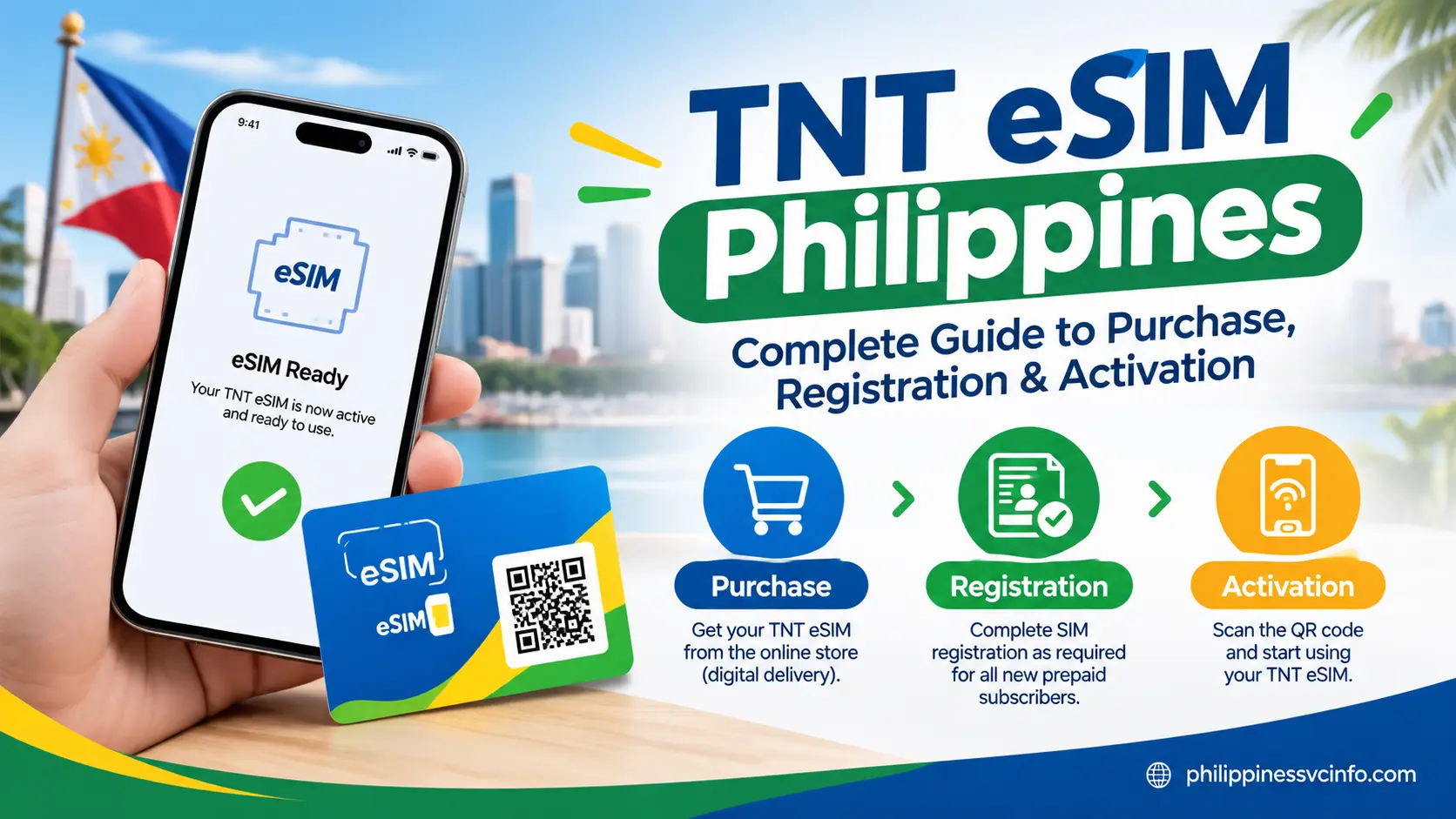
TNT eSIM is a digital prepaid SIM service in the Philippines that lets users activate a TNT mobile number on compatible smartphones without inserting a physical SIM card. It uses a QR code for installation and requires SIM registration before users can access supported calls, texts, mobile data, and prepaid services.
What Is a TNT eSIM?
A TNT eSIM is the digital version of a traditional TNT SIM. Instead of receiving a plastic card, you receive an eSIM QR code that can be scanned by an eSIM-capable device.
Once the profile is installed and the required registration is completed, the TNT eSIM can provide the usual prepaid mobile services, including:
- Mobile data
- Incoming and outgoing calls
- SMS
- TNT prepaid promos
- Access to supported local mobile services
- Use alongside another SIM on compatible phones
The main difference is how the SIM profile reaches your phone. A physical TNT SIM is inserted into the SIM tray, whereas the TNT prepaid eSIM is downloaded electronically.
Why Choose a TNT Digital SIM?
The digital format can be convenient for people who do not want to handle another physical SIM card. It can also be useful for phones with one physical SIM slot because a compatible device may allow a physical SIM and eSIM to operate together.
TNT says users can install multiple eSIM profiles on supported devices, although the number of profiles that can be stored and the number that can be active simultaneously depend on the specific phone.
Key point: eSIM capability alone is not enough. The handset should also be compatible with the TNT/Smart eSIM service and, where applicable, should not be locked to another network.
Who Can Use a TNT eSIM in the Philippines?
A TNT eSIM Philippines service can be relevant to local users as well as people visiting or staying in the country. TNT specifically provides information for tourists and foreign nationals, including the documents required for registration.
Foreign visitors should pay particular attention to the registration rules. According to TNT’s official SIM registration information, tourists and foreign nationals must register their SIMs. Tourists are asked for information such as their mobile number, full name, nationality, date of birth and selfie, along with a passport, proof of address in the Philippines and a return ticket or other evidence showing departure from the Philippines.
Foreign nationals staying in the Philippines under other types of visas may have additional documentation requirements, such as a passport, proof of address and applicable immigration, employment or student documents.
What About Minors?
TNT’s official registration information states that a person below 18 may purchase a SIM, but the SIM cannot be registered under the minor’s own name. Registration must instead be handled under the parent or legal guardian according to the stated requirements.
TNT eSIM Compatible Phones
Before buying a TNT eSIM, check whether your phone supports eSIM. TNT publishes a list of approved eSIM-capable devices, although the company notes that device compatibility can change and recommends checking the manufacturer’s information when a model is not listed.
Examples listed by TNT include:
| Brand | Examples of supported models listed by TNT |
|---|---|
| Apple | iPhone XR, XS, XS Max, iPhone 11–15 series, iPhone SE (2020) |
| Samsung | Galaxy S20–S23 series, selected Galaxy Fold and Flip models |
| Huawei | Huawei P40 / P40 Pro and Mate P40 Pro |
| OPPO | Find N2 Flip, Find N3 Flip |
The official TNT list shown on its current information page is based on approved devices, with the listed device information dated September 2023. Therefore, owners of newer or different models should confirm eSIM support with the phone manufacturer before purchasing.
Your Phone Should Be Unlocked
If you are bringing a phone from another country, check its carrier-lock status before trying to install the TNT eSIM.
TNT specifically states that a non-Smart-issued or open-line eSIM-capable device can use a TNT prepaid eSIM. However, a phone locked to another network may prevent the TNT profile from working.
Before buying, check these three things:
- Your phone supports eSIM.
- Your device is compatible with the TNT/Smart service.
- Your phone is not locked to another network.
How Much Does a TNT eSIM Cost?
The price depends on the product or transaction being purchased.
The current Smart Online Store listing for TNT eSIM – Digital shows ₱75 and advertises up to 21 GB of free data plus free calls and texts for seven days.
Meanwhile, TNT’s main eSIM information page currently states ₱89 for the TNT Prepaid Digital eSIM and also lists ₱89 for a carded eSIM package containing ₱300 TNT load.
Because the official pages show different pricing for the digital eSIM, users should check the actual Smart Online Store product page at checkout for the price applicable to their purchase.
This distinction is useful: do not assume that the ₱89 amount shown for an upgrade or replacement is necessarily the same as the current online-store price of a new digital eSIM.
Where Can You Buy a TNT eSIM?
TNT says its digital eSIM with a QR code delivered by email is available through the Smart Online Store. Carded eSIM products may also be available through Smart Stores, Smart-operated locations and selected official retail channels.

For a digital purchase, the basic process is:
- Open the official Smart Online Store.
- Find NEW TNT Prepaid Digital eSIM.
- Continue past the reminder shown on the store.
- Add the product to your cart.
- Open the cart.
- Select Check Out and Pay.
- Enter the required information, including an alternate 10-digit mobile number and email address.
- Verify the email OTP.
- Select an available payment method.
- Complete payment.
- Check your email for the TNT eSIM QR code.
TNT’s official instructions say the QR code is sent to the email address used for the transaction. The completed transaction page may also provide a View eSIM QR option.
Keep Your Email and QR Code Safe
The QR code is an important part of the TNT eSIM activation process. TNT recommends keeping a copy in a safe place because it may be needed again if the eSIM profile has to be installed on another compatible device.
However, do not share your eSIM QR code publicly. Treat it as sensitive mobile-service information.
How to Install Your TNT eSIM QR Code
Once you have purchased the TNT eSIM and received the QR code, the next stage is installing the digital SIM profile on your phone.
TNT recommends having a stable internet connection before beginning the installation. If the QR code was delivered by email, you can open that email on another device and scan the code with the phone where you want to install the TNT eSIM. Samsung devices may also allow the QR code to be saved as an image and uploaded through the SIM Manager.
Before Scanning the QR Code
Have these things ready:
- Your eSIM-capable phone
- The TNT eSIM QR code
- A reliable Wi-Fi or mobile-data connection
- Your TNT purchase email
- Access to your phone’s SIM/eSIM settings
- A valid ID for the subsequent registration process
Important: Do not delete the existing eSIM profile simply because you encounter an installation error. TNT specifically advises customers to contact support or visit a Smart Store for assistance rather than deleting the profile when an error occurs.
TNT eSIM Installation on iPhone
TNT’s published instructions cover Apple devices running iOS 12.4 or later. The exact menu wording can vary slightly between iPhone generations and iOS versions.
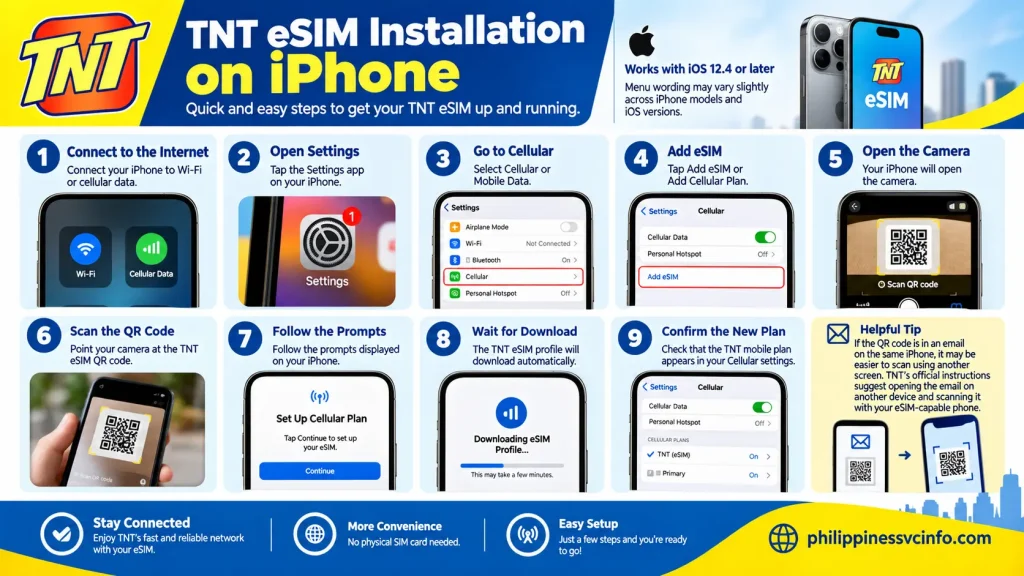
A typical installation process is:
- Connect your iPhone to Wi-Fi or cellular data.
- Open Settings.
- Select Cellular or Mobile Data.
- Choose Add eSIM or Add Cellular Plan.
- The camera will open.
- Scan the TNT eSIM QR code.
- Follow the prompts displayed by your iPhone.
- Wait for the TNT eSIM profile to download.
- Confirm that the new TNT mobile plan appears in your Cellular settings.
If the QR code is in an email on the same iPhone, using another screen to display the QR code can make scanning easier. TNT’s official instructions specifically suggest opening the email on another device and scanning it with the eSIM-capable phone.
After the iPhone Installation
Give the phone a moment to recognise the newly installed mobile profile. You may then see the TNT line under Cellular/Mobile Data.
You can assign a label such as TNT, Personal, or another name that helps you distinguish it from your existing number.
If you’re using two numbers, also check which line is selected for:
- Mobile data
- Voice calls
- SMS/iMessage
- FaceTime
The available dual-SIM options depend on the particular iPhone model and configuration.
Installing TNT eSIM on Samsung Galaxy
Samsung uses the SIM Card Manager for eSIM installation on supported models.
According to TNT’s official instructions:
- Connect the phone to Wi-Fi or cellular data.
- Open Settings.
- Tap Connections.
- Select SIM Card Manager.
- Choose Add Mobile Plan.
- Select Add using QR code.
- Scan your TNT eSIM QR code.
- Select Add Cellular Plan when prompted.
- Tap OK to activate the new mobile plan.
- Check that the TNT eSIM profile appears in your SIM settings.
The wording can vary depending on the Samsung model and software version, so use the device manufacturer’s current instructions if your menus look different.
Huawei TNT eSIM Installation
For supported Huawei models, TNT’s published process uses the phone’s Mobile Network and SIM Management settings:
Settings → Mobile Network → SIM Management → SIM 2 → eSIM → Add eSIM
You then scan the TNT QR code and select Add this eSIM.
For other brands, TNT recommends checking the manufacturer’s instructions for the specific phone model because the installation menus aren’t identical across Android devices.
TNT eSIM Registration: The Step You Should Not Skip
Installing the profile does not replace SIM registration.
The Philippine SIM Registration Act requires new SIMs to be registered, and TNT directs customers to its official registration channels to register their TNT eSIM before using the mobile services. TNT states that successful registration and activation enables services such as incoming and outgoing voice calls, SMS and mobile data.
Official registration options:
What Information Is Needed?
The information depends on your registration category.
For a typical individual registration, expect to provide identifying information and an accepted identification document. Foreign visitors have additional requirements under TNT’s registration instructions. TNT’s official page states that tourists need information including their mobile number, name, nationality and date of birth, together with a passport, proof of Philippine address and a return ticket or other document showing the intended departure from the Philippines.
Before starting, make sure your ID image is clear and your personal information matches the details you submit.
A Simple TNT eSIM Registration Checklist
Use this checklist before submitting:
- TNT eSIM installed
- TNT mobile number available
- Stable internet connection
- Valid identification document
- Personal details ready
- Clear ID image
- Selfie/verification information ready where required
- Foreign visitors have the additional required documents
- Registration confirmation saved
After submission, retain any confirmation or reference information provided by the registration system.
What Happens After TNT eSIM Registration?
Once the TNT eSIM registration and activation process has been successfully completed, TNT states that mobile services become available, including voice, SMS and data.
If the phone still displays No Service, don’t immediately delete the eSIM. First check that:
- Registration was successfully completed.
- The TNT line is switched on in your SIM settings.
- Your phone has restarted or been refreshed after activation.
- The device is compatible and not restricted by another carrier.
- The phone has an appropriate network connection.
If the problem continues, TNT recommends contacting its support channels or visiting a Smart Store.
TNT eSIM Freebies and Initial Data
The benefits attached to a newly purchased or activated TNT eSIM can depend on the specific product and current offer.
TNT’s current eSIM page explains that the digital eSIM provides access to TNT’s local calls, texts and data services. The same page also identifies separate welcome-pack information for TNT SIM activations, so customers should check the current offer attached to their particular purchase rather than assuming every TNT eSIM receives the same promotional package.
The Smart Online Store’s current digital TNT eSIM listing advertises up to 21 GB of free data plus free calls and texts for seven days with the product currently displayed online.
Promotional inclusions can change, so the product page and the offer displayed during purchase should be treated as the current reference.
How to Load a TNT eSIM
Once the TNT eSIM is active, you can add prepaid load and register available TNT promos through supported loading channels.

Common options include:
1. Smart App
The Smart mobile app can be used for supported TNT account and prepaid functions. Depending on the current app version, users can check account information, purchase load and manage available offers.
2. Smart Online Channels
TNT and Smart provide online options for prepaid services. These are useful when you don’t want to visit a physical retailer.
3. Physical Retailers
TNT prepaid services are also supported through authorised loading outlets and Smart/TNT retail channels.
4. Digital Wallets
Supported payment and loading options can change over time. When purchasing load online, use the payment methods shown by the official TNT/Smart service rather than relying on an old list found on another website.
Checking Your TNT Balance and Services
After activating your TNT eSIM, you may want to check your available load, data or registered offers.
TNT’s current support information points users towards Smart/TNT digital channels for managing services. USSD and app functions can change as the service is updated, so check the current TNT or Smart instructions if a particular code does not work.
This is especially important for visitors using a newly activated TNT eSIM Philippines number because the available account features may depend on the current prepaid service configuration.
Can You Use Two Numbers With a TNT eSIM?
Yes, one of the main advantages of an eSIM is the ability to combine mobile profiles on a compatible device.
TNT states that users can install multiple eSIM profiles, while the number that can actually remain active at the same time depends on the phone model. TNT’s current information says some devices can store approximately 8–10 eSIM profiles, but only two mobile numbers can be active simultaneously.
Depending on the handset, the active combination may include:
- One physical SIM + one eSIM
- Two eSIMs
- Two physical SIMs on supported dual-SIM devices
The manufacturer determines the exact configuration.
Example for a Traveller
A visitor could potentially keep:
Physical SIM: Home-country number
TNT eSIM: Philippine number
This arrangement can be useful when the device supports simultaneous operation of both lines.
You can then select which number handles mobile data and which line is used for calls or messages.
Can You Move a TNT eSIM to Another Phone?
Yes, TNT says a prepaid eSIM can be moved to another compatible eSIM device by scanning the QR code again, but the existing eSIM profile should first be removed from the previous device.
Before Moving It
Do not start by deleting the old profile unless you have access to the required QR code.
TNT recommends keeping the QR code in a safe place because it may be needed to reinstall the eSIM.
For an iPhone, TNT’s instructions use:
Settings → Cellular/Mobile Data → Select eSIM → Remove Cellular Plan
For supported Android devices, the relevant option is generally located under:
Settings → Connections → SIM Card Manager → Select eSIM → Remove
The exact menu can vary by manufacturer.
Important: TNT specifically warns users not to delete the eSIM profile when there is an error. Contact support first if you’re unsure whether the profile can be safely removed.
What If You Lose the TNT eSIM QR Code?
The QR code should be treated as an important part of your digital SIM records.
If the QR email has disappeared, TNT recommends checking your email’s Spam/Junk folder or, if you accidentally deleted the message, checking the Recycle Bin/Trash. If the QR cannot be recovered, TNT says customers can provide their email address or order reference number through its support channels. A Smart Store can also assist with an eSIM replacement.
This is one reason it is sensible to retain the original purchase email.
What If Your Phone Is Lost?
A lost phone creates a different situation because the eSIM profile may still be installed on that device.
TNT advises reporting the lost or stolen device to the nearest Smart Store. Depending on the circumstances, a replacement physical SIM or replacement TNT eSIM may be issued while retaining the same mobile number. TNT’s current information lists ₱89 for a replacement TNT eSIM when the original QR cannot be recovered or the lost device cannot be factory-reset remotely.
If your phone supports remote device management, follow the manufacturer’s procedures for securing or resetting the lost device.
TNT eSIM Troubleshooting
“My TNT eSIM QR Code Is Not Working”
First check the basics:
- Make sure the QR code is clearly visible.
- Use a stable Wi-Fi or data connection.
- Try displaying the QR code on another screen.
- Confirm that your phone supports eSIM.
- Check that the handset is not locked to another network.
- Do not repeatedly delete and reinstall the eSIM profile without checking TNT’s instructions.
TNT says a defective digital eSIM purchased through the Smart Online Store can be reported through its support channels, and a Smart Store may also assist with a replacement.
“My TNT eSIM Has No Signal”
Check whether the registration process has been completed first.
A newly installed TNT eSIM still needs to be registered and activated before mobile services can be used. TNT explicitly directs users to the Smart SIM Registration portal for this step.
If registration is already successful, check your phone’s:
- Cellular/mobile network setting
- TNT line status
- Network selection
- Mobile data setting
- Device compatibility
Restarting the phone can also refresh the network connection.
“I Never Received My TNT eSIM QR”
Check your:
- Primary inbox
- Spam folder
- Junk folder
- Email address entered during checkout
If the QR remains missing, TNT says customers can contact support through Messenger or @SMARTCares and provide their email address or order reference number.
TNT eSIM vs Physical TNT SIM
For many users, the decision is simply whether a digital or physical SIM better suits their phone and circumstances.
| Feature | TNT eSIM | Physical TNT SIM |
|---|---|---|
| Plastic card | No | Yes |
| Installation | QR/download | Insert SIM |
| Compatible phone required | eSIM-capable | Physical SIM slot |
| Online purchase | Available | Available through various channels |
| SIM registration | Required | Required |
| Useful for dual-SIM phones | Yes, where supported | Yes, where supported |
| Easy to remove physically | No | Yes |
| Risk of losing the card | Lower | Higher |
| Device compatibility | More limited | Broader |
The TNT eSIM is particularly useful when the phone supports eSIM and the user wants to avoid handling another physical card. A physical TNT SIM can make more sense for phones without eSIM support.
Neither format removes the Philippine SIM registration requirement.
Important Things to Check Before Buying TNT eSIM
A few minutes of preparation can prevent most installation problems.

1. Confirm eSIM Support
Do not rely only on the brand name. Check the exact model number because eSIM support can differ between models, regions and variants.
2. Check Carrier Lock
A phone purchased through a foreign mobile carrier may be restricted to that carrier.
An unlocked device is important when bringing an overseas phone to the Philippines.
3. Prepare Your Registration Documents
The required documentation depends on whether you are:
- A Filipino citizen
- A foreign tourist
- A foreign resident
- A student
- A business user
- A minor registering under a parent or guardian
Foreign visitors should prepare their passport and the additional documents specified by TNT before starting registration.
4. Keep the QR Code
The QR code is an important part of the TNT eSIM activation process.
Do not post it online, send it publicly or leave it in an easily accessible account.
5. Use Official Websites
For purchasing, registration and support, start with official TNT or Smart channels.
Official TNT: tntph.com
TNT SIM & eSIM: tntph.com/Pages/SIM
TNT SIM Registration: tntph.com/sim-reg
Smart SIM Registration: smart.com.ph/simreg
Smart Online Store: store.smart.com.ph
Avoid websites that ask you to upload your passport, ID or selfie outside the official registration process.
Common TNT eSIM Mistakes to Avoid
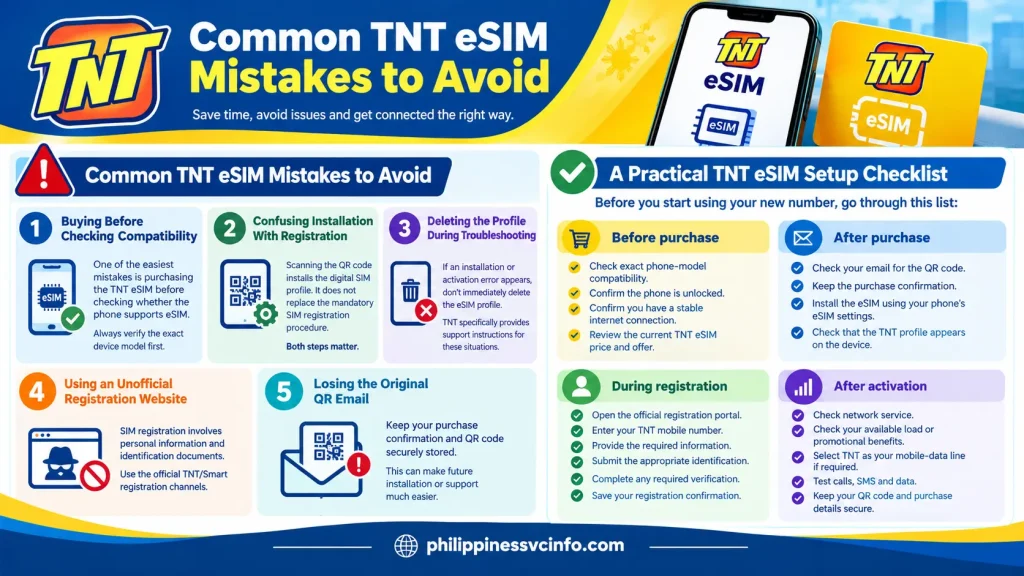
Buying Before Checking Compatibility
One of the easiest mistakes is purchasing the TNT eSIM before checking whether the phone supports eSIM.
Always verify the exact device model first.
Confusing Installation With Registration
Scanning the QR code installs the digital SIM profile. It does not replace the mandatory SIM registration procedure.
Both steps matter.
Deleting the Profile During Troubleshooting
If an installation or activation error appears, don’t immediately delete the eSIM profile. TNT specifically provides support instructions for these situations.
Using an Unofficial Registration Website
SIM registration involves personal information and identification documents. Use the official TNT/Smart registration channels.
Losing the Original QR Email
Keep your purchase confirmation and QR code securely stored. This can make future installation or support much easier.
A Practical TNT eSIM Setup Checklist
Before you start using your new number, go through this list:
Before purchase
- Check exact phone-model compatibility.
- Confirm the phone is unlocked.
- Confirm you have a stable internet connection.
- Review the current TNT eSIM price and offer.
After purchase
- Check your email for the QR code.
- Keep the purchase confirmation.
- Install the eSIM using your phone’s eSIM settings.
- Check that the TNT profile appears on the device.
During registration
- Open the official registration portal.
- Enter your TNT mobile number.
- Provide the required information.
- Submit the appropriate identification.
- Complete any required verification.
- Save your registration confirmation.
After activation
- Check network service.
- Check your available load or promotional benefits.
- Select TNT as your mobile-data line if required.
- Test calls, SMS and data.
- Keep your QR code and purchase details secure.
TNT eSIM for Students, Tourists and Everyday Users
The TNT eSIM Philippines option can serve different types of prepaid users.
For International Students
An international student can use a compatible phone with a TNT eSIM while retaining another SIM for their existing number, subject to the handset’s dual-SIM capabilities.
The student should complete the required Philippine SIM registration using the documentation applicable to their status.
For Tourists
For short-term visitors, the digital format removes the need to find and insert a physical SIM. However, tourists must still meet the applicable registration requirements.
A visitor should prepare their passport and other required documents before beginning the registration process.
For Local Prepaid Users
Local users who have a compatible unlocked phone can use the TNT prepaid eSIM instead of purchasing a physical SIM.
It can be particularly useful for dual-SIM phones where the user wants to maintain another number.
TNT eSIM FAQs
Final Takeaway
A TNT eSIM provides a digital way to get TNT prepaid mobile service without inserting a plastic SIM card. The essential process is straightforward: check device compatibility, purchase the digital eSIM through an official channel, install the QR-based profile, complete the required SIM registration and then activate and manage the prepaid service.For visitors and foreign residents, document preparation is particularly important because registration requirements vary by status. For everyone else, the most important checks are eSIM compatibility, carrier-unlock status and the correct official registration channel.Before relying on a price, promo, device list or USSD feature, check the current TNT or Smart page because these details can change. The official TNT pages remain the best reference for the latest TNT eSIM requirements and support information.
Discover What You Need to Know:
- Globe Prepaid eSIM Philippines 2026 : Buy, Install & Activate Guide
- Globe Recharge ML: Complete Guide to Mobile Legends Top-Up in the Philippines 2026
- GOMO Load Philippines 2026 : How to Buy Load, Check Balance, Data & Promos
- Globe Load Philippines 2026 : Complete Guide to Buying, Checking Balance, Promos & More
- Globe Prepaid Sim Pack Philippines 2026 : Registration, Load & Activation Guide








