Globe Plan Renewal 2026: Requirements, Eligibility, Online Steps & Guide

A Globe Plan Renewal is a convenient way for existing Globe Postpaid subscribers to continue their mobile service while moving to a newer plan, choosing a different device, or taking advantage of updated plan features. Globe provides an online renewal channel where eligible customers can review available plans, choose a device or SIM-only option, provide the required information, and complete their order.
The official Globe renewal website is:
Globe also confirms that plan renewal can be done through the Globe Online Shop, Globe Stores, or the GlobeOne app.
This guide explains the Globe Plan Renewal process, eligibility, requirements, available options, online steps, possible charges, and common questions so subscribers can understand what to expect before submitting a renewal request.
What Is Globe Plan Renewal?
Globe Plan Renewal means extending your mobile postpaid service by entering into a new plan or contract arrangement after becoming eligible for renewal. Depending on your account and the current offers available, you may be able to continue with a similar plan, move to a different GPlan, or choose a new device.
Renewal is different from simply changing your plan. Globe explains that a plan change updates your existing postpaid plan, while a renewal extends your postpaid contract.
For customers who want a new smartphone, renewal can also provide access to Globe’s current device offers. The official renewal shop currently lists options such as GPlan with Device and different smartphone bundles.
Why Renew Your Globe Plan?
There are several reasons a subscriber may choose a Globe Plan Renewal, including:
- Getting a newer smartphone
- Choosing an updated postpaid plan
- Accessing newer data and service inclusions
- Continuing an existing Globe Postpaid number
- Choosing a SIM-only plan instead of a device bundle
- Taking advantage of current device promotions
- Customizing a plan with available add-ons
- Moving to a plan that better matches current data requirements
Available devices, promotions, inclusions, and pricing can change, so it is important to check the official Globe website before submitting your application.
Globe Plan Renewal Eligibility
Before starting your Globe Plan Renewal, check whether your account is eligible. Eligibility can depend on your existing contract, account status, and the type of renewal you want.
Globe’s official guidance says existing subscribers who are already out of lock-up can change plans, while customers who are still within a contract can be subject to additional conditions or fees depending on the requested change.
Your Globe account should also be active and free from outstanding balances. Globe’s renewal guide specifically advises subscribers to make sure they have no outstanding balance before renewing.
Basic Eligibility Checklist
Before beginning your application, check the following:
- Your Globe Postpaid account is active.
- You have checked your current contract status.
- Any outstanding balance has been settled.
- You have access to the mobile number associated with your account.
- You can complete account verification when requested.
- You have the necessary information for your selected plan.
- If required, you can provide supporting documents.
The exact requirements may vary depending on the plan and application. The online renewal portal can indicate when supporting documentation is needed. For example, Globe’s current plan-builder page displays a request for Proof of Financial Capacity in applicable cases.
Globe Plan Renewal Requirements
The requirements for a Globe Plan Renewal depend on the plan you select and the information Globe needs to verify your account.
Globe’s current GPlans FAQ lists the following general application requirements:
- Proof of Identity
- Proof of Billing Address
- Proof of Financial Capacity
Not every renewal necessarily requires every document in the same way. The specific requirements can depend on the application and selected plan.
If the online application asks you for supporting documentation, prepare clear and valid documents before continuing. This can help prevent delays during the application process.
What Should You Prepare?
Before starting your renewal, it is useful to have:
- Your active Globe Postpaid mobile number
- Access to your phone for account verification
- A valid identification document if requested
- Billing information
- Proof of financial capacity when required
- Your preferred plan
- Your preferred device, if applicable
- Your delivery address for physical orders
For the most accurate requirements, always follow the instructions shown on the official Globe renewal portal because requirements can change between plans.
Globe Plan Renewal Options
One of the most important decisions during a Globe Plan Renewal is whether you want a SIM-only plan or a plan that includes a device.
All-New GPlan PLUS
The All-New GPlan PLUS is Globe’s SIM-only postpaid option designed to provide greater flexibility. Globe describes it as offering unlimited all-net calls and texts to mobile and landline numbers, along with options for converting data into services such as app access, roaming services, content subscriptions, and shopping vouchers.
Current Globe information states that All-New GPlan PLUS has no-contract, 12-month, and 24-month options.
This option may be suitable if you already have a smartphone and primarily want a new or updated mobile plan.
GPlan with Device
If you want a new smartphone or another supported gadget, you can choose a GPlan with Device during renewal.
Globe’s current information states that GPlan with Device contracts can be 24 or 36 months, depending on the device selected.
The official Globe renewal shop currently displays different device-and-plan combinations, so the available models, cash-out amounts, and promotions should be checked directly when you begin your application.
How to Start Globe Plan Renewal Online
The simplest starting point is the official Globe renewal portal.
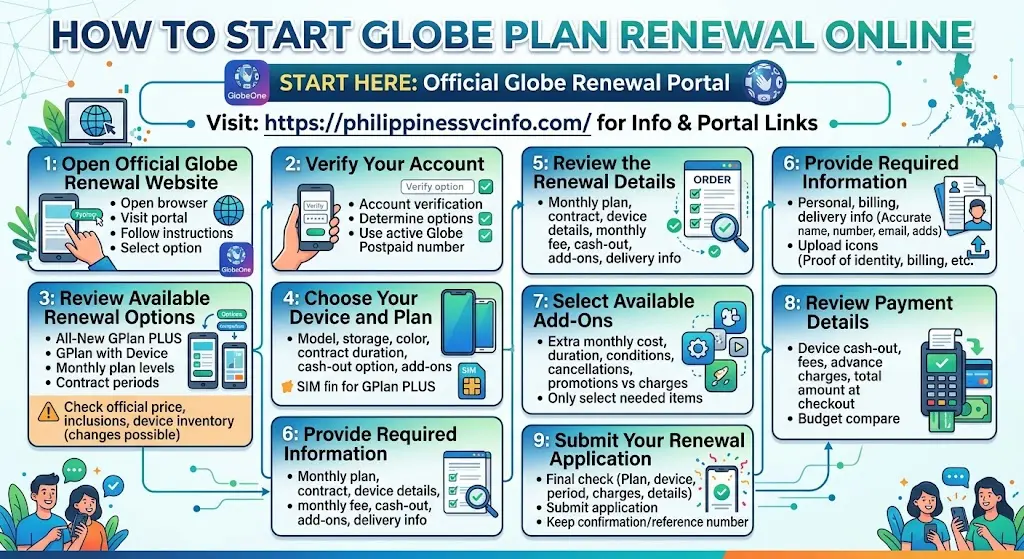
Step 1: Open the Official Globe Renewal Website
Open your browser and visit:
This is the official online plan-renewal channel listed by Globe.
From there, follow the available renewal instructions and select the appropriate option for your account.
You can also use the GlobeOne app. Globe’s official renewal guide explains that customers can log in to GlobeOne, select Renew Plan, and then choose between renewing the current plan or applying for a new plan.
Step 2: Verify Your Account
Account verification helps Globe determine which renewal options are available to you.
Depending on the application flow, you may need to provide your active Globe Postpaid number and complete the requested verification.
Make sure the mobile number you enter is correct and that you have access to it. If Globe requests additional information, provide it exactly as shown on your account or official documents.
Step 3: Review Your Available Renewal Options
Once your account has been verified, review the plans and devices available to you.
You may see options such as:
- All-New GPlan PLUS
- GPlan with Device
- Different monthly plan levels
- Different contract periods
- Available smartphones
- Device cash-out options
- Optional add-ons
The current Globe renewal interface allows customers to choose a device, select a contract duration, choose a color and storage capacity, and add available extras.
Important: Don’t choose a plan based on an old price or promotion from another article. Globe’s device inventory, pricing, and promotional inclusions can change. Check the amount displayed on the official renewal page before confirming your order.
Step 4: Choose Your Device and Plan
If you selected GPlan with Device, browse the available smartphones and choose the model that suits your needs.
Depending on what is currently offered, you may need to select:
- Smartphone model
- Storage capacity
- Device color
- Contract duration
- Available cash-out option
- Applicable add-ons
The official Globe renewal page provides the current device and plan choices available through the renewal process.
If you already own a suitable smartphone, you can instead consider an All-New GPlan PLUS SIM-only option. This can be useful when you want to continue your Globe Postpaid service without getting another device.
Step 5: Review the Renewal Details
Before proceeding, carefully review your Globe Plan Renewal summary.
Check the following information:
- Selected monthly plan
- Contract duration
- Device model
- Device storage and color
- Monthly recurring fee
- Device cash-out, if applicable
- Selected add-ons
- Delivery information
- Other applicable charges
This step is important because changing your plan or device after submitting an order may involve additional conditions.
If the displayed price or inclusion differs from information you saw elsewhere, rely on the amount and terms shown through the official Globe renewal channel.
Step 6: Provide Your Required Information
The renewal application may ask you to provide or confirm personal, billing, and delivery information.
Make sure your details are accurate, particularly:
- Full name
- Mobile number
- Email address
- Billing address
- Delivery address
- Account information
If Globe requests supporting documents, upload the documents according to the instructions provided on the application page.
For some applications, Globe may request proof of identity, proof of billing address, or proof of financial capacity. The exact requirement can vary according to the application and plan selected.
Step 7: Select Available Add-Ons
Depending on the renewal offer, you may have the opportunity to add extra services or benefits to your plan.
Available add-ons can change over time. Therefore, check the official renewal page to see which options are currently offered rather than relying on an older list.
Before adding anything, check:
- Additional monthly cost
- Duration of the add-on
- Whether it has a separate subscription condition
- Whether it can be cancelled later
- Whether it is included as a promotion or charged separately
Only select add-ons that you actually need.
Step 8: Review Payment Details
If your selected Globe Plan Renewal includes a device or other upfront charge, carefully review the payment information shown during checkout.
Potential costs can include:
- Device cash-out
- Applicable fees
- Advance charges, if displayed
- Optional add-ons
- Other charges shown in the order summary
Do not assume that every renewal has the same upfront cost. The amount can depend on the selected plan, device, offer, and account.
Before making payment, compare the total amount shown at checkout with your budget.
Step 9: Submit Your Renewal Application
Once you have checked all the information, complete the final confirmation steps shown on the official Globe website.
Review the:
- Plan
- Device
- Contract period
- Charges
- Personal details
- Delivery address
- Terms and conditions
Then submit the application.
After successful submission, keep the confirmation details or reference number provided by Globe. This information can be useful if you need to check the status of your renewal or contact customer support.
Globe Plan Renewal Through GlobeOne
Customers may also manage their postpaid account through the GlobeOne app.
According to Globe’s renewal guidance, eligible subscribers can open GlobeOne, select the renewal option, and proceed with the available renewal choices.
A typical process involves:
- Open the GlobeOne app.
- Sign in to your Globe account.
- Select the relevant postpaid mobile number.
- Look for the Renew Plan option.
- Review your available renewal choices.
- Select your preferred plan or device.
- Follow the instructions displayed by Globe.
- Review the final order details.
- Complete the required confirmation or payment.
The exact app interface can change after updates, so use the labels currently displayed in your GlobeOne account.
Globe Plan Renewal Fees and Charges
One of the most important things to check before a Globe Plan Renewal is the total cost.
A renewal may involve different costs depending on what you choose. For example, selecting a new device can result in a device cash-out, while a plan-only renewal may have a different pricing structure.
Device Cash-Out
A device cash-out is an upfront amount associated with certain device-and-plan offers.
The amount varies according to the device and plan selected. Always check the current amount shown on the official Globe renewal page.
Early Renewal Charges
If you want to renew before becoming normally eligible, additional conditions or charges may apply.
Do not assume that early renewal will have the same cost as renewal after your existing contract has ended. Check your account’s specific eligibility and the terms presented by Globe.
Add-On Charges
Optional services can also affect your total monthly cost. Review each add-on before confirming your order.
How to Avoid Problems During Globe Plan Renewal
A few simple checks can make the renewal process easier.
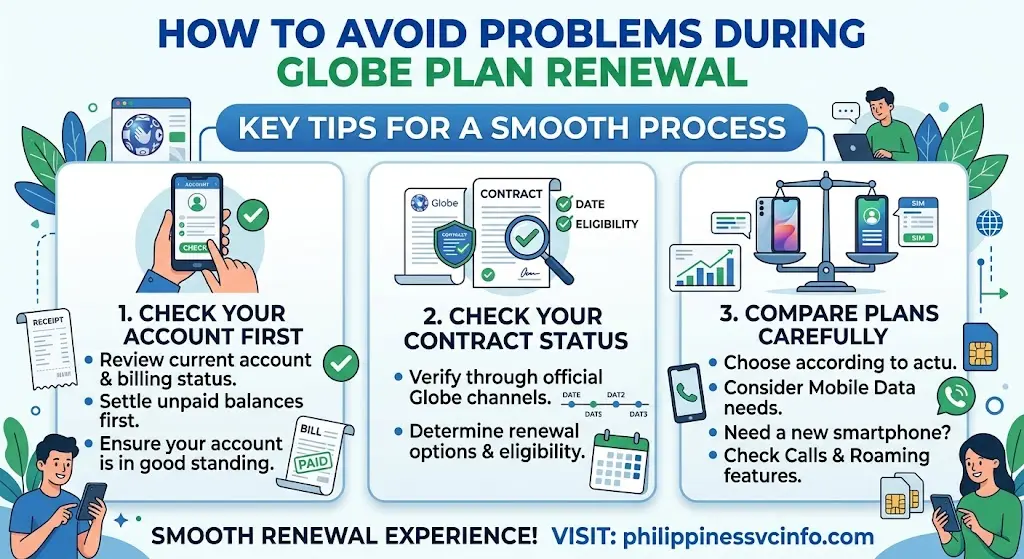
Check Your Account First
Before beginning your Globe Plan Renewal, review your current account and billing status.
If there is an unpaid balance, settle it before attempting to complete the renewal where required.
Check Your Contract Status
Don’t rely only on the date you remember signing your previous contract. Check the status displayed through Globe’s official channels.
Your eligibility can determine which renewal options are presented to you.
Compare Plans Carefully
A higher monthly plan isn’t automatically better for every subscriber.
Consider your actual usage:
- How much mobile data do you use?
- Do you need a new smartphone?
- Do you regularly make calls?
- Do you need international or roaming services?
- Would a SIM-only plan be enough?
Choosing according to your usage can help prevent paying for features you rarely use.
Globe Plan Renewal Troubleshooting
Sometimes subscribers may encounter problems while trying to renew online.
Renewal Option Is Not Available
If you cannot see a renewal option, your account may not currently be eligible for the specific renewal offer.
Check your account status and contract information through Globe’s official channels.
You can also contact Globe support if you believe your account should already be eligible.
Verification or OTP Problem
If you experience difficulty receiving an OTP, first make sure your Globe mobile number has network connectivity.
You can try:
- Checking your signal
- Waiting briefly before requesting another OTP
- Restarting your phone
- Checking whether SMS messages are working
- Trying again later
Avoid repeatedly requesting OTPs in quick succession if the system limits verification attempts.
Selected Device Is Unavailable
Device availability can change because of stock levels and demand.
If your preferred smartphone is unavailable, check whether another storage capacity or color is available. You can also review other devices offered through the official renewal store.
Renewal Application Does Not Proceed
If the application stops during checkout, review all required fields and documents.
Make sure:
- Your information is complete.
- Uploaded documents meet the requested requirements.
- Your delivery information is correct.
- Your selected plan is still available.
- Your payment method is working properly.
If the problem continues, use Globe’s official support channels rather than providing personal account information to unofficial websites or social media accounts.
Tips Before Renewing Your Globe Plan
Before completing your Globe Plan Renewal, use this quick checklist:
- Check your current contract status.
- Pay outstanding balances if applicable.
- Decide whether you need a device.
- Compare SIM-only and device plans.
- Check the contract duration.
- Review the monthly recurring fee.
- Check any device cash-out.
- Review optional add-ons.
- Confirm your delivery address.
- Read the final terms before submitting.
- Save your renewal reference number.
Most importantly, check the official Globe renewal website for the latest plans, prices, devices, and promotions because these details can change.
Globe Plan Renewal vs Plan Change
A Globe Plan Renewal and a plan change are not necessarily the same thing.
A plan change generally means modifying your existing postpaid subscription, while renewal involves entering a new contract or renewal arrangement.
If your goal is simply to change your monthly plan, review Globe’s plan-change information before submitting a renewal application.
Globe Plan Renewal vs SIM-Only Plan
Choosing between a device bundle and SIM-only option depends mainly on your needs.
|
Feature |
GPlan with Device |
SIM-Only GPlan PLUS |
|---|---|---|
|
New smartphone |
Available |
Not included |
|
Existing phone |
Can still be used |
Ideal |
|
Contract |
Typically 24 or 36 months |
Flexible options |
|
Device cash-out |
May apply |
Not applicable for a device |
|
Best for |
Customers wanting a new device |
Customers keeping their phone |
If your current smartphone works well, a SIM-only renewal may be the simpler choice. If you need a new smartphone, a GPlan with Device can combine the device and postpaid service.
What Happens After Globe Plan Renewal?
After submitting your application, keep the confirmation or reference information provided by Globe.
If you ordered a physical device or SIM, follow the delivery instructions supplied with your order. If additional verification is required, complete it through the official Globe process.
For account-related concerns, use Globe’s official support channels instead of third-party websites requesti
Globe Plan Renewal FAQs
Final Thoughts
A Globe Plan Renewal is a convenient option for existing Globe Postpaid customers who want to continue their service while exploring updated plans, new devices, and available benefits. Before renewing, check your eligibility, compare the available plans, review the monthly charges and any device cash-out, and confirm all order details carefully. Customers looking for a new smartphone can explore GPlan with Device, while those who already have a suitable phone can consider GPlan PLUS SIM-only options. Since Globe plans, devices, prices, promotions, and requirements may change, always check the latest information on the official Globe renewal portal before making a payment or submitting your application.
Discover What You Need to Know:
- AIMS ICCT Student Portal Guide 2026: Login, Enrollment, Grades & Registration
- BFP Payslip Online 2026: Login, Download, Salary, Deductions & Payroll Guide
- DITO Unli Data 2026: Complete Guide to 5G Promos, Prices, Registration
- DepEd Monday Uniform 2026 Philippines: Complete Uniform Schedule, Designs, Rules & Official Guidelines
- DOH Philippines Guide 2026: Department of Health Services, Online Portal, Registration & Login