

SSS registration is the process of obtaining a Social Security (SS) Number from the Philippine Social Security System and creating a My.SSS online account. It allows eligible members to establish their SSS record, manage membership information, monitor contributions, access available online services, and complete certain transactions through official SSS digital platforms.
SSS Registration: What You Need to Do First
If you do not have an SS Number, your first task is to apply for one. SSS states that people registering for an SS Number for the first time can apply through its website or an SSS electronic centre. The organisation has also implemented online registration for prospective employees, self-employed members, non-working spouses and OFWs.
Once you have your SS Number, you can create your My.SSS account. The current My.SSS registration page asks for your CRN or SS Number, mobile number, email address, preferred User ID and other personal information. It also provides several registration preference options for verifying your membership.
Quick distinction
| Service | What it does |
|---|---|
| SS Number application | Gives you your SSS identification number |
| My.SSS registration | Creates your online member account |
| My.SSS portal | Lets you access online SSS services |
| SSS website | Provides registration, membership, contribution and other information |
Before You Start Your SSS Application
Having your personal information and identification documents ready can reduce errors during registration. Your details should be consistent with your official records.
Depending on your circumstances, useful documents may include a birth certificate, passport, Philippine Identification Card, driver’s licence, UMID or other accepted identification documents. SSS also lists the Alien Certificate of Registration among its recognised identification documents.
For foreign-issued documents, SSS notes that identification documents in a foreign language should have an official English translation by the Philippine Embassy or Consulate where applicable.
Information worth preparing
- Complete legal name
- Date and place of birth
- Parents’ information where required
- Current residential or foreign address
- Active mobile number
- Working email address
- Appropriate identification document
- Existing SSS information, if you were previously registered
The most important precaution is to check whether you already have an SS Number before applying for another one. SSS describes an SS Number as a unique lifetime number that should be used for all SSS transactions. If you previously registered but cannot remember the number, SSS advises contacting its information and service channels rather than applying for another number.
How to Apply for an SSS Number Online
The first stage of SSS registration is obtaining your SS Number.

Step 1: Open the official SSS website
Start at www.sss.gov.ph rather than relying on third-party registration websites.
Look for the online SS Number application option. SSS documentation describes the service as Online SS Number Issuance, allowing eligible applicants to obtain an SS Number through the SSS online system. The service has no registration fee listed in the SSS Citizens’ Charter.
Step 2: Begin the online application
Follow the SSS instructions for applicants who do not yet have an SS Number. The online process asks you to provide the information required to identify and register you.
Take your time at this stage. A spelling mistake in your name, an incorrect date of birth or other inaccurate personal information can create problems when your SSS record needs to be verified later.
Step 3: Complete the identity and registration details
Enter the requested personal information carefully and ensure that it agrees with your supporting documents.
For applicants using a passport or another identification document, use the information exactly as it appears on the document. Do not shorten your legal name simply because a shorter version is more convenient.
Step 4: Save your registration records
After your SS Number has been issued, keep the confirmation information and any transaction or registration documents supplied by SSS.
A digital copy stored securely can be useful later when you create your My.SSS account or need to communicate with SSS about your membership.
What Happens After You Receive Your SS Number?
Receiving an SS Number does not mean that you should stop at the registration page. The next useful step is to establish your My.SSS account.
My.SSS is the online member facility through which members can access information and perform eligible transactions. SSS currently requires individually paying members, including self-employed, OFW and voluntary members, to use its online facilities for activities such as generating Payment Reference Numbers (PRNs).
The My.SSS system can also provide access to membership details, contribution information and other member services.
The official SSS mobile application provides similar digital functions, including viewing monthly contributions, generating contribution PRNs, resetting a password and searching for SSS branches.
How to Register for My.SSS After Getting Your SS Number
Having an SS Number is only the beginning of your online SSS access. The My.SSS Member Portal is where registered members can manage a range of SSS-related services without having to visit a branch for every transaction.
If you completed your SS Number application online, SSS may send an activation link to the email address used during registration. According to the current SSS procedure, this link is valid for 30 calendar days. If it expires, you can register directly through My.SSS using the Transaction Number shown on your E-1 form as your registration preference.

Setting Up Your My.SSS Account
There are two practical routes depending on how you obtained your SS Number.
Route 1: Use the SSS Registration Email
For applicants who obtained their SS Number through the SSS website, check the email account used during the application.
The official SSS instructions say the email contains an SSS Web Registration activation link. Opening that link takes you to the password nomination stage. You will need to provide the last six digits of the CRN or SS Number used during My.SSS registration before setting your password.
The activation process is straightforward:
- Open the SSS registration email.
- Select the activation link.
- Enter the requested last six digits of your CRN or SS Number.
- Submit the verification information.
- Create your preferred My.SSS password.
- Confirm the password.
- Sign in to your My.SSS account.
Keep the email until you have successfully logged in. It provides a useful record of the registration process.
Route 2: Register Directly Through My.SSS
If your activation link has expired, or you need to create your My.SSS account separately, go to the official My.SSS Member Portal.
The current registration page asks you to select a Registration Preference before proceeding. Available options shown by the official portal include:
- Savings Account Number
- UMID Card
- Employer/Household ID
- Payment Reference Number
- Date of Loan
- Transaction Number in the Personal Record Form
- Check Number of a monthly pension
The exact option available to you depends on your SSS membership and the information already associated with your record.
Why the Registration Preference Matters
This step is used to help verify that the person creating the online account is the legitimate SSS member.
For example, someone with an existing Payment Reference Number may be able to use that information as their verification preference. A newly registered member may instead use the Transaction Number in the Personal Record Form, depending on the registration route and information available.
Do not randomly select an option simply to get past the page. Use a verification method that corresponds to your actual SSS record.
Information Required During My.SSS Registration
The current My.SSS registration form asks for several account and personal details. These include your:
- CRN or SS Number
- Mobile number
- Email address
- Confirmation email address
- Preferred User ID
- Confirmation of User ID
- Preferred password
- Confirmation of password
- Name
- Birth date
- Mailing or foreign address
The portal specifically provides fields for a foreign address, including address, city, ZIP/postal information and country. This is particularly relevant for members who live outside the Philippines.
Use an Email Address You Can Access
Your registered email is important because SSS uses it for account-related communications and password-related processes.
Before submitting the form, check that:
- The email address is spelled correctly.
- You can currently access the inbox.
- You can also receive messages from SSS.
- The confirmation email matches the address you intend to use.
A small typing mistake can turn into a larger problem when you later need to activate or recover the account.
What Happens After You Submit My.SSS Registration?
After entering your information, review everything before submitting the application.
The current portal provides a review stage where you can check the registration details before confirming them. The registration process also includes acceptance of the My.SSS Terms of Service.
If your registration is accepted, SSS sends the relevant account communication to your registered email address. The activation process then takes you to the password setup stage.
SSS documentation states that member accounts use the last six digits of the SS Number or CRN during password setup. Once the preferred password has been assigned, the member can access the My.SSS account.
My.SSS Password Activation
Password activation is the point where your registration becomes an accessible online account.
When you receive the activation email:
Open the email → follow the activation link → verify the requested SS/CRN information → create your password → submit → log in.
SSS’s published registration material describes the activation process as requiring the last six digits of the CRN/SS Number, followed by password creation.
Choose a password that you do not use for unrelated websites. Never send your password or one-time authentication codes to another person claiming to represent SSS.
What Can You Do Through My.SSS?
The purpose of creating a My.SSS account is not simply to have another login. It provides access to digital SSS services and membership information.
SSS says its MySSS mobile application, for example, allows members to view membership details and monthly contributions, access certain benefit information, generate contribution Payment Reference Numbers, reset a password and find SSS branches.
The exact services available to an individual can depend on membership status and eligibility.
For self-employed, voluntary and other individually paying members, the online system is particularly useful because SSS uses Payment Reference Numbers (PRNs) for contribution payments. SSS provides an online contribution-payment process through its digital services.
Useful My.SSS Functions
Depending on your account and eligibility, online services may help you:
- Review SSS membership information
- Check posted contributions
- Generate contribution PRNs
- Access relevant benefit information
- Manage certain online transactions
- Reset account credentials
- View available SSS announcements and notifications
The MySSS mobile app also provides activity history and inbox notifications, giving members another way to monitor activity associated with their account.
What If the My.SSS Activation Link Has Expired?
This is one of the more common points of confusion during SSS registration.
The current SSS instructions specify that the web-registration activation link associated with a newly generated SS Number is valid for 30 calendar days. If it expires, SSS says you should register through My.SSS using the Transaction Number shown on your E-1 as the registration preference.
That means an expired activation email does not mean you should apply for another SS Number.
Instead:
- Go to the official My.SSS portal.
- Start member registration.
- Select the appropriate registration preference.
- Use your E-1 Transaction Number when applicable.
- Enter your SS Number and requested account information.
- Complete the registration.
- Watch your email for the next activation or password-setting instructions.
This distinction is important because your SS Number is the underlying membership identifier; creating another number simply because an online activation link expired is not the appropriate solution.
What If You Cannot Find the Email?
Before restarting anything, check your:
- Spam folder
- Junk folder
- Promotions or filtered folders
- Email search for messages from SSS
Also confirm that the email address entered during registration was correct.
If the message still cannot be located, use the official SSS website and My.SSS registration page rather than clicking links from unofficial websites or social media posts.
The SSS website provides a dedicated My.SSS Registration page and lists the SSS Hotline at 1455 for inquiries and concerns.
A Note for Members Living Abroad
The My.SSS registration form accommodates a foreign address, so members outside the Philippines should pay close attention to the address section rather than assuming that a Philippine address is mandatory.
The current portal displays separate fields for mailing address and foreign address, including country selection.
For OFWs and other members who regularly move between countries, keeping contact information current can also make future account communication easier.
The important point is to provide information that accurately reflects your SSS record and current circumstances.
Security: Protect Your My.SSS Account
Your My.SSS account contains personal membership information, so account security matters.
SSS has also introduced additional authentication options. Its current guidance includes Time-based One-Time Password (TOTP) authentication, which uses an authenticator application to generate a six-digit code for login.
If TOTP is available for your account, follow SSS’s official setup instructions rather than using an unofficial authentication guide.
Basic security practices remain important:
- Never share your password.
- Do not disclose OTP or authentication codes.
- Avoid saving credentials on public computers.
- Check that you are using the official SSS domain.
- Do not give personal information to unofficial registration agents.
- Log out after using a shared device.
Official My.SSS Resources
For registration and account access, use these SSS-controlled pages:
SSS membership and SS Number registration:
My.SSS registration instructions:
My.SSS Member Portal:
SSS TOTP authentication guide:
SSS mobile application information:
One More Thing Before You Start Using Your Account
Once My.SSS is active, check your membership information and contribution history rather than assuming everything has already been posted correctly.
If you are an employee, contribution posting may depend on your employer’s remittance and the SSS processing of the payment. If you are paying voluntarily or as a self-employed member, make sure you use the appropriate payment process and PRN where required.
Keeping your own records—such as payment confirmations and transaction references—can make it much easier to resolve discrepancies later.
Common SSS Registration Problems and What to Do
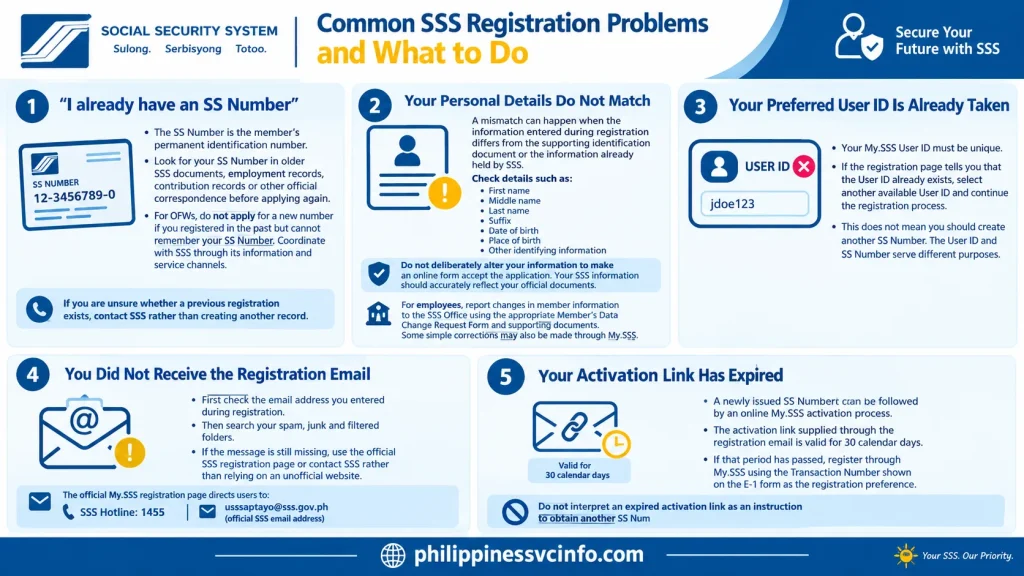
“I already have an SS Number”
This is an important situation to handle carefully.
SSS describes the SS Number as the member’s permanent identification number. If you have previously registered, look for the number in older SSS documents, employment records, contribution records or other official correspondence before attempting another application.
For OFWs, SSS explicitly says that people who registered in the past but cannot remember their SS Number should not apply for a new number. Instead, they should coordinate with SSS through its information and service channels.
If you are unsure whether a previous registration exists, contact SSS rather than creating another record.
Your Personal Details Do Not Match
A mismatch can happen when the information entered during registration differs from the supporting identification document or the information already held by SSS.
Check details such as:
- First name
- Middle name
- Last name
- Suffix
- Date of birth
- Place of birth
- Other identifying information
Do not deliberately alter your information to make an online form accept the application. Your SSS information should accurately reflect your official documents.
For employees, SSS states that changes in member information should be reported to the SSS Office using the appropriate Member’s Data Change Request Form and supporting documents. Some simple corrections may also be made through My.SSS.
Your Preferred User ID Is Already Taken
Your My.SSS User ID must be unique.
If the registration page tells you that the User ID already exists, select another available User ID and continue the registration process.
This does not mean you should create another SS Number. The User ID and SS Number serve different purposes.
You Did Not Receive the Registration Email
First check the email address you entered during registration. Then search your spam, junk and filtered folders.
If the message is still missing, use the official SSS registration page or contact SSS rather than relying on an unofficial website.
The official My.SSS registration page currently directs users to the SSS Hotline at 1455 for inquiries and concerns and provides the official SSS email address [email protected].
Your Activation Link Has Expired
A newly issued SS Number can be followed by an online My.SSS activation process. SSS states that the activation link supplied through the registration email is valid for 30 calendar days.
If that period has passed, the SSS instructions say to register through My.SSS using the Transaction Number shown on the E-1 form as the registration preference.
Do not interpret an expired activation link as an instruction to obtain another SS Number.
Forgot Your My.SSS Password?
If you already have a My.SSS account but cannot remember your password, use the official password-recovery function.
The current My.SSS recovery page offers authentication options including:
- Multi-factor authentication
- Security questions
The current SSS system also supports password resetting through authentication methods such as an SMS one-time PIN or a time-based one-time password (TOTP), depending on the account setup.
Use the official My.SSS password recovery page rather than third-party password-reset services.
If your account has been locked, the My.SSS system instructs users to contact SSS for assistance.
What If You Enter the Wrong Password Several Times?
SSS’s Terms of Service state that an account can be automatically blocked or disabled after five consecutive incorrect password attempts.
If this happens, stop repeatedly guessing the password. Use the official password-recovery process or contact SSS if the available recovery method does not work.
This is another reason to keep your registered email and authentication information up to date.
Can Foreign Nationals Register for SSS?
Foreign nationals may fall within SSS coverage depending on their employment and circumstances. The documents accepted for SSS transactions include identification documents relevant to foreign nationals, including an Alien Certificate of Registration (ACR) among the recognised IDs/documents. SSS also lists a passport as an accepted primary identification document.
However, registration should not be interpreted as automatic eligibility for every SSS programme or benefit. Coverage depends on the person’s circumstances and the applicable SSS rules.
Foreign applicants should therefore prepare valid identification and any other documents required for their particular membership category.
SSS also states that foreign-government identification documents written in another language should have an official English translation by the Philippine Embassy or Consulate where required.
Foreign Address on My.SSS
The current My.SSS registration form contains a dedicated Foreign Address Information section with fields for address, city, ZIP code and country. This is useful for members who live outside the Philippines.
Enter your current information accurately instead of entering a Philippine address simply because you are registering with a Philippine government agency.
SSS Registration for OFWs
OFWs have a dedicated SSS membership category and information page.
SSS defines an OFW as a Filipino engaged, or to be engaged, in remunerated activity in a country where the person is not an immigrant, citizen or permanent resident, subject to the conditions specified by SSS.
For an OFW who is registering for the first time, SSS allows online SS Number application. The agency also recommends preparing supporting documents for uploading, such as a birth certificate, passport, driver’s licence, PRC card or Seaman’s Book, depending on the circumstances.
If an OFW already has an SS Number, however, the correct approach is to recover or verify that existing number rather than apply for another one.
Does SSS Registration Cost Money?
The basic online SS Number registration process is not a paid service.
SSS’s official membership information provides the online SS Number application as a registration service, while its Citizens’ Charter identifies the online SS Number issuance process as having no service fee.
Be cautious if an unofficial website, individual or social-media account asks you to pay a fee simply to generate your SS Number.
You may encounter legitimate costs later for particular services, documents, payments or financial transactions, but these should not be confused with the basic SS Number registration process.
Is the SS Number the Same as the My.SSS User ID?
No.
These are separate identifiers.
SS Number:
Your SSS membership identification number.
My.SSS User ID:
The username you create to access your online account.
You should not create another SS Number because your preferred My.SSS User ID is unavailable. Simply choose another User ID.
What Is the Difference Between SS Number and CRN?
The SS Number identifies your SSS membership. A Common Reference Number (CRN) may also appear in SSS systems and related identification records.
The My.SSS registration and password-recovery pages can request either a CRN or SS Number, depending on the particular process. The current registration form labels the relevant field “CRN / SS Number.”
If a particular SSS form asks for a CRN and you are unsure which number applies to you, check your official SSS record rather than guessing.
SSS Registration FAQs
Your Final SSS Registration Checklist
Before considering the registration process finished, check the following:
- I confirmed whether I already had an SS Number.
- I used the official SSS website.
- I entered my legal personal information correctly.
- I prepared an accepted identification document.
- I saved my SS Number and registration records securely.
- I created my My.SSS account.
- I verified my email and completed account activation.
- I created a secure password.
- I know how to use the official password-recovery process.
- My mobile number and email address are current.
- My foreign address is accurate if I live outside the Philippines.
- I know where to check my SSS contributions and available online services.
- I will not apply for another SS Number if I lose or forget my existing number.
Final Takeaway
The simplest way to understand SSS registration is to treat it as a two-stage process: first secure your permanent SS Number if you do not already have one, then establish your My.SSS online account.
Accuracy matters throughout the process. Your name, birth information, identification details and contact information should correspond with your official records. If you discover that an SS Number already exists, do not create another one merely to restart the application.
For online account problems, use the official My.SSS recovery and registration facilities. For issues that cannot be resolved online, contact SSS through its official service channels.
The most important rule is simple: use the official SSS website, protect your login credentials, keep your records, and never create a duplicate SS Number simply because an online registration step failed.
Discover What You Need to Know:
- SSS Employer Philippines Complete Guide of Registration, Contributions & Payment Guide
- SSS Portal Guide 2026: Registration, Login & Online Services in the Philippines
- DepEd Logo PNG: Official Download, Transparent File & Usage Guide 2026
- eFPS Login Philippines 2026: BIR eFPS Login Guide, Filing & Payment







