

Globe Load refers to the prepaid credit or balance used by Globe Telecom subscribers in the Philippines to access mobile services such as calls, text messages, mobile data, and prepaid promos. Users can add load through various authorized channels and use it to register for available Globe prepaid offers.
What Is Globe Prepaid Load?
Globe prepaid load is the balance added to a Globe Prepaid account before you use certain chargeable mobile services. Think of it as credit attached to your prepaid number rather than a monthly postpaid bill.
You can purchase regular load and then use it for eligible services, or use supported channels to purchase a specific promo directly. Globe’s current loading information includes GlobeOne, GCash, banking channels and authorised retailers among the available ways to top up.
This distinction matters. Regular Globe load and a Globe prepaid promo are not always the same thing. Regular load is a monetary balance, while a promo can provide a defined package of data, calls, texts or other inclusions for a stated validity period.
Quick Answer: Where Can You Buy Globe Load?
You can currently purchase or reload Globe Prepaid through several supported channels, including:
- GlobeOne app
- GCash
- Supported bank channels
- Globe Stores
- AutoLoadMax retailers
- Selected digital loading platforms
Globe’s current official buying page states that its online website Buy Load feature was discontinued from April 2, 2025, with loading moved to GlobeOne and GCash for digital purchases.
How to Buy Globe Prepaid Load
The easiest option for many smartphone users is the GlobeOne app. It combines account management, loading and promo purchases in one place.
Globe’s current instructions say users can open GlobeOne, choose Buy Load, select an account or enter the mobile number, enter the amount and complete payment using an available payment method.
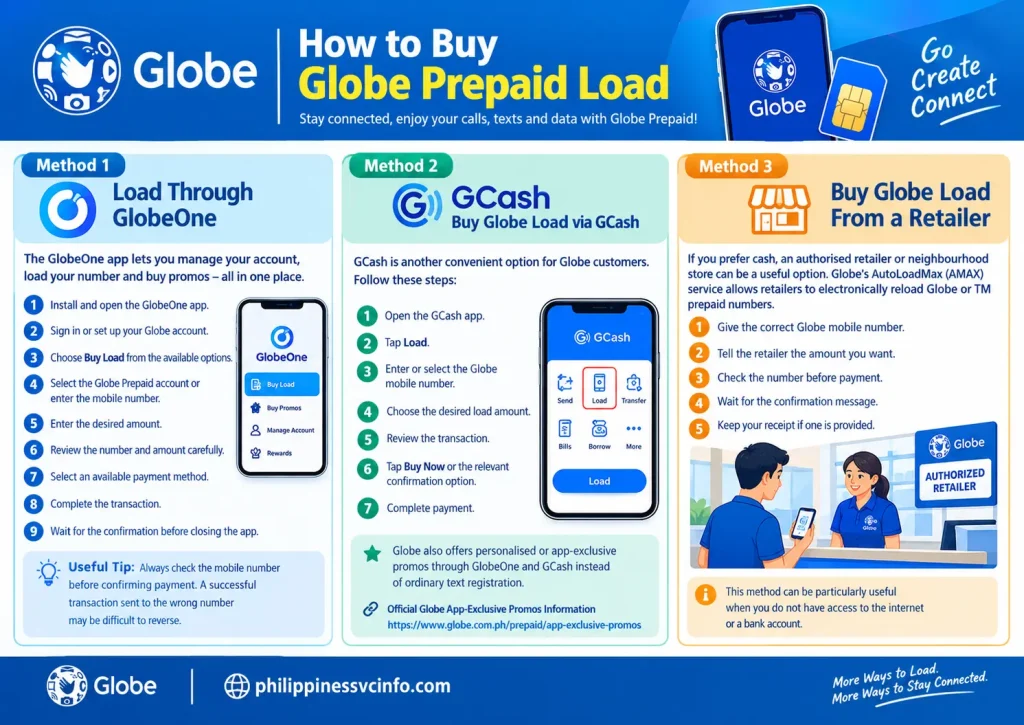
Method 1: Load Through GlobeOne
Follow these steps:
- Install and open the GlobeOne app.
- Sign in or set up your Globe account.
- Choose Buy Load from the available options.
- Select the Globe Prepaid account you want to reload, or enter the mobile number.
- Enter the desired amount.
- Review the number and amount carefully.
- Select an available payment method.
- Complete the transaction.
- Wait for the confirmation before closing the app.
Globe also allows users to browse prepaid promos through GlobeOne. Its current loading page directs customers to Shop → Buy Globe Prepaid Promos, where they can select an account, choose a promo and proceed with payment.
Useful tip: Always check the mobile number before confirming payment. A successful transaction sent to the wrong number may be difficult to reverse.
Method 2: Buy Globe Load Through GCash
GCash is another convenient option for Globe customers. Globe’s official instructions show that users can open GCash, select Load, enter the mobile number, choose the amount and confirm the purchase.
The basic process is:
- Open the GCash app.
- Tap Load.
- Enter or select the Globe mobile number.
- Choose the desired load amount.
- Review the transaction.
- Tap Buy Now or the relevant confirmation option.
- Complete payment.
GCash can also provide access to selected app-based Globe offers. Globe states that some personalised or app-exclusive promos are available through GlobeOne and GCash rather than through ordinary text registration.
Method 3: Buy Globe Load From a Retailer
If you prefer cash, an authorised retailer or neighbourhood store can be useful.
Globe’s AutoLoadMax (AMAX) service allows retailers to electronically reload Globe or TM prepaid numbers. Globe says customers can obtain AutoLoadMax through Globe Stores and participating retailers.
When buying Globe load at a shop:
- Give the correct Globe mobile number.
- Tell the retailer the amount you want.
- Check the number before payment.
- Wait for the confirmation message.
- Keep your receipt if one is provided.
This method can be particularly useful when you do not have access to an e-wallet or banking app.
Can You Buy Globe Load Through the Globe Website?
This is an important point for anyone searching for an old Globe online loading page.
The Globe Online Shop Buy Load page no longer sells load directly. Globe states that beginning April 2, 2025, the website’s Buy Load feature was moved to GlobeOne and GCash.
So, if an older article tells you to complete a Globe prepaid load purchase directly through the old website page, check the current Globe instructions first.
Other Ways to Reload a Globe Prepaid Number
Globe also lists banking and other supported digital channels for prepaid loading. Its official loading page currently mentions bank services and several mobile apps, including BPI, Lazada, Shopee, Coins.ph and other supported channels.
The exact menu names can vary between apps, so look for options such as:
- Buy Load
- Mobile Load
- Prepaid Load
- Telecom Load
- Globe
Before confirming a transaction, verify both the Globe number and amount.
Globe Prepaid Load: What Should You Choose?
| Loading method | Best for | Main advantage |
|---|---|---|
| GlobeOne | Regular Globe users | Account and promo management in one app |
| GCash | E-wallet users | Convenient digital top-up |
| AutoLoadMax | Cash users | Reload through participating retailers |
| Banking apps | Bank customers | Load directly through supported banking services |
| Other supported apps | Digital users | Additional purchasing channels |
The most suitable method depends on how you normally pay and whether you need regular load or a specific Globe prepaid promo.
Globe Prepaid Promos: How to Choose the Right One
Buying Globe prepaid load is only the first step. The next decision is whether to keep that balance as regular load or use it to register for a promo. Globe’s current prepaid lineup includes Go+, GoEXTRA, GoUNLI, GoBOOSTERS, UnliGo and app-exclusive offers. Because promo prices and inclusions can change, the official Globe promo pages should be checked before registration.
A promo is usually more useful when you already know how you use your phone. Someone who mainly makes calls may need a different package from a student who spends most of the day watching videos, using social media or attending online classes.
Current Globe Prepaid Promo Options
| Promo | Example current offer | Main purpose |
|---|---|---|
| Go+ | Go+99 includes 8GB all-site data, 4GB 5G, 8GB for selected apps, a voucher and unlimited all-net texts for 7 days | Data, apps and lifestyle benefits |
| GoEXTRA | GoEXTRA59 includes 5GB all-site data plus unlimited all-network calls and texts for 3 days | Data plus calls and texts |
| GoUNLI | GoUNLI95 includes 1GB data plus unlimited calls and texts for 7 days | Heavy calling and texting |
| GoBOOSTERS | Add-on options for selected needs | Extra data when an active promo is running |
| App-exclusive offers | Personalised offers through GlobeOne and GCash | Users looking for offers shown specifically in the apps |
These are examples of the current offers shown by Globe and are subject to change.
Go+ Promos
Go+ is designed for customers who want a combination of open-access data, 5G data, selected app data and other benefits. Current Go+ options include Go+99, Go+109, Go+129, Go+149, Go+179, Go+250 and Go+400, with different data allocations and validity periods.
For example, the current Go+99 offer provides:
- 8GB data for all sites
- 4GB 5G data
- 8GB for selected apps
- Unlimited all-network texts
- One voucher
- 7-day validity
The app categories can include GoWATCH, GoPLAY, GoSHARE and GoLEARN. Globe notes that 5G benefits require a compatible device, 5G SIM and access to a 5G-ready area.
You can register for Go+ through GlobeOne, GCash, SMS or supported retailers. The exact registration keyword should be checked on Globe’s current promo page rather than relying on an old blog post.
GoEXTRA for Data, Calls and Texts
GoEXTRA is aimed at users who want data together with unlimited calls and texts to all networks. Globe currently lists GoEXTRA59, GoEXTRA99, GoEXTRA109, GoEXTRA149, GoEXTRA179 and GoEXTRA199.
For instance, GoEXTRA59 currently provides 5GB of data for all sites, unlimited calls to all networks and unlimited texts to all networks for 3 days. GoEXTRA99 provides 7GB for all sites plus 4GB of free 5G data, with unlimited all-network calls and texts for 7 days.
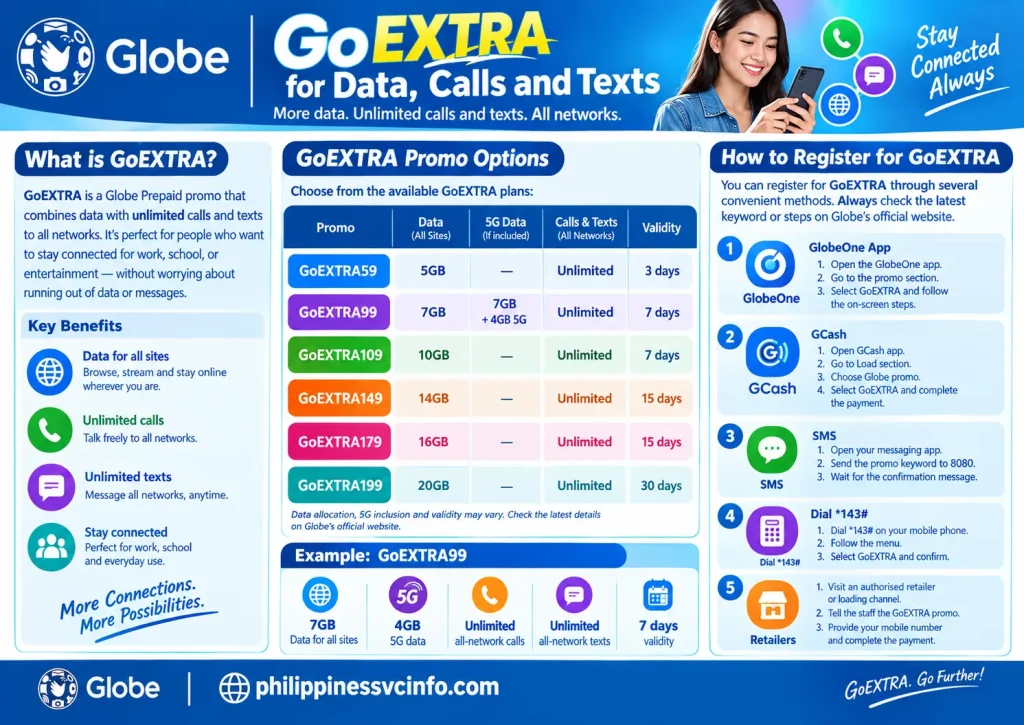
Globe supports several registration methods:
- Open GlobeOne and select the relevant promo.
- Use GCash and choose the Globe promo through the Load section.
- Send the appropriate keyword to 8080.
- Dial *143# and follow the menu.
- Use an authorised loading channel where available.
GoUNLI for Calls and Texts
If your priority is communication rather than a large data allowance, GoUNLI may be more relevant. Current Globe offers range from GoUNLI20 to GoUNLI350.
Examples include:
- GoUNLI20: 50MB, unlimited all-network calls and texts, 1 day
- GoUNLI30: 100MB, unlimited all-network calls and texts, 2 days
- GoUNLI50: 500MB, unlimited all-network calls and texts, 3 days
- GoUNLI95: 1GB, unlimited all-network calls and texts, 7 days
- GoUNLI180: 2GB, unlimited all-network calls and texts, 15 days
- GoUNLI350: 3GB, unlimited all-network calls and texts, 30 days
Globe says GoUNLI can be registered through GlobeOne, GCash or text. One GoUNLI promo can be active at a time, and some restrictions apply when another promo with unlimited calls or texts is already active.
How to Check Your Globe Load and Promo Balance
Checking your balance regularly helps you avoid using up your regular load or data without noticing.
The GlobeOne app provides a convenient way to see account information and active promo details. Globe also provides specific balance-checking methods for some prepaid services.
For Go+ data, Globe’s current FAQ says users can check remaining data through GlobeOne or by texting DATA BAL to 8080.
For other services, available USSD and SMS options can differ by product and promo. Therefore, it’s better to use the current Globe instructions associated with your specific account instead of assuming that an old balance code will always work.
What to Check After Buying Globe Load
After a successful Globe prepaid load transaction, check:
- Your regular load balance
- Active data promos
- Promo expiry date
- Remaining calls
- Remaining texts
- Any 5G or app-specific data
- Confirmation SMS or transaction receipt
If your balance does not update immediately, don’t purchase another load straight away. First check whether the payment was successful in your e-wallet or banking transaction history.
Globe SIM Registration: What New Users Need to Know
A Globe Prepaid SIM must be registered before it can be used under the Philippines’ SIM Registration requirements. Globe states that the requirement applies to both Filipino users and foreign nationals.
Registration can be completed through Globe’s official online registration portal or through the GlobeOne app. Globe’s current registration instructions begin with entering the 10-digit mobile number and verifying it using a one-time PIN. Users then provide the required personal information and identification documents.
Requirements for Foreign Residents and Students
Foreign users should pay particular attention to the documentation requirements because they can differ from those for Filipino citizens.
Globe states that foreign nationals must provide a passport and other applicable documents. For tourists, the requirements include the passport, proof of address in the Philippines and a return ticket or ticket to another destination. Tourist SIM registration is valid for 30 days and automatically deactivates after that period.
Foreign nationals staying in the Philippines under other visa types may additionally need an Alien Certificate of Registration Identification Card (ACRI-Card) and supporting documents such as an employment permit or school registration/ID, depending on their circumstances.
This is especially relevant for international students. Before attempting registration, prepare the documents that apply to your status rather than relying on a generic list copied from an older website.
What Happens If a Globe SIM Is Not Registered?
An unregistered SIM cannot continue normal mobile use. Globe explains that SIM registration is required for mobile internet, calls and texts, and failure to comply results in deactivation.
That means purchasing Globe prepaid load does not replace SIM registration. A user should make sure the SIM itself is properly registered before depending on it for communication.
How to Share Globe Load With Another User
Globe has historically provided load-sharing services such as Share-A-Load and related options. However, registration methods, fees, keywords and availability can change.
For this reason, users should verify the current sharing instructions through Globe’s official Help & Support channels before transferring credit. Avoid relying on an old SMS format copied from an unofficial website.
If the option is available on your account, check the GlobeOne app or the current Globe USSD/help menu for the applicable transfer procedure and charges.
This is particularly important when sending money-like prepaid credit to another person: confirm the recipient’s number before approving the transfer.
Common Globe Load Problems and Fixes

Load Was Paid For but Has Not Appeared
A digital purchase can sometimes take time to appear because of processing or network delays.
First, check the transaction history of the service you used. Look for a successful payment confirmation and check whether Globe has sent an SMS confirmation.
If the payment was successful but the Globe load is still missing, use Globe’s official support channels rather than purchasing the same load again.
The Promo Says “Insufficient Balance”
If you are registering a promo using regular Globe prepaid load, the available balance must cover the required amount.
For example, having ₱95 available will not be enough to register a ₱99 promo. Check the current price in GlobeOne or the official Globe promo page, then add enough regular load if necessary.
Mobile Data Is Not Working
Having Globe prepaid load does not automatically mean mobile data is active. If you have an active data promo but cannot connect, check the following:
- Make sure Mobile Data is switched on.
- Check whether Airplane Mode is accidentally enabled.
- Restart the mobile connection or phone.
- Confirm that your active promo still has available data.
- Check your phone’s network settings.
- If you’re using a 5G-specific allocation, confirm that your device, SIM and location support 5G.
For technical settings, use Globe’s official support information because network configuration can depend on the device and service being used.
A Promo Keyword Does Not Work
Promo keywords can change when Globe updates its offers. If an SMS registration returns an invalid keyword message, don’t repeatedly send old codes found in outdated articles.
Instead, open GlobeOne or the current official Globe promo page and use the registration option shown there. Globe currently provides app, GCash, SMS and USSD registration methods for several major promo families.
GoRENEW: Automatic Promo Renewal
Globe also offers GoRENEW, a feature that can automatically register eligible customers to selected favourite promos.
Globe currently lists eligible offers such as GoUNLI95, SURF4ALL99, SURF4ALL249, GoEXTRA90 and GoEXTRA99 for 7-day renewal schedules, while certain 15-day offers include Go250, Go400 and GoUNLI180.
GoRENEW can be activated through GlobeOne, GCash, SMS or supported USSD options. Because automatic renewal can charge your available balance when the renewal becomes due, check the renewal details before activating it.
Globe Prepaid Load Tips for Students and Foreign Residents
If you’re new to Globe, a few habits can make prepaid service easier to manage.
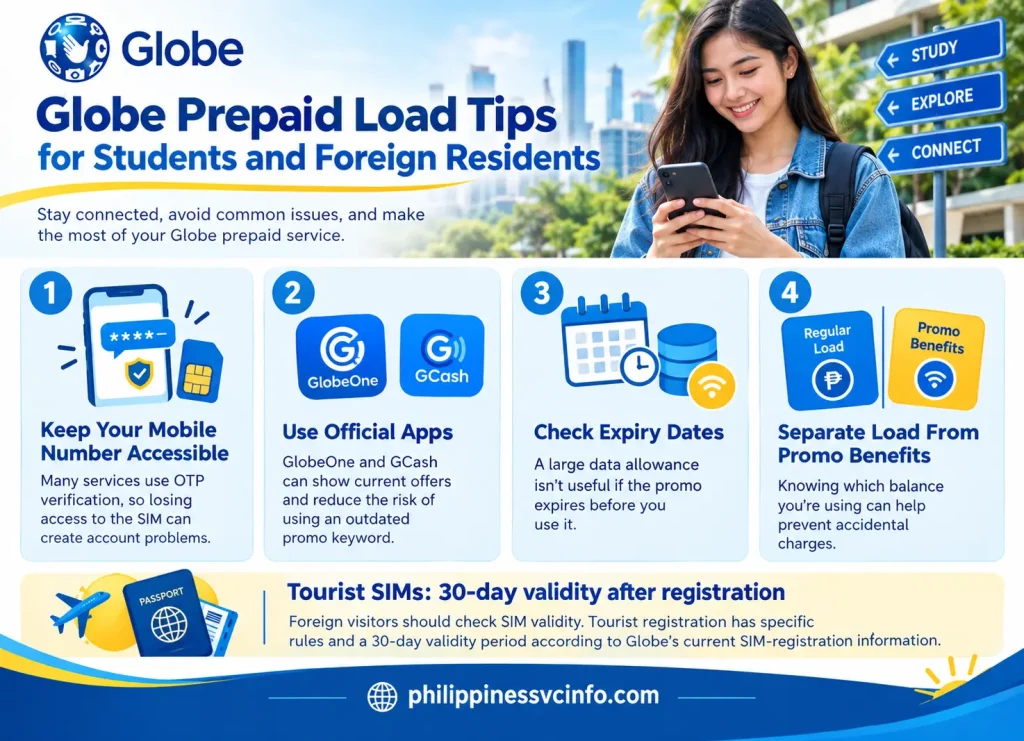
Keep your mobile number accessible. Many services use OTP verification, so losing access to the SIM can create account problems.
Use official apps when possible. GlobeOne and GCash can show current offers and reduce the risk of using an outdated promo keyword.
Check expiry dates. A large data allowance isn’t useful if the promo expires before you use it.
Separate regular load from promo benefits. Knowing which balance you’re using can help prevent accidental charges.
Foreign visitors should check SIM validity. Tourist registration has specific rules and a 30-day validity period according to Globe’s current SIM-registration information.
Final Checklist Before You Buy Globe Load
Before pressing the final payment button, check these five things:
- Mobile number: Is it the correct Globe number?
- Amount: Is the load or promo value correct?
- Promo: Does it include the data, calls or texts you actually need?
- Validity: When does it expire?
- Confirmation: Did you receive a successful transaction or registration message?
For the latest Globe prepaid load options, use the official Globe pages rather than relying on old promo lists because prepaid offers can change over time.
Official Globe Resources
- Globe Prepaid Load & Loading Services
- Globe Prepaid Promos
- Globe Go+ Promos
- Globe GoEXTRA Promos
- Globe GoUNLI Promos
- Globe SIM Registration
- Globe SIM Registration Guide
FAQs about Globe load
Conclusion
Globe Load provides prepaid users with a convenient way to stay connected through calls, text messages, mobile data, and prepaid promos. Understanding how to buy load, check your balance, register available offers, and handle common loading issues can make managing your Globe account easier. Always use official Globe channels or authorized payment and loading methods when adding credit. For the latest load options, promos, and services, check the official Globe website before making a purchase or registration.
Discover What You Need to Know:
- Blackboard UST Philippines 2026: Login Guide, Student Portal, Courses, Assignments & Grades
- Globe Prepaid Sim Pack Philippines 2026 : Registration, Load & Activation Guide
- SIAS NCF Philippines 2026 : Login, Admission, Portal & Student Guide
- Bangko Sentral ng Pilipinas 2026 : Official Website, Services, Regulations & Consumer Guide
- Blippi Philippines 2026 : Educational Videos, Learning Activities, Games & Complete Parent Guide








