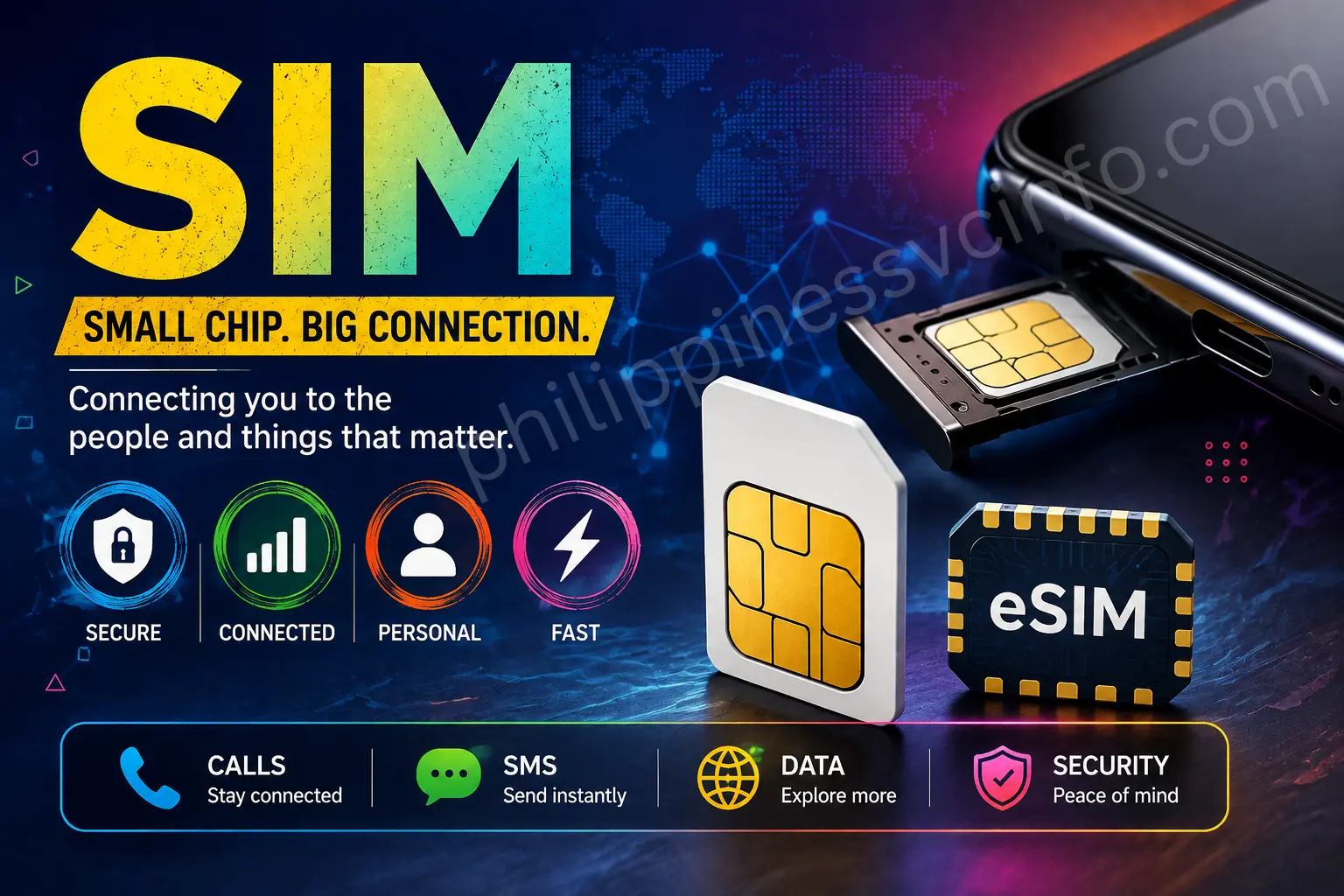
A SIM is one of the most important components of a mobile device. Whether you use a traditional physical SIM card or a modern eSIM, the SIM connects your mobile subscription with a compatible device and allows your carrier to identify and authenticate your service.
SIM technology has changed considerably over the years. The familiar plastic SIM card has become smaller, while eSIM technology allows compatible phones, tablets, watches, and other devices to use a digital SIM profile without inserting a removable card.
What Is a SIM?
SIM stands for Subscriber Identity Module. It is a secure component used by mobile networks to identify and authenticate a subscriber or mobile subscription.
A traditional SIM is usually provided as a small removable card that fits into a compatible phone or other cellular device. An eSIM performs the same fundamental subscriber-identification role through a digital profile stored in compatible device hardware.
When a device connects to a mobile network, the SIM provides the information and security credentials needed for the network to recognize the subscription. This helps the carrier determine which mobile service should be associated with the connection.
A SIM is therefore more than simply the small plastic card that users insert into a phone. It is part of the authentication system that allows a mobile subscription to work on a cellular network.
Depending on the carrier and service plan, a SIM can be used for:
- Voice calls
- SMS messages
- Mobile data
- Network authentication
- Roaming
- Mobile account services
- Cellular connectivity on compatible devices
Modern SIM technology can also be used in tablets, mobile Wi-Fi devices, smartwatches, connected vehicles, and Internet of Things devices.
What Is a SIM Card?
A SIM card normally refers to the physical form of a SIM.
It contains a small integrated circuit and contacts that allow the device to communicate with the SIM. When inserted into a compatible phone, the SIM can provide the subscriber information and authentication credentials required to connect to the carrier’s network.
The phrase SIM card is commonly used interchangeably with SIM, especially in everyday conversations.
For example, someone may say:
“I need a new SIM.”
Another person may say:
“I need a new SIM card.”
In ordinary mobile-service conversations, both expressions can refer to the same physical product.
Technically, however, SIM is the broader term. An eSIM is also a SIM, but it does not exist as a removable plastic card.
This distinction becomes increasingly important as more devices support digital SIM technology.
SIM vs SIM Card vs eSIM
These three terms are closely related but should not be treated as perfectly identical.
SIM
SIM means Subscriber Identity Module. It describes the subscriber-identification technology and profile used for mobile-network authentication.
SIM Card
A SIM card generally means the physical removable SIM that is inserted into a device.
eSIM
An eSIM, or embedded SIM, is a digital SIM implementation built into compatible device hardware. Instead of inserting a removable card, the user downloads or activates a carrier profile on the device.
The basic purpose remains similar: the mobile network needs to identify and authenticate the subscriber.
So, when someone asks, “Are SIM and SIM card the same?”, the practical answer is usually yes in everyday language, but technically SIM is broader than SIM card.
What Does a SIM Do?
A SIM performs several important functions in mobile connectivity.
1. Subscriber Identification
The SIM contains subscriber-related information used by the mobile network.
This allows the carrier to associate the connection with the correct subscription.
2. Network Authentication
The SIM participates in the authentication process used when the device connects to a cellular network.
This helps prevent unauthorized devices or subscriptions from simply pretending to be legitimate subscribers.
3. Mobile Service Access
After successful network authentication, the device can use the services permitted by the subscription.
Depending on the plan, this can include:
- Calls
- Text messages
- Mobile internet
- Roaming
- Other carrier services
4. Subscriber Security
SIM technology incorporates security mechanisms designed to protect subscriber credentials and support secure network authentication.
This is one reason users should protect their SIM, PIN, PUK, account credentials, and other authentication information.
How Does a SIM Work?
When you insert a physical SIM into a compatible phone, the phone communicates with the SIM.
The device then attempts to connect to a cellular network.
The network checks whether the subscription can be authenticated and whether the requested service is available.
A simplified process looks like this:
SIM → Device → Mobile Network → Authentication → Network Access
The exact technical process is much more complicated, but the basic concept is straightforward.
The SIM provides subscriber credentials, while the mobile network verifies those credentials.
Once authentication succeeds, the device can receive the network services allowed by the subscription.
The SIM itself does not create the cellular signal. Instead, it provides an important identity and authentication component that works together with the phone’s cellular modem, antennas, operating system, and carrier network.
Types of SIM Cards:
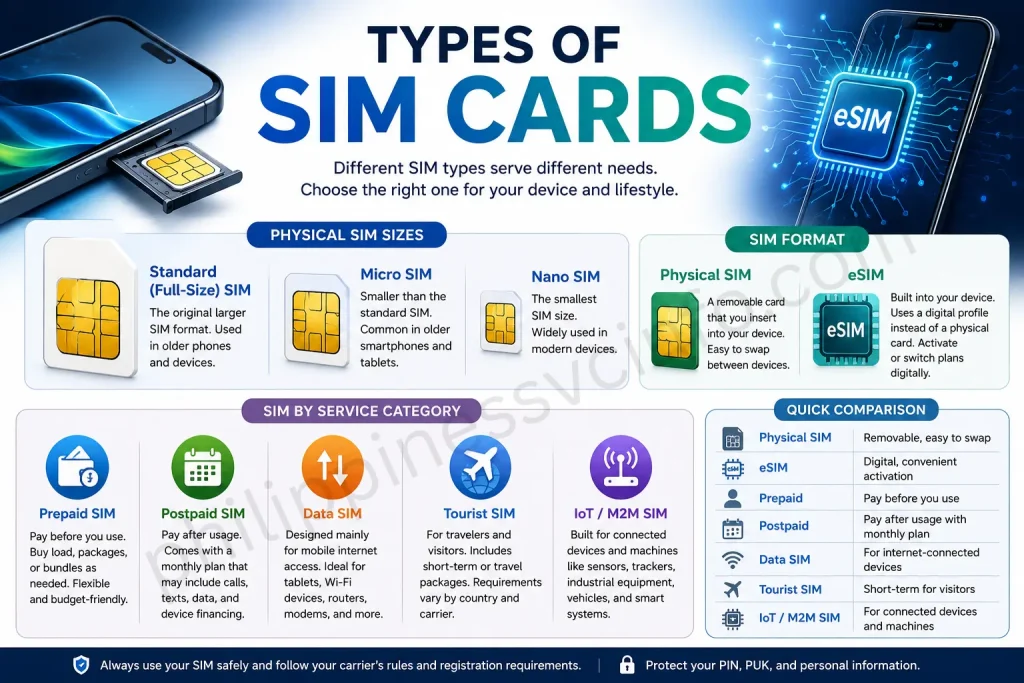
SIM technology comes in several forms. The most familiar distinction is between physical SIM cards and eSIMs, but users may also encounter different physical sizes and service categories.
Physical Sim Size:
Standard SIM
The original larger SIM format is commonly called a standard or full-size SIM.
Modern smartphones generally no longer use the full-size format directly, although older devices may support it.
Micro SIM
The Micro SIM is smaller than the original standard SIM.
It became common in older generations of smartphones and tablets.
Nano SIM
The Nano SIM is smaller than the Micro SIM and became widely adopted by modern smartphones.
Many physical-SIM smartphones use Nano SIMs.
Sim Format:
Physical SIM
A physical SIM is a removable card that can be inserted into a compatible device.
Its main advantage is simplicity. Users can remove it from one supported device and insert it into another, subject to carrier policies and device compatibility.
eSIM
An eSIM is integrated into compatible hardware and uses a downloadable digital profile instead of a removable plastic card.
It can make activating or switching subscriptions more convenient, depending on the carrier and device.
Sim by Service Categorie
Prepaid SIM
A prepaid SIM is connected to a prepaid service. Users generally purchase load, packages, or bundles before consuming the service.
Prepaid SIMs are popular because they can provide flexible spending without a traditional monthly contract.
Postpaid SIM
A postpaid SIM is associated with a monthly service plan.
Depending on the carrier, postpaid plans may include calls, texts, mobile data, device financing, or other services.
Data SIM
A data SIM is designed primarily for mobile internet access.
It may be used in:
- Tablets
- Mobile Wi-Fi devices
- Routers
- Modems
- Other compatible devices
Tourist SIM
Tourist SIMs are designed for visitors and may include temporary service periods or travel-oriented packages.
Requirements can vary considerably between countries and carriers.
IoT SIM
IoT and machine-to-machine applications can use specialized SIM technologies to connect devices such as sensors, trackers, industrial equipment, and connected machines to cellular networks.
Physical SIM vs eSIM
The most important modern SIM comparison is physical SIM vs eSIM.
| Feature | Physical SIM | eSIM |
|---|---|---|
| Physical card | Yes | No removable card |
| Installation | Insert card | Download/activate profile |
| Easy to remove | Yes | No physical card |
| Device requirement | Physical SIM slot | eSIM-compatible hardware |
| Carrier support | Very widespread | Depends on carrier/device |
| Useful for travel | Yes | Often convenient |
| Risk of losing card | Yes | No physical card |
| Switching profiles | Usually requires changing SIM | Can support multiple profiles depending on device |
An eSIM does not eliminate the need for a mobile carrier. The carrier still provides the subscription and network service.
The main difference is how the SIM profile is delivered and stored.
Modern eSIM systems can use remote provisioning to download a carrier profile to compatible hardware.
Advantages of a Physical SIM
Physical SIM cards remain popular because they are familiar and widely supported.
Easy to move between devices
If both devices support the same SIM format and carrier requirements, a physical SIM can often be moved from one phone to another.
Easy to replace
If a physical SIM is damaged, lost, or no longer works, the carrier can usually provide a replacement.
Broad compatibility
Physical SIM support remains common across many mobile phones and cellular devices.
Useful for backup phones
A physical SIM can be particularly convenient when users regularly move their service between devices.
Advantages of eSIM
eSIM technology offers several benefits.
No physical card
There is no removable plastic SIM to lose or damage.
Convenient activation
Depending on the carrier, an eSIM can often be activated by scanning a QR code or using an official app or device activation process.
Useful for travel
Compatible devices may allow users to add another cellular profile for travel without physically removing their main SIM.
Multiple profiles
Some devices can store multiple eSIM profiles, although the number of stored and active profiles depends on the device.
Less physical handling
Changing or adding a subscription can be performed digitally when supported by the carrier.
Disadvantages of eSIM
eSIM is convenient, but it is not automatically better for every user.
Device compatibility
The phone or other device must support eSIM.
Carrier support
The mobile carrier must support eSIM activation for the relevant service.
Transfer procedures vary
Moving an eSIM between devices can require carrier-specific procedures.
More difficult physical swapping
You cannot simply remove an eSIM and place it into another phone.
For this reason, travelers and users who frequently change devices should check carrier and device compatibility before choosing an eSIM.
What Is a SIM Number?
The term SIM number can be confusing because people use it to describe several different numbers.
A SIM can be associated with identifiers such as:
- Mobile phone number
- ICCID
- IMSI
- PIN
- PUK
These are not interchangeable.
Mobile Number
Your mobile number is the telephone number people use to call or message you.
It identifies the subscriber’s reachable telephone service.
ICCID
The Integrated Circuit Card Identifier, commonly abbreviated as ICCID, is an identifier associated with the SIM itself.
It is commonly printed on physical SIM packaging or card material, although the exact location and accessibility depend on the carrier and device.
IMSI
The International Mobile Subscriber Identity, or IMSI, is a technical subscriber identifier used by cellular networks.
It should not be confused with your ordinary phone number.
SIM PIN
The SIM PIN is a security code that can protect access to the SIM.
PUK
The PUK, or Personal Unblocking Key, is used in certain situations when a SIM has become locked after incorrect PIN attempts.
SIM Number vs Phone Number
A SIM number and phone number are not necessarily the same thing.
Your phone number is the number people dial to reach your mobile service.
The SIM has other technical identifiers that help the network manage and authenticate the subscription.
This distinction becomes particularly useful when dealing with:
- SIM replacement
- SIM activation
- Network support
- eSIM conversion
- Account troubleshooting
- SIM registration
If a website or customer-service agent asks for a “SIM number,” check what specific identifier they mean before providing information.
SIM vs IMEI
Another common confusion is SIM vs IMEI.
They serve different purposes.
| SIM | IMEI |
|---|---|
| Related to mobile subscription | Identifies the mobile device |
| Can be associated with a subscriber | Associated with the device hardware |
| Physical SIM or eSIM profile | Device identifier |
| Can move between supported devices | Normally remains associated with the device |
A useful way to remember the difference is:
SIM = subscriber/service identity
IMEI = device identity
For example, you can remove a SIM from one compatible phone and use it in another. The IMEI of the phones does not move with the SIM.
How to Insert a Physical SIM
(Step-by-Step Guide)
Installing a physical SIM is usually straightforward.
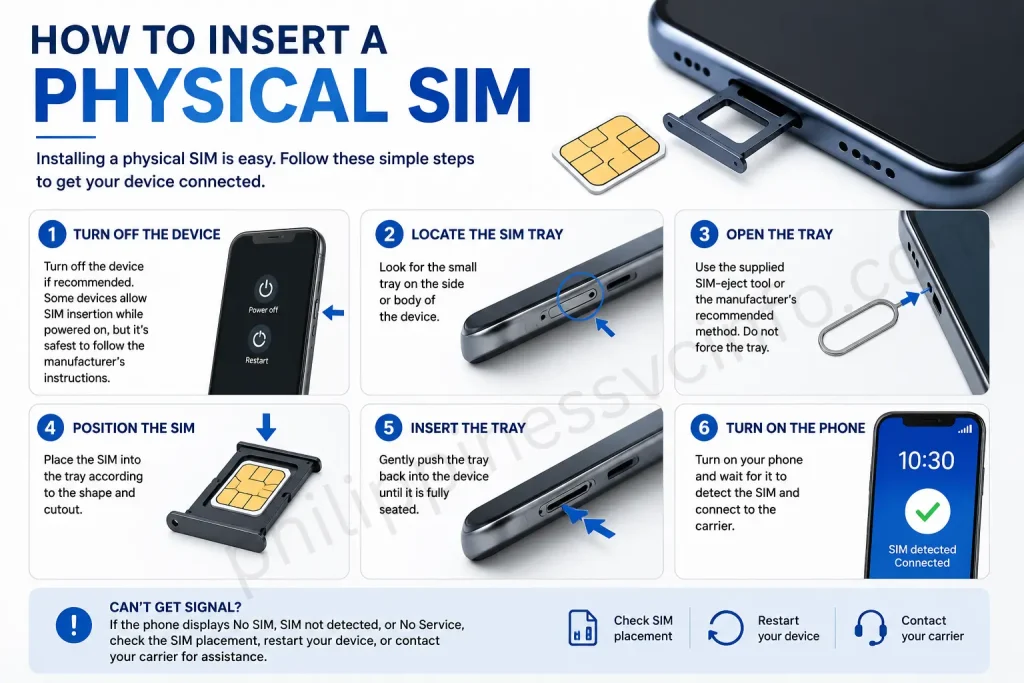
Step 1: Turn off the device if recommended
Some devices allow SIM insertion while powered on, but following the manufacturer’s instructions is safest.
Step 2: Locate the SIM tray
Look for the small tray on the side or body of the device.
Step 3: Open the tray
Use the supplied SIM-eject tool or the manufacturer’s recommended method.
Do not force the tray.
Step 4: Position the SIM
Place the SIM into the tray according to the shape and cutout.
Step 5: Insert the tray
Gently push the tray back into the device.
Step 6: Turn on the phone
Wait for the phone to detect the SIM and connect to the carrier.
If the phone displays No SIM, SIM not detected, or No Service, troubleshooting may be required.
How to Insert a Physical SIM (Video Guide)
How to Activate a SIM?
SIM activation varies by carrier.
A typical activation process can include:
- Insert the physical SIM or install an eSIM.
- Turn on the device.
- Wait for the carrier network to appear.
- Follow the carrier’s activation instructions.
- Complete verification if required.
- Register the SIM when required by local law.
- Test calls, SMS, and mobile data.
For eSIM activation, the carrier may provide a QR code or another digital activation method.
Always use the carrier’s official activation instructions.
How to Activate an eSIM?
The exact steps vary by phone and carrier, but a typical eSIM process may look like this:
- Confirm that your device supports eSIM.
- Obtain an eSIM activation method from the carrier.
- Open the phone’s cellular or mobile-network settings.
- Select the option to add a cellular/eSIM plan.
- Scan the carrier’s QR code or follow its activation instructions.
- Allow the device to download the SIM profile.
- Follow any verification steps.
- Select the eSIM for calls, texts, or mobile data as required.
- Test the connection.
Never scan an eSIM QR code from an unknown source. The activation profile is part of your cellular service and should be treated as sensitive.
Prepaid SIM vs Postpaid SIM
Both prepaid and postpaid services use SIM technology, but the billing arrangements are different.
Prepaid SIM
With prepaid service, users generally pay before using their allowance.
Advantages include:
- Spending control
- Flexible packages
- No traditional monthly bill
- Easy short-term use
Postpaid SIM
With postpaid service, users normally receive service under a monthly plan.
Advantages can include:
- Predictable monthly service
- Larger data allowances
- Device plans
- Additional account features
The best option depends on how much you use mobile service and how much flexibility you need.
SIM Registration
SIM registration is a legal requirement in many countries. The exact rules depend on the country.
In the Philippines, Republic Act No. 11934, known as the SIM Registration Act, requires SIM users to register under the applicable rules.
The purpose includes increasing accountability and helping authorities and telecommunications providers address activities such as scams, fraud, and other crimes involving telecommunications services. DITO’s official information confirms that new subscribers must register before activation and existing subscribers must comply to avoid deactivation.
SIM registration can apply to both physical SIM cards and eSIMs. Globe specifically states that its SIM Registration Act requirements apply to physical SIM cards and eSIMs used in phones, prepaid Wi-Fi kits, and other devices.
A typical registration process can involve:
- Entering the mobile number.
- Receiving an OTP.
- Entering subscriber information.
- Providing an accepted identification document.
- Completing a selfie or identity verification when required.
- Reviewing the information.
- Submitting the registration.
- Saving the confirmation or reference number.
The exact process varies by provider.
SIM Registration in the Philippines
The Philippines has several major mobile providers, including Smart/TNT, Globe/TM, and DITO.
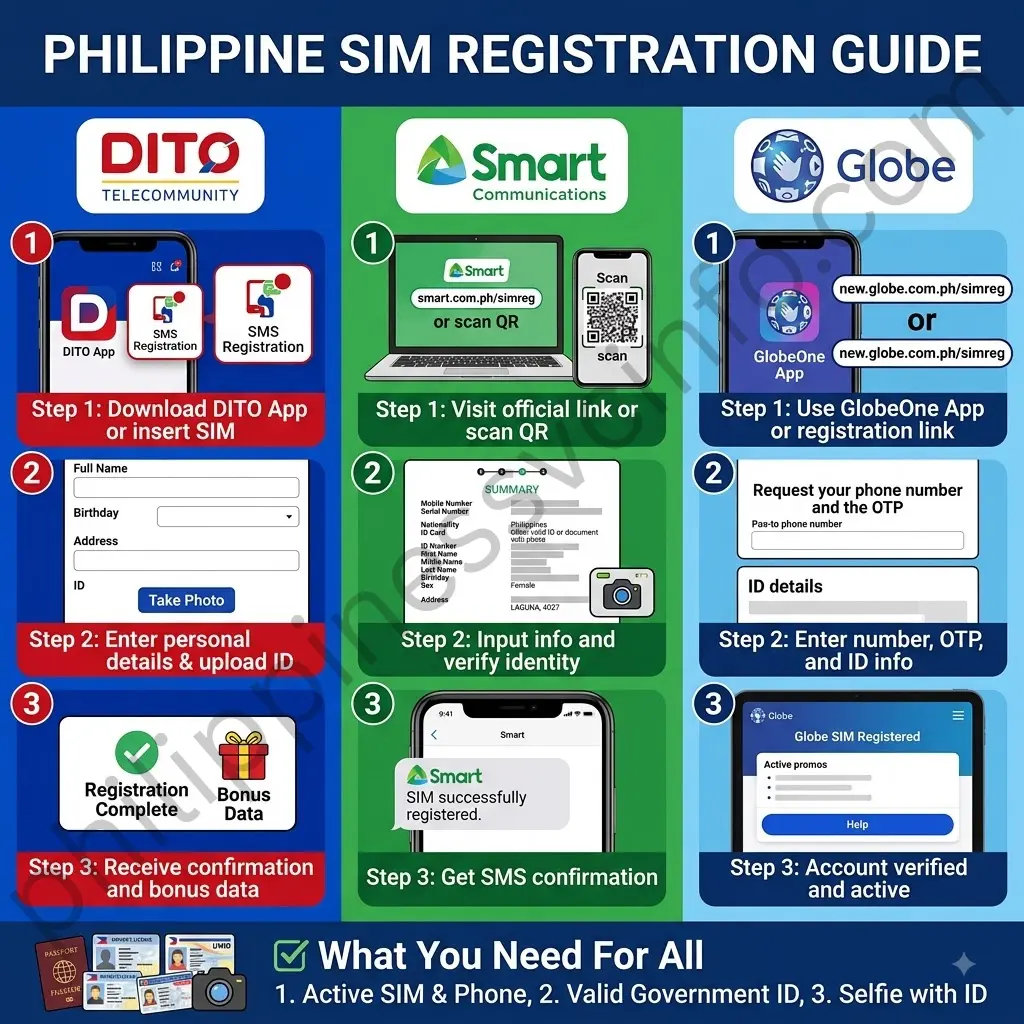
Users should always register through the provider’s official website, app, or authorized channel.
Smart and TNT SIM Registration
Smart provides an official SIM registration channel for Smart and TNT users.
The registration process generally requires users to follow the instructions provided by Smart, verify the mobile number, submit the required subscriber information, and complete applicable identity verification.
Because registration interfaces can change, use the instructions displayed on Smart’s official portal rather than relying on screenshots from old guides.
Globe and TM SIM Registration
Globe provides an official SIM registration website and also supports registration through the GlobeOne app.
Globe’s current registration flow includes mobile-number verification, SIM registration type selection, ID and selfie submission, completion of the registration form, and review of the submitted details.
Globe’s published instructions also state that users can enter their mobile number, receive a six-digit OTP, provide personal information, take a selfie, upload a valid government ID, agree to the relevant notices, and submit the registration. A reference number is displayed after successful submission.
Globe currently lists accepted IDs including:
- Passport
- Driver’s License
- National ID
- BIR/TIN ID
- UMID
- PhilPost Postal ID
- SSS ID
- PRC ID
Always check the current official page because provider requirements can change.
DITO SIM Registration
DITO Telecommunity also requires its SIM users to complete registration under the Philippine SIM Registration Act.
DITO states that its SIM registration requirement applies to prepaid and postpaid users, including foreign nationals, as well as businesses and corporate entities.
A DITO registration may involve:
- Opening the official registration channel.
- Providing the mobile number.
- Completing the requested subscriber information.
- Providing an accepted government-issued ID.
- Completing identity verification.
- Entering the required OTP.
- Reviewing the information.
- Submitting the registration.
- Saving the confirmation.
DITO’s official materials have also described registration through the DITO app and the submission of a valid government ID and selfie.
SIM Registration for Foreigners in the Philippines
Foreign nationals using Philippine SIMs can also be subject to SIM registration requirements.
Globe states that the SIM Registration Act applies to locals and foreigners, including corporate entities using SIMs purchased in the Philippines.
Foreign users may need additional documents depending on their status.
Possible documents can include:
- Passport
- Philippine address information
- Visa-related documentation
- Employment documentation
- Student documentation
- Other documents required by the provider
Do not assume that the requirements for a tourist are identical to those for a foreign resident or worker.
Always follow the provider’s current official instructions.
SIM Registration for Tourists
Foreign tourists can have special registration requirements.
Depending on the provider and circumstances, a tourist may need documentation such as:
- Passport
- Philippine address or accommodation details
- Travel information
- Return or onward ticket
- Other required supporting information
Tourist SIMs can also be subject to temporary validity rules.
Because these requirements are provider-specific and can change, tourists should verify the current requirements directly with the carrier before purchasing or registering a SIM.
SIM Registration for Minors
Minors can also have special SIM-registration rules.
For example, Globe states that SIMs belonging to minors who do not have a government-issued ID must be registered under the name of the parent or legal guardian.
A parent or guardian may therefore need to provide:
- Their valid identification
- The required information
- Proof of relationship or guardianship where applicable
- The minor’s relevant supporting documents
The exact procedure should be confirmed with the telecommunications provider.
How to Check SIM Information?
There are several ways to find information associated with your SIM.
Check Your Phone Settings
Modern Android and iPhone devices may display cellular information in their settings.
The exact menu names differ according to the device and operating-system version.
Check the SIM Packaging
For a physical SIM, the original packaging may contain information such as:
- Mobile number
- SIM identifier
- Activation instructions
- Carrier information
Use the Carrier App
Many providers offer official apps that can display account and mobile-service information.
Only download carrier apps from legitimate app stores or official provider websites.
Contact Customer Support
If you cannot find the information you need, contact the carrier through its official customer-service channels.
Never provide your account credentials or OTP to an unofficial “support” account.
Common SIM Problems:
SIM-related problems can happen for many reasons.
SIM Not Detected
If the phone says No SIM or SIM not detected, try:
- Restarting the phone.
- Checking that the SIM is inserted correctly.
- Removing and reinserting the SIM.
- Checking the SIM for visible damage.
- Testing the SIM in another compatible device if appropriate.
- Contacting the carrier if the problem continues.
No Service
If your SIM is detected but the phone shows No Service, the problem may involve:
- Network coverage
- Account status
- SIM activation
- Network settings
- Carrier outage
- Device compatibility
Check the carrier’s official service information before assuming the SIM is defective.
SIM Not Activated
A newly purchased SIM may require activation and registration before it can provide service.
Check the provider’s official instructions.
OTP Not Received
If the registration OTP does not arrive:
- Confirm the mobile number.
- Check network signal.
- Make sure the SIM can receive SMS.
- Wait before requesting another OTP.
- Restart the device if necessary.
- Use the provider’s official support channel if the problem continues.
SIM PIN Locked
Entering an incorrect SIM PIN repeatedly can cause the SIM to become locked.
At that point, the device may request a PUK code.
Do not randomly guess the PUK. Contact your carrier or use its official account tools to obtain the correct recovery information.
What Is a PUK Code?
A PUK, or Personal Unblocking Key, is a security code used to unlock a SIM after too many incorrect PIN attempts.
The PUK is different from:
- Phone passcode
- SIM PIN
- Account password
- Mobile number
- IMEI
If the PUK is entered incorrectly too many times, the SIM may become permanently unusable.
For this reason, never guess a PUK code.
SIM Security Tips
A SIM connects your mobile service to your device and account, so protecting it is important.
Never Share Your OTP
A legitimate carrier may use an OTP to verify an action, but you should not casually disclose that code to another person.
If someone calls claiming to be your carrier and asks for your OTP, stop and verify the request through an official channel.
Protect Your SIM PIN
If you use a SIM PIN, choose a secure code and avoid sharing it.
Keep Your PUK Secure
Do not post your PUK publicly or store it where unauthorized people can access it.
Avoid Fake SIM Registration Websites
Phishing websites can imitate legitimate carrier pages.
Before submitting:
- Passport
- National ID
- Driver’s license
- Selfie
- Mobile number
- OTP
check the website address carefully.
For Philippine users, start from the official carrier website rather than clicking an unexpected registration link.
Never Provide Banking Credentials
SIM registration should not require your online banking password, ATM PIN, cryptocurrency wallet password, or unrelated financial credentials.
If someone claims these are necessary, stop the transaction.
What Is SIM-Swap Fraud?
SIM-swap fraud occurs when an attacker attempts to convince a mobile carrier to transfer a victim’s mobile service to another SIM controlled by the attacker.
If successful, the attacker may receive calls and SMS intended for the victim.
Potential consequences can include attempts to bypass SMS-based authentication.
To reduce the risk:
- Protect your personal information.
- Use strong account passwords.
- Enable stronger authentication where available.
- Avoid sharing OTPs.
- Be suspicious of unexpected loss of cellular service.
- Contact your carrier immediately if your SIM suddenly stops working without explanation.
What to Do If Your SIM Is Lost or Stolen
If your physical SIM is lost or stolen, act quickly.
Step 1: Contact Your Carrier
Use the provider’s official customer-service channel.
Step 2: Request SIM Blocking or Replacement
The carrier may be able to deactivate the lost SIM and issue a replacement.
Step 3: Verify Your Identity
You may need identification or account information before the carrier can replace the SIM.
Step 4: Protect Your Accounts
If your mobile number is connected to important accounts, review their security settings.
Step 5: Monitor for Suspicious Activity
Pay attention to unexpected password-reset messages, OTPs, account notifications, or sudden loss of mobile service.
Can You Use One SIM in Another Phone?
A physical SIM can generally be moved to another compatible unlocked device, but several factors can affect whether the service works.
These include:
- SIM size
- Device compatibility
- Network compatibility
- Carrier restrictions
- Account status
- Frequency-band support
For eSIMs, transferring service normally requires a carrier-supported digital transfer or reactivation process.
So physical SIMs are often easier to move between devices, while eSIM transfers can depend more heavily on carrier and device support.
Can One Phone Have Two SIMs?
Yes, many modern phones support dual SIM configurations.
A dual-SIM device can potentially use:
- Two physical SIMs
- One physical SIM and one eSIM
- Multiple eSIM profiles, depending on the device
The exact configuration varies by phone model and region.
Dual SIM functionality can be useful for separating:
- Personal and work numbers
- Local and travel numbers
- Voice and data services
- Two different carriers
However, having two SIM profiles does not necessarily mean both lines can perform every function simultaneously. Device-specific limitations apply.
SIM for Travel
A SIM can be particularly useful when traveling internationally.
Travelers may use:
- Roaming
- Local physical SIM
- Travel SIM
- eSIM
- Dual-SIM configuration
An eSIM can be convenient for compatible travelers because a digital profile can often be installed without removing the user’s primary physical SIM.
Before traveling, check:
- Carrier coverage
- Roaming rates
- eSIM support
- Device compatibility
- Activation requirements
- Local registration laws
Do not assume that a travel SIM is automatically valid in every country.
SIM and Mobile Data
A SIM allows a device to authenticate with the mobile network, but the SIM itself is not the same thing as a data plan.
For mobile internet to work, several pieces must cooperate:
SIM + compatible device + network coverage + active subscription + data service
If one component fails, mobile data may not work.
For example, you can have a perfectly functioning SIM but no mobile internet because your data package has expired.
SIM and Network Coverage
A SIM does not guarantee network coverage.
Your mobile experience depends on factors such as:
- Carrier network availability
- Location
- Signal strength
- Device compatibility
- Network congestion
- Indoor or outdoor conditions
- Roaming arrangements
If a SIM works perfectly in one location but shows no service in another, the issue may be network coverage rather than the SIM itself.
Does Changing a SIM Change the Phone?
No.
Changing the SIM does not physically change the phone.
Instead, it changes the mobile subscription or network identity being used by the device.
The phone continues to have the same:
- Hardware
- IMEI
- Operating system
- Camera
- Storage
- Apps
The cellular service associated with the device can change.
Does Changing a SIM Change Your Number?
It depends.
If you replace a SIM through your carrier and request a replacement for the same account or number, you may retain your existing mobile number.
If you purchase a completely new SIM with a new subscription, it may come with a different number.
Number portability can also allow users in supported markets to move an existing number between carriers.
The exact rules depend on the country and telecommunications provider.
SIM Registration and Privacy
SIM registration involves personal information, so users should understand where their information is being submitted.
When registering a SIM:
- Use the official provider website.
- Check the privacy notice.
- Provide accurate information.
- Do not upload documents to unofficial websites.
- Avoid sending IDs through random messaging accounts.
- Keep confirmation information secure.
In the Philippines, Globe states that SIM-registration data is processed under the SIM Registration Act, the Data Privacy Act of 2012, and its privacy policy.
Is SIM Registration Free?
The cost depends on the provider and country.
For Philippine users, Globe currently states that its online SIM registration is free and zero-rated.
Users should be cautious if an unknown person demands payment simply to “register” a SIM, especially when the provider offers an official registration process.
Never pay an unofficial person in exchange for an OTP or registration shortcut.
How to Stay Safe When Registering a SIM
Use these simple rules:
- Start from the provider’s official website.
- Check the domain before entering personal information.
- Never share your OTP.
- Use a valid identification document.
- Do not upload your ID to random websites.
- Do not provide banking passwords.
- Save your registration confirmation.
- Keep your phone and SIM secure.
- Use official provider apps.
- Contact customer support through verified channels if something goes wrong.
Frequently Asked Questions About SIM
Final Thoughts:
A SIM connects your mobile device to a cellular network and helps authenticate your mobile subscription. Whether you use a physical SIM or eSIM, keep your SIM and account details secure, use official carrier channels, and follow applicable SIM registration requirements, including those in the Philippines.
For Philippine users, the official starting points are:
This approach keeps your SIM, identity information, and mobile account on the right side of the security fence.
Discover What You Need to Know:
- SIM Registration 2026: Complete Guide for Smart, Globe & DITO
- Globe eSIM Philippines: Buy, Install, Register & Activate Online 2026
- Smart eSIM Activation: Complete Philippines Setup & Registration Guide 2026
- DITO SIM Registration 2026: Official Registration Link, Requirements & Guide
- Globe SIM Registration 2026: Complete Online Registration Guide
- Smart SIM Registration Guide 2026: Register, Verify & Activate Your SIM