FEO System refers to the online platform available through FEO-System.com, where users can access information and services provided through the system. The exact functions, registration process, eligibility requirements, and available features should be confirmed from the platform’s official website before users submit information, create an account, or use any service.
What Is the FEO System?
The FEO System is the online environment used for firearms-related licensing and registration services administered by the Philippine National Police Firearms and Explosives Office.
Depending on the applicant and transaction, the system may be used in connection with services including:
- LTOPF applications
- LTOPF renewal
- Firearm registration
- Firearm registration renewal
- Firearm-related transactions
- Certain permits and other FEO services
The official FEO forms page currently separates services into areas including the Firearms Licensing Division (FLD), Permit to Carry Firearms Outside Residence (PTCFOR), Explosives Management Division (EMD), and Education and Enforcement Management Division (EEMD).
This means the FEO System Philippines is not simply a general government account. The exact service available to you depends on the transaction you are trying to complete and the applicable requirements.
Where You Access the FEO Online Service?
For the latest official information, start with the PNP-FEO website:
The FEO website also publishes official forms and service information:
An older PNP document refers to feo.pnp-csg.org as the FEO online account website, while older FEO forms also refer to Feo-System.com. Because government portals can be changed or migrated, applicants should verify the currently active online portal through the present official FEO website rather than relying on an old bookmark or an unofficial search result.
FEO System Registration: What to Prepare
Before starting an online application, prepare the personal information and documents that may be requested for your particular transaction.
Common account information can include:
- Full legal name
- Mobile telephone number
- Email address
- Residential information
- Identification details
- Other information required by the current FEO application form
The precise documents depend on the service. For example, official FEO material lists different documentary requirements for an LTOPF application, including proof of citizenship and evidence relating to income, profession, business or occupation.
Do not assume that a document listed on a third-party website is automatically required for every applicant. Always compare your checklist with the current FEO instructions for the specific service you selected.
How to Create an FEO Online Account
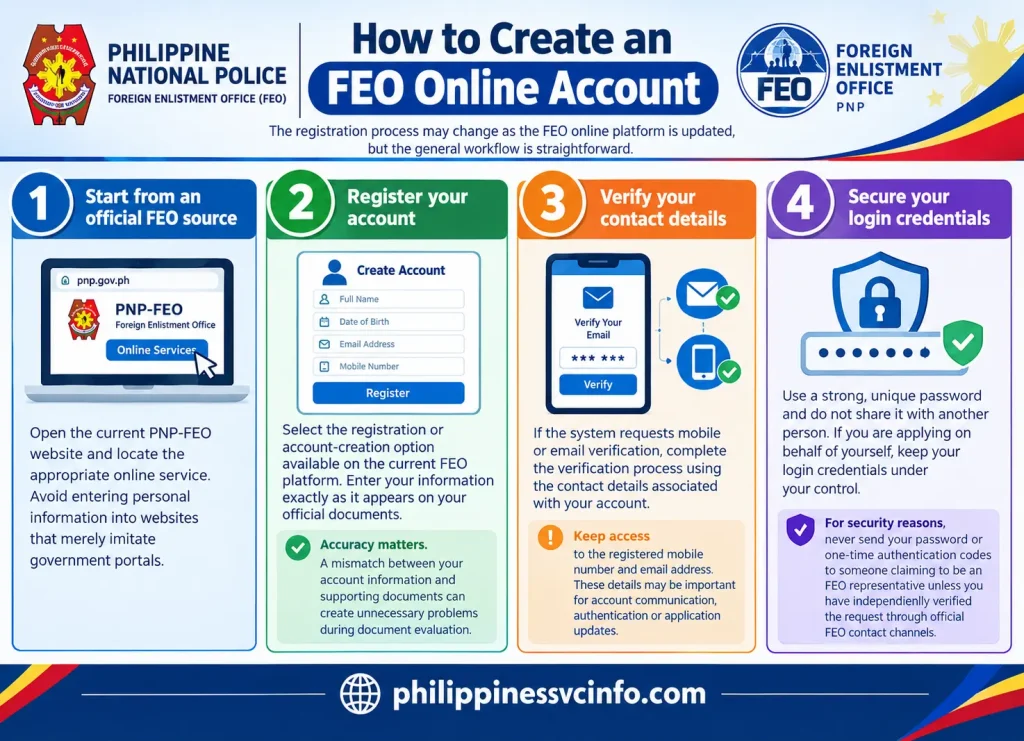
The registration process may change as the FEO online platform is updated, but the general workflow is straightforward.
Step 1: Start from an official FEO source
Open the current PNP-FEO website and locate the appropriate online service. Avoid entering personal information into websites that merely imitate government portals.
Step 2: Register your account
Select the registration or account-creation option available on the current FEO platform. Enter your information exactly as it appears on your official documents.
Accuracy matters. A mismatch between your account information and supporting documents can create unnecessary problems during document evaluation.
Step 3: Verify your contact details
If the system requests mobile or email verification, complete the verification process using the contact details associated with your account.
Keep access to the registered mobile number and email address. These details may be important for account communication, authentication or application updates.
Step 4: Secure your login credentials
Use a strong, unique password and do not share it with another person. If you are applying on behalf of yourself, keep your login credentials under your control.
For security reasons, never send your password or one-time authentication codes to someone claiming to be an FEO representative unless you have independently verified the request through official FEO contact channels.
Logging In to the FEO System
After registration, use the current FEO online portal to access your account.
Depending on the current version of the system, the login process may request your registered mobile number, email address, password or another authentication method. The exact interface can change when the FEO updates its online services.
If you cannot remember your password, use the recovery function provided on the official login page rather than creating multiple accounts.
The FEO’s Computer Section is responsible for maintaining the technical processes of the FEO Online System, including technical operations connected with the system and the printing of LTOPF and firearm registration licence cards.
Applying for an LTOPF Online
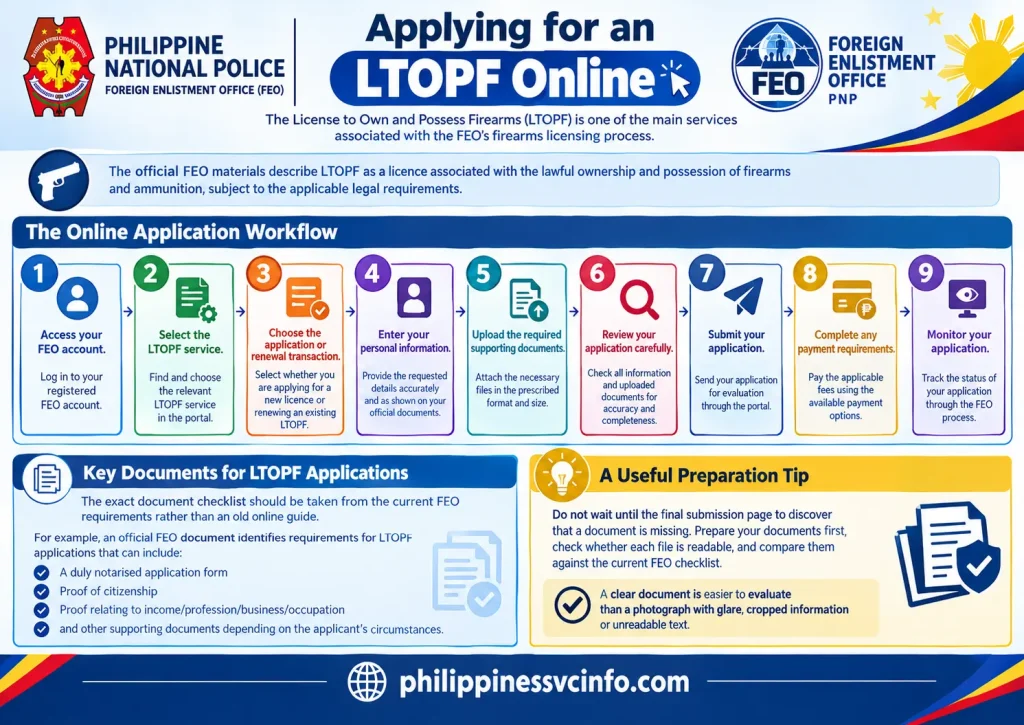
The License to Own and Possess Firearms (LTOPF) is one of the main services associated with the FEO’s firearms licensing process.
The official FEO materials describe LTOPF as a licence associated with the lawful ownership and possession of firearms and ammunition, subject to the applicable legal requirements.
A typical online workflow involves:
- Accessing your FEO account.
- Selecting the relevant LTOPF service.
- Choosing the appropriate application or renewal transaction.
- Entering the requested personal information.
- Uploading the required supporting documents.
- Reviewing the application carefully.
- Submitting the application for evaluation.
- Completing any applicable payment requirements.
- Monitoring the application through the available FEO process.
The exact document checklist should be taken from the current FEO requirements rather than an old online guide.
For example, an official FEO document identifies requirements for LTOPF applications that can include a duly notarised application form, proof of citizenship, proof relating to income/profession/business/occupation and other supporting documents depending on the applicant’s circumstances.
A useful preparation tip
Do not wait until the final submission page to discover that a document is missing. Prepare your documents first, check whether each file is readable, and compare them against the current FEO checklist.
A clear document is easier to evaluate than a photograph with glare, cropped information or unreadable text.
What Happens After Online Submission?
Submitting an online application does not necessarily mean that the licence has already been issued.
The FEO’s Individual Licensing Section is responsible for evaluating requirements submitted through the online system and, after approval, carrying out the appropriate document evaluation and releasing LTOPF and firearm registration certificates.
Applicants should therefore distinguish between:
Application submitted → documents received for processing
Under evaluation → FEO assessment is taking place
Payment or other action required → applicant may need to complete a specified requirement
Approved/released → processing has reached the applicable completion stage
The exact status labels displayed in your account may differ according to the current system version.
What Documents May Be Required?
The exact requirements depend on the service you are applying for, so there is no single document list that applies to every FEO System transaction.
For an LTOPF application, official FEO material has identified documents such as a notarised application form, proof of citizenship, proof of income or occupation, police clearance and other supporting documents. The applicable checklist can vary according to the application and the applicant’s circumstances.
For this reason, check the current FEO form or requirement list before uploading anything.
A useful preparation checklist is:
- Check the current FEO requirements for your specific service.
- Make sure names and personal details are consistent across documents.
- Use readable copies or files in the format requested by the system.
- Check whether a document needs to be notarised or otherwise authenticated.
- Keep copies of the documents you submit.
- Do not rely on an old checklist simply because it appears on a third-party website.
Important: The FEO website itself notes that its online information can be affected by errors or changes and advises users to evaluate information carefully. Current official FEO instructions should therefore take priority over old blog posts, social-media posts or unofficial guides.
How Does LTOPF Renewal Work?
LTOPF renewal is different from submitting a first-time application. The FEO currently provides a dedicated renewal form, and its official forms page lists both LTOPF application and renewal services.
The FEO’s published online-system instructions have also described a renewal route for existing users, using existing LTOPF information and account credentials. Because online systems can be updated, applicants should follow the options displayed on the current official portal rather than relying solely on older screenshots or instructions.
Before starting a renewal, check:
- Your existing licence information.
- The current renewal form.
- The current documentary requirements.
- Any applicable clearance or supporting document.
- The validity date of your licence.
- Any payment instructions shown during the application process.
The implementing rules published by the FEO state that an LTOPF renewal application may be filed within six months before the licence’s expiry. They also state that failure to renew on or before expiry can result in automatic revocation of the licence and firearm registration under the relevant rules.
Because these are legal requirements, don’t treat a third-party renewal calendar as definitive. Confirm the applicable date against the current FEO rules and your own licence records.
Firearm Registration Through the FEO System
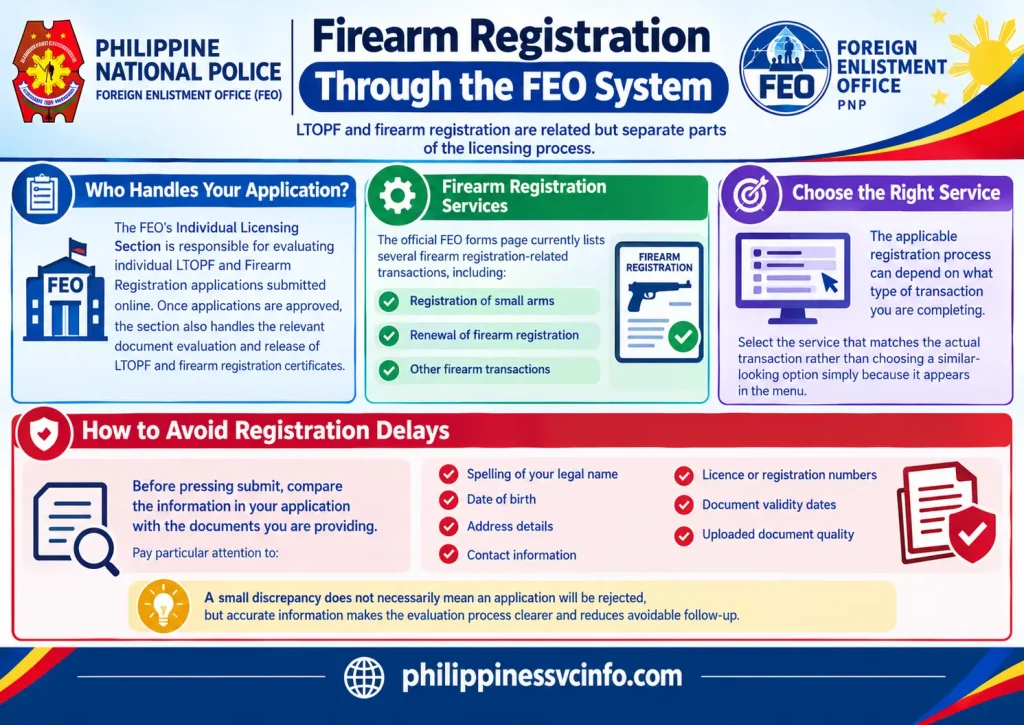
LTOPF and firearm registration are related but separate parts of the licensing process.
The FEO’s Individual Licensing Section is responsible for evaluating individual LTOPF and Firearm Registration applications submitted online. Once applications are approved, the section also handles the relevant document evaluation and release of LTOPF and firearm registration certificates.
The official FEO forms page currently lists several firearm registration-related transactions, including registration and renewal of small arms and other firearm transactions.
The applicable registration process can therefore depend on what type of transaction you are completing. An applicant should select the service that matches the actual transaction rather than choosing a similar-looking option simply because it appears in the menu.
How to Avoid Registration Delays
Before pressing submit, compare the information in your application with the documents you are providing.
Pay particular attention to:
- Spelling of your legal name
- Date of birth
- Address details
- Contact information
- Licence or registration numbers
- Document validity dates
- Uploaded document quality
A small discrepancy does not necessarily mean an application will be rejected, but accurate information makes the evaluation process clearer and reduces avoidable follow-up.
Can Check Your FEO Application Status Online?
The exact status options available to an applicant depend on the current version of the FEO online system.
The FEO’s published functions confirm that online applications are evaluated by the appropriate licensing section and that the FEO Online System is maintained by its Computer Section. The Computer Section is also responsible for technical processes associated with the online system and the printing of LTOPF and firearm-registration licence cards.
If your account provides an application-status or transaction-history area, use that information as the first reference for your application.
Do not assume that an application is approved merely because documents have been uploaded successfully. Submission, evaluation and final release are separate stages.
What If Your Application Appears to Be Stuck?
If the status has not changed for a period that concerns you, first check whether the FEO has requested additional information, payment or another action.
You can then use the appropriate official FEO assistance channel rather than relying on an unofficial contact number.
The current FEO contact page provides dedicated assistance contacts for firearms licensing and registration concerns, including the Firearms and Licensing Division help desk and separate contacts for relevant sections.
FEO System Login Problems: What to Do?
Login problems can have several causes, including incorrect credentials, account-verification issues or technical problems with the online service.
Try the following before creating another account:
Check your registered details. Make sure you are using the same contact information associated with your FEO account.
Use the available account-recovery option. If the current portal provides a password-recovery function, use that rather than repeatedly attempting different passwords.
Check the official FEO website for announcements. System maintenance or changes may affect online access.
Contact FEO through an official channel. If the problem continues, use the contact information published on the current FEO website.
The FEO’s Computer Section specifically states that it maintains the technical processes of the FEO Online System, making the official FEO support channels more appropriate than unofficial troubleshooting services.
Note About FEO System Websites and Old Links
One point deserves special attention when searching for the FEO System online.
Older FEO documents and forms may contain references to previous online addresses or older system names. For example, an older FEO document references Feo-System.com, while another published instruction refers to an earlier FEO online address.
That does not mean an old address should automatically be treated as the current official portal.
The safest approach is to begin with the present official PNP-FEO website and follow the online-service instructions currently published there. The official FEO website is:
This approach also helps reduce the risk of entering personal information into a website that is not currently authorised or maintained by the relevant government office.
Payment and Application Processing
Payment is another stage where applicants should follow the instructions attached to their particular transaction.
The FEO’s Individual Licensing Section states that it is responsible for validating payments associated with new firearm purchases, while the relevant licensing sections handle evaluation of applications and supporting documents.
Do not assume that uploading documents means every payment requirement has already been completed. Likewise, don’t send money to a person who contacts you through an unofficial channel and claims they can accelerate an FEO application.
Use only payment instructions provided through the official process and retain any legitimate transaction records for your own reference.
Quick FEO System Checklist
Before submitting an online application, review these points:
| Check | What to confirm |
|---|---|
| Account | Your registered details are accurate |
| Service | You selected the correct FEO transaction |
| Documents | Current requirements have been followed |
| Files | Uploaded documents are clear and readable |
| Information | Details match your supporting documents |
| Payment | You have followed the official payment instructions |
| Status | You know where to monitor the transaction |
| Support | You have the current FEO contact details |
This simple review can help identify problems before an application reaches the evaluation stage.
Where to Get Official FEO Information
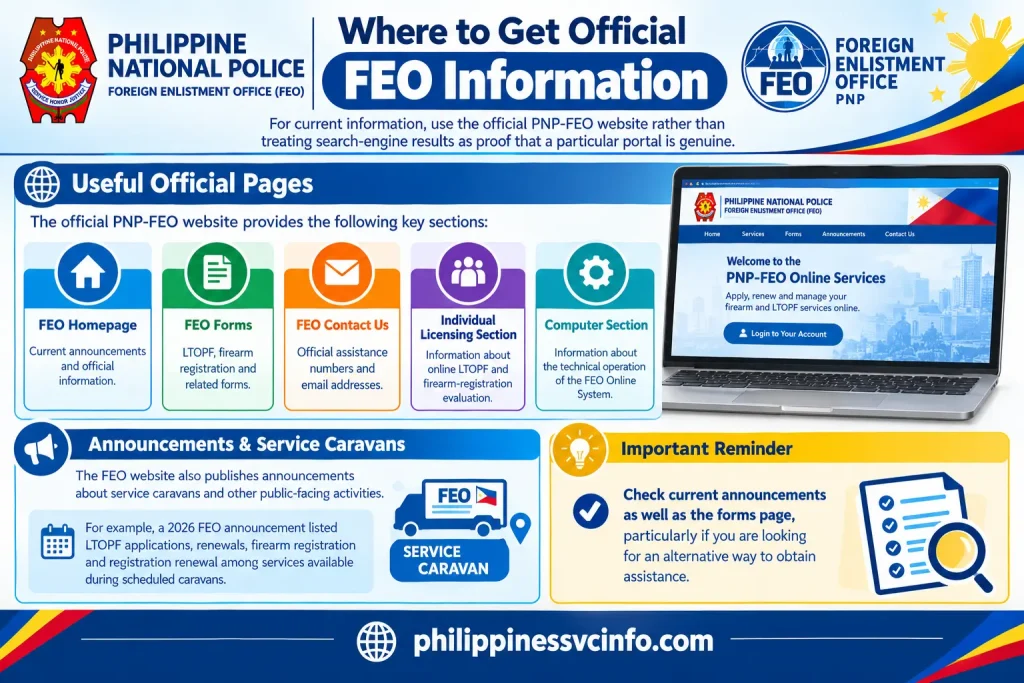
For current information, use the official PNP-FEO website rather than treating search-engine results as proof that a particular portal is genuine.
Useful official pages include:
- FEO homepage: current announcements and official information
- FEO Forms: LTOPF, firearm registration and related forms
- FEO Contact Us: official assistance numbers and email addresses
- Individual Licensing Section: information about online LTOPF and firearm-registration evaluation
- Computer Section: information about the technical operation of the FEO Online System
The FEO website also publishes announcements about service caravans and other public-facing activities. For example, a 2026 FEO announcement listed LTOPF applications, renewals, firearm registration and registration renewal among services available during scheduled caravans.
That means applicants should check current announcements as well as the forms page, particularly if they are looking for an alternative way to obtain assistance.
Common Problems and How to Handle Them
1. My application is submitted. What happens next?
Submitting an application does not necessarily mean that the transaction has already been approved.
The FEO’s Individual Licensing Section is responsible for evaluating online applications for the License to Own and Possess Firearms (LTOPF) and Firearm Registration (FR). It also evaluates documents and handles the release of LTOPF and FR certificates after approval.
If your application has already been submitted, monitor the information available through your account and check whether the FEO has requested any further action.
2. What if I uploaded the wrong document?
Do not assume that submitting another application will automatically solve the problem.
First check whether the FEO System provides an option to amend, replace or otherwise comply with a documentary requirement. If the system does not clearly explain what to do, contact the relevant FEO assistance channel before making another submission.
The current FEO website publishes dedicated contact information for LTOPF and firearm-registration concerns.
3. Why does an old FEO guide mention Feo-System.com?
This is an important point for anyone searching for FEO System information online.
Older FEO forms and instructions do contain references to Feo-System.com. For example, an official FEO renewal form includes the wording that the applicant’s email address is the one used in “Feo-System.com”.
However, older references should not automatically be treated as confirmation that a particular web address is the current online portal. The official FEO website currently operates under the Philippine National Police domain, and its current pages should be used as the starting point for updated information.
This distinction matters because online government services can be replaced, redesigned or moved.
4. Where can I find the current FEO forms?
The official FEO Forms page is the appropriate place to check available forms.
The current forms page lists LTOPF applications and renewals, firearm registration, small-arms registration renewal and other firearm-related transactions. It also includes forms for other FEO divisions and services.
Before downloading an old form from another website, compare it with the version currently published by FEO.
FAQs About the FEO System
Official FEO Websites and Resources
For readers searching for the FEO System, the safest approach is to begin with the current official FEO website and navigate from there.
Official FEO website
The homepage provides current announcements and information about FEO activities and services.
FEO forms
Use this page to check the current forms available for LTOPF, firearm registration, renewals and other transactions.
FEO contact page
This page provides the published assistance numbers and email addresses for relevant FEO divisions and sections.
Individual Licensing Section
This is useful for understanding the role of the section responsible for evaluating individual LTOPF and firearm-registration applications.
A Practical FEO System Checklist
Before you finish an online transaction, run through this short checklist:
| Check | What to verify |
|---|---|
| Account | Your registered information is correct |
| Service | You selected the appropriate transaction |
| Documents | You followed the current FEO requirements |
| Personal details | Names, dates and addresses match your documents |
| Files | Uploaded copies are readable |
| Application | Required information has been completed |
| Payment | You followed the official payment instructions |
| Status | You know where to monitor the transaction |
| Support | You have the latest official FEO contact details |
| Records | You retained relevant application or transaction records |
This final review is particularly useful when renewing an existing licence or registration, because it gives you an opportunity to spot inconsistencies before they become a reason for further clarification.
What the FEO Computer Section Does
Technical issues and licensing decisions should not be confused.
The FEO Computer Section is responsible for maintaining the technical processes of the FEO Online System. Its listed functions also include printing LTOPF and firearm-registration licence cards and implementing approved resolutions concerning firearm status and correction of data-entry information.
That means a technical problem with an online account is different from a documentary or eligibility issue with an application.
If the website itself is not functioning properly, technical support is the more relevant route. If the question concerns documents, licensing or registration, the appropriate licensing section should be contacted.
Keep Your Information Secure
An FEO online account can involve personal and application information, so users should take reasonable care when accessing the service.
Avoid entering account credentials into websites reached through unverified advertisements, social-media messages or unofficial links. Start from the current official FEO website whenever possible.
The FEO’s published disclaimer also warns users that information on its website may contain errors or omissions and says users are responsible for evaluating information obtained through linked third-party pages.
For privacy-related questions, the FEO website provides information about its data practices and lists the Philippine National Police–Firearms and Explosive Office as a contact point.
Final Takeaway
Searching for the FEO System can lead to older forms, archived instructions and references to previous online addresses. The key is to distinguish historical material from the information currently published by the Philippine National Police Firearms and Explosives Office.For an application, renewal or registration, begin with the current official FEO website, check the latest forms, follow the requirements for the specific transaction and use the published FEO contact channels if something is unclear.The FEO itself maintains online processes for LTOPF and firearm-registration applications, while its Individual Licensing and Computer sections handle different parts of evaluation and system administration.Most importantly, don’t assume that an old FEO System link, screenshot or checklist is still current simply because it appears in search results. Government online services can change, so the current official source should remain your reference point.
Discover What You Need to Know:
- SALN 2026 Form Philippines: Download, Requirements & Filing Guide
- SSS Registration Philippines 2026: How to Get an SS Number & Create My.SSS
- DepEd Logo PNG: Official Download, Transparent File & Usage Guide 2026
- eFPS Login Philippines 2026: BIR eFPS Login Guide, Filing & Payment
- MMDA NCAP Guide Philippines 2026 : Check Violations, Fines & May Huli Ka