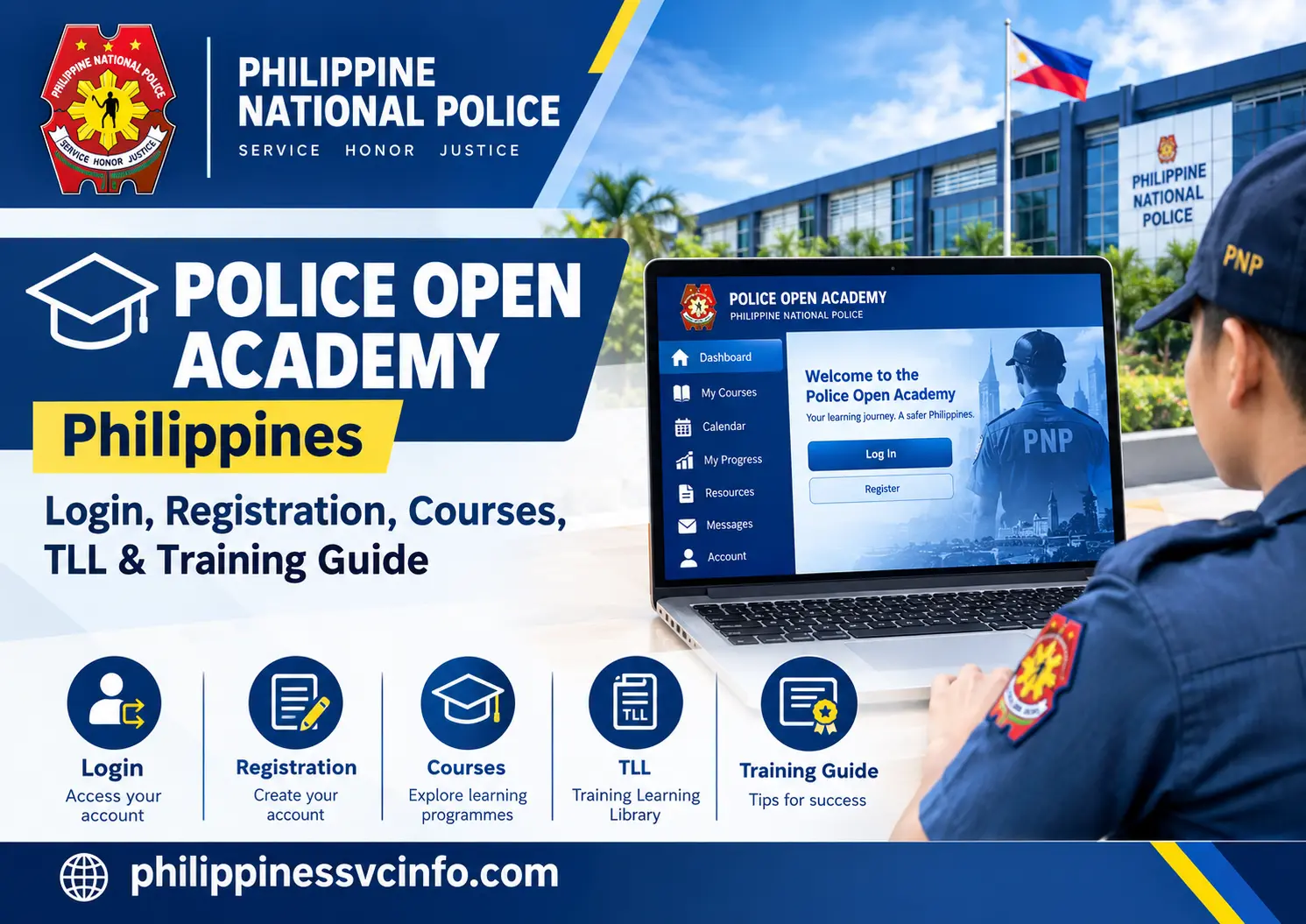
The Police Open Academy (POA) is an online education and training platform of the Philippine National Police (PNP), designed to support authorised personnel and trainees through professional development, digital courses, training activities, schedules, progress monitoring, and related learning records. Access depends on institutional eligibility, approved programmes, and authorised account credentials.
What Is the Police Open Academy?
The Police Open Academy is an online education and training platform associated with the Philippine National Police. The information supplied for this guide describes it as operating under the PNP’s education and training structure and supporting continuous learning, professional development and training administration.
Rather than being simply a public information website, the Police Open Academy is designed around learning and training activities. Depending on the user’s authorisation, the system may provide access to courses, training schedules, learning materials and personal training information.
The platform can therefore be particularly relevant to:
- Active PNP personnel
- Authorised trainees
- Students participating in approved programmes
- Other institutional users with permitted access
- Members of the public who need to understand the purpose of the platform
It is important to distinguish the Police Open Academy from PNP recruitment channels. Someone interested in joining the police should not assume that creating an account on a training platform constitutes an application for police service.
Police Open Academy at a Glance
| Feature | Information |
|---|---|
| Platform | Police Open Academy |
| Organisation | Philippine National Police |
| Main purpose | Online education and training |
| Official portal | policeopenacademy.pnp.gov.ph |
| Main users | Authorised PNP personnel and trainees |
| Learning format | Online and potentially blended activities |
| Training records | May be associated with authorised personnel training information |
| Public recruitment | Not the primary purpose of the platform |
The supplied information describes the platform as supporting continuous learning and development while also helping with training-related administration. This fits within the broader PNP framework in which education and training records have an institutional role. A PNP memorandum, for example, describes the maintenance of a Training Lineal List (TLL) for personnel and procedures connected with mandatory career courses.
Who Can Use the Police Open Academy?
Access to the Police Open Academy is not necessarily the same for every visitor.
The platform’s role-based nature means that an active PNP member may see different options from an authorised trainee or another approved system user. Course availability can also depend on the training programme to which the person has been assigned.
Active PNP Personnel
PNP personnel may use the Police Open Academy for authorised professional learning, career-related training and other institutional development activities.
Depending on their role and current programme, personnel may have access to training courses, schedules, learning resources and training records.
Authorised Trainees and Students
Some learners may receive access because they have been enrolled or authorised to participate in a particular programme.
Their dashboard may therefore contain only the courses or learning resources relevant to their approved training.
General Public
Members of the public may be able to visit the Police Open Academy website, but public access to institutional learning functions should not be assumed.
If you are looking for information about joining the Philippine National Police, use the appropriate official recruitment or admissions channel rather than treating the academy portal as a general police application website.
Police Open Academy Login: How to Access Your Account
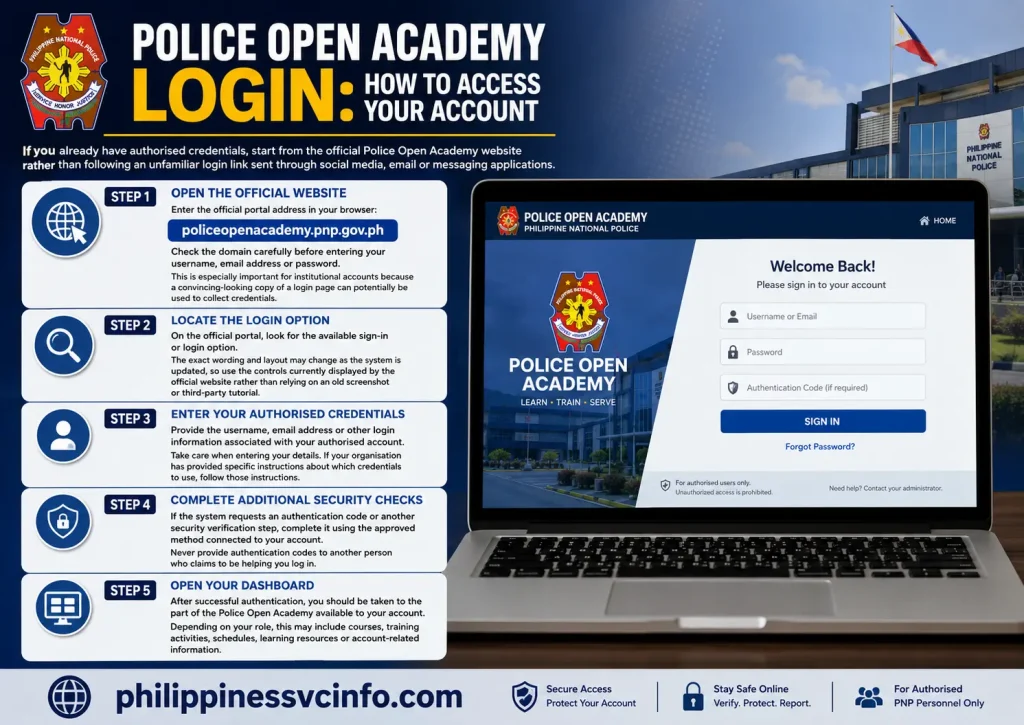
If you already have authorised credentials, start from the official Police Open Academy website rather than following an unfamiliar login link sent through social media, email or messaging applications.
Step 1: Open the Official Website
Enter the official portal address in your browser:
policeopenacademy.pnp.gov.ph
Check the domain carefully before entering your username, email address or password.
This is especially important for institutional accounts because a convincing-looking copy of a login page can potentially be used to collect credentials.
Step 2: Locate the Login Option
On the official portal, look for the available sign-in or login option.
The exact wording and layout may change as the system is updated, so use the controls currently displayed by the official website rather than relying on an old screenshot or third-party tutorial.
Step 3: Enter Your Authorised Credentials
Provide the username, email address or other login information associated with your authorised account.
Take care when entering your details. If your organisation has provided specific instructions about which credentials to use, follow those instructions.
Step 4: Complete Additional Security Checks
If the system requests an authentication code or another security verification step, complete it using the approved method connected to your account.
Never provide authentication codes to another person who claims to be helping you log in.
Step 5: Open Your Dashboard
After successful authentication, you should be taken to the part of the Police Open Academy available to your account.
Depending on your role, this may include courses, training activities, schedules, learning resources or account-related information.
Police Open Academy Registration: What Should You Know?
Registration is different from simply visiting the portal.
The information supplied for this guide indicates that account creation may depend on current academy programmes or institutional arrangements. Consequently, a registration option may not always be available to every member of the public.
If a registration or sign-up facility is displayed, users should provide accurate information and follow the requirements shown by the official system.
Potential information requested by an institutional registration process may include:
- Full name
- Date of birth
- Active email address
- Contact information
- Official PNP credentials, where applicable
- Secure account credentials
- Required verification information
Do not create duplicate accounts simply because a registration attempt does not immediately work. If your access is supposed to be provided through a PNP unit, training office or authorised programme, confirm the correct procedure with that institution.
What Courses Are Available Through the Police Open Academy?
The Police Open Academy can support different forms of professional learning rather than a single course.
The material supplied for this guide identifies several broad areas of training.
Mandatory Career Training
Some PNP personnel may be required to complete particular career courses as part of their professional development.
PNP documentation concerning mandatory career courses shows that training schedules and eligibility can be connected with institutional records and the Training Lineal List.
In-Service Professional Development
Training can also cover continuing professional development. Such learning may help personnel remain familiar with current operational, administrative or professional requirements.
Technical and Specialised Learning
The supplied information also identifies areas such as cybersecurity, investigative updates and modern policing as examples of specialised learning that may be represented in the platform.
The exact course catalogue available to an individual should be determined from the user’s authorised dashboard and current PNP training programme. It should not be assumed that every course is publicly available.
How the Police Open Academy Supports Online Learning
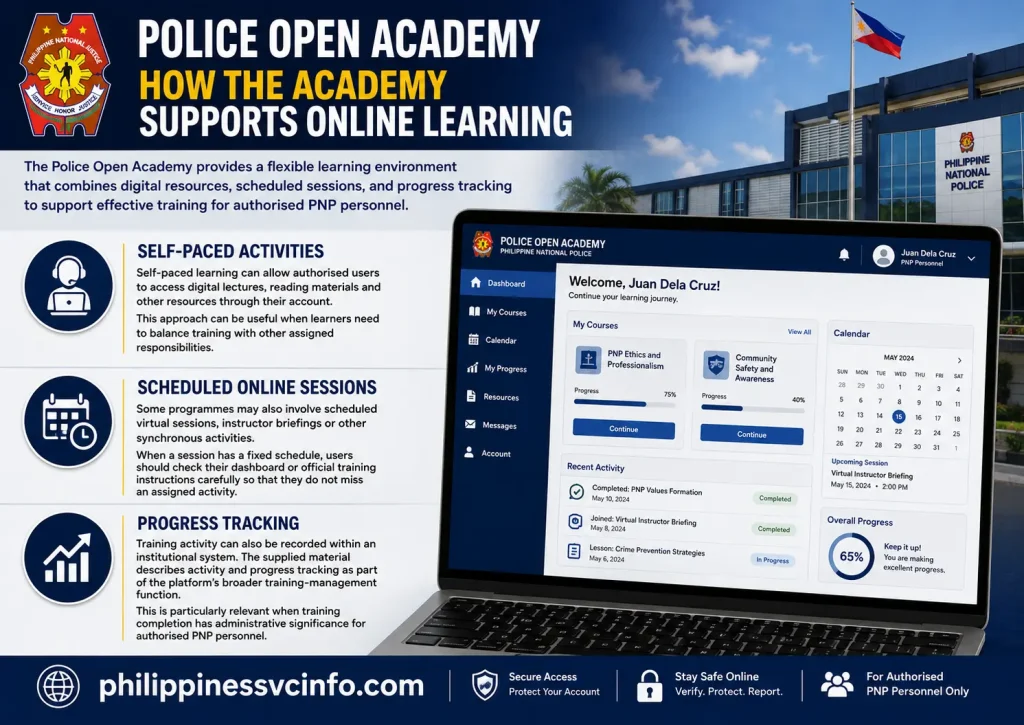
One useful feature of an online academy is that learning does not necessarily have to take place in a traditional classroom for every activity.
The Police Open Academy information supplied for this article describes a combination of digital and scheduled learning.
Self-Paced Activities
Self-paced learning can allow authorised users to access digital lectures, reading materials and other resources through their account.
This approach can be useful when learners need to balance training with other assigned responsibilities.
Scheduled Online Sessions
Some programmes may also involve scheduled virtual sessions, instructor briefings or other synchronous activities.
When a session has a fixed schedule, users should check their dashboard or official training instructions carefully so that they do not miss an assigned activity.
Progress Tracking
Training activity can also be recorded within an institutional system. The supplied material describes activity and progress tracking as part of the platform’s broader training-management function.
This is particularly relevant when training completion has administrative significance for authorised PNP personnel.
Why Training Records Matter
Training is not only about completing individual lessons. For personnel, official records can matter when an organisation needs to verify who has completed particular requirements.
PNP documentation illustrates the importance of structured training records. For example, official PNP material describes maintaining a database of the Training Lineal List and using it in connection with personnel scheduled for mandatory schooling.
The Police Open Academy can therefore be understood as part of a wider training ecosystem rather than as an isolated educational website.
For an authorised user, keeping course information accurate and checking completion status can help avoid confusion when training requirements are reviewed.
Police Open Academy and Career Development
Professional development is an important part of institutional training.
For eligible PNP personnel, training requirements may be connected to career-course processes and administrative records. The official PNP memorandum cited above describes procedures involving personnel scheduled for mandatory schooling and coordination among PNP offices and education institutions.
This does not mean that completing any course on the Police Open Academy automatically guarantees promotion or a new position.
Instead, users should follow the specific requirements attached to their rank, role, training order or career programme.
If a course is required for a particular personnel process, the safest approach is to confirm the applicable requirement through the authorised PNP office or official training instructions.
Police Open Academy: Important Things to Remember
Before using the platform, keep these points in mind:
- Use the official policeopenacademy.pnp.gov.ph domain.
- Do not assume every course is open to public users.
- Use only credentials issued or authorised for your account.
- Follow the training instructions provided by the responsible PNP office.
- Check course schedules and deadlines regularly.
- Keep your account credentials private.
- Use an updated web browser if the portal does not display correctly.
- For account problems, use the recovery or support process provided by the official system.
- Do not confuse the training portal with PNP recruitment websites.
The PNP’s broader education and training framework includes formal systems and institutional responsibilities, so users should rely on current official instructions when a course or personnel requirement affects their status.
Official Websites
Police Open Academy:
Philippine National Police:
Official PNP mandatory career-course guidance:
How to Enrol in a Police Open Academy Course
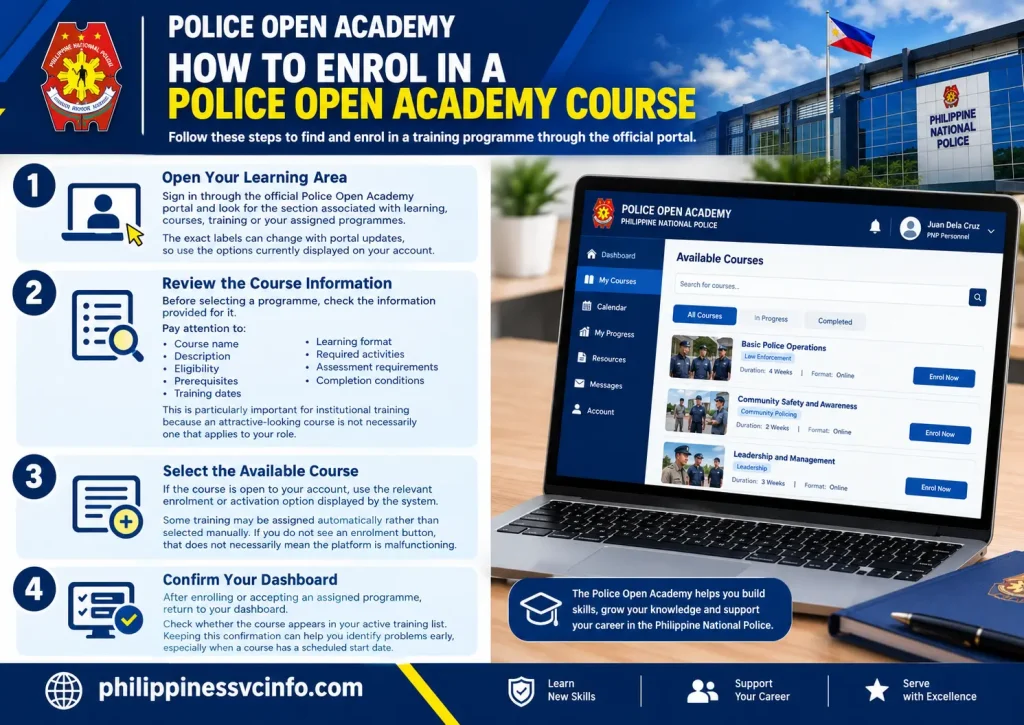
Once an authorised user has successfully accessed the Police Open Academy, the next step may be selecting an available learning programme. Course visibility can depend on the user’s role, eligibility and the training activities assigned to their account.
The general process can be approached in four stages.
1. Open Your Learning Area
Sign in through the official Police Open Academy portal and look for the section associated with learning, courses, training or your assigned programmes.
The exact labels can change with portal updates, so use the options currently displayed on your account.
2. Review the Course Information
Before selecting a programme, check the information provided for it.
Pay attention to:
- Course name
- Description
- Eligibility
- Prerequisites
- Training dates
- Learning format
- Required activities
- Assessment requirements
- Completion conditions
This is particularly important for institutional training because an attractive-looking course is not necessarily one that applies to your role.
3. Select the Available Course
If the course is open to your account, use the relevant enrolment or activation option displayed by the system.
Some training may be assigned automatically rather than selected manually. If you do not see an enrolment button, that does not necessarily mean the platform is malfunctioning.
4. Confirm Your Dashboard
After enrolling or accepting an assigned programme, return to your dashboard.
Check whether the course appears in your active training list. Keeping this confirmation can help you identify problems early, especially when a course has a scheduled start date.
What Happens After Enrolment?
The Police Open Academy may become the central place where an authorised learner accesses course material and monitors training activity.
Depending on the programme, the learning experience may include several components.
Digital Learning Materials
Online modules can include written resources, presentations, recorded lessons or other educational material.
Learners should work through the material according to the instructions attached to their programme rather than assuming that simply opening a lesson counts as completion.
Assignments and Activities
Some courses may require activities or assignments. If deadlines are shown in the system, record them somewhere reliable so they are not overlooked.
Where the platform provides progress indicators, check them periodically.
Online Sessions
A blended programme can combine online self-study with scheduled sessions. These may require attendance at a particular date and time.
A scheduled session should be treated differently from self-paced material. Missing a live activity may have different consequences from simply postponing a reading module.
Police Open Academy Training Lineal List (TLL)
One of the important terms associated with PNP training administration is the Training Lineal List, commonly abbreviated as TLL.
The TLL is relevant to the organisation and scheduling of personnel for training. Official PNP guidance describes procedures for maintaining information concerning personnel scheduled for mandatory career courses and coordinating related training requirements.
For authorised personnel, this means that training is not necessarily handled as an informal online course.
There can be an administrative process behind:
- Identifying personnel due for training
- Scheduling mandatory courses
- Coordinating with training institutions
- Recording training participation
- Monitoring requirements
- Maintaining personnel training information
Why the TLL Matters
The TLL can help organise who is due for particular training requirements.
The Police Open Academy should therefore be viewed within the wider PNP education and training system. The online platform can support digital learning and training administration, while institutional offices remain responsible for applicable personnel processes.
A learner should not assume that simply seeing a course on the platform means that the course is mandatory for their particular position.
If you are unsure whether a programme applies to you, check the official training instruction or ask the responsible PNP training office.
Police Open Academy Certificates
Training certificates can be important evidence that a learner has completed an approved educational activity.
According to the information supplied for this article, successful completion of applicable courses may result in a system-generated Certificate of Completion.
The exact certificate process depends on the course and its requirements.
Typical Completion Requirements
A programme may require learners to satisfy conditions such as:
- Completing assigned learning material
- Meeting attendance requirements
- Finishing required activities
- Passing an assessment
- Meeting the course’s completion standard
A learner should therefore avoid assuming that logging into the Police Open Academy automatically produces a certificate.
Completion normally depends on the requirements established for the particular training activity.
Where to Look for a Certificate
If the course provides digital certification, check the account area after the system records successful completion.
Depending on the platform’s current configuration, a certificate may be available through an account archive or course-completion area for viewing, downloading or printing.
If a certificate does not appear after you have apparently completed all requirements, first check your course status. If the status remains incomplete, identify the outstanding requirement before requesting assistance.
How to Check Your Police Open Academy Training Status
Regularly checking your training status can prevent avoidable problems.
After logging in, look for information associated with your active courses, completed learning activities or training history.
A useful personal check is:
Course Status Checklist
Course assigned?
Confirm that the expected course appears in your account.
Modules completed?
Check whether individual lessons or activities are marked as finished.
Assessment completed?
Look for any outstanding examination, quiz or evaluation.
Attendance recorded?
For scheduled sessions, verify that your participation has been recorded where the system provides this information.
Certificate available?
After all requirements are satisfied, check whether the applicable certificate or completion record has been generated.
Training record updated?
If the training has administrative importance, make sure the relevant completion information is reflected correctly.
If something appears incorrect, retain any relevant course information and contact the authorised office responsible for your training.
Police Open Academy Password & Account Problem
Login problems can happen for several reasons. Before assuming that the Police Open Academy is unavailable, work through the basic checks below.
Forgot Your Password?
If the official login page provides a Forgot Password or account-recovery option, use that facility rather than attempting to create another account.
Follow the instructions displayed by the official portal.
Recovery procedures may require information associated with your account. Never share your password or authentication code with another person.
Account Locked
Repeated unsuccessful login attempts can sometimes trigger account-security measures.
If your account becomes locked, follow the official recovery procedure or contact the appropriate institutional support channel.
Avoid repeatedly guessing passwords because doing so can make account-access problems more difficult to resolve.
Login Page Will Not Open
If the website does not load correctly:
- Confirm that you entered the official domain correctly.
- Check your internet connection.
- Refresh the page.
- Try an updated browser.
- Clear temporary browser data if necessary.
- Try another supported browser.
- Check whether the problem affects only one device.
The supplied user information recommends current versions of Google Chrome, Mozilla Firefox or Microsoft Edge for compatibility.
Police Open Academy Security Tips
Because the Police Open Academy can involve institutional accounts, account security deserves particular attention.
Verify the Domain Before Signing In
The official address supplied for the platform is:
policeopenacademy.pnp.gov.ph
Look carefully at the spelling before entering credentials.
A fraudulent website can use a similar-looking domain, so do not rely only on the appearance of the page.
Do Not Share Passwords
Your password should remain private.
Avoid sending your password through:
- Facebook Messenger
- Text messages
- Public chat groups
- Unofficial support accounts
If someone asks for your password while claiming to be a system administrator, verify the request through an official channel.
Protect Authentication Codes
If your account uses an authenticator or another additional verification method, treat its codes as confidential.
An authentication code can be an important part of account security. It should not be given to another person simply because they claim to be assisting you.
Be Careful With Saved Credentials
If you use a shared or public computer, avoid saving your Police Open Academy password in the browser.
Always sign out after using a shared device.
Police Open Academy vs PNP Recruitment
A common source of confusion is assuming that an online police training platform is also a recruitment portal.
These are different functions.
The Police Open Academy is described in the supplied material primarily as an education, training and professional-development platform.
Someone who wants to become a police officer should look for the relevant official recruitment or admissions process instead.
For example, prospective Philippine National Police Academy applicants may need to use the appropriate PNPA admission process rather than the Police Open Academy.
This distinction is important because:
| Police Open Academy | Recruitment/Admissions Portal |
|---|---|
| Education and training | Recruitment or admission |
| Primarily authorised learners | Applicants |
| Courses and professional development | Application requirements |
| Training activities | Selection/admission procedures |
| Learning records | Applicant records |
Do not submit personal information to an unofficial website claiming that it can enrol you in the PNP simply because it uses the words “police”, “academy” or “PNP”.
What If a Course Does Not Appear?
Not seeing a course does not automatically indicate an account problem.
Course access can depend on:
- Your user category
- Current training programme
- Institutional authorisation
- Eligibility
- Assigned courses
- Training schedules
- Availability of a particular programme
First check whether you have received separate instructions from your responsible PNP office.
If you are expected to have access but the course is missing, contact the appropriate official training or system-support channel rather than registering another account.
Police Open Academy Best Practice for Learner
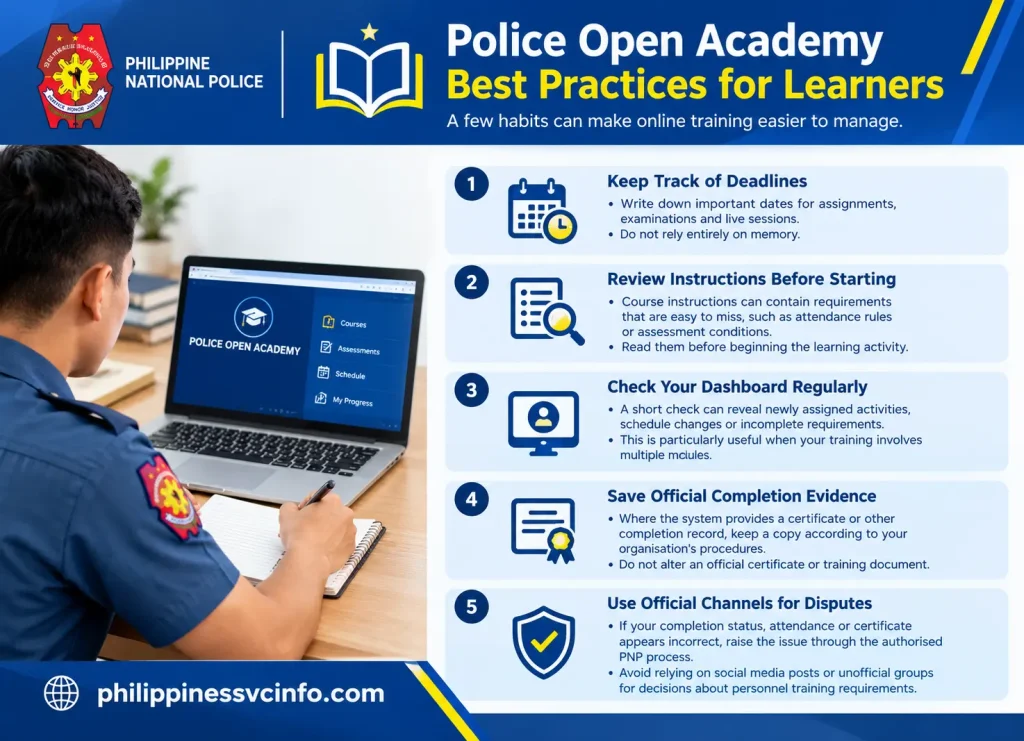
A few habits can make online training easier to manage.
Keep Track of Deadlines
Write down important dates for assignments, examinations and live sessions.
Do not rely entirely on memory.
Review Instructions Before Starting
Course instructions can contain requirements that are easy to miss, such as attendance rules or assessment conditions.
Read them before beginning the learning activity.
Check Your Dashboard Regularly
A short check can reveal newly assigned activities, schedule changes or incomplete requirements.
This is particularly useful when your training involves multiple modules.
Save Official Completion Evidence
Where the system provides a certificate or other completion record, keep a copy according to your organisation’s procedures.
Do not alter an official certificate or training document.
Use Official Channels for Disputes
If your completion status, attendance or certificate appears incorrect, raise the issue through the authorised PNP process.
Avoid relying on social media posts or unofficial groups for decisions about personnel training requirements.
Common Police Open Academy Mistakes
Using a Search Advertisement Without Checking the Domain
Search results can contain advertisements or third-party pages. Always confirm that the final login page uses the official PNP domain.
Assuming Public Registration Is Always Available
The existence of a portal does not mean every visitor can create an account.
Access may depend on current programmes and institutional authorisation.
Confusing Training With Recruitment
The Police Open Academy is not automatically a police recruitment application system.
Use the appropriate official recruitment channel for recruitment-related matters.
Ignoring Course Requirements
Opening a module is not necessarily the same as completing it. Check the requirements displayed for each programme.
Sharing Login Information
Never give your password or authentication codes to another person.
Waiting Until the Deadline to Check Your Account
If a course, assignment or certificate has a problem, discovering it early gives you more time to use the appropriate support process.
Police Open Academy Quick Checklist
Before you begin, make sure you have:
- Access to the official portal
- An authorised account, if required
- Your correct login credentials
- A stable internet connection
- An updated browser
- Any required institutional instructions
- Awareness of course deadlines
- A secure place to keep completion records
For security, always start from the official portal:
FAQs About Police Open Academy
Final Takeaway
The Police Open Academy provides a digital route for authorised PNP-related education and training. Its role goes beyond simply displaying online lessons: the platform can form part of a broader training environment involving courses, scheduled activities, progress information and institutional training records.
For users with authorised access, the most important habits are straightforward: begin with the official portal, use the correct credentials, check assigned training regularly and follow the instructions attached to each programme. When a training requirement affects career or personnel administration, rely on the applicable PNP instructions rather than assumptions based solely on what appears on the website.
Discover What You Need to Know:
- Form 138 Philippines 2026 : How to Request Your DepEd Report Card Online
- NU Manila Philippines 2026 : Admission Requirements, Courses, Fees, Scholarships & Login Guide
- DepEd Logo PNG: Official Download, Transparent File & Usage Guide 2026
- SIAS CSPC Login Philippines 2026 : Student Portal, Enrollment, Registration & Account Guide