

GOMO SIM offers flexible and affordable mobile plans designed to keep users connected without the pressure of long-term contracts or frequent expiry concerns. Its straightforward approach gives customers in the Philippines a convenient way to manage their mobile services while getting good value from their chosen plan. Registering your GOMO SIM is an important step for users in the Philippines. The registration process can help address common account or SIM-related concerns and provides access to the services associated with a registered SIM. There are several ways to complete GOMO SIM Registration, making the process accessible to different users. In this guide, you’ll learn why SIM registration matters, what you may need before starting, and how to get your GOMO SIM registered successfuOlly.

Why GOMO SIM Registration Is Important
Better Protection for Your SIM
Registering a GOMO SIM connects it with the registered user, helping reduce the risk of misuse. If your SIM is lost or stolen, having registration details may also make it easier to recover access to your account.
Meeting Legal Requirements
SIM registration is required under applicable telecommunications policies. Its purpose is to encourage responsible mobile phone use and help reduce the use of SIM cards for unlawful activities.
Improved Customer Service
GOMO’s registration system allows the service to associate your SIM with your information. This can support a more personalised service experience, including account-related assistance and service management.
GOMO SIM Registration Requirements
Having the required information and identification ready can make the GOMO SIM registration process easier. Before starting, prepare the following personal details and an accepted government-issued ID.
Personal Information You May Need
- Full name
- Date of birth
- Residential address
- Gender
- Nationality
- A valid government-issued photo ID
Accepted Government-Issued IDs
The source lists the following identification documents:
- Passport
- Driver’s Licence
- Social Security System (SSS) ID
- UMID card
- Philippine National ID
- Voter’s ID
- Philippine Postal ID
- Senior Citizen ID
- Overseas Workers Welfare Administration (OWWA) ID
- Any government-issued photo ID
- Police Clearance
- Person with Disability (PWD) ID
- Professional Regulation Commission (PRC) ID
Requirements for Foreign Visitors and Tourists
Foreign visitors and tourists staying in the Philippines may be asked to provide the following information and documents for GOMO SIM registration:
- Full name
- Date of birth
- Gender
- Nationality
- Address during your stay in the Philippines
- Valid ID card
- Police Clearance
- Return ticket
Having these details and documents ready can help make the registration process more straightforward for visitors.
Ways to Register Your GOMO SIM
GOMO provides several registration options for its SIM users. Depending on the available method, you can register through the GOMO web portal, use the registration app, send the required details by SMS, or visit a GOMO retail shop. The web portal is one of the options you can use to begin the registration process.
Registering Your GOMO SIM Through the Web Portal
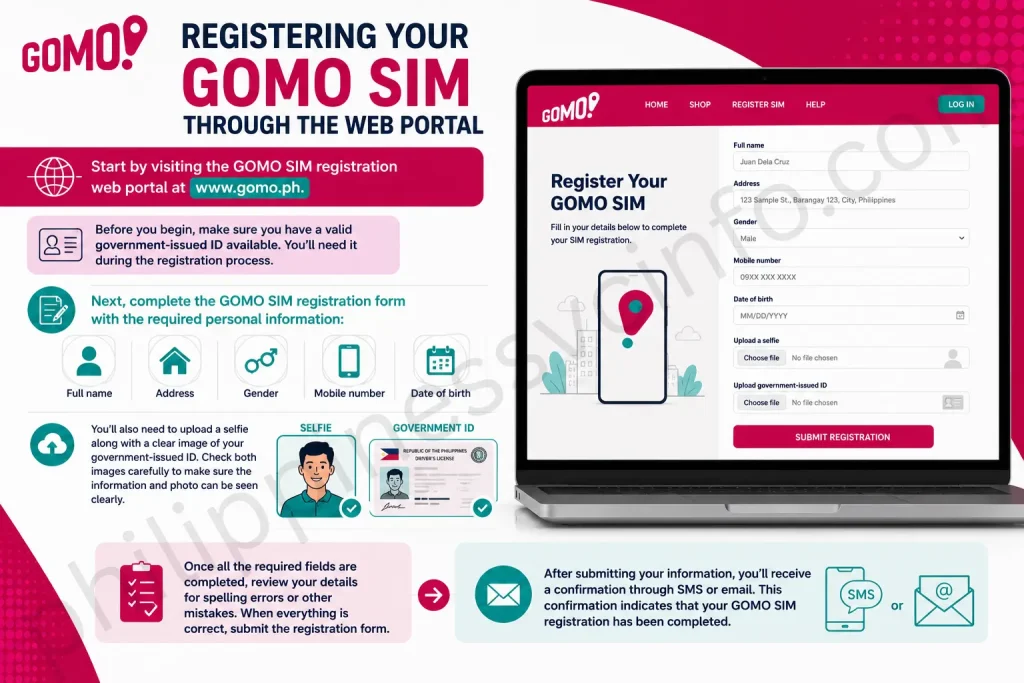
Visit the GOMO SIM registration web portal:
Before you begin, make sure you have a valid government-issued ID available. You’ll need it during the registration process.
Next, complete the GOMO SIM registration form with the required personal information:
- Full name
- Address
- Gender
- Mobile number
- Date of birth
You’ll also need to upload a selfie along with a clear image of your government-issued ID. Check both images carefully to make sure the information and photo can be seen clearly.
Once all the required fields are completed, review your details for spelling errors or other mistakes. When everything is correct, submit the registration form.
After submitting your information, you’ll receive a confirmation through SMS or email. This confirmation indicates that your GOMO SIM registration has been completed.
Registering Through the GOMO App

The GOMO app provides another way to complete SIM registration. Start by downloading the GOMO SIM registration app from the Google Play Store.
Once the app is installed, open it and enter your GOMO SIM registration number. You’ll then be asked to provide your birth date, first name, middle name, last name, and email address.
Next, enter your nationality and ID card number. Upload a clear photo of your valid ID so the details can be reviewed properly.
After entering the required information, complete the GOMO registration form and select Submit. A verification code will then be sent to you. Enter the code in the app to confirm your registration.
Once the verification is successful, the GOMO SIM registration process is complete.
Register Your GOMO SIM via SMS
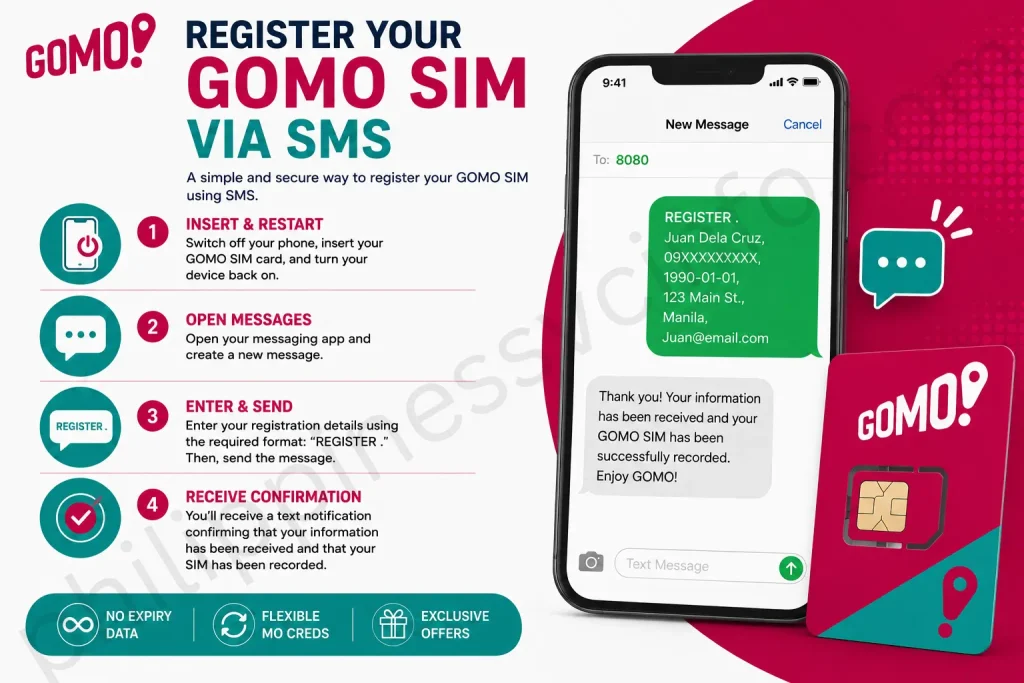
SMS registration is another method described for registering a GOMO SIM. Before starting, switch off your phone, insert the GOMO SIM card, and then turn the device back on.
Once your phone is active, open the messaging app and create a new message. Enter your registration details using the required format: “REGISTER .”
After sending the message, you’ll receive a text notification confirming that your information has been received and that your SIM has been recorded.
How to Check Your GOMO SIM Registration Status
If you’ve recently obtained a GOMO SIM, it’s useful to confirm that the registration has been completed successfully. Checking your registration status can give you confidence that your SIM is ready to use.
The supplied information describes two ways to check your GOMO SIM registration status: using a USSD code or sending a text message.

Check Registration Status Using *101#
You can use the following steps to check your registration status:
- Unlock your mobile phone.
- Open the phone dialler.
- Enter *101#.
- Press the call button.
- Wait for the notification confirming whether your GOMO SIM is registered.
Check Through SMS
The source also provides an SMS method for checking the registration status:
- Open your phone’s messaging application.
- Start a new text message.
- Enter 26888 as the recipient.
- Type “REGISTER” in the message field.
- Send the message.
- Wait for the reply containing your GOMO SIM registration status.
Key Features of GOMO SIM
- Contract-Free Plans: GOMO provides mobile plans without a binding contract, giving users the freedom to cancel whenever they choose.
- Affordable Pricing: GOMO offers budget-friendly plans designed for users who want to manage their mobile costs.
- 5G Connectivity: Selected GOMO plans provide access to 5G connectivity. The source states that this service is available across 530 towns and cities in Ireland.
- EU Roaming: GOMO offers roaming options for customers travelling within the EU. According to the source, users can access up to 16GB of 5G data while roaming.
- Keep Your Existing Number: Customers switching to GOMO can port their current mobile number, allowing them to stay reachable without changing numbers.
- Price Guarantee: Some GOMO plans include a lifetime price guarantee, helping customers avoid unexpected increases to their plan costs.
- Extensive 4G Coverage: GOMO operates on its own network and, according to the source, provides 99% 4G coverage across Ireland.
Common GOMO SIM Registration Problems and Solutions
Registration can sometimes be delayed by incorrect information, unclear document images, verification backlogs, or activation problems. Here are the common issues described in the source and the suggested ways to address them.
Incorrect ID Information
Problem: Registration may be delayed when the information on your ID does not match the details provided during registration.
Solution: Review your personal and ID information carefully before submitting the form. If you need to correct your details, use the GOMO app or contact customer support.
Unclear ID Photos
Problem: Blurry, hazy, or poorly focused ID images may result in a rejected registration.
Solution: Take the ID photo in a well-lit area and make sure the image is sharp and readable. Avoid glare, reflections, and shadows that could hide important information on the ID.
Verification Taking Too Long
Problem: Verification may take longer during periods of high demand. The system may provide an update about the status of your verification.
Solution: Avoid repeatedly submitting the same request, as this may add to the processing time. If the verification remains pending for more than 48 hours, contact GOMO customer support.
SIM Activation Problems
Problem: In some cases, the SIM may not activate properly even after registration has been completed.
Solution: Restart your phone or try the SIM in another compatible device. These basic troubleshooting steps may resolve activation-related problems. If the issue continues, contact GOMO customer support for further assistance.
Benefits You May Get After GOMO SIM Registration
Registering and activating your GOMO SIM can give you access to various mobile benefits. The supplied content highlights no-expiry data, flexible Mo Creds, and a possible welcome data bundle as key perks for GOMO users.
No-Expiry Data Access
One of GOMO’s highlighted benefits is data that doesn’t expire. Purchased data remains available for use whenever you need it, allowing you to browse the internet, stream content, or save your data for later.
This removes the pressure of using your data within a fixed period. You can decide when and how to use your available data based on your own needs.
Flexible Mo Creds
Mo Creds give users flexibility in how they use their mobile allowance. According to the supplied content, you can convert data into calls or text messages when those services are more useful to you.
Whether you need to make calls, send messages, or continue using mobile data, this flexibility lets you adjust your usage according to your needs.
Possible Welcome Data Bundle
The supplied content also mentions that registering a GOMO SIM may come with a special welcome data bundle. However, availability can depend on the current offer and the user’s location.
Before registering, check the latest GOMO offers to see whether a welcome bundle is currently available. If eligible, this bonus can provide new users with additional data at the start of their GOMO experience.
Making the Most of Your GOMO Service
Once your GOMO SIM is registered and activated, you can take advantage of the plans and features available to you. Checking the current offers and understanding how benefits such as no-expiry data and Mo Creds work can help you get more value from your mobile service.
Frequently Asked Questions About GOMO SIM Registration
Conclusion
Registering your GOMO SIM is an important step towards getting the most from your mobile service. The process is designed to be straightforward, with options such as web-based registration, app registration, and SMS registration. By providing the required information, submitting a valid ID, and completing the verification process, users can ensure that their GOMO SIM registration is properly completed. Once your SIM is registered and activated, you can make use of the GOMO services and benefits available to you, including flexible mobile options and features highlighted in this guide. Always check your information carefully before submitting it and follow the required registration and security procedures. Keeping your registration details accurate can help you manage your GOMO service more smoothly and stay connected.
Discover What You Need to Know:
- Smart eSIM Activation: Complete Philippines Setup & Registration Guide 2026
- GlobeOne App: Complete Guide to Registration, Login, Load & Rewards (2026)
- TM SIM Registration Number: How to Check, Verify & Update (2026 Guide)
- PEOS Certificate: Complete Guide to Online Registration, Download, Requirements & FAQs 2026
- Genyo E-learning: Complete Guide to Features, Login & Benefits 2026








