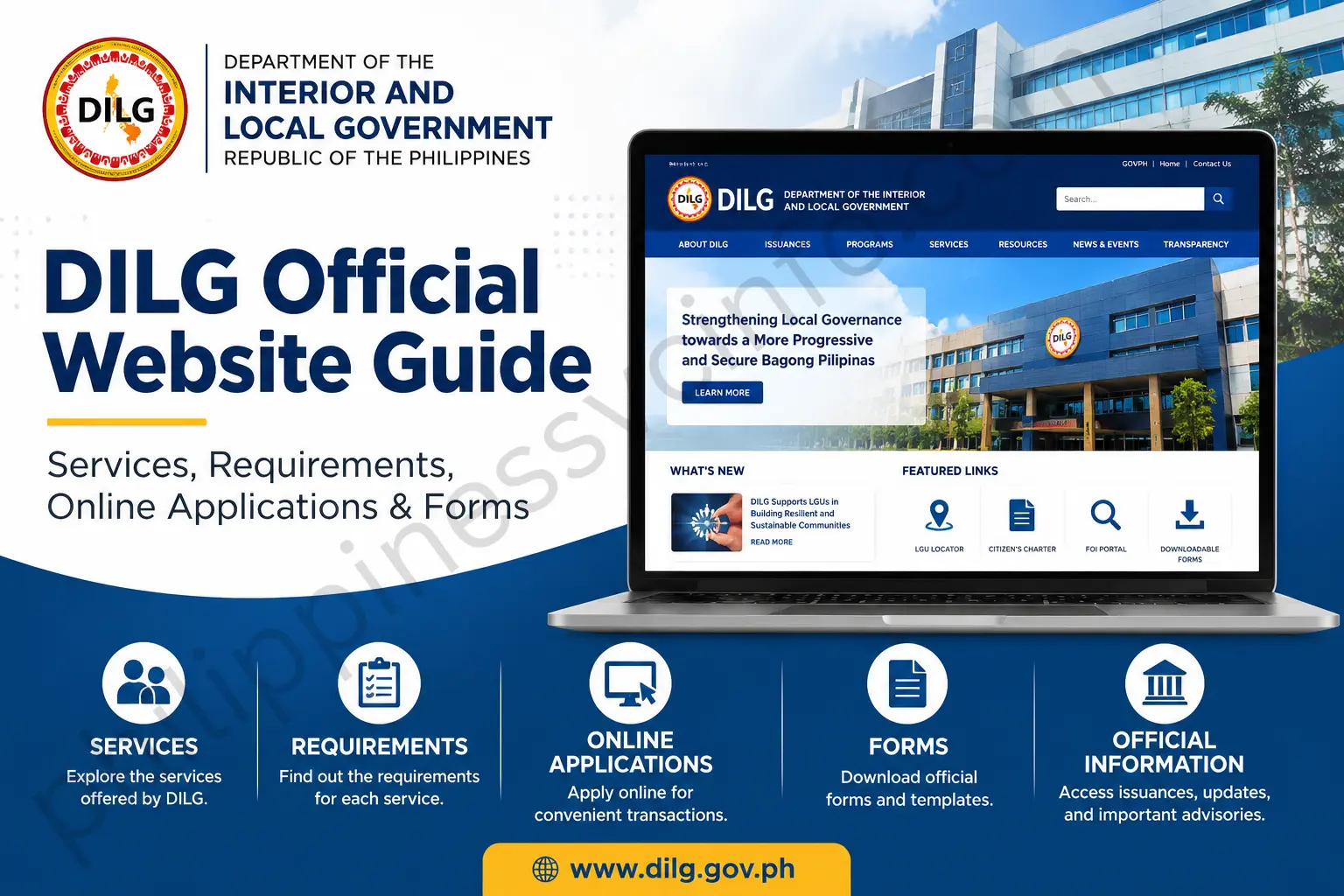
The DILG official website is the main online source for information about the Department of the Interior and Local Government (DILG) in the Philippines. The website, available at dilg.gov.ph, provides access to government information, local governance resources, frontline services, issuances, downloadable documents, and other online systems.
For citizens, local government officials, LGU employees, students, researchers, and other users, knowing how to navigate the DILG website can make it easier to find requirements, forms, service information, and relevant government resources.
This complete guide explains how to use the DILG official website, where to find important services, how online applications generally work, how to locate requirements and forms, and where to look for verification and status information.
What Is DILG?
DILG stands for the Department of the Interior and Local Government. It is a Philippine government department concerned with local governance and related government functions.
The DILG official website serves as an online information and service portal. Depending on the service, users may be directed to a specific online system, regional DILG website, frontline service page, or downloadable document.
The information provided through the DILG web ecosystem can be useful for:
- Local government officials
- LGU employees
- Citizens
- Students
- Researchers
- Foreign residents and other eligible applicants
- People looking for DILG forms and government issuances
Your supplied guide identifies the main purposes of the portal as access to local governance services, frontline permits, Foreign Travel Authority services, Barangay certification verification, legal opinion-related resources, and downloadable forms.
DILG Online Services and Regional Portals
The DILG web ecosystem includes more than the main national website. Regional offices provide additional resources, frontline services, Citizen’s Charters, forms, announcements, and specialized systems.
For example, official DILG regional portals can provide access to LGU-related systems and resources. A DILG Region XII portal lists systems and resources including the Barangay Information System and other LGU portals.
Some regions also publish digital quick guides and online forms for frontline services. DILG Region III Aurora, for example, provides frontline-service resources and a Citizen’s Charter handbook through its official website.
Therefore, if you cannot find a particular service on the national DILG website, check the official regional DILG website responsible for your transaction.
How to Access the DILG Official Website

To access DILG online information, open your browser and visit:
Once the website opens, look for the relevant section based on the service you need. Depending on the transaction, you may find information under services, frontline services, online systems, resources, issuances, or related DILG regional portals.
It is important to use official DILG domains when submitting government-related information. Avoid entering personal information into websites that imitate government portals or use unrelated domains.
What Can You Find on the DILG Website?
The DILG website covers several categories of information and services. Your supplied material groups the main user intents into requirements and issuances, registration and accounts, online applications, status checking and verification, forms and downloads, and clearances and permits.
1. DILG Requirements
Before applying for a DILG service, users should check the applicable requirements.
Requirements vary according to the transaction. For example, a service involving local government personnel may require official endorsements, identification, certifications, or other supporting documents.
Your source material lists examples such as Foreign Travel Authority requirements, Certificate of Incumbency documents, Death Benefit Assistance documents, and information used for Barangay Certification Verification.
Because requirements can change depending on the service and current government rules, applicants should always confirm the latest checklist from the relevant official DILG office or service page.
DILG Registration and Account Creation
Not every DILG service requires the same type of online account. Some specialized systems may require registration before an applicant can submit an online request.
Your supplied guide identifies systems such as the Foreign Travel Authority Online System and other DILG-related portal systems as examples where account access may be required.
General DILG Registration Steps

If the particular DILG service requires an account, the general process described in your source is:
- Visit the DILG official website.
- Locate the relevant Online Systems or Frontline Services section.
- Select the appropriate account or user type.
- Enter the requested personal or institutional information.
- Provide the required identity or verification document when requested.
- Create a secure password.
- Complete email verification or activation if required.
- Sign in to the applicable DILG system.
The supplied material specifically describes entering a legal name, official email address, mobile number, and LGU designation where applicable, followed by identity-document upload and email verification.
However, users should follow the current registration fields displayed by the actual DILG system because individual portals may have different requirements.
DILG Online Application Process
One of the most useful functions of the DILG online ecosystem is the ability to access certain government services electronically.
The general workflow can be understood as:
Access Portal → Select Service → Enter Details → Upload Requirements → Submit → Track Application
This workflow is summarized in the supplied guide.
Step-by-Step DILG Online Application
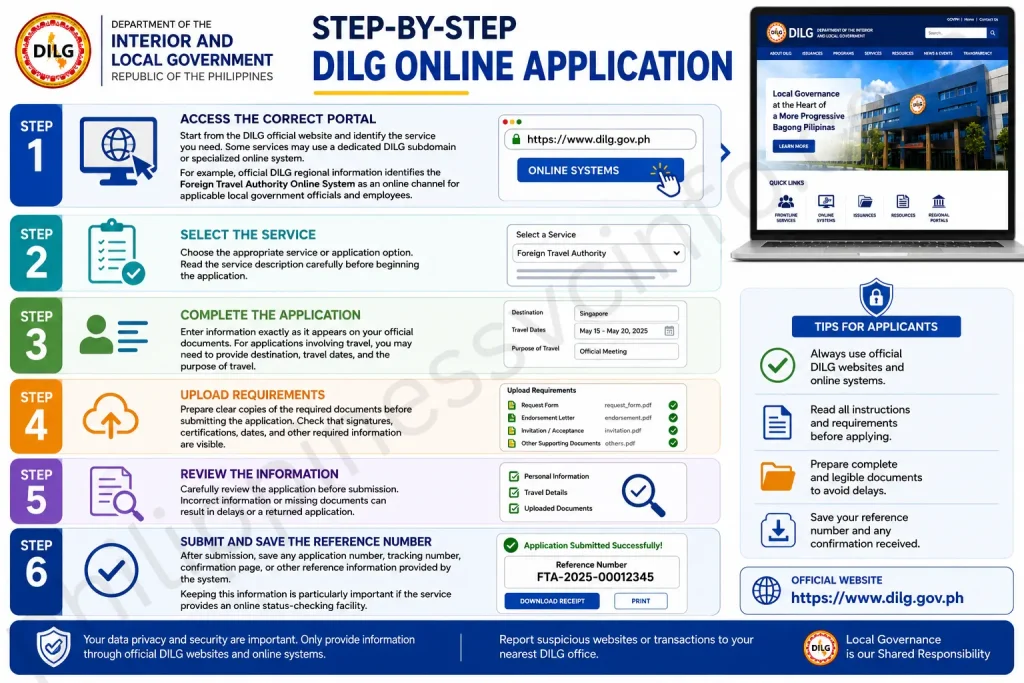
Step 1: Access the Correct Portal
Start from the DILG official website and identify the service you need. Some services may use a dedicated DILG subdomain or specialized online system.
For example, official DILG regional information identifies the Foreign Travel Authority Online System as an online channel for applicable local government officials and employees.
Step 2: Select the Service
Choose the appropriate service or application option. Read the service description carefully before beginning the application.
Step 3: Complete the Application
Enter information exactly as it appears on your official documents. For applications involving travel, the source material indicates that users may need to provide destination, travel dates, and the purpose of travel.
Step 4: Upload Requirements
Prepare clear copies of the required documents before submitting the application. Check that signatures, certifications, dates, and other required information are visible.
Step 5: Review the Information
Carefully review the application before submission. Incorrect information or missing documents can result in delays or a returned application.
Step 6: Submit and Save the Reference Number
After submission, save any application number, tracking number, confirmation page, or other reference information provided by the system.
Keeping this information is particularly important if the service provides an online status-checking facility.
Why You Should Check the DILG Official Website Before Applying
Government procedures can change. A requirement that applied previously may be modified, replaced, or supplemented by a new rule.
Before submitting a DILG application, check:
- Current documentary requirements
- Latest Citizen’s Charter
- Applicable forms
- Current online application procedure
- Correct DILG office
- Processing information
- Applicable instructions for your specific transaction
The DILG-NCR Citizen’s Charter, for example, lists multiple frontline services including Foreign Travel Authority, Full Disclosure Policy certification, LGU vehicle authority, civil society organization accreditation, barangay officials’ death benefits, legal opinions, public assistance, and certificates of incumbency.
This demonstrates why users should identify the exact service rather than assuming that every DILG transaction follows the same process.
DILG Verification
A DILG verification process depends on the document or service being verified. Users should therefore check the instructions associated with the particular document rather than assuming that every DILG document uses the same verification procedure.
For services that provide an online verification facility, the general process may involve entering a reference number, document information, or other details supplied with the document.
How to Check a DILG Document

Follow these general steps when an official DILG service provides an online verification facility:
- Open the official DILG websiteVisit the DILG official website and locate the relevant online service.
- Find the verification serviceLook for the applicable verification or document-checking option. The exact location can differ between services and DILG systems.
- Enter the requested informationDepending on the service, you may be asked for a document number, reference number, date, QR-related information, or other identifying details.
- Submit the verification requestReview the information before selecting the verification or search option.
- Review the resultIf the system finds a matching record, carefully compare the information shown with the document you are checking.
If a document cannot be verified online, contact the appropriate DILG office or the office that issued the document for further instructions.
DILG Status Check and Application Tracking
If you have submitted an application through a DILG online system that provides tracking, keep your application reference number or tracking information.
Your supplied material describes a general status-checking process in which applicants access the portal used for their application, enter their tracking information, and review the current application status.
How to Track a DILG Application
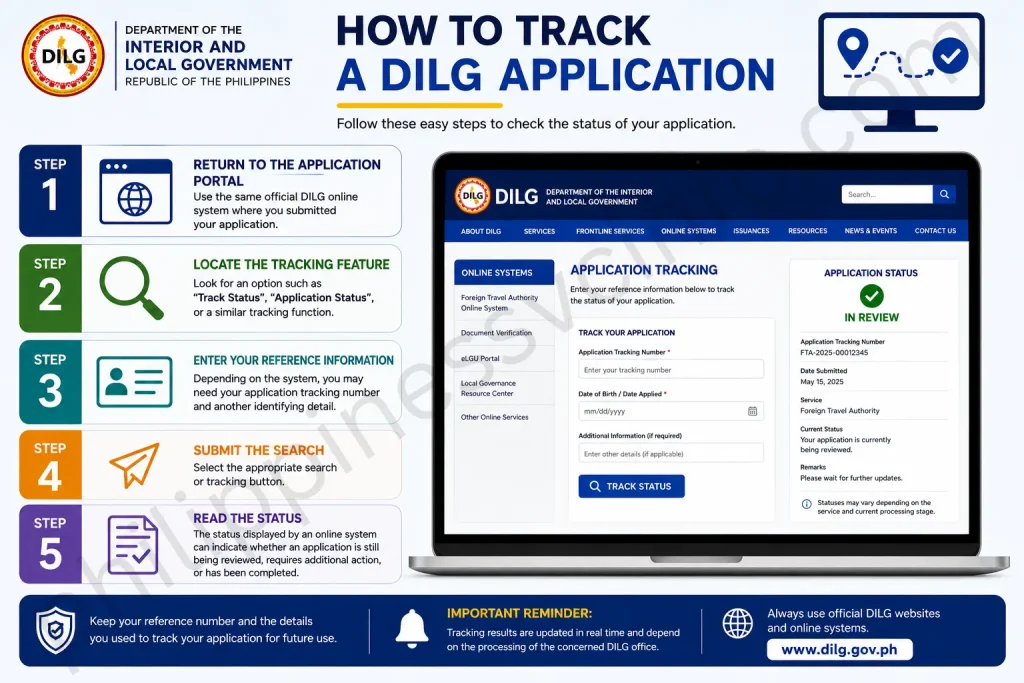
Step 1: Return to the Application Portal
Use the same official DILG online system where you submitted your application.
Step 2: Locate the Tracking Feature
Look for an option such as Track Status, Application Status, or a similar tracking function.
Step 3: Enter Your Reference Information
Depending on the system, you may need your application tracking number and another identifying detail.
Step 4: Submit the Search
Select the appropriate search or tracking button.
Step 5: Read the Status
The status displayed by an online system can indicate whether an application is still being reviewed, requires additional action, or has been completed.
Your supplied guide uses four example status categories: Submitted/Pending Review, Under Processing, Action Required/Returned, and Approved/Released.
If an application is returned because of incomplete information, carefully read the feedback provided by the system and follow the instructions for correction or resubmission.
DILG Appointment Booking
Not every DILG transaction is completed entirely online. Some services may require physical submission, validation, consultation, or interaction with a DILG regional, provincial, or field office.
The appropriate appointment procedure depends on the office and service.
How to Prepare for a DILG Appointment
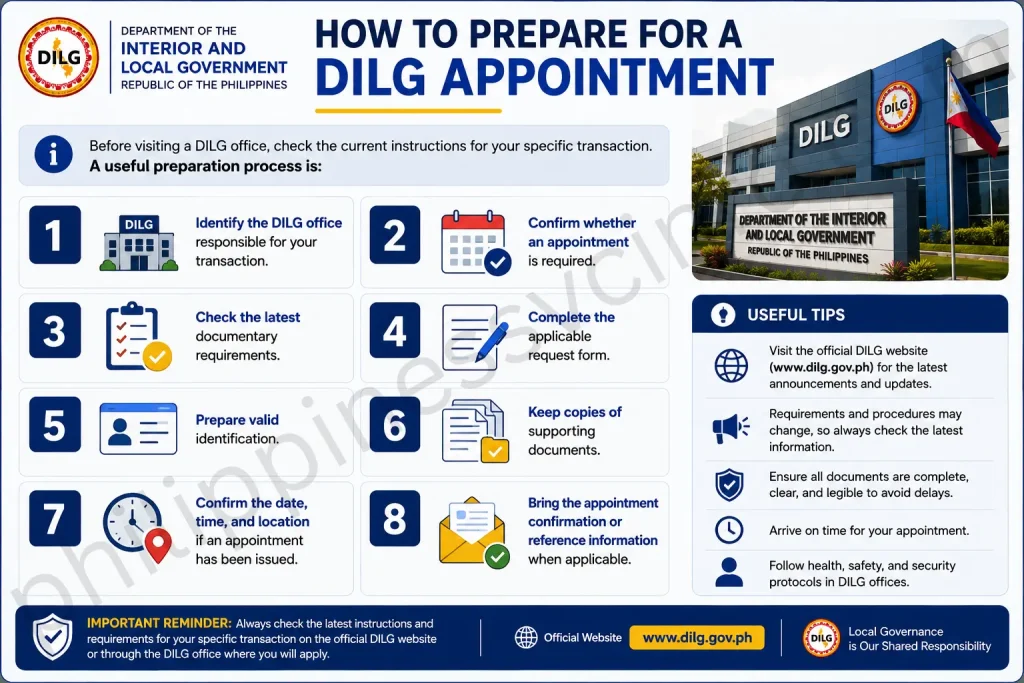
Before visiting a DILG office, check the current instructions for your specific transaction.
A useful preparation process is:
- Identify the DILG office responsible for your transaction.
- Confirm whether an appointment is required.
- Check the latest documentary requirements.
- Complete the applicable request form.
- Prepare valid identification.
- Keep copies of supporting documents.
- Confirm the date, time, and location if an appointment has been issued.
- Bring the appointment confirmation or reference information when applicable.
Do not assume that every DILG regional or field office uses the same appointment procedure.
The official DILG regional websites provide information about their own frontline services and Citizen’s Charters. For example, DILG Region III publishes its Citizen’s Charter and lists various frontline services for the public.
DILG Forms and Downloads
One of the most useful reasons to visit the DILG website is to find official forms, Citizen’s Charters, issuances, and other government documents.
Your supplied material identifies Resources, Downloadable Forms, and Issuances as areas where users can look for official documents.
How to Find DILG Forms

- Go to the DILG official website.
- Open the relevant resources or documents section.
- Search for the form or issuance related to your transaction.
- Confirm that the document applies to your service.
- Download the official file.
- Read the instructions before completing it.
- Prepare the completed form according to the submission requirements.
Some DILG forms may be available through regional DILG websites or specific service portals rather than one central download page.
For example, official DILG Citizen’s Charter documents identify certain request forms as being obtainable from a DILG field office or the DILG official website.
Before Downloading a DILG Form
Always check:
- The document title
- Issuing DILG office
- Applicable service
- Revision or edition
- Date of the document
- Required supporting documents
- Submission instructions
This helps prevent using an outdated or incorrect form.
DILG Citizen’s Charter
The DILG Citizen’s Charter is an important resource for people who need detailed information about government services.
A Citizen’s Charter can explain the service, who may avail of it, documentary requirements, fees, processing time, steps, and responsible office.
The DILG Citizen’s Charter materials available through official DILG regional websites demonstrate this structure. For example, a DILG Citizen’s Charter lists the service for issuing a Certificate of Incumbency, including documentary requirements, processing information, and the steps taken by the requesting party and agency.
Why the Citizen’s Charter Matters
Before applying for a DILG service, checking the relevant Citizen’s Charter can help you understand what is expected.
It can help answer questions such as:
- What documents do I need?
- Who can apply?
- Where should I submit the request?
- How long does the process take?
- Is there a government fee?
- What steps does the applicant need to complete?
- Which DILG office handles the transaction?
For current information, use the latest Citizen’s Charter published by the appropriate DILG office.
DILG Clearance and Certifications
DILG provides various certifications, authorizations, and frontline services for eligible applicants.
The exact requirements depend on the service.
For example, the DILG Citizen’s Charter includes the Certificate of Incumbency of Local Officials as a service. A current Citizen’s Charter document identifies the request form, letter request, valid identification, and additional documents that may be required in particular circumstances. It also specifies a processing period for that service.
Certificate of Incumbency
A Certificate of Incumbency can be used to document the official status or incumbency of a local official.
If you need this service, check the applicable DILG Citizen’s Charter before submitting a request.
The general process may include:
- Obtain the appropriate request form.
- Prepare the required letter or supporting documents.
- Provide valid identification.
- Submit the request to the appropriate DILG office.
- Allow the office to verify the information.
- Receive the certificate according to the applicable release procedure.
The exact requirements should be confirmed with the responsible DILG office.
DILG Foreign Travel Authority
The Foreign Travel Authority (FTA) is another major DILG-related service.
Official DILG Citizen’s Charter material states that the FTA Online System was established to streamline requests for authority to travel abroad by covered local government officials and employees. The official material directs applicable applicants to the FTA Online System at fta.dilg.gov.ph, while also describing alternative procedures when the online portal is inaccessible.
General FTA Application Process
For covered applicants, the process generally involves:
- Review the current FTA requirements.
- Access the official FTA Online System.
- Complete the applicable request information.
- Obtain required endorsements.
- Upload or submit the required documents.
- Review the application.
- Submit the request.
- Keep the application reference information.
- Monitor the application according to the system’s instructions.
The current Citizen’s Charter should always be consulted because requirements can vary according to the type of travel and applicant.
DILG Frontline Services
DILG frontline services cover a variety of transactions. These can differ between the central office and regional or field offices.
The DILG-NCR Citizen’s Charter, for example, lists services including Foreign Travel Authority, Full Disclosure Policy certification, LGU vehicle authority, civil society organization accreditation, barangay officials’ death benefit assistance, certification of service rendered, technical assistance, legal opinions, public assistance, complaints handling, and certificates of incumbency.
This means that when searching for a DILG service, it is important to identify the exact service instead of searching only for the general term “DILG.”
DILG Requirements: What Should You Prepare?
Before starting an application, prepare the documents specifically requested for your transaction.
Depending on the service, documents can include:
- Government-issued identification
- Accomplished request forms
- Letters or endorsements
- Certificates
- Official records
- Proof of relationship
- Supporting certifications
- Other documents identified in the Citizen’s Charter
For example, DILG Citizen’s Charter material for a barangay official death benefit request identifies a request form, oath of office, certificate of incumbency, death certificate, and other supporting documents depending on the claimant’s relationship to the deceased official.
Never submit unnecessary personal documents to unofficial websites. Use the requirements published by the appropriate DILG office or official service portal.
DILG Troubleshooting Tips
Online government systems can sometimes produce login, upload, email, or application problems.
Here are practical steps based on the supplied guide:
1. Check Your Documents
Make sure uploaded documents are clear, complete, and readable. Check signatures, dates, certifications, and other required information before uploading.
2. Check Your Email
If you are waiting for a confirmation or system notification, check your spam or junk folder as well as your main inbox.
3. Save Your Reference Number
Always save application numbers, tracking codes, confirmation pages, and other transaction information.
4. Avoid Session Expiration
Prepare your documents before starting a lengthy online application. This can reduce the risk of losing information if an online session expires.
5. Contact the Correct DILG Office
If the online system does not resolve your issue, contact the DILG regional, provincial, or field office responsible for the service.
The supplied guide similarly recommends checking attachments, preparing documents before online forms are started, checking spam folders, and contacting the relevant DILG office for portal-related assistance.
Common DILG Problems and Solutions
DILG Website Is Not Loading
If the DILG website does not load:
- Check your internet connection.
- Refresh the page.
- Try another browser.
- Clear your browser cache if necessary.
- Try again later if the website is temporarily unavailable.
- If the problem affects a specialized service, check the corresponding regional DILG website.
Do not immediately assume that your application has failed simply because a website is temporarily unavailable.
DILG Online Application Is Not Submitting
If an online application cannot be submitted, check:
- Required fields
- File formats
- File sizes
- Missing attachments
- Incorrect information
- Internet connection
- Whether the service is currently available
Prepare your documents before beginning the application so you can complete the process efficiently.
DILG Email Confirmation Has Not Arrived
If a DILG system is supposed to send an email confirmation:
- Check your main inbox.
- Check the Spam or Junk folder.
- Confirm that you entered the correct email address.
- Look for a resend or verification option if the portal provides one.
- Contact the responsible DILG office if the problem continues.
I Lost My DILG Application Number
If you lose your application reference number, first check your email, downloaded confirmation documents, screenshots, or saved application records.
If the number cannot be recovered through the online system, contact the DILG office or service administrator responsible for your application.
Provide enough information to help the office locate your transaction, but do not send sensitive personal information through unofficial channels.
My DILG Application Was Returned
A returned application does not necessarily mean that you are permanently ineligible.
Read the reason provided by the relevant DILG system or office. The problem may involve missing documents, incorrect information, an incomplete form, or another requirement.
Correct the issue according to the official instructions and resubmit if the system allows it.
How to Avoid DILG Application Delays
A few simple steps can make the application process easier.
Check Requirements First
Do not begin an application until you understand the current requirements.
Use Official Forms
Download forms from the official DILG website, regional DILG portal, or the office specified in the current Citizen’s Charter.
Prepare Clear Documents
Scanned documents should be readable and complete. Make sure signatures, dates, certifications, and other important information are visible.
Double-Check Personal Information
Names, dates, identification numbers, addresses, email addresses, and other information should match the supporting documents when required.
Save Transaction Details
Keep your reference number, confirmation email, appointment information, and submitted documents.
Use the Correct DILG Office
A national DILG website may provide general information, while a regional, provincial, or field office may handle the actual transaction.
If the Citizen’s Charter identifies a particular office, follow that instruction.
DILG Official Website Safety Tips
When searching for DILG services online, be careful with unofficial websites.
Check the Domain
Official DILG websites generally use dilg.gov.ph or an official regional DILG domain.
Before entering personal information, confirm that you are using the correct government website.
Avoid Unofficial Payment Requests
Do not send money to individuals or websites claiming to process a DILG service unless the official service instructions clearly identify a legitimate government fee and payment method.
Some DILG Citizen’s Charter services explicitly state that no fee is charged. For example, the DILG Citizen’s Charter for Foreign Travel Authority lists the applicable fee as none.
Verify Information Through Official Sources
Government procedures can change. A blog post, social media post, or old screenshot may no longer reflect the current process.
For the most reliable information, consult the current DILG website and the latest Citizen’s Charter published by the appropriate DILG office.
DILG Official Links
Here are useful official starting points:
- DILG Main Website: dilg.gov.ph
- Foreign Travel Authority Online System: fta.dilg.gov.ph
- DILG-NCR Citizen’s Charter: ncr.dilg.gov.ph/citizens-charter
- DILG Region III Citizen’s Charter: region3.dilg.gov.ph
- DILG Region XI Citizen’s Charter: region11.dilg.gov.ph
Use the link that corresponds to your specific service or regional office.
Frequently Asked Questions About DILG
Final Thoughts
The DILG official website is the best starting point for information about local governance services, government issuances, frontline transactions, Citizen’s Charters, forms, and specialized online systems. Since DILG requirements and procedures can vary by service and office, always check the latest instructions, requirements, and applicable Citizen’s Charter before submitting an application. For services such as Foreign Travel Authority, Certificate of Incumbency, certifications, public assistance, and other frontline transactions, prepare the required documents carefully and keep your application or reference number after submission.
Discover What You Need to Know:
- SSS Employer Philippines Complete Guide of Registration, Contributions & Payment Guide
- DTR (Daily Time Record) Philippines: CSC Form 48 Guide, Download, Requirements & FAQs (2026)
- PEOS: Complete Guide to Registration, Requirements, Benefits & Online Process (2026)
- PNP Payslip Portal 2026: Login, Registration, Download, and Online Salary Access Guide
- DTI Registration Philippines 2026: Complete Guide to Requirements, Fees, Online Application & Certificate
- National ID Digital Copy: Complete Guide PhilSys Registration Process, Download & Use (2026)