

The PNP Payslip Portal is an online platform that allows active Philippine National Police (PNP) personnel to securely access their electronic payslip records anytime. It provides detailed salary information, including basic pay, allowances, deductions, loan payments, and net salary, helping officers easily monitor their monthly earnings. Through this digital system, PNP personnel can view, download, and print payslips without relying on manual paperwork, making salary management faster, more convenient, and more organised.
What Is the PNP Payslip Portal?
The PNP Payslip Portal is an online platform designed for Philippine National Police (PNP) personnel to securely access their electronic payslips through a digital system. It allows authorised users to check salary-related information conveniently without relying on traditional paper-based payslip distribution.
By moving payslip access online, the portal helps reduce paperwork, makes salary monitoring faster, and provides a more efficient way for PNP personnel to review their payment details. Users can access the service through a secure login process using the official portal.
Who Can Access the PNP Payslip Portal?
The PNP Payslip Portal is available only to active Philippine National Police (PNP) personnel who have a valid PNP ID number. Serving PNP members can create an account, log in securely, and view their official payslip records through the online system.
The portal is intended specifically for current PNP employees and is not available to retired officers or civilian personnel. Retired PNP members who need access to previous salary information should coordinate with their respective unit finance office for further assistance.
Benefits of Using the PNP Online Payslip Portal
The PNP Online Payslip Portal provides a more convenient way for Philippine National Police personnel to manage and review their salary information digitally. Instead of depending on printed documents or manual requests, users can access their payslip details through a secure online account.
Key benefits of using the portal include:
- 24/7 access to monthly payslips
PNP personnel can view their salary records anytime whenever they need to check their payment details. - Downloadable PDF payslip copies
Users can save and download payslips in PDF format for official purposes, documentation, or record keeping. - Faster salary monitoring
The portal helps personnel review salary information more efficiently by providing digital access to their payslip records. - Reduced paperwork
Online payslip access minimises the need for printed documents and manual salary record requests. - Secure password recovery
A password recovery feature helps users regain access to their accounts while maintaining account security.
PNP Payslip Login: Step-by-Step Access Guide
Accessing your PNP payslip online is a straightforward process that allows authorised personnel to view their salary records through the official portal. Follow these steps to sign in:

- Open the official PNP Payslip Portal
- Enter your username
Provide your registered username, which is usually your PNP ID number. - Type your password
Enter the correct password associated with your account. - Select the Login button
Click the “Login” button to submit your account details. - Access your payslip dashboard
If your login information is correct, you will be directed to your account dashboard, where you can view and download your available payslip records.
How to Access and View Your PNP Payslip Online
After successfully logging in to the PNP Payslip Portal, personnel can easily locate and review their salary records through the payslip section. Follow these steps to view your electronic payslip:

1. Locate the Payslip Menu
Open your account dashboard and find the menu option labelled “Payslip” or “e-Payslip.”
2. Open the Payslip Section
Click the payslip option to access the available salary records linked to your account.
3. Select the Pay Period
Choose the specific month or pay period you want to review from the available dropdown menu.
4. View Your Payslip Details
Click “View Payslip” to display your selected salary record. You can review the information online, download a PDF copy, or print it directly when needed.
How to Register for a PNP Payslip Account
New users need to create an account before they can access their electronic payslip records through the PNP Payslip Portal. Once registration is completed, PNP personnel can log in and manage their payslip information online.

Follow these steps to register and access your payslip:
- Visit the official PNP Payslip Portal
- Create a new account
First-time users should complete the registration process by providing required details, including their name, PNP ID number, and a secure password. - Log in to your account
After registration, use your PNP ID and password to sign in to the portal. - Open the payslip section
Select the “Payslip” or “e-Payslip” option from the available menu. - Choose the payslip month
Select the required month from the dropdown list to access the corresponding salary record. - View and download your payslip
Click “View Payslip” to display your salary details. You can then download or print a copy for your records or official requirements.
How to Print Your PNP Payslip
A printed payslip may be required for official transactions, loan applications, or personal record keeping. The portal allows users to save and print their payslip copies easily.

Follow these steps:
1. Open the Required Payslip
Log in to your account and select the month for which you need a printed copy.
2. Select Print or Download
Choose the “Print” or “Download” option available on the payslip page.
3. Save a PDF Copy
For digital backup, save the payslip as a PDF file on your device before printing.
4. Print the Saved File
Open the downloaded PDF document and send it to a printer to create a physical copy of your payslip.
How to Reset Your PNP Payslip Password
Forgetting your PNP Payslip Portal password does not mean losing access to your account. The portal provides a password recovery option that allows users to create a new password and regain access securely.
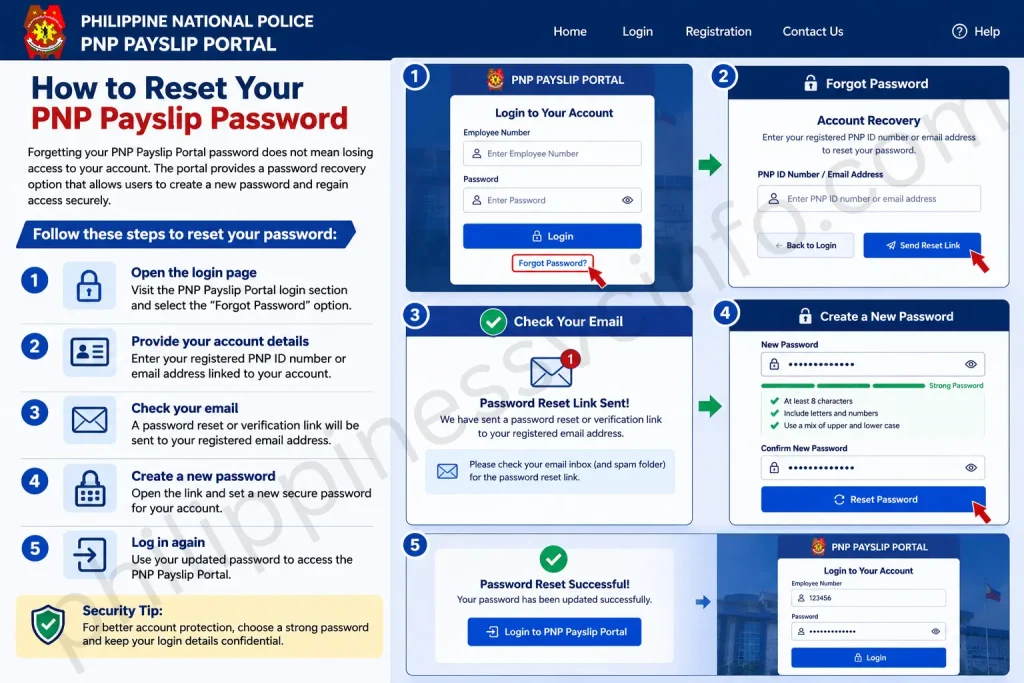
Follow these steps to reset your password:
- Open the login page
Visit the PNP Payslip Portal login section and select the “Forgot Password” option. - Provide your account details
Enter your registered PNP ID number or email address linked to your account. - Check your email
A password reset or verification link will be sent to your registered email address. - Create a new password
Open the link and set a new secure password for your account. - Log in again
Use your updated password to access the PNP Payslip Portal.
For better account protection, choose a strong password and never share your login credentials with anyone.
Understanding the PNP Payslip Format
A PNP payslip is organised into different sections that help personnel review their salary information clearly. The online payslip format typically separates personal details, earnings, deductions, and final payment information for easier understanding.
1. Employee Information
This section provides the employee’s identifying and professional details. It may include information such as the full name, badge number, rank, and other important personnel identifiers.
2. Earnings
The earnings section shows the total income received during a specific pay period. It includes the basic salary along with additional payments such as allowances, bonuses, incentives, and other eligible benefits.
3. Deductions
This part displays the amounts removed from the gross salary. Common deductions may include government contributions such as Pag-IBIG, PhilHealth, and GSIS, along with taxes and other authorised deductions.
4. Net Pay
The net pay section shows the final amount the employee receives after all deductions have been applied. It represents the actual take-home salary available to the PNP personnel.
What Is Inside a PNP Payslip?
A PNP payslip is organised into four main sections that provide a complete overview of an employee’s salary information. These sections help personnel understand their personal details, total earnings, deductions, and final take-home pay for a specific pay period.
1. Employee Information
The employee information section appears at the top of the payslip and contains important personal and service-related details. It may include:
- Full name
- Badge number
- Rank
- Unit code
- Date of birth
- Date of entry into service
- Retirement date
- Account number
- Covered pay period
This section helps identify the employee and confirms the period covered by the salary record.
2. Earnings
The earnings section shows the total income received before any deductions are applied. It may include different salary components and authorised benefits, such as:
- Base pay
- Long pay
- PERA (Personnel Economic Relief Allowance)
- Hazard pay
- Clothing allowance
- Laundry allowance
- Incentive pay
- Quarter allowance
- Other applicable allowances
These details provide a clear breakdown of the payments included in the employee’s gross salary.
3. Deductions
The deductions section lists the amounts removed from the employee’s earnings. Common deductions shown on a PNP payslip may include:
- PhilHealth contributions
- Pag-IBIG contributions
- Withholding tax
- GSIS or AFPSLAI loan payments
- PSSLAI contributions
- Other authorised deductions
Reviewing this section helps personnel understand how their final salary amount is calculated.
Understanding Your PNP Payslip Deductions
PNP payslips often contain different deduction codes that may look unfamiliar at first. These deductions represent various government contributions, loan payments, savings programmes, and membership benefits. Understanding each item helps personnel track where their salary deductions are being allocated.
PhilHealth
PhilHealth refers to the monthly health insurance contribution deducted from the salary. These payments help provide healthcare coverage for members and their qualified dependents when medical services are needed.
Pag-IBIG Fund
Pag-IBIG Fund is a housing and savings contribution that allows members to access benefits such as housing loans, savings programmes, and other financial assistance options.
Withholding Tax
Withholding tax is the income tax automatically deducted from an employee’s salary. The amount is based on the applicable income level and tax requirements.
AFPSLAI
AFPSLAI is a savings and loan association serving military and police personnel. Deductions under this category may represent savings contributions or payments for active loans.
PSSLAI
PSSLAI is another savings and loan association available to PNP members. Related deductions are typically used for member savings or loan repayment.
PMSMBFI
PMSMBFI refers to a PNP cooperative where salary deductions may cover membership contributions or payments for approved loans.
S4GTI
SGTI may represent a deduction connected to a cooperative, insurance programme, or group benefit service, depending on the employee’s enrolment.
Reviewing these deduction entries regularly helps PNP personnel understand their payslip better and monitor their financial commitments.
Troubleshooting PNP Payslip Portal Access Issues
Sometimes users may experience difficulties while accessing the PNP Payslip Portal. Most login problems can be resolved by checking account details, browser settings, or connection-related issues.
Try the following solutions if you cannot access your account:
- Clear browser cache or use private browsing mode
Remove stored browser data or open the portal using incognito mode to avoid loading errors. - Verify your login credentials
Make sure you are entering the correct PNP ID number and password associated with your account. - Avoid VPNs and proxy connections
Some network settings may interfere with portal access. Try connecting through a standard internet connection. - Contact the PNP Finance Service IT Helpdesk
If the issue continues, seek assistance from the support team.
Phone Support: Contact your regional finance office for available assistance.
Tips for Secure Use of the PNP Payslip Portal
Keeping your account secure helps protect your personal and salary information. Follow these best practices when using the portal:
- Always log out after completing your session.
- Avoid accessing your account through public Wi-Fi networks.
- Enable two-factor authentication (2FA) if the feature is available.
- Update your password regularly and avoid sharing your login details.
For more information about related police services, you can also learn about Police Clearance registration and application procedures.
Frequently Asked Questions About the PNP Payslip Portal
Conclusion
The PNP Payslip Portal provides active Philippine National Police personnel with a convenient way to access and manage their salary information online. Through secure login, organised payslip details, and digital access to payment records, the system makes it easier for officers to monitor their earnings and deductions.With features such as account registration, password recovery, and online payslip viewing, the portal helps users maintain better control over their financial records. By using the system responsibly and following security practices, PNP personnel can access their salary information safely whenever needed.
Discover What You Need to Know:
- DTI Registration Philippines 2026: Complete Guide to Requirements, Fees, Online Application & Certificate
- National ID Digital Copy: Complete Guide PhilSys Registration Process, Download & Use (2026)
- eRegistration: Complete Guide to Registration, Login, Requirements & Account Setup (2026)
- Philippines eTravel Card 2026: Complete Registration Guide, Requirements & QR Code
- Complete ORUS Guide 2026: BIR Registration, Login & Digital TIN ID
- eGovPH Philippines 2026: Registration, Login & Services Guide








