

A National ID Digital Copy is the electronic version of a government-issued national identification card. It contains the same personal information as the physical ID and can be accessed on a digital device. When officially recognised, it serves as valid proof of identity for online, government, and private transactions after successful authentication.
The National ID Digital Copy is the official electronic version of the Philippine National ID issued through the Philippine Identification System (PhilSys). It contains the same essential identity information as the physical National ID card and serves as a secure proof of identity for eligible PhilSys-registered individuals.
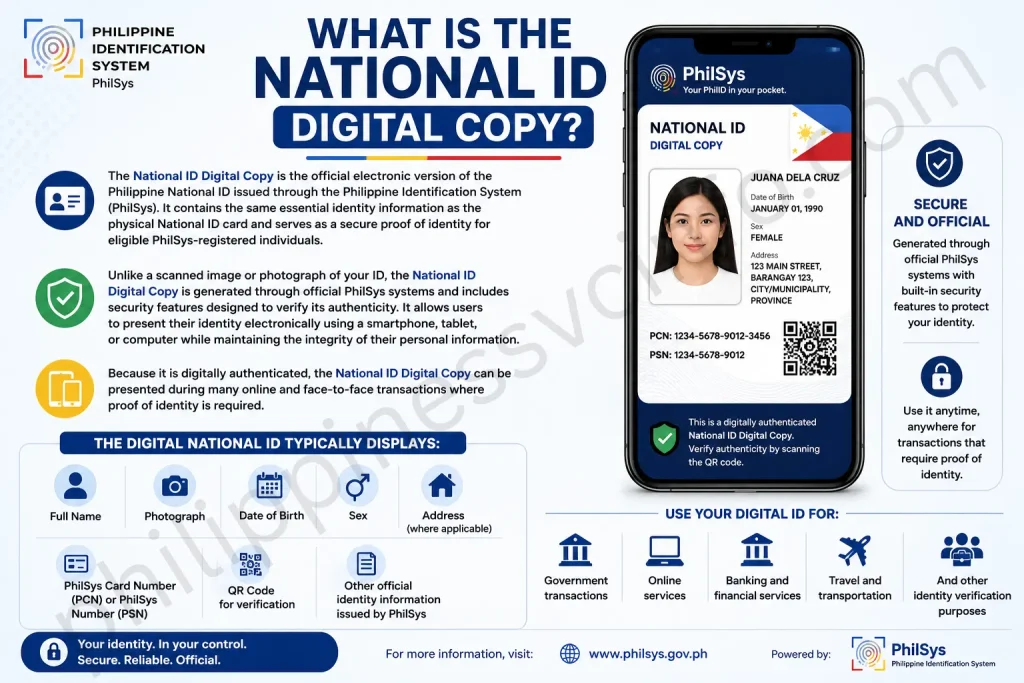
Unlike a scanned image or photograph of your ID, the National ID Digital Copy is generated through official PhilSys systems and includes security features designed to verify its authenticity. It allows users to present their identity electronically using a smartphone, tablet, or computer while maintaining the integrity of their personal information.
The Digital National ID typically displays important details such as:
- Full Name
- Photograph
- Date of Birth
- Sex
- Address (where applicable)
- PhilSys Card Number (PCN) or PhilSys Number (PSN)
- QR Code for verification
- Other official identity information issued by PhilSys
Because it is digitally authenticated, the National ID Digital Copy can be presented during many online and face-to-face transactions where proof of identity is required.
Why the National ID Digital Copy Is Important
The National ID Digital Copy plays an important role in making identity verification faster, more secure, and more convenient for millions of Filipinos. As government agencies, banks, schools, and private organizations continue to adopt digital services, having an official electronic version of your National ID allows you to complete many transactions without relying solely on the physical card.
For individuals who have not yet received their physical National ID, the Digital National ID serves as a practical alternative for proving their identity during eligible transactions. It helps reduce delays in accessing government services, opening bank accounts, registering SIM cards, applying for jobs, and completing other identity-related processes.
Another major advantage is accessibility. Instead of carrying a physical ID everywhere, users can securely access their Digital National ID using an internet-connected device through official PhilSys platforms. This makes identity verification more convenient, especially for online transactions and digital government services.
The National ID Digital Copy also supports the Philippine government’s goal of digital transformation. By enabling secure electronic identity verification, it reduces paperwork, improves public service delivery, minimizes identity fraud, and promotes financial inclusion for more Filipinos.
Key Reasons Why the National ID Digital Copy Is Important
- Provides an official digital proof of identity.
- Makes government services more accessible.
- Simplifies online identity verification.
- Reduces the need to carry multiple IDs.
- Helps prevent identity fraud through secure verification.
- Supports digital banking and financial services.
- Useful while waiting for the physical National ID.
- Improves convenience for everyday transactions.
Eligibility for the National ID Digital Copy
Not everyone can immediately access a National ID Digital Copy. Eligibility depends on your registration status in the Philippine Identification System (PhilSys) and whether your identity has been successfully processed and verified.
Generally, individuals who have completed the PhilSys registration process and whose information has been validated by the Philippine Statistics Authority (PSA) may be eligible to access their Digital National ID through official PhilSys services.
Who Can Get a National ID Digital Copy?
You may qualify if you:
- Successfully completed your PhilSys registration.
- Submitted all required demographic information.
- Completed biometric capture (photo, fingerprints, and iris scan where applicable).
- Passed identity verification by PhilSys.
- Have an active PhilSys record.
- Meet the requirements set by the Philippine Statistics Authority (PSA).
Who May Not Yet Be Eligible?
You may not yet be able to access your Digital National ID if:
- Your PhilSys registration is still being processed.
- Your biometric information has not yet been verified.
- Your registration contains incomplete or incorrect information.
- Your National ID application is still under review.
- There are technical issues affecting your registration status.
Before Accessing Your National ID Digital Copy
Before attempting to access your National ID Digital Copy, make sure you have everything needed for a smooth and successful process.
Preparing these requirements in advance can help avoid delays or verification issues.
Basic Requirements
You may need:
- A successful PhilSys registration.
- Stable internet connection.
- Smartphone, tablet, laptop, or desktop computer.
- Updated web browser.
- Mobile number or email associated with your registration (if required).
- Verification information requested by PhilSys.
Depending on the authentication method being used, additional verification steps may be required to protect your identity.
How to Register for a National ID
Before you can access a National ID Digital Copy, you must first complete your registration with the Philippine Identification System (PhilSys). Registration is managed by the Philippine Statistics Authority (PSA) and is available to all eligible Filipinos and resident aliens.

Step 1: Check Your Eligibility
Ensure you meet the eligibility requirements for PhilSys registration. Both Filipino citizens and qualified resident aliens can apply for a National ID.
Step 2: Prepare the Required Documents
Bring an accepted supporting document that proves your identity and personal information. Make sure your document is valid and contains accurate details.
Step 3: Visit a PhilSys Registration Center
Go to the nearest PhilSys registration center or any authorized registration site. Staff will assist you throughout the registration process.
Step 4: Submit Your Personal Information
Provide your demographic information, including:
- Full Name
- Date of Birth
- Place of Birth
- Sex
- Nationality
- Address
- Mobile Number (if available)
- Email Address (if available)
Ensure all information is correct before submission.
Step 5: Complete Biometric Capture
Your biometric information will be collected, including:
- Photograph
- Fingerprints
- Iris scan (where applicable)
This information helps verify your identity and improves the security of the PhilSys system.
Step 6: Review and Confirm Your Information
Carefully review all the information you provided before confirming your registration. Any errors should be corrected immediately.
Step 7: Receive Your Transaction Slip
After completing your registration, you will receive a transaction slip or reference number. Keep it safe, as it may be needed to track your registration status or for future inquiries.
Step 8: Wait for Processing
The Philippine Statistics Authority (PSA) will verify your registration details and process your National ID application. Once approved, your physical National ID and, if available, your Digital National ID can be accessed according to the official PhilSys process.
How to Download the National ID Digital Copy
If downloading is available through the official PhilSys service you are using, follow the instructions provided after successfully accessing your Digital National ID.

General Download Process
- Access your Digital National ID through the official PhilSys platform.
- Complete identity verification.
- Wait for your Digital National ID to appear.
- If a download option is available, select Download or follow the provided instructions.
- Save the file securely on your device.
- Keep your downloaded copy protected from unauthorized access.
Note: The availability of download options may vary depending on the official PhilSys service and current policies. Always follow the instructions provided on the official platform.
How It Different from a Physical National ID?
Although both contain the same identity information, there are several differences between the physical card and the digital version.
| National ID Digital Copy | Physical National ID |
|---|---|
| Accessible online through official PhilSys platforms | Printed PVC card |
| Can be viewed on smartphones, tablets, or computers | Must be carried physically |
| Includes digital verification features | Includes printed security features |
| Convenient for online transactions | Better suited for offline verification |
| Can be accessed anytime with internet (where required) | Does not require internet |
Both versions represent your official identity and may be accepted according to applicable PhilSys guidelines and verification requirements.
Components of the PhilSys Identification
The Philippine Identification System consists of several interconnected components:

1. PhilSys Registry
A secure national database containing demographic and biometric information of registered individuals.
2. PhilSys Number (PSN)
A unique permanent identification number assigned to every registered person.
3. PhilSys Card Number (PCN)
A card-specific number used on the physical and digital National ID for verification purposes.
4. National ID
The official proof of identity available in physical and digital formats.
5. Authentication Services
Official verification services that allow authorized agencies and institutions to confirm the authenticity of a person’s identity while protecting personal information.
Why PhilSys Matters
PhilSys plays a vital role in the Philippines’ digital transformation. By establishing a secure and standardized identity system, it helps improve public service delivery, reduces administrative burdens, and enables faster access to essential services.
The introduction of the National ID Digital Copy further strengthens this vision by allowing registered users to access their identity electronically whenever needed, making identification more convenient, secure, and accessible.
Can You Save Your National ID Digital Copy?
Yes. Eligible users can access their National ID Digital Copy online, and the official service allows you to display it whenever identity verification is required.
Depending on the current PhilSys service features, you may also be able to save or screenshot the displayed digital ID for easier access. However, you should always ensure that the copy remains clear, complete, and unaltered.
Avoid editing or modifying any part of the digital ID, as altered copies may not be accepted during verification.
Official Resources
To protect your personal information, always access your National ID Digital Copy through official PhilSys and Philippine Statistics Authority (PSA) channels. Using unofficial websites, third-party applications, or links shared on social media may expose your personal information to fraud or identity theft.
Official resources provide secure access to your Digital National ID, verification services, registration updates, announcements, and other PhilSys-related information.
Official PhilSys Resources
- Official PhilSys website
- Philippine Statistics Authority (PSA) website
- Official PhilSys registration centres
- PSA customer support
- Official government announcements
- Authorized government service portals
Why You Should Use Official Resources
Using official PhilSys platforms helps you:
- Protect your personal information.
- Avoid fake websites and phishing scams.
- Access accurate registration information.
- Download authentic Digital National IDs.
- Verify your identity securely.
- Receive official updates and announcements.
Important: Never enter your PhilSys information on unofficial websites or share your login credentials with anyone.
Where Use National ID Digital Copy?
The National ID Digital Copy is designed to make identity verification easier across both government and private sectors. Once successfully authenticated through official PhilSys services, it can serve as valid proof of identity for many transactions that require identity verification.
As more organizations integrate PhilSys authentication into their systems, the Digital National ID continues to expand its usability.
Government Services
Many government agencies require proof of identity before processing applications or providing public services. The Digital National ID can simplify these processes by offering a trusted and secure form of identification.
It may be used for:
- Government benefit applications
- Social welfare programs
- Taxpayer identification and updates
- Driver’s license transactions
- Voter-related services (where accepted)
- Government-issued certificates
- Public healthcare services
- Pension-related transactions
Banking and Financial Services
Banks and financial institutions often require identity verification before allowing customers to open accounts or perform sensitive transactions.
The National ID Digital Copy may be accepted for:
- Opening savings or current accounts
- Updating customer records
- Identity verification
- Loan applications
- Credit card applications
- Digital banking registration
- Electronic wallet verification
- Financial service enrolment
Acceptance may vary depending on each financial institution’s verification procedures.
SIM Card Registration
Telecommunication companies require customers to verify their identity when registering SIM cards.
The Digital National ID can help during:
- New SIM registration
- SIM ownership verification
- Updating subscriber information
- Mobile account verification
Passport Applications
Applicants may use the National ID Digital Copy as one of the accepted proof-of-identity documents during passport-related processes, subject to the requirements of the responsible government agency.
Employment
Employers often request valid identification during hiring and onboarding.
The Digital National ID may assist with:
- Job applications
- Employee verification
- Human resource documentation
- Payroll registration
- Government employment requirements
Education
Schools, colleges, and universities may request official identification during enrolment or student verification.
Possible uses include:
- Student enrolment
- Scholarship applications
- Student identification
- Examination registration
- School record verification
Healthcare Services
Hospitals, clinics, and healthcare providers may request proof of identity before providing services.
The Digital National ID may be used for:
- Patient registration
- Medical record verification
- Health insurance transactions
- Government healthcare programs
- Hospital admissions
Private Sector Transactions
Many private businesses also require valid identification for customer verification.
Examples include:
- Hotel check-ins
- Courier services
- Property transactions
- Utility applications
- Insurance services
- Membership registrations
- Online identity verification
Always check with the organization beforehand, as acceptance of the Digital National ID may depend on their verification policies.
Legal Validity of the National ID Digital Copy
The National ID Digital Copy is an officially recognized digital representation of the Philippine National ID under the Philippine Identification System (PhilSys). When accessed through official PhilSys platforms and successfully authenticated, it is intended to serve as a valid proof of identity for transactions where it is accepted.
The Digital National ID contains the same core identity information as the physical National ID and is protected by official security and authentication measures. These features help ensure that the identity presented is genuine and has not been altered.
However, acceptance of the Digital National ID may vary depending on the requirements of individual government agencies, banks, private companies, or institutions. Some organizations may perform additional verification before completing certain transactions.
Users should always present their Digital National ID through official PhilSys services and avoid relying on unofficial copies or altered images.
Features of the National ID Digital Copy
The National ID Digital Copy includes several features that make it a secure and convenient form of digital identification.
Key Features
- Official electronic version of the Philippine National ID.
- Contains verified identity information.
- Secure digital authentication.
- QR code for identity verification.
- Accessible through official PhilSys platforms.
- Compatible with smartphones, tablets, and computers.
- Designed for online and in-person identity verification.
- Helps reduce identity fraud.
- Convenient for digital government services.
- Supports secure electronic transactions.
Benefits of the National ID Digital Copy
Using the National ID Digital Copy offers many practical advantages for individuals, businesses, and government agencies.
Benefits for Citizens
- Faster identity verification.
- Reduced need to carry multiple IDs.
- Easier access to online services.
- Convenient for digital transactions.
- Helpful while waiting for the physical National ID.
- Improved access to banking and financial services.
- Simplified government applications.
- Better protection against identity fraud through official verification systems.
Benefits for Government Agencies
- Faster citizen verification.
- Improved public service delivery.
- Reduced paperwork.
- Better record accuracy.
- More efficient digital services.
- Stronger identity management.
Benefits for Businesses
Improved compliance with identity verification requirements.
Faster customer verification.
Reduced fraud risks.
More efficient onboarding.
Security Tips for Your National ID Digital Copy
Your National ID Digital Copy contains sensitive personal information that should always be handled with care. Although it is protected by the security features of the Philippine Identification System (PhilSys), users also have a responsibility to keep their digital identity safe from unauthorized access, fraud, and identity theft.
Whether you access your Digital National ID on a smartphone, tablet, or computer, following good security practices helps ensure that your information remains private and secure.
Why Security Matters
Your National ID Digital Copy can be used to verify your identity during official transactions. If it falls into the wrong hands, criminals may attempt to misuse your personal information for fraudulent activities such as identity theft, financial scams, or unauthorized account access.
Taking a few simple precautions can significantly reduce these risks and help protect your digital identity.
National ID Digital Copy Storage Tips

1. Save It Only on Trusted Devices
Access and store your National ID Digital Copy only on devices that you personally own or trust. Avoid downloading or saving it on shared computers, internet cafés, or public devices where your information could remain accessible to others.
2. Protect Your Device
Enable strong security features on your smartphone, tablet, or computer, including:
- Strong password or PIN
- Fingerprint authentication
- Face recognition
- Screen lock
- Automatic device lock
These features help prevent unauthorized access if your device is lost or stolen.
3. Keep Your Software Updated
Install the latest updates for your:
- Operating system
- Web browser
- Security software
- Mobile applications
Software updates often include important security improvements that protect your personal information.
4. Avoid Public Wi-Fi
Whenever possible, access your National ID Digital Copy using a secure internet connection. Public Wi-Fi networks may expose your personal information to security risks.
If you must use public Wi-Fi, avoid entering sensitive personal information unless the connection is secure.
5. Never Share Your Digital ID Publicly
Do not post your National ID Digital Copy or screenshots of it on:
- TikTok
- X (Twitter)
- Messaging groups
- Public websites
Sharing your personal information online increases the risk of identity theft.
6. Log Out After Accessing Your Digital ID
Always sign out of official PhilSys services after viewing your National ID Digital Copy, especially if using a shared or borrowed device.
7. Delete Unnecessary Copies
If you download or temporarily save your National ID Digital Copy, remove outdated or unnecessary copies that you no longer need. Keeping fewer copies reduces the chance of accidental exposure.
8. Be Careful with Cloud Storage
If you choose to store your Digital National ID in cloud storage, make sure your account is protected with:
- A strong password
- Two-factor authentication (2FA)
- Secure recovery options
Only use reputable cloud storage services with strong security features.
Common Issues of National ID Digital Copy
Although the Digital National ID is designed to provide convenient access to your official identity, users may occasionally encounter technical or verification issues. Most of these problems can be resolved by following the recommended steps or contacting the appropriate PhilSys support channels.
1. Unable to Access the Digital National ID
Possible Causes:
- Registration is still being processed.
- Incorrect information entered.
- Temporary system maintenance.
- Internet connection problems.
Solution:
- Check your internet connection.
- Verify that your registration details are correct.
- Try again later if the system is under maintenance.
- Contact official PhilSys support if the issue continues.
2. Identity Verification Failed
Verification may fail if the information entered does not match your PhilSys registration records.
Possible Solutions:
- Double-check your personal details.
- Ensure you are using the correct registered information.
- Follow all verification instructions carefully.
- Retry the verification process after a short time.
3. Website Not Loading
Sometimes official services may experience temporary downtime.
Try the following:
- Refresh the page.
- Clear your browser cache.
- Use another browser.
- Restart your device.
- Try again later.
4. Digital Copy Not Available
Some users may not yet have access to their Digital National ID because their registration is still under review or has not been fully processed.
If your registration was recently completed, additional processing time may be required.
5. Download Option Not Appearing
Not every PhilSys service or platform provides a download feature.
If no download option is available:
- Follow the instructions displayed on the official website.
- Use the Digital National ID directly through the official platform when required.
How to Use Your Digital ID Safely
Keeping your Digital National ID secure is just as important as protecting your physical ID. Following these safety tips can help reduce the risk of fraud and unauthorized use.
Important Safety Tips
- Always access your Digital National ID through official PhilSys services.
- Never share your passwords or verification codes.
- Be cautious of fake websites that imitate official government pages.
- Do not respond to emails or messages asking for your National ID information unless you can verify they are legitimate.
- Avoid clicking suspicious links received through text messages, emails, or social media.
- Never allow strangers to take photographs of your National ID.
- Verify the identity of organizations requesting your Digital National ID.
- Report suspicious activity immediately to the appropriate authorities if you believe your identity has been compromised.
Frequently Asked Questions
Conclusion
The National ID Digital Copy is an important part of the Philippine Identification System (PhilSys), offering Filipinos a secure and convenient way to verify their identity in both online and face-to-face transactions. By providing an official electronic version of the National ID, it simplifies access to government services, banking, education, healthcare, employment, and many other essential activities.As digital services continue to expand across the Philippines, the National ID Digital Copy helps make identity verification faster, more efficient, and more accessible. However, users should always access it through official PhilSys platforms, protect their personal information, and follow recommended security practices to prevent fraud and identity theft.Understanding how to access, use, and safeguard your National ID Digital Copy ensures that you can take full advantage of its benefits while keeping your digital identity secure. Whether you are waiting for your physical National ID or prefer the convenience of digital identification, the National ID Digital Copy is a valuable and reliable proof of identity for modern transactions.
Discover What You Need to Know:
- Quizizz: Complete Guide to Online Quizzes, Login, Features & How It Works (2026)
- eRegistration: Complete Guide to Registration, Login, Requirements & Account Setup (2026)
- TNT SIM Registration 2026: Complete Guide to Online Registration, Requirements & Activation
- OLFU AIMS Login Guide 2026: Enrollment, Grades, Student Portal & Account Access
- 51Talk: Complete Guide to Online English Learning Platform, Courses, Login, App & Registration (2026)








