Unli Data TNT refers to TNT prepaid data promotions that provide unlimited or extended mobile internet access for a specified validity period. Depending on the selected offer, subscribers may use data for browsing, streaming, social media, gaming, and other online activities, subject to eligibility, network conditions, promo terms, and applicable restrictions.
What Is Unli Data TNT?
Unli Data TNT generally refers to TNT prepaid data offers designed to provide extended or unlimited mobile-data access under the specific conditions of the selected promotion.
It is important to distinguish between a general unlimited-data offer and Unlimited 5G with Non-Stop Data. The latter has specific requirements involving a compatible 5G SIM, 5G-capable device and 5G coverage. TNT states that the Unlimited 5G experience depends on the device, network conditions, location and subscriber traffic.
Some offers may provide access across websites and applications, while others combine open-access data with specific app allocations. Therefore, the word “unlimited” should always be read together with the exact promo description.
Quick Answer
If you want Unli Data TNT, the safest approach is to:
- Open the official Smart App.
- Sign in using your TNT mobile number.
- Look at the available data or promotional offers.
- Check the price, inclusions and validity.
- Confirm that the offer is available for your particular TNT number.
- Subscribe only after reviewing the conditions.
You can also check available options through the *123# menu where supported. TNT’s official information confirms that certain data offers can be accessed through the Smart App and *123#.
Who Can Use TNT Unlimited Data Offers?
TNT prepaid subscribers are the main audience for these offers. They can be particularly useful for people who regularly use mobile internet for video, social media, online classes, navigation, messaging or general browsing.
The service can also be relevant to:
- Students who need mobile connectivity outside campus or home Wi-Fi
- Travellers and visitors using a local TNT SIM
- Foreign residents living in the Philippines
- Prepaid users who consume substantial amounts of data
- Users with 5G-compatible phones looking for 5G-specific packages
- People who need internet access while travelling around the country
However, eligibility is not necessarily identical for every promo. TNT’s official promotional pages show that some offers are specifically available to TNT subscribers, while particular promotions can have their own requirements.
Before Registering for Unli Data TNT
Checking the offer before subscribing can prevent many common problems.
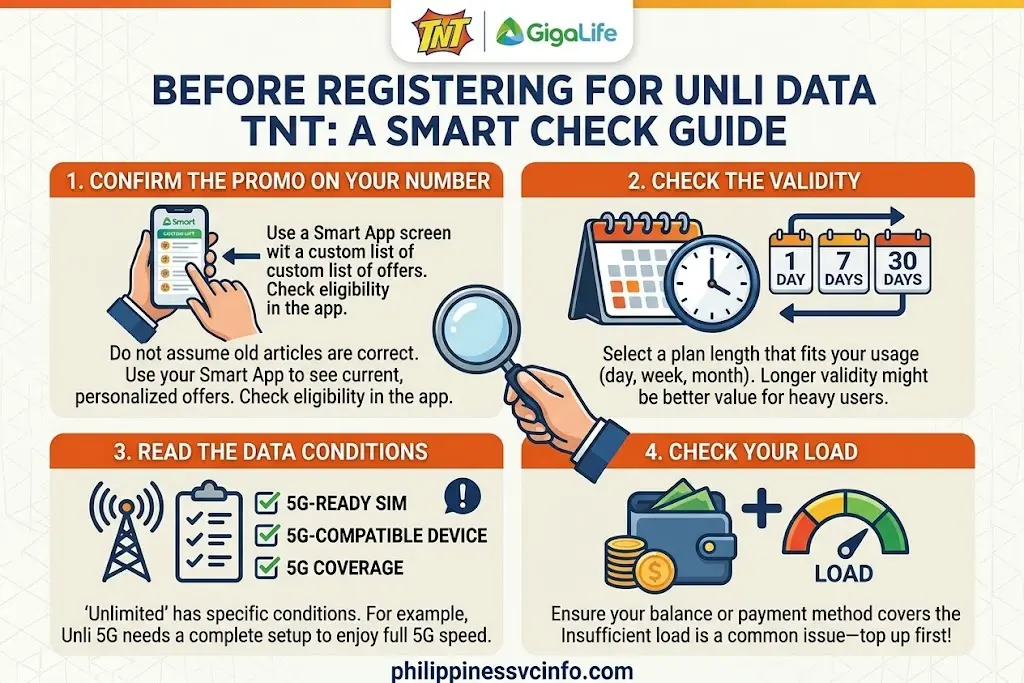
1. Confirm the Promo on Your Number
Do not assume that an offer listed in an old article will appear on every SIM. Promotional pricing, availability and eligibility can change.
Your Smart App account is therefore useful because it can show the offers currently presented to your number.
2. Check the Validity
Look carefully at whether the package lasts for a day, several days or a full month.
A lower-priced offer can sometimes be suitable for short-term use, while a longer-validity package may make more sense for someone who relies on mobile data throughout the month.
3. Read the Data Conditions
“Unlimited” does not necessarily mean that every network feature works under identical conditions.
For example, TNT’s official information for Unlimited 5G with Non-Stop Data states that the subscriber needs a 5G-ready SIM, a compatible 5G device and 5G coverage to enjoy the 5G component.
4. Check Your Load
Make sure your regular balance or selected payment method can cover the price before confirming registration.
If an offer is not available because of insufficient balance, adding load first may resolve the issue.
How to Register Unli Data TNT
There are several ways a TNT subscriber may encounter and register an eligible data offer. The most convenient option for many users is the Smart App because it can display the offers currently associated with the account.
Method 1: Use the Smart App

The Smart App is one of the main digital channels for managing Smart and TNT prepaid services.
Step 1: Open the Official Smart App
Install or open the official Smart App from your device’s authorised app store.
Avoid downloading an APK or modified application from an unfamiliar website. When dealing with your mobile account, using the official application reduces the risk of entering credentials into a fake service.
Step 2: Sign In With Your TNT Number
Log in using the TNT mobile number associated with your account.
If you are a new user, follow the account setup instructions presented inside the official application.
Step 3: Find the Available Data Offers
After signing in, review the data or promotional section.
Depending on the current application layout and the offers available to your number, you may see categories such as All Data, Unli 5G, or other TNT promotions.
TNT’s current official information specifically directs users towards the Smart App for Unlimited 5G with Non-Stop Data offers.
Step 4: Review the Offer
Before pressing Subscribe, check:
- Promo name
- Price
- Validity
- Included data
- 5G requirements, if applicable
- App-specific allocations
- Any stated restrictions
This step matters because two offers with similar names can have very different inclusions.
Step 5: Confirm the Subscription
If the package meets your requirements, follow the confirmation instructions shown in the app.
Wait for the registration confirmation before assuming the promo has become active.
Tip: Keep the confirmation SMS or in-app confirmation until you have verified that the data allocation is working.
Method 2: Register Through *123#
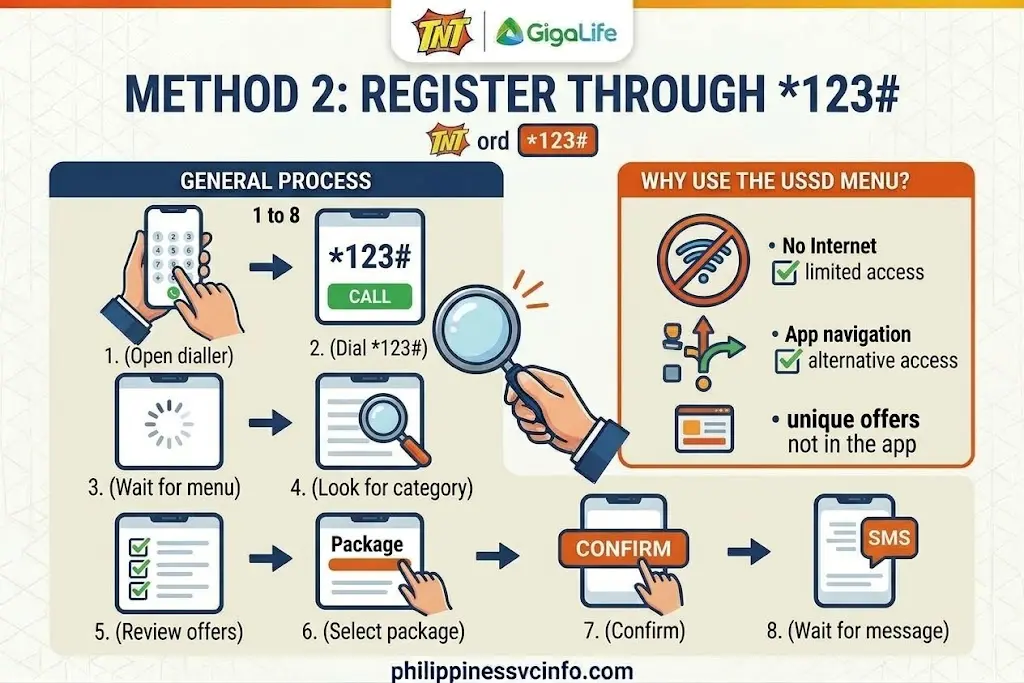
TNT also provides prepaid self-service options through the *123# menu.
The exact menu structure can change, so do not rely on an old numbered sequence from a third-party guide.
General Process
- Open your phone’s dialler.
- Dial *123#.
- Wait for the interactive menu.
- Look for the relevant data or promotional category.
- Review the offers displayed for your account.
- Select the package you want.
- Confirm the registration.
- Wait for the confirmation message.
TNT’s official pages show *123# as an available channel for certain promotional registrations, including current TNT data-related offers.
Why Use the USSD Menu?
The USSD method can be useful when you have limited internet access or cannot conveniently navigate the application.
It is also a useful alternative when an offer appears through the official USSD menu but is difficult to locate in the app.
Method 3: Use an Authorised TNT Retailer

Subscribers can also encounter TNT promotions through authorised retail channels.
If you choose this method, clearly state the exact promo you want and confirm the price and validity before completing the transaction.
A retailer may have access to promotional offers that differ from what another channel displays, so it is still worth checking the details.
TNT’s official promotional information lists Suking Tindahan among channels for certain offers.
Current TNT Unlimited Data and 5G Offers
Promo inventories can change, so historical price lists should not be treated as permanent.
The official TNT website currently lists Unlimited 5G packages such as UNLI 5G DATA 299, UNLI 5G DATA 599 and UNLI 5G DATA 799 on its promotional information page. The listed examples include different validity periods and additional data for non-5G areas.
| Example official offer | Price | Validity | Main idea |
|---|---|---|---|
| UNLI 5G DATA 299 | ₱299 | 7 days | Unlimited 5G + extra data in non-5G areas |
| UNLI 5G DATA 599 | ₱599 | 30 days | Unlimited 5G + extra non-5G data |
| UNLI 5G DATA 799 | ₱799 | 30 days | Unlimited 5G + larger non-5G allocation |
These figures come from TNT’s official promotional information and should be checked again before publication or subscription because telecom promotions can be replaced or updated.
What About Older ₱199, ₱499 or ₱999 Unli Data Offers?
You may find references online to packages such as Unli Data 199, Unli Data 499, Unli Data 599, Unli Data 999 or Unli Data 1199.
Those prices and packages should not automatically be presented as current nationwide TNT offers unless they are displayed through an official channel for the subscriber.
This is especially important for targeted promotions. An offer appearing on one TNT account may not appear on another.
The safest rule is straightforward:
Use the official Smart App or TNT/Smart channel to confirm the price and eligibility immediately before subscribing.
Understanding Unlimited 5G With Non-Stop Data
One of the most important distinctions for users searching for Unli Data TNT is the difference between unlimited 5G access and ordinary open-access data.
TNT explains that its Unlimited 5G with Non-Stop Data offers require the appropriate 5G setup. The subscriber should have a 5G-ready SIM, be in a 5G-covered location, and use a 5G-capable device.
If those conditions are not met, the applicable non-5G allocation or terms may apply instead.
TNT also states that the non-5G wallet can be used when the 5G requirements are not satisfied, subject to the conditions of the particular offer. Its official page notes that non-5G data may be limited to SD video-streaming speed.
What Can You Do With the Data?
Depending on the exact offer, mobile data may support activities such as:
- Web browsing
- Social media
- Video streaming
- Online gaming
- Messaging
- Downloads
- Online learning
- General app usage
The precise inclusions still depend on the registered package.
Important: “Unlimited” Does Not Mean Every Use Is Permitted
TNT’s official information places restrictions on certain abusive or harmful uses for its Unlimited 5G allocation. Its page specifically mentions P2P and torrent sites/apps among excluded uses.
For that reason, subscribers should read the terms of the particular package instead of assuming that unlimited access means unrestricted use of every type of network traffic.
Network performance can also vary. TNT states that actual experience depends on the device, detected signal, subscriber traffic and location.
That means a subscriber can have an active unlimited offer and still experience slower speeds in a weak-signal area or during periods of network congestion.
Quick Checklist Before You Subscribe
Use this short checklist before activating Unli Data TNT:
- ✓ Your TNT SIM is active.
- ✓ You have sufficient balance or an accepted payment method.
- ✓ The offer is actually displayed for your number.
- ✓ You have checked the validity period.
- ✓ You understand whether it is 4G, 5G or a combination.
- ✓ Your phone supports the required network technology.
- ✓ Your location has suitable network coverage.
- ✓ You have read any restrictions.
- ✓ You have received the registration confirmation.
Getting these details right at the beginning can save you from accidentally buying a package that does not match your device or usage.
How to Check Your Unli Data TNT Balance anMethod 1 Use the Smart Appd Expiry
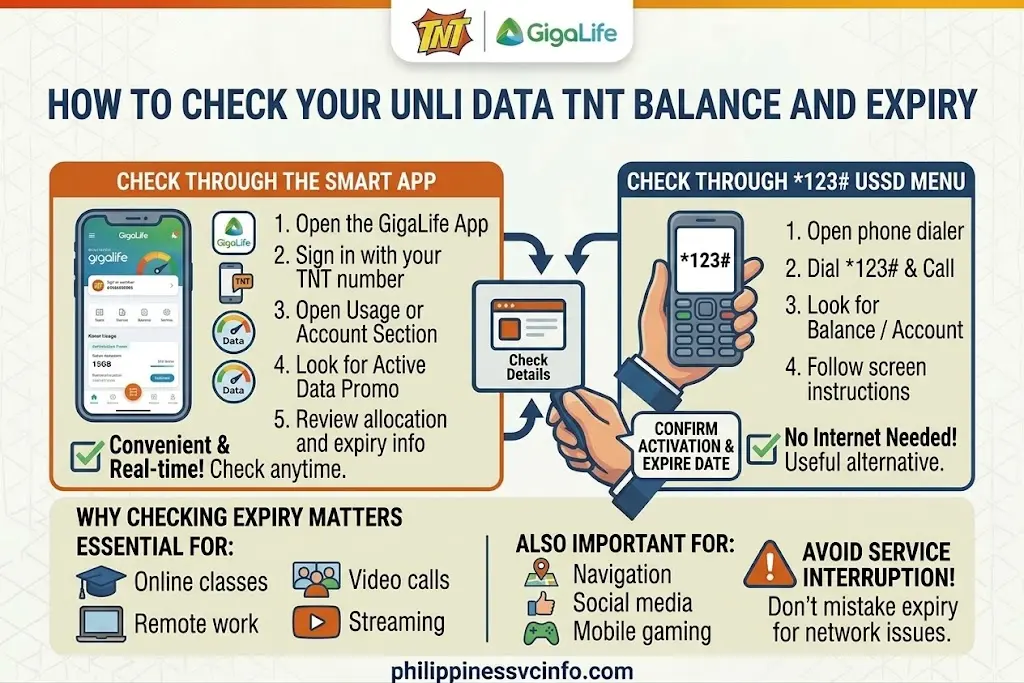
Checking your account after registration is a good habit, particularly if you use mobile data heavily. It lets you confirm that the promo was activated and helps you know when the validity period is ending.
Check Through the Smart App
The Smart App is the most convenient option for many subscribers.
- Open the official Smart App.
- Sign in with your TNT mobile number.
- Open the account or usage section.
- Look for your active data promo.
- Review the remaining allocation and validity information displayed for your account.
The exact appearance of the application can change after an update, so menu names may not always remain identical.
Check Through *123#
If you prefer a phone-based option, dial:
*123#
Then look for the balance, account or services option presented in the current menu.
The available selections can change, so follow the instructions shown on your screen rather than relying on an outdated USSD sequence.
Why Checking Expiry Matters
An active Unli Data TNT package has a defined validity period. Once that period ends, the promotional data access also ends.
Checking beforehand is particularly useful if you use TNT as your primary internet connection for:
- Online classes
- Remote work
- Video calls
- Streaming
- Navigation
- Social media
- Mobile gaming
A subscriber who waits until the data stops working may mistakenly think there is a network problem when the actual issue is simply that the promo has expired.
What Happens When Your TNT Unli Data Promo Expires?
Expiration does not necessarily mean that your TNT SIM stops working.
Instead, the promotional entitlement ends according to the conditions of the registered package. If you still have regular load, you should be careful about continuing to use mobile data after the promo has expired because ordinary charges may apply under the applicable service terms.
This is why checking your validity before the end of the promo is a useful precaution.
A Safer Approach
If you know you will not need mobile internet after the promo expires:
- Check the expiry time.
- Turn mobile data off when the promo ends.
- Connect to Wi-Fi where available.
- Register another appropriate promo if you still need mobile internet.
- Confirm activation before resuming heavy data use.
This can help prevent your regular load from being consumed unexpectedly.
Does Unli Data TNT Automatically Renew?
Do not assume that every TNT data package automatically renews.
Whether an offer renews, expires or has another continuation mechanism depends on the specific promotion’s terms. Before registering, check the information shown in the official Smart App, TNT channel or promotional page.
This is especially important when an offer has a low initial price and a longer validity period. The safest practice is to understand the package’s renewal conditions before confirming payment.
How to Avoid Unexpected Load Deduction
If your promotional data has ended, your phone may still have mobile data enabled.
Before continuing to browse, consider checking whether another active package is available.
You can also:
- Turn off mobile data temporarily.
- Use Wi-Fi.
- Check your active subscriptions.
- Review your regular load balance.
- Confirm the expiry of your current promo.
- Register a new package only after checking its terms.
Important: Don’t rely on an old social-media post or an unofficial keyword to determine whether a package is still active. TNT promotions can change.
How to Fix Unli Data TNT Registration Problems
Not every registration attempt succeeds on the first try. The problem may come from eligibility, insufficient balance, an outdated offer, network conditions or an incorrect registration method.
Here are some of the most common situations.
“Transaction Failed” or Registration Did Not Complete
If your registration does not go through, first check whether:
- You have enough load.
- Your TNT number is active.
- The selected offer is currently available.
- You are using the official Smart App or USSD menu.
- Your phone has sufficient network signal.
If you attempted to use an old SMS keyword found online, try the official app or current *123# menu instead.
Promo keywords can be changed or discontinued, making old instructions unreliable.
The Promo Is Not Showing on My Account
This does not necessarily mean that your TNT SIM has a problem.
Some promotions may be available only to particular subscribers or through particular channels. Your account may therefore show a different selection from another TNT user’s account.
What You Should Do
Open the Smart App and check the offers presented specifically to your number.
You can also check the current options through the official TNT website.
Avoid paying someone who claims they can “unlock” a hidden promo for your SIM. If an offer is legitimate, it should be available through an authorised TNT or Smart channel.
What If You Don’t Have Enough Load?
An insufficient balance is one of the simplest reasons a prepaid registration can fail.
For example, if the required amount is ₱299 and your available regular load is below the required amount, the transaction cannot be completed using that balance.
Possible Solutions
You can add load through an available authorised channel, such as:
- GCash
- Maya
- Participating retailers
- Other supported electronic payment channels
- Official Smart/TNT channels
After adding load, check your balance and attempt registration again.
Always verify the amount before confirming a transaction.
Can Foreign Residents and Tourists Use Unli Data TNT?
Foreign residents and visitors can use TNT prepaid services when they meet the applicable SIM-registration and service requirements.
For foreign nationals, SIM registration requirements can involve identity and Philippine address information. The exact documents and procedure should be checked through the official Smart registration process and current Philippine regulations.
Do not rely on an unofficial agent claiming that SIM registration can be bypassed.
Before Using a TNT SIM
A foreign visitor should make sure that:
- The SIM has been properly registered.
- The registration information is accurate.
- The SIM remains active.
- The phone is compatible with the Philippine network.
- The selected data promo is available for that SIM.
For official information, use the Smart SIM registration page rather than third-party registration websites.
Unli Data TNT on 4G and 5G Phones
Your device can make a significant difference to the experience you receive.
A subscriber with a 5G-capable handset in a suitable 5G coverage area may be able to use a TNT Unlimited 5G offer according to its conditions.
Someone using a 4G-only phone cannot use the 5G component simply by subscribing to a 5G package.
Check These Three Things
Before buying a 5G-focused offer, verify:
1. Your SIM
Make sure it is compatible with the required network service.
2. Your handset
Your phone must support the relevant 5G bands and service.
3. Your location
You need suitable 5G coverage where you intend to use the service.
TNT notes that actual network performance can depend on factors such as location, device compatibility, signal conditions and network traffic.
Why Is My TNT Internet Slow Even With Unlimited Data?
An unlimited promotional package does not guarantee a fixed internet speed at every location.
Network performance can vary because of:
- Weak signal
- Indoor coverage
- Distance from a network site
- Network congestion
- Device limitations
- 4G/5G availability
- Local network conditions
For example, a user may see strong 5G performance outdoors but experience weaker connectivity inside a building.
Try These Basic Checks
If your Unli Data TNT connection suddenly becomes slow:
- Check whether your phone shows 4G or 5G.
- Move to an area with better signal.
- Turn Airplane Mode on and off.
- Restart the phone.
- Confirm that your promo is still active.
- Check whether your device is using the intended SIM for mobile data.
- Check the official TNT or Smart service information for network issues.
If the problem continues, use official Smart/TNT support channels rather than changing random network settings from unofficial tutorials.
Can You Use TNT Unli Data for Hotspot?
Hotspot availability depends on the specific promo’s terms and network conditions.
Do not assume that every package has identical tethering rules simply because its name contains “Unli Data”.
Before using your TNT phone as a hotspot for a laptop, tablet or another device, review the conditions of the exact package you purchased.
If tethering is permitted, remember that multiple connected devices can consume substantial bandwidth. Your experience can also vary depending on the phone’s signal and the number of devices connected.
Common Mistakes to Avoid
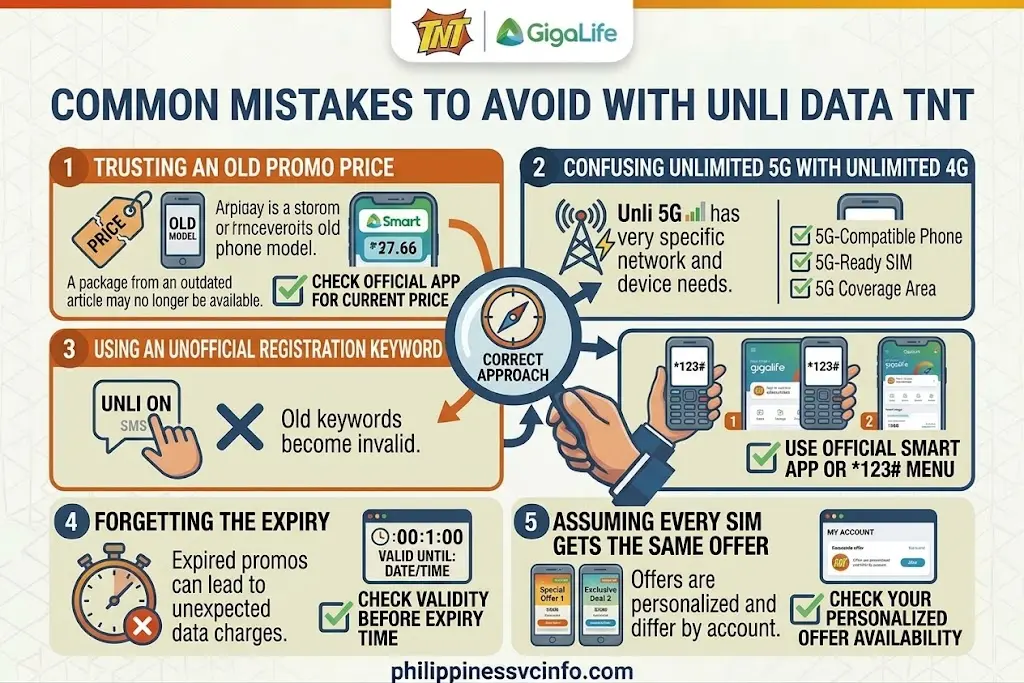
A few mistakes can cause unnecessary expense or frustration when using Unli Data TNT.
Mistake 1: Trusting an Old Promo Price
A package that existed previously may no longer be available.
Better approach: Check the current offer inside the official Smart App or TNT channel.
Mistake 2: Confusing Unlimited 5G With Unlimited 4G
An Unlimited 5G offer has specific 5G requirements.
Better approach: Check your device, SIM and coverage before subscribing.
Mistake 3: Using an Unofficial Registration Keyword
Old keywords can become invalid.
Better approach: Use the current Smart App or *123# menu.
Mistake 4: Forgetting the Expiry
An expired promo can leave your phone connected to mobile data without the expected promotional coverage.
Better approach: Check the validity before the expiry time.
Mistake 5: Assuming Every SIM Gets the Same Offer
Promotions can differ between subscribers.
Better approach: Treat the offer displayed on your own account as the relevant availability check.
Unli Data TNT: Which Registration Method Is Best?
There is no single method that is best for every subscriber.
| Method | Best for | Main advantage |
|---|---|---|
| Smart App | Most users | Easy offer comparison and account management |
| *123# | Users with limited internet access | Works through a USSD menu |
| Authorised retailer | Cash-based users | Useful when purchasing through a physical outlet |
| Official website | Checking information | Helps verify current promotional details |
For most users, the Smart App is the easiest starting point because it can show account-specific offers.
The *123# option is useful when you want to access prepaid services without navigating a data-heavy application.
Before You Buy: A 30-Second Safety Check
Before pressing the final confirmation button, ask yourself:
Is this offer actually displayed for my TNT number?
Have I checked the price?
Have I checked the validity?
Does it work with my phone and network type?
Have I read the restrictions?
If the answer to all five is yes, you are in a much better position to choose the appropriate package.
The most reliable source is always the official TNT or Smart channel displaying the offer at the time of registration.
Official TNT and Smart Resources
When searching for Unli Data TNT, use official sources whenever possible.
This should be your first reference for TNT-related information, services and current promotional material.
Smart is TNT’s network operator and provides account, prepaid and network information.
Use the official registration service for SIM-registration requirements rather than third-party websites.
TNT Promotional Information
TNT’s official promotional pages can be used to verify current offers, prices and package conditions. Because promotions change, check the official page at the time you intend to subscribe rather than relying on an archived price list.
A Practical Unli Data TNT Checklist
Before purchasing any unlimited-data package, run through this checklist.
Account
- Is your TNT SIM active?
- Is the SIM properly registered?
- Can you access your Smart/TNT account?
- Is your regular load sufficient if you are paying through load?
Promo
- Is the offer currently visible?
- Is the price correct?
- Have you checked the validity?
- Have you read the inclusions?
- Are there specific 4G or 5G requirements?
Device
- Does your phone support the required network technology?
- Is the correct SIM selected for mobile data?
- Does your current location have suitable coverage?
After Registration
- Did you receive confirmation?
- Does the active promo appear in your account?
- Is mobile data working?
- Have you checked the expiry information?
Keeping these checks together can make the registration process considerably less confusing.
How to Choose the Right TNT Data Offer
The cheapest package is not always the best package.

Instead, consider how you actually use mobile data.
For Short-Term Internet Use
If you only need connectivity for a few days, a shorter-validity offer may be more practical than paying for a longer package.
For Regular Monthly Usage
A longer-validity package may be more convenient if you use mobile data every day for work, study, entertainment or communication.
For 5G Users
If your phone supports 5G and you regularly stay in a location with reliable 5G coverage, a qualifying Unlimited 5G offer may be worth considering.
For 4G-Only Users
A 5G-focused package may not provide the experience you expect. Check whether the offer includes usable non-5G data before subscribing.
Why Official Verification Matters
Search results can contain outdated TNT promo prices, discontinued keywords and offers that were only available to particular subscribers.
That can create a common problem: a reader follows an old registration instruction, enters an obsolete keyword and assumes that the TNT service is not working.
The better approach is to treat online articles as explanatory resources and the official TNT/Smart channels as the final authority for the current offer.
This is particularly important for Unli Data TNT because promotional inventories and eligibility can change.
Frequently Asked Questions About Unli Data TNT
Final Takeaway
Unli Data TNT can be useful for prepaid subscribers who need more freedom than a small fixed data allocation provides, but the correct package depends on the offer currently available to the individual TNT number.
The safest registration route is to check the official Smart App or use the current *123# menu where applicable. Before paying, confirm the price, validity, network requirements and any restrictions attached to the package.
For 5G-focused offers, check your handset, SIM and location before subscribing. If a promotion is missing from your account, do not assume that your SIM is defective; the offer may simply not be available to that subscriber.
Most importantly, avoid relying on old keywords, unofficial sellers or outdated promo lists. Start with the official TNT Philippines website and Smart website whenever you need to verify current information.
Discover What You Need to Know:
- Smart App Download Philippines 2026: Official Smart App, Login, Setup & Support Guide
- SSS Registration Philippines 2026: How to Get an SS Number & Create My.SSS
- Smart Magic Data Philippines 2026 : Prices, No-Expiry Promos, Registration & Guide
- Smart Rocket SIM Philippines 2026 : Price, Registration, Activation, Promos & Unlimited Data Guide