

The SSS Portal (My.SSS Portal) is the official online platform of the Philippine Social Security System (SSS), allowing members and employers to access a wide range of SSS services online. From registration and login to checking contributions, applying for loans and benefits, and updating account information, the portal makes it easier to complete transactions anytime without visiting an SSS branch.
What Is the SSS Portal?

The SSS Portal, also known as My.SSS, is a secure online service that enables members and employers to manage their SSS accounts from anywhere. It is available to private-sector employees, self-employed individuals, voluntary members, Overseas Filipino Workers (OFWs), pensioners, and registered employers. Through the portal, users can monitor contribution records, generate a Payment Reference Number (PRN), apply for salary or calamity loans, file benefit claims, update personal information, and access various SSS online services using a computer or mobile device.
Who Can Register for the SSS Portal?
The My.SSS Portal is available to eligible SSS members and registered employers. You can create an online account if you belong to any of the following categories:
- Employed members
- Self-employed individuals
- Voluntary members
- Overseas Filipino Workers (OFWs)
- Non-working spouses of active SSS members
- Retirees and lifetime members
- Registered employers
Choose Your SSS Portal Guide
Select the section that best matches your role to quickly find the information you need.
Individual Members
Perfect for employees, self-employed individuals, voluntary members, retirees, and OFWs who want to:
- Register a My.SSS account
- Log in to the SSS Portal
- Check contribution records
- Apply for salary or calamity loans
- File benefit claims
- Generate a Payment Reference Number (PRN)
- Update personal information
Employers & HR Professionals
Designed for business owners and HR personnel who need to:
- Register an employer account
- Manage employee contributions
- Generate and pay PRNs
- Submit contribution reports and remittances
- Process employee loan applications
- Stay compliant with SSS requirements
Requirements for SSS Portal Registration
Before creating your My.SSS Portal account, prepare the following information and documents:
- Your SSS number (if already issued)
- A valid government-issued ID (such as a Passport, Driver’s License, or PRC ID)
- An active email address
- A valid mobile phone number
- Employer details (for employed members)
What You Need to Access the SSS Portal
After registering your account, make sure you have the following before signing in:
- A registered My.SSS Portal account
- Your username or registered email address
- Your account password
- Access to your registered mobile number or email address for one-time password (OTP) verification, if required
- A stable internet connection
- A supported web browser or the My.SSS mobile app
For Individual Members
The My.SSS Portal allows members to manage their Social Security System (SSS) account online without visiting a branch. After creating an account, members can check contribution records, apply for salary or calamity loans, file benefit claims, generate a Payment Reference Number (PRN), update personal information, and monitor their SSS transactions anytime.
How to Register for a My.SSS Account
Before starting the registration process, prepare the following:
- Your SSS Number, CRN, or UMID number (if applicable)
- A valid email address
- An active mobile phone number
- Your date of birth and other personal details
- Bank account information or other required identifiers (if applicable)

Registration Steps
Step 1: Visit the My.SSS Registration Page
Go to the official SSS website and select Member Registration to begin creating your online account. Always make sure you are using the official SSS website to protect your personal information.
Step 2: Select Your Registration Option
Choose the available registration method, such as SSS Number, CRN, or UMID Card, then provide the required details accurately.
Step 3: Create Your Account Credentials
Enter your email address and mobile number, create your User ID and password, and complete any verification requirements.
Step 4: Activate Your Account
Submit your registration and check your email for the activation link. Click the link to complete your My.SSS account setup.
Tip: If you do not receive the activation email or the link expires, return to the registration page and use the Resend Activation Link option.
How to Log In to the SSS Portal
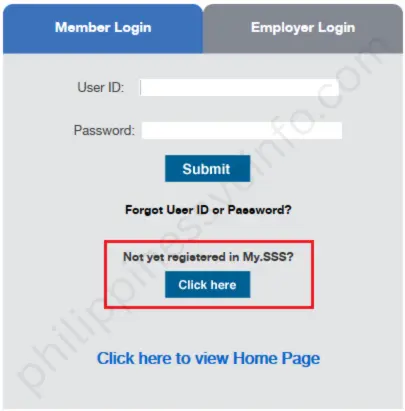
Follow these steps to access your My.SSS account:
- Visit the official SSS website and select Member Login.
- Enter your registered User ID and password.
- Complete any required verification, such as OTP verification, if prompted.
- Click Sign In to open your account dashboard.
If you forget your login details, select Forgot User ID or Password and follow the instructions provided to recover your account.
My.SSS Dashboard Overview
After logging in, you can access different sections designed to help you manage your account:
| Section | Purpose |
|---|---|
| Member Info | View and update personal information and account details. |
| Inquiry | Check contribution records, loan status, and eligibility. |
| E-Services | Apply for loans, benefits, and other online transactions. |
| PRN Services | Generate a Payment Reference Number for contribution payments. |
Core My.SSS Portal Services for Members
Through the SSS Portal, members can:
- View contribution history
- Apply for salary and calamity loans
- File benefit claims
- Generate a Payment Reference Number (PRN)
- Update personal information
- Monitor loan balances and payment records
- View employment details
- Access other available SSS online services
My.SSS Mobile App vs. Web Portal: Which Should You Use?
The My.SSS Web Portal and My.SSS Mobile App both allow members to access their SSS accounts online. However, each platform is designed for different needs. The web portal offers more complete features, while the mobile app provides faster and more convenient access for everyday tasks.
| Feature | My.SSS Web Portal | My.SSS Mobile App |
|---|---|---|
| Account Registration | Offers complete account setup and access to all registration options. | Allows users to begin registration, but some steps may require web access. |
| View Contributions | Provides detailed contribution history, records, and printable information. | Best for quick contribution checks but may provide fewer details. |
| Loan Applications | Provides complete loan forms, eligibility information, and submission options. | Offers a faster way to check and submit selected loan applications. |
| Benefit Claims | Better for detailed claim tracking and managing complete transactions. | Useful for checking updates and receiving notifications. |
| Employer Functions | Provides full access to employee records, reports, and PRN-related tasks. | Mainly useful for quick account monitoring and basic access. |
| Convenience | Best for complex transactions that require a larger screen. | Best for quick checks and managing your account anytime through your phone. |
Which One Should You Use?
- Use the My.SSS Web Portal if you need to register an account, submit detailed applications, manage employer transactions, or access complete records.
- Use the My.SSS Mobile App if you want quick access to contributions, notifications, account updates, and basic transactions while on the go.
For the best experience, many members use both platforms: the web portal for important transactions and the mobile app for daily account monitoring.
SSS Portal Troubleshooting: Common Problems and Solutions
While the My.SSS Portal makes online transactions easier, users may sometimes experience login errors, account issues, or technical problems. The table below lists common SSS Portal problems and their possible solutions.
| Common Problem | Possible Cause | Solution |
|---|---|---|
| Forgot User ID or Password | Incorrect login details or outdated email information | Use the Forgot User ID or Password option and follow the recovery instructions sent to your registered email. |
| Account Locked | Multiple failed login attempts | Try recovering or resetting your account through the portal. Contact SSS support if the issue continues. |
| Email Already Registered | Email address was previously used for another account | Use the existing account or contact SSS for assistance with account verification. |
| Activation Link Expired | Registration activation link is no longer valid | Return to the registration page and select Resend Activation Link. |
| No Record Found | Incorrect SSS Number, CRN, or personal details | Check your information carefully and try registering again with the correct details. |
| Cannot Log In | Browser issues, incorrect credentials, or account problems | Verify your login details, clear browser cache, or try accessing the portal using another browser. |
| Website Slow or Unavailable | High traffic or temporary system maintenance | Wait and try again during off-peak hours, such as early morning or late evening. |
| Duplicate Account | Multiple registration attempts or existing account records | Contact SSS support for account checking and possible consolidation. |
| Missing Contribution Records | Delayed employer remittance or posting issues | Confirm payment details with your employer and coordinate with SSS if the problem remains. |
| File Validation Error | Incorrect file format or incomplete information | Correct the file details and upload the document again. |
| Incorrect Personal Information | Typographical errors or outdated records | Update your details online or submit the required documents through an SSS branch if necessary. |
Tips for a Better SSS Portal Experience
Follow these practices to keep your account secure and avoid common access problems:
- Keep your registered email address and mobile number updated.
- Use a secure and private device when accessing your My.SSS account.
- Avoid clicking suspicious links or fake websites pretending to be from SSS.
- Always verify that you are using the official SSS website before entering your account details.
- Access the portal during less busy hours for faster loading times.
- Keep your User ID and password private and never share your login credentials.
My.SSS Online Services Guide: Contributions, Benefits, Loans, Payments & Account Management
How to Use My.SSS Online Services
The My.SSS Portal provides members with convenient access to important SSS services, including checking contributions, applying for loans, managing benefit claims, generating PRNs, and updating account information. Below are the steps for completing common transactions online.
How to Check Your SSS Contributions
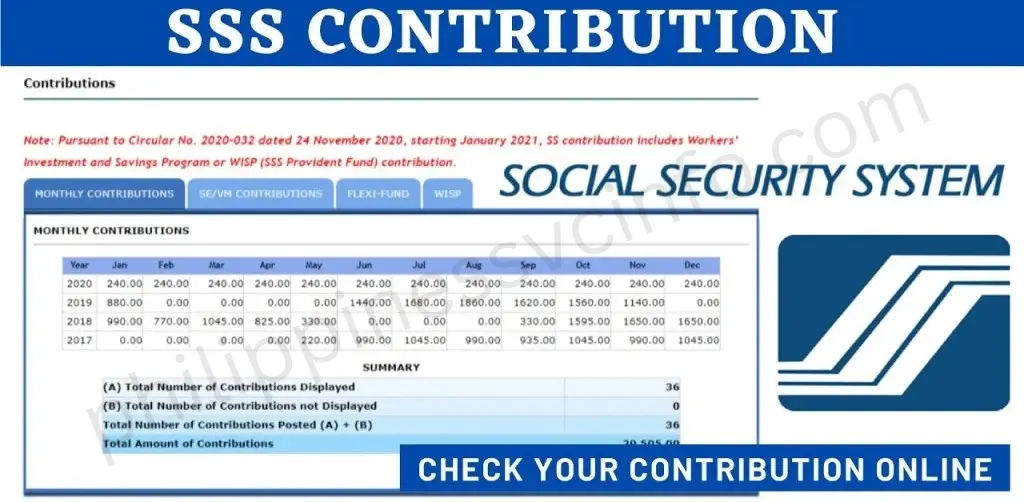
Reviewing your SSS contribution records helps you confirm that payments have been properly posted and identify any missing or incorrect remittances.
Steps:
- Log in to your My.SSS account.
- Go to Inquiry → Contributions.
- Select the preferred year or contribution period.
- Review the contribution table, including posted payments, employer remittances, and any possible discrepancies.
How to Apply for an SSS Salary Loan

Eligible members can apply for a salary loan directly through the online portal.
Steps:
- Access E-Services → Loans → Salary Loan.
- Review your eligibility and provide the required information.
- Submit your application online.
- Monitor the application progress through the Loan Status section.
How to Check SSS Benefit Claims
Members can submit and monitor benefit applications, including maternity, sickness, disability, and retirement benefits.

Steps:
- Open E-Services → Benefit Claims.
- Select the type of benefit you want to apply for.
- Upload or submit the required documents.
- Track your claim status through your My.SSS account.
How to Generate a Payment Reference Number (PRN)
A Payment Reference Number (PRN) is required for contribution payments and helps ensure that transactions are properly recorded.
Steps:
- Go to E-Services → PRN.
- Enter your contribution period and payment details.
- Generate your PRN.
- Save the reference number for online banking, payment centres, or other authorised payment channels.
How to Update Your SSS Contact Information

Keeping your contact details updated helps you receive important notifications and complete account verification.
Steps:
- Open Member Info → Update Contact Details.
- Review your registered email address and mobile number.
- Update any outdated information and save the changes.
Tip: Keeping your email and mobile number current is especially important for account security and verification processes.
How to Apply for an SSS Number Online (For New Members)
Individuals who do not have an SSS Number must apply for one before creating a My.SSS account.
- Visit the official SSS website and choose Apply for an SSS Number Online.
- Complete the application form with accurate personal information.
- Submit the form and check your email for confirmation and your generated SSS Number.
- Complete the remaining required details and generate your SS Number Slip.
- Print the required documents and submit them with the necessary supporting requirements to an SSS branch if requested.
- Your membership status will remain Temporary until document verification is completed. After approval, it will be updated to Permanent.
How to Retrieve a Lost SSS Number
If you cannot remember your SSS Number, you can recover it through the following options:
- Visit the nearest SSS branch with a valid ID
- Contact the SSS Action Center through official communication channels
- Call the SSS hotline for assistance
- Use available online recovery options if your account details are registered
Always verify your identity before requesting SSS account information to protect your personal data.
SSS Benefits and Services Available to Members
The Social Security System (SSS) provides various benefits and services designed to support members during important life events, emergencies, retirement, and financial needs. Eligible members can access these benefits depending on their contribution records and SSS requirements.
SSS Benefits
Sickness Benefit
SSS provides a daily cash allowance to eligible members who are unable to work due to illness or injury. The benefit helps replace lost income during approved periods of absence.
Maternity Benefit
Female members who experience childbirth, whether through normal delivery or Caesarean section, may receive a daily cash allowance during the maternity leave period, subject to SSS requirements.
Retirement Benefit
Qualified members may receive retirement benefits in the form of a monthly pension or lump-sum payment, depending on their contribution history and eligibility.
Disability Benefit
Members who suffer from permanent or partial disability may receive either a monthly pension or lump-sum payment based on the severity of the disability and SSS rules.
Employees’ Compensation (EC) Program
The EC Program provides additional protection for employees who experience work-related sickness, injury, or disability. Contributions are paid by the employer on behalf of covered employees.
Personal Equity and Savings Option (P.E.S.O.) Fund
The P.E.S.O. Fund is an optional savings program that allows members to increase their retirement savings by making additional contributions.
Funeral Benefit
Eligible beneficiaries or individuals who paid for the funeral expenses of a deceased SSS member may receive financial assistance.
Death Benefit
Beneficiaries of a deceased SSS member may receive a monthly pension or lump-sum benefit, depending on the member’s eligibility.
Unemployment Insurance or Involuntary Separation Benefit
Qualified employees, including covered kasambahays and OFWs, may receive cash assistance after involuntary separation from employment due to reasons such as retrenchment, company closure, or redundancy.
Important Note: Members must meet SSS eligibility requirements before applying for benefits or loans. Membership status, posted contributions, and other qualifying conditions may affect eligibility.
SSS Loans and Financial Assistance
The Social Security System (SSS) provides short-term financial assistance programs to eligible members who need support for personal, emergency, or financial needs. Through the My.SSS Portal, qualified members can check their loan eligibility, submit applications online, and monitor their loan status without visiting an SSS branch.
SSS Salary Loan
The SSS Salary Loan is a short-term cash assistance program available to qualified SSS members. It allows members to borrow money based on their contribution records and eligibility requirements set by SSS.
Who Can Apply for an SSS Salary Loan?
Members may apply if they meet the required SSS conditions, including:
- Sufficient posted contributions
- Active SSS membership status
- Updated membership records
- Compliance with SSS loan requirements
How to Apply for an SSS Salary Loan Online
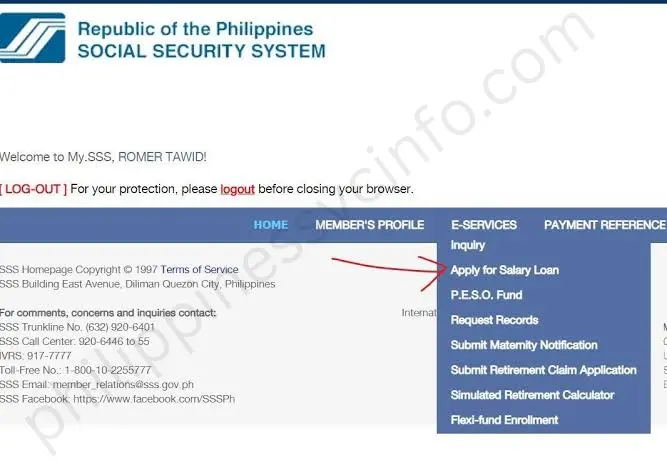
Follow these steps to submit your application through the My.SSS Portal:
- Log in to your My.SSS account.
- Go to E-Services → Loans → Salary Loan.
- Review your loan eligibility and available loan amount.
- Provide the required information.
- Submit your application online.
- Monitor your application status through the Loan Status section.
How to Check Your SSS Loan Status
After submitting your application, you can track updates through your My.SSS account:
- Log in to the SSS Portal.
- Open the loan section.
- Check your application status, approval details, and loan records.
SSS Loan Payment
Members can repay their SSS loans through authorised payment channels, including:
- Online banking platforms
- Accredited payment centres
- Banks and remittance partners
- Other approved SSS payment options
Keeping loan payments updated helps members maintain good standing and avoid account issues.
Important Note: Loan approval depends on SSS eligibility requirements, contribution records, and other qualifying conditions. Always check your My.SSS account for the latest loan information.
How to Pay SSS Loans and Contributions Online
The SSS Online Payment Service provides members and employers with a convenient way to settle their SSS contributions and loan payments digitally. Instead of going to an SSS branch or physical payment centre, users can complete transactions through approved online channels from anywhere with internet access.

How to Pay SSS Contributions Online
SSS members can settle their monthly contributions using various authorised payment options designed for convenient and secure transactions. Available payment methods include:
- Online banking platforms from participating financial institutions
- Accredited banks and approved payment channels
- Payment centres and authorised remittance partners
- Employer payroll deduction for employed members
Before paying your contribution, make sure to generate your Payment Reference Number (PRN) through the My.SSS Portal. This unique reference number allows SSS to properly identify and record your payment, ensuring that your contribution is credited to your account correctly.
How to Pay SSS Contributions Online
SSS members can pay their monthly contributions through various authorised payment methods, such as:
- Online banking platforms from participating banks
- Accredited bank payment channels
- Approved payment centres and remittance partners
- Employer payroll deduction for employed members
Before completing a contribution payment, members should first generate their Payment Reference Number (PRN) through the My.SSS Portal. The PRN is required to properly identify and record the payment, helping ensure that contributions are credited to the correct SSS account.
Keeping the PRN and payment confirmation details after every transaction is also recommended for easier tracking and future reference.
Benefits of Paying SSS Online
Using online payment options offers several advantages:
- 24/7 accessibility – Members can make payments anytime using available online platforms.
- Less waiting time – Online transactions help avoid long queues at payment locations.
- Better payment monitoring – Members can easily track their payment records and transaction details.
- Convenient access anywhere – Payments can be completed from home, the workplace, or any location with an internet connection.
Why SSS Registration Matters
Registering with SSS ensures that members can access important benefits, loans, and social security protection when needed. Employees who fail to register may lose access to benefits, while employers who fail to comply may face penalties, unpaid contribution liabilities, and legal consequences.
Maintaining an active SSS account helps protect both employees and employers while ensuring access to essential government services.
SSS Employer Portal: Registration, Features & Employer Guide
Employer Responsibilities
The SSS Employer Portal allows businesses and HR teams to manage their SSS-related duties online. Through this platform, employers can update employee records, submit contribution reports, handle loan-related transactions, and complete other required SSS processes without visiting a branch.
Using the portal helps employers organise their records, improve transaction tracking, and maintain compliance with SSS rules and reporting requirements.
How to Register for the SSS Employer Portal
Before creating an employer account, prepare the necessary information and documents to complete the registration process.
Requirements for SSS Employer Portal Registration
Employers should have the following:
- Employer SSS Number
- Official company or business information
- Active company email address
- Details of the authorised employer representative
- Supporting documents required for verification (if applicable)
Steps to Create an SSS Employer Portal Account

Follow these steps to register:
- Visit the official SSS Employer Portal registration page.
- Enter the required company details and employer information.
- Upload or submit the necessary documents for verification.
- Confirm the registered email address and create a secure password.
- Access the Employer Portal dashboard using the newly created account.
Main Features of the SSS Employer Portal
After registration, employers can access various online services, including:
- Submitting employee contribution reports
- Generating Payment Reference Numbers (PRN)
- Managing employee membership information
- Processing loan-related submissions
- Filing maternity and sickness notifications
- Checking company transactions and payment records
These features help businesses handle SSS obligations more efficiently and reduce manual paperwork.
How to Submit Contribution Collection List (R-3) Online
Employers are required to submit employee contribution information regularly through the SSS Employer Portal. The R-3 Contribution Collection List contains details of employee contributions and payment records.
Steps to Submit R-3 Online
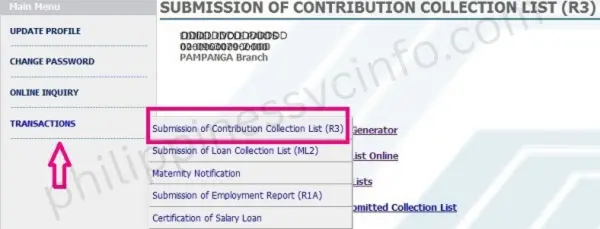
- Log in to your SSS Employer Portal account.
- Open the Contributions section.
- Select the option for online encoding of R-3 contribution details.
- Enter the required information, including:
- Transaction number
- Payment date
- Contribution amount
- Review the submitted details carefully.
- Submit the report and save the confirmation receipt.
Reminder: Employers should submit contribution reports within the required SSS deadlines to avoid penalties, delays, or compliance concerns.
How to Generate PRN and Pay Employer Contributions (R-5)
Employers must create a Payment Reference Number (PRN) before paying employer and employee contributions.
Steps to Generate PRN and Complete R-5 Payment

- Open the Employer Portal dashboard.
- Select the PRN Generation option for R-5 payment.
- Enter the required contribution information.
- Generate the PRN.
- Complete payment through authorised channels, such as:
- Online banking services
- Accredited banks
- Approved payment partners
- Keep the payment confirmation receipt for future reference.
How to Submit Loan Collection List (ML-2)

Employers handling employee salary loan deductions can submit loan collection details through the SSS Employer Portal.
Steps for ML-2 Submission
- Prepare the required ML-2 loan collection information.
- Enter employee loan deduction details accurately.
- Review and verify all information before submission.
- Upload the completed ML-2 file through the Employer Portal.
- Save the confirmation receipt for company records.
Managing Employee Information and Certifications
The SSS Employer Portal helps HR departments maintain accurate employee records and complete required certifications.
Employers can use the platform to:
- Verify employee SSS membership details
- Update and maintain employee information
- Certify employee loan applications
- Submit required benefit-related notifications
- Monitor contribution records and related information
Employer Responsibilities After Portal Registration
Registering for the SSS Employer Portal is only the first step. Employers must continue fulfilling their legal and reporting obligations.
Key responsibilities include:
- Reporting newly hired employees within the required timeframe
- Paying employer and employee contributions on schedule
- Generating PRNs before contribution payments
- Keeping employee records accurate and updated
- Maintaining payment receipts and submission confirmations
- Following SSS announcements and policy updates
Tips to Maintain SSS Compliance
Employers can prevent common reporting and payment issues by following these practices:
- Submit contribution reports before deadlines
- Review employee information regularly
- Keep copies of payment receipts and online submissions
- Protect Employer Portal login details
- Use secure systems when handling employee information
For companies with a large workforce, payroll software and HR management systems can help simplify employee records, salary processing, and government contribution tracking. However, employers should always verify transactions through the official SSS Employer Portal and keep account credentials protected.
Frequently Asked Questions About SSS Portal (My.SSS)
Conclusion
The SSS Portal has simplified the way members, employers, and pensioners manage their Social Security transactions online. Through its digital services, users can register accounts, securely log in, check contribution records, pay loans, generate PRNs, and complete various SSS-related requirements without the need for frequent branch visits.To make the most of the platform, users should keep their information updated, secure their account credentials, and access services only through official SSS channels. By understanding the portal’s registration process, login features, and available online services, members can manage their SSS responsibilities more conveniently and stay connected with their records throughout 2026 and beyond.
May Also Like This:
- Swertres Result History 2026: Complete PCSO 3D Results Archive
- Globe SIM Registration 2026: Complete Online Registration Guide
- SIM Registration 2026: Complete Guide for Smart, Globe & DITO
- EZ2 Result Today 2026: Live PCSO 2D Results, Draw Schedule, Prizes & FAQs
- LTO Online Portal Complete Guide for License Renewal, Registration & Services








