LTO CDE Online Validation Exam Philippines 2026: Complete Guide
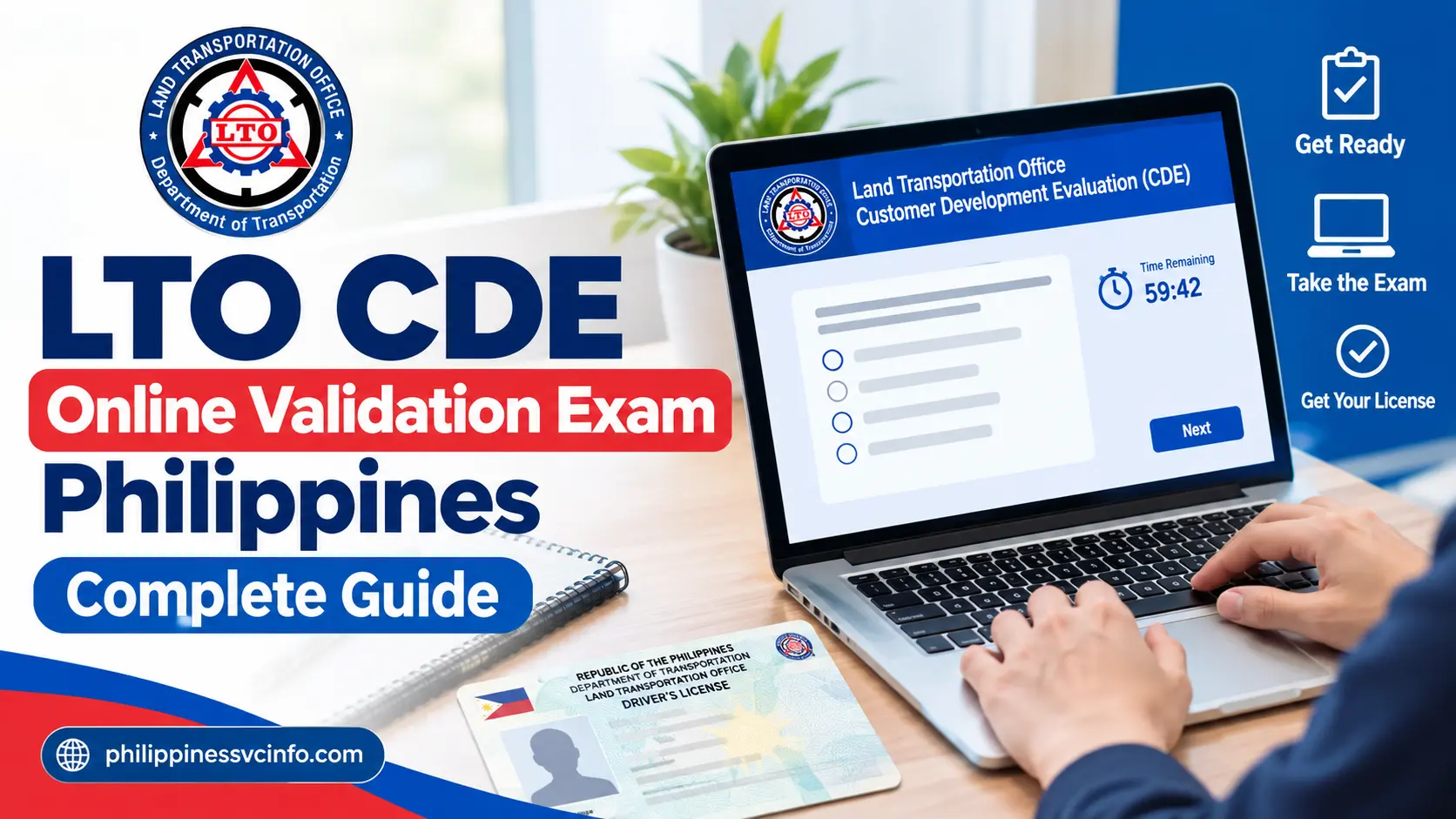
The LTO CDE Online Validation Exam is an online assessment provided through the Land Transportation Management System (LTMS) Portal in the Philippines. It evaluates drivers’ knowledge of traffic rules, road signs, defensive driving, and road safety. The exam helps applicants fulfil applicable Comprehensive Driver’s Education requirements when renewing their driver’s licences.
What Is the LTO CDE Online Validation Exam?
The Comprehensive Driver’s Education programme is intended to reinforce the knowledge drivers need to use Philippine roads safely and responsibly. Its online validation exam checks whether applicants understand essential driving principles before proceeding with the relevant licence renewal requirements.
The programme covers subjects such as road signs, traffic rules, defensive driving, road courtesy and responsibilities behind the wheel. Drivers can use the learning resources provided through the LTMS Portal to review these topics before taking the assessment.
The legal framework for Philippine driver’s licensing includes Republic Act No. 10930, which amended provisions of the Land Transportation and Traffic Code concerning driver’s licences. Read the legislation through Lawphil’s official text of Republic Act No. 10930.
It is worth distinguishing the legal framework from the online exam procedure: the portal is the best place to confirm the current test instructions, passing score and available certificate options.
LTO CDE Exam at a Glance
| Exam detail | Information |
|---|---|
| Official platform | LTMS Portal |
| Exam format | Multiple-choice questions |
| Number of questions | 25 |
| Passing requirement | 20 correct answers out of 25 (80%) |
| Time limit | No time limit, according to the official portal |
| Online access | Through an LTMS account |
| Main purpose | Support the driver’s licence renewal process |
| Official exam fee | Check the portal; avoid paying unofficial exam websites |
The passing score is particularly important. A result of 20 correct answers meets the stated 80% requirement, while 19 correct answers does not. Read the instructions displayed on the portal before starting, as these are the most relevant instructions for your exam session.
Who Should Take the CDE Validation Exam?
The exam is relevant to holders of Philippine professional and non-professional driver’s licences who are preparing for renewal and need to complete the applicable CDE requirements. Applicants should confirm which requirements apply to their individual licence and transaction before proceeding.
Foreign nationals holding Philippine driver’s licences should also check the applicable LTO instructions and documentation requirements for their circumstances.
Do not assume that every applicant follows precisely the same renewal process. Licence status, transaction type and current LTO rules can affect the steps required. The LTMS Portal and the relevant LTO licensing office are the appropriate places to resolve questions about individual eligibility.
Requirements and Registration on the LTMS Portal
Before attempting the LTO CDE online validation exam, prepare your account details and check that you can access the official portal. If you already have an LTMS account, try signing in first rather than registering again.
What Do You Need Before Starting?
Prepare the following items where applicable:
- An active email address that you can access.
- Your Philippine driver’s licence details, if you already hold a licence.
- Personal information matching your existing LTO records.
- An internet-connected phone, tablet, laptop or desktop computer.
- A current browser and a stable internet connection.
Foreign residents should check the LTO’s current identity and residency documentation requirements if these apply to their transaction. The exact documents required can vary, so confirm them with the official portal or licensing office instead of relying solely on a third-party checklist.
How to Register for an LTMS Account
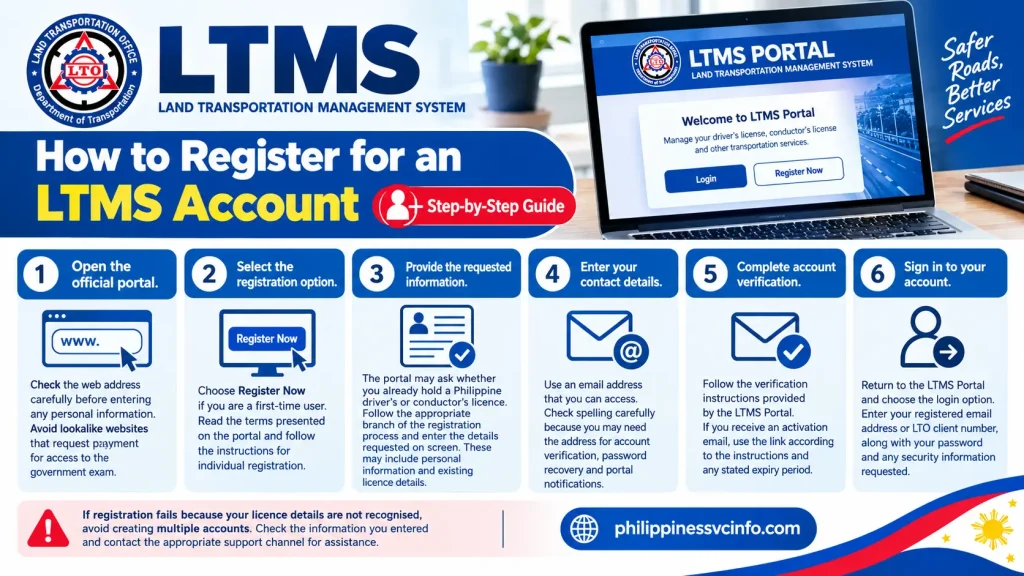
Step 1: Open the official portal.
Check the web address carefully before entering any personal information. Avoid lookalike websites that request payment for access to the government exam.
Step 2: Select the registration option.
Choose Register Now if you are a first-time user. Read the terms presented on the portal and follow the instructions for individual registration.
Step 3: Provide the requested information.
The portal may ask whether you already hold a Philippine driver’s or conductor’s licence. Follow the appropriate branch of the registration process and enter the details requested on screen. These may include personal information and existing licence details.
Step 4: Enter your contact details.
Use an email address that you can access. Check spelling carefully because you may need the address for account verification, password recovery and portal notifications.
Step 5: Complete account verification.
Follow the verification instructions provided by the LTMS Portal. If you receive an activation email, use the link according to the instructions and any stated expiry period.
Step 6: Sign in to your account.
Return to the LTMS Portal and choose the login option. Enter your registered email address or LTO client number, along with your password and any security information requested.
If registration fails because your licence details are not recognised, avoid creating multiple accounts. Check the information you entered and contact the appropriate LTO office if your records need correction.
Existing Users: What If You Cannot Log In?
Use the portal’s Forgot Password option if you cannot remember your credentials. If you suspect that an account already exists under your email address, attempt account recovery before registering again.
If the portal is temporarily unavailable, wait and retry later. Keep your login details private, and never share your password or verification codes with an unofficial agent claiming to arrange an exam result or certificate.
How to Take the LTO CDE Online Validation Exam
Once your LTMS account is working, you can move on to the CDE assessment. Reviewing the learning materials first is a sensible way to prepare, especially if you have not studied Philippine traffic rules recently.
Step-by-Step Guide to Taking the Online Exam
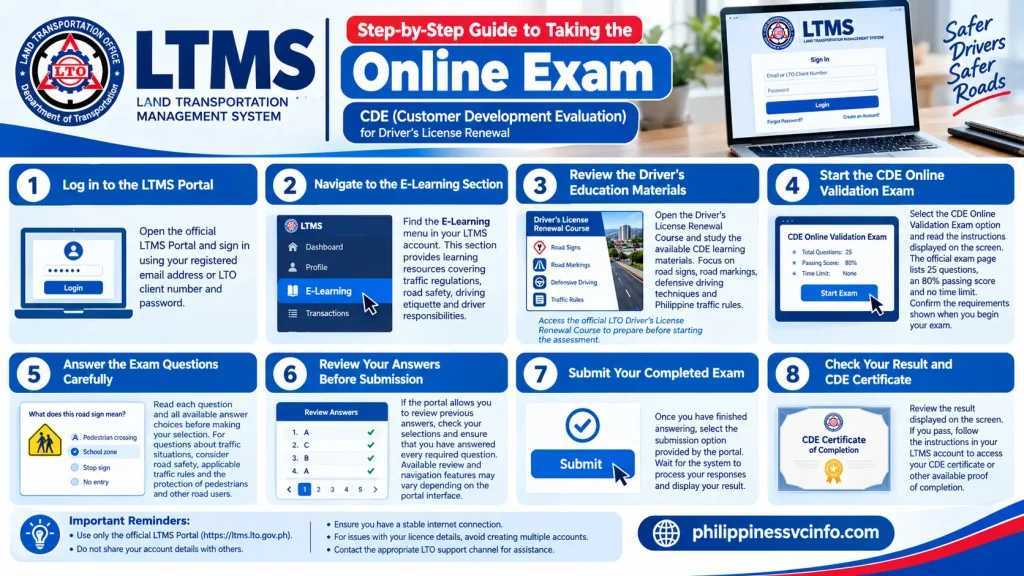
Step 1: Log in to the LTMS Portal
Open the official LTMS Portal and sign in using your registered email address or LTO client number and password.
Step 2: Navigate to the E-Learning Section
Find the E-Learning menu in your LTMS account. This section provides learning resources covering traffic regulations, road safety, driving etiquette and driver responsibilities.
Step 3: Review the Driver’s Education Materials
Open the Driver’s License Renewal Course and study the available CDE learning materials. Focus on road signs, road markings, defensive driving techniques and Philippine traffic rules.
Access the official LTO Driver’s License Renewal Course to prepare before starting the assessment.
Step 4: Start the CDE Online Validation Exam
Select the CDE Online Validation Exam option and read the instructions displayed on the screen. The official exam page lists 25 questions, an 80% passing score and no time limit. Confirm the requirements shown when you begin your exam.
Step 5: Answer the Exam Questions Carefully
Read each question and all available answer choices before making your selection. For questions about traffic situations, consider road safety, applicable traffic rules and the protection of pedestrians and other road users.
Step 6: Review Your Answers Before Submission
If the portal allows you to review previous answers, check your selections and ensure that you have answered every required question. Available review and navigation features may vary depending on the portal interface.
Step 7: Submit Your Completed Exam
Once you have finished answering, select the submission option provided by the portal. Wait for the system to process your responses and display your result.
Step 8: Check Your Result and CDE Certificate
Review the result displayed on the screen. If you pass, follow the instructions in your LTMS account to access your CDE certificate or other available proof of completion.
What Topics Should You Study for the CDE Exam?
The assessment is designed around driving knowledge and road safety. The LTMS learning resources offer a useful starting point for reviewing the following areas.
| Topic | What to revise |
|---|---|
| Road signs and signals | Regulatory signs, warning signs, traffic lights and sign meanings |
| Road markings | Lane lines, pedestrian crossings and restrictions indicated by markings |
| Traffic rules | Right of way, speed limits, overtaking and parking rules |
| Defensive driving | Maintaining a safe distance, anticipating hazards and adjusting to road conditions |
| Road courtesy | Sharing the road, respecting pedestrians and avoiding aggressive driving |
| Traffic laws | Relevant Philippine transport laws and penalties for violations |
| Driver responsibilities | Safe vehicle operation and responsible conduct on public roads |
For legal topics, consult the official learning materials rather than memorising an unverified list of penalties. Traffic laws and implementing rules may change, and the correct answer can depend on the situation described.
How to Improve Your Chances of Passing
A few practical preparation habits can make the assessment easier to manage.
- Study before starting. Review the official CDE course instead of relying entirely on guessed answers.
- Learn the meaning of signs. Understand what each sign requires you to do, rather than memorising its appearance alone.
- Read scenario-based questions closely. Look for details involving pedestrians, intersections, lane changes and potential hazards.
- Use a stable connection. A reliable connection reduces the risk of interruptions during the exam.
- Take your time. The official page states that there is no time limit, so focus on understanding each question.
- Use official sources. Treat third-party practice tests as supplementary study aids, not as proof of the current exam format.
The goal is not simply to obtain a passing score. Understanding the rules can help you make safer decisions after your licence has been renewed.
Results, Certificate Access and Troubleshooting
How Do You Know If You Passed?
After submitting your answers, check the result displayed by the LTMS Portal. The stated passing requirement is at least 20 correct answers out of 25, equivalent to 80%.
If you do not pass, read the instructions shown by the portal to determine the available next steps. Do not assume that every retake rule or waiting period remains unchanged; follow the current instructions on the official service.
How to Access Your CDE Certificate
If the portal confirms that you have passed and provides a certificate, follow the available document or result links in your LTMS account.
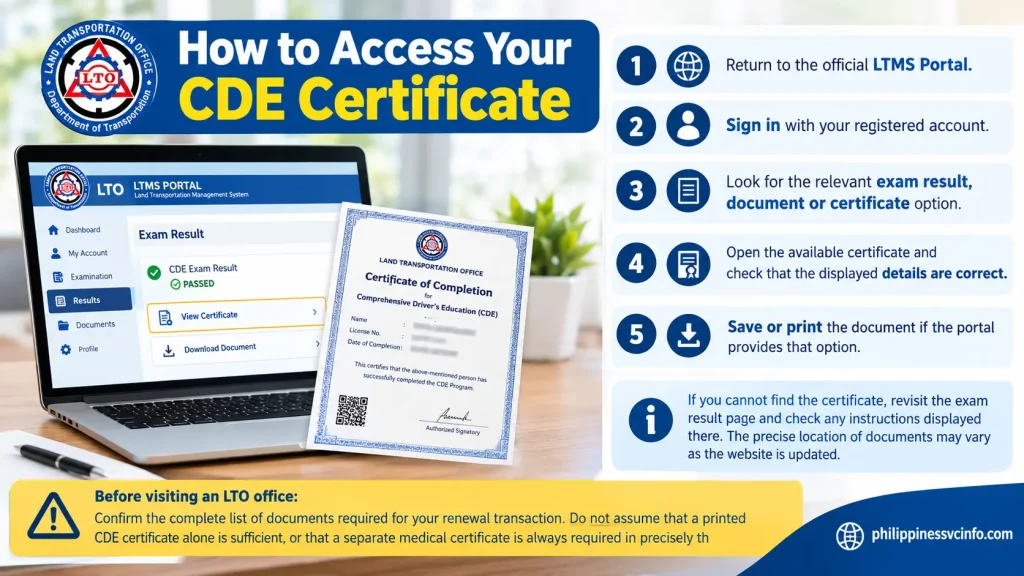
- Return to the official LTMS Portal.
- Sign in with your registered account.
- Look for the relevant exam result, document or certificate option.
- Open the available certificate and check that the displayed details are correct.
- Save or print the document if the portal provides that option.
If you cannot find the certificate, revisit the exam result page and check any instructions displayed there. The precise location of documents may vary as the website is updated.
Before visiting an LTO office: Confirm the complete list of documents required for your renewal transaction. Do not assume that a printed CDE certificate alone is sufficient, or that a separate medical certificate is always required in precisely the same form for every applicant.
Common LTMS Portal Problems and Possible Solutions
| Problem | What to try |
|---|---|
| Email address already registered | Use the existing account’s password-recovery option instead of creating another account. |
| Verification email missing | Check spam and junk folders, verify your email address and follow the portal’s resend instructions if available. |
| Login unsuccessful | Check your credentials and use the official password-recovery feature if needed. |
| Portal unavailable | Wait before trying again, check your connection and return through the official website. |
| Licence details not recognised | Check for typing errors. If the information remains unrecognised, contact an LTO office to ask about your records. |
| Certificate not visible | Reopen the exam results or document area and follow the certificate instructions provided by the portal. |
| Page freezes during the exam | Avoid repeated submissions. Check the session status and follow the portal’s instructions before attempting the assessment again. |
These are general troubleshooting suggestions, not guarantees that every error has the same cause. If a problem persists, use the official LTO channels to resolve it rather than paying a third party to access your account.
Frequently Asked Questions About the LTO CDE Exam
Final Checklist Before Taking the LTO CDE Exam
Use this checklist to prepare for the assessment and the next stage of your renewal process.
- Open the genuine LTMS Portal.
- Sign in to your existing account or complete registration.
- Review the available Driver’s License Renewal Course.
- Study road signs, traffic rules and defensive driving.
- Check the exam instructions and passing score.
- Answer all required questions carefully.
- Confirm the result displayed by the portal.
- Follow the official instructions for accessing your certificate.
- Check all remaining licence renewal requirements before visiting an LTO office.
The most reliable way to complete the LTO CDE online validation exam is to prepare using official learning materials, follow the instructions displayed by the LTMS Portal and keep your completion records accessible. This approach helps you prepare for licence renewal while reinforcing the knowledge needed for safer driving on Philippine roads.
Conclusion
Completing the LTO CDE Online Validation Exam is an important step in preparing for your Philippine driver’s licence renewal. By registering through the official LTMS Portal, reviewing the available driver’s education materials and understanding road signs, traffic rules and defensive driving practices, you can approach the assessment with greater confidence. Remember to check the latest exam instructions, including the required passing score and certificate procedures, before starting. Once you pass, follow the portal’s guidance to access your CDE certificate and confirm any remaining renewal requirements with the LTO. Always use the official LTMS Portal to avoid unofficial websites and misleading services. Preparing properly not only helps you complete the CDE online validation exam but also reinforces the knowledge needed to become a safer, more responsible driver on Philippine roads.
Discover What You Need to Know:
- Silliman University Philippines 2026: Admission, Courses, Fees & Portal Guide
- Edusuite Portal Login Philippines 2026 : Stdent Enrollment, Grades, Payments & Parent Guide
- Police Open Academy Philippines 2026 : Login, Registration, Courses, TLL & Training Guide
- Form 138 Philippines 2026 : How to Request Your DepEd Report Card Online
- NU Manila Philippines 2026 : Admission Requirements, Courses, Fees, Scholarships & Login Guide