
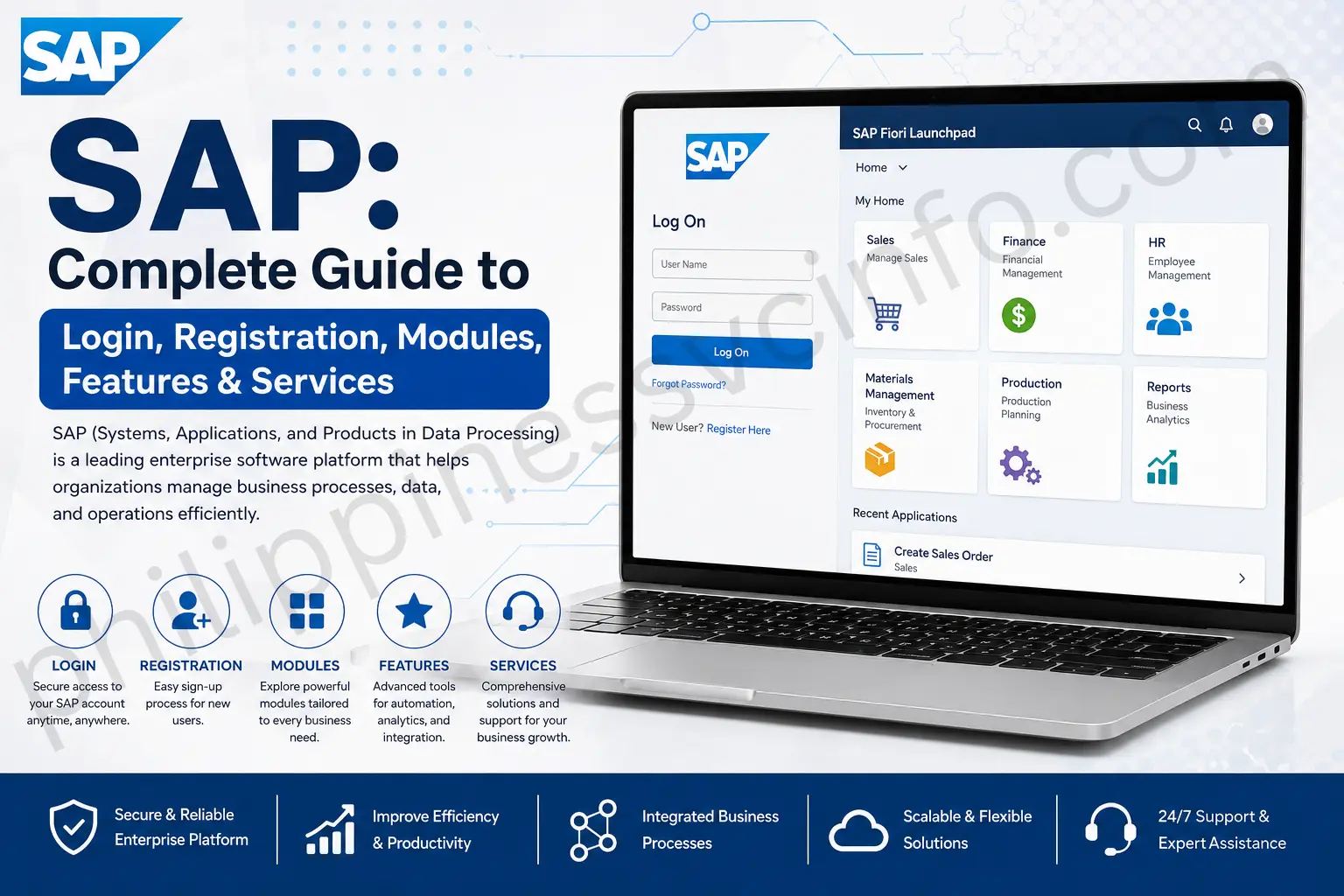
SAP (Systems, Applications, and Products in Data Processing) is enterprise software that helps businesses manage their daily operations in one integrated system. It connects departments such as finance, human resources, sales, purchasing, inventory, and production, allowing organizations to manage data efficiently, automate processes, improve productivity, and make informed business decisions.
What Is SAP?
SAP is a leading provider of enterprise software designed to help organisations manage data and streamline their business operations. Its ERP (Enterprise Resource Planning) solutions bring different business functions together within a centralised system.
Instead of keeping information such as sales, purchasing, inventory and other operational data in separate systems, SAP enables businesses to manage these areas through an integrated platform. Its modular approach also allows organisations to select the components that match their particular operational needs.
SAP solutions can be deployed on-premises, through the cloud, or in a hybrid environment, depending on how an organisation wants to manage its software and data.
History of SAP
SAP’s development began in Germany in 1972, when SAP SE introduced SAP R/1, its first product. The system used a single-tier architecture and included a financial accounting function. In 1979, the company followed with SAP R/2, moving to a two-tier architecture.
During the 1980s, SAP continued expanding its software with additional capabilities, including an HR management module. A major turning point came in 1992, with the release of SAP R/3. It introduced a three-tier architecture, a consistent graphical interface and a client-server model designed to improve scalability and performance. Its customisation options, multilingual support and multi-currency capabilities helped SAP become a widely adopted ERP solution. SAP also introduced its partner strategy during this period, which later developed into a broader ecosystem of vendors, developers and businesses.
In 2004, SAP introduced ERP Central Component (ECC), which became the predecessor to its modern core platform, SAP S/4HANA. ECC offered enterprise performance management and could be tailored through modules designed for specific tasks and industries.
SAP’s technology development continued with SAP HANA in 2010, a multi-modal database. In 2012, the company expanded into cloud computing with SAP HANA Cloud PaaS. Then, in 2015, SAP launched SAP S/4HANA, a modular business platform built around HANA’s in-memory database, supporting faster processing and advanced capabilities such as machine learning and artificial intelligence.
SAP Registration Requirements
Before starting SAP Registration, users may need to provide the following information:
- Full Name
- Valid Email Address
- Contact Information
- Organisation Details, if applicable
- Required Account Information
- Secure Password
The exact SAP Registration requirements may vary depending on the specific SAP service. Always check the official registration page for the latest requirements before creating your account.
How to Create an SAP Account
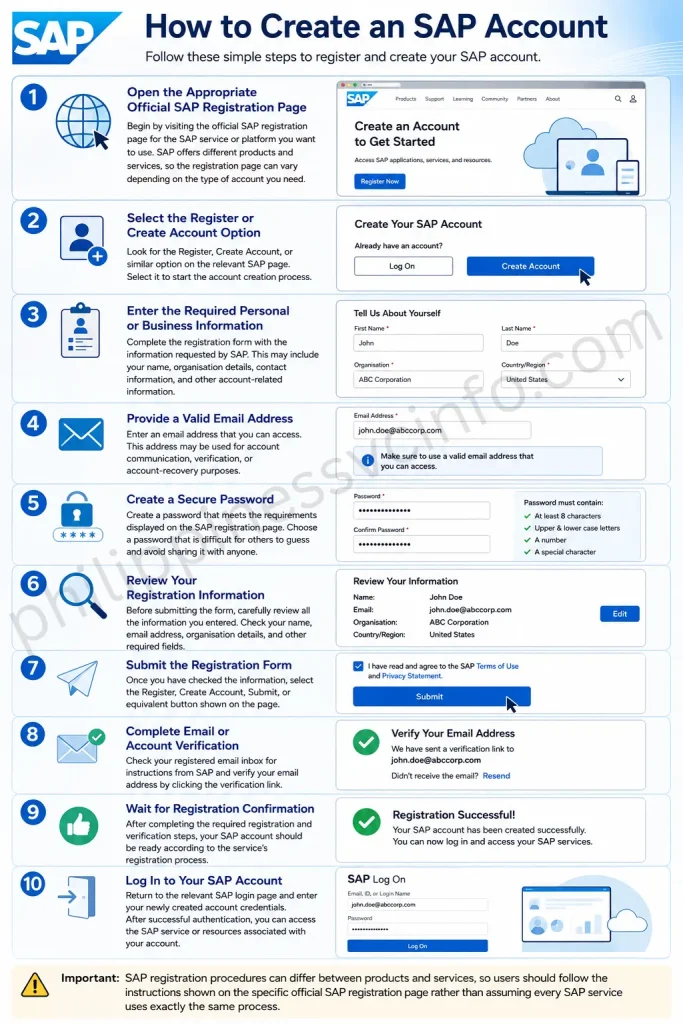
1. Open the Appropriate Official SAP Registration Page
Begin by visiting the official SAP registration page for the SAP service or platform you want to use. SAP offers different products and services, so the registration page can vary depending on the type of account you need.
Before entering any personal information, make sure you are on the correct official SAP website.
2. Select the Register or Create Account Option
Look for the Register, Create Account, or similar option on the relevant SAP page. Select it to start the account creation process.
If you already have an SAP account, you may not need to register again. Instead, use the existing account login option.
3. Enter the Required Personal or Business Information
Complete the registration form with the information requested by SAP. Depending on the service, this may include your name, organisation details, contact information, and other account-related information.
Enter the information carefully because incorrect details may cause problems during verification or future account access.
4. Provide a Valid Email Address
Enter an email address that you can access. This address may be used for account communication, verification, or account-recovery purposes.
Check the email address carefully before continuing, as an incorrect address can prevent you from receiving important registration messages.
5. Create a Secure Password
Create a password that meets the requirements displayed on the SAP registration page. Pay attention to any rules concerning password length, characters, numbers, or other security requirements.
Choose a password that is difficult for others to guess and avoid sharing it with anyone.
6. Review Your Registration Information
Before submitting the form, carefully review all the information you entered. Check your name, email address, organisation details, and other required fields.
Correct any mistakes before continuing so that your account information is accurate.
7. Submit the Registration Form
Once you have checked the information, select the Register, Create Account, Submit, or equivalent button shown on the page.
SAP will process the information you provided and may display a confirmation message or provide additional instructions.
8. Complete Email or Account Verification
Depending on the SAP service, you may need to verify your email address or complete another account-verification step.
Check your registered email inbox for instructions from SAP. If you do not see the message, check your spam or junk folder and look for an available option to resend the verification message.
9. Wait for Registration Confirmation
After completing the required registration and verification steps, your SAP account should be ready according to the service’s registration process.
Keep your account credentials secure and remember which email address or user ID you used during registration.
10. Log In to Your SAP Account
Once registration has been confirmed, return to the relevant SAP login page and enter your newly created account credentials.
After successful authentication, you can access the SAP service or resources associated with your account. The exact services and features available will depend on the type of SAP account and the permissions associated with it.
Important: SAP registration procedures can differ between products and services, so users should follow the instructions shown on the specific official SAP registration page rather than assuming every SAP service uses exactly the same process.
SAP Login Requirements
Before starting the login process, users generally need:
- A registered SAP account or authorized user ID
- Password or another supported authentication method
- Access to the relevant SAP service
- A stable internet connection
- The correct SAP login portal
How to Login to SAP
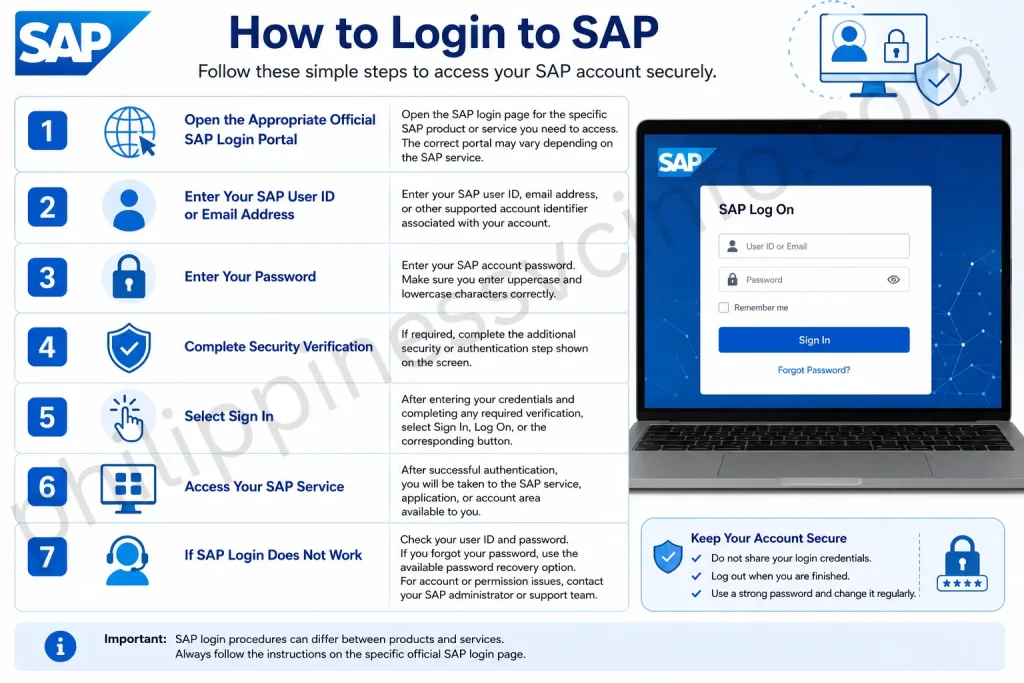
1. Open the Appropriate Official SAP Login Portal
Open the SAP login page for the specific SAP product or service you need to access. The correct portal may vary depending on the SAP service.
2. Enter Your SAP User ID or Email Address
Enter your SAP user ID, email address, or other supported account identifier associated with your account.
3. Enter Your Password
Enter your SAP account password. Make sure you enter uppercase and lowercase characters correctly.
4. Complete Security Verification
If required, complete the additional security or authentication step shown on the screen.
5. Select Sign In
After entering your credentials and completing any required verification, select Sign In, Log On, or the corresponding button.
6. Access Your SAP Service
After successful authentication, you will be taken to the SAP service, application, or account area available to you.
7. If SAP Login Does Not Work
Check your user ID and password. If you forgot your password, use the available password recovery option. For account or permission issues, contact your SAP administrator or support team.
Evolution of SAP Solutions
Over the decades, SAP has expanded from its original ERP offering into a broad portfolio of business solutions designed for different organisational needs. Its ecosystem includes core SAP products as well as applications, services, partners and consultants that extend the platform. The source also notes that SAP provides training programmes for customers, while universities may offer SAP-related certificate programmes.
Some of the major solutions that have developed alongside SAP’s core ERP capabilities include:
- SAP Ariba and SAP Fieldglass — solutions supporting procurement and related processes.
- SAP Business Technology Platform (BTP) — supports cross-functional data, analytics, application development and integration.
- SAP SuccessFactors — provides capabilities for human resources, payroll and talent management.
- SAP S/4HANA — SAP’s modern ERP platform, built to work with the HANA in-memory database and support advanced technologies such as AI and machine learning.
Cloud Computing
SAP expanded into cloud computing during the early 2010s, including software-as-a-service offerings. In 2021, SAP introduced its cloud-based Business Technology Platform (SAP BTP) as a unified platform for developing applications, extending integrations and applying analytics and AI to business processes.
BTP can help organisations build solutions around their specific requirements rather than relying only on standard applications.
Customer Relationship Management
SAP introduced standalone CRM software in the early 2000s and later integrated CRM capabilities more closely with its ERP ecosystem. These solutions can provide businesses with information about customer interactions, purchasing history and preferences.
The source also describes more recent CRM capabilities involving process automation and AI-supported personalised communications.
Enterprise Resource Planning
ERP remains a central part of SAP’s product ecosystem. SAP solutions bring different business functions together through shared data and integrated processes, helping organisations automate operations and support digital transformation.
The platform can be extended through specialised modules and third-party applications supplied through SAP’s partner ecosystem. SAP has also added capabilities related to environmental, social and governance (ESG) reporting.
Financial Management
SAP connects financial processes with other business functions, allowing finance teams to work with information from across an organisation. Its financial solutions include reporting and payment capabilities designed to support decision-making and regulatory requirements.
More recent cloud-based financial tools can reduce reliance on extensive on-premises infrastructure. The source also highlights AI and machine learning applications for automating routine financial work, identifying anomalies and improving forecasting.
Human Capital Management
Human resources was part of SAP’s earlier ERP capabilities. In 2012, SAP incorporated these functions into the SAP SuccessFactors Suite, a cloud-based HCM platform covering areas such as core HR, recruiting, payroll, workforce analytics and employee engagement.
The platform also includes advanced capabilities such as performance analytics and scenario modelling, while integrating with SAP finance and payroll solutions.
Spend Management
SAP’s spend-management solutions cover activities across the procure-to-pay process, including supplier relationships and invoice processing. Analytics can help organisations understand spending patterns, while supplier-management tools support procurement planning and purchasing decisions.
Supply Chain Management
SAP’s supply-chain capabilities extend beyond basic inventory and materials management. Organisations can use the platform to track goods and materials while applying analytics to identify potential disruptions and anticipate changes in demand.
The source also highlights IoT integration and Industry 4.0 capabilities, which can support real-time monitoring of production and logistics activities.
SAP Use Cases
SAP is used by organisations ranging from smaller businesses to large enterprises that need to connect information from different departments and manage complex processes more efficiently. Its modules can bring financial, operational, customer and workforce data together, giving organisations a more consistent view of their activities.
The source highlights several real-world examples. A large hospital consortium in India used SAP S/4HANA Cloud to centralise inventory management and vendor payments while maintaining real-time communication with its secure Hospital Information System. In Norway’s airline industry, SAP Ariba has been used to support contracts, sourcing and risk management while helping address carbon-emission goals. A large US insurance company also deployed SAP solutions to process financial information faster, gain deeper insights and support future planning.
Financial Management
SAP financial-management solutions can bring together activities such as invoicing, billing and cash-flow analysis. This can help organisations improve operational efficiency while supporting compliance requirements.
Spend-management products such as SAP Ariba and SAP Fieldglass can also use market information and generative AI capabilities to improve cost estimates and help identify potential errors.
Supply Chain Management
Businesses can use SAP Supply Chain Management (SAP SCM) to support logistics and manufacturing planning. The software can also help organisations analyse equipment lifecycles and make better decisions about supply-chain operations.
Customer Experience and CRM
SAP customer-experience and CRM solutions help businesses connect sales, marketing and customer-service data. This unified information can be used to improve customer relationships and create more relevant experiences.
For example, an e-commerce business could use existing customer information to develop more personalised engagement or use customer feedback to improve its digital shopping experience.
Talent Management and HCM
Solutions such as SAP SuccessFactors support workforce planning, talent management and human capital management. Organisations can use information from areas such as recruiting and payroll to understand workforce needs and plan for future growth.
These tools can also help businesses assess employee engagement and identify ways to improve workforce efficiency.
Contracts and Procurement
SAP procurement solutions provide a centralised environment where buyers and suppliers can manage purchasing activities and collaborate more effectively. This can help streamline procurement by bringing related processes together rather than managing them through disconnected systems.
Cloud Solutions
SAP offers cloud-based options that allow organisations to manage business activities without relying entirely on traditional on-premises infrastructure. Depending on the use case, businesses can connect IoT sensors to monitor logistics, while machine learning and AI can support predictive analysis and automation.
These capabilities make SAP suitable for organisations looking to combine enterprise data with newer technologies for more responsive and automated business processes.
CRM and Customer Experience
Sales and Customer Relationship Management
SAP supports customer relationship management, sales activities and marketing campaigns. It gives businesses a broader view of their interactions with customers.
Customer Relationship Management
SAP CRM modules help organisations build and maintain strong customer relationships. They provide a 360-degree view of customer interactions, including sales, service requests and marketing activities.
Sales Procedures
SAP supports sales automation by helping sales teams manage leads, opportunities and the overall sales cycle. It can track sales activities, forecast revenue and identify sales trends.
Marketing Campaigns
SAP marketing tools help organisations plan, execute and analyse marketing campaigns. Businesses can use them to target suitable audiences, measure campaign performance and adjust their strategies when needed.
Comprehensive View of Client Interactions
SAP CRM centralises customer information so sales and customer-service teams can access a complete history of interactions. This can improve customer service and support a more personalised customer experience.
Manufacturing and Production
SAP also supports manufacturers with production planning, quality control and maintenance, helping organisations coordinate production activities effectively.
Production Planning
SAP production-planning modules help manufacturers plan and schedule production activities. They consider factors such as resource availability and demand forecasts to support efficient production operations.
Key Functions of SAP Software
Financial Management
SAP helps businesses manage important financial activities such as bookkeeping, financial reporting, budgeting and forecasting. It provides access to financial information that can support more effective financial management.
Supply Chain Management
SAP’s Supply Chain Management (SCM) functions help organisations coordinate supply-chain activities. These include demand planning, inventory management, procurement and operations coordination.
Human Resources Management
SAP’s Human Capital Management (HCM) supports various HR activities, including recruitment, employee performance and talent development. It can help organisations manage and develop their workforce.
Customer Relationship Management
SAP CRM helps businesses manage their relationships with customers. Its functions support sales automation, marketing activities and customer service, which can contribute to better customer satisfaction and loyalty.
Production and Manufacturing
SAP provides production and manufacturing functions for managing production activities efficiently. These tools can help organisations optimise production plans, manage resources and maintain product quality.
Business Analytics
SAP provides analytics and reporting tools that allow organisations to gain insights from their business data. Features such as dashboards, data visualisation and predictive analytics support data-driven decision-making.
Business Intelligence
SAP’s business intelligence capabilities help organisations analyse business information and use data to support planning and decision-making. These capabilities can provide a clearer understanding of business performance.
Enterprise Mobility
SAP also supports mobile access to business information and processes, allowing organisations to work with relevant enterprise data through mobile solutions. This can help employees access information and perform business activities when working away from traditional office systems.
Advantages and Disadvantages of SAP
Advantages of SAP
- Integration
SAP brings different business processes together within one system, which can improve data accuracy, coordination and operational efficiency. - Scalability
SAP can support organisations as they grow and adapt to changing business requirements. - Customisation
SAP provides a broad range of customisation options, allowing businesses to configure solutions according to their specific requirements. - Global Support
SAP has a strong international presence, a large customer base and an extensive support network.
Disadvantages of SAP
Upgrade Cycle
SAP’s regular upgrade requirements can require considerable planning and resources and may temporarily disrupt normal business operations.
Complexity
SAP can be complicated to implement and manage, particularly for small and medium-sized businesses.
Cost
SAP can involve significant purchasing, licensing and maintenance expenses. Businesses may also need SAP-certified professionals, adding to overall costs.
Change Management
Introducing SAP can require major changes to existing business processes and workflows. Employees and management may need time and training to adapt.
SAP FAQs
Conclusion
SAP has grown from a small startup founded in 1972 into one of the world’s leading providers of enterprise resource planning (ERP) software. Its solutions help businesses integrate and manage important processes, including finance, sales, procurement, human resources, manufacturing, and supply chain operations. By bringing business data and processes together in centralized systems, SAP helps organizations improve efficiency, accuracy, productivity, and data management. Technologies such as SAP HANA provide powerful data processing and real-time analytics, enabling companies to make faster and more informed decisions. As businesses continue to adopt digital transformation, SAP remains an important technology partner, providing scalable and innovative solutions that help organizations streamline operations, respond to changing market demands, and support long-term business growth.
Discover What You Need to Know:
- MATATAG Curriculum Guide: Grades, Subjects & Official PDF 2026
- PRC Renewal Complete Guide to Online License Renewal, Requirements, Fees & Appointment 2026
- PRC Online Appointment 2026: Registration, Booking and Requirements
- GSIS Website 2026: Complete Guide to Registration, Login, Loans, Benefits & Pension
- May Huli Ka Portal: Check MMDA Violations, Fines & E-Contest








