

SMS BCP is the official Student Management System of Bestlink College of the Philippines, designed to simplify the admission and academic management process for students. Through the SMS BCP portal, applicants can register online, apply for admission, upload required documents, and monitor their application status, while enrolled students can access academic records, schedules, announcements, and other essential services. This complete guide explains everything you need to know about SMS BCP, including its features, registration process, login steps, admission requirements, and troubleshooting tips to help you use the portal efficiently and securely.
What Is SMS BCP?
SMS BCP (Student Management System BCP) is the official online student portal developed for Bestlink College of the Philippines (BCP). It allows applicants, current students, faculty members, and authorised staff to manage admission, enrolment, academic records, schedules, and student-related services through a secure online platform.
The SMS BCP portal simplifies many processes that previously required visiting the campus. Instead of standing in long queues, students can complete several academic tasks online from a computer or mobile device. Whether you are applying for admission, checking your enrolment status, reviewing your subjects, or accessing important announcements, SMS BCP provides a central location for these services.

Students should always access SMS BCP through the official Bestlink College website to ensure they are using the legitimate platform.
About Bestlink College of the Philippines (BCP)
Bestlink College of the Philippines is a recognised educational institution that provides quality education through various academic programmes designed to prepare students for employment and higher learning. The institution focuses on practical skills, industry-oriented education, and affordable learning opportunities.
Through the SMS BCP platform, Bestlink College has modernised its student services, allowing digital access to admissions, enrolment management, student records, and academic information.
Today, thousands of students rely on SMS BCP for day-to-day academic activities because it offers a faster and more convenient way to manage student information.
Official SMS BCP Website
Students should only use the official Bestlink College website when accessing SMS BCP services.
The official website provides access to:
- Student Admission
- Student Management System (SMS BCP)
- Academic Programmes
- School Announcements
- Contact Information
- Scholarship Information
- Student Services
- Campus Updates
Avoid unofficial websites that claim to provide SMS BCP login services, as they may compromise your personal information.
Why Students Use SMS BCP
The SMS BCP portal has become an essential tool because it combines multiple academic services into one online system.
Instead of handling paperwork manually, students can complete many academic tasks online.
Some of the most common reasons students use SMS BCP include:
- Online admission
- Student registration
- Subject viewing
- Schedule checking
- Student profile updates
- Academic record management
- Announcement notifications
- Enrolment monitoring
- School information access
The system saves time while improving communication between students and the institution.
Who Can Use SMS BCP?
The SMS BCP system is designed for different types of users within Bestlink College.
These may include:
New Applicants
Individuals applying for admission can use SMS BCP to complete the online application process.
Current Students
Enrolled students use SMS BCP to manage academic information, monitor enrolment, and stay updated with school announcements.
Faculty Members
Authorised faculty members may access student-related academic information based on their assigned responsibilities.
School Administrators
Administrative staff use SMS BCP to manage admissions, enrolment records, student information, and institutional data.
Admission Requirements
Before beginning the admission process through SMS BCP, applicants should prepare the required information.
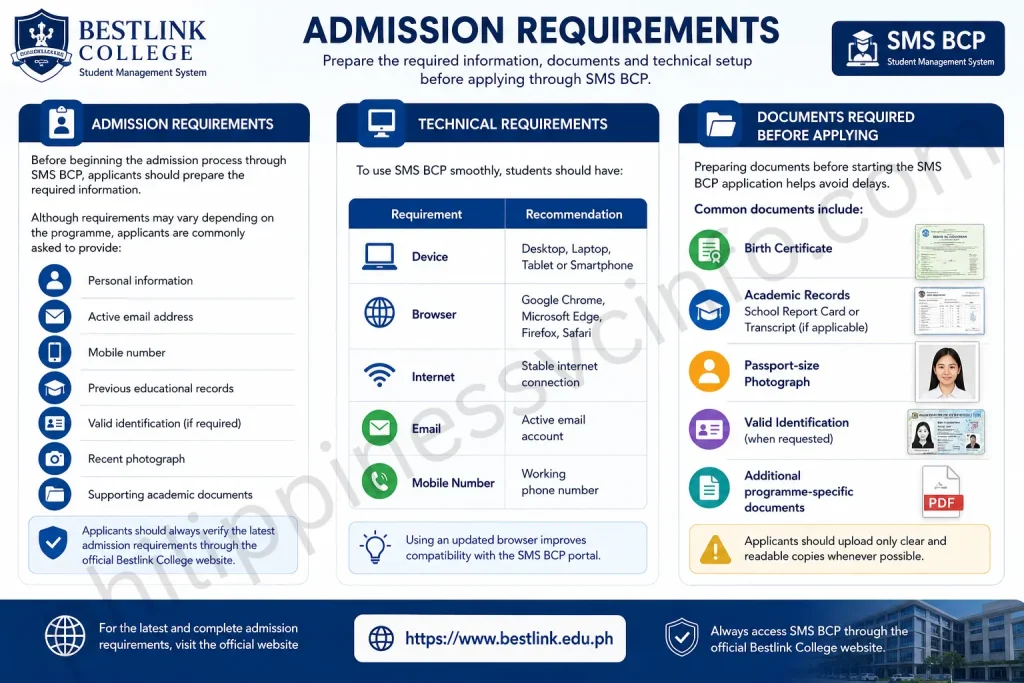
Although requirements may vary depending on the programme, applicants are commonly asked to provide:
- Personal information
- Active email address
- Mobile number
- Previous educational records
- Valid identification (if required)
- Recent photograph
- Supporting academic documents
Applicants should always verify the latest admission requirements through the official Bestlink College website.
Technical Requirements
To use SMS BCP smoothly, students should have:
| Requirement | Recommendation |
|---|---|
| Device | Desktop, Laptop, Tablet or Smartphone |
| Browser | Google Chrome, Microsoft Edge, Firefox, Safari |
| Internet | Stable internet connection |
| Active email account | |
| Mobile Number | Working phone number |
Using an updated browser improves compatibility with the SMS BCP portal.
Documents Required Before Applying
Preparing documents before starting the SMS BCP application helps avoid delays.
Common documents include:
- Birth Certificate
- Academic Records
- School Report Card or Transcript (if applicable)
- Passport-size Photograph
- Valid Identification (when requested)
- Additional programme-specific documents
Applicants should upload only clear and readable copies whenever online submission is required.
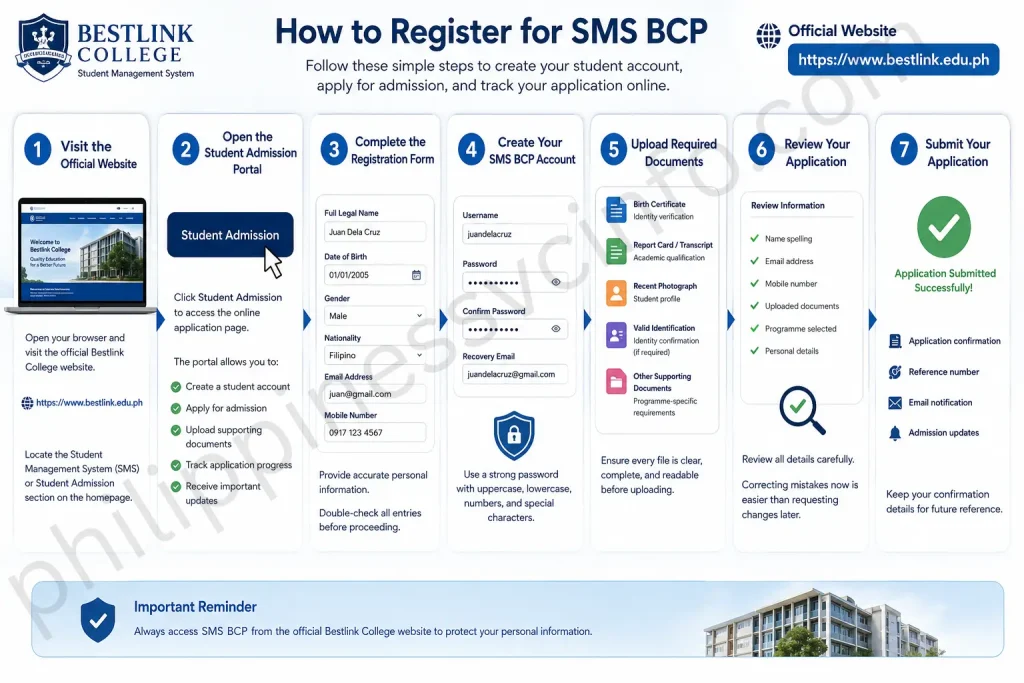
How to Register for SMS BCP
Step 1: Visit the Official Website
Open your preferred web browser and visit the official Bestlink College website:
Locate the Student Management System (SMS) or Student Admission section on the homepage.
Step 2: Open the Student Admission Portal
Click Student Admission to access the online application page.
The admission portal allows new students to:
- Create a student account
- Apply for admission
- Upload supporting documents
- Track application progress
- Receive important updates
Step 3: Complete the Registration Form
Provide accurate personal information, including:
- Full legal name
- Date of birth
- Gender
- Nationality
- Home address
- Email address
- Mobile number
- Previous school information
Double-check all entries before proceeding because incorrect information may delay your application.
Step 4: Create Your SMS BCP Account
Choose your login credentials carefully.
Typically, you will create:
- Username or Student ID (if assigned)
- Strong password
- Recovery email
- Security verification details (if requested)
For security, use a unique password that combines uppercase letters, lowercase letters, numbers, and special characters.
Step 5: Upload Required Documents
The SMS BCP portal may request digital copies of your admission documents.
Common uploads include:
| Document | Purpose |
|---|---|
| Birth Certificate | Identity verification |
| Report Card or Transcript | Academic qualification |
| Recent Photograph | Student profile |
| Valid Identification | Identity confirmation (if required) |
| Other Supporting Documents | Programme-specific requirements |
Ensure every file is clear, complete, and readable before uploading.
Step 6: Review Your Application
Before clicking Submit, review all information carefully.
Check:
- Name spelling
- Email address
- Mobile number
- Uploaded documents
- Programme selected
- Personal details
Correcting mistakes now is much easier than requesting changes later.
Step 7: Submit Your Application
Once everything is complete, submit your application through SMS BCP.
After submission, you may receive:
- Application confirmation
- Reference number
- Email notification
- Admission updates
Keep your confirmation details for future reference.
SMS BCP Login Guide

After your registration is approved, you can sign in to SMS BCP whenever you need to manage your student account.
Login Steps
- Visit the official Bestlink College website.
- Open the SMS BCP login page.
- Enter your registered username or student ID.
- Type your password.
- Complete any verification if prompted.
- Click Login.
Once signed in, you’ll be directed to your student dashboard.
Common SMS BCP Login Problems and Solutions
| Problem | Possible Solution |
|---|---|
| Incorrect password | Reset your password and try again. |
| Wrong username | Verify your registered student ID or email. |
| Browser issues | Clear cache or try another browser. |
| Slow website | Wait a few minutes and try again. |
| Internet connection | Switch to a stable network. |
| Account not activated | Check your email for activation instructions. |
Tips for Using SMS BCP Safely
Protecting your student account is essential. Follow these best practices:
- Never share your password with anyone.
- Log out after using public or shared computers.
- Use a strong, unique password.
- Keep your contact information up to date.
- Access the portal only through the official Bestlink College website.
- Beware of unofficial links asking for your login credentials.
How to Check Your Admission Status
After submitting your application, you can monitor its progress through SMS BCP.

Typical application stages include:
| Status | Meaning |
|---|---|
| Submitted | Application received |
| Under Review | Documents are being evaluated |
| Pending Documents | Additional information is required |
| Approved | Admission accepted |
| Enrolled | Student registration completed |
Checking your account regularly helps ensure you don’t miss important requests or deadlines.
How to Update Your Student Information
Students should keep their records current within SMS BCP.
You may be able to update:
- Contact number
- Email address
- Home address
- Emergency contact
- Personal profile
Some academic information may require approval from the registrar before changes are reflected.
Forgot Your SMS BCP Password?
If you cannot access your account, follow these steps:
- Open the SMS BCP login page.
- Select Forgot Password (if available).
- Enter your registered email address or student ID.
- Follow the password reset instructions.
- Create a new secure password.
- Log in again using your updated credentials.
If the self-service option is unavailable, contact the college’s admissions or IT support team through the official website for assistance.
Programmes Offered at Bestlink College
Bestlink College offers various educational programmes across different disciplines. Depending on campus availability and current admissions, students may find opportunities in fields such as:
- Information Technology
- Business Administration
- Hospitality Management
- Tourism Management
- Education
- Criminology
- Engineering-related programmes
- Technical and vocational courses
- Senior High School strands
The latest list of available programmes can be found on the official Bestlink College website.
Why Choose Bestlink College?
Many students choose Bestlink College because it combines accessible education with modern student services like SMS BCP.
Some reasons include:
- Affordable education
- Student-centred learning
- Online admission through SMS BCP
- Convenient student services
- Industry-focused programmes
- Experienced faculty
- Modern learning environment
- Digital student management
The integration of SMS BCP demonstrates the college’s commitment to improving the student experience through technology.
Understanding the SMS BCP Dashboard
The SMS BCP dashboard serves as your central hub for student services.
Depending on your role and enrolment status, you may see options such as:
- Student Profile
- Admission Status
- Subject List
- Enrolment Information
- Academic Records
- Class Schedule
- School Announcements
- Notifications
- Account Settings
Scholarships and Financial Assistance
The SMS BCP platform includes several features that help students manage their educational journey more efficiently.
1. Online Student Admission
One of the most useful features of SMS BCP is its online admission system. New applicants can submit their admission information digitally without visiting the campus during the initial application process.
Applicants can:
- Create an account
- Enter personal information
- Submit educational details
- Upload required documents
- Monitor admission progress
2. Student Profile Management
Students can maintain their personal information through SMS BCP.
Information commonly available includes:
- Full name
- Student ID
- Contact information
- Address
- Guardian details
- Programme information
Keeping this information updated helps the college communicate important notices promptly.
3. Enrolment Monitoring
After admission, students can use SMS BCP to monitor their enrolment process.
The system may display:
- Enrolment status
- Registered subjects
- Semester information
- Academic programme
- Course load
This helps students confirm that their enrolment has been processed successfully.
4. Academic Records
Another important function of SMS BCP is providing access to academic information.
Students may be able to review:
- Subjects
- Grades
- Academic progress
- Course history
- Semester records
Having digital access to these records makes academic planning easier.
5. School Announcements
Important announcements are regularly published through SMS BCP.
Students can stay informed about:
- Class schedules
- Enrolment dates
- Examination notices
- Holiday announcements
- School events
- Administrative updates
Checking the portal regularly ensures students do not miss important deadlines.
6. Student Information Management
The primary purpose of SMS BCP is to organise student information securely.
The platform helps maintain accurate educational records while reducing paperwork and administrative delays.
Benefits of Using SMS BCP
The SMS BCP portal provides advantages for both students and the college administration.
| Benefit | Description |
|---|---|
| Online Access | Manage academic services anytime with an internet connection. |
| Faster Admission | Submit applications electronically. |
| Easy Record Management | View student information in one place. |
| Time Saving | Reduces unnecessary campus visits. |
| Secure Information | Student records are stored within the official system. |
| Better Communication | Receive updates and announcements quickly. |
| Convenient Services | Complete several academic tasks from home. |
Student Services Available Through SMS BCP
Besides admission and enrolment, SMS BCP supports several student services that make academic life more organised and convenient.
These services may include:
| Student Service | Description |
|---|---|
| Student Admission | Apply for college admission online. |
| Student Records | View academic information and personal records. |
| Enrolment Monitoring | Track your enrolment progress. |
| Subject Information | Check registered subjects each semester. |
| Class Schedule | View assigned class schedules. |
| Announcements | Receive official school notices and updates. |
| Student Profile | Manage your personal information. |
| Academic Information | Access grades and educational records, where available. |
Best Practices for Using SMS BCP
Using SMS BCP correctly helps ensure a smooth academic experience.
Keep Your Account Secure
- Never share your password.
- Use a strong password with letters, numbers, and symbols.
- Change your password regularly.
- Avoid logging in on untrusted devices.
Check the Portal Frequently
Important updates such as enrolment schedules, admission announcements, examination dates, and school notices are often posted online. Logging in regularly helps you stay informed.
Update Personal Information
Always keep your:
- Mobile number
- Email address
- Home address
- Emergency contact details
up to date so the college can contact you when necessary.
Common Mistakes to Avoid
Many students experience delays because of avoidable errors.
Avoid these common mistakes:
- Entering incorrect personal information
- Uploading unclear or incomplete documents
- Missing admission deadlines
- Forgetting login credentials
- Ignoring email notifications
- Using unofficial websites
- Leaving required fields blank during registration
Taking a few extra minutes to review your application can save significant time later.
Troubleshooting Tips
If you encounter issues while using SMS BCP, try the following:
| Problem | Suggested Solution |
|---|---|
| Website not loading | Refresh the page or try again later. |
| Login failed | Verify your username and password. |
| Browser compatibility | Use the latest version of Chrome, Edge, Firefox, or Safari. |
| Slow performance | Check your internet connection. |
| Missing email | Look in your Spam or Junk folder. |
| Document upload error | Ensure files meet the required size and format. |
If problems continue, contact the college through the official website.
Frequently Asked Questions
Conclusion
SMS BCP serves as the official Student Management System for Bestlink College of the Philippines, providing a reliable platform for admissions, enrolment, and academic management. By centralising essential student services, it helps applicants and enrolled students complete important tasks more efficiently while reducing paperwork and unnecessary campus visits.Whether you are applying to Bestlink College for the first time or managing your studies as a current student, using SMS BCP through the official website ensures that you receive accurate information, secure access, and the latest updates from the institution.For the safest experience, always use the official Bestlink College website and keep your account information secure.
Discover What You Need to Know:
- Philippines eTravel Card 2026: Complete Registration Guide, Requirements & QR Code
- Tinkercad 2026: Complete Guide to 3D Design, CAD, Circuits, Codeblocks & 3D Printing
- LIS Philippines: DepEd Learner Information System Guide, Login & LRN
- LERIS PRC Philippines 2026: Registration, Login & License Renewal Guide
- ARCarrierPoint.net 2026 Complete Guide With Features, Services, Benefits & How to Use








