SSS Employer is a business, company, organisation, or individual registered with the Philippine Social Security System (SSS) to fulfil employer obligations. These include enrolling covered workers, withholding the employee’s required contribution, adding the employer’s share, and remitting the total contribution to SSS according to the applicable payment schedule.
What Is SSS?
Established under the Social Security Act of 1954, the Social Security System (SSS) provides social security coverage for workers in the private sector. Its protection includes financial support that replaces income when members face events such as sickness, maternity, disability, death, or retirement.
SSS Employer ID vs Employee SSS Number
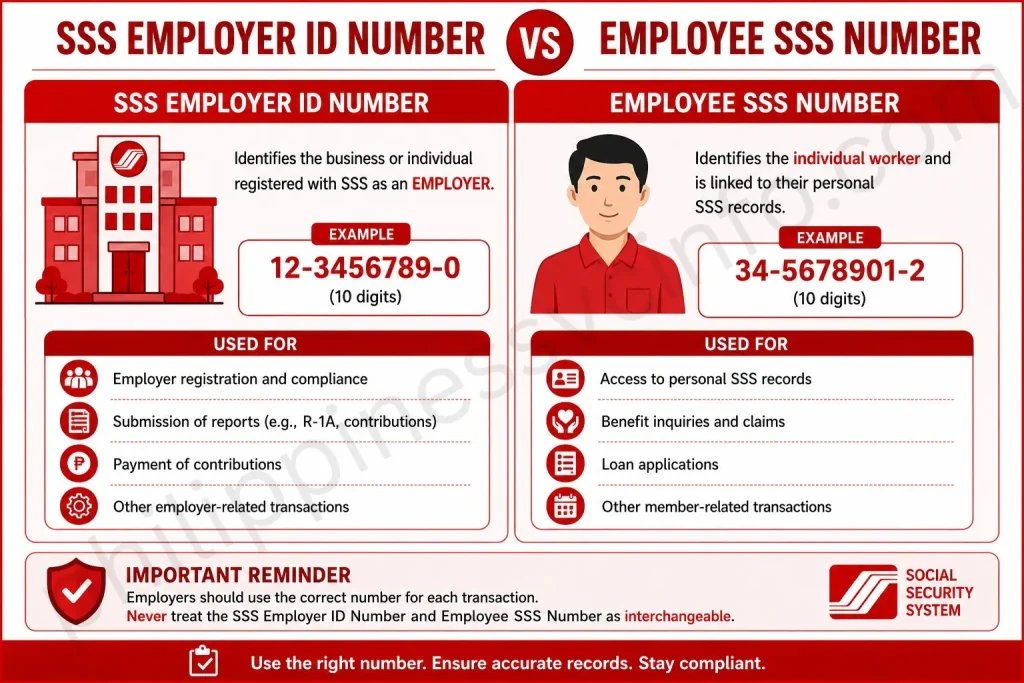
The SSS Employer ID Number and an employee’s SS Number serve different purposes and should not be confused.
The Employer ID Number identifies the business or individual registered with SSS as an employer. In contrast, an employee’s SS Number is a personal identifier assigned to the individual worker and linked to their SSS records.
Employers should use the correct number for each transaction. The SSS Employer ID Number is used for employer-related transactions, while employees use their personal SS Numbers to access and manage their individual SSS records.
Who Needs to Register as an SSS Employer?
The Social Security Act requires employers to register their businesses with the Social Security System (SSS). Employers must complete the Employer Registration Form (SS Form R-1) and report their employees for SSS coverage through the Employment Report Form (SS Form R-1A) within 30 days from the actual date of employment.
For legal purposes, an employer may be a natural or juridical person, whether domestic or foreign, that conducts any trade, business, industry, undertaking, or other activity in the Philippines and engages another person to work under their orders or direction in an employment relationship.
Why Is SSS Employer Registration Important?
For employers, registering with the SSS is an essential part of meeting Philippine labour and social security obligations. Proper registration helps businesses avoid penalties and potential legal consequences while strengthening their professional reputation, making them more attractive to skilled workers, and supporting long-term business growth.
For employees, employer registration helps protect their social security rights and access to benefits. It supports coverage for important programmes such as retirement, disability, sickness, and maternity benefits, as well as loan programmes and other forms of financial assistance that can provide support during difficult circumstances.
Penalties for Failing to Register with SSS?
An employer who fails or refuses to comply with RA 11199 may face a fine of PHP 5,000 to PHP 20,000, imprisonment ranging from 6 years and 1 day to 12 years, or both, depending on the court’s decision.
A similar penalty applies when an employer fails or refuses to register themselves or their employees, or when they deduct required SSS contributions from employees’ compensation but do not remit those amounts to the SSS. In such cases, the prescribed penalty is a fine of PHP 5,000 to PHP 20,000 together with imprisonment of 6 years and 1 day to 12 years.
A more serious consequence may apply when an employer deducts SSS contributions or loan amortisations from an employee’s wages or salary but fails to remit the money to the SSS. According to the source, the applicable penalty is under Article 315 of the Revised Penal Code on Estafa, which provides for imprisonment of up to 20 years.
SSS Employer Registration Requirements
The required SSS employer registration forms can be downloaded from the official SSS website. Although employers may complete the registration process online, the forms can also be filled out electronically, printed, and uploaded through My.SSS when required.
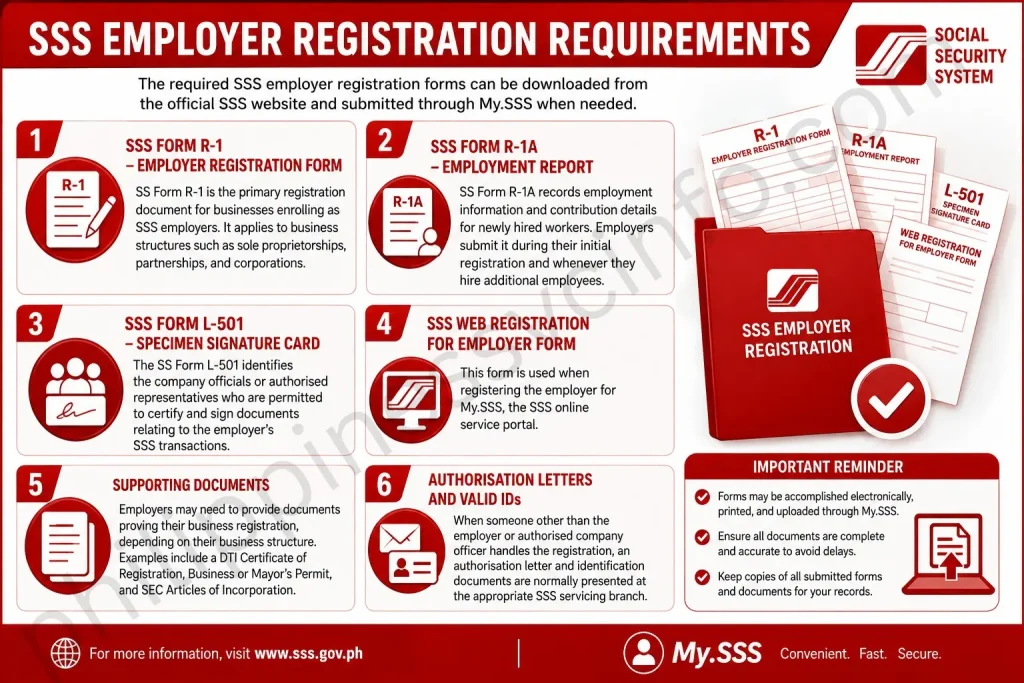
SSS Form R-1 – Employer Registration Form
SS Form R-1 is the primary registration document for businesses enrolling as SSS employers. It applies to business structures such as sole proprietorships, partnerships, and corporations.
SSS Form R-1A – Employment Report
SS Form R-1A records employment information and contribution details for newly hired workers. Employers submit it during their initial registration and whenever they hire additional employees.
SSS Form L-501 – Specimen Signature Card
The SS Form L-501 identifies the company officials or authorised representatives who are permitted to certify and sign documents relating to the employer’s SSS transactions.
SSS Web Registration for Employer Form
This form is used when registering the employer for My.SSS, the SSS online service portal.
Supporting Documents
Employers may need to provide documents proving their business registration, depending on their business structure. Examples include a DTI Certificate of Registration, Business or Mayor’s Permit, and SEC Articles of Incorporation.
Authorisation Letters and Valid IDs
When someone other than the employer or authorised company officer handles the registration, an authorisation letter and identification documents are normally presented at the appropriate SSS servicing branch.
How to Register an SSS Employer
SSS employer registration forms part of the wider business registration and incorporation process in the Philippines. Understanding where it fits within the overall process helps employers determine the appropriate time to register. In practice, registrations with SSS, PhilHealth, and Pag-IBIG Fund may be processed at the same time, although the procedure can differ when registration is completed online.
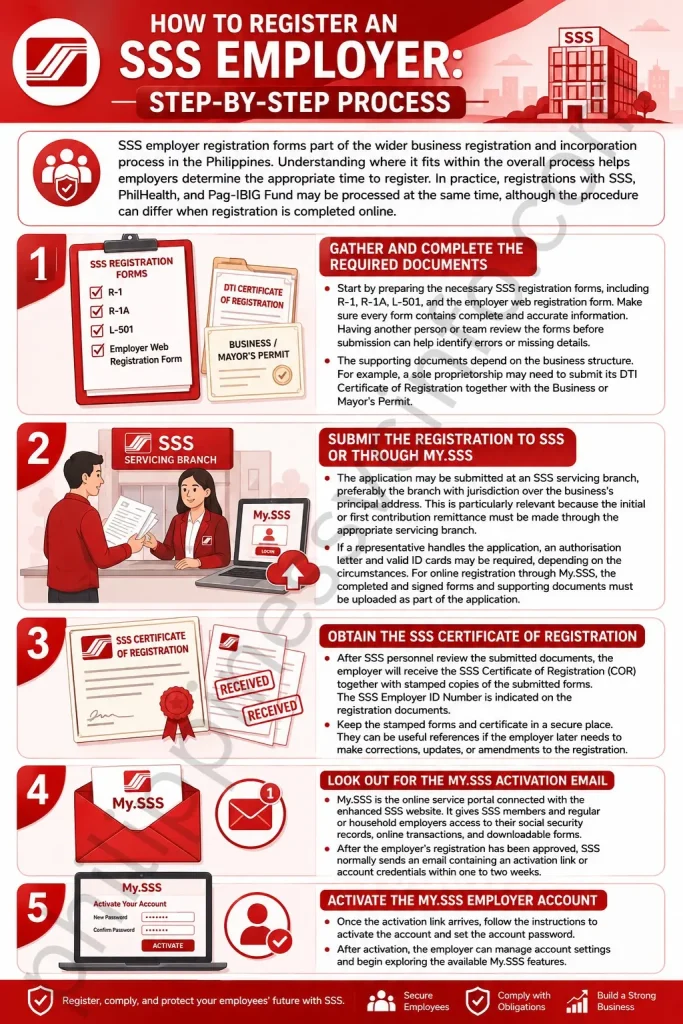
1. Gather and Complete the Required Documents
Start by preparing the necessary SSS registration forms, including R-1, R-1A, L-501, and the employer web registration form. Make sure every form contains complete and accurate information. Having another person or team review the forms before submission can help identify errors or missing details.
The supporting documents depend on the business structure. For example, a sole proprietorship may need to submit its DTI Certificate of Registration together with the Business or Mayor’s Permit.
2. Submit the Registration to SSS or Through My.SSS
The application may be submitted at an SSS servicing branch, preferably the branch with jurisdiction over the business’s principal address. This is particularly relevant because the initial or first contribution remittance must be made through the appropriate servicing branch.
If a representative handles the application, an authorisation letter and valid ID cards may be required, depending on the circumstances. For online registration through My.SSS, the completed and signed forms and supporting documents must be uploaded as part of the application.
3. Obtain the SSS Certificate of Registration
After SSS personnel review the submitted documents, the employer will receive the SSS Certificate of Registration (COR) together with stamped copies of the submitted forms. The SSS Employer ID Number is indicated on the registration documents.
Keep the stamped forms and certificate in a secure place. They can be useful references if the employer later needs to make corrections, updates, or amendments to the registration.
4. Look Out for the My.SSS Activation Email
My.SSS is the online service portal connected with the enhanced SSS website. It gives SSS members and regular or household employers access to their social security records, online transactions, and downloadable forms.
After the employer’s registration has been approved, SSS normally sends an email containing an activation link or account credentials within one to two weeks.
5. Activate the My.SSS Employer Account
Once the activation link arrives, follow the instructions to activate the account and set the account password. After activation, the employer can manage account settings and begin exploring the available My.SSS features.
Employer Duties After SSS Registration
Registering as an SSS employer is only the beginning. Employers must continue meeting their responsibilities to maintain compliance and keep their records with the Social Security System accurate.
Keep Contributions and Reports Up to Date
Employers are responsible for regularly deducting the required SSS contributions and loan payments from employees’ salaries and adding the corresponding employer share. They must also submit the required reports and other reportorial documents to SSS.
Report Changes in Business and Employee Information
Any changes to important business information, such as the business address or ownership structure, should be reported to SSS through the appropriate amendment forms.
Employee records should also be kept current. Employers need to update information relating to personal details, salary changes, employment status, and other relevant changes. Keeping these records accurate helps support proper benefit processing and continued compliance with SSS requirements.
Assist Employees With SSS Concerns
Employers often act as a link between their employees and the SSS. When employees have questions or concerns about contributions, records, benefit claims, or related matters, the employer may need to coordinate with SSS to help address the issue.
Businesses are legally required to register with the Social Security System, handle the statutory contributions of covered employees, and support the wider social protection system for private-sector workers.
Because the required SSS forms and supporting documents are readily available, the registration process may be completed within a few days, or up to two weeks when My.SSS activation is included, according to the source. Employer registration may also be processed alongside PhilHealth and Pag-IBIG Fund registration, which can make the overall business registration process more efficient.
SSS Employer ID for Household Employers
Previously, household employers who hired kasambahays, personal drivers, or other household workers were not required to obtain a separate SSS Employer (ER) Number. They could use their personal SSS number when dealing with the agency. Under the Kasambahay Law, however, household employers are now required to secure an ER number.
Household employers who have been remitting their kasambahay’s SSS contributions using their personal SSS number may continue to do so until SSS provides them with a new ER Number.
For newly registered household employers, the process starts by completing and submitting SSS Form R-1 (Employer Registration Form) to the nearest SSS branch. After receiving the ER number, the employer must file SSS Form R-1A (Employment Report) to have their household workers registered in the SSS system.
Paying contributions is not the only responsibility of a household employer. The SS Form R-3 must also be completed and submitted quarterly so SSS can properly identify the employees to whom the contributions should be credited.
Submit SSS Employer Reports Online
Once an employer has completed registration, employees must be reported to the SSS so their coverage and access to applicable benefits can be properly established. Employers can use the online portal to submit the Employment Report Form (SS Form R-1A).

1. Sign In to the Employer Portal
Access the SSS employer portal using your Employer ID Number and account password.
2. Open the Employment Report Section
After logging in, find the option for submitting an Employment Report or SS Form R-1A.
3. Provide the Employee Information
Enter the required details for each worker, including:
- SSS number
- Full name
- Date of birth
- Employment start date
- Monthly salary
For newly hired workers who do not yet have an SSS number, the employer should assist them in obtaining one through the SSS website.
4. Review the Details
Check every entry against the employer’s personnel records before submission. Accurate information helps reduce errors that could affect or delay an employee’s benefit eligibility.
5. Upload the Completed Form
After completing the SS Form R-1A, upload the digital copy through the portal. The form should be signed by an authorised representative.
6. Submit and Keep the Confirmation
Select Submit to complete the report. Save or download the confirmation receipt and keep it with the employer’s records as proof of submission.
7. Observe the Reporting Deadline
Under RA 11199, the employment report should be filed within 30 days from the employee’s start date. Meeting this deadline helps employers avoid penalties associated with late reporting.
Submitting employment reports online provides a convenient way to keep employee records updated and supports workers’ access to their applicable SSS benefits.
SSS Benefits
Members of the Social Security System (SSS) may receive different forms of financial assistance depending on their circumstances. The main benefits include:
- Sickness Benefit
Members who are unable to work because of sickness or injury may receive a daily cash allowance for the covered days they cannot report for work. - Maternity Benefit
Female members may receive a cash allowance for the period they are unable to work because of childbirth or miscarriage. - Disability Benefit
Members who develop a partial or total disability may qualify for a cash benefit. Depending on the circumstances, this may be provided as a lump-sum payment or pension. - Retirement Benefit
Members who can no longer work because of old age may receive a monthly cash benefit. - Death Benefit
When an SSS member dies, their qualified beneficiaries may receive a cash benefit, which may be provided as a lump sum or pension. - Funeral Benefit
A cash benefit may be granted to the person who paid for the funeral expenses of a deceased member. - Unemployment Benefit
Also referred to as unemployment insurance or involuntary separation benefit, this provides cash assistance to covered members who lose employment because of circumstances such as retrenchment, redundancy, or closure of operations. The source specifically includes covered members such as household helpers and OFWs. - Employees’ Compensation (EC) Program
The Employees’ Compensation Program provides assistance to workers who experience sickness or injury that results in disability or death.
FAQs About SSS Employers
Conclusion
Getting registered as an SSS employer is an important step for businesses and individuals who hire workers in the Philippines. After completing the required registration, employers should secure their SSS Employer ID Number and consistently meet their responsibilities, including proper employee reporting and timely contribution payments.SSS compliance is not only a legal responsibility. It also plays an important role in helping employees maintain their social security coverage and access benefits when they qualify. By maintaining complete records, paying contributions on schedule, and keeping employer details updated, businesses can build a more organized and compliant employment system.
Discover What You Need to Know:
- SSS Portal Guide 2026: Registration, Login & Online Services in the Philippines
- DTR (Daily Time Record) Philippines: CSC Form 48 Guide, Download, Requirements & FAQs (2026)
- PEOS: Complete Guide to Registration, Requirements, Benefits & Online Process (2026)
- PNP Payslip Portal 2026: Login, Registration, Download, and Online Salary Access Guide
- DTI Registration Philippines 2026: Complete Guide to Requirements, Fees, Online Application & Certificate