DITO eSIM Guide
A DITO eSIM gives you a digital way to connect to the DITO mobile network without needing a traditional plastic SIM card. It can be useful when moving to an eSIM-ready phone, setting up dual-SIM service, or choosing a digital alternative to a physical SIM.
This guide covers the essential steps for buying a DITO eSIM, activating it on a compatible device, completing the required SIM registration, identifying eSIM-compatible phones, and resolving common activation problems.
It also answers common searches such as DITO eSIM, eSIM DITO, DITO e SIM, DITO eSIM buy, eSIM Philippines, eSIM card, e-SIM, what is eSIM, and eSIM-compatible phones.
What Does eSIM Mean?
An eSIM, short for Embedded SIM, is a digital SIM technology built into compatible smartphones, tablets, smartwatches, and other devices. Rather than inserting a physical SIM card, you can activate a mobile plan digitally by scanning a QR code supplied by your network provider.
Because an eSIM card is integrated into the device, it cannot be physically taken out like a standard SIM. One useful advantage is that changing mobile plans can be more convenient, while supported phones can also use dual-SIM features by combining a physical SIM with an eSIM.
With the growing availability of eSIM Philippines services, carriers such as DITO provide digital SIM activation for eligible devices and users.
What Makes DITO eSIM a Useful Choice?
A DITO eSIM can make mobile connectivity more convenient compared with using a conventional physical SIM. Its digital format offers several practical benefits for compatible devices.
Activate Your Service Digitally
When you purchase an eSIM online, you can avoid waiting for a physical SIM to arrive. Activation can be completed digitally on a supported device.
Use Dual SIM Features
Compatible smartphones can run a DITO eSIM alongside a physical SIM. This can be useful when you want to keep two mobile lines available on the same phone.
Works Without a Physical SIM Slot
An eSIM is built into the device, so there is no need to insert or remove a plastic SIM card. This makes it particularly suitable for newer smartphones that support digital SIM technology.
Switch Plans More Conveniently
With eSIM technology, adding or changing mobile plans can be easier because the service is managed digitally rather than through a physical SIM card.
Reduce Plastic SIM Waste
Because an eSIM does not require a plastic SIM card, using digital SIM technology can help reduce the physical materials associated with traditional SIM cards.
For easier registration and account management, you can also use the DITO app.
DITO eSIM Cost and Starter Package
The DITO eSIM is available for ₱99 through official DITO sales channels. The prepaid starter offer typically comes with the following inclusions:
- 9GB All-Access Data
- Unlimited texts to all networks
- Unlimited DITO-to-DITO calls
- 150 minutes of calls to other networks
- 15-day validity
DITO may update its promotional packages from time to time. Before you buy a DITO eSIM, check the current offer to confirm the latest price, inclusions, and validity period.
Where Can You Purchase a DITO eSIM?
Getting a DITO eSIM doesn’t require a trip to a physical shop. You can purchase the digital SIM online through DITO’s official sales channels and receive the information needed for activation electronically.
Purchase from the DITO eShop
The official DITO eShop is the recommended option for buying a digital SIM. Once your payment has been processed, the eSIM QR code and activation details appear on the confirmation page and are also sent to the email address you provided.
Order Through the DITO App
You can also purchase a DITO eSIM using the DITO App. This option is available to both existing customers and new users who want to set up a DITO digital SIM.
Buy from Verified Online Marketplaces
Official DITO products are also available through verified DITO stores on:
- Shopee
- Lazada
Always check that you’re purchasing from an official DITO store. Buying from an unauthorised seller can lead to problems with activation or support.
How to Buy a DITO eSIM
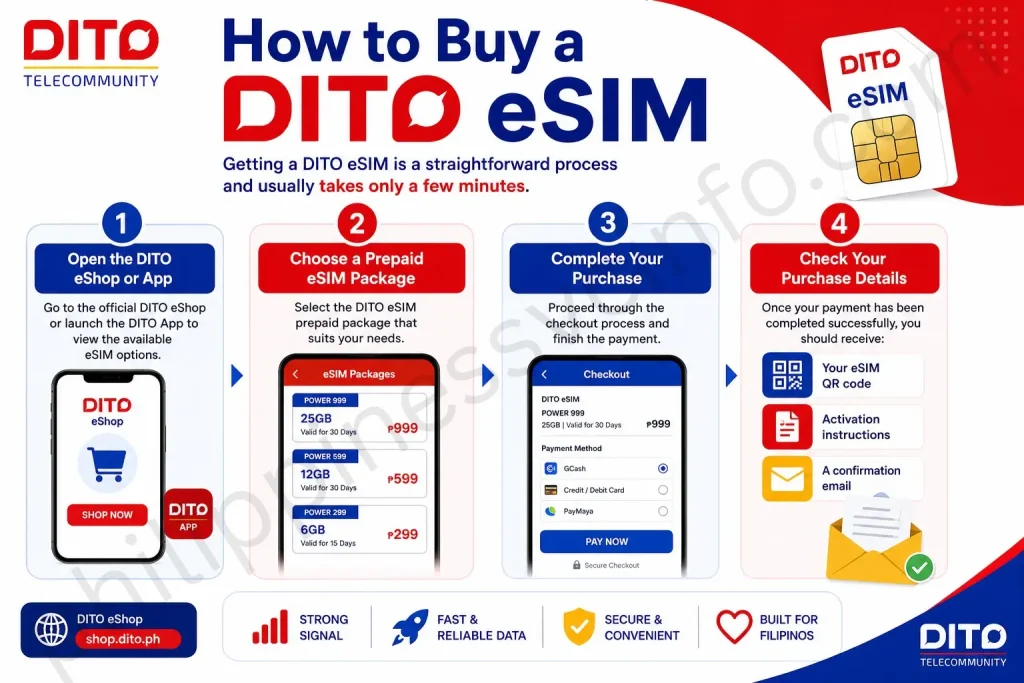
Getting a DITO eSIM is a straightforward process and usually takes only a few minutes.
1. Open the DITO eShop or App
Go to the official DITO eShop or launch the DITO App to view the available eSIM options.
2. Choose a Prepaid eSIM Package
Select the DITO eSIM prepaid package that suits your needs.
3. Complete Your Purchase
Proceed through the checkout process and finish the payment.
4. Check Your Purchase Details
Once your payment has been completed successfully, you should receive:
- Your eSIM QR code
- Activation instructions
- A confirmation email
Important: Keep your QR code secure. You’ll need it when setting up and activating your DITO eSIM on your compatible device.
How to Activate a DITO eSIM
Before you start, connect your phone to a stable Wi-Fi network to ensure the eSIM installation goes smoothly.
Activate DITO eSIM on iPhone
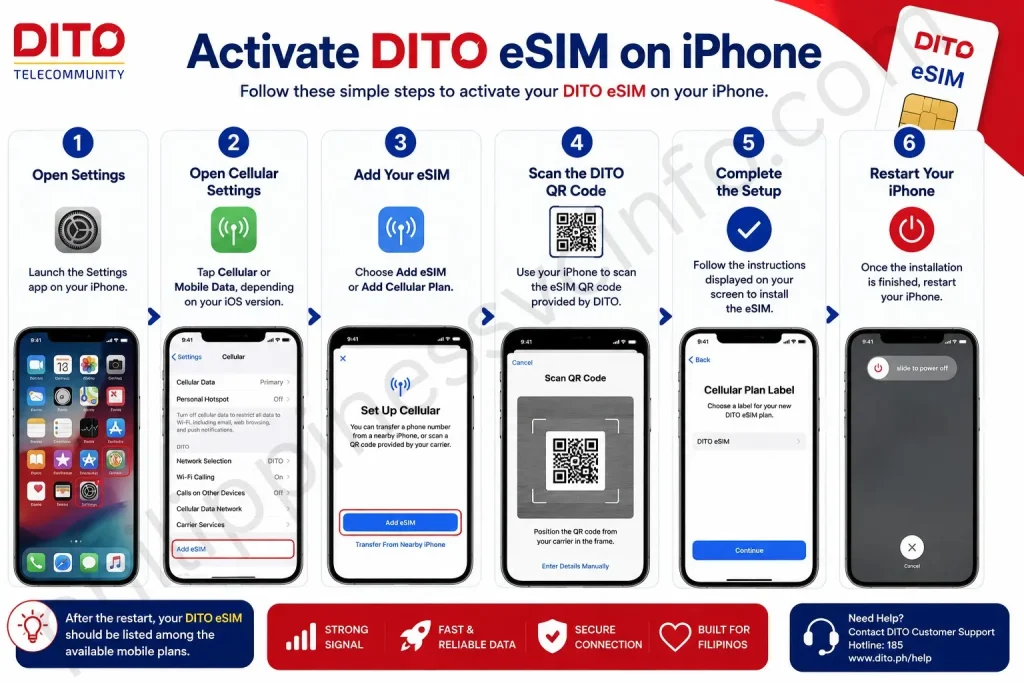
If you’re using an iPhone, follow these steps:
Step 1: Open Settings
Launch the Settings app on your iPhone.
Step 2: Open Cellular Settings
Tap Cellular or Mobile Data, depending on your iOS version.
Step 3: Add Your eSIM
Choose Add eSIM or Add Cellular Plan.
Step 4: Scan the DITO QR Code
Use your iPhone to scan the eSIM QR code provided by DITO.
Step 5: Complete the Setup
Follow the instructions displayed on your screen to install the eSIM.
Step 6: Restart Your iPhone
Once the installation is finished, restart your iPhone.
After the restart, your DITO eSIM should be listed among the available mobile plans.
How to Activate a DITO eSIM on Android
The exact settings can differ slightly between Android phones, depending on the manufacturer and software version. However, the eSIM setup process is generally similar.
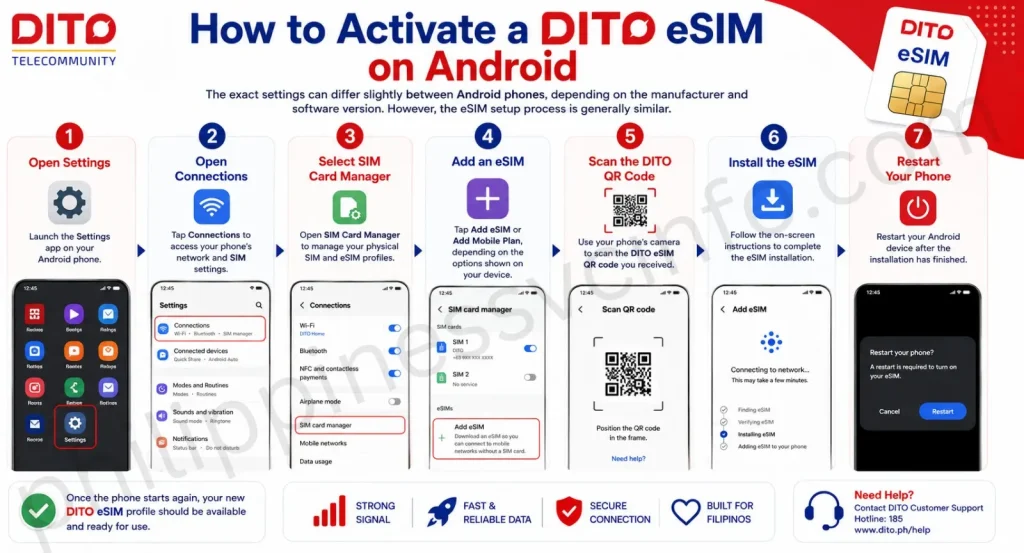
Step 1: Open Settings
Launch the Settings app on your Android phone.
Step 2: Open Connections
Tap Connections to access your phone’s network and SIM settings.
Step 3: Select SIM Card Manager
Open SIM Card Manager to manage your physical SIM and eSIM profiles.
Step 4: Add an eSIM
Tap Add eSIM or Add Mobile Plan, depending on the options shown on your device.
Step 5: Scan the DITO QR Code
Use your phone’s camera to scan the DITO eSIM QR code you received.
Step 6: Install the eSIM
Follow the on-screen instructions to complete the eSIM installation.
Step 7: Restart Your Phone
Restart your Android device after the installation has finished.
Once the phone starts again, your new DITO eSIM profile should be available and ready for use.
How to Register a DITO eSIM
Under Republic Act No. 11934, also known as the SIM Registration Act, DITO eSIM users must register their SIM before full activation.
The registration process requires your DITO number, personal details, a valid government-issued ID, and selfie verification.
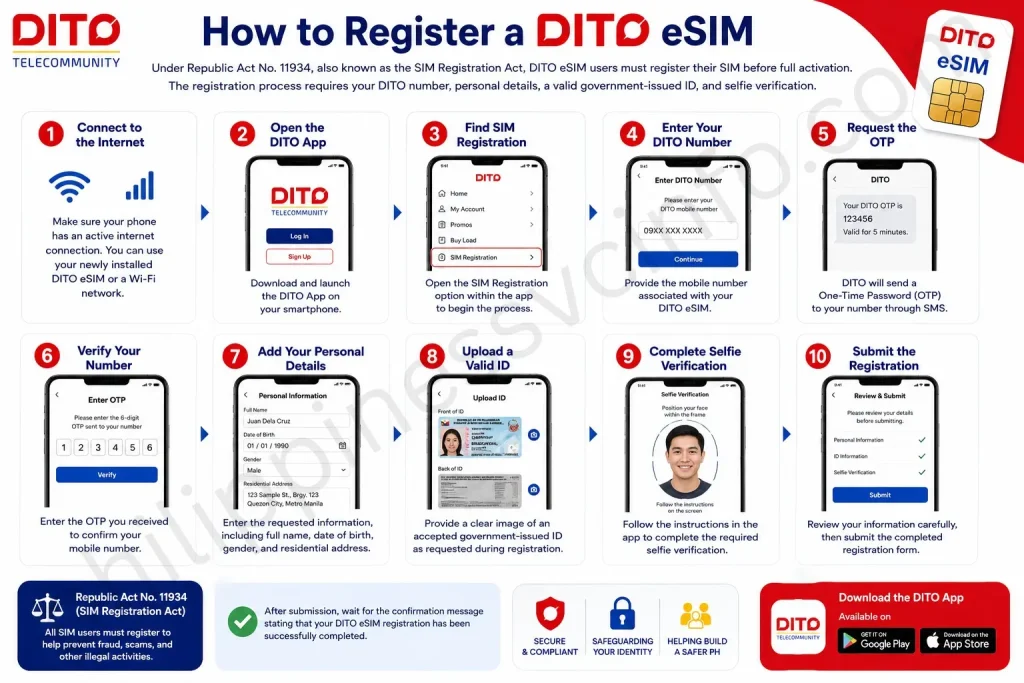
Step 1: Connect to the Internet
Make sure your phone has an active internet connection. You can use your newly installed DITO eSIM or a Wi-Fi network.
Step 2: Open the DITO App
Download and launch the DITO App on your smartphone.
Step 3: Find SIM Registration
Open the SIM Registration option within the app to begin the process.
Step 4: Enter Your DITO Number
Provide the mobile number associated with your DITO eSIM.
Step 5: Request the OTP
DITO will send a One-Time Password (OTP) to your number through SMS.
Step 6: Verify Your Number
Enter the OTP you received to confirm your mobile number.
Step 7: Add Your Personal Details
Enter the requested information, including:
- Full name
- Date of birth
- Gender
- Residential address
Step 8: Upload a Valid ID
Provide a clear image of an accepted government-issued ID as requested during registration.
Step 9: Complete Selfie Verification
Follow the instructions in the app to complete the required selfie verification.
Step 10: Submit the Registration
Review your information carefully, then submit the completed registration form.
After submission, wait for the confirmation message stating that your DITO eSIM registration has been successfully completed.
What You Need for DITO eSIM Registration
Have the necessary information and identification documents ready before starting your DITO eSIM registration. This can help you complete the process without unnecessary delays.
Personal Details
You may be asked to provide:
- Full legal name
- Date of birth
- Complete residential address
- Gender
- DITO mobile number
Government-Issued IDs
DITO may accept government-issued identification such as:
- PhilSys National ID
- Passport
- Driver’s License
- UMID
- PRC ID
- SSS ID
- GSIS ID
- Other government-issued IDs accepted by DITO
Requirements for Foreign Nationals
Foreign visitors registering a DITO eSIM may need additional documentation, such as:
- Passport
- Proof of address in the Philippines
- Other travel documents required by DITO
Check the requirements shown during registration because documentation for foreign nationals may differ.
Phones That Support DITO eSIM
An eSIM isn’t available on every smartphone. Many newer flagship phones support the technology, but compatibility can depend on the exact model and regional version.
Apple iPhone
eSIM is supported on many newer iPhone models, including:
- iPhone XS and newer
- iPhone XR and newer
- iPhone 11 series
- iPhone 12 series
- iPhone 13 series
- iPhone 14 series
- iPhone 15 series
- iPhone 16 series
Samsung Galaxy
Selected premium Samsung phones offer eSIM functionality, including models from:
- Galaxy S Series
- Galaxy Z Fold
- Galaxy Z Flip
- Galaxy Note series
Google Pixel
Most recent Google Pixel smartphones include eSIM support.
Other Android Phones
eSIM capability is also available on selected flagship models from brands such as Xiaomi, OPPO, vivo, HONOR, Motorola, and Huawei. Support varies by model and region.
Before buying a DITO eSIM, check your exact smartphone model and regional variant to make sure it supports eSIM technology.
Why Choose a DITO eSIM?
A DITO eSIM provides a convenient alternative to a traditional physical SIM card. It can make mobile connectivity easier to manage while offering several practical advantages:
- No physical SIM required: Your mobile plan is stored digitally, so there’s no plastic SIM card to insert or replace.
- Convenient activation: An eSIM can be installed digitally, making the setup process more convenient.
- Dual-SIM support: Compatible phones can use an eSIM alongside another SIM or mobile plan.
- Useful for travellers: eSIM technology can make it easier to manage mobile connectivity while travelling.
- Less risk of physical damage or loss: Since there’s no removable SIM card, you don’t have to worry about misplacing or damaging the physical card.
- Easy plan management: Supported devices can make switching between available mobile plans more convenient.
- Digital and paper-free: eSIM technology reduces the need for a physical SIM card and supports a more digital approach to mobile connectivity.
Common Problems When Activating a DITO eSIM
Even when the setup steps are followed correctly, you may occasionally run into an issue while activating your DITO eSIM. The problem is often related to the QR code, device compatibility, network settings, or verification process.
QR Code Is Not Scanning
If your phone can’t read the DITO eSIM QR code, check for these possible causes:
- Poor lighting when scanning
- A damaged or unclear QR image
- A QR code that has already been used
- Camera focus problems
Try improving the lighting, making sure the QR code is clearly displayed, or showing it on another screen before scanning again.
eSIM Installation Is Not Available
If your phone won’t let you add the eSIM, the issue could be caused by:
- An incompatible device
- A carrier-locked phone
- The device reaching its eSIM profile limit
- Outdated phone software
Check your phone’s eSIM compatibility and install any available software updates before trying again.
DITO eSIM Has No Signal
Sometimes the eSIM installs successfully but doesn’t immediately connect to the mobile network. In that case:
- Restart your phone.
- Make sure the DITO eSIM profile is enabled.
- Review your network settings.
- Give the activation process a few minutes to complete.
OTP Has Not Arrived
If you don’t receive the OTP during DITO eSIM registration, first make sure your phone has a mobile signal. You can then wait a few minutes and request another OTP.
Also, double-check that you entered the correct DITO mobile number before trying again.
Things to Check Before Buying a DITO eSIM
A little preparation can help prevent problems during installation and registration. Before purchasing a DITO eSIM, keep these points in mind:
- Check eSIM compatibility: Make sure your exact phone model supports eSIM technology.
- Use official DITO channels: Purchase your eSIM only through authorised DITO sources to avoid unreliable sellers.
- Protect your QR code: Store the eSIM QR code somewhere secure because you may need it during installation.
- Register promptly: Complete your eSIM registration after activation rather than leaving it unfinished.
- Keep your confirmation email: Save the purchase or registration confirmation for future reference.
- Use reliable Wi-Fi: Connect to a stable Wi-Fi network during eSIM installation to reduce the chance of connection problems.
Frequently Asked Questions About DITO eSIM
Final Thoughts
A DITO eSIM provides a convenient way to connect to DITO’s mobile network without carrying a physical SIM card. According to the provided information, the eSIM is available for ₱99, with online purchase, QR-code delivery, digital activation, and SIM registration through the DITO App all forming part of the setup process. As eSIM-compatible phones become more common, digital SIMs offer useful benefits such as a cleaner setup and greater dual-SIM flexibility. Before purchasing, check that your device supports eSIM technology, prepare a valid government-issued ID for registration, and keep your DITO QR code and confirmation details secure.
Discover What You Need to Know: