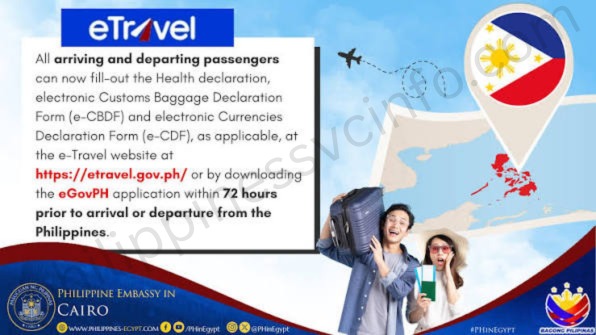
The Philippines eTravel Card is a free online travel registration system required for eligible travellers entering or leaving the Philippines. It replaces the previous paper-based arrival forms and allows passengers to submit their personal details, flight information, and health declaration through one digital platform. After completing the registration at the official eTravel website, travellers receive a QR code that is used for airport verification. This guide covers everything you need to know about eTravel Philippines registration, including requirements, step-by-step application, QR code details, departure registration, family travel, common mistakes, and frequently asked questions.
What Is the Philippines eTravel Card?
The Philippines eTravel Card is a free digital travel declaration form that travellers must complete online before arriving in or departing from the Philippines. It is not a visa but an electronic system used to collect important traveller details, including personal information, flight details, passport data, and health declarations. The system replaces paper-based arrival forms and provides a faster, centralised way of managing border entry information.

Launched on December 1, 2022, the eTravel Card was introduced to modernise Philippine immigration procedures under R.A. 11032 (Ease of Doing Business Law). It replaced the previous eArrival Card and One Health Pass systems used before its implementation. After completing registration, travellers receive a unique QR code that immigration officers scan during arrival or departure verification.
Who Needs to Register for the Philippines eTravel?
The Philippines eTravel registration is required for most international travellers entering the Philippines and for Filipino citizens departing or returning from abroad. This includes Filipino citizens, foreign tourists, OFWs, balikbayans, business travellers, students, permanent residents, and foreign nationals with valid visas. Each traveller must complete their own registration, including children travelling with family members.
Travellers arriving through international airports or seaports must submit their eTravel information before entry, while those departing the Philippines may also need to complete the required departure registration. The system helps speed up immigration processing, replaces manual arrival and departure forms, supports health monitoring, and provides government agencies with accurate travel records.
Some travellers may be exempt from eTravel registration depending on their official status, including foreign diplomats and dependents, foreign dignitaries and delegation members, 9(e) visa holders, and holders of diplomatic or official/service passports. Passengers who remain in the secure transit area without passing through Philippine immigration generally do not need to register, but travellers leaving the transit zone must complete the eTravel process.
What Documents Do You Need for eTravel Registration?
To complete the Philippines eTravel registration, travellers need a few essential details before starting the online application. The main requirements include a valid passport, active email address, confirmed flight information, accommodation details, and health declaration information. No physical documents or photo uploads are usually required because all details are entered directly into the online form.
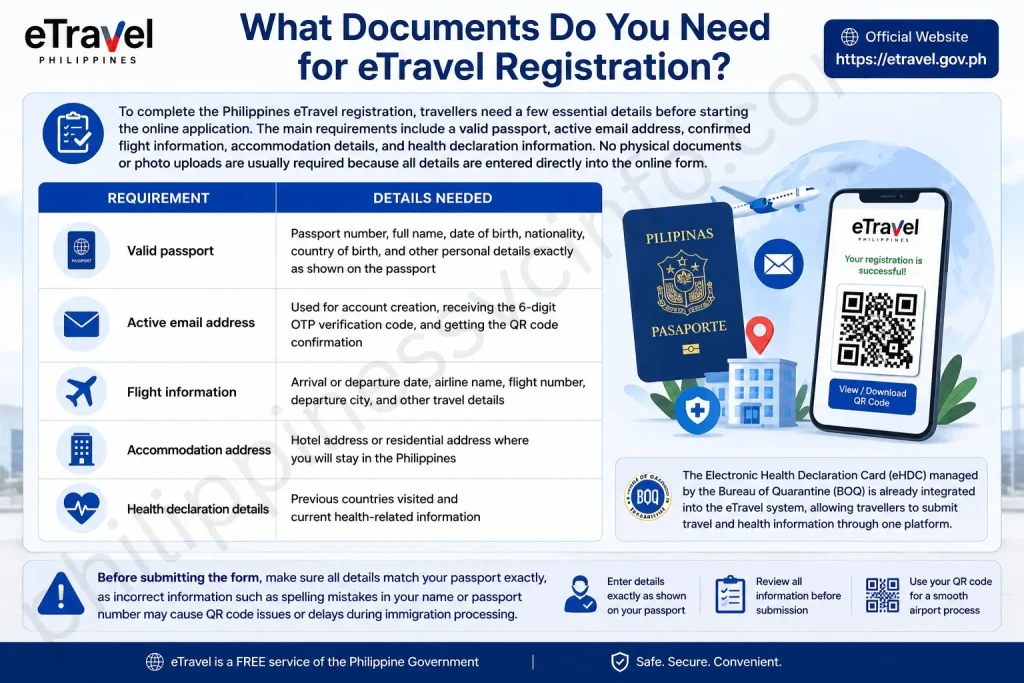
| Requirement | Details Needed |
|---|---|
| Valid passport | Passport number, full name, date of birth, nationality, country of birth, and other personal details exactly as shown on the passport |
| Active email address | Used for account creation, receiving the 6-digit OTP verification code, and getting the QR code confirmation |
| Flight information | Arrival or departure date, airline name, flight number, departure city, and other travel details |
| Accommodation address | Hotel address or residential address where you will stay in the Philippines |
| Health declaration details | Previous countries visited and current health-related information |
The Electronic Health Declaration Card (eHDC) managed by the Bureau of Quarantine (BOQ) is already integrated into the eTravel system, allowing travellers to submit travel and health information through one platform. Before submitting the form, make sure all details match your passport exactly, as incorrect information such as spelling mistakes in your name or passport number may cause QR code issues or delays during immigration processing. The eTravel registration is separate from a visa application and does not replace any visa requirements.
How to Register for eTravel Philippines
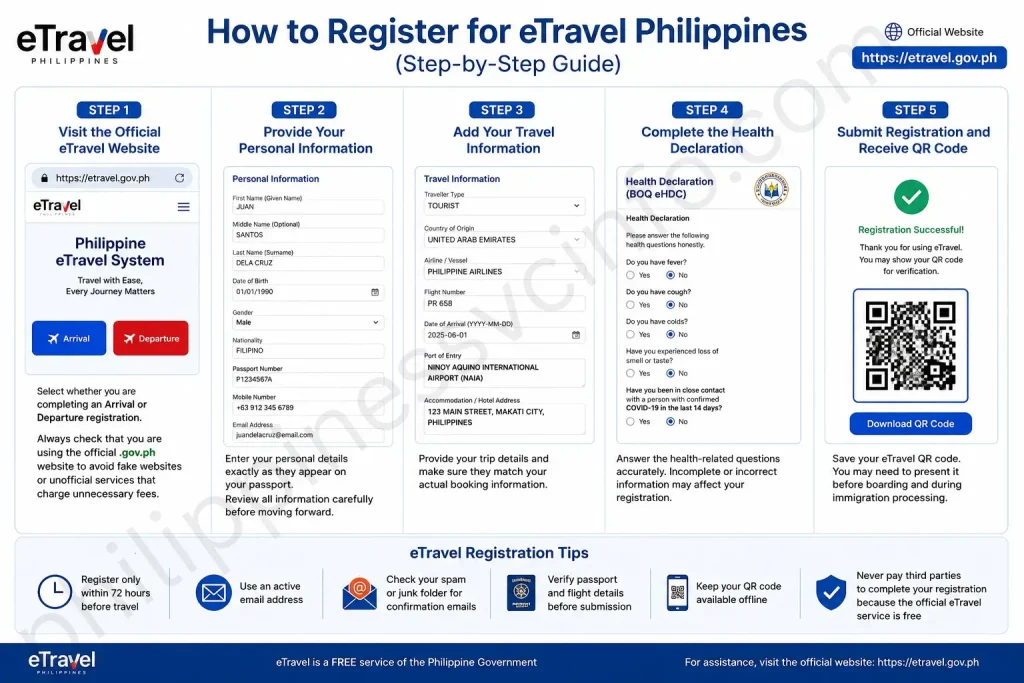
Registering for the Philippines eTravel Card is a free online process that can be completed through the official website. Travellers should complete the registration within 72 hours (three days) before their scheduled arrival or departure to receive a valid QR code for airport processing.
Step 1: Visit the Official eTravel Website
Go to the official eTravel portal:
Select whether you are completing an Arrival or Departure registration. Always check that you are using the official .gov.ph website to avoid fake websites or unofficial services that charge unnecessary fees.
Step 2: Provide Your Personal Information
Enter your personal details exactly as they appear on your passport, including:
- Full name
- Date of birth
- Gender
- Nationality
- Passport number
- Contact information
Review all information carefully before moving forward, as incorrect passport details may create problems during verification.
Step 3: Add Your Travel Information
Provide your upcoming trip details, such as:
- Airline or vessel information
- Flight number
- Arrival or departure date
- Port of entry or exit
- Country of origin or destination
- Traveller type (tourist, OFW, resident, business traveller, and others)
- Accommodation address in the Philippines (if required)
Make sure your travel details match your actual booking information.
Step 4: Complete the Health Declaration
The eTravel system includes the Electronic Health Declaration Card (eHDC) managed by the Bureau of Quarantine (BOQ). Travellers may need to answer health-related questions about symptoms, recent exposure, and travel history.
Provide accurate information when completing the health section. Leaving required fields incomplete or providing incorrect details may affect the registration process.
Step 5: Submit Registration and Receive QR Code
After reviewing and submitting your information, the system will generate your personal eTravel QR code. This QR code serves as proof that your registration has been completed.
You should:
- Take a screenshot of the QR code on your phone
- Save a digital copy or confirmation email
- Print a copy as backup if preferred
Travellers may need to present the QR code before boarding and during immigration processing. The QR code is linked to your specific trip, so a new registration is required for future journeys.
When to Register: Understanding the 72-Hour eTravel Rule
The Philippines eTravel Card registration must be completed within 72 hours (three days) before your scheduled arrival or departure date. Travellers should avoid submitting the form too early because registrations completed outside the allowed timeframe may become invalid and require a new application closer to the travel date.
The registration timing works as follows:
| Registration Time | Details |
|---|---|
| Earliest | You can register up to 72 hours before your scheduled flight. |
| Recommended Time | Complete your registration 24–48 hours before travel to allow enough time to fix possible errors. |
| Latest | Registration should be completed before boarding and ideally before arriving at the airport. |
| Too Early | Applications submitted more than 72 hours in advance may not be accepted or may require re-registration. |
The 72-hour rule applies to both arrival and departure eTravel registrations. If your flight schedule changes, you can use the “Edit Registration” option on the official eTravel website to update your travel information before your new departure or arrival time.
If you forget to complete your registration before arriving in the Philippines, airport personnel and Bureau of Quarantine (BOQ) staff may assist you with the process. However, completing it before travelling is recommended to avoid delays during airport procedures.
eTravel QR Code: Understanding the Colour Meanings
After completing your Philippines eTravel Card registration, the system generates a QR code that appears on the confirmation page and is also sent through email. This QR code is used by immigration officers to verify your submitted travel information during airport processing.
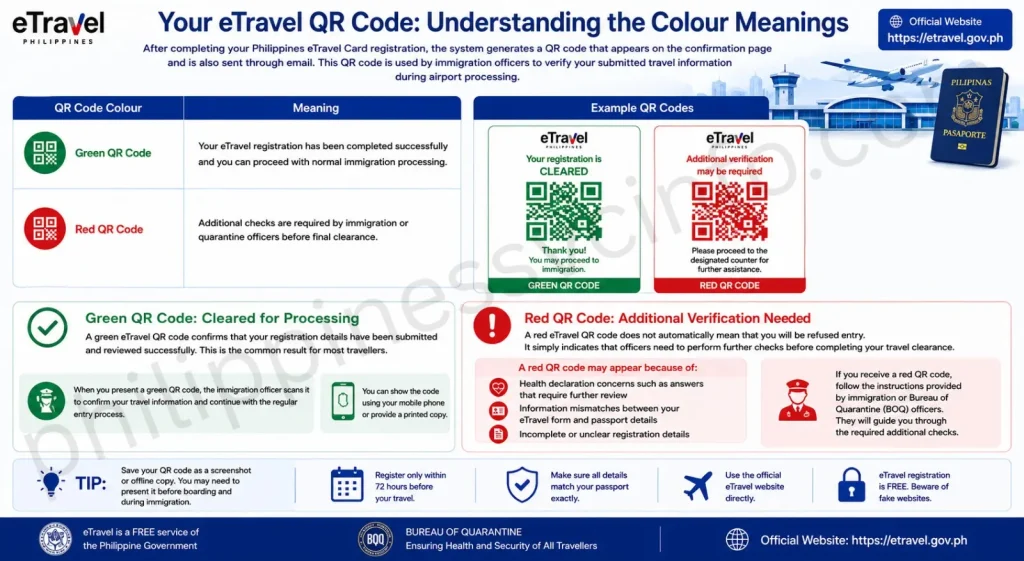
The QR code colour indicates your registration status. A green QR code usually means your information has been successfully processed, while a red QR code means that additional verification may be required before you can continue through immigration.
| QR Code Colour | Meaning |
|---|---|
| Green QR Code | Your eTravel registration has been completed successfully and you can proceed with normal immigration processing. |
| Red QR Code | Additional checks are required by immigration or quarantine officers before final clearance. |
Green QR Code: Cleared for Processing
A green eTravel QR code confirms that your registration details have been submitted and reviewed successfully. This is the common result for most travellers.
When you present a green QR code, the immigration officer scans it to confirm your travel information and continue with the regular entry process. You can show the code using your mobile phone or provide a printed copy.
Red QR Code: Additional Verification Needed
A red eTravel QR code does not automatically mean that you will be refused entry. It simply indicates that officers need to perform further checks before completing your travel clearance.
A red QR code may appear because of:
- Health declaration concerns such as answers that require further review
- Information mismatches between your eTravel form and passport details
- Incomplete or unclear registration details
If you receive a red QR code, follow the instructions provided by immigration or Bureau of Quarantine (BOQ) officers. They will guide you through the required additional checks.
Tip: Save your QR code as a screenshot or offline file before travelling. This ensures you can access it even if airport internet service is slow or unavailable.
Registering for Departure from the Philippines
The Philippines eTravel Card is required for both arriving in and departing from the Philippines. Many travellers only associate eTravel with arrival procedures, but the system also includes departure registration for eligible passengers leaving the country.
Travellers can use the same eTravel account and select “Departure” instead of “Arrival” when completing their registration. This applies to Filipino citizens travelling abroad, OFWs leaving for employment, and foreign visitors departing after their stay in the Philippines.
How to Complete Departure eTravel Registration
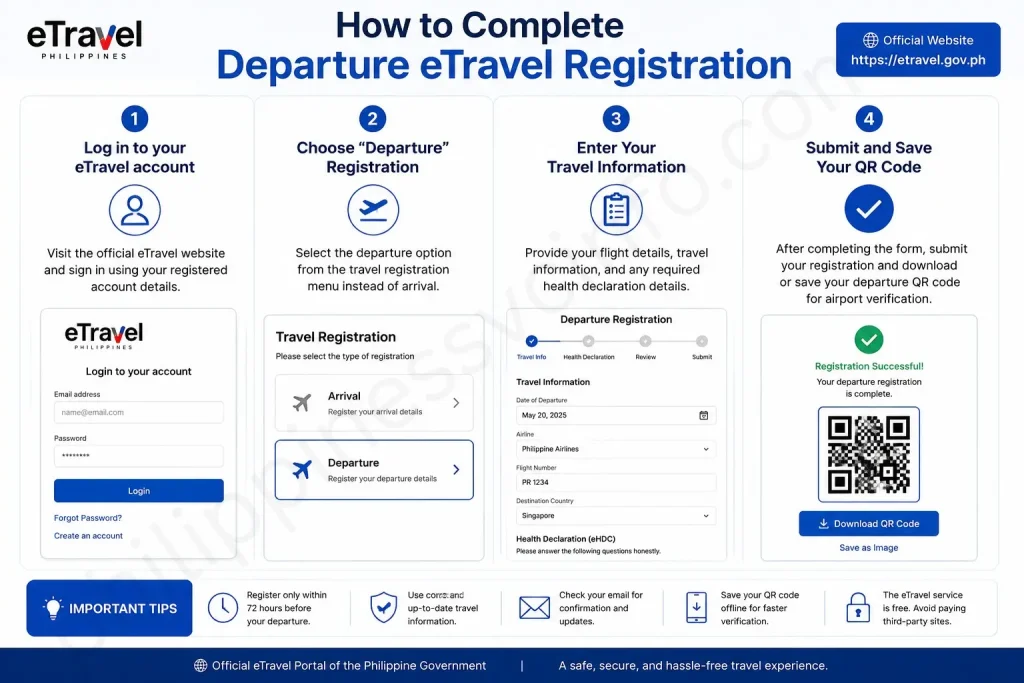
- Log in to your eTravel account
Visit the official eTravel website and sign in using your registered account details. - Choose “Departure” Registration
Select the departure option from the travel registration menu instead of arrival. - Enter Your Travel Information
Provide your flight details, travel information, and any required health declaration details. - Submit and Save Your QR Code
After completing the form, submit your registration and download or save your departure QR code for airport verification.
The same 72-hour registration rule applies to departure registration. Travellers should complete their eTravel departure form within three days before their scheduled outbound flight to ensure the QR code is valid and ready for processing.
eTravel for Children and Families
The Philippines eTravel Card registration requirement applies to all travellers, including infants and children. Each minor must have an individual eTravel registration connected to their own passport details. Parents or legal guardians are responsible for completing the registration on behalf of children travelling with them.
Families should keep the following points in mind:
- Every child needs a separate registration — the eTravel system does not provide a family group registration option.
- Each traveller receives a unique QR code linked to their individual passport information.
- Parents or guardians can submit the form using the child’s personal details and travel information.
- One eTravel account can register multiple family members, making it easier for families travelling together to manage their records.
- Immigration authorities handle age-specific requirements, such as parental consent documents or special travel permissions, not the eTravel platform.
For convenience, families can register all members through one account and save each person’s QR code before going to the airport. Keep all QR codes accessible on a phone or as printed copies to avoid delays during travel processing.
For infants who do not yet have their own passport, travellers should confirm the latest requirements with the Bureau of Immigration (BI) or their airline, as documentation rules may vary depending on the travel situation.
What Happens If You Forget to Register for eTravel?
If you forget to complete your Philippines eTravel Card registration before your flight, you may experience delays during airport processing. While missing registration does not automatically result in denied entry, travellers will need to complete the required form before immigration procedures can continue.
Bureau of Quarantine (BOQ) staff and airport personnel can provide assistance for travellers who arrive without a completed eTravel registration. However, completing the process at the airport usually takes more time compared with registering in advance.
| Situation | What Happens |
|---|---|
| At the airport | BOQ staff or airport personnel may direct you to a registration assistance area to complete the form. |
| Processing time | Airport registration can take longer and may cause delays during immigration procedures. |
| Entry status | Forgetting to register does not automatically mean you will be refused entry, but additional processing will be required. |
| Airline check-in | Some airlines may request your eTravel QR code before boarding, so completing registration early helps avoid possible issues. |
The best practice is to complete your Philippines eTravel registration 24–48 hours before your scheduled flight. This provides enough time to review your information, fix any mistakes, and arrive at the airport with your QR code ready.
Using the eTravel QR Code at the Airport
The Philippines eTravel QR code serves as proof that your travel registration has been completed. Required travellers may need to present this QR code during airport procedures when entering or leaving the Philippines. You can show it digitally on your mobile device or provide a printed copy.
| Type | Details |
|---|---|
| Digital QR Code | A screenshot or saved copy on your phone is convenient and commonly accepted. Keep it available offline and make sure your device has enough battery. |
| Printed QR Code | A printed copy provides a useful backup for senior travellers, families, or anyone who may experience phone, battery, or internet problems. |
Before Departure from the Philippines
Filipino passengers travelling abroad may be asked to present their eTravel QR code by airline or airport personnel before departure. It is recommended to keep the following documents ready:
- Passport
- Visa (if required for your destination)
- Flight ticket or booking details
- eTravel QR code (digital or printed copy)
Foreign passengers departing from the Philippines are generally not required to complete eTravel departure registration.
Upon Arrival in the Philippines
All required Filipino and foreign travellers entering the Philippines should complete their eTravel registration before arrival. The QR code may be checked at different points during airport processing, including:
- Airline check-in counter before boarding
- Quarantine or health verification areas (if applicable)
- Immigration counter
- Customs area, when required
Lost or Forgotten eTravel QR Code
If you cannot find your QR code, visit the official eTravel website and use the Edit Registration or Update Existing Record option to retrieve or manage your registration.
You may need your:
- Reference number
- Date of birth
Avoid unofficial websites or paid services claiming to provide eTravel assistance. The official Philippines eTravel registration service is free and should only be completed through the government portal.
Tips to Avoid Common eTravel Mistakes
A few simple checks can help you avoid rejected QR codes, boarding issues, and immigration delays when completing your Philippines eTravel Card registration. Always enter your information carefully, use only the official eTravel website, and keep your QR code accessible before travelling.
Match Your Details with Your Passport
Your full name, passport number, date of birth, and other personal information must match your passport exactly. Even small differences, such as incorrect spelling or missing details, may cause problems during verification, airline check-in, or immigration processing.
Save Your QR Code Offline
After completing your registration, save your eTravel QR code before heading to the airport.
Recommended options:
- Take a screenshot and save it in your phone gallery
- Download or keep a digital copy of the confirmation
- Print a backup copy if possible
Do not rely only on email access because airport internet connections may be slow or unavailable.
Register Within the Correct Timeframe
Complete your eTravel registration within the required 72-hour window before your flight. Submitting the form too early may make your registration invalid.
The recommended time to register is 24–48 hours before departure, giving you enough time to correct any mistakes.
Update Information When Plans Change
If your flight schedule changes or your details need correction, use the “Edit Registration” option on the official eTravel website to update your information before processing is completed.
Recover Your MPIN If Forgotten
If you forget your 6-digit MPIN, use the “Forgot Password” option on the eTravel login page. A reset link will be sent to your registered email address.
Register Children Separately
Children and infants travelling with family members need their own eTravel registration and QR code. A child is not automatically included under a parent’s registration.
Additional Travel Tips
- Use only the official eTravel website: etravel.gov.ph
- Never pay third parties to complete your registration because the service is free
- Check your email inbox and spam folder for registration details
- Fully charge your phone before going to the airport
- Carry a power bank if possible
- Arrive early in case additional document checks are required
- Keep your passport, flight details, and QR code ready for inspection
Following these steps helps ensure a smoother airport experience and reduces unnecessary delays during your journey to or from the Philippines.
Benefits of the Philippines eTravel Card
The Philippines eTravel Card provides a faster and more convenient way for travellers to complete required arrival and departure procedures. By moving the process online, it reduces paperwork, improves airport efficiency, and helps both travellers and government agencies manage travel information more effectively.
Key Benefits of eTravel Philippines:
- Faster Airport Processing
The digital QR code allows immigration officers to quickly verify traveller information, helping reduce waiting time at airports. - Paperless Travel Registration
Travellers no longer need to complete traditional paper arrival and departure forms because all information is submitted online. - Free and Easy Access
The eTravel registration service is available online at no cost, allowing travellers to complete the process from anywhere before their trip. - Centralised Travel Information
The system combines personal details, flight information, and health declarations in one platform for easier management. - Improved Border Security
Digital records help government agencies verify traveller information and strengthen immigration procedures. - Better Public Health Monitoring
The integrated health declaration feature supports health monitoring and emergency response when needed. - Convenient QR Code System
Travellers receive a unique QR code that can be saved digitally or printed for quick verification at the airport. - Helpful for Families and Groups
One account can manage multiple traveller registrations, making it easier for families and companions travelling together. - Reduces Travel Errors
Completing details online before arriving at the airport gives travellers time to review and correct information before processing. - Accessible Anywhere
The online system allows travellers to register using a computer or mobile device without visiting an office or airport counter beforehand.
Frequently Asked Questions About eTravel Card
Conclusion
The Philippines eTravel Card has made international travel procedures more convenient by replacing manual forms with a faster digital registration system. By completing your eTravel registration on time, checking your information carefully, and keeping your QR code ready, you can avoid unnecessary delays at the airport. Whether you are a Filipino citizen, OFW, balikbayan, foreign visitor, or travelling with family, understanding the requirements and process helps ensure a smoother journey. Always use the official eTravel platform, remember that registration is free, and complete your details accurately before travelling to enjoy a hassle-free arrival or departure experience in the Philippines.
Discover What You Need to Know:
- Tinkercad 2026: Complete Guide to 3D Design, CAD, Circuits, Codeblocks & 3D Printing
- Metrobank Philippines 2026: Online Banking, Login, Accounts & Loans
- Complete ORUS Guide 2026: BIR Registration, Login & Digital TIN ID
- eGovPH Philippines 2026: Registration, Login & Services Guide
- NBI Appointment Philippines 2026: Online Booking, Registration & Requirements Guide