
ATPECOOP (Amkor Technology Philippines Employees Cooperative) is a voluntary employee cooperative that supports the financial and socio-economic well-being of eligible members. It provides savings opportunities, loan services, mutual funds, member benefits, and digital account services through authorised cooperative systems, helping Amkor Technology Philippines team members manage financial resources collectively.
What Is ATPECOOP?
ATPECOOP, or the Amkor Technology Philippines Employees Cooperative, is a voluntary cooperative formed around the common interests of Amkor Technology Philippines team members.
The cooperative traces its origins to January 6, 1981, when 43 employees contributed funds to create a financial support system for colleagues facing financial difficulties. It initially focused on savings and two loan products before developing into a multipurpose cooperative.
Today, ATPECOOP states that its activities extend beyond traditional savings and lending. Its website describes business activities that include cooperative merchandise, a Petron Gas Station operation in Sto. Tomas, Batangas, and ownership of a dormitory building in Biñan, Laguna.
The cooperative’s current digital approach also includes the TMI Portal, which its official website describes as supporting 24/7 automated loan assessment and approval.
ATPECOOP at a Glance
| Feature | Information |
|---|---|
| Organisation | Amkor Technology Philippines Employees Cooperative |
| Main audience | Amkor Technology Philippines team members |
| Main purpose | Savings, pooled resources and member financial support |
| Digital platform | TMI Portal |
| Loan services | Multiple member loan offerings |
| Savings | Share capital and voluntary mutual-fund options |
| Official website | atpecoop.com |
| Office | Cupang, Muntinlupa City |
| Office hours | Monday–Friday, 7:30 AM–5:00 PM |
Who Can Become an ATPECOOP Member?
ATPECOOP membership is primarily intended for qualified Amkor Technology Philippines employees or team members. It is not presented as a general public cooperative registration service.
Before attempting to register, an eligible employee should confirm the current membership rules with the appropriate HR or cooperative office. This is particularly useful because membership requirements, forms, contribution arrangements and internal procedures can change.
The cooperative’s stated purpose is based on a common bond among Amkor Technology Philippines team members.
Typical Membership Requirements
Based on the supplied ATPECOOP information, prospective members should be prepared to:
- Be an official Amkor Technology Philippines team member or employee.
- Complete the required membership application.
- Agree to applicable cooperative policies, By-Laws and the Cooperative Pledge.
- Make the required capital contribution or share-capital subscription.
- Follow the cooperative’s membership and contribution rules.
Because these are internal cooperative requirements, applicants should verify the latest form, contribution amount and approval process directly with ATPECOOP or the appropriate workplace office.
How to Apply for ATPECOOP Membership
If you are an eligible Amkor Technology Philippines employee, the membership process generally begins through the workplace rather than through an open public registration page.

Step 1: Confirm Your Eligibility
First, verify that your employment status qualifies you for ATPECOOP membership. If you’re unsure, ask your HR representative or cooperative office.
Step 2: Request the Membership Form
Obtain the current ATPECOOP Membership Application Form through the authorised cooperative or workplace channel.
Don’t rely on an old copy of a form from an unofficial website or social-media post. Internal cooperative forms can be updated.
Step 3: Provide the Required Information
Complete the application using accurate information. Review your details before submitting the form so that your cooperative records can be created correctly.
Step 4: Complete the Required Contribution
The supplied information indicates that initial capital-share contributions or applicable fixed dues are used to activate membership. Confirm the current amount and payment arrangement directly with ATPECOOP.
Step 5: Wait for Membership Activation
After your application and required contribution have been processed, follow the cooperative’s instructions for accessing member services and digital systems.
Practical tip: Keep your membership information and any confirmation documents in a safe place. They may be useful when contacting ATPECOOP support later.
What Services Does ATPECOOP Provide?
The range of ATPECOOP services reflects its development from a basic employee credit cooperative into a multipurpose cooperative.
The official website says ATPECOOP now provides multiple loan products, voluntary mutual funds and other cooperative activities. Its history page states that the cooperative currently offers 21 different loan types, while its voluntary savings options include Fixed Income, Balanced and Equity Funds.
Loans and Financial Assistance
Loans remain an important part of the ATPECOOP model. The organisation’s history explains that its earliest products included Provident and Character Loans, while its present offering has expanded to 21 loan types.
Members can use the designated digital system to access supported loan functions. The ATPECOOP website specifically describes the TMI Portal as providing 24/7 online automated loan assessment and approval.
Exact loan eligibility, limits, rates, repayment terms and supporting documents should be checked through the current member portal or cooperative office.
Savings and Mutual Funds
ATPECOOP also encourages members to build savings.
In addition to share capital or fixed dues, the supplied information identifies three mutual-fund categories:
- Fixed Income Funds
- Balanced Funds
- Equity Funds
These categories have different characteristics and should not automatically be treated as identical savings products. Members should review the current cooperative terms before making a financial decision.
Member Perks and Cooperative Businesses
ATPECOOP members may also have access to selected cooperative offers and partner services.
The official website currently promotes a 12% Petron fuel savings benefit based on VAT exemption for members.
The cooperative also reports activities involving merchandise from accredited vendors, a Petron Gas Station operation in Sto. Tomas, Batangas, and a dormitory building in Biñan, Laguna.
Availability and eligibility for individual offers can vary, so members should check the current ATPECOOP announcement or programme page before relying on an offer.
How the ATPECOOP Portal Works
For members who need digital access, the ATPECOOP portal is designed to make selected cooperative services available online instead of requiring every transaction to be handled manually at the office.
The cooperative identifies the TMI Portal as a digital platform supporting 24/7 automated loan assessment and approval. This can make it easier for eligible members to submit and monitor supported loan requests outside normal office hours.
The exact buttons, login requirements and services displayed after signing in may depend on the member’s account and current system configuration.
ATPECOOP Login: Basic Access Steps
If you have already been provided with ATPECOOP digital credentials, use the authorised portal supplied by the cooperative.
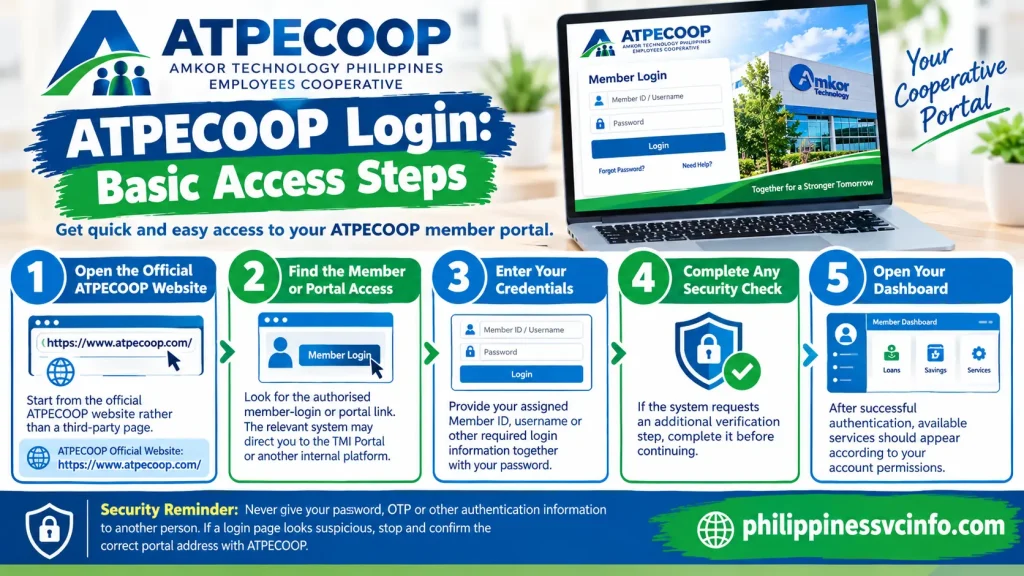
Step 1: Open the Official ATPECOOP Website
Start from the official ATPECOOP website rather than a third-party page.
Step 2: Find the Member or Portal Access
Look for the authorised member-login or portal link. The relevant system may direct you to the TMI Portal or another internal platform.
Step 3: Enter Your Credentials
Provide your assigned Member ID, username or other required login information together with your password.
Step 4: Complete Any Security Check
If the system requests an additional verification step, complete it before continuing.
Step 5: Open Your Dashboard
After successful authentication, available services should appear according to your account permissions.
Security reminder: Never give your password, OTP or other authentication information to another person. If a login page looks suspicious, stop and confirm the correct portal address with ATPECOOP.
What Can Members Do Through the Digital System?
The exact features available can depend on the member’s access level. Based on the supplied ATPECOOP information, digital services can include loan-related activities and member account management.
Online Loan Applications
One of the key reasons members may use the ATPECOOP portal is to access loan services.
The TMI Portal is described by ATPECOOP as providing automated loan assessment and approval around the clock. This means members do not necessarily need to wait for normal office hours to initiate supported online loan processes.
Before submitting an application, check the current loan requirements, available loan type, repayment conditions and any required supporting information.
Loan Monitoring
Where the relevant functionality is available, members can use their online account to follow the status of submitted requests and review information associated with their cooperative transactions.
If a loan application does not appear correctly, avoid submitting duplicate requests immediately. Check the portal status first and contact the cooperative if the issue remains unclear.
Account and Ledger Information
The digital member environment may also provide access to account-related information, such as balances and transaction records.
This is particularly useful for members who want to keep track of their cooperative activity without repeatedly visiting the office.
ATPECOOP Savings and Investment Options
Saving is central to the cooperative’s purpose. ATPECOOP states that its activities are intended to encourage thrift and help members build financial resources through cooperative participation.
Members may encounter several different financial categories rather than a single savings balance.
Share Capital
Share capital represents a member’s participation in the cooperative. The supplied information indicates that members are expected to make regular capital contributions or share-capital subscriptions as part of membership.
The exact contribution schedule and amount should be confirmed through current ATPECOOP rules.
Fixed-Income Fund
ATPECOOP lists Fixed Income among its voluntary mutual-fund choices.
As the name suggests, this category is associated with investments that focus on fixed-income instruments. However, members should review ATPECOOP’s current fund documentation before assuming a particular return, risk level or guarantee.
Balanced Fund
The Balanced Fund is another voluntary mutual-fund option identified in the supplied information.
A balanced investment approach generally combines different asset types, but the specific holdings, terms and risks applicable to ATPECOOP members should be checked against the cooperative’s current documentation.
Equity Fund
ATPECOOP also lists an Equity Fund as a voluntary investment option.
Because equity investments can fluctuate in value, members should understand the applicable terms and risks before making contributions. Current ATPECOOP information should be treated as the controlling source for eligibility, procedures and product details.
Managing Contributions and Loan Payments
Regular contributions and loan repayments are important parts of maintaining an active cooperative account.
The supplied ATPECOOP information indicates that capital contributions may be handled through payroll deductions or direct cooperative transactions. Loan repayments may likewise be arranged through authorised deduction or payment channels.
A member should check the actual deduction appearing in payroll or the cooperative account rather than relying solely on an estimated amount.
Before Making a Payment
Use this quick checklist:
- Confirm the account or loan involved.
- Check the amount due.
- Verify the authorised payment method.
- Keep a transaction reference or receipt.
- Review the updated balance afterwards.
- Contact ATPECOOP if a payment is missing or incorrectly recorded.
This approach is especially useful when managing several cooperative transactions at the same time.
Other ATPECOOP-Related Digital Systems
The supplied information also references internal systems associated with workplace administration, including:
- Leave Management and Approval System
- DTR and Payroll Systems
- Vehicle Request System
These systems are separate from the public-facing ATPECOOP website and may require specific workplace permissions.
A member should therefore use the system provided for the particular task rather than assuming that one ATPECOOP login gives access to every internal application.
ATPECOOP Office Support
Digital services can save time, but some questions still require direct assistance.
According to the supplied information, the ATPECOOP office can be contacted for membership questions, account concerns and support.
Office hours: Monday to Friday, 7:30 AM–5:00 PM
Telephone: (02) 850-7509
Address: ATPECOOP, Km. 22 East Service Road, South Superhighway, Cupang, Muntinlupa City, Philippines
For current contact details and official announcements, start with the ATPECOOP official website.
Common ATPECOOP Portal Problems
Even when a digital system is available 24/7, access problems can still occur.
Forgotten Password
If you cannot remember your password, use the portal’s official recovery option if one is provided. Do not repeatedly guess credentials if doing so could lock your account.
If no recovery function is available, contact the authorised ATPECOOP support channel.
Incorrect Member Information
If your personal details or account information appear incorrect, don’t create a second account to fix the problem. Ask the cooperative to verify and correct the underlying member record.
Portal Not Loading
First check your internet connection and try the official portal again. If the problem continues, the issue may be related to the service itself or your account permissions.
Loan Application Not Showing
Check your application status and transaction history before submitting another request. If the information remains unavailable, contact ATPECOOP with the relevant transaction details.
Best Practices for Using ATPECOOP Online
A few habits can make digital cooperative transactions safer and easier to track.
- Use the official domain. Start with
atpecoop.comwhen looking for ATPECOOP information. - Protect your credentials. Passwords and verification codes should remain private.
- Keep records. Save important receipts, confirmations and transaction references.
- Check before submitting. Review loan amounts, account information and other details before confirming a transaction.
- Use current information. Internal systems and cooperative procedures can change, so verify important requirements with ATPECOOP rather than relying on an old screenshot or unofficial guide.
- Ask when uncertain. If a payment, loan status or membership record looks wrong, contacting the cooperative directly is safer than making assumptions.
ATPECOOP Services: Quick Reference
| Service | Main Purpose |
|---|---|
| Membership | Join and participate in the employee cooperative |
| Share Capital | Maintain cooperative capital contributions |
| Loan Services | Apply for and manage eligible member loans |
| Mutual Funds | Access available Fixed Income, Balanced and Equity options |
| Member Account | Review relevant account and transaction information |
| Fuel Benefit | Access applicable member fuel savings |
| Merchandise | Purchase from accredited cooperative offerings |
| Digital Systems | Use authorised online workplace and cooperative tools |
ATPECOOP Member Checklist
Before using an ATPECOOP service, it helps to have the following information ready:
- Your member identification details
- Current login credentials, where applicable
- The relevant loan or account information
- Required application details
- Payment or deduction records
- Transaction references
- Current contact information
For financial transactions, keep copies of confirmations and receipts. They provide a useful record if you later need assistance from the cooperative.
Important Things to Remember
The ATPECOOP portal should be accessed through authorised channels. Search engines can sometimes display third-party pages, old information or unofficial references, so check the domain carefully before entering account information.
The official website is:
Also remember that not every ATPECOOP service necessarily works in the same way. Membership applications, loans, savings products and internal workplace systems can have separate requirements and access permissions.
For financial products such as loans and mutual funds, review the current terms before making a decision. The information in an older guide should not replace the latest cooperative instructions.
Frequently Asked Questions About ATPECOOP
Final Takeaway
ATPECOOP provides Amkor Technology Philippines team members with a cooperative framework for savings, lending and other member-focused services. Its digital tools, including the TMI Portal, make selected services more accessible and support online loan processing and account-related activities.
For new members, the practical starting point is to confirm eligibility, obtain the current membership requirements and complete the authorised application process. Existing members can use the appropriate digital systems for supported transactions while keeping their login details and financial records secure.
When something does not look right—whether it is a login problem, an unfamiliar transaction, an incorrect balance or a loan-status issue—the safest approach is to contact the cooperative directly through its authorised channels.
Discover What You Need to Know:
- Nutrition Month Headdress Printable Philippines 2026 : Easy DIY Templates, Ideas & NNC Guide
- ClassPoint Philippines 2026 : Login, AI Quiz, Student Join & PowerPoint Guide
- Blackboard UST Philippines 2026: Login Guide, Student Portal, Courses, Assignments & Grades
- SIAS NCF Philippines 2026 : Login, Admission, Portal & Student Guide
- Blippi Philippines 2026 : Educational Videos, Learning Activities, Games & Complete Parent Guide








